
But Does It Walk the Dog?
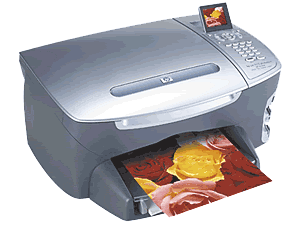 In past months–actually, almost a year now–I have been thinking about getting a new printer, and a new fax machine. What has recently come to my attention are the new lines of all-in-one devices. My first exposure, of sorts, came when a colleague at my school got a combination printer-scanner machine for his desk in the office. In the computer class I teach, I have long told my students that a copy machine is essentially a scanner atop a printer. And that’s what this kind of thing is; in addition to scanning and printing, they linked the two together so you have a kind of ad-hoc copy machine. And since it’s based on ink-jet technology, it’s essentially a color copier.
But with a little imagination, they have taken the idea to its logical extreme, which leads us to the all-in-one machines. This monster seems to be a conglomeration of every other peripheral out there. The functions include: scanner, printer, copier, fax machine, and photo printer. And the things are starting to come with a large set of special features using special software designed for the tasks. You’ll begin to wonder when the damn thing will start making breakfast.
The photo printer in particular caught my eye. The printer I’m looking at buying (the HP PSC 2450, called the 2410 in the U.S.–pictured top right), has four slots for the flash memory cards used by digital cameras (capable of accepting five or six different types of cards). Take some photos, take out the flash card (the digital equivalent of a roll of film, some as small as a nickel, some holding hundreds of photos), stick the flash card into the printer–and in a few seconds, the photos begin to show up on a small color LCD screen atop the machine. Choose the shot, the paper size, and whatever other options you like, and push a button–instant photo.
Even more sexy (but probably ultimately less useful) is the index sheet–the printer will print out a contact sheet with a dozen or more small thumbnails of your photos. Each one has a small empty oval, like the ovals you saw on those machine-read scan tests you took in school. With a pen, fill in the ovals under the photos you want printed; pass it back through the scanner, and the printer will read your marks as commands to print those photos.
In the end, though, the photo printer may be the feature I least use, based on past experience that the neatest-looking features ten to be the least used. The fax will come in handy from time to time, though perhaps only once a month–email attachments (pre-arranged so you can trust ’em) are eating up more of what the fax used to do. Also, I already have a scanner–but the copier feature is what would come in most handy as far as scanning is concerned. Though apparently the scanner on the all-in-one can automatically save document images as PDF files, which is not too shabby.
Other downsides include size–the thing is as big as a small-to-medium-sized microwave oven; ink cartridges–there is only one cartridge for color, meaning you toss unused ink when just one color runs out; and connectivity–this model is not a network printer (that costs $200 extra), and so I’d have to swap cables between my Mac and my PC as need arises. And it’s a USB 2.0 cable, so i don’t know how my USB 1.1 Mac will do speed-wise. Also, this model lacks a sheet feeder, but I’m not really gonna do a whole lot of OCR with it anyway. The big problem, same with most ink-jets: costs of photo paper, and, especially, ink. That ink is almost worth its weight in gold, when you figure things out.
What I am primarily looking for is a fair ink-jet printer to replace my 6-year-old, clunky, noisy-as-hell Epson (which might actually still work, though I haven’t used it forever). This all-in-one goes for 30,000 yen (about $280), about twice the price of a decent cheap printer. Not excessively expensive for what it does (especially considering most fax phones cost at least that much and more, and I already have a phone).
Some extra good points: it comes Mac- and Windows-ready, suiting both of my computers; the software package for the Mac alone is about 60MB-plus, so it’s not the usual 10-apps-for-Windows-and-one-for-the-Mac. The print quality (4800 x 1200 dpi) looks pretty good. It prints borderless, so it can shoot out what could pass for lab-quality prints (though I have yet to find out how long the inks last on paper before they start to fade). Basic low-res copy speeds look good,l and there are zoom features included with that. And in what is one of the most-appreciated features, one which is thankfully popping up on lots of electronic devices in Japan nowadays–a multilingual control panel, switchable to English. Which means less guessing and figuring-out what the heck that kanji means.
So I’ll be looking over these things in the next few weeks, my usual process when buying a big ticket item, and figuring out if I need one and if this model is the best for me. If anyone out there knows about these things, please comment!
I got an Officejet 6110 all-in-one recently. It’s pretty amazing, and I haven’t had any problems with it. On Windows, though, the software is a bit…buggy. Not the core scanning utility — that loads fine when I import from TWAIN or WIA in Paint Shop Pro. I’m talking about the “photo and imaging director,” etc. It loads about 6 separate processes in 2000/XP that are pretty much unnecessary and malfunction every now and then. The recommended fix on their site is to reinstall the software…lol. As for Mac software, it claims to be as functional as on a PC (what about Red Hat, I say!). But I’d say definitely go for an HP regardless, I’ve always considered them the leader in printers.
[Comment removed: was a “form letter” manifesto, reprinted identically in many blog comment areas.]