
Blogging 102 – Lesson Plan 2, RSS Feed Reader
Thanks to various sources I have been upgrading my blogging experience quite a bit recently, and wanted to share what I’ve found with anyone who hasn’t heard of these yet. I primarily use Macs, so the following will mostly center on apps for that platform.
Another recent find for me was an RSS Feed reader, NetNewsWire Lite. I found this program by checking my web site statistics. Naturally, two months after I started it, I’m interested in how this blog is doing, whether or not it’s being read. So far this month, I have some 400 unique visitors, not bad for a startup. A lot of it is thanks to joining the Japan Blogger’s Webring, a lesser but substantial number of hits coming from search engines.
When scanning these stats, I found that one of the biggest referrers was ranchero.com, and when I went to the page, instead of finding a link to my blog, I found it was a site for some software called NetNewsWire. After looking at it, I found that I might want to use this thing.
Some web sites, not too many so far, produce what is called an RSS Feed (“RSS” usually stands for Really Simple Syndication,” though other names have been used) using XML code. This feed effectively allows other sites or applications to grab the web site’s content and display it dynamically. For news readers, this means that you can view the web site’s content in the reader, or at least see an excerpt and follow a link to that web page.
How the app works: First, you subscribe to a particular site’s RSS Feed. If a site provides such a feed, there will usually be a link to it, most often titled “syndicate” or “XML.” Copy the URL within the link to the clipboard, then go to the reader, click the “Subscribe” button, and paste. If you think the site provides a feed but you can’t find a link, just click “Subscribe” and type in the base URL for the site; the reader will search for the feed and find it if there is one.
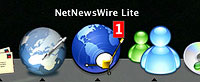
Once you have subscribed to whatever sites you desire, the reader will then, on a regular basis, check the site for changes. If it finds a change, you are notified and can view it. The Mac app NetNewsWire displays the number of new, unread articles it finds by showing it in a red indicator box in its Dock icon. This way, you don’t even have to make the app active to see if there’s something to look for.
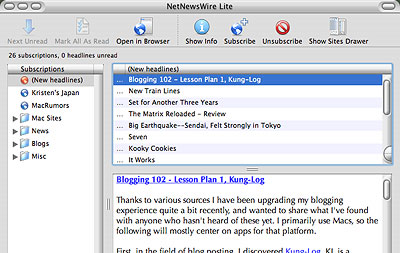 When you see that there is a new story to check, activate NetNewsWire and click on the site (or folder containing many sites) with the indicator for new stories. If you see any titles that interest you, you can click on the title and read the feed. Some web sites syndicate their entire feed, meaning you can read the entire story, with photos. Most sites, though–especially those who depend on clickthrough ad revenue–will just show you a snippet or summary, and to read the whole article you must go to the web site. But no sweat there, just click on the link right there in NetNewsWire, and it’ll open the page automatically in your default browser (I use Mozilla, BTW, and highly recommend it).
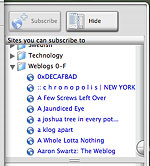 If you want to see a collection of sites with RSS feeds, you can check out the Sites Drawer, a pop-up drawer (a nice but underused Mac OS X capability) which contains many sites waiting to be read, including a large number of blogs. Want your blog included in the app? email to Brent at Ranchero and if he approves of the site, he’ll add yours to the drawer in the next version release.
Thus we see one of the primary benefits of the reader: you no longer have to check each web site on a regular basis. The news reader does it for you. One drawback is that few web sites have RSS Feeds yet; we’ll have to see if that improves in the future.
NetNewsWire Lite is freeware; a more feature-rich version is available for $40 as downloadable software. For those of you with Windows PCs, check out Newz Crawler ($25), Feedreader, or Syndirella, both freeware. For cross-platform, Amphetadesk is also free, and has both Mac and Windows versions, for users with current and older OS versions.
Thanks a lot for this info! New to blogging, I couldn’t figure out what “RSS Feed Reader” was all about. Finally, now I understand!
Glad to be of help, and thanks for saying so!
Hello!