
Bluetooth Mouse – The Logitech V270

Why isn’t this technology used more? Beats me–I think Bluetooth is great. I waited for maybe 6 months for MacAlly to release their perpetually-coming-soon BTMouse (which some online stores perpetually advertised as “shipping in 3-10 days”), and then gave up rather unhappily when they finally fessed up that it was not coming soon at all. But Logitech came out with their version, the V270, an optical Bluetooth mouse. There are other mice out there, but most of them are mini-mice. Microsoft has a full-sized Bluetooth mouse, but (1) it’s a bit too big and clunky, and (2) it’s made by Microsoft. Apple has it’s new Mighty Mouse, but they went wrong with the scroll wheel/button, and tried to stay too true to the one-button-mouse form.
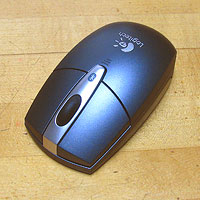 The V270 has it about right: the right size (slightly smaller than a regular mouse, but still palm-sized), a nice plain form, the obligatory (though not universal, apparently) on-off switch, and simplicity of use. For Apple, that is. It comes with an install disk for Windows, but on a Mac you just “discover” it and it works. It also comes with a very nice little zipper pouch, made of good material, simple and not overdone.
After using for a bit, it seems perfectly fine as a mouse. It tracks well, doesn’t jump or go berserk. The only problem is with distance. Even if the thing does work at 30 feet, one must have a clear line-fo-sight or it won’t work. With the computer on the sofa and the mouse higher on the kitchen counter, I couldn’t control it, because the bulk of the counter was in the way. And unless you’re in a really big room, you’re not going to find a flat surface with a direct line of sight with the computer thirty feet away–not that you could see the computer screen clearly from that distance, anyway. What I will do is click the mouse button, usually to advance Powerpoint slides, and that works fine as far as I get the mouse indoors.
The only other drawback I can think of is that it’s a 3-button mouse, the third button being the scroll wheel. Especially for a cordless mouse which would be of more use as a button-clicker rather than a desk-scroller, you’d thing at least a 4th button would be easy to add and much more functional.
On the brighter side, this is a true Bluetooth mouse, meaning that you don’t need a USB dongle sticking out of your laptop all the time, an easily-lost bit of really unnecessary extra hardware.
Clear line of site between what and what?
Why?
Can the signal get through a hand? Torso? Wood table top?
Is this the way it is for all blue tooth devices?
Looks like just what I’m looking for. Thanks for the real world mini-review.