
And the Printer Works Well
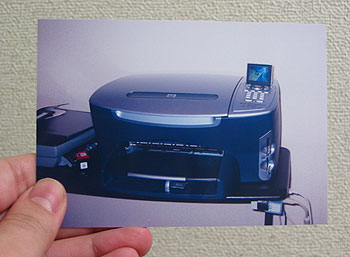 So the HP All-in-one printer (HP PSC 2450 PhotoSmart All-In-One) got here as promised Sunday, and I’ve been working with it since then. Most everything works just great. I set up the software on both the Mac and the PC (both included English language versions of the software), and the functions mostly seemed to work just fine out of the box; the drivers do a good job here. Without any serious fiddling around, I was able to print very nicely.
One of the most impressive things–and not just for the all-in-ones, but for ink jets in particular–is the photo printing. Although a few printouts had noticeable banded lines running through lighter areas of the picture, most photos I printed (3.5″ x 5″) came out amazingly clear and sharp, pretty much indistinguishable from photos printed by a photo lab. And that’s using the cheaper photo paper, not the good stuff, and not at best printing resolution. I haven’t tried an 8×10 glossy yet, but will at some point. Most people who see the photos can’t believe they were made by an ink jet.
What impressed me as much was the copy feature. I took out a map book and put it on the scanner glass, and hit “copy”–and the copy came out very nicely. Even on regular paper at normal quality, it came out with quite acceptable clarity and accuracy. This will work much better than carrying a big map book around next time I want a street guide. Apparently, using photo paper at high quality, it can effectively reproduce a photo you place on the machine to copy–which I haven’t tried yet but can believe. I also haven’t tried to fax yet, nor have I tried the
The photo printing worked as promised–take your flash memory card out of your digital camera, stick it into the slot in the printer (there are four, for different types of media), and the images come up on the 2.5″ LCD screen. Select the one you want, change the settings for paper size, quality, etc., and off it goes.
The downside: so far I can’t even find the OCR program which is promised in the documentation. It is supposed to come with something called “ReadIris,” but it seems to not be included in the installation, which would be a big disappointment. HP’s customer support has been a mixed bag–their first reply came a day later than promised and was a canned response, which I hate (canned responses almost never accurately address the specific problem you have, and this one did not either). When I wrote back asking for a real person to answer, I got a prompt reply which was quite long, but boiled down to “call customer support by phone.” Yargh.
Another shortfall is the lack of network capability–I would have had to pay an extra $200 just for that one feature–so I have to suffer with a USB switching box, and will have to set up my Powerbook in the living room and plug it in there whenever I want to print from my Mac.
Hi Luis,
Love your site! I found this page while researching the HP 2450 Photosmart. Do you mind if I ask you some questions? I was wondering if you still consider it a good buy. And did you work out the issue with the OCR software? I’m looking at buying the 2450 at Topos in Fujisawa. Can I ask how much you paid and where you got it from? And finally, how long does it take to print a good quality photo? (BTW, I’ve been looking to buy a new digital camera for a while now and after seeing your photos I am very impressed with the Canon PowerShot S30) Glad I found your blog!!! Cheers!
Andrew: not having looked at any new printers since I bought this one, I could not comment on how it compares with current models. I can tell you that the printer is still working well, no problems found.
And yes, I worked out the OCR. It was included in the HP Director application (on the Windows version, at least–I haven’t used it with the Mac too much), and it works reasonably well.
I bought mine at Yodobashi, I forget the price, but you can look it up ( http://www.yodobashi.com ). It was reasonable, I think somewhere in the 30,000 yen range, but I could be mistaken.
Color printing at high quality on photo paper always takes a long time, up to several minutes depending on the size. Simply a fact of life with inkjet printers
If I were to buy a new digital camera today, it would be the Canon Powershot S1 IS. 10x zoom!
Hi Luis. Thanks for your comments. I finally picked up a 2450 from Yamada Denki for only ¥18,200. I guess I shoulda paid more because unfortunately mine didn’t come with OCR software. I’ve contacted HP and they said OCR software is for Windoze only. Man, I’m sick of being treated like a second class citizen just for owning a Mac! I guess it’s “Limewire to the rescue!” 😉
Andrew: Really? No OCR for Mac? But HP Director on my Mac includes the option for “Scan Document,” which is OCR, or at least I thought. I use the HP mostly with my PC, so I haven’t tried–but you might want to check it out.
i have a hp psc 2450 photomaster but psc work properly
Properly work but screen no t show (screen is not on). what can I do ?
Pleas help me and replay answer e-mail add: noman86ali@hotmail.com
Go to a telephone and call HP customer support.
I bought my 2450 at comp mart in Tsujido about three years ago. It has worked flawlessly. I have just recently moved back to the USA after living in Japan for the last 26 years. Now I am presented with a problem. I am trying to find the drivers to use with Windows Vista. I have checked the HP web site, but can’t find them. If anyone knows where I can download the new drivers from. Your help would be greatly appreciated.
Glenn: Welcome to Vista. Yours is not an isolated case–many people suffer from the same thing, a lack of Vista-ready drivers. It’s not that they are hard to find–it’s that they simply don’t exist yet. If they did, then HP’s site would have them. Since you report that HP’s web site doesn’t have them, it means that they don’t exist and you’ll have to wait for HP to get around to making them.