Archive

Archive for the ‘BlogTech’ Category

Stats Are Fun

November 16th, 2003 Comments off

Okay, it is a bit narcissistic. But partly that’s what a blog is about, you have to admit. Seeing how many people are interested in what you have to say.

If you own your own web site–not just a spot on a free blog service, but your own domain with a web hosting service you pay for–then you can get the full spectrum of services, including full-featured web stats. If you can get something called “Awstats,” then go for it, even if it means changing hosts; it is a very good stats package. It keeps track of how many visits, unique IP addresses, total hits, pages, bandwidth and other data on an hourly, daily and monthly basis. It keeps close track of exactly where your visitors are coming from, showing sites that link into yours, as well as how many hits come from search engines and even what the search terms were.

The stats made me aware of the fact that MacSurfer had linked to one of my stories and that some 8000 people dropped in over a two-day period last month (necessitating the removal of graphics that would have caused me to pass my bandwidth allotment–a handy warning there), and tells me this month that already 550 people have read my spoiler review for the second Matrix movie–meaning I should get right to work on the spoiler review for #3 this weekend, as promised. It also tells me that for the sixth straight month I remain Eyelid-Twitching Central (it all started from one of my first entries, where lacking much else to say at the time, I mentioned I had a twitch that day, and the attention has never ebbed), and, for some strange reason, my stories on Eudora 6 remain a strong draw.

Oh yeah, and 92 people have downloaded the Great Chicken Struggle movie starring my hamster. Without the MacSurfer draw, I can afford the bandwidth, though.

Other draws, in order: The Matrix: Revolutions non-spoiler review, an article on Crime and Foreigners in Japan, my famous Gyoza recipe, the Matrix: Reloaded non-spoiler review, and my article on the Yoshi Hattori incident.

General stats, by the way: average visitors per day this month: 310+ per day. 2050 or more of the 4670 visitors so far were repeat visits, as the hits came from 2620 unique IP addresses. The rate of increase in visitors is slowing, but the numbers continue to climb–on schedule for 5,500 visitors this month, far exceeding the optimistic hope of 4,000 monthly visitors by year’s end.


Categories: BlogTech Tags:

More on Blog Comment Spam

September 29th, 2003 3 comments

[Editor’s Note: Posting #300! Small milestone, but then again, I am trying to post daily, subtantially, and have missed only a few days in the past three months.]

Blog Comment Spam seems to be coming into vogue now; the blogs I participate in or run are getting it more and more often. Xpat.org, which I run with Sako, just got hit by an infamous “penis-enlargement” spammer from China, who posts a very long list of sexual-aid device web sites, completely off-topic from whatever post, and then ends with the ludicrously absurd comment, “If you find this entry inappropriate please remove it from your database.” Yeah, like a lot of people would find such a post appropriate.

As I’ve mentioned before, some blog spam is subtle, designed so that most people won’t even recognize it. I got one spam message which actually clipped text from a previous comment and mechanically (though in a very clever way) reworded it into a genuine-sounding, on-topic sentence–but the link provided, which was automatically tagged onto the poster’s name, was a spam site.

I even got one spam that was hand-written (at least partially), but nevertheless was from a marketer (he identified himself as such) who included three links to his business site. When I called him on it, he protested vigorously, saying I should keep the links because his comment was on-topic–but spam is spam.

One poor fellow told the story of getting a spam comment in every one of his posts, which would require going through each one manually and deleting them, more than a hundred times–except that he was an experienced power user, and was able to do it quickly. (One good reason to back up the blog database at regular intervals–easier to re-load an older database and then re-add recent posts.)

One rather persistently obnoxious spammer is some fool named “Mishka,” who has a program that auto-spams comments to a single entry in a blog twice within the span of a few minutes, only posting the short comment “Mishka rules!” Again, the name-link points back to this pinhead’s site.

The interesting thing about most of this spam is that the spammers don’t even usually aim for people to follow the link in the comments directly to their site. Much of the spam is aimed at older entries, usually a few weeks or a few months old, way back in the archives somewhere.

So why post spam where few will see it? Because the idea is not to get people to come from the blog, the idea is to establish links from blogs to the spam site. If a site has a large number of links coming from other sites, it will get listed higher in Google, Yahoo, and other search engines. Hopefully, the search engines will find some way of tweaking this, such as not counting blog comment links in their rankings, so that such spam will be of little or no benefit to the spammers.

What ticks me off here is the principle: complete strangers are hijacking resources I have paid for to use as a tool to add value to their own resources. Like someone coming by your house and slapping an ad for their shop on your front window, or stealing your name and falsifying an endorsement for their goods. If someone wants to advertise, fine–but they can do it on their own dime, not on mine.

So I would strongly encourage everyone running a blog site to carefully monitor every comment that comes in, checking for bogus URLs. If any link leads to any kind of business site at all, then immediately delete it. The links provided for in comments are supposed to be for personal, not business, sites.

Categories: BlogTech Tags:

Blog Comment Spam

August 31st, 2003 4 comments

You know, I think I’ve just been blog-comment spammed. I hadn’t heard of this before, but a quick Google shows it’s not new or unique here.

I get comments to any of my posts automatically emailed back to me, and upon hearing the “ding!” from my email program, I went to read it… and it looked suspicious.

The post the comment was made in was one of my old, quick photo entries on a Costco shopping trip (Costcos are relatively new to Japan).

First, I noted that the name that had been entered was “juicers,” which was one of the products in my cart. So I looked at the link that the person had left behind, and saw that it was a page on a web shop for juicers. I had mentioned buying a juicer in the text.

Then I looked carefully at the comment:

I heard that Costco wants to open 50 branches in Japan over the next 10 years too.. I bet it is true!

In a response I had made to another poster in my comments area, I had previously written:

[…] I heard that Costco wants to open 50 branches in Japan over the next 10 years, […]

And so noted that the wording was exactly the same. I also noted that this page is often hit by search engines. I may be mistaken, but I have the feeling that someone has a spam program that searches for products sold by the company mentioned in posts, and when it locates a blog entry, looks for ways to comment in a seemingly human form–in this case, probably looking for the words “I heard that” among others, then just copied the text up to the next punctuation mark, and added the “too.. I bet it is true!” at the end. Could be completely mechanical.

In any case, I deleted the URL and email just in case this was spam; the comment is still there, as it alone makes no reference to the spammer or any URLs.

Still, this is kind of disturbing. Will I have to start putting spam filters on my blog comments?

A few pages talking about these things and reactions to them are here, here, here, and here.

Categories: BlogTech Tags:

Internet Pet Peeve #274

July 27th, 2003 6 comments

You know how sometimes you have to write letters or requests for information using forms on web pages? For example, you want to submit a ticket to technical support; they lead you to a “ticket” web page, where you input your name, email address, and often your password as well–and then type your message.

Here’s my question: why is it that every danged form like that has a “message” field about the size of a large postage stamp??? I hate that. Do the people who make these pages enjoy typing in text boxes only large enough to contain a half dozen words? It makes it impossible to write any message of length. I know that some sites want you to keep it brief, but dammit, just tell us, don’t squeeze us into some ridiculously tiny box. I have even seen these micro-boxes on pages where you are expected to write long messages. What are people thinking?

In designing this site, one of the things I did was to redesign the comments pop-up window so the message box was comfortably large. I wish more people would do that…

Another pet peeve: forms demanding that you include all sorts of useless information, especially email addresses. I hate spam, and I am fully aware that if my email address is accessible anywhere on a page, even if only in the HTML code, spambots can and will find it and I will be inundated with the junk before long. Unless it’s absolutely necessary, please don’t require that kind of stuff.

Categories: BlogTech Tags:

1st Amendment Covers Us Bloggers–At Least to a Degree

July 4th, 2003 1 comment

The 9th Circuit court decided on Tuesday that bloggers have 1st amendment protection when it comes to republishing information. The same protection that covers ISPs, email providers or Internet content providers covers us as well.

What does that mean? Well, you can still be sued for libel if you intentionally post untrue information which causes damages to another party, but you cannot be sued if information you republish is libelous. However, if someone posts a comment to your blog and that comment is libelous, then, under this new decision, you cannot be held liable for it, even if you “take some affirmative steps to edit the material posted.”

Now, a pertinent question becomes, what about information that you repost from another source? What if, say, you see information on another web site, and you repost it on yours (presumably citing your source and showing quotes or denoting paraphrasing), and the information turns out to be libelous? Are you culpable then?

Not being a legal scholar, I cannot say for certain, but I would presume the answer is “no.” The decision speaks to the definition of being an “information content provider,” which is to say, did you “create or develop” the information? This was addressed in the context of having received an email from someone else and then posting it, and did not speak of actively clipping the information and bringing it to your site yourself. Still, it would seem to be an act of “republishing” rather than “creating or developing.” Or, if you are simply reporting that someone else said this, then you are merely commenting on a fact–unless, of course, you chime in a say that you believe it to be true.

A sticky issue, and not really addressed by this decision by the 9th.

Anyone out there have any opinions on this? Or, better yet, legal knowledge? Can you be sued for libel by reprinting information that was published elsewhere?

Comments are invited.

Categories: BlogTech Tags:

Visitor Check for June

June 30th, 2003 Comments off

Well, the end of the month is here, and according to the AwStats on my web site, business is up appreciably. The table for visitors for the year so far is displayed below. Note that I started the current incarnation of this blog in early April:

Month Unique
visitors
Number
of visits
Pages Hits Bandwidth
Jan 2003 6 6 33 52 592.24 KB
Feb 2003 5 5 17 33 416.12 KB
Mar 2003 13 13 36 90 1.42 MB
Apr 2003 79 120 718 1991 12.53 MB
May 2003 442 679 2445 6178 130.60 MB
Jun 2003 717 1907 4979 33384 749.88 MB
Total 1262 2730 8228 41728 895.41 MB

Not bad growth here–almost too fast, in fact. If traffic increases at this rate, I’ll be over my traffic bandwidth limit by October of this year (I’m allowed 3GB/mo. under my current plan). But then again, that’s the whole idea of putting up a web site–getting people to visit.

Categories: BlogTech Tags:

Eyelid Twitching Is Hot

June 18th, 2003 83 comments

NOTE: “Eyelid twitching” is getting zillions of Google hits. I wrote an update that will be more helpful, and more entertaining, to twitching sufferers.

By the way, I wrote the article below before I knew that it would attract even more search engine hits by re-stating the most popular search terms. Oops.

————————————-

I love going through the web stats feature on my web site, provided by the web host. It keeps track of how many visitors I’ve had, which pages are most popular, which OS and browser my visitors are using (useful for design!), and which pages people followed links to my site from. I find, for example, that I’m getting about 50 visits a day and about 450 unique visitors each month, that Google is doing the best job of listing and linking to me, and that the pinging to blog lists is working, bringing in quite a few visitors.

Another point the stats list is what searches are being done on my site. Here are the top searches:

twitching eyelid (7)
eudora 6 (5)
eyelid twitching (4)
matrix reloaded shibuya station (2)
cartoons of people loading coke machines (1)
permission denied mt blog (1)
neo merovingian (1)
matrix reloaded oracle message (1)
matrix reloaded hover ships (1)
bizarro comic halliburton (1)
self-service gas station (1)
floor does neo meet with the merovingian (1)
restaurant sagamihara hashimoto (1)
blog stylesheets (1)
matrix revolutions spoiler brother wachowski (1)
in times of war the law falls silent (1)
software freeware blog rss (1)
interesting places of sendai (1)
jessica lynch story fact fiction (1)

At first I was a bit confused at the eyelid twitching searches, until I realized that I posted a little blurb right when I started the blog about how that had been happening to me, and now I get hit when someone looks into that problem using a search engine.

If the stats are right, I should start writing a lot more about twitching eyelids! Anyone else out there with twitching stories?

Categories: BlogTech Tags:

Blogging 102 – Lesson Plan 3, Cleaning the Feed

May 31st, 2003 Comments off

One last note in this recent learning process: I found that my own blog’s RSS feed was not what I wanted it to be. At first, it would only display a short snippet, 40 words, with no formatting and no photos. By going into the Movable Type web interface, I found that under “Weblog Config,” if you clicked on “Preferences,” you could set the “number of words that should appear in an auto-generated excerpt.” I changed it to 400, and that allowed bigger excerpts, but it still allowed no line breaks, and no photos.


Kristen McQuillin to the rescue. I noted that her blog displayed quite nicely in NetNewsWire Lite, so I asked in the Japan Blogger’s Ring mailing list for help, and she responded immediately. What is needed is for the Movable Type RSS templates to be updated via the MT web page interface. She pointed to this site for instructions and links to the correct scripts, and this site to validate it. She also pointed me to this page on MT’s web site, which has a variety of updated templates for MT. Thanks, Kristen.

The question remains, will a complete and formatted RSS Feed work out? Even after a very short while, I have noted a big jump in bandwidth traffic on my site, and am fairly sure it is not due to more visitors–the increased RSS feed might be increasing the traffic in terms of KB downloaded, though maybe not visitors to the site. I am still way under my monthly traffic limit with my web host, but I will have to keep an eye out as time goes on as to how the increased RSS Feed affects things.

Categories: BlogTech Tags:

Blogging 102 – Lesson Plan 2, RSS Feed Reader

May 31st, 2003 3 comments

Thanks to various sources I have been upgrading my blogging experience quite a bit recently, and wanted to share what I’ve found with anyone who hasn’t heard of these yet. I primarily use Macs, so the following will mostly center on apps for that platform.

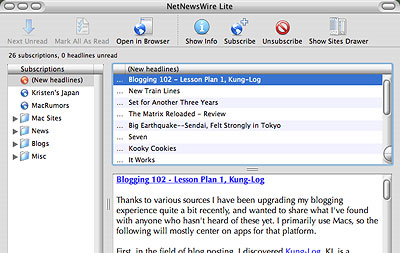
Another recent find for me was an RSS Feed reader, NetNewsWire Lite. I found this program by checking my web site statistics. Naturally, two months after I started it, I’m interested in how this blog is doing, whether or not it’s being read. So far this month, I have some 400 unique visitors, not bad for a startup. A lot of it is thanks to joining the Japan Blogger’s Webring, a lesser but substantial number of hits coming from search engines.

When scanning these stats, I found that one of the biggest referrers was ranchero.com, and when I went to the page, instead of finding a link to my blog, I found it was a site for some software called NetNewsWire. After looking at it, I found that I might want to use this thing.

Some web sites, not too many so far, produce what is called an RSS Feed (“RSS” usually stands for Really Simple Syndication,” though other names have been used) using XML code. This feed effectively allows other sites or applications to grab the web site’s content and display it dynamically. For news readers, this means that you can view the web site’s content in the reader, or at least see an excerpt and follow a link to that web page.

How the app works: First, you subscribe to a particular site’s RSS Feed. If a site provides such a feed, there will usually be a link to it, most often titled “syndicate” or “XML.” Copy the URL within the link to the clipboard, then go to the reader, click the “Subscribe” button, and paste. If you think the site provides a feed but you can’t find a link, just click “Subscribe” and type in the base URL for the site; the reader will search for the feed and find it if there is one.

Once you have subscribed to whatever sites you desire, the reader will then, on a regular basis, check the site for changes. If it finds a change, you are notified and can view it. The Mac app NetNewsWire displays the number of new, unread articles it finds by showing it in a red indicator box in its Dock icon. This way, you don’t even have to make the app active to see if there’s something to look for.

When you see that there is a new story to check, activate NetNewsWire and click on the site (or folder containing many sites) with the indicator for new stories. If you see any titles that interest you, you can click on the title and read the feed. Some web sites syndicate their entire feed, meaning you can read the entire story, with photos. Most sites, though–especially those who depend on clickthrough ad revenue–will just show you a snippet or summary, and to read the whole article you must go to the web site. But no sweat there, just click on the link right there in NetNewsWire, and it’ll open the page automatically in your default browser (I use Mozilla, BTW, and highly recommend it).

If you want to see a collection of sites with RSS feeds, you can check out the Sites Drawer, a pop-up drawer (a nice but underused Mac OS X capability) which contains many sites waiting to be read, including a large number of blogs. Want your blog included in the app? email to Brent at Ranchero and if he approves of the site, he’ll add yours to the drawer in the next version release.

Thus we see one of the primary benefits of the reader: you no longer have to check each web site on a regular basis. The news reader does it for you. One drawback is that few web sites have RSS Feeds yet; we’ll have to see if that improves in the future.

NetNewsWire Lite is freeware; a more feature-rich version is available for $40 as downloadable software. For those of you with Windows PCs, check out Newz Crawler ($25), Feedreader, or Syndirella, both freeware. For cross-platform, Amphetadesk is also free, and has both Mac and Windows versions, for users with current and older OS versions.

Categories: BlogTech Tags:

Blogging 102 – Lesson Plan 1, Kung-Log

May 31st, 2003 Comments off

Thanks to various sources I have been upgrading my blogging experience quite a bit recently, and wanted to share what I’ve found with anyone who hasn’t heard of these yet. I primarily use Macs, so the following will mostly center on apps for that platform.

First, in the field of blog posting, I discovered Kung-Log. KL is a donationware Mac app that allows you to create blog entries more easily than by using Movable Type’s web page editor. This is not to put down MT’s editor–it is very well made and easy to use. Nor is it to say that KL allows you to control all aspects of your site, it can’t. But when entering the daily blog, it is a lot easier to use an independent app than to depend on a web page interface. It’s kind of like the difference between using a web page email account like Hotmail and using an email client like Eudora (try their beta version 6, it’s working well for me so far); the client is much faster and more flexible in many regards. So is KL.


With KL, you initially enter your blog’s URL, the user name and password, and it logs in automatically from then on. When you use the app, a nice Aqua-esque window with toolbar comes up, with a drawer for recent posts if you want to edit. Just type in the entry and its title and click on the Post button, and that’s it. But the real benefits come from the HTML coding and the image uploading.

There is an HTML menu in the toolbar that automatically inserts HTML code around whatever text you’ve selected. You can add code selections yourself, or modify what’s there; it even allows you to add hotkey commands. For example, I’ve added the hotkey “COMMAND-U” for adding a link. The link feature automatically grabs whatever URL is in the clipboard (that you’ve copied with CMD-C or -X) and puts it into the link.

Even better is the “Upload File” feature. When activated, a window comes up, and you just drag your photo into a frame in the window; a preview of the photo appears, and there are prompts for “arguments” at the right–for example, what kind of border and spacing, alignment, and so on you want. When you click “upload,” it not only uploads the file (a la FTP) to your blog’s image folder, but it also adds the HTML code to link to the photo within the blog entry! Very cool stuff.

You can save drafts on your computer on the fly to avoid having your work wiped in case of a crash (faster than on the web page). You can edit recent entries, ping URLs, and even have KL automatically add to your post what music you’re listening to in iTunes when you post. And there is spell-checking, a very badly missed feature in the web page editor. The program also allows “previews,” but they do not show correct formatting; perhaps this will improve in future releases.

That said, I did have a problem, which may or may not have been related to KL. After using it for a few days, I suddenly started getting error messages when I tried to post, saying “permission denied.” The error messages even prevented me from posting via the web page interface; I could save files and edit them, but I was denied permission whenever I tried to rebuild the indexes so the changes would appear on the site. I was able to get past the problem with a few fixes suggested at the MT forums. For all I know, the errors had nothing to do with KL, but they happened when I was using KL. The errors were easily fixed, though.

In the meantime, it looks like a good app, and I would recommend it to anyone looking for these features. I plan to keep trying it out, and hope it’ll prove itself over time.

For those using Windows, aside from my sympathies, I would suggest trying W. Bloggar freeware.

Categories: BlogTech Tags:

It Works

May 28th, 2003 Comments off

OK, I am officially using Kung-Log as my blog editor. It makes it a LOT easier to upload photos; you don’t have to use an FTP. Also, it allows for some customization and previews. Even has a spell-checker–I was getting tired of doing that manually. Cool enough.

Categories: BlogTech Tags:

We’re Back

April 30th, 2003 Comments off

OK, let’s hope that was the last time we’re going offline for a while. I still have one domain offline, but at least it won’t affect this blog. One can only hope that these troubles do not occur yet again; if they do, I’m going shopping for a new web host.

Categories: BlogTech Tags:

Web Host Issues

April 29th, 2003 1 comment

Well, my main web host has been jerking things around recently. They’re going through a bit of a transition and have been moving things around, and their method of alerting customers needs serious work, ergo the downtime for teach-japan.com where this blogs photos are stored as well as other issues unrelated to this blog.

This morning I got a warning about shutting down “dynamic” pages, of which this blog might be one, and getting ready to be moved to another server. This means that BlogD.com may be temporarily unavailable for a short time, and may lose a few posts; I might also temporarily lose the ability to post for all I know. Frankly, I don’t know if I *can* shut this blog down, depending on what they mean by “shut down.”

All this is incredibly bad timing–I finally get going seriously on a blog, and my web host chooses this exact time to start going whacko on me. Rrrghh. Hopefully, we won’t miss much–but watch for possible updates on what might have gone missing and where it can be found. Thanks.

Categories: BlogTech Tags: