Archive

Archive for the ‘BlogTech’ Category

So Far, Very Good

June 14th, 2004 Comments off

An update on my new web hosts–I’m impressed with what I’ve seen so far at Surpass Hosting. I’ve already mentioned the 7GB hard disk space and 75GB bandwidth, double that now that they’ve given me the second account free (from the June 5~7 2-for-1 promotion).

So far, only the typical startup kind of matter have come up–email had to be changed to allow for every-minute checking, and I asked for some account name and domain changes (not a problem, just a preference). Every time so far I have contacted the, response time has been excellent–always within the hour, but more likely within minutes. Had a whole conversation with them at the help desk that took half an hour, and my account name and assigned domain name were successfully changed as per my request. At Myacen, the same transaction would have taken days.

Add-on domains have gone very smoothly indeed. At Myacen, it never worked properly, and I always had to ask the tech support for help, and it took quite a while and some jiggling of the handle, so to speak, to get the add-ons to work–not to mention that whenever Myacen did a server change, which was often, the add-on got dislodged, and had to be re-attached, with the same difficulties every time. At Surpass, it worked like it should–the same control panel interface, but there were no problems there. I tested transferring a blog, with all the database setup stuff involved, and it was not a problem.

Also, I very much do like the ability to refresh stats whenever I want to, and am looking forward to playing with the much-expanded control panel options. My year-long account with Myacen means I’m paid until September, but I have the feeling that I will jump ship and switch the hosting to Surpass well before then.

Categories: BlogTech Tags:

Well, Maybe They Aren’t So Hot

June 7th, 2004 Comments off

Okay, this is mostly a personal rant, dissatisfaction over the poor service I’ve been getting from my web host. You may just want to skip down to the next entry, but if you like hearing people complain, then read on.

I have been sending people to a web host called Myacen.com, an Aussie web host. When recommending them, I have always cut them quite a bit of slack as I figure that every web host has their warts, and they have fair uptime. But I just got pushed over the edge.

I asked them last month about canceling one of my accounts, asking them specifically about how things would take place, with what timing. I mentioned that their billing site showed my account’s renewal date to be June 17th, and asked them to confirm this. Their answer was, “Cancellations apply immediately, once we receive the request you authorize us to remove the content.”

This brought up another problem I have always had with Myacen, one which I had put up with until now: their frustratingly vague answers via customer support (commonly called the “help desk” in the business). They did not answer many of my questions, particularly the one I asked them about when I would have to cancel in the billing cycle, and for them to confirm the date–just “cancellations apply immediately.” Since previous attempts to drag more specific information out of them usually failed, I simply took them at their most reasonably applied meaning–when I cancel the account, service will terminate immediately. Naturally, since they should not bill me for time I didn’t use, I presumed that I would be held accountable only for the services I did use; that I would be accountable for the time I had already paid for–as shown on their site–and not for anything more.

Well, I got kinda screwed on that one. It turns out that, according to them, because of billing problems–which were mostly Myacen’s fault–they had a discrepancy in what they showed and what they legally held me to. Their site informed me I was good until the 17th, but when I asked today, they said, “Because you had many overdue invoices in the first half of 2003 your renewal date varied on payments from the one when initally you started this account.” In other words, it’s all your fault, mate–we won’t be responsible for what we tell you. We just billed you for the 7th, despite our site saying you were good till the 17th.

As for the overdue invoices, this was due primarily to Myacen’s screwed-up billing system. When I signed up for them first in August 2002, they claimed that an automated billing system was coming up right away, meanwhile use our monthly billing system. Unfortunately, that was a messy, confusing jumble of different web pages that had to be navigated each month, and often gave conflicting information–for example, their system told me that my account had expired despite my having just paid; another time, there was an indication that I had been charged and that payment had been made when I hadn’t paid yet.

Not surprisingly, I started getting messages like this:

It has come to our attention that some customers have not been paying their bills. In an effort to make the task easier we have pro-rated all users accounts to the first of each month. Please remember you must pay manually on the first of each month.

Clearly I was not the only one being messed with. And then this:

As many of you know we have had quite a drama this month with client’s payments. With Worldpay out of action due to our billing script problems we asked users to pay via 2checkout for the time being. In 50% of cases this worked great however a large number of clients could not pay due to their cards being denied by 2checkout.

Then I would get frequent notices like this:

Due to a billing problem this month next months invoices have been generated today. If you are already on recurring payments you are not required to make any payments. However if you are yet to pay this month and your invoice is usally generated around the 1st of each month you will need to pay using the futurepay recurring feature.

And then I got emails which read, “This email is to notify you that you currently have outstanding balance with us,” but then below that it would read, “Outstanding Balance: none.” Naturally, I had problems paying my bills.

And now they’re telling me I missed the cancellation because the dates they display in my billing account are wrong because I had overdue invoices a year and a half ago?? When I asked them to tell me the correct information and they failed to do so, and gave me misleading information to boot?

Not only that, but I was also made to believe that I had to pay for my site through July even if I made the cancellation immediately. They told me belatedly that the fine print says I have to give 15 day’s notice before the billing date to cancel an account. The billing date turned out to be on the 7th of the month, even though their site said the 17th (“your invoices were late in early 2003! Your fault!). So I was led to believe that I would cancel immediately–and my files would be erased immediately–but I would have to pay for an additional 25 days (15 days’ notice plus 10 days’ discrepancy) that I did not receive service for.

Time for another revision; they informed me that I could specify my files to be deleted when the last paid day was reached, after I had cancelled. That went exactly against what they told me, that cancellations apply immediately, and that they would “remove the content” as soon as I gave the cancellation notice.

Not the first time recently they got things wrong; I had asked about changing a different web site–this blog site, specifically–from a base account to a higher-priced account with more bandwidth (I’ve been scraping the ceiling recently). They gave me wrong information about how that would work–they said my prior yearly payment would be pro-rated and applied as credit to a new monthly account charge–and then reversed themselves only after billing had been made. They suddenly and without explanation charged me $20, said they would hold me to the yearly account after having previously told me they absolutely would never do such a thing–then blamed it on “newly hired reps”. Another problem I’ll have to make sure gets untangled.

There have been other problems–the uncooperatively vague tech support, a several-month server switch that caused major interruptions in service, and the disabling of cgi scripts without any alternative solution offered–but as I said, I always cut them slack as I figured these are the vagaries of trying to keep a complicated service going. And I will say here and now that I have had far worse experiences–but their current attitude and unwillingness to be flexible in light of their clearly misleading communications, I’m getting out of here. In addition to canceling the account I had planned to cancel, I am taking this blog off their servers first chance I get–though I am paid up through September. And I will be going to all the people I sent their way, and will do what I can to persuade them to instead go to the new host I’ve found (Surpass) or any other host they feel is wise.

Needless to say, I do not recommend them any more.

Update: I just tried to cancel the account in question. Of course, their cancellation form doesn’t work and returns an error. It also leads you to cancel an account that has been prepaid for as much as a month in advance, and leaves no way to indicate you want access for the entire time you paid. Charming.

Categories: BlogTech Tags:

Well, Something Happened in March…

June 6th, 2004 Comments off

Pictured at right is a chart I made of the number of visitors to this blog (yes, I am vain). But what surprises me here is the sudden spike in visitors. From May to October last year, I was looking at a hopeful upswing–and then from last October to February of this year, that seemed to stop and even started to fall. All good and well–but then in March something happened–the numbers took off at a strangely linear angle, adding approximately 1,300 more visitors each month.

Has anyone else running a blog understood what makes these numbers change like this? Frankly, I don’t think I did anything different in March than I did in February–no new search engine submissions or significant new links that I know of. A closer look at the numbers showed that visitors coming from search engines, direct submission (RSS or bookmark) and external links all rose about the same. Random fluctuations or trends wouldn’t bother me, but both together seem kinda weird.

Well, regardless of all that, it doesn’t seem like I’m doing anything wrong, so I can’t complain much. So far this month, an average of 650 visitors a day have come, a new high, so it looks like I’ll break 10,000 visitors this month–without outside influence, that is–a MacSurfer link put me over the line last September (I smoothed that part of the chart to erase its effects). And as I’ve said before, even the readership I was getting a year ago startled me–I never expected to get more than a dozen or two regular visitors. Such are the vagaries of the blogosphere.

Categories: BlogTech Tags:

Getting Started with Surpass

June 5th, 2004 Comments off

As Surpass hosting has started their 2-for-1 sale, I’ve signed up and am getting my account in order, for one of my less-used domains (to test the waters, before putting BlogD and The Expat in their hands). As advertised, once you sign up, setup is immediate–I got my setup email from them in a few minutes, and was able to log on to my cpanel and get into FTP right away. Just have to wait for the DNS to resolve, and I should be on my way.

One thing that hit me right away when I started fooling around with things was that they allow you to update AwStats at any time you want. For those of you who run web sites and use AwStats, you may understand why this is a bit of a thing. AwStats is the statistics engine that tells you all about who is visiting your site. Most web hosts will restrict AwStats from compiling your stats except for once every 24 hours, so you never see who’s visiting until a day later sometimes. Worse, the web host’s servers will not do it exactly every 24 hours, they usually lag by anywhere from 5 minutes to several hours–which means that you never know when yours stats will be updated. This is especially difficult whenever I have a visitor surge–like when MacSurfer linked to my site and I got 8,000 visitors in two days, and was unable to see it until some time after it happened, and was never sure if I was about to go over my bandwidth limits.

So being able to click an “Update Now” link and have the latest numbers when I want, as opposed to when the host lets me, is a very nice feature indeed.

I was also successful in transferring the AwStats records compiled over the past 2 years, so it is nice I won’t be losing those.

As another test, let me post the new Michael Moore’s Fahrenheit 9/11 trailer there (Windows Media file), and see if the site responds to everyone’s requests. Since the domain hasn’t resolved to the new IP address yet, that’s a direct IP link. Please try it out (if you’d like to watch the trailer–and if you have broadband, it’s 26MB!) so I can see if everything works OK.

Update: It turns out that the stats don’t kick in until the domain name resolves (successfully is pointed to the new web host). As I check right now–some 12 hours after changing the DNS–the domain is still associated with my old host. So any access to the site won’t be metered. The DNS change usually resolves in less than a day, but the standard disclaimer is that it can take up to 72 hours.

Categories: BlogTech Tags:

Spam Update

June 4th, 2004 Comments off

Just thought I’d let you know how my spam research is going. As I mentioned previously, I wanted to see how much spam I could generate if I (a) placed an email address on a web page, and (b) responded to the “opt-out” messages that are supposed to stop spam. In both cases, I used virgin accounts which had never been used elsewhere, therefore eliminating any outside source of spam.

The results, after six weeks:

For the email address posted on the web page (invisibly, by the way; no casual viewer would ever spot it, ergo bots must have found it), 293 spam emails have been received. That number consists of:

21 emails notifying me that I had won a European lottery;
24 viruses or virus-related emails;
63 emails from Nigerian 419 scammers (+ from other countries);
184 standard spam advertisements; and
1 political plea for Falun Gong support.

The opt-out account I entered into web pages that advertise that they will strike you from their lists–which by U.S. law must never be sent email; I entered the email address into 26 opt-out pages, and used it nowhere else.

After a few weeks of inaction, it sparked to life and now has generated 84 spam emails in one month. The frequency is growing rapidly: at first it was just one every few days, but recently it has been 4 or 5 per day and just today 10 have come in so far. After a slow start, the email from the opt-outs now exceeds that of the posted email.

However, 100% of the spam from this test is advertising, which suggests that the scam artists rely primarily on bots that search for posted email addresses, while the regular advertisers use many methods to generate their lists.

Categories: BlogTech Tags:

Update on Web Hosting Search

May 31st, 2004 2 comments

Just received a reply to an information request made to Surpass: they define “high server load” as one account taking up 25% of the CPU’s workload. Seems quite reasonable.

Scaramouche asked about streaming video; Surpass simply advertises “audio/video streaming,” Jaguar has “Real Media HTTP Streaming.”

It should be pointed out to the more budget-oriented readers out there that Surpass offers a low-priced plan (Pketh mentioned the plan in general terms), a one-year deal at $40 (roughly $3.33/mo.) which offers 1 GB of disk space, 15 GB bandwidth, and all the other features of the other plans, except it allows no add-on domains. The 2-for-1 sale would double all the numbers, though, in addition to allowing a second domain.

One very pleased review of Surpass posted to the WebHostingTalk forums came from someone with 1,809 posts–meaning the person had been on the boards a very long time, and did not just sign up so they could post nice things about someone they work for. They claimed to have been with Surpass for 16 months; that long at one host and still a positive attitude is a good sign.

Again, they say that deal is only good between June 5-7.

Categories: BlogTech Tags:

Settling on a Web Host

May 30th, 2004 4 comments

In my current search for an upgraded hosting package, it came down to two finalists: JaguarPC and Surpass Hosting (the latter of which was called to my attention by the graphically talented Pketh).

My first inclination has been towards Jaguar, as I have had a site hosted with them for one year and 9 months, and in that time there has been only one rather limited disruption of service (ironically it occurred as I was writing about them recently). My thoughts of changing hosts came as I heard that Jaguar had a new offer, called the “Gigadeal,” which offers a gigabyte of disk space, 45 GB of bandwidth, 30 MySQL databases and 5 add-on domains for $10/mo.–a leap above standard offers. Usually I would take such offers with a grain of salt–many less-than-reliable web hosts entice people with grand offers but then boot anyone who tries to take full advantage of them–but since I had been with Jaguar for almost two years, I felt I could trust them on it, to a certain extent.

Then when Pketh suggested Surpass, I took a look–and though initially cautious about a service I’d never heard of before, was interested in what they had to offer. They start with a GB disk space deal at $40 a year (about $3.33/mo.), but for the same price as the Gigadeal ($10), they offer 7 GB of disk space, 75 GB bandwidth, 3 add-on domains, and “unmetered” MySQL databases. The Jaguar deal only does better in add-on domains, and only by 2. But there is no doubt that Surpass lives up to its name and offers much better features.

More study found that Surpass offered more in other areas too–for instance, something called Scripta, which allows installation of open source or freeware scripts for the site. That’s a normal feature, but the list of additions in Scripta is much more fleshed-out. They also offer something called Xoops, a site development tool, which I do not yet know the value of but looks interesting.

I emailed Surpass to check out a few of their unmentioned policies–for example, database usage. They replied: “We do not have a specific set limit on SQL usage, but it cannot use a high server load. If the server starts running slow or if there is packet loss due to the script, we would have to disable it.” Which brings up a bit of a doubt about what they consider to be “high server load.” This seems to fall in line with what the less scrupulous web hosts do–offer unlimited use but then cut you off when you reach an unspoken limit. Not knowing exactly where the limit is is the problem.

A check on WebHostingTalk’s forums uncovered a few bad reviews, but fewer than normal and mostly in the range that I would consider acceptable. In fact, they received fewer poor reviews than Jaguar. Some veterans also spoke of it as being a reliable service. (Pketh, what’s your experience so far? Or have you signed up with them yet?) So in that area they seem to check out OK.

Something that has in a way sealed the deal with me, however, is a new promotion they will be offering from June 5 to June 7: a 2-for-1 deal. Buy one account, and receive another at equal or lower value for free. If I read that correctly, it means that if I pay $10 per month for the “Deluxe” account (7GB disk space, 75GB transfer, etc.), I can get two of that account and pay for just one, indefinitely. Effectively, 14GB of disk space, 150GB bandwidth, and 6 add-on domains for $10 a month. That sounds spectacular–and trips some of my too-good-to-be-true alarms. Still, there is a 90-day money-back guarantee, and I would opt for the monthly payment so I could get out of Dodge should things become dodgy. So I figure I’ll start getting geared up for the switch on June 5th–though that comes very close to the billing deadline for my current host.

I’ll keep you notified of any new information, and would appreciate your comments and advice on the matter!

Categories: BlogTech Tags:

Mastering Your Domain, Part II

May 28th, 2004 3 comments

This a continuation of “How to Be the Master of Your Domain” from four days back. In the prior post, I explained how to get a domain name and some of the basics about getting a web host. What I left unsaid was the features offered by web hosts.

Disk Space: This is the amount of disk space you may fill up with your web site. If you have a simple site with few graphics, maybe a primarily-text blog, for instance, then disk space is not a big issue. But if you plan to have a lot of photos or even video on your site, then a lower disk space allotment of 50MB, for example, can get filled up fast. For $5-$10 a month, you should get at least 200 MB of space.

Data Transfer / Bandwidth: This is how much data can be sent to your site and downloaded by visitors (the latter being the major drain, of course). For example, if you have a photo page that weighs in at 500 KB total, and 100 people view it, that would use up 50 MB of bandwidth–plus the 500 KB you used to put the photo page up in the first place. Bandwidth can be crucial if your site is popular or if you have photos and/or audio/video media that people download a lot. Perhaps you have heard about a site that has a great video on it, and you go there and the site is off-line, perhaps with a “Bandwidth Exceeded” note in place; that’s because too many people came to view, and the web site operator did not pay for extra bandwidth.

I myself am just grazing the ceiling with this blog–my current account has 5 GB of bandwidth alloted, and is going to end the month just under that amount, so I’m going to have to graduate the site from the $9/mo. “beginner” account to the $13/mo. “homestead” account (as my current web host titles them).

So more bandwidth is better, but people who run web sites often talk about how one must beware of web hosts who offer “unlimited” bandwidth. Such offers are usually scams, they report; when you start using up more bandwidth than they really want you to, they find a way to cut you back or cut you off.

Domain Pointing / Add-on Domains: let’s say you have many domains (as I do) but you would rather not pay, say, $10 a month for each one of them. Instead, you can put all of them into one web hosting account. Get the account with the web host for a primary domain (let’s say in my case, blogd.com), and then you can add new domains as subsets of that account (for example, I could add xpat.org and teach-japan.com).

Each added domain would be ‘hosted’ within something called a ‘subdirectory,’ which is a folder inside your main account. So in my main blogd.com account, I would create a folder called ‘xpat,’ and in that folder I would put all the files for xpat.org. I would then direct my site (through a control panel they give you) to point the domain ‘xpat.org’ to that folder. When you go to www.xpat.org in a browser, the folder acts as its own web site, with the correct URL and everything. Currently, I do this with teach-japan.com, which is the primary domain; another of my domains, lcjapan.com, is an added domain. You can see this by going to the address http://www.teach-japan.com/lcjapan/; it displays exactly the same as http://www.lcjapan.com.

This is a bit similar to something called ‘sub-domains,’ which are subdirectories just like the add-on domains, but do not have a completely different domain name associated with them. For example, in this site, I could create a folder called ‘luis,’ and by assigning that as a ‘subdomain,’ people could access it by going to http://luis.blogd.com. The subdomain name replaces the “www” you usually see in URLs. That’s how ‘blogger’ works, giving each person with a blog a distinct subdomain, e.g. http://blogd.blogger.com (if I did my blog with them).

Each web host offers a different number of add-on domains, but the number is often no less than 2 and no more than 5.

Email: When you have a hosted site, you get the works, including the ability to create your own email accounts as you see fit. Usually you would want POP3 accounts, email which you can access with programs like Eudora, Mail (on Mac OS X), or Outlook Express. These accounts can usually be accessed via ‘webmail’ as well–that is, through using a browser, in the same way you would with Hotmail or Yahoo Mail.

Some web hosts limit the number of email addresses to 5 or 20 or 50. Many give you an ‘unlimited’ number, though of course each account takes up hard disk space, so that is a real limit that must be dealt with–though you’d need to have a lot of accounts all loaded with email in order to really infringe on the disk space limit.

Email accounts you can make will of course end with you domain name (e.g., ‘@blogd.com’). Creating one is trivial: go to the control panel, select the email manager, click ‘add account,’ and then give the account a name and password. You can also set the space limit on the account to however many megabytes, or just leave the option blank for unlimited space.

Email is usually accompanied by auto-forwarding (forward email sent to address X to address Y), autoresponders (pre-written messages automatically sent out to anyone who sends email to a certain address), a catch-all account (any email with your domain name but without a correct account name will pile up here, usually spam), mailing lists (so you can send one email and have it go to multiple addresses), and filters (for filtering out spam before email gets to your screen).

Databases: This is important for running blogs or forums; each entity uses one database. I prefer MySQL databases, of which you are often alloted up to 5, maybe 10, or more if you pay more. However, you have to read the web hosts’ policies before planning to set up many blogs or forums–some hosts do not allow more than one of either or each because they create more work for the server’s CPU. Some hosts may even ban the use of some blog or forum software due to processor strain. So check that out before signing up for a hosting plan.

Scripting Languages: Usually cgi and php; these allow you to run simple programs on your web site. A very common example is the hit counter, which acts like a site odometer, adding a tick each time someone visits. Another is a clock or count-down for some event or another. One that I often use is formmail, which allows you to create a form (with pull-down menus, buttons, and text boxes) that visitors fill out; when they click on the ‘submit’ or ‘send’ button, it generates an email to be sent to you.

You have to be careful, though–some scripts can be hijacked by hackers. On more than one occasion I have noted my formmail script being accessed thousands of times, and it turned out a spammer had somehow access my script and used it to send truckloads of spam to people, using my domain as the point of origin. More reason to despise that scum.

Statistics: a boon to the vain, but also an extremely useful tool. AwStats is the best stat arranger. Webalizer is as common or more common, but is less attractively done and much less useful in how it adds numbers and displays things. For example, in listing sites and pages which send visitors to your site, Webalizer includes people who move from one of your pages to another, so outside link-ins are lost among a sea of ‘referrals’ from your own pages; AwStats handles it much better, omitting internal transfers.

AwStats also tells you the total number of unique IP Addresses that visited your site (also lacking in Webalizer), and gives totals for the hour, day, month and year; which country visitors came from, the ISPs that handled the requests, visits by spiders and bots, how long your visitors stayed (average for this site: 5.5 minutes), what file types they downloaded, what pages they visited and how many times, their browser and operating system versions, which search engines sent visitors your way and how many, and what searches they performed that led them to your site. Quite an impressive array of information that tells you not just how many people visit your site, but all kinds of information about them. The main drawback is that the stats are never a running tally; they get revised only once every 24 hours or so, which means that if you get a sudden spike, you won’t know it for another day.

From this I know that 74% of my visitors type in my address directly, or use a bookmark or have me on an RSS feed application; 23% come from search engines (fully half from Google), and 3% come from links from other web sites. I know that visitors wane during weekends and near midnight California time, that most people view my site with an RSS feeder; that fully three quarters of my visitors use Windows (17% Mac) and 70% use Explorer (when will people learn?!). If a web host does not offer AwStats, I usually look elsewhere.

Another useful stat utility is “Recent visitors,” which gives you a long list of the people who visited your site most recently. This is useful if your site is getting hotlinked–you would otherwise not be aware that your photos are being accessed (AwStats does not track specific image downloads). That’s how I caught the guy who copied my post and hotlinked to my photos.

Other features include hotlink protection, customized error pages, password-protected directories, pre-set blogs, forums, counters, guestbooks and the like, as well as a variety of professional tools which I have yet to understand.


Recently I stumbled upon a new plan at a web host I have long used. The company started as one called “Aletia,” which I used after I left the dreaded AIT debacle. Aletia ran OK for a while, but then started messing up big-time. Just as I was ready to move my primary domain away from there, they told me that because of the screw-ups, they would host my site indefinitely at no charge. So I figured, why not, and after that, their service was pretty good. Not too long after, they were bought out by JaguarPC, which was kind enough to carry the gratis account, which I still enjoy today. Jaguar had been too expensive for me so I did not do any paid hosting there, but recently I discovered that they are now offering a new deal: 1 GB of disk space, 45 GB bandwidth, 5 Domain pointers, 30 MySQL databases, unlimited POP3 email and email resources, and an otherwise fully-loaded package–including AwStats–for $10 a month, or $95 a year. Compare that to my present $9/mo. package, which gives me 200 MB hard disk space, 5 GB bandwidth, 10 MySQLs, and 2 Domain pointers. Not too shabby.

But the best thing is that I have used Jaguar with that gratis account for a few years, so I know I can trust these guys, and that their service is usually good–except for that hiccup last week, the first I experienced with them.

So I will probably get two accounts, one for my blogs and another for the rest of my domains (now hosted between 4 different accounts averaging $8 a month or so). But first I will get a single account, put my non-blog stuff there and do a lot of experimenting to make sure the account is all it is cracked up to be, then move this blog and The Expat to a second account when I’m more sure-footed.

Categories: BlogTech Tags:

Oh, By the Way…

May 28th, 2004 Comments off

Yesterday, May 27th, was my 300th consecutive day of blogging.

Categories: BlogTech Tags:

Nibbled to Death by Spammers

May 27th, 2004 4 comments

Well, I am coming much, much closer now to switching to a blog type which requires registration. And I hate doing it. However, I just don’t see as how I’ve got the choice here.

I was hoping to be able to stay with what is tried and true, good ol’ Movable Type v. 2.6. Up until now I’ve been doing OK, but the spammers have been getting out of hand. At the end of last August, I got my first blog comment spam, something that had been new to me. At first I was OK with just deleting each comment, but then the spammers started hitting me more often, and then with multiple spams. By early December, some jerk put spam in the comments of 50 different posts–and I found MT Blacklist, thank God in heaven. It caught most of the worst spammers, and best of all, if somebody hit me on many different posts’ comments, I could use MT-Blacklist and zap them all in one go, as opposed to slowly and deliberately going through the steps to eliminate them one at a time.

Well, now I’m facing a new tide. When spammers hit, they are now using different IP addresses and different new URLs every time, and they are hitting me daily. Now, I face between 4 and 10 spam comments each day that get by the blacklist (that’s after MT-Blacklist stopped the majority of them already!), and I usually have to take them out one by one, as Blacklist can’t connect the IP addresses or URLs found within them. It’s really getting intolerable.

I hate comment registration systems. I hate them because it means people have to jump through hoops when they want to leave a comment, it makes the site less accessible. But there comes a point where it’s just not worth it. Still, you really want to find out where those spammers live, and then hire a dozen homeless people to camp out in their backyard and ring their doorbell every five minutes. Or rig a software program to autodial their business phone incessantly and play a recording of Van Halen at full blast when they answer.

I’ve found a great hosting plan that I might take, loads of bandwidth, 5 add-on domains, and 20 MySQL databases plus lots else for $10 a month, I’ll probably get that account and then install every type of blog software I can find, see how they each compare, then make a decision about which one to go with…

Categories: BlogTech Tags:

Stealing Bandwidth

May 27th, 2004 5 comments

Here’s where the value lies in checking your stats.

There’s something called “netiquette,” a kind of Emily Post for the Internet. Certain rules you shouldn’t break. One of them is plagiarism, a universal breach of etiquette. If you take someone else’s words and reprint them, you give credit–and with blogs, you link to the source, so that the person who originally wrote something not only gets the credit deserved, but also possibly more traffic from the link.

Just as bad is something called “hotlinking.” If you use an image from somewhere else, the least you can do is save the image on your own site. But some people don’t do that; instead, they link directly to the image on the other site. So that when someone visits the hotlinker’s page, they see the photos as if they were native to the site. But each time a visitor views the hotlinker’s page, the images are loaded from the original site. This results in the content being displayed on the hotlinker’s site but the original site does the heavy lifting–the original site has to do the sending of the photos, which takes up bandwidth, which is a resource that people pay for.

Let me put it this way. Let’s say you write software, you create a program. Another person comes along, steals the program and publishes it under their own name. And then they add your home phone number as the tech support line, and tell people to call collect. That’s kind of like what this is.

When I checked my stats this morning, I noticed that some guy had done that to one of my blog posts. He had taken my blog entry verbatim, and had hotlinked to the two photos in it. No credit, no link, nothing. As if he’d written it and he was hosting the photos.

So I played a little trick on him. The danger in hotlinking is that the original images are not under your control, but are controlled by the person who owns the originating site. If that person changes the photos, then your site changes without you knowing it. So I replaced the photos on my own site with blank cards announcing what this guy did. For my own site, I re-uploaded the original images under new names and edited the posts accordingly so the images display correctly on my site. But the hontlinker gets busted–on his own page.

Yeah, I’m a vindictive stinker. But it is a little piece of justice, and I do so enjoy it. When the guy eventually finds out what happened and changes his post, I’m turning the hotlink protection feature of my site on. Until then, this guy’s page will look like this:

Update: this guy’s not paying attention to his site. I even sent him a blog comment, and still he hasn’t edited the post. I have had emails of interest about it, so what the heck–here’s his site’s URL and the URL for the specific post. Let’s see if we can’t give him some business.

Categories: BlogTech Tags:

How to Be the Master of Your Domain

May 24th, 2004 3 comments

If you want to have your own domain on the Internet (such as www.yourname.com), you need two things: the domain name, and a web host. The domain name is easy: just go to a registration service and buy one, the price usually ranging from $9 to $35 per year. Of course, you have to find one which hasn’t been taken yet, and most of the good ones already have (I still can’t believe I snagged blogd.com and xpat.org). You can choose the root domain name (in my case, “blogd”) and the three- or four-letter suffix (.com, .net, and .org being the most common).

Register.com is a classic registrar service, but they charge top dollar. If I use them, it’s just for the search feature to see if a particular name is still available; but since they charge the highest price possible, I never get a domain from them. I use RegisterFly.com, which sells domains for $10 per year, and many use GoDaddy.com, which charges $9. Bulk registrations of say, over 1000 domains, will usually get you rock-bottom prices–but mostly businesses and cybersquatters do that (like the scumballs who got my surname-plus-.com–some Korean outfit which wants me to cough up $3,500 for it!).

The domain registrar does more than just sell you the name; they then give you a control panel, and you use that to (a) point the domain at the web host, and (b) do other stuff, like pay them every year or two for renewals.

The web host is the real meat-and-bones; they provide the computer which hosts your actual web site. They run servers which are connected to the Internet 24/7, do maintenance, install and keep running the software required to make your place on their hard drives a functioning web site, and take care of problems when they arise.

When you choose and pay for a web host, they essentially give you a folder on one of the hard disks on their computers. The folder you get has everything set up–a matrix of directories with programs and documents all set up which house your web page area, email, logs and statistics and more. They also give you something called DNS (Domain Name Server) information, which you then take to your domain host (like RegisterFly) and input; within 48 hours after that, your domain name will be associated with the folder on your web host which contains your web site, and you’re on line.

Good web hosts are tricky to get, though. It is such a finicky business, both technically and in terms of trust–not to mention features. Maintaining web sites requires a good and reliable bunch of people in a business which often has very little profit margin, which means skimping is not uncommon. If you cannot get 99.9% uptime (meaning your site is down 0.1% of the time), that could be trouble. 99.9% sounds like a lot, but that means your site will not function for 10 minutes each week on average. Uptime of only 99% means you’re off for one hour and forty minutes each week, and that can be frustrating. And if anything goes wrong, how long will it take tech support to get back to you? 24 hours used to be standard (I’ve had situations where email or the whole site is down for days, and it can be highly aggravating), but today, 8 hours or less of considered more reliable.

And then there’s the trustworthiness. The web hosting business can be very fly-by-night. It can be hard to find a host who will not rob you or shut down and disappear overnight. Look here to read about my dealings with one spectacularly awful host.

One example is happening as I type this: just as I was trying to figure out the address for the above page, I noticed my site was not loading. Then I checked the email, and it had stopped for that domain. Which is not unusual, it happens–but talk about bad timing, just as I was going to tell you about their smooth service! But even with the best host, occasional outages are the status quo.

One way to find out more about a potential host is to see what other people say about them. A good watering hole to get that kind of info is WebHostingTalk.com, where you’ll find a lot of people with experience with hosting outfits, plus a lot of people who represent those outfits. Before you start asking any questions–general or specific–do a search of the forums first. people there are willing to help you out, but do not have too much patience for people who ask questions that can be answered with a search first.

You have to watch out there, however. First, a lot of “people” who post their opinions are nothing more than accounts created by the sales reps for less scrupulous web hosts, talking about how great their service is while pretending to be an impartial customer. One way to check is to look at how many posts they’ve made at the forums (listed under their name at left). If they’re relatively new, they may be sales people. Better than seeing how many good things have been said about a potential web host, instead see how many bad things are being said. That tends to be more honest. Also you have to be aware that not all of the bad reviews are due to the web host–sometimes go-betweens (like PayPal) and even the customer have screwed things up. Look for comments by the veteran posters to see how they react.

Finally, you have to look for good terms–but it is getting late, I have classes tomorrow, and that’s a whole other ball of wax. there are a lot of things you have to look for. I’ll get to that in the next post.

Categories: BlogTech Tags:

What the…

May 16th, 2004 Comments off

For some strange reason, BlogD.com just got a big surge in visitors. Standard numbers have been about 550 per day on average, and yesterday we get 1177. Usually when that kind of surge comes there is a clear indication of the source in my stats, and usually it is when a popular web site links to this one, and the link shows up in my stats, showing which site the traffic came from.
But the stats show no one site as the contributor, although links in from Yahoo Search did jump by a certain amount. Sometimes my site does appear at the top of a specific search at a search engine, and that brings in more traffic until other sites crowd it out–but usually such jumps are not so sudden, and they almost always point to a specific entry, not the main page of the site. But the current stats show that most or all of the increase this time came to traffic directly to the main page of BlogD. Furthermore, the search engine stats for my site only show “Nick Berg” as being a commonly searched-for term, and a search on Yahoo for that does not show my page anywhere near the top.

So I am kind of at a loss this time–I always like to see people coming to visit, but this one’s a head-scratcher….

Categories: BlogTech Tags:

From Kung-Log to Ecto

April 10th, 2004 Comments off

It may be time for an upgrade.

For a while now, I have been using the freeware/donationware “Kung-Log” app for the Mac to make my blog entries. I am just finishing up grading my final exams (and finishing up suffering from a particularly bad throat cold, but you don’t want to hear about that, trust me), and was planning to reinstall Kung-Log, as it had started to get buggy on me–I could no longer retrieve posted articles to edit, for example, and the comment and format settings would switch at apparently random times.

But now the same people have evolved Kung-Log, changing its name and status: it is now called Ecto, and is now shareware (US$17.95, two-week free trial allowed; visit their web site).

ecto1

ecto3For those of you who are not familiar with this kind of thing, it’s a blog authoring tool. Usually, when you make entries in your blog, you have to do so through your browser, in a web page format using forms and CGI scripts. It can be tedious, requiring jumping between several pages (which can take a while at times), there is no spell-checking (unless you have outfitted your browser that way), certain blog software works differently with some browsers (they’re usually designed to work optimally with Explorer, which I hate), and if the browsers crashes, you’re out of luck, unless you publish often as a draft, which can also be a pain. And forget about uploading images, I couldn’t even figure that one out.

Blog authoring tools are stand-alone apps which are designed to make blogging much easier. They allow easier access to functions, speedy response, and in-line spell-checking, along with easy image uploading–a huge help. For those of you poor souls stuck with a PC, the common tool is W.Bloggar, a clunky tool at best. For the Mac, there has been Kung-Log, and while snazzy, it needed a cleaning-up–and it got that, with the new version, Ecto.

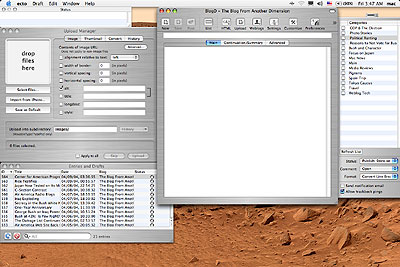
Ecto is very similar in form to Kung-Log. Most of the features are the same, though many have morphed a little bit. For example, the various text windows (Main, Continuation, Summary) have been divided into tabs; the categories are now a check-box list, not a pull-down menu; the recent entries and drafts have both been removed from tabbed placements in the slide-out drawer, and thrown together into a single window, which is now searchable (a la iTunes, though the entry with the search term is highlighted, and the list does not reduce to found entries only); the upload manager has a few more features; and there is now a status window that tells you what is going on.

ecto4

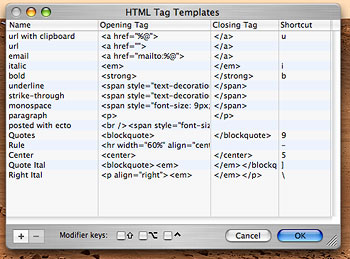
ecto7Another feature brought over from Kung-Log is the ability to set HTML tags. Let’s say you like to put quotes from others in blockquotes, in italics. This would usually require typing “blockquotes” and “em” in brackets before the quote, and the ending versions (with a slash before the command) at the end of the quote. You can set such HTML tags in Kung-Log/Ecto, along with your own hotkey commands; just select the text you want to affect, and type the command. Ecto will automatically place the HTML for you.
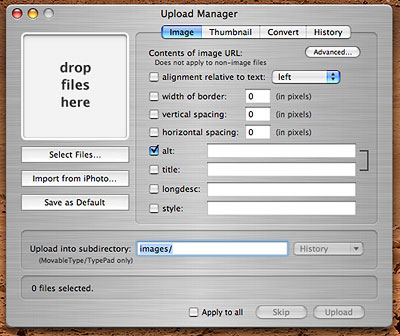
The same is true for images, which are a snap here. First, place the cursor where you want the picture to go. Open the Upload Manager window, drag and drop an image (or other) file onto the preview window, select your settings (alternate text, alignment, borders, margins, etc,), then click Upload. Ecto automatically sends the image up to your web site, and then places the required HTML tags in your entry where you left the cursor. This is perhaps one of the most indispensable features of the program if you want to include photos in your blog like I do.

There is another feature which, for a while, I mistook as a bug: in Kung-Log, when I set the URLs to Ping (this is a feature that alerts blog monitoring web sites when you post a new entry; you can add more monitoring sites manually), the new settings disappeared when I quit and returned later. This happened ecto6with Ecto also, but my Upload Image settings seemed to have reset as well. I finally figured out that to avoid this happening, you have to change the settings, then go to the Draft menu and select “Save Settings.” I don’t like this bit, as it struck me as counter-intuitive, but it seems to be just a difference of opinion between myself and other users; according to the software author, it is set up this way at the request of users who use different settings, but only by exception.

New features in Ecto: the new windows, the redesign of the buttons, tabs, drawers and palettes; a very easy setup procedure, you just have to type the blog’s URL, your username and your password, and Ecto does the rest; inter-operability with iPhoto for photo placement (I haven’t tried this yet), to go along with the long-standing feature of including a note of what you’re playing on iTunes at the time of posting; and very importantly, a now truly-WYSIWYG preview window (Kung-Log’s was not in the least accurate). Another improvement is better save features. In Kung-Log, the app went into spinning-beachball wait mode when it was posting an entry, something which could take some time. Ecto does this in the background, allowing you to get on to the next task immediately.

Ecto can post in English as well as Japanese, French and German, can switch between brushed metal and OS X eye-candy skins, is highly customizable and and has tons of features, many of which I haven’t explored yet. It can post to Movable Type, TypePad, Metaweblog, Blogger, WordPress, MarkDown, and Nucleus weblog platforms. If you blog a lot on your Mac, it can soon become something you can’t live without. I’ll very likely be buying the upgrade when the trial runs out, save if some hairy bug presents itself before then, which I doubt.

ecto88x31

Categories: BlogTech Tags:

One-Year Anniversary

April 6th, 2004 2 comments

Today marks one full year since the inauguration of this blog site. Many thanks to all of those who visit! I plan to continue for however many years to come as I can manage, posting every day.

Categories: BlogTech Tags:

Blog Stuff

April 2nd, 2004 2 comments

Last month was a record-breaker, with The BfAD going past 6000 visitors (I got 10,000 one month last year, but that was due to a very unusual link-in from macsurfer), with an average of 425 unique visitors per day. Eyelid twitching and gyoza recipes remain among the most popular, but my extensive review of Matrix Revolutions (212 views) and my special page detailing Bush’s sordid past got heavy traffic as well.

And now I seem to be getting a huge amount of traffic from my bits about Air America Radio; the stats aren’t in on that yet, but I’m getting lots of comments, and somehow I’m #1 on Google for the search “Air America radio Blog.” Cool.

UPDATE: Okay, here’s an interesting one. My blog post, titled “Air America Radio”, has been getting lots of comments from people who seem to think that it is actually the official blog for Air Americaa Radio. Someone asked if Sam and Janeane were reading the post now (who knows, maybe!), and 9 others followed with praise and commentary. This is a little surreal.

Categories: BlogTech Tags:

LinkBoard and Standards

March 22nd, 2004 5 comments

Just a small note on the blog design. For the economy of space and for a better appearance, I have started to display links to other sites on the “LinkBoard” located on the lower right (main page only, for now), just below the “Categories” section. A few may be hard to read, but I kind of like the graphic representation better, and this allows me to put a lot more links into a smaller space–and lets me locate the links closer to the top of the page while not pushing other items so far below. If you have a suggestion for a site that fits in with the type of sites I have on the board, let me know.

If you have a monitor set to 800 x 600 resolution–buy a new monitor! Or set the darn thing to a better resolution. Join the 21st century! This site is optimized to for a minimum 1024 x 768 resolution, though you can still read it at 800 x 600 (objects just start crossing over borders and overlapping). I generate the site using the 1280 x 854 monitor on my Macintosh PowerBook G4 (800 DVI), and check it on my Windows PC monitor set to 1280 x 1024. If you don’t know how to set the resolution, then: for Mac OS X, open System Preferences, click on “Displays,” and click on the desired resolution; for Windows, right-click on the Desktop, choose “Properties” at the bottom of the pop-up menu, click the “Settings” tab at top, and set the resolution in the lower half of the dialog box. (Note: on a Windows machine, especially a cheap one, I would advise caution: I have used some Windows computers that, when I set the resolution too high, the monitor blacks out, probably because of insufficient video memory. With luck, the resolution will reset itself in 15 seconds, but if not, I don’t know how to fix that particular problem…)

This blog is also produced with Mozilla/FireFox as a way to check the appearance, not Explorer. I have found Explorer to be notably deficient in its performance in many ways. Mozilla, and it’s little brother FireFox, are tabbed browsers with great pop-up window blockers, superior preference settings, and much more. If you’re using Explorer now, ask yourself why–and if you’re like most people, the answer will be, “because that’s what was on my desktop when I started browsing.” Hardly a compelling reason for choosing software–and if that was your answer, then get your butt over to Mozilla.org and download the free Mozilla or FireFox browsers (FireFox is a streamlined browser, Mozilla is a fully-featured Internet suite including email, web page editing, and more). Both are open-source, with upgrades coming out with good frequency.

Categories: BlogTech Tags:

Thank you, MT-Blacklist!

December 9th, 2003 Comments off

As I just noted, I got spammed 50 times by some jerk–mass blog comment spam, my first time. Unfortunately, in Movable Type–the software that runs this blog–to delete a comments you have to click, wait, click, wait, click, click and click again just to delete one comment. There is no batch-deletion built in.

Enter MT-Blacklist, a freeware plugin made by Jay Allen. It not only detects and blocks likely spam, but it allows for just the mass-deletion I was looking for. Just upload three files to the directories noted in the ReadMe file, Chmod the permissions to 755, go to the mt-blacklist.cgi file, and presto, you’re golden. Instead of spending an hour deleting the slimy spam droppings defacing my site, I zapped them all in a few seconds.

Thank you, Mr. Allen!

Categories: BlogTech Tags:

Spammers Strike Again

December 9th, 2003 Comments off

Any other bloggers paying attention, here is a warning about blog comment spam:

Immediately block IP Addresses stemming from 195.120, I just got spammed by them about 50 times in quick succession. To avoid headaches, keep them out. The specific IP Address is 195.120.185.220.

Thank you. You may now return to regularly scheduled programming.

Categories: BlogTech Tags:

November Stats

December 1st, 2003 1 comment

Well, we didn’t get as high numbers as expected, but the numbers for people visiting the site were still good. Broke 9000 different visits, and will top out at maybe 4700 unique visitors, with an average of 300 visits per day. Not bad, again considering the modest expectations from the start of the site. Overall, either the site’s growth is slowing down, or this month was a blip. If the former, the numbers could go anywhere; if the latter, then I’m on target for 10,000 unique visitors by next June. Seeing as how in early October I predicted 4000 monthly visitors by year’s end, I tend to be hopeful.

3410 visits were from search engines, 780 of them looking for something on the Matrix, about another 500 looking for information on Panther, OS X 10.3 for the Mac. The No. 1 site for linked references was this one, the name of which I’d rather not mention directly; after that, the blog tracking sites, with some kind of family tree site which apparently linked in to see the hamster movie.

The number one page people visited was the Spoiler Review for Matrix: Reloaded(640 visits), followed closely by the perennial favorite, the entry on Eyelid Twitching (400 visits–I’ve come to accept my fame). After that is my review of Panther (also 400), and then the Spoiler Review for Matrix: Revolutions (360 views). The Great Chicken Struggle, a movie of my hamster vying to get a chicken leg bone into her cage, was downloaded 112 times.

Most visitors came from the U.S., and next Japan. As usual, someone in Estonia looks in from time to time, as do a few hardy followers from Israel, Finland, Singapore and Belgium, along with about 30 other nations. The average visitor stays for at least seven and a half minutes. Most visitors use Windows and MS Internet Explorer (can’t win ’em all).

And by the way, if your IP Address is 82.36.128.40, 219.113.201.110, or 66.151.128.23, then let me know why you’re visiting so much!

Categories: BlogTech Tags: