MacWorld Expo
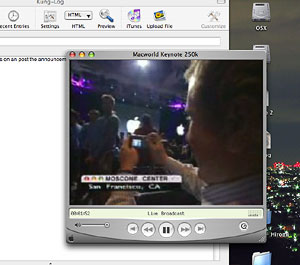 And the webcast begins… I’ll be watching as it goes on an post the announcements as they come, as added updates to this post. Right now it’s just crowds and Elvis music–Jobs should be out momentarily. Looks like the mini-iPods are more or less a lock, from both the various confirmations from the rumor sites as well as the emphasis on iPod advertising at the Expo itself.
Initial announcements are being made, and they’re showing people videotaping, photographing, and using their laptop Macs to broadcast reports out. The rumor sites as well as others have people reporting on it at the site–some even have stripped their sites down to the bare text minimum to accommodate as many as a million hits in the next few hours as those without the bandwidth to watch the stream come by to read the blow-by-blow. This expo, every year, really is a Mac phenomenon. And it begins….
Steve began by acknowledging…me! Well, the more than 60,000 people from more than 100 countries accessing the webcast. Then he stepped right into the 20th anniversary bit, talking about and running the 1984 ad, to huge cheers (it really is a good commercial). On showing the commercial, Jobs quipped: “We couldn’t help ourselves.”
Jobs then went into his usual start-of-the-keynote recap of past news (OS X progress) and new app versions. The first was Final Cut Express (impressive little app for the price). Then came MS Office 2004; new features: “notebook” view in Word, palette fading, a slightly improved print layout view in Excel, and the “project center”–all of them rather unimpressive, small-potatoes improvements. Why would we want to buy this new version? And from what I hear, this will be the last version before MS discontinues the suite on the Mac platform–they seem to be going out with a whimper rather than a bang.
Then Jobs went on about the G5 Supercluster at Virginia Tech, showing a video about it made by Apple.
And whoops, there’s the G5 Xserve in a 1u form factor and an unlimited client license for OS X Server 10.3. There is a single-2GHz version and two dual-2GHz versions. And a new Xserve RAID array which will work on Windows and Linux servers as well). Apple is now aggressively going after the server market.
And now iTunes (first the stats): the music store has sold 30 million songs and sales are going up, and it has a 70% market share; the top spender at the iTunes music store bought $29,500 worth of music–and Jobs wouldn’t say who it was. 50,000 audio books sold. And other little stuff. New iTunes features: BillBoard music charts, 12,000 classical tracks (where are the orchestral soundtracks?), making half a million songs on the store.
And there’s another rumor confirmed: Pepsi and Apple will give away 100 million songs in Pepsi yellow bottle caps (1 in 3 will have a free song) in February and March (watch for a super bowl ad). Also the iTunes music store will be open in Japan by the end of January, and Europe a few months later.
And here comes iLife. iLife ’04, they call it–“Like Microsoft Office for the rest of your life.” With iTunes, of course. Then iPhoto 4 (what happened to 3? Did I miss it? No, it says “2” on Apple’s web site still–hmmm), with support for up 25,000 photos, smart albums, better slide shows with 3-D transitions, Rendezvous photo sharing, and some other features–but what about speed? Sure, it works fast on Jobs’ superfast Mac onstage, but how about on my 800 MHz G4 Powerbook? Frankly, I have been less than impressed with iPhoto in the past, and it will take a major speed boost to get me back to it. Admittedly, Jobs did a good demo of buying a song–fast–from the music store and then integrating it on the fly into an iPhoto slide show with cube transitions.
iMovie 4: a few improvements–some interesting new title effects, non-destructive clip trimming in place, audio scrubbing (playing audio as you drag the play head manually), importing video from an iSight camera, and easy interactivity with .mac accounts.
iDVD4: You can tell they’re (a) making all of them version 4, and (b) building up to a new iApp. But with iDVD, some new features of course, including a project map which shows a flowchart of how all the clips are connected; new transitions and themes; and better encoding for 2 hours of video on one DVD.
And here comes the new, fifth app for iLife…
GarageBand.
A “pro music tool for everyone.” It basically acts as a music recording, mixing and publishing app. Mixing: up to 64 tracks; 50 software (MIDI) instruments (including, for example, a $50,000 grand piano); 1000 audio loops and other audio effects; and different guitar amps. You can play a MIDI instrument, like a keyboard, into the Mac, switching instruments for each new track that you record to simulate a band, laying new live instrument tracks down over existing ones, and editing existing tracks. The 1000 loops includes all kinds of instruments, all sorts of pre-recorded music loops, so you could patch together music without even knowing how to play an instrument or owning one. Jobs did a fairly impressive demo of using the loops to make a new piece of music that could easily be used as background music for a film or slide show, or perhaps even just to serve as a composition in itself. Once you get your composition finished, it is exportable right into iTunes and the iPod. Pretty impressive little piece of software there.
Now for the price: Jobs compares it with a Windows suite patched together for $300, justifiably said to be much lower in quality than iLife–and Apple keeps iLife’s price down at $49, free on every new Mac. Coming out January 16th. Also Jam Pack (more loops, MIDI instruments, and effects) and a USB keyboard, each for $99.
Not too shabby.
And last (unless there is “one more thing”), the iPod. 730,000 iPods sold in the last quarter, 2 million in total, with sales shooting up; iPod market share is 31% in units, 55% in revenue, making the iPod the #1 MP3 player sold. Small news: the 10GB model gets upgraded to 15GB; new headphones for $39…
Jobs then focuses on the fact that some 60% of the market in MP3 players are flash-memory, talking about the cost and low storage ability for songs. Obviously leading up to the mini-iPods. Says they’re going after this market. And here it is:
The iPod mini: 4 GB of storage, rather than hundreds of MB on Rio and other players. Smaller (business card size, half-inch thick) thinner than other players–16x more storage in a smaller form for $250, $50 more than a Rio. And colors–anodized aluminum, in silver, gold, blue, green and pink.
Not bad–not the $100 price range people were hoping for, but still a very nice deal, and Apple has never had problems selling players at higher-than normal prices.
And now Jobs is wrapping it up, reviewing the whole keynote, and coming back to the 20th anniversary theme–but no “one more thing,” no anniversary special-edition Mac, no new speed bumps for the G5 (yet).
Nevertheless, a very interesting set of announcements–interesting for me as well, since I was going to get my school to buy iLife anyway. And now it’s 4am, and I really have to get to sleep!


 One of the first things one might do in visiting Tokyo is to visit the Ginza district. Made famous in the post-war years by U.S. military personnel doing their shopping and entertaining, the Ginza has today become a kind of upper-class shopping district. To me, this meant that it turned out to be kind of boring. Department stores and boutiques are not my kind of thing, really. There used to be a McDonald’s when I first visited in 1983, but it was more or less banished for not being upscale enough (kind of like the Stanford Shopping Center has been trying to do to their McD’s for a long time). For a while, there was a Mrs. Fields’ Cookie shop there, and that brought me down from time to time. Otherwise, I just regarded it as another overrated, overrun, high-profile street.

 In the middle of the fourth floor, there was a table for the kids, and very nicely set up, too. A low, round table equipped with CRT eMacs loaded with kids’ software, with nice, modern-looking black ball chairs set around. Not too many kids in the joint, but they had found this place. A very nice touch.
 Going downstairs, one finds something that seems very out of place for a shop: a theater. You see this from the elevator going up. It really looks like a movie theater, except for the size and the fact that there is a podium with a tech person giving explanations to the shows. Here is where they give the Introductory Presentations and the Workshops. The Presentations seem pretty much like commercials, introducing the lineup of Apple products. But the Workshops seem to be a very nice service, especially for newbies. The Workshops are free, from three to five of them given each day, each day having a theme (e.g., movies, music, photos). If you want more advanced lessons, you have to pay for the Studio Series.
 As it turned out, I didn’t get too many actual answers. They had never heard of my problem with browsing networks before (sometimes shared folders, which should appear as network-globes-in-a-glass-box icons, instead show up as plain folders with the same names, but empty), nor could they explain why some of my students’ USB Flash memory sticks were not showing up on my Mac’s desktop. But the Genius helping me did give me some ideas about how to test out why my father in the S.F. Bay Area and I can’t get a voice chat going, so it wasn’t a complete wash.
 Wow.
Wow.  Right off, I will admit that I have an interest in finding this to be a nice machine, having just plunked down $450, including tax, for the little thing. That said, I think it goes beyond that bias to say that this is a sweet device.
 asks, “Are they heavy?” The kid answers “Yes,” and the adult replies, “Then they’re expensive. Put them back.” That’s what this feels like. Totally subjective, but that’s part of the experience.
 The one hassle I expected was the expected limited ability, from one jog dial and five buttons, to effectively operate the machine, especially considering the fact that two and a half thousand songs were on the thing. But they did a very good job with this. It’s like a single, extended, hierarchical menu (it even has the menu font Apple uses). The jog dial (works like a trackpad, solid-state) acts as a scroll wheel; dial this way or the other, and you move up and down the list, quickly. Tap the button at its center and you move into the next submenu; tap the “Menu” button to move back. For example, choosing a single piece this way: Browse >> Albums >> Jurassic Park >> Theme From Jurassic Park. Very quickly, you can narrow down your selection. Feedback is given by little clicks, which you can mute if you like. And the menus are customizable; you can choose to have “Albums” in the top menu, for example, or turn off “Extras” (Address Book, Calendar, Games, etc.).
 Not much time to blog tonight–I’m grading midterms. But I did have time to stop by the electronics store earlier and get myself an early Christmas present: a 20 GB iPod. I never buy big-ticket items on a whim, I always give myself at least a few weeks to mull it over, especially to avoid those impulse buys where a few weeks later you ask yourself, “why did I buy that thing?”
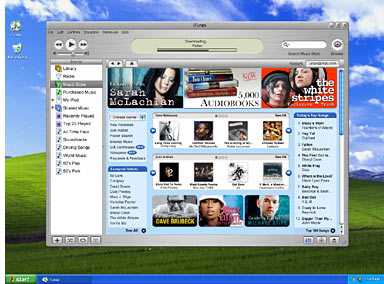 Apple is hitting its stride with its music initiative, and several new announcements today. First is the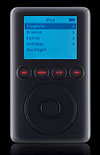
 And I’m finally going to break down and get an iPod. Probably the 30 GB model. I’ve been teetering on the line, more on the not-buy side lately, but with the introduction of two new accessories, the microphone to make voice recordings, and the Flash memory adapter to store photos–well, that about did it. That’s my Christmas present for myself this year. Am getting it before I go to the U.S. so I can use the music and games on the flight over and back (watching DVDs on my Powerbook is limited to the battery life, not enough to stretch out for the 8- to 10-hour flight), and to hold all the photos I take on my digital camera without having to haul my laptop everywhere.
 Apple has announced it will


 Another new Finder tweak is a long-missed feature from OS 9 and before, you can now assign a color to any icon. Instead of color-shading the entire icon, the filename instead takes on a colored button-like appearance.
  Sorting by color is now available as well. And in the contextual (right-click pop-up) menu, you have the added options of compressing (by using zip) the item, or “Toasting” the item–archiving to a CD-R using Toast.