Archive

Archive for May 31st, 2003

Blogging 102 – Lesson Plan 3, Cleaning the Feed

May 31st, 2003 Comments off

One last note in this recent learning process: I found that my own blog’s RSS feed was not what I wanted it to be. At first, it would only display a short snippet, 40 words, with no formatting and no photos. By going into the Movable Type web interface, I found that under “Weblog Config,” if you clicked on “Preferences,” you could set the “number of words that should appear in an auto-generated excerpt.” I changed it to 400, and that allowed bigger excerpts, but it still allowed no line breaks, and no photos.


Kristen McQuillin to the rescue. I noted that her blog displayed quite nicely in NetNewsWire Lite, so I asked in the Japan Blogger’s Ring mailing list for help, and she responded immediately. What is needed is for the Movable Type RSS templates to be updated via the MT web page interface. She pointed to this site for instructions and links to the correct scripts, and this site to validate it. She also pointed me to this page on MT’s web site, which has a variety of updated templates for MT. Thanks, Kristen.

The question remains, will a complete and formatted RSS Feed work out? Even after a very short while, I have noted a big jump in bandwidth traffic on my site, and am fairly sure it is not due to more visitors–the increased RSS feed might be increasing the traffic in terms of KB downloaded, though maybe not visitors to the site. I am still way under my monthly traffic limit with my web host, but I will have to keep an eye out as time goes on as to how the increased RSS Feed affects things.

Categories: BlogTech Tags:

Blogging 102 – Lesson Plan 2, RSS Feed Reader

May 31st, 2003 3 comments

Thanks to various sources I have been upgrading my blogging experience quite a bit recently, and wanted to share what I’ve found with anyone who hasn’t heard of these yet. I primarily use Macs, so the following will mostly center on apps for that platform.

Another recent find for me was an RSS Feed reader, NetNewsWire Lite. I found this program by checking my web site statistics. Naturally, two months after I started it, I’m interested in how this blog is doing, whether or not it’s being read. So far this month, I have some 400 unique visitors, not bad for a startup. A lot of it is thanks to joining the Japan Blogger’s Webring, a lesser but substantial number of hits coming from search engines.

When scanning these stats, I found that one of the biggest referrers was ranchero.com, and when I went to the page, instead of finding a link to my blog, I found it was a site for some software called NetNewsWire. After looking at it, I found that I might want to use this thing.

Some web sites, not too many so far, produce what is called an RSS Feed (“RSS” usually stands for Really Simple Syndication,” though other names have been used) using XML code. This feed effectively allows other sites or applications to grab the web site’s content and display it dynamically. For news readers, this means that you can view the web site’s content in the reader, or at least see an excerpt and follow a link to that web page.

How the app works: First, you subscribe to a particular site’s RSS Feed. If a site provides such a feed, there will usually be a link to it, most often titled “syndicate” or “XML.” Copy the URL within the link to the clipboard, then go to the reader, click the “Subscribe” button, and paste. If you think the site provides a feed but you can’t find a link, just click “Subscribe” and type in the base URL for the site; the reader will search for the feed and find it if there is one.

Once you have subscribed to whatever sites you desire, the reader will then, on a regular basis, check the site for changes. If it finds a change, you are notified and can view it. The Mac app NetNewsWire displays the number of new, unread articles it finds by showing it in a red indicator box in its Dock icon. This way, you don’t even have to make the app active to see if there’s something to look for.
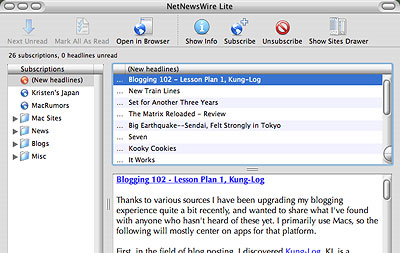
When you see that there is a new story to check, activate NetNewsWire and click on the site (or folder containing many sites) with the indicator for new stories. If you see any titles that interest you, you can click on the title and read the feed. Some web sites syndicate their entire feed, meaning you can read the entire story, with photos. Most sites, though–especially those who depend on clickthrough ad revenue–will just show you a snippet or summary, and to read the whole article you must go to the web site. But no sweat there, just click on the link right there in NetNewsWire, and it’ll open the page automatically in your default browser (I use Mozilla, BTW, and highly recommend it).
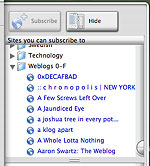
If you want to see a collection of sites with RSS feeds, you can check out the Sites Drawer, a pop-up drawer (a nice but underused Mac OS X capability) which contains many sites waiting to be read, including a large number of blogs. Want your blog included in the app? email to Brent at Ranchero and if he approves of the site, he’ll add yours to the drawer in the next version release.

Thus we see one of the primary benefits of the reader: you no longer have to check each web site on a regular basis. The news reader does it for you. One drawback is that few web sites have RSS Feeds yet; we’ll have to see if that improves in the future.

NetNewsWire Lite is freeware; a more feature-rich version is available for $40 as downloadable software. For those of you with Windows PCs, check out Newz Crawler ($25), Feedreader, or Syndirella, both freeware. For cross-platform, Amphetadesk is also free, and has both Mac and Windows versions, for users with current and older OS versions.


Categories: BlogTech Tags:

Blogging 102 – Lesson Plan 1, Kung-Log

May 31st, 2003 Comments off

Thanks to various sources I have been upgrading my blogging experience quite a bit recently, and wanted to share what I’ve found with anyone who hasn’t heard of these yet. I primarily use Macs, so the following will mostly center on apps for that platform.

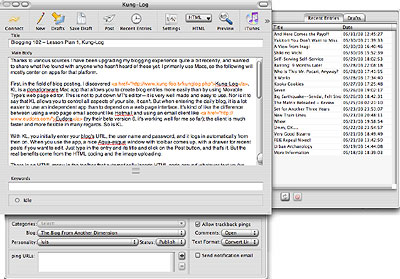
First, in the field of blog posting, I discovered Kung-Log. KL is a donationware Mac app that allows you to create blog entries more easily than by using Movable Type’s web page editor. This is not to put down MT’s editor–it is very well made and easy to use. Nor is it to say that KL allows you to control all aspects of your site, it can’t. But when entering the daily blog, it is a lot easier to use an independent app than to depend on a web page interface. It’s kind of like the difference between using a web page email account like Hotmail and using an email client like Eudora (try their beta version 6, it’s working well for me so far); the client is much faster and more flexible in many regards. So is KL.


With KL, you initially enter your blog’s URL, the user name and password, and it logs in automatically from then on. When you use the app, a nice Aqua-esque window with toolbar comes up, with a drawer for recent posts if you want to edit. Just type in the entry and its title and click on the Post button, and that’s it. But the real benefits come from the HTML coding and the image uploading.

There is an HTML menu in the toolbar that automatically inserts HTML code around whatever text you’ve selected. You can add code selections yourself, or modify what’s there; it even allows you to add hotkey commands. For example, I’ve added the hotkey “COMMAND-U” for adding a link. The link feature automatically grabs whatever URL is in the clipboard (that you’ve copied with CMD-C or -X) and puts it into the link.

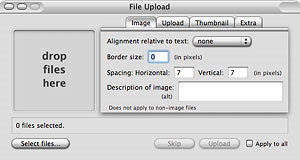
Even better is the “Upload File” feature. When activated, a window comes up, and you just drag your photo into a frame in the window; a preview of the photo appears, and there are prompts for “arguments” at the right–for example, what kind of border and spacing, alignment, and so on you want. When you click “upload,” it not only uploads the file (a la FTP) to your blog’s image folder, but it also adds the HTML code to link to the photo within the blog entry! Very cool stuff.

You can save drafts on your computer on the fly to avoid having your work wiped in case of a crash (faster than on the web page). You can edit recent entries, ping URLs, and even have KL automatically add to your post what music you’re listening to in iTunes when you post. And there is spell-checking, a very badly missed feature in the web page editor. The program also allows “previews,” but they do not show correct formatting; perhaps this will improve in future releases.

That said, I did have a problem, which may or may not have been related to KL. After using it for a few days, I suddenly started getting error messages when I tried to post, saying “permission denied.” The error messages even prevented me from posting via the web page interface; I could save files and edit them, but I was denied permission whenever I tried to rebuild the indexes so the changes would appear on the site. I was able to get past the problem with a few fixes suggested at the MT forums. For all I know, the errors had nothing to do with KL, but they happened when I was using KL. The errors were easily fixed, though.

In the meantime, it looks like a good app, and I would recommend it to anyone looking for these features. I plan to keep trying it out, and hope it’ll prove itself over time.

For those using Windows, aside from my sympathies, I would suggest trying W. Bloggar freeware.

Categories: BlogTech Tags:

And Here Comes the Payoff

May 31st, 2003 Comments off

This coming Monday, a decision will be made by the U.S. government which will decide how the property of the American people will be parceled out to large corporations, a decision that will greatly affect the interests of the American people, and how we receive information that enormously influences the public’s stance on all social and political issues. And if you are a member of the American public and want to have a part in this decision: too bad. The doors are closed, and you’re not allowed in.

It’s payoff time.

Remember how the large media organizations tore into Clinton whenever there was even a whiff of scandal? How they went endlessly on about relatively unimportant issues such as how he “didn’t inhale” and had affairs and then lied about them. That demonstrates how willingly, even enthusiastically presidents were hounded by the press in light of a potential scandal.

Remember in the 2000 campaign, whenever Gore, a man with strong character, was caught in the smallest of prevarications, he was widely labeled a liar and a spinner of tall tales in the media, but when Bush was found to have been a drunk driver, cocaine user, National-Guard deserting, SEC reg violator who lied under oath as governor of Texas and showed the worst of character–that the media essentially shrugged its collective shoulders and said, “so what?”

During that election, Gore was often put down by the media and Bush was given every benefit (save for the funny stuff about his speaking skills). And in the crucial days of December in Florida, the media clearly favored Bush–for example, it made big news about the “people of Florida” protesting and disrupting the recount, but went silent when it was revealed they were really Washington D.C. Republican staffers.

It was quite clear to anyone who looked at the overall picture: the media corporations liked Bush and did not like Gore. But why? A conservative media? Not really, it has more to do with a relatively little-known corner of FCC regulations. Currently, there are limits to how many TV and radio stations one person or corporation can own. The reason: so that the media cannot be controlled by one person or a small group of people who could then control what people see and hear. Remember the Frank Capra movie “Mr. Smith Goes to Washington,” where the political machine run by the kingmaker Taylor owned all the media in Smith’s hometown, and silenced any opposing views about him? That caricature is what the current FCC rules are designed to prevent.

Not for long, though.

All the media bias over the past several years is about to pay off. Gore was staunchly opposed to changing these FCC regs, but Bush was clearly in favor of letting the big boys have even bigger slices of the pie. And the large media conglomerates have known that if they want the FCC to allow them to own as much of the media pie as they want, they had better show that it will benefit the president–after all, would Bush want to allow the media giants to own it all if they worked against his interests? The media conglomerates also made sure that the issue did not get much play–only now, at the very last minute,are a few news outlets picking up the story, far too little, far too late, perhaps so they can claim that they “covered the story” before the decision was made. It would not have served their interests to alert the public beforehand.

See these stories by FAIR (Fairness and Accuracy In Reporting) and Truthout.org.

Ironically, activists on both the right and the left are against the new FCC regs to be swept in under the cloak of the gag on Monday. Liberals and conservatives both reel at the thought of the media conglomerates, which could potentially swing to the left or the right depending on the issue or the CEO, dominating the airwaves and sending only a single voice out to the people. Even the NRA is getting into the picture, getting their faithful to send out 300,000 messages to the FCC, fearful of what they see as a press consolidated against free gun rights.

But the political activists and the people are in the back seat on this one–the media lobbyists, with the full weight of media power endorsing the current office holder, have control of the wheel, and it looks like they are going to get their way.

Look for the current 6 television and 2 radio media giants to merge soon under the blessings of the current administration, and expect voices of opposition to be broadcast less and less. So goes the state of Bush’s America.

Categories: Archived Tags: