
Google Analytics: Initial Reaction
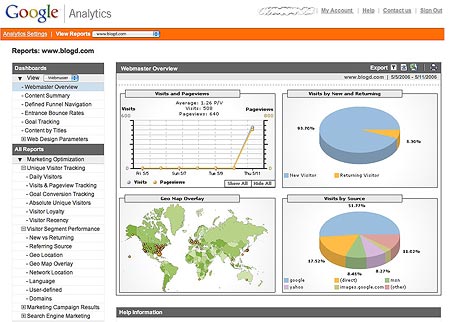
The first data set came in for this site from GA, and while it’s incomplete (only a half-day’s report), it does give some interesting insight.
One huge drawback is that GA can’t track RSS feeds. According to AwStats, fully 1/3 of the visits to my site are people who get a feed of the blog, and don’t visit the blog directly. But when someone reads the feed, that means they aren’t actually visiting any pages on the site. RSS feed can’t use Javascript, which is how GA tracks visitors. So that’s a rather significant blind spot. It could be significant for me because I’d like to know for certain that all the hits on the RSS feed are actual people, and not bots or spam or whatever. Other data on it would be nice too, of course.
Of course, part of this is my own fault: I’m too generous with the RSS feed. Most feeds only let you glimpse the first few lines of text of any entry/article; I opened the floodgates, letting people see everything, all the content, entire posts, including photos, in the RSS feed alone. This is relevant because if I limited the feed to a snippet, RSS visitors would have to click “read more” and visit the actual web page in order to see my whole posts. Depending on how things go, I might temporarily (or even permanently) change to snippets rather than full feed. The good side of that would be that more people would visit the actual pages, giving me a better view of who is actually reading things on my site. The down side is that people who enjoy reading in RSS might be annoyed that I’m making them click links all of a sudden. Are there any RSS readers out there who would like to give feedback on that before I decide?
On the other hand, there is a positive blind spot for GA: it doesn’t track spambot-driven accesses to comment and trackback scripts, which is mostly how the spammers attack. Simply by nature, GA ignores most spam.
Of the data that does come in, GA seems to claim some pretty amazing abilities, tracking data I had no idea was possible. For example, GA claims to be able to detect the screen resolution and color depth settings of each visitor. According to the stats, about 52% of visitors to this site over the past 12 hours had a screen resolution of 1024×768; 14% had 800×600, and 13% had 1280×1024. How can GA tell that? It also claims to be able to tell if someone is using DSL, Dial-up, or “Corporate,” whatever the last one means.
GA also does a fun trick with the IP addresses of visitors, detailing which country, region, and even city the hit apparently came from. I’m not sure how accurate this is when you get down to the city–the IP address would be from the ISP, not the user, after all. 12 visitors appeared to come from Saint Petersburg, FL, but I think that’s where my blog host is, so they might be entering into the data somehow. After that, in the past 12 hours, 12 people came from New York, 7 from Denver, 6 each from L.A., Washington D.C., and St. Louis, 5 each from Oakland and Sacramento, 4 each from Plano, Atlanta, Austin, and Wilmington, and so on. Apparently visitors are coming from locales like Schaumburg, Mililani, Panorama City, Colchester, Poughkeepsie, Buzzard’s Bay, Glen Carbon, Sedro Woolley, Cockeysville (no, I did not make that up), Halethorp, and Plymouth Meeting. A shout-out to my peeps in Plymouth Meeting!
Another cute trick GA does is give you the ability to view cross-sections, stat breakdowns on any one group. For example, I can see what screen resolutions were used to view my birdwatching in Japan page, or see which cities people came from to view my eyelid-twitching page (apparently there’s an outbreak in Schaumburg).
But as I’ve mentioned, I’m playing with a very limited amount of data–I don’t even have a full day’s stats yet. And a better view will come after a few weeks or longer, when I can start really tracking returning visitors and various trends. One thing is for certain, GA is an incredibly powerful analytical tool, limited only by which data it is unable to track at all.