
The iPhone Keyboard
One of the chief criticisms that has been going around about the iPhone is the usability of the keyboard. One recent such rant was made by John Dvorak, who claimed that an unnamed “industry insider” says that the keyboard is a “disaster,” and that “people are going to return the phone in droves,” as many as 20% of buyers. But then, Dvorak is a self-proclaimed Apple troll, the Mac world’s Ann Coulter. Still, others have express concern over how hard it might be to use the keyboard. A few images of the keyboard below, and a demo of how it is used from Apple’s web site.
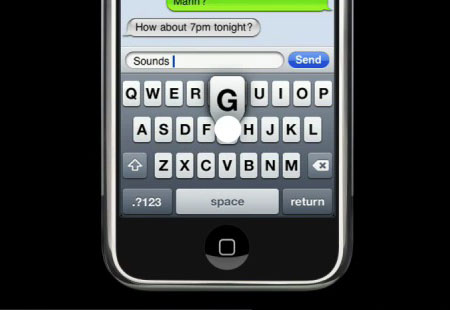
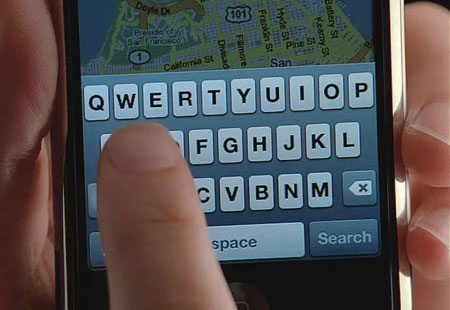
The interface is pretty simple: you have a virtual keyboard on the screen which you can use with one or two fingers. As your finger moves over the keyboard, the selected key grows a tab that appears above your finger, so that the view of the letter is not occluded by your finger. (Apple might want to think about adding transparency to the pop-up so that the letters behind it are not constantly masked, causing trouble for us hunt-and-peck types.) There is a shift key and a numbers-symbols key to allow for non-lowercase letters; the numbers-symbol button replaces the regular keyboard with all ten digits on top and thirteen common punctuation marks and symbols below.
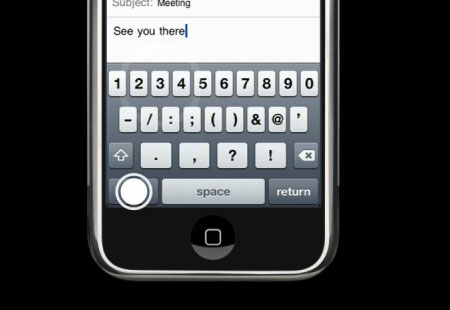
Presumably, hitting the shift key here will allow access to other symbols, but I can’t find a demo which shows that.
The iPhone keypad also has error correction for hasty mistyping (how well it works stands to be seen), and an auto-capitalization feature when you enter a new text field or hit the “return” button. The error-correction feature might also double as an auto-complete, but I’m not sure on that one.
So: with all of that established, how hard will the keyboard be to use? Of course, it’s almost impossible to tell until you get your hands on one and try, and then there’s the fact that everyone is different and so people will disagree to a certain extent. But from what I can see, I have the feeling that, while it might take a little getting used to, it should be a good system. I was put off originally by the pop-up tab for the key about to be pressed, but upon reflection I think it’s a positive; although it would obscure the two keys above the key to be pressed, it serves to un-obscure the key to be pressed and as such acts as a visual confirmation that you’ve got the right key. The auto-correct would seem to handle whatever errors are made anyway. I could imagine becoming pretty adept at it, typing not as fast as a standard keyboard, but still very quickly.
But here’s the real test: how does it compare with other real-world options? When you compare this to the standard numeric-keypad system, there’s simply no contest. For example, using the number keypad, the “7” key is “PQRS,” with lowercase and uppercase either rotating (p-q-r-s-P-Q-R-S) or using a shift key; in such a case, typing a capital “S” requires either five or eight keystrokes–which is why I never enter text into my cell phone unless I am absolutely forced to. I know that one could get adept at it, but it still requires a lot of extra effort even if you do. Most cell phones that I have seen have this keypad, and I cannot imagine anyone actually preferring it over the iPhone’s keypad, unless they had some sort of unusual and highly annoying difficulty with the iPhone.
An additional problem with the alpha-numeric keypads is that one sometimes must manually advance the cursor. For example, if you want to type the word “cab,” all the letters are on the same key. That means that you have to punch three (or six) times to get the “C,” and then you must press the cursor-advance key to get the “A” because pressing the same key again would just be considered an attempt to repair the original entry.
Then there are the alternatives to the standard keypad, which offer more buttons while still keeping with the original size constraints of the normal cell phone. Take these two for example:
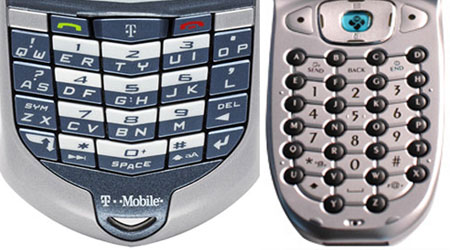
The one on the left (these links are to web pages where I got the images from) is an intermediate solution, reducing the number of letters per key to two instead of three, and adding the shift key. This helps a bit, but still is not as good as the iPhone. While it reduces the number of steps from the normal keypad, it does not do it as well as the iPhone does as there are still more strokes. Also, the phone has compromised a bit in making the keys a bit smaller and the phone a bit wider. I can’t see this as a preferable system, again unless a user has some unusual problem with the touch screen. This keypad also still suffers from the same-key-different-letter problem, requiring an advance-the-cursor keystroke sometimes.
The one on the right adds an almost piano-like white-and-black-keys solution, in alphabetical order. This could be better or worse than the standard keypad, depending. The buttons are tiny, and are laid out in a nonstandard fashion; though alphabetical, it is something a person would have to get used to–which means that it is no better than the iPhone in that respect. I really can’t see this as outclassing the iPhone, either.
Then we get the Blackberry solution:
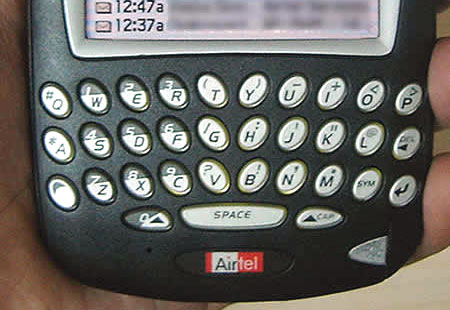
I think this is what people are thinking about when they complain about the iPhone’s keypad. Instead of comparing the iPhone to most cell phones, they instead compare its keyboard to the best keyboard on the market, while ignoring other considerations. The Blackberry keyboard would seem to beat out the iPhone’s, again except for unusual situations or personal preference. The problem is that the Blackberry has other faults, chiefly the size and appearance, something a full comparison would have to take into consideration. Comparing the form factor between the two alone would, for most people, leave the iPhone the clear winner. So, if we take all aspects–including browsing abilities, music playing, photo taking and viewing, email and texting, syncing with a computer, menu interface–everything–into account, does the Blackberry still win? Again, it comes down to personal preference.
There are also slide-out keyboards, and maybe some people prefer them–but they would not only make the phone thicker and cause other design problems, but they would be an additional moving part, something extra that could get broken more easily.
However, the iPhone could possibly cancel out slide-out keyboards’ and the Blackberry’s chief advantage–the keypad–with a simple software fix: use its ability to change from portrait to landscape via motion sensor, and apply it to the keyboard, as this Photoshopper demonstrates:
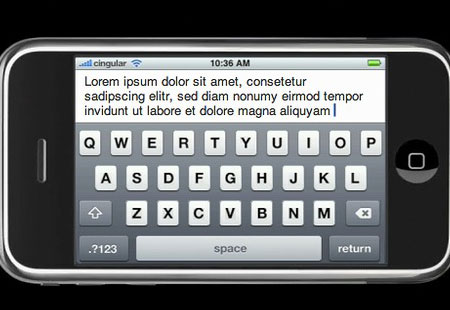
Or maybe not–maybe some people prefer the tactile response of buttons. Maybe the landscape margins on the iPhone would be considered too much of an obstruction. But it could work.
Additionally, the iPhone, as a touch-screen phone, has the unique advantage of being software-reconfigurable. What if you, like my brother, is a Dvorak-keyboard (not that Dvorak) user? An iPhone could, potentially, make that switch easily, as it uses the Mac OS which can make that change as well, or it could change the keyboard language (e.g., Greek, Russian, etc.).
All in all, I think the pre-release negativity about the iPhone’s text keypad is premature and probably misplaced. Maybe it’s just the easiest thing for Apple critics to kvetch about, one of the only known things aside from the price that the device could be criticized about, ergo the attention to it.
We’ll see in a few week’s time anyway, won’t we?