Archive

Archive for the ‘Gadgets & Toys’ Category

Come and Go

November 27th, 2007 2 comments

Well, it had to happen. The DVR/DVD recorder I got three years ago finally crapped out. Last night I wanted to record something on the fly, but couldn’t figure out how to make it shut down automatically after a certain period of time. I knew it would eat up all the hard disk space before I cold wake up, but I’d done that before–it just eats up all the time and then shuts down. So I wake up this morning, find it has shut down like I figured; I edit the recording to erase the 4 extra hours it recorded, freeing up a bit of space.

But by the time I returned home this evening, the hard disk was clicking away–as it had some times in the past. I shut it down and restarted–and I got a hard disk error. Tried all kinds of things, but no go–the hard disk looks like it’s fried. Looking it up on the web, it seems that every mention of this error was treated by swapping out the hard drive. And mine was full of stuff I had not yet archived. Oh well.

I got the thing three years ago, for about a thousand bucks (electronics always cost more in Japan, sometimes 30-40% more than they do in the U.S., for some reason), and had always felt that the thing wouldn’t last too long. It had several meltdowns in the first year, most of them in the initial few months. Most of the breakdowns concerned the DVD drive–it failed twice, fortunately both times within warranty. I am actually surprised that it worked smoothly for two years after that. At least, I got a hell of a lot of use out of it–I’ve got hundreds of DVDs to show for it.

Repairing it now isn’t too promising an option; most likely, it’d cost more to repair it than it’s worth. Also, similar machines in Japan have dropped to below $500 (yeah, I know they’re cheaper in the U.S.–like I said), and it’d probably be safer and cheaper to go that route.

The machine I’ve used had already lost one big feature: the ability to switch the satellite tuner. Well, it didn’t lose it–instead, I lost the satellite when I moved to the new place. The new tuner is from a cable company, and it’s not compatible. I’ve been trying to record Boston Legal and Heroes off of Japanese TV for Sachi and I to watch, and half the time I miss them because we forget to set the tuner to the channel we want the DVR to record.

So tomorrow, I’ll have to check quickly with the cable company to see if there’s a model that can interact with their tuner (they rent out DVRs, but not with DVD recording), then check out what Labi, Bic, and maybe even Costco are selling. Oh, boy! An all-new convoluted machine navigation system! New adventures in frustration! Whee!

Categories: Gadgets & Toys Tags:

Battle of the Fanboys

November 23rd, 2007 3 comments

There’s a recent web poll being carried by the Wall Street Journal: Which of these items are you most likely to purchase as a gift?

• Flat Panel TV
• iPhone
• Compact Camera
• SLR Camera
• BlackBerry
• Zune
• DS Lite
• GPS Navigator

Interestingly, they did not initially include an iPod–supposedly they assumed that since the iPhone includes that, even though buying an ipod is far easier to do, as they start at far lower prices.

Anyway, very early on, the iPhone showed a very large lead, as reported by MacDailyNews:

• Flat Panel TV – 5% (69 votes)
• iPhone – 51% (647)
• Compact Camera – 5% (69)
• SLR Camera – 6% (78)
• BlackBerry – 10% (131)
• Zune – 8% (101)
• DS Lite – 5% (66)
• GPS Navigator – 10% (126)

That lead held steady when a lot more people had voted:

Small-Iphonepoll

Now, here’s the interesting part: notice the Zune. Though it got an early head start with 8%, after a few hours, the Zune had fallen to about 0%–just 257 votes out of 123.510. The fact that the very early results were so iPhone-centric are realistic–the numbers came out that way before word could spread to the fanboys.

Well, that didn’t sit well with Zune fanboys. The claim was that when MacDailyNews reported on the missing iPod choice, it sent “thousands of angry iFans voting” at the site. The thing is, that doesn’t really wash. Before MacDailyNews made the report, the iPhone rang in at 51%–exactly the same level as when the Zune fanboys complained of iFans pouring in to “skew” the vote. Flat panel TVs and GPS navigators stayed just as steady as the iPhone, while DS Lite games and compact cameras surged. If there had been a fanboy surge, the iPhone would have pulled out ahead. Instead, it was just that the Zune fell waaaay behind–most likely for the most obvious reasons.

Like I said, the Zune fanboys couldn’t have that–so they called for everyone to spread the word and vote for the Zune. However, that wasn’t good enough: one of them made a script that acted as an auto-voter for Zunes. A Zune fan would simply go to the auto-voter site and leave the page open in their browser, and the page would automatically keep voting for the Zune again and again and again. Then other Zune sites started up with more auto-voters. The result:

Wsjpoll-2

Definitely the Zune auto-voters had an impact. It would seem that there was also a response somewhere on the Apple side, as votes for the iPhone/iPod similarly surged. Strangely, while I could find many Zune sites directing fanboys to auto-voters, I could find nothing on the Mac side–no auto-voters, not even anyone urging Mac fanboys to go out and vote. So it should not be too surprising that the Zuners seem to be winning the spam-vote war. Here’s the latest result:

Wsjpoll-3

So pretty much, the fanboys have made the poll into a farce. Kinda funny in some ways, kinda sad in others. Not that web polls are worth a rat’s fart anyway.

Categories: Gadgets & Toys Tags:

Keyboard of the Future? Redux

November 13th, 2007 1 comment

1107-Optimax In Use
Kind of looks like a 1960’s Star Trek console, doesn’t it?

A few years ago I posted on the Optimus Keyboard by Art Lebedev in Russia. After two years of being vaporware, they’re finally coming out with the thing… but it’s priced at $1564, more than five times what was initially rumored. And only a few hundred are being made in the next few months–understandable, as not too many people can drop a couple of G’s on a keyboard.

But the potential is huge. If the costs can be brought down (and the makers are talking about a sub-$500 configuration for the near future), then an OLED keyboard is potentially a “killer app” piece of hardware. Aside from the coolness of having a keyboard where every key is a mini-LCD monitor, aside from the ability to show game controls, application tools, or various language sets directly on the keytops, an OLED keyboard stands the best chance of any innovation yet developed to finally, once and for all, shed us of the shackles of the QWERTY keyboard.

If you already know why QWERTY is bad, then go ahead and skip on down to the video. Many people actually assume that QWERTY is laid out to accelerate typing, but in fact, the reverse is true. QWERTY was developed for old-style typewriters, which used key-shaped (hence the word “keyboard”) metal rods laid out in a fan shape below a strike zone with an embedded ink ribbon. Push a button on the keyboard, and a key strikes up and hits the target area with its engraved head, leaving an imprint on the paper rolled around the carriage beneath the strike zone; the carriage would then move a character’s width so that the next key to hit the strike zone would leave an imprint in the next blank space. The problem was, all keys were mechanically aimed at the same spot (the strike zone), so if you typed too quickly, the keys would collide with each other, sometimes sticking and piling up on each other in a “keyjam” that would at the very least delay you while you extricated the keys, and at the worst, left an indelible mess which screwed up your whole document. Thus, the QWERTY layout was developed to either slow people down or to place oft-used keys farther from each other inside the machine, thereby reducing keyjams.

1107-Mac-Intl-LayoutsThe keyjam problem was solved decades ago with type-ball and daisy-wheel typewriters which eliminated keys and so could not jam (and also introduced changeable fonts as early as 1961), and later more effectively with electronic word processing. And there is a keyboard layout which actually is designed to speed up typing: DVORAK. In fact, your computer could do DVORAK, right now; Apple has had it since 1980 or so, and Windows since the mid-90’s. A minor series of mouse clicks could switch you to DVORAK, no matter what your physical keyboard is. However, DVORAK goes largely unused; we have been stuck with the QWERTY layout because of a catch-22: people are trained to use QWERTY keyboards because that’s the keyboard everyone has, and we can’t change the layout because everyone is trained on QWERTY. So we have been stuck with a keyboard that works against us for a few generations now, robbing us of productivity. A few people (like my brother, for instance), have trained themselves on DVORAK anyway, not caring what’s printed on the keys.
But in order to really leave QWERTY behind, we need a flexible keyboard, one that can be both QWERTY and DVORAK, so two different pieces of equipment are not needed. The Optimus keyboard is an attractive answer, except for the fact that it’s prohibitively expensive. But when OLED drops enough in price, and OLED keyboards begin catching on, I would not be at all surprised if they became standard issue. How long that will take is the question.

In the meantime, enjoy this video of an Optimus in operation. The camera work in the video is annoying, but you can see what a changing OLED keyboard looks like.

Categories: Gadgets & Toys Tags:

Zune Enters the Year 2005

October 3rd, 2007 11 comments

Zune2-Lineup

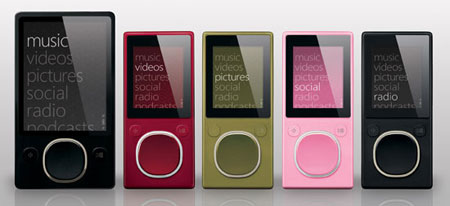
The new Zunes are out. And predictably, they are as much of a non-event as the new iPods were an event. They now come in smaller-form flash variety, and sport a somewhat less-dorky control pad, with–get this–touch-sensitive ability. That’s not a touch-sensitive screen. It’s a touch-sensitive pad. Similar to the iPod click-wheel, which has been around for, what, five or six years now? Additionally, Apple has had flash-based iPods for over two and a half years now. So, congrats to the Zune for reaching 2005.

But no touch screen. No Internet browsing. No wireless purchasing of music. No international language support. No 160 GB model. No ultra-mini model (along the lines of the iPod shuffle). Still a smaller screen, and a thicker, clunkier body.

The big Zune now has a screen that is 3.2“ in size, as opposed to their old 3” screen, but is still smaller than the iPod Touch’s 3.5“ screen. No word yet on the screen resolution, though it’s bound to be less than the iPod’s; the question is, is it as bad as Zune 1.0’s? The iPod Touch’s 3.5” screen has twice the resolution of the Zune 1.0; if the Zune 2 has the same pixel size as its predecessor, it will be just as unimpressive.

Even the thickness of the player is still lacking–at 0.5“, it is 1/10th” thinner than the previous Zune, but still almost twice as thick as the 0.31“-thick iPod Touch.

Actually, the only advantage that the Zune has that I can see is the ability to sync wirelessly with a computer; that’s a plus, but not a game-winner, as you have to charge the unit anyway, and WiFi syncing may just drain the battery faster as it is. And, I suppose, the FM radio, if that’s to your liking. Yes, you can share music across Zunes, and they ”opened it up“ so the songs don’t evaporate after three days (they just self-destruct after three plays of more than one minute, like they used to), and recipients can now pass them on to third users and so on. But really, does anyone share music that way? MS is pushing the whole ”Social“ thing, making a new ”Social“ web site, but it smacks of MS trying to egg on an activity that people aren’t really participating in.

Other improvements include dropping features: many songs MS sells in the Zune marketplace will no longer have DRM, and the Zune will no longer come in the color brown. So credit them for at least minimal intelligence.

But a breakthrough? Hardly. But, as I pointed out last November when the Zune was originally released, MS has a record for releasing stuff that’s crappy at first, and progressively becomes less and less crappy until it is just good enough that they can then depend on their OS monopoly to get a feedback loop going.

So despite a continued lackluster presence, the Zune at least is not quite as crappy as it used to be, and that bodes relatively well for MS in the future.

UPDATE: Just as I was about to post this, MS updated the Zune web site to include the new Zunes–a little. Still no specs listed for the screen resolution. Just a zippy blurb, mostly. You’d think that they would have been prepared for this….

UPDATE 2: Still no specs published by MS, but Engadget has the rundown. Apparently, no one is even sure of the screen resolution! And preliminary reports hint at why they’re hiding the number; the reports are saying that it is, or is expected to be, 320 x 240. That’s exactly what is was before. Which means that the Zune 2 80GB (the only one with a big screen) actually loses screen resolution in pixels-per-inch with the new model… and it is still 1/2 the resolution of Apple’s iPod Touch. Hell, the iPod Nano has the same resolution, with only a 2” screen.

What are they thinking?

Categories: Gadgets & Toys Tags:

New DVD Player

August 7th, 2007 6 comments

I had two DVD players, until recently. One was a Region-1 unit I bought in the U.S. maybe six or seven years back, and the other was a region-free unit I bought at Costco four years ago. Both units had been acting flaky, but after the move, neither one would recognize anything I put into them. So, time to get another player. After advising a friend to look for region-free players in Akihabara, and they reported success, I decided to try it myself.

I was also looking for a feature I’d heard about but not seen: a DivX-playing DVD player. DivX is a “codec,” or a method of compressing audio/video data to save space. What it means is that you can download audio and video files from the Internet, and the DVD player will recognize them and play them, just like your computer does.

I found the kind of machine I was looking for, and settled on the Pioneer DV-400VS.

0807-Divx Dvdplayer-500

Even better, the player I got has a USB port, so it will recognize files on USB Flash drives, or potentially on USB external hard disk drives. Since I got a 1 GB flash stick just last week, I can now use it to show up to 2.5 hours of video on the player, if I transfer it from my computer–without burning a DVD disk. Cool.

0807-Divx Dvdplayer2-450

The player can handle DVDs made for any country (they were pretty outspoken about it at the electronics store, after Costco made a deal about how “it’s not legal”), and can handle just about any type of CD (Audio CD, CD-R/RW, VCD) or DVD (DVD±R/RW, Video DVD, Audio DVD)–audio, video, or data–so long as it’s got some sort of visual or audio media on it. JPEG photos will play as slideshows, audio CDs or mp3/wma/aac files play as music, and lots of data-stored video files (mpg/avi/wmv) will play just fine (but not all, of course).

Better yet, it has an HDMI port and progressive/1080p compatibility (upscaling), so it will work fine with the HDTV I plan on getting in not too long a time.

In short, it’ll handle pretty much everything I’ll need to throw at it… until it too breaks down in four or five years. Inevitably.

Categories: Gadgets & Toys Tags:

Cell Phone Charging

January 14th, 2007 7 comments

I am ready to smash my cell phone to pieces, and despair at the thought of having to wait a year or more for an iPhone. The reason: charging the damned cell phone. The phone I have now and the last one I had (the only two I have ever owned in fact) were very different models and designs, but they both shared the same flaw. You put the cell phone in its charging cradle, and nothing happens. You try again, this time pushing it down. Nothing. Wiggle it around, pick it up and breathe on the contacts to moisten them a bit, and then maybe, if you’re lucky, the charge light comes on.

But it gets worse. Half the time, the charge light starts flashing on and off, meaning that it’s got a contact, but for some reason, is not charging correctly. So you go through the process another 2-3 times until you finally get a solid light, and the phone’s LCD screen says that the phone is charging.

But even then, you’re not home free. All too often, the phone says it’s charging, the charge light stays on for a while then goes off, just like it does with a successful charge–but then, when you pick it up and open it, you see that it has not charged at all. And you usually find this out just as you are ready to walk out the door, and discover that you now have no cell phone for the day.

Is this just me? Am I incredibly unlucky and almost no one else gets this? Because it is driving me up the frakking wall.

Categories: Gadgets & Toys Tags:

Thud

December 5th, 2006 Comments off

Despite the Zune’s slow takeoff, the media hailed it as getting off to a flying start when the player was given the No. 2 slot among MP3 players, coming in second to Apple’s iPod. Of course, you had to read down a bit to see that the Zune took 9% while Apple held the No. 1 spot at 63%. Still, it looked impressive to say it was “No. 2” (no pun intended), and less impressive to say that it was not even in the top 50 or so on Amazon.com’s consumer electronics top seller list.

The thing is, that was in the first week of sales, with all the huge buzz and hype, when it was bound to sell more than a usual amount. Predictably, the Zune’s sales dropped in it’s second week–quite a large amount. It fell from a 9% market share to a 2.1% share, and fell from second to fifth among digital media players.

Currently, on Amazon.com’s consumer electronics best-seller list, the Zune occupies the #73 spot, just beating out a universal remote control by Logitech. Among other items selling better than the Zune: an iPod travel charger (#58), four digital picture frames (#56, 32, 29, & 28), a 5-pack spindle of CD-Rs (#50), an iPod power adapter (#49), two digital turntables (#44 & 36)–and twelve iPods (7 of which are in the top 15).

Oh, it’s only the black Zune which is #73. No other Zune colors made the top 100.

Among MP3 players alone, the Zune came in at #21, with iPods occupying 12 of the top 15. Week #3 should be a blast. It’s only uphill from there…

Categories: Gadgets & Toys Tags:

New Watch

March 22nd, 2006 3 comments

0306-NewcasioSo I splurged just a little and got a new watch, one that monitors your heart rate. It cost $105 (¥12,200), what I guess is pretty good price at that, for what it is. I went to Victoria Sports yesterday, but all they had was one cheap-o watch that looked dodgy at best. Today I went to Yodobashi’s watch shop, and they had better variety, and better quality for the money. The one I got is a Casio (pretty much every watch I’ve had since I first got wristwatches has been a Casio), and has all the features I need.

It replaces the last watch I had, which conked out a few years ago, and I’ve done without for some time because I just used my cell phone clock instead. But now that my foot is more or less healed, I’m starting up on what I hope will be a consistent and building exercise program, and so having a heart monitor was a big plus. This one monitors your heart rate by use of a chest strap that sends the data to the watch by a radio signal. I had heard about watches like this, but had never looked at them. After testing it, it seems to work pretty well.

The watch also happens to match my other wants–it has a stopwatch, timer, alarms, an easy-to-change world clock, and most of all, the thing is not a huge chunk of plastic. Despite its relatively slim form, however, it still feels like it sticks out too much, especially under my jacket cuffs. But it might only feel that way because I haven’t worn a watch in over two years.

Not having exercised much in the past, I did not know about the Karvonen Formula. It’s a calculation that takes your age and your resting heart rate (the rate you experience before getting out of bed in the morning) and determines your target heart rate zone, or “training zone,” which is 60% to 80% of your maximum heart rate (which I presume is just before your heart becomes over-stressed). Maintaining that zone during exercise is best for cardiac exercise and fat burning, which is what I need right now. I’ve already lost 12 kilos off my top weight by diet alone, but I need to lose another ten or so to get into a healthier range.

After having been more or less immobile for three and a half months with a broken foot, I am way out of shape. Not that I was in great shape before, but now my legs start getting shaky if I walk up four or five flights of stairs. That exertion doesn’t get me winded–it just saps all the energy from my legs and leaves me weak-kneed. What better time to start an exercise program and try to make it stick?

Knowing the rate also helps me pace myself for longer exercise. I have an aerobic training machine, one that mimics cross-country skiing motions, with arm sticks and all. I started exercising on that, and found I could not go on for more than a few minutes before I couldn’t take any more. With the watch monitoring my heart rate (sitting on the handlebar in front of me so I could keep an eye on it), I was forced to artificially slow my pace to keep my heart rate in the zone–and doing that helped me handle the workout better without tiring out, and allowed me to continue going for a lot longer. Forgive me if any of this sounds obvious or too fundamental; I haven’t exercised outside of normal activity for some time. In high school, I was in great shape, having a weight training and aerobics-centered PhysEd course. But back then, we just worked out–no science, and no timing aside from simply going on until the end of the period.

Categories: Gadgets & Toys Tags:

Invention of the Year: TeleCrapper 2000

September 13th, 2005 4 comments

This guy deserves a Nobel Prize or something. He created a free, slap-together do-it-yourself product that serves a dual purpose: reducing the efficiency of telemarketers while, at the same time, making fools out of them for your sheer delight.

Have you ever received a robotic telemarketer call? The kind carefully designed to fool you into thinking you’re having a conversation with someone in your neighborhood, and you don’t realize for a while that it’s a recording and they’re selling something? This guy (whom I found via Engadget) took that idea, juiced it up, and aimed it right back at the telemarketers.

Here’s how it works: You start with a pre-recorded conversation with a variety of statements, questions, and generalized utterances. The TeleCrapper 2000 then waits behind your Called ID service with a list of numbers identified as telemarketers. When the phone rings, the Telecrapper 2000 scans the Caller ID against the list. If it’s one of them, then the TeleCrapper 2000 picks up after the first ring. It plays the recorded script’s first line, then waits for an answer. The TeleCrapper 2000 can detect the silence at the end of a telemarketer’s statement, and so it can realistically answer shortly after they finish saying something. The TeleCrapper 2000 then plays the next recorded line, waits for an answer, and so on, and so on. When you hear the conversations it has, it is amazingly realistic, and you can imagine it fooling just about anybody. (Unfortunately, it’s more than just the average person can wire together; hopefully, someday someone will sell a ready-made version of it.)

The idea of this, as I mentioned before, is twofold: first, it completely wastes the telemarketers’ time by engaging them in a protracted, fake conversation with zero benefit to them. Some of these people go on with the TeleCrapper 2000 for quite some time, even after the TeleCrapper 2000 reaches the point where it runs out of material and just loops the same four or five replies over and over and over again.

The second purpose is that it gives you a great deal of entertainment and sheer joy. You can record, listen to, and share the conversations the telemarketers have with your computer, and laugh yourself silly. The creator of this product, who will surely be rewarded handsomely by God, has put up a dozen or so of these recorded conversations on his web site; scroll down to the very bottom of the page and listen to them. Probably the best of this guy’s list is #5, which was turned into a Flash animation on this site. But #9 was a hoot, because the robotic conversation was based on accusing the caller of being “Chris,” and the caller was in fact named “Christy” (another called was “Crystal”). #11 was outright hysterical; the robot conversation simulated a confused old man, and trapped the caller into a seemingly endless three minutes of pure, hilarious nonsense.

But that has nothing on the conversation numbered 12, in three parts, where first the caller is fooled for 3 or four minutes, then believes that he’s talking to a deranged old man and tries to make fun of him with the office listening, not realizing he’s trying to cruelly tease a machine on an endless loop, sounding like a complete fool. Then he calls back and tries again, this time seriously attempting to get the woman of the house before it spins off into absurdity again.

The maker states his desire that many people will do this, and share their own recordings over the Internet. I hope they do.

I tell you, I haven’t laughed this hard in years.

Categories: Gadgets & Toys, The Lighter Side Tags:

PowerMic, SchmowerMic

July 20th, 2005 1 comment

I haven’t had much to complain about with my new Powerbook, but one thing recently has me a bit miffed. That’s the line-in audio. By advertising this, Apple knows people will assume that you can plug in a microphone and have it work. That, it turns out, is completely untrue. It’s not a mic port, it’s a powered sound input port, and practically no microphone you buy will work with it. I tried buying a regular mic, and nothing registered. I then read that it has to be a powered mic, so I got one of those. This registered, but waaaay too quietly–at full gain, the recorded audio was almost inaudible.

Apparently, to record sound, you have to either find a powered mic with very specific specs which Apple does a good job of hiding from you, or buy an adaptor which in itself costs about $40.

Sure, Apple doesn’t outright say you can’t plug in a mic. But it’s a falsehood of omission–they know people are going to assume that’s what the audio line-in is for. And I thoroughly read through all the information I could find, including Apple’s manual, for any warning of this, and found none. In fact, the Powerbook manual reads:

You can also connect external microphones or other audio equipment to the audio line in port. The audio line in port is a stereo 3.5 mini-phono jack, which does not provide power to a connected device, so you must use self-powered peripherals.

So they’re covered on the self-powered part, but I have one of those and it still doesn’t work. I don’t see any specs about what type of powered mic is necessary, or any other specs on this. If they exist, they are well-hidden.

Bad form, Apple.

Update: Before I posted this, I found a solution–a very messy kludge, but it works: if I plug my powered external mic into my digital video recorder and then plug the sound out from the camera to the Powerbook’s line-in port, it works. As I said, messy, but at least I won’t have to buy an expensive adaptor.

Categories: Gadgets & Toys Tags:

The Keyboard of the Future?

July 17th, 2005 3 comments

Every once in a while, a new product comes along that stands to break long-standing paradigms. The GUI (mouse, windows, menus, etc.) is perhaps the most significant example. Cameras going from film to digital is another big one. The kind of change that opens up new possibilities for a piece of equipment, allowing you to use it in a variety of new ways. One that will probably change a long-standing (almost 140 years) keyboard paradigm may be coming soon: the Optimus keyboard, from Russian designer Art Lebedev. The keyboard is designed so that every key is a stand-alone, miniature OLED display:

Opt1

Opt2

Instead of each key’s function being painted on simple plastic key caps, the function of each key is indicated by the display–which, of course, can change to whatever you want it to show. That means an instant keyboard switch, not just between languages and QWERTY-DVORAK layouts, but also to any controls that any application might require. Playing a game with keyboard controls, but having trouble remembering what key controls what function? It would all be visible, right there on the keys. Want to see all the key functions when you hold down the shift, alt or function keys? Want the key caps on your keyboard to reflect the font you’re using? Want to redesign the keyboard completely? This keyboard would allow for that. Below is an animated GIF made from images from the Optimus’ site, showing how the keys can change, in this case from English to game mode (for “Quake”) to Photoshop and cycling back through:

Opt

The OLED technology means that the keys emit light, so they require no backlight. From what I can gather, the keyboard is wireless, but I haven’t found out if it uses infrared ports, Bluetooth, or something else. Nor has it been specified whether it runs on disposable batteries, rechargeable batteries, or some other way of keeping the juice up, not how long the charge holds.

Optw

Though the keyboard is designed nicely and looks svelte, it is also looks pretty wide (an extended keyboard with extra keys on the left); you might not have the desktop space for it. Then there is the question of how the keyboard feels, an important point for many. And finally, there is the issue of durability: any key that sticks or blacks out permanently could screw up the whole keyboard. Will the keys be replaceable?

On the other hand, the makers are claiming that price will be between $200 to $300, a seeming bargain considering what you’re getting; specialty keyboards can already cost much more than that, and even standard wireless keyboards can cost up to $200. So despite the new functionality, the price (which may fall considerably over time) will not break the bank and relegate the new keyboard to the backwaters of super-expensive toys.

Some have claimed that this is not even a real device, even a prototype, but is rather a design presentation, a graphic rendering only. If that’s true, then they did a damn good job of it. Even if that claim is true and the product is only an imagining, I would think that it is revolutionary enough to spur production of the real thing. But the site claims that it could be out by next year, and a lot of people take this seriously. We’ll see.

One additional note: this also is another step in the direction of Star Trek technology, just like today’s cell phones imitate the communicators from the 60’s series. In the 80’s series Star Trek: The Next Generation, computer controls were portrayed as reprogrammable visual displays; you want to do something different at a work station, the keyboard would change for you. Hmm.

Categories: Gadgets & Toys Tags:

Audacity

July 14th, 2005 Comments off

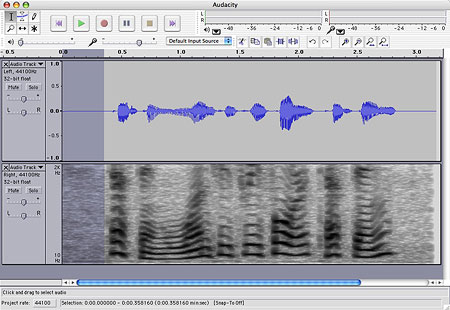
A few weeks ago, I went on a bit about how to make a podcast, and I recommended a few audio recording and editing programs. I’m back to say that there’s one I missed which outdoes all the others. It is a freeware app called Audacity, and it’s a great program–so much so, you wonder why it’s freeware. Maybe Peak LE does stuff that pros use which I don’t know about, but as far as lay-people using apps to record and edit, this program has Peak beat hands-down.

Auda1

It works much the way SoundEdit did, perhaps even better, and is a worthy successor. Audacity can open WAV, MP3, OGG, AIF and Sun AU audio files (MIDI import is also possible). THe application can save audio projects as proprietary Audacity files, and can export at WAV or OGG; you can also export as MP3 with the use of a LAME library file. You can also use Audacity to record via a microphone.

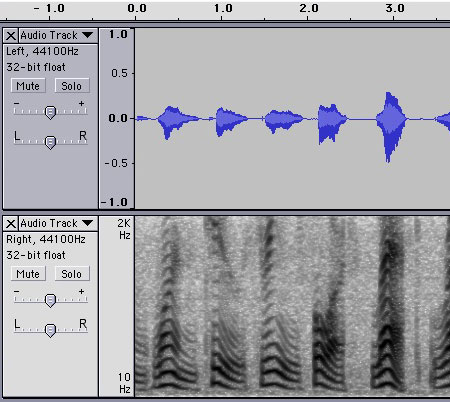
Once open, you can view and edit audio files in a variety of ways. In the example below, the left audio track is shown as a waveform while the right track is shown as a spectrogram:

Auda2

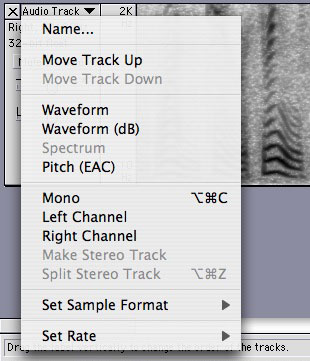
You can split stereo audio tracks and edit them separately, adding or subtracting tracks as you go. You can change the view for or switch channels for each track:

Auda3
Picture 10
A small control panel (shown at left) allows you to change the cursor mode between selection, edit volume (envelope), edit samples, magnify, move and multi-tools modes. The envelope mode is pretty neat, allowing non-destructive volume changes on the fly which you can edit back and forth without resorting to a dialog box, making permanent changes to the volume.
Auda4
Another toolbar (shown at right) allows you to cut, copy, paste; crop in and crop out; undo and redo; zoom in and zoom out; and most useful, the last two controls allow you to quickly expand either the selection or the entire audio track to fit the window.

The tracks themselves are easily and intuitively expandable, allowing you to resize the display to whatever is most convenient for you.

The audio-out and audio-in volume are even presented just right (for my tastes at least). Almost everything feels like it was designed in just the right way. Complex enough to please high-end users, but simple and intuitive enough for a lay person like myself.

Auda5

Furthermore, Audacity has a range of special effects very similar to SoundEdit, including fades, pitch/speed/tempo changes, amplification, bass boost, normalization, equalization, reverse/inverse, etc. etc. It can also generate tones and silence, sometimes useful and usually missing from other apps.

It’s also available cross-platform, Mac (OS 9 and X), Windows, and Linux/Unix.

If you’re looking for a good audio program and don’t want to pay for a professional package, this is your baby.

Categories: Gadgets & Toys, Mac News Tags:

New iTunes Cell Phone

July 5th, 2005 3 comments

Apparently the cat is–or might be–out of the bag: three days before an official announcement is expected, Engadget has posted photos and an iTunes screen shot of the new phone. It uses a TransFlash card for memory, the biggest size for that format being 256 MB. The phone appears to have some video function as well. However, the nature of the video function, or even if the phone includes a camera, is unclear. There is also talk about whether this is the real deal, or if it’s an older proof-of-concept version of an existing phone model, and not the final product. The same site showed this image of what was then also rumored to be the new iTunes phone. So nothing is certain–except that there will be an iTunes phone, and we’ll likely know its real final form by the end of this week.

Categories: Gadgets & Toys, Mac News Tags:

That’s Better

June 24th, 2005 Comments off

I’ve been using my new Powerbook with 512 MB of RAM, the pre-installed amount, awaiting the delivery of a new 1 GB RAM module. Just got it this morning, and installed it about an hour ago. Got 1.5 GB of RAM now.

Man, what a difference that makes!

My first test with it was to use Virtual PC, which I could now assign 512 MB of RAM all by itself. With the new 1.67 GHz CPU and max RAM for the app, using Windows XP is damn snappy! On my old TiBook (with half the CPU speed and half the RAM I’ve got now), I used to have to wait several seconds for the screen to redraw and for windows and apps to open. Now using that particular CPU- and RAM-intensive app is much smoother; I almost don’t notice that I’m not using a PC.

Even outside of VPC, I could tell that the memory shortage was slowing me down, causing problems when I had several apps open at once. I knew the extra RAM would make a difference–but was still surprised at how much of a difference it made.

One thing I did notice: Dashboard is eating a lot more memory than it was before. Tiger’s new Konfabulator-like widget module feature used to eat maybe anywhere from 2 MB to 13 MB per widget upon opening, maybe averaging at 3-4 MB each. (Though memory leaks in Dashboard would cause some widgets’ memory allocation to bloat up to dozens of MB each if you left them on long enough.) But after installing the new RAM, tripling my memory, it more than tripled Dashboard’s memory usage. One widget started out eating 30 MB of RAM, and the smallest eater was using 15 MB. Each widget was using maybe 20 MB average.

Not that I can’t afford it now; even with Virtual PC eating up nearly 600 MB or RAM total, and with Dashboard, Safari, and Ecto operating, I still have almost 500 MB of RAM free, almost my total RAM amount before the upgrade. I could open up several more apps before memory started getting tight.

I always tell my students that they should, as a matter of course, buy more memory when they get a new computer, and I’d tell the same to you. Computer makers want to offer you a machine at the lowest price they can, and one of the easiest ways to make the unit seem cheaper is to give you the minimum RAM necessary. 512 MB is quickly becoming the new norm, since 256 MB can’t really cut it so well anymore.

Of course, it’s possible you may not need extra RAM. If you only use one app at a time, if you don’t use RAM-intensive apps, and if you don’t expect to upgrade the OS or apps on your machine for its foreseeable lifetime, then you will probably be happy with what you get at the outset.

Many people are not like that, though. You may play some games with 3-D graphics, you may do photo or movie editing, or you may use apps like VPC. You will probably be opening several applications at the same time. And you will very likely upgrade both apps and operating system at some time, meaning that in a few years, your computer will be eating more memory than it does now; in this respect, adding RAM will effectively extend the lifetime of your computer, allowing you to upgrade farther into the future.

I have a friend who has a 1 GHz Athlon PC running XP. She called me up at one point and told me that she was experiencing a big problem. If she had MS Word only up and running, the computer was fine; but if she opened up another app, like Internet Explorer, suddenly her computer slowed waaay down. I asked her to go to her “My Computer” window, right-click on the icon at the left side of the title bar, select “Properties” from the pop-up menu, and report how much RAM her computer had. Turns out she only had 128 MB of RAM, and that, of course, was her problem.

Extra RAM may add a few hundred dollars to the cost of your computer, but you should see that as a part of the whole price of buying one.

It’s Here!

June 17th, 2005 5 comments

Got the new PowerBook. And as advertised, it’s very, very nice. Transferred all my data and settings from the old TiBook, it was very seamless. So far, it’s working brilliantly. It plays the Hi-res Apple Movie trailers quite well, ones which would not play well at all on my old ‘Book. And though the unit gets hot, it doesn’t get nearly as hot as my older computer would get. And though it’s supposed to be .2 pounds heavier, somehow it feels lighter, even when holding both computers at the same time, one in each hand. I haven’t had the chance to take it for a real spin yet, and won’t see its full effect until the 1GB RAM upgrade gets here next week.

One problem: a dead pixel. Yargh. At least, it’s partly dead. As far as I can tell, only the green element to the pixel is dead. But in most circumstances, it makes the pixel look dead, next to the other pixels around it. Anything that’s not pure red, blue or purple, anything that’s lighter than that, and it shows up. And there seems to be another pixel stuck on blue as well. The good news, somewhat: both are on the right side of the screen, less than an inch from the edge, so they won’t be so noticeable. But you always really hope for the screen to be perfect. And Apple’s policy is to accept anywhere up to five or perhaps seven dead or stuck pixels on a screen. Won’t stop me from taking it to the Genius Bar at the Apple Store in Ginza and seeing what they say and do about it. I doubt I’ll get anywhere, but best to try all options.

Categories: Gadgets & Toys, Mac News Tags:

Confirmation

June 14th, 2005 6 comments

I received an email from Apple telling me that the PowerBook G4 I ordered last week will be arriving late this week, earlier than they first predicted. They told me it would get here on the 22nd, but now the correspondence says it’ll get here no later than this Friday, the 17th.

But that’s not the confirmation I’m referring to in the title of this entry. Rather, it’s a review of the exact same PowerBook model on a website called “Notebook Review.” The article is written by Gabe Lipson, a long-time Windows user who intended to buy another PC, but heard of issues with the model he wanted and quickly was sold on the PowerBook when he visited an Apple Store.

Many parts of the review are comforting especially in light of the possibility of Mactel Powerbooks as early as a year from now. Lipson points out that using a very simple benchmark (calculating pi to 2 million digits), the PowerBook outperforms a range of Pentium-M Wintel laptops running from 1.6 to 1.9 GHz; so despite the lack of a G5, the PowerBook G4 is still fast enough to rank up there in the laptop market. I know that more complex benchmarks will rank things differently, but still we’re talking about an equivalent class of computers.

Lipson also compared the PowerBook screen favorably compared to the highly-touted BrightView reflective screen. I’ve seen these on PCs and they look very nice, but as Lipson points out, the reflective part seems like it could be an annoyance. The PowerBook’s screen, he reports, does just as good a job without that down point.

Otherwise, Lipson praises though does not gush about the PowerBook: the size of the computer, the keyboard and the screen is just about right, not too big or small; the speakers do well, the processor performs well, the ports, WiFi and battery all perform as well as can be expected. Lipson likes the backlit keyboard, and admires OS X 10.4.

All of this not bad at all for a notebook computer which has received no significant processor upgrades for the past three years!

Lipson also mirrors my worries and complaints: the possibility of dead pixels (crossing my fingers big-time) and the fact that you never know when a huge upgrade may or may not be just around the corner.

This is what I’ve become used to hearing from long-time Wintel users who make the switch: pleasantly surprised. It also confirms many of the reasons why I like the Mac.

One more point, while I’m here: there has been a lot of talk in the past week about how Mac users are reacting to the switch to Intel, as if we’re all supposed to feel betrayed or something. My reaction has been, “why?” The Mac switched over to RISC and IBM years back, and it didn’t hurt me at all then. Apple will likely make this change just as transparent. So what? A new chip is a new chip.

Many Windows enthusiasts have been crowing about this, gloating about how Mac fans have been touting the PPC, and now have to eat crow over the switch to Intel. I don’t get that, either. I had great hopes for what IBM was supposed to deliver, and if it towered over what Windows PCs were getting, all the better. But what happened was IBM’s failure, not Apple’s, so Apple just went with someone else who could do a better job. Maybe if I’d been going on about how crappy Intel chips were and IBM was so superior and that’s the way it would be forever and ever and I’m so sure I would bet the farm, then I’d have to eat crow. But even at that, for the present at least, IBM’s existing chips are still superior to most of what’s out there in the Windows market. This is evidenced by what I mentioned above, that the laptop G4 still compares well to the latest Wintel chip offerings. The problem is that IBM has stalled and had no future promise–and apparently, no interest, either.

The only way that I see the Mactel news as being of any importance is that it seems to signal strong possibilities for the Mac OS to encroach on the Windows market. And even many Windows enthusiasts I see on the web seem to be more biased towards PC hardware, and would be fine with the Mac OS, so long as it could work transparently with Windows software–which is what will very likely happen.

Categories: Gadgets & Toys, Mac News Tags:

This Is Where It Gets Creepy

June 12th, 2005 4 comments

Rpqrobot

See the pretty girl giving the demonstration at the World Expo in Aichi? At first, seeing what looked like a little camera behind her, I thought she was wearing gloves as part of some motion-sensor demonstration. It was only when I read the small print that I found out what I never would have guessed: that’s not a girl. It’s an android. Specifically, it’s the Repliee Q1, developed by Osaka University. As the unit’s co-creator points out, when androids get to looking that human, it gets a little creepy.

When you visit the project’s home page, the photos there are higher-definition and the android no longer looks as perfectly human as it does in the Expo photo. But well worth watching are the three MPG videos of the android talking, moving, and reacting to someone touching it. Here it’s a mixture of the thing looking less human than you thought but at the same time also looking more human than you might have expected.

One thing it suggests: androids indistinguishable from humans are a little less far off in the future than you may have thought. They’re not coming soon, but we’re farther along the road than I’d have thought.

Categories: Gadgets & Toys, The Lighter Side Tags:

Taking the Plunge

June 10th, 2005 10 comments

So I just got off the phone with the Apple Store, having ordered the new Mac. Should arrive in about a week and a half. Got the 15″ PowerBook G4 SuperDrive model running at 1.67 GHz, with optional U.S. keyboard (which causes the delivery delay).

Now to order an extra Gig of RAM.

I’m probably also going to order a Bluetooth mouse, though I don’t see many out there that look too attractive. But MacAlly has a new model, called the BT-Mouse, which sells for $50 and looks like it’s well-put-together. It’s full size (most BT mice are minis, which I don’t like at all), and has the third button just below the scroll wheel, also where I prefer it.

The mouse won’t be available for a few more weeks, but I should be able to get the RAM at about the same time as the computer arrives, which will be nice.

Anyone want to buy a used 800 MHz DVI TiBook?

Categories: Gadgets & Toys, Mac News, Main Tags:

Easy for Him to Say, Now

June 9th, 2005 3 comments

Chris Seibold, in an article for Apple Matters, wrote:

Witness the people hauling around first generation TiBooks holding out for the (never to come) G5 laptop. People have been guessing that a G5 PowerBook was just around the corner for two or three years and have waited for it accordingly.  Wouldn’t their overall computing experience have been better if they had gone ahead and purchased a new PowerBook when they first felt the need?

Now, if he’d written that before the Mactel announcement, I would have given him more credit. Right now, it’s unmistakably clear in hindsight. So thanks, Chris, for being paid to state the bleeding obvious after the fact.

Close to a Decision

June 8th, 2005 14 comments

For me, it’s harder to say that the Mactel news will slow Mac sales, because that very news has drawn me to decide, or almost decide, to get a new PowerBook G4. Of course, I won’t be in a typical place.

Right now I have an 800 MHz G4 PowerBook (the first DVI model) which just turned three years old a few months ago. I have been waiting for a significant upgrade before getting my next Mac ‘Book, but the Mactel news has spurred me to move forward sooner than I’d planned.

The model I’d buy now is the 15″ PowerBook G4 running at 1.67 GHz, the Superdrive model. I should be able to get academic pricing from Apple Japan on a model with the US keyboard layout, meaning not having to ship from the U.S. and not having to pay high California state sales taxes. The cost would be about ¥245,000 ($2300) including tax. Add another $200 for an extra 1 GB of RAM. It’s not a quantum leap over my present computer, considering that it’s been 3 years. The new ‘Book would have double the CPU speed, but in the past, that’s happened a lot faster. However, there are other considerations, including 512 KB of on-chip L2 cache as opposed to 1 MB L3 cache (the former is better than the latter, for those of you who don’t know what cache is about), a (slightly) higher bus speed, better RAM, better graphics chip, and several other small points. The big differences would be a faster Superdrive instead of a slower Combo drive, double the size of the HDD (40 GB to 80 GB), built-in Bluetooth, USB 2, and AirPort Extreme to match my base station.

If I wait for the new Mactel Powerbook instead of buying now, I could be waiting as long as 2 years, and will have spent much of that time impatiently expectant of a new PowerBook “any day now,” not to mention trying to get along with a much slower computer than I’d prefer.

In addition, most completely new models–not just upgrades, but new designs–have kinks in the system that need to be worked out, and the new Mactel PowerBooks are probably more likely to have such bugs than other models. These bugs get smoothed out, but only after one or two revisions. Which means that when the first Mactel PowerBook comes out, it’ll be fast but with the risk of annoying problems.

Getting a Powerbook now means that it’ll be three years old (my standard computer retirement time) when the first Mactel PowerBook free of problems rolls out.

The risks: there could be a significant G4 upgrade soon, such as dual-core, that could come out in 3-6 months. If that happened, I’d be kinda pissed. However, the chances of that are low, and by waiting for that much longer, I would be getting started later on the lifetime of my next computer. Also, there is the chance that the first Mactel PowerBook out of the gate could be killer and have no flaws. Again, chances are low, but possible. Were both these things to happen, I’d feel pretty stupid. But I’d also feel like an idiot if I waited till MacWorld SF in January to find the next PowerBook model to be a minor speed bump to 1.8 GHz and little else, followed by a Mactel release in June 2006, 6 moths after buying the speed-bumped G4.

If I buy a new computer this week, I’ll even have a good excuse: today was my birthday. Taking time zones into account, it’s 2:35 am Japan time on Thursday, June 9.

So I’m probably a day or two away from ordering. Anyone has good reasons to stop me, better chime in fast!