Archive

Archive for the ‘Gadgets & Toys’ Category

Now Your Dog Takes You for a Walk

June 6th, 2005 Comments off

An interesting invention here. Do you have a dog, but don’t like having to exert so much energy walking the pooch every day, struggling to hold him back? This device takes care of that: strap Fido into the harness, and let him pull you along while you steer.

Kalana8

A movie showing the device in action is also available on the product’s site.

This may not be in line with what most canine lovers may accept as doggie-friendly, but it’s better than some ideas I’ve seen before, like one guy I saw “walking” his dog from his car, holding the leash out the window. The makers of this “urban mushing” device claim that it actually gives “identity and pride for your dog,” though somehow I’m not fully sure that this is what the dogs are thinking.

If you want to spread the workload of dragging your fat ass around, there’s a model of the Dog-Powered Scooter which allows for two dogs. Though frankly, I might not want to be on that scooter when Spot and Rover lay their eyes on Fluffy the Cat and decide to go for it.

Categories: Gadgets & Toys, The Lighter Side Tags:

Well, That’s a Little Disturbing

June 6th, 2005 5 comments

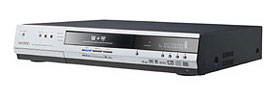
If you’ve read this blog for a while, then you know that I got a Toshiba TiVo-like box late last year, one that not only records shows digitally, but then archives them on DVDs.

But in April, the DVD burner started producing multiple disk errors, just as the hard drive filled up. I got it repaired–but now, only a month and a half later, the drive sputtered out once more, again producing disk errors. So I called up, and again, they sent a techie out to replace the DVD drive.

Now, just the fact that the DVD burner craps out twice, once after four months and again after one and a half months, is bad enough. But then the tech guy doing the replacement was kind enough to be honest with me: the drives, he said, are built to last only for about 600 burns. Prior models, he said, could last for 1000, but this one does about 600. And he was giving me a refurbished unit–no way of telling how far along the odometer was. And I burn a lot of DVDs. I could easily run through 600 in less than two years. So that’s the lifetime on the unit I bought?

Of course, I could always have the DVD unit swapped out, like I’m having now under warranty. But that costs about $300, adding 50% to the cost of each DVD I burn, from $1 a pop to a buck fifty. In addition to the original cost of the machine, which was over $1000.

Not exactly what I thought I was getting, and I’m none too happy about it. Is this considered the norm for DVD burners?

Categories: Gadgets & Toys Tags:

That’s a Relief

April 18th, 2005 Comments off

For some time now, I’ve been having problems with my DVR, the Toshiba I talked about a while back. For the past month or so, the DVD burner has been acting up. At first, I thought it was just some bad DVD-Rs I’d bought (some were indeed bad). A new brand worked fine, for about 10 DVDs, but then things went south again, and after trying three or four other brands as well as the two original brands that should’ve worked, it became apparent that the DVR was to blame.

Now, none of this is end-of-the-world kinda stuff, but I have carefully recording and archiving several shows as they’re rebroadcast here in Japan (often commercial-free and uncut), making a cheaper version of the series archives sold by the studios. I got all seven years of Deep Space Nine, for example, for maybe less than $100 worth of DVD disks, instead of paying $640 retail. Sure, it required a bit more work, but it’s worth the end cost.

But when my burner cut out, I still had a lot of stuff on the disk, and with no way to transfer the shows off the HDD, room was quickly running out. Fortunately, the Toshiba customer support line was less insufferable than last time–I only had to dial constantly for about an hour to get through–and they agreed to send a repair guy out to my place this morning. Strangely, I got asked–twice–whether I’d bought my machine less than a year before. It must have been some question on a form, because I had identified the machine constantly as the XS53, which was only released some 6 months ago.

I feared, of course, that the repair guy would tell me that it would be necessary to take the machine in for repairs for a few weeks, so I was prepared to start taping shows in 2-hour mode on my antiquated VHS deck (re-using a few of the hundreds of old tapes I’ll be able to toss when I get all the shows on DVD), and pray that Toshiba didn’t zap my hard drive full of shows during repairs.

To my surprise, however, the repair guy just came in and swapped out the DVD drive. Now it works beautifully again. But it does now make me question the quality of the DVD drives they use….

Categories: Gadgets & Toys Tags:

Not to Overstate It

April 6th, 2005 1 comment

So there I was at the shop, mulling over which zoom lens to buy. I have a camera with 10x optical zoom, so the 1.6x and 2.2x telephoto converters would, naturally and respectively, make my optical zoom 16x or 22x. You’d think I’d only naturally go with the 22x. However, there are other considerations.

Size and weight. The Raynox 2.2x lens is light, but it’s also huge. At five inches, it’s twice as long and maybe three times as bulky as the Canon lens. And bulk would be a big down point if I just wanted to hop out the door and jaunt on down to the park. While the Canon is also a bit bulky, at least I can still break it down into small enough pieces to fit into my jacket pockets. And though the Raynox feels lighter (larger items even of greater weight usually feel lighter), it’s almost double the Canon–275 grams to Canon’s 145.

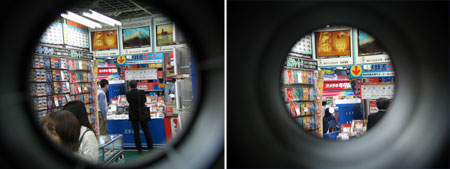
Flexibility. Both lenses have the black outer silhouette when not zoomed in at all, but the Raynox’s silhouette is far more constricting. (See the image in yesterday’s post.) You have to zoom in almost to the full 10x before the black outer silhouette disappears; with the Canon, the smaller silhouette disappears at maybe halfway through the zoom. That allows for me to zoom out to get a wider angle photo without having to change lens assemblies. And, as a small point, the Raynox requires an additional adapter to match the adapter you need to latch on to the Canon S1-IS lens assembly. That means adding three extra pieces instead of two.

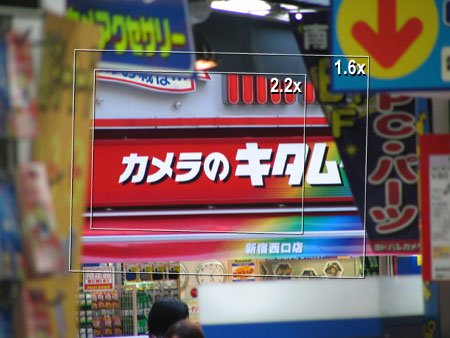
Price. This was actually closer than I expected: ¥15,000 for the Canon, ¥21,500 for the Raynox (that’s roughly $140 vs. $200). Less than 50% more money for effectively double the zoom magnification–though, as you can see from the image below, the 2.2x zoom doesn’t really seem as impressive, doesn’t seem like twice the extra magnification, when you look at the end result–though that is largely due to the fact that the extra zoom is seen only after the initial 10x zoom–so from 16 to 22 is not really double.

Effect on performance. This is one I hadn’t really thought through before, and had on of the strongest impacts on me. When I took the comparison shots, it became clear, even through the S1-IS’s tiny LCD display, that the 2.2x lens produced lower-quality images than the 1.6x Canon, and when I thought about it, the reasons made sense. After all, the whole reason Canon’s image stabilization is important is because you’ve got a big zoom lens, and that means that hand jiggle will translate more strongly. So it stands to reason that the more you increase that zoom, the more your hand shaking will overcome the image stabilization–which may be why Canon stopped at a 1.6x tele-converter instead of going for 2.0x or better. Despite the large size of the lens to gather more light, the 2.2x might wind up capturing less light, affecting exposures (though I don’t really know that one way or the other). But the bottom line is, the more zoom you get, the higher a price you pay in performance.

And then, there’s the overall impression:

Zoomcomp1

Look at those two zoom fields. The 2.2x doesn’t really look like like it’s all that much more impressive. Yes, technically, you’re zooming in more. But it really doesn’t seem worth it–more specifically, it doesn’t feel worth the size, weight, extra cost and hit on performance. In the end, I just felt that I’d be too often disappointed and unhappy with the bigger lens–so of course, I wound up buying the Canon TC-DC52B 1.6x converter. And so here it is:

S1Wtc

By the way, the black part of the lens assembly is not all the tele-converter. From the camera’s lens assembly to that first major seam in the black assembly is just the conversion adapter for the S1-IS.

Entry for the Dumb Ideas Department: having just bought the Canon lens, I was heading back to Shinjuku station, and in the back of my mind, I was thinking about the lens. My thoughts wandered to blogging about it (as I am now doing), and one consideration was how to get an image of the camera with the lens. Now, you see above that very photo, but at that point, I had not yet considered it, and hadn’t thought it through. I couldn’t take a straight-on photo of the camera in my mirror, I realized, because that would only show the lens head-on, the least interesting view.

So here’s where the dumb idea came in. Now, keep in mind that I was navigating my way through Shinjuku Station, and looking at people and storefronts along the way, so the front of my mind was otherwise occupied; this thought process I’m describing was only going on in the back of my mind. And apparently, the back of my mind isn’t very bright. Because the solution it hit upon was to set the camera’s timer to 2-second mode; I would then focus and click the shutter button while looking straight-on into the mirror–but before the 2 seconds elapsed and the camera took the picture, I would turn the camera so as to get a much better angle!

Once my hindbrain came up with this ingenious plan, it alerted my forebrain. At which time, my forebrain considered it for a split second, and then pointed at my hindbrain and laughed uproariously. It was good for merriment for much of the way home.

Not that my hindbrain stopped there. After a bit, my forebrain realized that the thing to do is to get out the old camera (which I haven’t used since last December) and take a photo of the new camera with that. “Good idea!” answered my hindbrain. “But won’t it be hard to hold both cameras while you’re taking the photo in the mirror?”

Categories: Gadgets & Toys Tags:

Zooming In

April 6th, 2005 Comments off

Well, it didn’t take long for me to get to want more than 10x zoom on my digital camera. Not that I’m complaining too much; 10x is pretty good, and if you’ve been looking at the Birdwatching in Japan series, then you have a good idea of what good quality shots I’ve been able to get–especially considering that I’m using a digital camera priced just over $300.

But knowing that better lenses are out there, I decided to see what I could find. I went to Yodobashi, and found two candidates: the Canon-specific TC-DC52B 1.6x Tele-converter, and the Raynox DCR-2020PRO 2.2x Tele-converter. Both are priced higher in Japan than in the U.S.; the Japan prices were $140 and $200 respectively. I tried both out on a local target–a shop sign seen out the doorway. Below is the zoom range comparison shot:

Zoomcomp1

The main image was taken with just the regular 10x optical zoom on the Canon. The two interior squares represent the images taken by the camera with the two zoom lenses at maximum optical zoom. I superimposed the 16x and 22x images and then reduced the images until they matched the original image. Each square shows the area covered by each zoomed image; imagine each area expanded to match the original shot, and you get an idea of the magnification. The images are slightly tilted because of the way I held the camera.

The lenses must be used with the camera at a higher zoom setting, or else you get a telescoping black circle around the image; below are photos taken with the Canon and Raynox, respectively, with the camera fully zoomed out:

Zoomsil1

As you can see, you have less of a field of view with the Raynox; to get rid of the black frame, you have to zoom the camera nearly to the limit. the Canon lens allows for much more flexibility. Both allow you to start zoomed out in order to find the target before zooming in, however, and that is really all that I was looking for.

I’ve got to go–final exams and all. But I’ll be back with more, including which lens I got, some shots of the lens on the camera, and a real humdinger in the “dumb ideas” department!

Categories: Gadgets & Toys Tags:

Super Battery?

March 30th, 2005 1 comment

Just announced from Toshiba, via Mac Rumors: Toshiba has a new battery, available commercially in 2006, which will be able to attain an 80% charge after only one minute of recharging (total recharge would take “a few more minutes”). Furthermore, it will lose only 1% of its capacity in 1,000 charges.

There may be some caveats there, of course: the lossless capacity is likely tested under ideal laboratory conditions, not real-life ones, and no clear mention is made as to how much energy is stored–will it provide for a longer battery usage time? Or will each charge last only half as long as batteries of a similar size today? Are there other problems with it we don’t know about yet?

It has only just been announced and not at all tested; but if its performance can hold up to current batteries, this will turn out to be quite a revolutionary change.

Categories: Gadgets & Toys Tags:

Zooming In

December 31st, 2004 Comments off

Well, I’ve had the Canon S1 for a few weeks now, but because of my nosebleed situation, I have not had all that many opportunities to test it. But soon after I got here in mid-December, I did have one chance to test it against the old Canon PowerShot model’s zoom lens. The PowerShot S30 I’ve got has the typical 3x zoom for a digital camera, and that is identical to the zoom on my father’s S45. So when we went to the 49ers-Washington game a few weeks back, we took side-by-side photos for comparison.

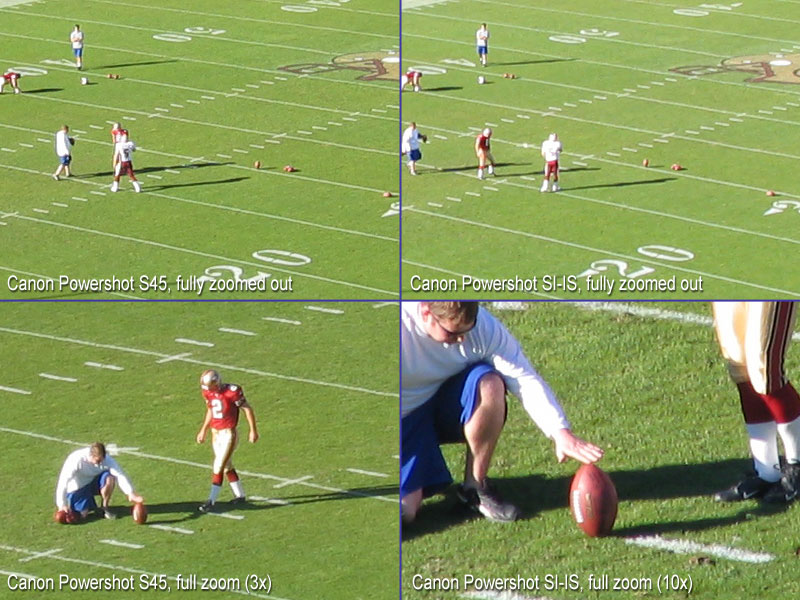
The grid of four images below represent the extremes of the zoom lenses for both cameras. Due to size restrictions, I couldn’t post the full-sized comparison here, but if you click the image, it will take you to the 800×600 original image in a new window.

Canonzoomm

Of the four images in this grid, the two on the left are taken with the S45, and the two on the right are taken with the S1-IS. The top two images are fully zoomed out, and the bottom two are fully zoomed in. All the images are cropped, and in the full-sized image, are not reduced or enlarged in any way, so what you see is the original image, pixel for pixel. Since the images are cropped, that in itself acts like a zoom, but since I don’t want to burden you with four megabyte-sized images each many times larger than your display, this will have to do.

The two key images are the ones at the bottom, which show the difference you get between the 3x zoom and the 10x zoom. These images were shot from the upper deck at Candlestick Park during the pre-game activities. I figure that the 25-yard-line, where the kicker was practicing, was about 60 yards distant from the lens. So looking at the lower-right image of the ball at the kicker’s feet, that’s a pretty good zoom image. I mean, I’m getting blades of grass and you can almost read the writing on the football.

So until they come up with a 20x zoom in a mid-range digital camera, I’m going to consider this as being pretty cool.

Categories: Gadgets & Toys Tags:

Toshiba RD-XS53 Having Meltdown

November 21st, 2004 Comments off

You pay $1000-plus for a piece of electronic machinery, you expect it to work. I’m speaking of the DVR I got, and blogged about here.

After two months of use, the machine froze at one point. Not unexpected, it is, after all, a computer with an operating system. You run it that long without restarting–which I did, neglectfully–it will crash. But at least after that, you can expect that upon restart, it will function okay. The first time it happened, I restarted–and a good portion of the presets were trashed. I had to work for the better part of an hour to figure out that the local channel setup had to be reset in order for the schedule screen–and thereby everything else–to work. I found all my programming for shows in place, but with the channels erased, so those had to all be reset. Some other stuff too, but suffice it to say that it ate up 2 hours of my weekend (it always happens then, just when I can’t call up support). But at least I figured that if I shut down and restarted the machine properly every so often, I could avoid this from happening.

No such luck. Today it hard-crashed. Twice. Both times as I started to play a file. Once just after I had spent an hour prepping a few dozen shows for DVD burning–only to find after the crash, my edits had been wiped, and I’ll have to do them all over again.

What’s worse is the prospects for the future. Now I’ll be nervous every time I start to view any file I have saved. I’m pretty sure that if I call Toshiba, they will tell me that either I have to re-initialize the hard disk(s) in the machine, or I’ll have to send the machine in to them. Both are unsavory prospects. I have so much stuff on the disks that it will take so much time to catalog in DVD form–if the machine doesn’t keep freezing or fall apart completely–I will have to spend every moment of free time for a week just clearing the system. And not everything will fit neatly on DVDs at that, meaning some mostly-empty disks. Worse, having to send it in means not having the machine at all for two or three weeks or even more. Unless they send me a loaner–which I doubt–that means a huge hole in my current cataloguing of shows, which is what I bought the damn machine for in the first place.

So, in short, I am becoming less and less impressed by this machine. Either I got a lemon, or the machine is just very poorly designed. And either way, dealing with Toshiba’s dismal support system will be a nightmare all in itself.

Categories: Gadgets & Toys Tags:

Next on the “To-Buy” List

November 20th, 2004 1 comment

My top-rated Canon Powershot S30 is showing its age–and its damage in that I’ve dropped it on concrete a couple of times. It has served brilliantly over the past couple of years, taking beautiful photos and having the flexibility I really enjoy in a camera. But now the shutter window is kind of messed up from the concrete-dropping (it tends to close shut at the slightest touch and is often difficult to open), and with digital cameras, a couple of years is a long time. So it’s time for a new camera.

I am not looking for more megapixels. Really, 3.2 (what the S30 provides) is more than enough if you’re not printing 8×10 glossies, which I never do. More megapixels is mostly for print quality–though it could be used as a quasi-zoom, messily–and I use my camera 99% of the time for digital storage, rarely printing images on paper, even 4×6 sized. So I don’t mind a 3-megapixel camera. Which is what I’m going for.

In steps the Canon S1-IS (pictured at right). Not new, it’s about 8 months old; I’ve been waiting to buy on the off chance that Canon will introduce a new version, but it looks like that won’t happen in time. But the S1 has a lot of what I want.

First and foremost, the 10x zoom with the image stabilization (the “IS” in the name). On far too many occasions I wanted to zoom way more than my 3x S30 will allow. Digital zoom just ain’t the same thing. And from what I’ve read, the image stabilization–a big selling point for such a strong zoom lens–really does work, allowing not just stable long-zoom shots, but also good low-light shots with a relatively fast shutter speed–another thing on my wish list. And the zoom works fast, smooth and silent–allowing zooms to be made during movie shooting.

It still has the wide variety of settings and features that the S30 has, with manual focus, aperture and shutter settings, allowing for special photographic effects like extended exposures and depth-of-field tricks. Improvements include full-frame, full-TV-quality video shooting. Though it takes up lots of space, I intend to buy a 1GB Compact Flash card (I’m glad they’re staying with that format) that can hold about 8 minutes of video; as such, it will almost replace my digital video recorder. The longest shutter speed is still 15 seconds (why not 30?), but the fastest has doubled to 1/2000th of a second. And it will work nicely with my Canon printer, plugging in directly so that photo printing–when I want it–will not require the computer to be involved.

I thought the fact that it eats 4-AA Alkaline batteries would be a disadvantage, but after consideration, it beats out the expensive, proprietary battery packs–it’s cheaper to have rechargeable AA’s, and if the available rechargeables all lose their juice, standard AA’s will work nicely.

The down side is the form factor–being a bit bulkier with more protrusions, it will not fit into my shirt pocket like my S30 does–but I can live with that. Maybe it’ll still fit in pants or jacket pockets. The lens cap is a nuisance, but can be dealt with. There are a lot of buttons and controls, but not so many that I’ll be lost or anything. I also expect the flash and low-light focusing to be sub-par–a common failing among Canon cameras, but well-made-up-for by the image quality and feature set.

Finally, the price is right: about $320 to $350. Though I have to buy it in the U.S.–ironically, the cameras are quite a bit more expensive in Japan, at $510–even with the 15% point-card “discount,” it’s still a big chunk of change cheaper in the U.S.

I plan to order in the next couple of weeks so that it will be delivered to my folks’ house before I arrive for Christmas vacations. The 49ers-Washington game my father’s taking me to should provide a good test for the zoom.

Categories: Gadgets & Toys Tags:

How To Be a Professional Couch Potato

September 19th, 2004 2 comments

I recently purchased of the Toshiba RD-XS53, the TiVo-like HDD/DVD recorder, and am quite satisfied with how it’s turning out. After a steep initial learning curve, I got it all programmed and am now training myself through the various procedures, which are lengthy–the thing has countless options, which can be both good and bad. If you’re not interested in techy, gadget-oriented home video kind of stuff, you may want to go on to the next post. Otherwise:

Essentially, this is like a TiVo or ReplayTV machine, but with added features. Like other DVRs, it records video on a hard disk in the MPEG-2 format (the same as on DVDs). Because it’s digital, it can then be manipulated in a variety of ways.

There are a variety of Toshiba machines that do similar things, but the RD-XS53 is the only one that has the ability to work with SkyPerfecTV. Although that connection is limited to turning the tuner on and off and changing channels, that’s really all you need, at least right away. The SkyP connectivity is important if you’re living in Japan and want to record a good amount of English-language video. Unless your local cable has a good selection of channels and its tuner can work with a DVR box, the SkyP-Toshiba combo is probably best. The machine can also get the “BS” satellite feed as well, and of course can record off of local broadcast stations. You can also record any video input, like from a DVD player, a VCR, a video camera (there is a Firewire/iLink port for digital video cameras) or from the video-out on a PC. Want to make a DVD of a demonstration on your computer? This will let you do it.

Also, the RD-XS53 (at least in Japan) has a whopping 320 GB of hard drive space, allowing for up to 570 hours of recording at the lowest quality setting–144 hours at “high.” That’s more than enough to have a great deal of video saved up before archiving is necessary–and that’s where the DVD recorder comes in handy; more on that later. The large hard drive also allows you to record all your shows while you’re on vacation, and it even claims (though I have yet to come close to figuring it out) that you can set programming by remote control using your cell phone, sending a text message with coded instructions that the machine will receive via the Internet connection.

The RD-XS53 does fall short in a few areas, such as ease-of-use, as evidenced that sharp learning curve I mentioned. There are four different main special activity areas, dozens of preferences screens, and so many menus that I can’t count them. And not all processes are easily performed; deleting commercial breaks, for example, requires you to go to the editing area, going through a process of determining “chapters,” and then going back to the recorded-shows area, and deleting the vaguely-titled chapters one by one, each time having to navigate back to the recorded-video area. Another problem not really Toshiba’s fault is the inability to record “bilingual” shows in English on Fox or Disney channels–they have a unique bilingual mode which must be set by hand each time.

But if you can put up with little stuff like that, there is a lot of compensation. You can access an Internet-based program schedule with the next week of programming included, with search options available. You can surf the programming schedule area, up and down for channels, left and right for times, with all the available broadcasts shown on the grid. Unfortunately, it’s all in Japanese (if you can’t read at least Katakana, then you shouldn’t get this), though the SkyP box can show you the same grid in English for reference if you want. The programming has to be done on the Toshiba, though.

Once you find a show, you can reserve it for automatic recording. You’re given the flexibility to change the exact time it starts and ends, which days it will record the show (every Tuesday, or every Monday-Saturday, for example); you can set the recording quality exactly on a 1-9 scale or use presets, and you can direct the recorder to save the show in a specific folder. Unlike most VCRs, which only allow 8 programmed recording times, this machine can keep a large number of pre-set recordings. I don’t know if there’s a limit–I have 21 set at present.

The machine also has two tuners/encoders, so it can record two shows at the same time–though only if they are on different inputs. For example, you could record two shows simultaneously if one is on SkyP and the other is on local antenna, but you can’t do that if both shows are coming from SkyP.

Like most DVRs, this one has “Timeslip,” which allows you to “pause” live TV. This comes from the ability to both watch and record at the same time. When you hit “Timeslip,” the DVR starts recording the show on the hard disk, and at the same time plays back the file it is recording, but pauses it at the start. The show can keep on recording for as many hours as you like, and you can come back any time and then play the recording from the beginning, going forward or “rewinding” or pausing or skipping around to your heart’s content, until you “catch up” with the live picture.

My father uses this on his ReplayTV to avoid endless commercials in football games. He sets the Timeslip, then keeps it on pause and does something else for half an hour. Then he comes back and watches the part of the game that was just recorded (as the recording continues), skipping through commercials until he catches up with the live game. Then when a live commercial rears its ugly head, he pauses and goes away for a half hour again so he can come back and skip through the commercials again. But this feature is handy in other ways, too–have you ever been settling down to watch your favorite show and the phone rings? Just pause it, and pick up where you left off.

While the file system is a bit clunky on the TV display, because this machine connects to your computer network (in order to download the programming information) it is also visible from your PC. The Toshiba people did a pretty good job of creating a browser control interface for the machine. Just find out which IP Address the machine was designated (e.g., 192.168.0.5) and type it into the browser’s address box, and you get the machine’s control interface. You can program recordings, create and title folders, see the recorded show titles and view and alter their information (titles, show info, assign chapter titles, etc.)–and most handy, you can author DVD titles and menus.

For example, I recorded Groundhog Day as a test. On the RD-XS53 directly, I then cut off the excess recording before the start and after the end so it was just the movie. Then I broke it into chapters, like on a DVD, and for each one set the thumbnail image. Then I went into the browser interface and viewed the thumbnails, giving each a title (it is so much nicer to type that than to use the cell-phone-like remote control typing feature). Then, also on the computer, I searched the Internet for a nice photo from the movie. I found a few, patched them together in Photoshop, and saved it as a BMP image, which I could them export to the RD-XS53. Also using the browser controls, I set the exact color scheme for the titles, then went back to the RD-XS53 and went through the DVD authoring process. After recording the DVD, I had the equivalent of a commercial DVD of the movie, with menus like this:

Granted, it’s a bit of a chore, especially at first, but if you don’t mind it or even enjoy it, you can build a pretty nice library on your own.

The DVD recording features are very nice–with them, you can archive any number of shows or movies. It is still a little pricey–the cheapest brand-name DVD-Rs I can find are ¥150 ($1.35) apiece. In high-quality mode, you could save three episodes of a one-hour TV show on one DVD, costing perhaps ¥1200 (about $11) for one season–but considering the $40 ~ $130 cost of these seasons on commercial DVD, this is an acceptable price. Record enough stuff like this and the machine pays for itself, in a way. The RD-XS53 can also record on DVD-RW or DVD-RAM media, for those of you who don’t keep permanent copies of your recordings (I usually do, so I stick with the cheaper DVD-Rs).

There are a lot more features, some too insignificant to explain, others I haven’t discovered or figured out yet. But as you can tell from the length of this post, I am sort of getting into it. One thing I’ll admit, it’s not gonna be good for my health; I am turning into a veteran couch potato!

Toshiba Support Sucks

September 13th, 2004 1 comment

As I mentioned before, the manual for the $1,000 machine I just bought comes nowhere near being informative enough to tell me how to operate the thing. After hours and hours of translating, reading, and fiddling around I worked out maybe half of the bare minimum to get the machine to function. So I have to resort to the support line. Except there’s a problem. I’ve been hitting “redial” every fifteen seconds for 45 minutes now, and every number Toshiba has for support–three different numbers–have been solidly busy since opening time. And when I called the main support line over the weekend, the same person answered each time, suggesting that they only had one person on staff to answer the phones. You plop down that much money for a machine, you’d think that they’d either put more effort into writing the manual, or hire a few extra people to answer the phone…

I don’t suppose there’s anyone out there with an RD-XS53 who could give me some tips?

Categories: Gadgets & Toys Tags:

It Reads Like Stereo Instructions

September 11th, 2004 5 comments

So I broke down and went out and bought the Toshiba RD-XS53 HDD/DVD Recorder. That’s the (supposedly) TiVo-like machine which works with SkyPerfecTV (which I just got), recording whatever you like and doing all the programming work for you. Or not.
In order to get enough time to set up the gadgets that I buy, I usually get them Friday evening on the way home from work, or on Saturday afternoon (like this time); that’ll leave me the weekend, before I have to go back to work, to fiddle with the thing and get it just right.

And every time I seem to forget what happens every time before–the manual is frustratingly confusing, and the 24/7 telephone number is for pre-sales only–tech support won’t open till Monday at 10 am, by which time I have to go to work. Yargh.

One of the main features–and they advertise the spit out of the machine as having this very feature–is that it can control the SkyP tuner box through a control cable, turning it on and off, changing the channel, switching the bilingual mode. But just try getting it to do that. The “easy setup” manual is unforgivably lacking in detail–it only explains a portion of what you have to do before you can even do the most basic of tasks–and in order to get things to work right, you have to reference the thicker manual, without prompting from the “easy setup,” and, well, you get the picture. I could rant on, but I doubt you’d want to read about it.

Short story: I have figured out enough after a few hours of reading, fixing the settings, arranging the channels manually and so on, to get the thing to simply record whatever I manually set it to. Which will hold me, I suppose, until the tech support people come in from the weekend.

Spiffy features I hadn’t known about: you can divide any recorded show into DVD chapters, and delete any chapter you want–which can be used to separate out and then delete commercial breaks, if you want to take the time to do that. That I could figure out, though I wouldn’t even have known about it except that the Yodobashi Camera sales guy showed it to me. Another nifty feature is the ability to manually set the compression. Instead of just having “regular” (4.6) or “long” (3.2), you can set the quality from 1 to almost 10, so a DVD could hold anywhere from 1 to 8 hours of programming, depending on the quality you select. My current task is to figure out how much DVD play time is added by going up or down each step in compression so I can set the quality just right for X amount of video to fill up a disk.

One drawback: the DVD recorder will produce only Region-2 DVDs, so if you want to send homemade DVDs–even self-made things, like home movies–to anyone outside Japan, they’ll need a region-free DVD player to view them. And there is copy-protection, so you can’t just pop in a rental DVD, save it to disk, then record back onto a DVD-R (unless you have a pirate box that defeats the DVD protection).

I’m sure there are quite a few other ups and downs to come… And if anyone in the U.S. is interested in this kind of a machine, it’ll be released there next month, at about $700. I presume it’ll be geared to hook up to American satellite systems, and will probably have equivalent features.

Categories: Gadgets & Toys Tags:

Japanese TiVo?

August 18th, 2004 6 comments

Right now I’m considering switching from cable to satellite TV, but that’s not the main topic of this article. One piece of technology I’ve been waiting for is a TiVo-like easy-programmable device.

For those of you who don’t know about TiVo or its poor (but superior) cousin ReplayTV, these are hard-disk-based video recorders, belonging to a new category of home electronics, the “DVR” (Digital Video Recorder). Instead of saving recorded shows to VHS or even DVD, they save the video to a hard disk. The advantages are many: you can “pause” (“Time Slip” in Japanese) live TV while the digital recorder saves the ongoing programming into the hard drive; you can save up to a couple hundred hours of programming on the disk, no need to keep them on tapes and wonder what tape is free, what tape has what programming and other hassles; you can access any part of any recorded show very quickly; but best of all, the service usually includes an interactive program guide.

The program guide (called “EPG,” or “Electronic Program Guide” in Japan) is kind of the like the “what’s on” channel on cable TV in the U.S. On a grid displaying time horizontally and channels vertically, it allows you to access any part of the schedule. But with the HDD recorder, you can use that guide to program the recording of a show. For example, go to the program guide and find the “West Wing” slot, hit “program” and tell it how often, and your DVR will handle the recording of that show from then on–often including information such as episode title, summary, and whether or not it’s a repeat. My father uses this in the U.S., and I’ve been more than a little envious.

For me right now, well, I’ve got cable TV and pretty crappy cable at that. Not too many channels, and the channel can only be changed directly via the tuner. Which means that if I want to record a show, I not only have to set the VCR to tape the show, I also have to set the cable tuner to jump to that channel at that time. And aside from the extra work, the cable tuner is hard to program and de-program. Unlike a VCR which will only record from programming if switched off, the cable tuner will always switch to programmed presets, whether the tuner is on or off–which means that unless you de-program the cable box, it will skip to the programmed channel even if you’re watching another show. In short, it’s a huge hassle.

Hopefully, not any more, though. Toshiba now makes a machine (the RD-XS53) which, through a “control cable,” will control the satellite TV tuner as well as its own recorder functions. So like with TiVo or ReplayTV, you just have to go to the channel guide, choose a show, and then forget about it (you can also program the recorder from your PC). But it has some other very nice features as well: it can record two different shows simultaneously (so long as they don’t require the same tuner), and it has a built-in DVD-R/RW/RAM recorder, so you can save anywhere from 1 to 8 hours of programming on a single DVD-R (depending on the recording quality). So just leave the DVR to record a few months’ worth of shows, and for the ones you like, compile them on $3-a-pop DVD-Rs, which now cost about the same as, and record just as much as standard VHS tapes. You can watch these DVDs in your DVD player, or on your PC, if it has a DVD drive. Alas, it is not possible to directly put the video files on your PC, despite the network connection–copyright issues, I’m guessing. No biggie, though.

The major drawback, and possibly a deal-killer for me right now: the Toshiba machine costs ¥148,000 yen (about $1350). There is a lower-end model for ¥104,000 ($950), but it lacks the ability to mesh with SkyPerfecTV. For a while I thought the low-end model could do the satellite TV control, since the guy at Yodobashi and the sales guy at Toshiba both seemed to indicate that was possible when I asked about the two models together. But after my first call to Toshiba, I did more studying, noticed a small asterisk, and called again–and found out, sure enough, only the more expensive machine could do the satellite TV interface. Major difference there. The Toshiba guy was downright sheepish in admitting it to me.

So I might just go with the SkyPerfecTV for now and wait for the Toshiba models to get upgraded and priced down in 6 months or so. But it’s tempting, I have to admit.

One other problem for me, though–to get SkyPerfecTV, which is necessary for the cool programming features (not to mention far better programming than my local cable TV outfit), you need to have a line-of-sight to the satellite, which is relatively low in the southwestern sky–and there’s a building smack in the way from my apartment. However, at the east-most window ledge of my apartment, the SkyPerfecTV satellite map seems to indicate that I juuuuust might be able to peek around the building, just enough to catch the satellite. So, out goes the call to the local electronic shop’s technician, to tell me if I am go or not on the satellite.

And yes, I am a bit much of a couch potato and electronics geek, so no need to tell me so via comments.


Update: I went to Kojima Denki, and they had the high-end model on sale for ¥120,000 ($1090) or thereabouts. The actual standard selling price for the model is ¥135,000, but Yodobashi sells at suggested retail and “gives” you the extra hundred bucks on your point card, so you’ll spend it there. Kojima had it listed for 135, but with a kind of red writing diagonally over the price–which is an old Akihabara thing which means you ask the sales staff, they’ll tell you the real discount price.

120 Puts it back into my ballpark, but only if I feel extravagant… which I might, if I can get SkyPerfecTV.

Categories: Gadgets & Toys Tags:

And the Printer Works Well

March 3rd, 2004 8 comments

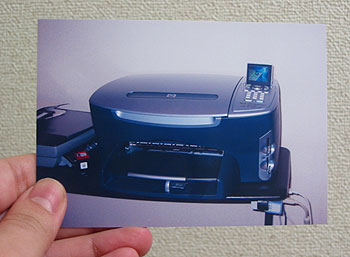
So the HP All-in-one printer (HP PSC 2450 PhotoSmart All-In-One) got here as promised Sunday, and I’ve been working with it since then. Most everything works just great. I set up the software on both the Mac and the PC (both included English language versions of the software), and the functions mostly seemed to work just fine out of the box; the drivers do a good job here. Without any serious fiddling around, I was able to print very nicely.

One of the most impressive things–and not just for the all-in-ones, but for ink jets in particular–is the photo printing. Although a few printouts had noticeable banded lines running through lighter areas of the picture, most photos I printed (3.5″ x 5″) came out amazingly clear and sharp, pretty much indistinguishable from photos printed by a photo lab. And that’s using the cheaper photo paper, not the good stuff, and not at best printing resolution. I haven’t tried an 8×10 glossy yet, but will at some point. Most people who see the photos can’t believe they were made by an ink jet.

What impressed me as much was the copy feature. I took out a map book and put it on the scanner glass, and hit “copy”–and the copy came out very nicely. Even on regular paper at normal quality, it came out with quite acceptable clarity and accuracy. This will work much better than carrying a big map book around next time I want a street guide. Apparently, using photo paper at high quality, it can effectively reproduce a photo you place on the machine to copy–which I haven’t tried yet but can believe. I also haven’t tried to fax yet, nor have I tried the

The photo printing worked as promised–take your flash memory card out of your digital camera, stick it into the slot in the printer (there are four, for different types of media), and the images come up on the 2.5″ LCD screen. Select the one you want, change the settings for paper size, quality, etc., and off it goes.

The downside: so far I can’t even find the OCR program which is promised in the documentation. It is supposed to come with something called “ReadIris,” but it seems to not be included in the installation, which would be a big disappointment. HP’s customer support has been a mixed bag–their first reply came a day later than promised and was a canned response, which I hate (canned responses almost never accurately address the specific problem you have, and this one did not either). When I wrote back asking for a real person to answer, I got a prompt reply which was quite long, but boiled down to “call customer support by phone.” Yargh.

Another shortfall is the lack of network capability–I would have had to pay an extra $200 just for that one feature–so I have to suffer with a USB switching box, and will have to set up my Powerbook in the living room and plug it in there whenever I want to print from my Mac.

Categories: Gadgets & Toys Tags:

Midterms and the Printer

February 27th, 2004 Comments off

Sorry, no full-blown blog today. I will be back in full bloom tomorrow, with luck. I have been spending all night figuring midterm grades; I just got through the last of them, and now I have to create about 50 emails and send them off to each student–each email with an itemized list of grades, including the midterm class grade. So I’ll be up a few hours still.

But one thing of personal note today–I finished my evaluation period and bought the HP all-in-one printer, the one I mentioned before. Had them do a little presentation for me, printing some photos, going through the functions, et cetera. I decided it was pretty easy to use, made nice photos, and for about $300, was a fairly good deal (as you can get in Japan). Figured that it wasn’t going to change between now and next week, and I knew about as much about it as I would without having it.

So I took my old, noisy, troublesome Epson printer (only good for use on my 6-year-old 500 MHz PowerMac MiniTower G3 anyway, as it was an old-style serial-cable printer, not USB), and, not knowing if it even worked anymore, tossed it into my closet. The new printer/fax/scanner/copier/yaddayaddayadda is due to arrive by express delivery Sunday morning. I will talk more about it then, I am sure.

Categories: Gadgets & Toys Tags: