Archive

Archive for the ‘Mac News’ Category

Here We Go Again

July 3rd, 2006 Comments off

Here’s an article I spotted on Google News, via Vnunet.com:

Security experts have warned that malware which exploits a flaw in the Mac OS X operating system has been spotted in the wild.

As usual, the warning came from Symantec, a firm that now has a firm track record, like McAfee, of releasing alarmist reports full of exaggerations and falsehoods which try to represent Mac OS X as being vulnerable to malware so they can sell frightened users their unneeded anti-virus software.

So you go to Symantec’s page warning of this new “OSX.Exploit.Launchd,” and it says this:

OSX.Exploit.Launchd is a Trojan horse that exploits the Apple Mac OS X LaunchD Local Format String Vulnerability (as described in Security Focus BID 18724). It provides root access on the Macintosh OSX version 10.4.6 or earlier.

The thing is, as much as I try to read this report and the news articles generated by it, I can find no description anywhere of how the trojan presents itself. A trojan is supposed to trick a user into opening the malware via social engineering, but there is not a word about how it does so–information which would be vital for people to avoid it. In fact, the Symantec page only will say that the “trojan” will provide root access to an outside user–but the “trigger” and “distribution” info fields all say “n/a.” Furthermore, while the report claims that the trojan is in the “wild,” it reports that there are “0-49” infections on “0-2” sites.

So guess what? It doesn’t exist. That’s right–this so-called “trojan” in the “wild” has no actual existence except as a potential for existing. The company has now admitted that nothing more than example exploit code exists–in other words, somebody wrote yet another unapplied and harmless bit of code to show how a certain security hole in OS X might be exploited. Not to mention that Apple released a security update a few days ago in 10.4.7 to patch the exploit.

And yet Symantec’s page on this “trojan” still stands, claiming it is a “trojan” (how can that be, when there is no method of delivery?) and that it is “in the wild”–although in a way, their report of “0-49 infections” is accurate in that there have been “0” infections. Incredibly misleading, however, as no one would expect such a classification to be made if there really were zero infections. And yet…

Categories: Mac News Tags:

Days of Wine and Windows

July 1st, 2006 1 comment

Something that few expected seems to be becoming more and more of a possibility: the direct ability to run Windows programs in the Mac OS, without having to own or boot up the Windows OS.

This year, we saw two Windows-on-MacTel solutions arise: Apple’s own Boot Camp, which allows one to choose which OS to use upon startup (but not both at once), and Parallels, a virtualization solution that allows you to boot up Windows within the Mac OS, allowing both operating systems to run side-by-side, or at least Windows-under-Mac (Apple is even touting Parallels in its commercials instead of its own Boot Camp).

But now a third solution is becoming possible: the WINE solution. WINE started more then a decade ago as a way to run Windows applications within Linux and other Unix-related systems. One does not need Windows to open Windows software; with WINE, you can open the software directly within the host OS (images here). One company which deals in this software translation, CodeWeavers, has just announced that they will be bringing WINE to the Mac.

The down side of this is that WINE is not a universal translator–it only allows you to use a limited number of apps (and a limited number of versions of those apps) on the host system. These include MS Office (Word, Excel, PowerPoint, Outlook, and Access), Macromedia Flash 7, Dreamweaver MX, and Shockwave 8.5, Adobe Photoshop 6 & 7, Quicken, and a few other apps.

Obviously, this is not a cure-all. However, it is promising in terms of what can be done, even without assistance from Apple. And despite the limitations, it could be meaningful–I’ve heard some people say that a few key apps, like Access, have been preventing them from making the move.

But more to the point, if this much can be done independently from Apple, then if Apple worked to include Windows APIs and incorporated WINE, a lot more could be achieved.

In the meantime, virtualization like Parallels offers is quite satisfactory, though it does require one to buy the Windows OS, which adds a few hundred dollars to the purchase of a Mac. You still get a lot more for your money, but the bean counters still trying to defend a Windows-only approach will grab hold of that as a last defense.

Leopard Parts

June 25th, 2006 Comments off

With the WWDC a little more than a month away, people are talking more and more about Leopard. So far, some “screenshots” have been released, but since they are contradictory, at least one of them–and just as likely both–are fake.

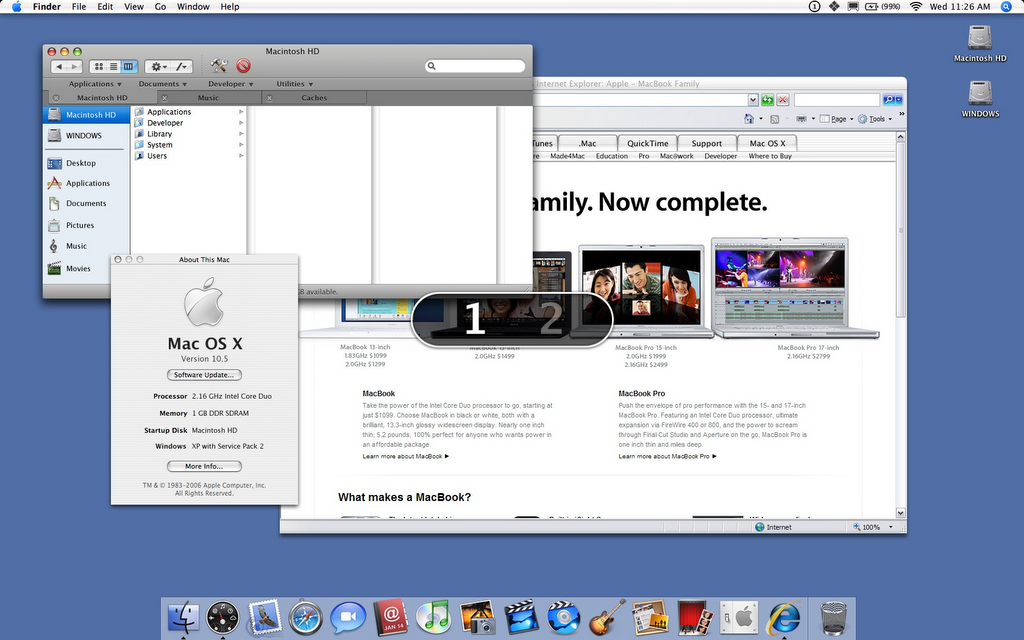
The first set were released on a Spanish-language web site, and are almost certainly fake. On the first image, of the Desktop, the window panes are repainted to match the new style in iTunes, and there’s a recolored iSync icon. The second image suggests a virtual Desktop switcher, but all the elements are again ripped off from existing Mac OS graphics.

And now a second set of two screenshots–of virtually the same activity, virtual Desktop switching–have been released through another site. These images seem much more realistic, and are more enticing, but are also probably fake. They show the intriguing feature of tabbed Finder windows a la Safari; a much better implementation of iTunes-style window panes (with a few new buttons and menus included); an icon for a joint Address Book and iCal app; menu bar icons for Windows and virtual Desktops; and, most intriguingly, a Windows app (Internet Explorer 7) apparently working seamlessly within the Mac OS. The “About” window seems to suggest that XP is working within Leopard as well. However, some flaws do show: the “About” window simply declares “Version 10.5,” while traditional beta builds show the raw build number; the Explorer window uses an XP-style scroll bar, suggesting it was Photoshopped in; and the shadows behind the Explorer window are incomplete, again suggesting a mock-up instead of the real thing.

Nevertheless, if it is a fake, as it almost certainly is, it is a very good fake.

So what will be in Leopard? Nobody seems to know for sure. Some kind of Windows-running solution, to be sure, but whether it will be a final version of Boot Camp, or a much-rumored virtualization technology, no one knows. The holy grail would be what is suggested in the second round of fake screen shots: the ability to run Windows apps from within Leopard, either transparently, or without even having to boot the Windows OS first. This is seen as the long shot, with virtualization (like that already provided by Parallels) more likely, and Boot Camp almost certainly (unless it is replaced by something better).

The two sets of faked screen shots both suggest virtual Desktops (a feature third-party apps now provide). This probably comes from this guy’s claims of having worked with Leopard, probably fake. He claims a lot of stuff, but mostly techie-oriented and unimaginative minor stuff (speed bumps, minor app reworks, etc.). And his multiple “Finder window” rumor may be erroneously based on this report based on Apple patent filing suggesting “multiple Finder window selects,” which is not about multiple Finders (Desktops), but about selecting icons in more than one open window at a time.

However, the iTunes theme is widely accepted as inevitable, as is the Address Book-iCal merger.

So what else? According to LoopRumors from last Fall, Leopard will include:

  • Window transparency (though this seems to “Vista-ish”)
  • Animated icons with sounds, maybe only in the Dock
  • Better Dashboard implementation (faster loading, using less RAM)
  • Applications running in Full-screen mode, or as Desktop pictures

Add to that a fixed Finder–though that also is already widely rumored. In fact, some rumors are that fixing the Finder will be a major focus in Leopard. Of course, that’s been rumored for almost every new version of OS X since it came out.

This very new report says that Apple will integrate a Google-Earth-type satellite image/road map/direction finder app into the OS. They also suggest that Boot Camp will be discarded in favor of virtualization, as reported above.

Other rumors include collaborative documents, allowing many people on different Macs connected on the Internet to make changes to a single app simultaneously. Others suggest an improvement in Boot Camp and/or virtualization allowing Vista and/or Linux to be run with Leopard as well as XP. Resolution scaling (the ability to make everything look larger without sacrificing image quality) is also being suggested. And some even suggest that Leopard will integrate BitTorrent, will use it for the iTunes Music Store and Apple Software updates–and users who donate their upstream bandwidth would get credit at the iTunes Music Store. Cool, if true (I could build up credit with my F/O), but I seriously doubt Apple has that much trouble with its own bandwidth to require such a thing. Some have also suggested that Leopard will use a completely new kernel (the core of the OS), but that is effectively being dismissed.

So a lot of rumors, but nothing at all confirmed yet. Apple might still be doing a very good job of keeping a lid on things, and we could all be surprised. But keep in mind that in the past, the reality is almost never as exciting as the rumors. Which is why so many people love the rumors…

Categories: Mac News Tags:

What Sucks About Mac OS X

June 15th, 2006 4 comments

A guy named Thom Holwerda on OS News did a piece on what he feels sucks about Mac OS X. While he has a few good points, most of his rant is either highly subjective and personal, or is relative to what this guy has gotten used to in Windows after using that OS since he got a PC. This is not to say that Mac OS X doesn’t have its sucky points; I feel it does, like pretty much all users (of any OS). And since I have so often harped on what I feel is wrong with Windows, maybe I should put in some equal time for the Mac.

I’ll get to what I think is wrong with it, but first what Holwerda wrote:

The MacOS does not exactly feel fast.

This is one of his better points. There are more delays than there should be, probably because of all the eye candy. Conversely, a Windows PC with maximum eye candy installed can slow down, too. But with the Mac it can be harder to turn it off. This is covered more in my own point #1 below.

MacOS X is an inconsistent mess. Yes, it really is. Graphically, that is. OSX now has, what, 7 or 8 different themes…

It does? There are a few variations of the original OS X eye candy, and a few variations of the brushed-metal theme, but 7 or 8? And does it really jar the eye that much? Frankly, I’ve gotten so used to them that I don’t even notice. But then, I think they’re all classier than the standard Windows theme anyway. But this is my point–it’s highly subjective.

One of my biggest pet peeves: that annoying Google search field in Safari.

Are you kidding me? I hadn’t even noticed it up there, I just never use it. So what if it’s there? Besides, freeware exists to modify it. This guy is just too lazy…

Tiger has some serious issues with… Screen remnants.

I’ve seen these, but only rarely. Again, either he’s oversensitive or something is wrong with his OS. And I’ve noticed just as many redraw issues on my Windows XP machine. Live with it.

Macs need an indicator LED for HDD activity. It is really annoying when your Mac becomes slow or unresponsive and you have to lay your ear on the keyboard to see hear whether it is still doing something or not.

Again, something must be wrong with his Mac for that to happen often enough to matter. Besides, when my Mac becomes unresponsive, I can usually tell by seeing when it becomes unresponsive. Then I do a command-option-escape to see the Force-quit window, which tells me if the app is unresponsive. Then I force-quit and restart the app if I need to. What’s the big deal? Same as Windows, in fact.

Mail.app is a pointless email client, and I am flabbergasted I still use it every day.

Then don’t use it, you idiot. Get Eudora. I wouldn’t use Outlook Express on Windows myself, I’d use Eudora again. I wouldn’t say XP sucks because some of Microsoft’s apps suck. Same goes for this guy’s Safari beefs above.

…MacOS X has an evil dock. Yes, it looks cool and all, but it’s a UI nightmare. Instead of having a separate section for taskbar entries and application launchers, the dock has one section which aims to be both, but obviously sucks at doing so. It’s confusing.

No, the dock is fine. This guy is just too used to Windows. I think that the dock works a hell of a lot better than Windows’ methods, and Exposé beats the living crap out of dealing with Window’s stupid task bar. The dock is perfectly simple, if you’re used to it and know how it works.

OSX needs a decent uninstaller, supplied with the OS… . You see, Mac people will tell you how easy it is to uninstall applications: just drag to the trash and done. That’s wrong. When you drag an application to the trash, it leaves behind a trail of configuration files and the like all over the OS. Obsessive-compulsive as I am… , I want an application to really be gone when I uninstall it.

This guy is blaming OS X because he’s got OCD? What a lamo. Just leave the prefs where they are. They won’t hurt a thing, and will have zero effect on anything. Jeez. In fact, if you decide you want to re-install the same app in the future, your prefs are already there! Besides, this guy seems to be stupid enough to believe that Windows’ uninstall leaves his OS clean! If you’re lucky, uninstalling Windows apps will not break the other apps–if you’re lucky. And he’s got his panties in a bunch because the Mac OS has some harmless leftover scraps he’ll probably never even see? What a loser.

Apple needs to put more effort into backwards compatibility.

Apple has been backwards compatible, right up until this year with the switch to Intel. On my Powerbook G4, I still have a little game app from 1986 I still play. I’d say two decades of backwards compatibility is not bad. True, it sucks that my next Mac won’t be able to play the original Civilization, which I much prefer to later versions, but I can keep using my old G3 tower for that, if need be. My father depends on a Classic app for business which has not been upgraded, and so can’t use a Mactel for that. So if you have that kind of dependency, then Holwerda has a point here. However, there are benefits to Apple’s philosophy on this; Windows suffers from all the woes connected with native backwards compatibility, which makes Windows more buggy and inflexible, less secure, and bloated.


So what do I feel is sucky about OS X? Well, mostly smaller stuff, I’ll admit, but there are some really annoying things. The one that most Apple people agree of is:

1. FTFF, or “Fix the F***ing Finder.” Holwerda touched on one aspect of this, that being the relative unresponsive nature of the Finder (notable mostly on older machines). But there’s a bit more to it. For example, when you go to the View Options, there’s an option to have your preferences apply only to the current window, or to all windows. But this option seems to have no default, and could be set either way any given time you go into View Options. Another problem is how the OS slows down if there is a problem with a network shared volume–though that particular problem has been greatly alleviated in Tiger. Another FTFF issue is icon spacing. You can’t change it, which can be annoying as well. There’s other stuff, mostly more small annoyances. Rumors have it that this will be a big focus in OS X 10.5, Leopard.

2. Language Stickiness. This may be something that only applies to people who type using more than one keyboard layout, and may even be tied to the FTFF issue, but I find it annoying enough to go high on my list. I often switch to Japanese language input. Then I switch back. The problem: Japanese will often pop right back into play when I switch to a different app or window, or even a different text box. And since I hunt-and-peck and must look at my keyboard, I often won’t notice I’m in the wrong language until after I’ve typed a whole sentence. Annoying as hell, and it usually takes a while to go away.

3. Safari. OK, I’ll include the browser too, but in one shot. And I won’t blame Apple for the fact that some web content providers don’t support it (what’s up with that, Google?). Safari has its own problems. One is general responsiveness. Sometimes it seems like half the time I’m using Safari is spent looking at the damned beachball, waiting for things to load. And if a web page anywhere in Safari auto-reloads, it puts Safari on hold for way too long a time, essentially the whole time needed for that one page to reload. I usually have Google News open in a tab somewhere, and every five minutes, Safari goes beachball when GNews does its auto-refresh. And am I the only one to notice, or doesn’t anyone else get fed up with certain web pages being unresponsive in Safari? Every time I go to MSNBC, as a common example, and I double-click on a word, Safari will do the beachball thing for like ten seconds. If I’m stupid enough to click four or five times, I might as well go and take a bathroom break. This is more a problem for me, as scrolling in Safari is often too fast, and so I select a line or a paragraph to mark my place so I don’t lose it when I scroll.

All that said, let’s not forget that Window’s Internet Explorer is still the suckiest browser on the planet. Version 7 is supposed to be better, but if you give Safari the same amount of time to improve as IE has taken (ten years?), it’ll probably be a hell of a lot better by then as well.

4. Full, Native AVI Support. Not too big a deal, since VLC will handle practically any video file. But it’d be nice if Apple finally got off it’s butt and added full support for what’s probably the #1 video format on the Internet, for crying out loud.

5. Search. Granted, Windows sucks way more than Apple on this, and Spotlight is fast and very cool. But not without issues. First of all, there is a lack of ways to sort things once you’ve found them. Spotlight won’t let you sort by size, for example, which is stupid. Hopefully it’ll get fixed soon–it used to be possible, and Spotlight is new. As it is, though, you have to open the “information” button on any given item just to see the size in search mode. Also, you’re supposed to be able to search by filename only and exclude content by adding quote marks to the keyword. That doesn’t work like it should. One more gripe: while it’s nice to be able to hide certain folders from searching (lest content from dictionaries, web page caches, and email archives overwhelm any search), you should be able to override this by doing a direct search within the folder hidden from search. You can’t. You instead must go to the preferences, delete the folder from the hide list, search, and then add the folder to the hide list again.

6. Options and Features. Another app problem, but this is common in almost all of Apple’s home-grown apps. There are way too few features and options. Strangely, the OS itself has no lack in this department, but the apps are quite a different story. Some say that Steve Jobs wants to keep things simple and streamlined. I, for one, don’t like that. Add more options! More features!

7. Displays. This is more a problem if you use external displays, like a TV set, in both mirrored- and non-mirrored modes. Sometimes your Mac will get confused. Sometimes wallpapers will vary unpredictably. Sometimes, only the external monitor will register and my Powerbook’s screen will remain black!

That’s about as much as I can come up with after mulling it over for a day or so. It’ll be interesting to see how much of this gets addressed–if any–in 10.5. One thing remains, however–despite all of the flaws in the Mac OS, it is still heads and shoulders above Windows, which is why more and more people are saying what this guy is.


Categories: Mac News Tags:

Smackbook

May 25th, 2006 Comments off

This is a cute little video showing a clever Mac Hack. Apple laptops include a hard disk motion sensor, intended to stop the hard drive whenever a sudden motion is detected; this was intended to prevent disk crash damage when a laptop was dropped or jarred too hard. But people have been finding ways to use the motion sensor to other ends. In this case, the hacker used to work with two monitors, but wanted to pare that down to one. So he used a virtual desktop app (one which creates two desktop/screen workspaces which you can switch between), and then keyed them to switch when the motion sensor detected a slight jarring of the laptop from the left or right. The result: when he smacks his Mac on the side, a side-to-side transition of desktops occurs, allowing him to switch between virtual monitors in a very tactile manner. Just watch the video, you’ll see.

Categories: Mac News Tags:

The Vista-Ready Computer

May 24th, 2006 Comments off

A writer at CNet’s News.com web site tried out the “Upgrade Advisor” software provided by Microsoft to test the readiness of various computers to accept and run, without trouble, the next version of Microsoft’s OS. Which computer was most compatible, according to the tester?

An Apple Intel Mac Mini with 1GB of RAM running Boot Camp.

Go figure.

There is a point I wanted to make in addition: always upgrade your RAM. When you buy a computer, you’re buying from a store that wants to price things as low as they can go while still maintaining as high a profit margin as they can manage. So add-ons are one way they go: if they can sell you on a low base price, they can still claim they’re selling cheaply even after you bought a whole bunch of other stuff that they stripped from the machine to make it look cheap.

RAM is one of the first things they pare down, like an airline getting rid of yet another “perk” like, say, food. Most people know little or nothing about RAM. If you know, for example, that with a sufficiently powerful CPU, 256MB of RAM is more than enough to run Windows Vista while having three or more standard applications running, then you are one of the 9 of 10 people who know very little about RAM, because that statement is totally false. If you caught on to the falsehood before you got to the part of the sentence where I let on to the truth, then you’re the other one in ten who knows a little something about it. But since 9 in 10 don’t, stores can sell you a computer with too little RAM and you won’t notice.

In fact, having enough RAM is very important–but that won’t be apparent at the store. First, the store model (presuming that they don’t cheat and put extra RAM in) is probably just running one app. RAM is a finite resource which your OS takes a big chunk of, and then each new app you open takes another chunk, and so on, until you run out of RAM. I had a friend who could open Windows ‘Me’ really well, and could even work MS Word snappily–but if she opened a second app, her computer would reeeally slow down. Reason: she had only 128MB of RAM, and Windows + Word used it all up.

Why does a computer slow down when it runs out of RAM? Because programs need a certain amount of memory to temporarily store data while the CPU is busy with something else. RAM is that storage space, and it’s very fast. When RAM fills up, the computer may have to resort to using the hard drive–which is way slower. So when RAM runs out and your computer starts using the hard drive for everything, your computer slows way down.

Here’s another reason why the need to upgrade RAM doesn’t show up at the computer store: because the need is off in the future. In the story I started this entry with, I noted that Microsoft’s “Upgrade Advisor” checks your computer for Vista compatibility. One point of compatibility is the amount of RAM. That’s because Vista needs a lot more RAM than XP. XP needed more RAM than Windows 2000. 2000 needed more RAM than ’95. Et cetera. Just about every new version of any kind of software requires more RAM than the last version, sometimes significantly more. This is true with operating systems or application software. So, while that present-day showroom computer can run XP and Word 2003 just fine with 512MB of RAM, if will fail dismally at running Vista and Word 2007. They can ignore that at the showroom.

A lot of people actually end up throwing away their computers when they become too slow, without realizing that all they need is more RAM, and it’ll become zippier.

That’s why it’s a good idea to upgrade your RAM right away, when you buy your computer: it allows you to open up as many apps as you like without worrying, and it inoculates you from slowdowns when you upgrade your software later on.

That’s not to say that RAM is the only thing you need to worry about. The CPU is important, as is the graphics card, and some other technical geek stuff. I’ve heard Windows users sneer at Macs because of the prices, talking about $500 PCs. When you point out that the Mac Mini starts at about that price, they’ll laugh, and point out that it doesn’t come with an LCD monitor! No problem. Just buy your Mac Mini and use your old monitor, then you can laugh at them next year, when your Core Duo Mac Mini is running Windows Vista and Office 2007 in Boot Camp (or whatever new version Apple has by then) while they’re just figuring out that the weak-ass Celeron they bought can’t make the same upgrade.

The New MacBook

May 17th, 2006 3 comments

Well, it’s finally out. Starting at $1100 with a dual-core 1.83 GHz Core Duo CPU and a 13.3″ glossy widescreen LCD at 1280 x 800 pixels. The mid-level model comes with a 2GHz Core Duo, with a SuperDrive instead of a Combo Drive, for $200 more. The next higher model, strangely, costs another $200, but the only thing you seem to get different is 20GB more on the hard drive and a black enclosure. Obviously, the mid-level model is the best deal. In fact, it’s pretty close in specs to the lower-end MacBook Pro, for a lot less. Compare this to my PowerBook G4, which I bought less than a year ago; mine cost almost double the new MacBook, and will be almost half as fast. For a consumer-end laptop, the new MacBooks have a respectable amount of power.

Of course, you have to add RAM (though the on-board 512MB is not horrible, at least 1GB is more like it) and pay $200 for Windows XP. That would make the mid-level model $1600 for a powerful laptop with Mac and Windows combined under the hood. Not too shabby.

Categories: Mac News Tags:

New “iBook”?

May 9th, 2006 Comments off

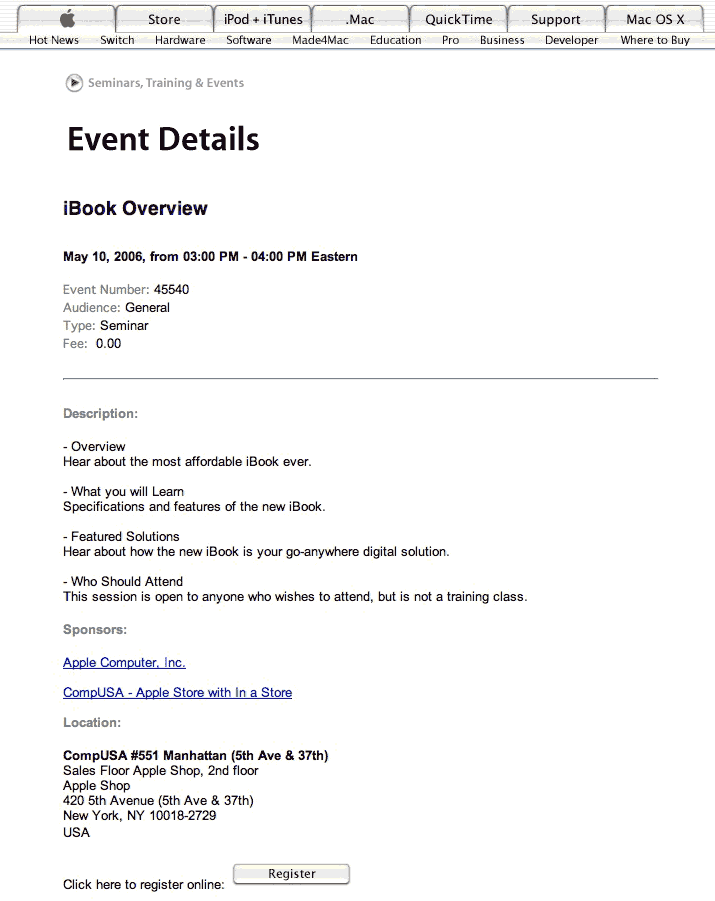
Via MacRumors: strange, but maybe an indication that the new iBook/MacBook is really coming out tomorrow (May 9). On Apple’s web site:

iBook Overview

May 10, 2006, from 03:00 PM - 04:00 PM Eastern …

– Overview
Hear about the most affordable iBook ever.

– What you will Learn
Specifications and features of the new iBook. …

Location:

CompUSA #551 Manhattan

Hasn’t been a “new” iBook in quite some time–it’s been nine months–hard to see how they could call a G4 iBook “new.” On the other hand, isn’t it supposed to be called a “MacBook”? Though Apple did keep the name “iMac” for the consumer desktop–maybe that’s the pattern. Though there was an apparent Apple web site “MacBook” sighting just a few days ago. Weirdness.

On the other hand, if it’s real, then the “most affordable iBook ever” is promising–it would mean the entry-level model would sell for less than $999. Which would be a really smart move on Apple’s part, even if it didn’t have the highest profit margin. Better to grab market share.

In case the page goes down, here’s a link to an image of the page.

UPDATE: …or not. Now they’re reporting that the new iBook/MacBook will not be out until next week at earliest. Such is the way of things when you rely upon rumors.

Categories: Mac News Tags:

Apple Wins Over Apple

May 9th, 2006 Comments off

Apple won, of course.

Quite frankly, I have always thought that Apple Corps Inc.’s string of legal actions against Apple Computer was kind of ludicrous. I mean, really, aside from the fact that both use the name “Apple”–about as common a word as you can get–within their corporate names, there’s little or nothing that would make you confuse the two. Apple Corps vs. Apple Computers. The Beatles’ tax shelter corporation used a photo of a whole green apple as a logo; Apple Computer used a rainbow or solid-color apple with a bite out of it (with the meaning of the Apple–taking knowledge–being wholly different from the Beatles’ use of the fruit). As the Apple Computer attorney put it, even “a moron in a hurry” would not confuse the two.

Even after Apple made the iTunes Music Store and iPod, there could not possibly be any confusion. Did anyone ever confuse anything by Apple for anything by the Beatles? Did anyone decide not to buy an Apple Corps product because they thought Apple Computer was too uncool?

And seriously, how could anything that Apple has done ever cost Apple Corps any money at all? What, people bought fewer Beatles songs because they thought Apple Computer ran the show? It really all has the smell of the Beatles firm simply trying to milk the maker of the Mac line for cash. They already got about $27 million out of the computer maker, probably far more than any confusion could possibly have cost them (if, indeed, they did not actually profit from any chance association). Heck, having the Beatles’ music on the iTMS would probably have prompted me to buy some; this lawsuit business prompts me not to. Apple Computers, even with the iTMS, is not a record label.

This really should be the end of it–but unfortunately, probably not. Apple Corps is set to appeal the ruling.

Categories: Corporate World, Mac News Tags:

MacBooks on May 9?

May 6th, 2006 Comments off

Looks like the 13.3″ widescreen Core Duo MacBook is finally coming out. Apple stores are said to be pushing iBook sales to clear inventory; new boxes are arriving at the stores that say “Do not open until May 9”; and the Apple web site made another error and showed a hierarchical label that read “MacBook.”

The price of the unit will be the important point. If it’s competitive with Windows notebooks, it’ll be a killer package–an affordable laptop that can do Mac and Windows, fast. Four more days…

Categories: Mac News Tags:

Here We Go Again

May 6th, 2006 4 comments

Seeing an opportunity to jump on the recent “Macs aren’t safe” bandwagon, McAfee Inc. just released a report (pdf file) which claims that Macs aren’t safe. The report is clearly biased, stretching facts and definitions, and presenting the case in as damaging a manner as possible.

This is what gets me: McAfee is a company that sells antivirus software. And yet, in the article, McAfee is identified only as a “security firm,” and no mention or disclaimer is presented to explain that the company issuing the report stands to gain financially from a biased and inaccurate report. How is that not an issue?

One dishonest point jumped out at me right away:

From 2003 to 2005, the number of vulnerabilities discovered on the Mac OS platform has soared 228 percent to 143 from 45, McAfee Inc. said in a report entitled “The New Apple of Malware’s Eye: Is Mac OS X The Next Windows?” Microsoft Corp.’s Windows platform, on the other hand, saw an increase of 73 percent.

Do you see it? That’s right–they note the percentage of increase of vulnerabilities in both operating systems, but not the number for both; while they note the number of Mac vulnerabilities, they neglect to clearly state the number of Windows vulnerabilities. In the original McAfee report, that number is intentionally buried in small print in the footnotes, though there is no honest reason to do so.

Windows vulnerabilities jumped from 92 to 159, as opposed to Mac vulnerabilities going from 45 to 143. So the Mac is made to look worse than Windows because Windows itself was less secure two years ago? Not to mention that it still has more vulnerabilities than the Mac OS today? No wonder they buried that number–it clearly shows they are playing with the truth here, manipulating the numbers to make Macs look far more open to threat than it actually is. Also of note is that the report fails to measure the potential threat of damage via the vulnerabilities or the effectiveness possible for any exploit attempted.

Another example of a clearly intentional omission: the McAfee report mentions the Inqtana worm that operated via a Bluetooth vulnerability:

OSX/Inqtana.a actually exploited an OS X vulnerability in the Bluetooth directory traversal and file exchange services…. Apple has a patch available on its web site for the vulnerability exploited by OSX/Inqtana.a.

What McAfee fails to mention is that the patch was made available by Apple eight months before the Inqtana worm appeared, and that the patch is not only available on its web site, but that most users have Apple’s Software Update running, and would have received the patch long before the worm appeared. In addition, while McAfee explains technically how the worm is transmitted, they skip any mention of how completely unlikely transmission would be (it requires two Bluetooth-active Macs in the same room, one infected, and then the other user has to authorize a non-existent Bluetooth peripheral). Even if the vulnerability had not been widely patched 8 months before, the chances of the worm spreading farther than a few users was unbelievably small.

One inaccuracy they don’t try to hide is their classification of the Leap trojan or the Inqtana worm as viruses. What’s the difference? A trojan depends on social engineering, and therefore is not a problem with the security of the OS. And while a worm can be more dangerous than a virus, it is not widely recognized as such; if you say something is a “virus” it’s bound to get more of a reaction. McAfee also glosses over the fact that with both “viruses,” user intervention to validate the malware was required, and in both cases was highly unlikely to happen.

All of this leads one to question any of the contentions of the report, including the vulnerability count. I’ll wait until any of this is verified by an independent source, thanks.

Once again, this is not to suggest that the Mac OS is invulnerable, or that the increase in the number of recent vulnerabilities is not cause for concern. It is to suggest, however, that this is nothing more than yet another wildly exaggerated claim of the alleged weakness of OS X security, in this case forwarded by a company that stands to profit from the fear the report inaccurately generates.

Update: ZDNet agrees with me.

Update 2: Just one day after releasing a highly biased report exaggerating the malware dangers of OS X, McAfee showed up their own self-serving motive by releasing a new anti-virus product “for Mactel.” The software being named as though it was designed for “MacTel” plays on irrational fears that somehow working on the Intel CPU will somehow make OS X more vulnerable when nothing of the sort is true. It is further disingenuous since (according to reports) the McAfee software is not even written for use on the MacTel platform, but instead runs under the Rosetta emulator; this means that the inclusion of “MacTel” in the name is for fear-mongering specifically, and does not describe anything about the actual software. McAfee really seems to be crossing lines of truth and propriety badly here.

Categories: Mac News Tags:

Windows Vista: Delayed Again?

May 4th, 2006 7 comments

Not according to Microsoft. They are standing by their most recent claim that Vista will be introduced in January 2007, a release already pushed back several times. But analysts at Gartner are now claiming that there is an 80% chance that Microsoft won’t even hit that target, and that “broad availability” of Vista could be delayed yet again, perhaps as late as June 2007. They base this prediction on the timing of Microsoft’s announced release date for the second Beta release of Vista, scheduled for this summer; they predict it will take at least 9-12 months to go from Beta 2 to full release. Microsoft counters that they’ll be ready in five months after Beta 2, as they were with XP–except that Vista is far more complex an upgrade than XP was.

One has to take the strong assurances from Microsoft that they are “on track” with a grain of salt; after all, just last November, when the Beta 2 release was pushed back from December to January or February (it’s still not out), Microsoft reps were positive that “the company remains on track for shipping Windows Vista in the second half of 2006.” Now they’re saying, “we remain on track to deliver the final product to volume license customers in November 2006 and to other businesses and consumers in January 2007.” Pretty soon, they might be saying, “we are dedicated to staying on track for a 2Q 2007 release.”

Also, Gartner has a point about the delayed release of the Beta 2 version of Vista, and Vista’s complexity. If Vista does come out on (current) schedule in January, it may be a relatively unfinished release that could need many upgrades before it reaches a stable level of usability.

Of course, it may be that this won’t matter to a lot of people. After all, Vista is reported to be a power and memory hog, and many people won’t be able to use Vista without buying a new computer. More will probably take a wait-and-see attitude before switching from XP. If I recall correctly, XP took a while to get a lot of people switched over.

If one thing is for certain, it is the fact that further delays in Vista will deal even more PR blows against Microsoft–especially if Apple’s OS X Leopard, 10.5, is released well before Vista makes it to the consumer.


In other Mac/Windows news, more and more articles on the web are pointing out that the recent “Macs besieged by viruses” stories are not quite so accurate. Snippets include:
Con Zymaris has been working with Unix systems for nearly three decades and for the past 15 years has been running a consultancy on open source software implementation. Zymaris says that, while it is true that a Mac can get infected with a virus, it is not easy and it is not likely to cause much damage. What’s more, Mac users don’t need to install firewalls and anti-virus software.

And:

OS X is not going to be vulnerability-free, but I do expect it to show significantly fewer vulnerabilities than Windows has. That does not mean OS X users can ignore security – at the very least, enable the built-in personal firewall – but it does mean you should not stay with Windows because you think it will be safer.

So there.


And finally, Apple has come out with its biggest new ad offensive since the “Switcher” ads a few years ago. The six new commercials (viewable here) feature two guys–a cool dude saying “I’m a Mac,” and a slightly nerdy business guy saying, “I’m a PC.” They then act out various conversations which cutely play out several of the advantages of the Mac, in a simple, friendly-joshing yet nevertheless competitive manner. At the least, they’re fun to watch. I love the one title’s “Network” with the Japanese gal playing the digital camera. In case you don’t understand Japanese–and it’s hard to catch exactly as there’s overtalking and it sounds a bit cut up–she asks the cool Mac dude about the PC guy, “Doesn’t that guy seem a bit nerdy?”

Nothing New, So They Recycle

May 1st, 2006 Comments off

You may recall a few months back when the media was sizzling with reports that Mac viruses were on the loose, and that the Mac OS was no longer secure. These reports turned out to be bogus; there were no viruses, and the malware that was found was harmless. As I promised, I have been keeping an eye out for reports of any actual malware, anything that could conceivably be a threat in real life, so I could give the word here that it was time to buy anti-virus software.

Today, reports are surfacing of a Mac virus that can damage your system; lots of media outlets are carrying it. They report that this one user named Benjamin Daines clicked on some links and caught a virus–on his Mac! Gasp! The AP article gives no date for Daines’ perilous encounter, so it sounds like it happened just now, and it sounds like a completely new viral outbreak.

Of course, it’s not. Daines was the same guy who reported the first “virus” back in mid-February, and the tale told in the new AP story is simply the same old story from before, warmed up and made to look like something new. In fact, if you look at the page where the trojan (not virus) was released (don’t worry, the offending link was removed, the thread just shows people reacting to it), you’ll notice that Daines was not even the first to notice it–he was the third.

As I’ve pointed out repeatedly, it’s not a virus–it’s a trojan, which depends on something called “social engineering” to propagate. Essentially, that means that the malware does not penetrate any security holes, but instead tricks the user into allowing the malware in. It’s like the difference between a home intruder breaking in by evading the house’s security system vs. an intruder tricking the occupant to let them in the front door. If you let the intruder in past the security defenses, you can’t put the blame on the defenses. Since no security system can possibly protect against social engineering, it is ridiculous to use such an example–even one as lame and harmless as the one Daines fell for–to claim that the Mac OS security is vulnerable. No computer can protect against the gullibility of the user. If you’re a Mac user and you think that you can do any stupid thing you like and never get harmed, then you’re gonna get burned. But it won’t be the Mac’s fault, it’ll be yours.

The real test will come when a true, self-propogating virus comes about, one that does not require active user intervention to allow access to your computer. Such a thing, as yet, does not exist for the Mac. It is possible, but not as likely or as easy as it would be for the Windows environment. So, despite alarmist stories in the media, you still don’t need anti-virus software for the Mac. You might, someday, so it might not be a bad idea to make a daily check at MacRumors.com, where news of any such outbreak will be reported, with far more reliable commentary and analysis to reveal the true threat to your Mac, if there is any threat.

Categories: Mac News Tags:

iTunes Staying at 99¢

April 23rd, 2006 Comments off

Who knows what Steve Jobs said or did, but for the time being, it looks like he convinced the major U.S. music labels (if not the Japanese ones previously) to stay with the universal 99¢ pricing system for iTunes. How Jobs did this is not clear, because it seemed that the labels were pretty serious about this, and some even threatened pulling their content from the iTMS if Jobs did not acquiesce. These are companies that consider themselves to be very powerful, and are used to getting their way; that Jobs was able to stare them down speaks to just how powerful Apple has become in this business, not to mention how important online paid downloads have become for the music industry. The iTMS has sold more than a billion songs so far, and has almost as complete a lock on the market as Microsoft has on the OS.

The labels wanted to change the pricing so that older songs would cost 60¢ to 80¢, while newer songs would be priced “more aggressively”–in other words, whatever the market could bear. They claimed that this was being done not for themselves of course, but instead for the artists and the consumers. Complete bull, of course–the labels have always ripped off both the artists and the consumers, the artists by making them sign usurious contracts that give them very little of the profits from their work, and the consumers by charging outrageously inflated prices.

Some suggest that Jobs wants the prices kept down so he can sell more iPods, but really this is closely connected to the sale of songs; Jobs makes money off of iPods if more songs are sold, and he’d make less money if the songs were priced too high. But then again, so would the labels. The disagreement is not over who makes money, it’s over who’s right about which business model will make more money for everybody.

[Editor’s note: sorry this was published late–I finished it last night but there’s a problem with my blog publishing software that I have yet to fully resolve.]

Categories: Mac News Tags:

More Bits and Pieces, 4/20/2006

April 20th, 2006 1 comment

Remember how the GOP’s and Bush administration’s Medicare drug plan prohibited Medicare from negotiating for better drug prices? Well, lots of seniors are finding out how that’s affecting them. Some are discovering that their subsidized purchase of drugs via Medicare are more expensive (and sometimes come with more restrictions) than buying their drugs at Costco.

Bush and the GOP like to talk about how Medicare is “broken.” Well, it is now they’ve sabotaged it.


It seems that finally a media company has figured out that in order to be successful in selling downloadable movies, they have to get rid of the ridiculous restrictions recently laid down by the big studios. Instead of limiting downloads to people with Windows, IE, and specific media players, instead of limiting the download to the feature attraction only, and instead of prohibiting the burning of the movie to DVD, one media company has boldly decided to allow customers to download the entire DVD content, with special features and all, and burn it to a DVD at home, for the same price as buying one at a store. The DVD will have some copy protection, but nothing the average consumer would notice unless they tried copying the DVD.

Who is this upstart media company? Vivid Entertainment Group. Who are they? They are an “adult entertainment giant.” That’s right, following a centuries-old paradigm that any popular new media concept will be first pioneered by the porn industry, Vivid will apparently be the first to sell downloadable videos without prohibitive restrictions. The big Hollywood studios are said to be watching this move closely (maybe in more ways than one), and if successful, they may emulate it. Where would we be without porn?


The new Macbooks (formerly “iBooks”) should be arriving in about a month. If they’re priced right, then they should be a huge seller. These laptops are supposed to be outfitted with Core Duos, only slightly slower than the Macbook Pros, and will have a widescreen 13.3″ display that should make them large enough for most people’s wants yet small enough for those who desire compactness. They will also be able to run Mac OS X and Windows XP side by side, at relatively low cost. I think a lot of my students would buy this one, where they wouldn’t buy the iMac or Macbook Pro. I think a lot of other people will be that way as well. However, if you’re at the other end of the scale and like to splurge, the 17″ Macbook Pro is reportedly just a few days away from release.

Meanwhile, Apple is doing very well. Sales have more than tripled over the past six years, much of it due to the iPod and iTunes Music Store, which now account for about half of Apple’s sales. Apple has bought 50 acres of land in Cupertino to build a new Apple Campus, since they have rented every square foot of available office space in Cupertino and still need more. On news of Apple’s sales report, Apple stock surged $3 (almost 5%).


Want to see something freaky? Go to this site and check out the video of the Robotic Chair. It collapses into six pieces, completely breaking apart. Then watch what happens. [WMV video; via Engadget.] The table videos are kind of cute.


Not so cute is the FBI’s apparent new policy: when an investigative reporter dies, they get first dibs to view all the reporter’s notes and documents and classify whatever they want. Seems to me to be less a matter of national security and more an issue of hiding dirty laundry. Not to mention the dirty tricks they appear to be using to accomplish this.

Naturally, the media is in an uproar, blasting the FBI and shouting “no fair” from the treetops. My question is, why didn’t the media do this when they knew Bush was lying to the American people about Iraq? It seems the media only gets outraged when the government screws with them, but not when the government screws the people.

Categories: Mac News, Main, Political Ranting Tags:

The MacBook

April 10th, 2006 1 comment

I think that’s the one that’s going to change a lot. Certainly in my part of town.

The MacBook Pro is for people who have a lot of money to drop on a laptop. The iMac is certainly big, as it’s cheap and fast, and it looks good. But laptops are a key market, and when the next consumer Mactel laptop comes out, I think that’s going to sell a lot–especially timed perhaps a month or so after Windows officially gets running on Mac computers.

Rumors now have the MacBook coming out in May, on the tail of announcements introducing Boot Camp and Parallels, two products that allow you to run Windows on Macs, either alternately or alongside with Mac OS X. Apple is honing the consumer laptop as well–better resolution (1280 x 720), a down point of past iBooks; the new resolution is almost the same as a 15″ Powerbook, but is on a 13.3″ widescreen display. This is a compromise between the tiny 12-inchers and larger screens, with good resolution without making the screen detail so tiny that you have to set all applications to display at zoomed-up sizes. The laptop will reportedly come with a Core Duo–not a solo, which would have hobbled it, making it harder to run dual OS’s.

And that last is a key point. In the classes I teach, usually only about 1 in 20 students has a Mac (just about right for market share, in fact). When I show them OS X in class as a demo, most are impressed and many want to buy one–but too many are wedded to Windows. But with a cheap laptop that can run both? I know a lot of my students will buy one…

For me, I made my decision almost a year ago, when I bought the last Powerbook G4 out of the gate. I buy a new laptop every three years, so it’ll be two more years before I snag a MacBook Pro. But by then, the kinks will have been worked out, and who knows–with Intel talking about quad-core processor chips a year from now, we might be looking at some wicked fast laptop chips by 2008.

In the meantime, I might just invest in an iMac….

Categories: Mac News Tags:

And the Long Wait Is Over

April 7th, 2006 2 comments

Workstation 2.1 Box Small2Man, things just take so long! We had to wait one whole day after Apple released Boot Camp’s free dual-boot system before they finally came out with a virtualization solution that runs both operating systems side-by-side! Why does it take them forever to get these things out?
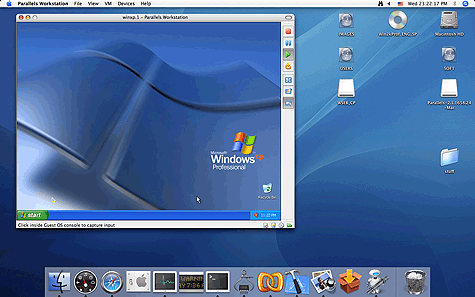
A company called Parallels is actually offering a beta version of this software for free–so if you have an Intel Mac and a copy of any version of Windows, MS-DOS, Linux, OS/2, or whatever, then get to their site, download the beta, and run multiple simultaneous OS’s now–so they tell us.

One can only presume that they released this now because of Apple’s move–they want people to go to their solution before they get too comfortable with Boot Camp.

According to the site, the software is easy to install, provides near-native performance, and can take full advantage of dual-core chips. No news yet on whether it provides full hardware support, or has any problems with video or audio drivers. Already some people are reporting that they’ve downloaded and installed it, and have gotten very fast performance with it (follow that link to see a flash movie showing XP on a Mac using Parallels); given that the news is just a few hours old as of this writing, it will naturally take a bit more time before full reports can come in. I myself am wondering if you can do full-screen switches, whether the Mac’s zoom feature will work in Windows mode (the Windows zoom sucks), and whether it will survive resolution switches reasonably well.

Nevertheless, this is pretty damn neat stuff, and may get me to start looking at buying an iMac sooner than I thought….

 Files Upload Mac Fullscreen 1

Categories: Mac News Tags:

Apple Turns 30, Goes to Boot Camp

April 6th, 2006 4 comments

BootcampHappy 30th Anniversary, Apple. Just weeks after hackers came up with a way to dual-boot Windows XP on an Intel Mac, Apple seems to be figuring that people might as well be doing it right. Previously mum on any work to make Macs run Windows in any way, Apple has spilled the beans and is now making available a utility called “Boot Camp,” an app that takes you through the steps necessary to install XP. It requires you to have a “bona fide installation disc for Microsoft Windows XP, Service Pack 2” in addition to a blank CD, the latest version of OS X, 10GB of hard disk space–and of course, an Intel Mac.
The software then takes you step by step through the procedure, holding your hand as you burn a customized install disk and then use it to put XP on your new Mac. This differs from the hackers’ setup in a few significant ways: first, it does the hand-holding part, which the hackers hadn’t gotten to yet (they’re probably now throwing up their hands at the weeks of work they put into it and wasted now), making it easy enough for anyone to do the dual-boot setup. I’m no hacker, but I’m a pretty high-level novice, and I’d have had difficulty going through the process. The second difference is that this software is more advanced, with drivers to allow Windows to use Mac hardware (e.g., the different keyboard) effectively.

Boot Camp is still a beta, and is not supported by Apple–you’ll get no phone help if something goes wrong. The instalklation will require the hard drive to be wiped. It doesn’t work perfectly yet, but it appears to be the best deal in town. The software is officially supposed to be part of the next big OS release, Leopard (10.5), due out late this year; presumably it’ll have all the bugs worked out by then.

Like the hackers’ dual-boot solution, Boot Camp does not allow for both operating systems to work at the same time. You have to shut down one OS before you can boot up the other. You can choose to boot XP or OS X by holding down the option (alt) key at startup. Rumors have it that “virtualization software” will also be finalized with Leopard that will allow for Windows to be used simultaneously with OS X, but that is not yet official; in the meantime, a third-party company has announced its own version of virtualization software, and Microsoft is known to be working on Virtual PC for Intel Macs to achieve the same ends.

This is seen as big news for Apple, whose stock rose 6% on the announcement. Analysts are calling this a watershed, saying Apple could explode its market share. I don’t know if Apple will allow official resellers to sell Macs with this option and Windows XP pre-installed, but I’ll bet that if it’s possible, someone will start doing it soon. Many will want to get a Windows Mac for the style, but others will for the performance–the new Intel Macs are reported to be very fast Windows machines.

Then there’s the argument over whether this will kill the Mac, kill Windows, or bring the two into some kind of equilibrium. Some say that software makers will see no reason to port to the Mac OS, making it irrelevant; others say that Windows users will start using OS X and ditch Microsoft as soon as they see how much cooler and easier to use OS X is. Probably the truth will be somewhere in the middle. Even if Apple gets torpedoed as a software company, it will probably succeed as a hardware company. But it’s difficult to imagine the Mac OS really dying off.

For now, it’s simply an exciting change. As for my preferences, the package is not quite there yet–it’ll be there when virtualization comes of age and I can run both operating systems side by side. I don’t want to have to shut down the OS in order to start up a different program–that’s so 1980’s. I remember when you had to do that when there was no hard disk, and each program came on a floppy with the Mac OS on it, or later when SCSI required you to shut down and restart every time you wanted to swap a cable out.

No, I’ll probably wait until next December, when Leopard (to be previewed in August) comes out and the first revision of the iMac is released. By January of next year, I may well have a 20″ iMac sitting on my desk to replace the aging Celeron that sits there today.

Next step: convince my school to buy Macs and not Dells the next time a new purchase is justified. Ah, the day when Macs rule the world is coming nigh! Bwa hahahahahaaa!

Categories: Mac News Tags:

Dual Boot Is Here

March 18th, 2006 5 comments

In case you haven’t been reading the news about Macs, the contest is over: a method to install both Mac OS X and Windows XP onto an Intel Mac has been developed. The method is posted (in Wiki format) on this page.

In theory, this will allow you to dual-boot both Mac and Windows OS’s without them interfering with each other. There are some caveats, however. First, you need a Windows PC to create the customized install CD to put Windows on your Mac; presumably, to create that install CD, you need a generalized Windows install CD (not one keyed to a specific machine). Next, the process is not a snap; probably only advanced users could carry it all out (I could probably do it if I really bore down and concentrated on it, though I expect there’d be three or four frustrating I-can’t-get-this-to-work roadblocks along the way). Next, it requires further fine-tuning, such as remapping the keyboard (to get ALT-CTRL-DEL or the Windows button to work). Installing Windows requires a hard disk reformat, which means you have to wipe your hard drive. And finally, it doesn’t work perfectly; there’s no good video driver that’ll work, so high-end video games or anything else needing special graphic support won’t work yet.

That said, the dual boot is described as working very well, and most of the software and hardware works well, certainly better than one might expect just days into development.

Since this is so new, information is still scarce; I have not heard yet how it works, like how does one switch from one OS to the other. What key command is used? Does Windows appear in a window, or is it a full-screen switch? Nor have I heard about performance issues–if you are using a Core Solo, the slowest chip, does the dual-boot operation slow down the computer significantly? How much RAM is needed?

As more users implement the hack and start building experience, we’ll hear more about it. Moreover, one would expect development to progress quickly. I presume that in time (several months from now?) someone will sell or give away (open source) an easy-to-use package, which will–one would hope–simply require you to insert a Windows XP Install CD, then it would generate a customized install CD image which you could burn on to a new CD. From there, you’d use the new CD to install Windows, hopefully without much hassle. Alternately (and perhaps to avoid digital rights issues), there might be an app you could run that would “handle” the original install CD, adding the needed hacks as the install takes place. By the time a simplified solution exists, most driver issues should be fixed and you could use both operating systems with only minor inconveniences.

Even at that, it wouldn’t be something just anyone could do, and until it becomes officially accepted by Apple and Microsoft, it’ll probably stay that way. And I’m guessing that that won’t happen in the near future. Apple clearly is not encouraging this, at least not yet (or else they’d have worked to make it possible themselves), and Microsoft owns Virtual PC, which means that the new dual-boot solution could cost Microsoft a few hundred bucks per Mac every time people use the open-source option instead of Virtual PC (which is still under development and doesn’t work on Intel Macs yet).

More news on this as it comes out.

Categories: Mac News Tags:

…And Again

March 9th, 2006 1 comment

If you recall, I recently posted on how shallow and uninformed most reporting is when it comes to Mac technical issues, and recent articles have borne out this view. A Swedish Mac enthusiast issued a challenge to see if anyone could hack in to the system from the outside and cause any damage. One user did so within 30 minutes, leading to articles like this one which decried the Mac a security sieve that could be easily attacked. There was a huge flurry of stories and again, the Mac’s reputation as a secure system appeared to be shot down.

But like with the “virus” outbreak, the reports turned out to be a load of bull, with the description “overblown” being an understatement. The articles made it sound like anyone could hack into your Mac via the Internet with ease. It turns out that the Swedish tester allowed people joining the challenge to access via a local access account–essentially, he granted everyone internal access, just as if they were sitting at the computer itself. This is like opening all the doors to your house and then expressing amazement at how easily burglars you invite in can carry off your TV set. What’s more, the challenge was to access a server, which is more vulnerable than a common consumer machine.

So the University of Wisconsin, which originally questioned the veracity of the initial contest, set up their own challenge. They hooked up the same computer, also as a server, to a high-speed Internet connection, and left it there for 38 hours with an open call for people to try to hack it. This time, they did not allow local access, representing a much more realistic environment. There were a huge number of attempts, but no one was successful.

So much for the “Mac is not secure” twaddle. If you think the Mac is an insecure platform because of malware or hacking, please take note that both flurries of reports to that effect were bogus. There are no Mac viruses, malware has been shown possible but does not yet exist (and the proofs of concept were lame to boot), and your Mac is not open to hacking from the outside–unless you work actively to allow people access.

Got that?

Categories: Mac News Tags: