Archive

Archive for the ‘Mac News’ Category

I’ve Got Future Tech?

October 1st, 2006 2 comments

When I was thinking of buying the 24-inch iMac, one small concern was whether or not I should wait for a WiFi upgrade. Apple’s iTV project will probably use the WiFi-n that I described in a recent post, and I was concerned that I might be left behind. I decided not to worry because I probably won’t use iTV anyway.

As it turns out, I seem to have gotten WiFi 802.11n anyway–Apple seems to have shipped the new iMacs with an 802.11n-compatible card. When the time comes, a firmware update might be all that’s needed to activate the new speed bump.

Cool.

Categories: Mac News Tags:

Dead Pixel, Stuck Pixel, Dim Pixel, Fine Pixel

September 30th, 2006 2 comments

As I mentioned before, when I got my new 24-inch iMac, my initial worry was dead or stuck pixels. I thought there was one dead one, but now I’m not so sure. Let me explain from the beginning.

A “pixel” is named after the words “picture element,” and refers to a single dot on a computer display. It’s an element because you can’t divide it further (in one sense). Each dot, or pixel, has its own unique color. Your display’s image is made up of perhaps over a million such dots. The computer generates the display image by telling each pixel exactly which color it should take for any given refresh of the screen, and there are perhaps 60 or so refreshes per second.

The old, heavy CRT monitors “painted” the pixels on the screen, line by line, and could change the number of lines (rows of pixels) flexibly; this allowed them to change resolution (number of pixels on the screen) and still maintain a sharp, clean image. Because they “painted” the pixels with color guns, you never had problems with individual pixels on CRTs; instead, if one of the guns failed, you’d have a discolored screen.

The new, thin LCD monitors work differently. In these monitors, each pixel is a physical entity on the screen; each pixel is its own mechanism. If you peer really, really closely at your LCD screen (preferably on a white area), you might just be able to squint and see the tiny lines, little rows and columns of teensy little squares. Those are the physical pixels of the LCD monitor. Here’s an image to save you some squinting:

Lcd1

Now, getting closer…

Lcd2

And closer yet…

Onepixel

Now you can see what a pixel on an LCD is really like. As you can see, each pixel actually has a red, green, and blue element. Those colors are the primary colors of light. By changing the brightness of each of the three colors from zero to full, you can create any color the human eye can see. For example, if you turn the red and green pixels on full and turn off the blue pixel, you get yellow. Turn on the red and the blue and turn off the green, it’ll be purple (magenta). Turn all three on full, it’ll be white; turn all off, and it’s black.

So actually, each LCD pixel has three parts to it, each one working independently. My LCD screen has 1920 x 1200 pixels, or 2,304,00 pixels. Count the color elements, and the LCD screen has 6,912,000 working parts.

We whine about dead and stuck pixels, but when you consider it, the ability to make a very expensive single piece of equipment with almost seven million working parts and not a single one of them failing–well, that’s one hell of an accomplishment, when you think about it. Frankly, it’s amazing they can make such screens without any malfunctioning pixels.

But parts do come out bad, and that’s what we have to deal with. The two most common ways for an LCD screen to have something wrong is with “stuck” pixels and “dead” pixels. In each case, it is commonly not the entire pixel, but usually one color element within the pixel that goes bad. In a “stuck” pixel, one of the color elements turns on and never turns off until the monitor is shut down. A “dead” pixel is the reverse–the color element, or sometimes the whole pixel, remains dark. Here are a few examples of “stuck” pixels:

Stpx1-1

Stpx2-1

Stuck pixels show up best against a dark screen, so you’ll notice them most when you’re watching a video with dark scenes.

A “dead” pixel will appear to be a tiny speck on your screen–you will often mistake it for a bit of dust, or conversely, you’ll mistake a piece of dust for a dead pixel. Here’s one that was on my Powerbook screen, before I had it swapped out last month:

Lcd4

Only the green element was dead, not the whole pixel.

So, getting back to the subject I started with, my new iMac. When I got it, I noted that there was one dead pixel up near the top left of the screen, apparently with the green element out. It seemed even smaller than I had seen a dead pixel look like before. At first I thought it was the larger screen and the pixels were smaller, but that’s not the case–Apple keeps the pixels about the same size.

So I decided to photograph it, that being the best way to see tiny details too small for the naked eye. Strangely, the photos showed no dead pixel elements. I looked at the monitor with my eyes, and sure enough, there was the dark dot. What the?

I started up Photoshop, and created a red, green, and blue image. By moving each color over the malfing pixel, I could see which elements might be mucked up. Sure enough, when I looked at the blue and the red, the dead pixel “disappeared”; when I put it on green, the dead pixel stood out. It was the green element, all right.

So why were my photos showing no dead pixels? After a bit of experimenting, I found out why: the pixel’s green element isn’t dead–it’s dim. I’d never heard of that before, but there it is. Here’s an image of the pixel with a green image; the red and blue elements will be dark, accentuating the green. You have to look carefully to see the one green element that’s dimmer than the others.

Dimpixel

Can you see it? It’s on the same pixel row as the horizontal bar of the “plus” cursor, with the arrow pointing at it.

Frankly, I’m amazed I even noticed it with my naked eyes–I must have pretty good vision. That explains why it’s not so dark as a dead pixel, and probably why I have to strain to even see it. I never even knew pixels could be permanently dim like this–now I do.

Using Parallels on a New 24-inch iMac

September 25th, 2006 1 comment

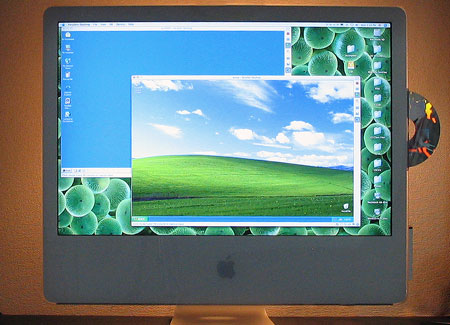
Parascreen
W2K and WXP alive on the Mac. Note the backlight, by the way; I find it helps a lot to make the screen brightness easier on the eyes.

The first thing you should know about running Parallels if you have one of the new Core 2 Duo iMacs is that the version of Parallels that download directly from their site won’t work–it will cause kernel panics, crashing your machine from the start. Instead, you have to get the latest build–which, at the time of this writing, is build 1908, which can be downloaded from this page.

Once you have that, it’ll all be cool. I installed Windows 2000 for starters, from an install disk my school gave me (we no longer use the OS, so they gave me a spare). With the new version of Parallels, it installed very nicely. When you make a new virtual machine, you’re supposed to check the CD-ROM settings to make sure that the optical drive will be recognized properly; since I was installing from a CD, the native settings were all I needed. Then you click the “Play” button on the right-hand toolbar (where the original version of Parallels would crash) and a virtual DOS setup starts, recognizes the CD-ROM, and you go from there.

After it installed, the Windows 2000 OS seemed to run fine–but was limited to a screen resolution of 640×480 pixels and a color depth of 4-bit (16 colors). It turns out that you have to install “Parallel Tools” in order for the W2K drivers to recognize your actual PC hardware. To do this, you go to the “VM” menu and select “Install Parallel Tools…” while your virtual OS is running. Then color and resolution work however you want them to. After you shut down the virtual OS, you can even go into “Edit” mode and create custom screen resolutions to fit your fancy.

After that test, I tried installing Windows XP, and had the same result–it installed just fine and started running without incident. In fact, XP instantly recognized my screen size, and allowed for better display settings from the get-go. However, there is still a big advantage to installing Parallel Tools: smooth transfer between operating systems.

In default mode, each virtual OS within Parallels will “capture” the attention of your cursor; the cursor will only stay within the bounds of the Windows virtual desktop, even if the virtual machine is not full screen. In order to get back to the Mac OS, you need to hit the Control and Option keys simultaneously. After installing Parallel Tools, however, this is no longer necessary; instead, the cursor will simply switch to whichever OS it happens to be hanging over at the time, making for much smoother transitions.

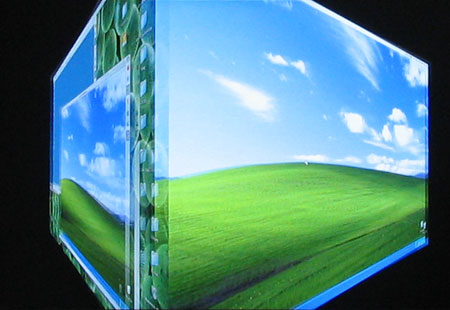
Switching to a full screen is similarly easy to do. Just hit Alt+Enter, and a nice Mac rotating 3-D cube effect switches you to full-screen mode in Windows. In fact, once you enter full-screen mode, Parallels automatically adjusts the Windows OS screen resolution to match your monitor, so the resolution remains clear and sharp. In addition to allowing full video control and smooth cursor transfer, Parallels Tools allow for audio to work well, cross-OS copy-and-pasting (text and small images only, at present), and shared folder privileges. At this time, Parallels does not allow for drag-and-drop transfers between OS’s–but give them time, and probably they’ll get that enabled as well.

Paracube

If you have an Intel Mac, want to use Parallels, but are having trouble, check out the Parallel Forums. For some reason, Parallels doesn’t appear to have a link to here from any of their main pages–but it is a enormously useful resource.

Categories: Mac News Tags:

Subtle Snow Job?

September 25th, 2006 Comments off

A lot of people seem to be presuming that the pricing of movies on the Apple iTunes Store is based upon how new they are–that new movies cost $15 and older titles are $10. Just to clear up a point, that’s not how they’re doing it. That was the rumor mill talking. Actually, Apple just has two-tier (actually, three-tier) pricing. If you look at the online store, you’ll see that some titles as far back as the 1940s are priced at $15, and some titles from just last year are priced at $10.

However, the misunderstanding is not wholly due to the rumor mill. You’ll note that Apple never actually says that new movies are $15 and old ones are $10–but when he introduced the service, Steve Jobs certainly made it seem that way. He said that new titles could be pre-ordered for $13, and would be priced at $15 after they were released–which makes it sound like the $15 pricing is reserved for new titles, but it’s not. Sure, all new titles do get that price, but a lot of older titles get it as well. Additionally, the $10 price range is applied to what Apple calls the “Library,” which again is unclear but sounds like we’re talking about older movies.

In fact, the two-tiered pricing simply applies in whatever way the movie studio decides. Disney has priced all of its animated features at $15, including decades-old titles like Dumbo, Cinderella, and The Aristocats. Meanwhile, poorly performing titles from 2005 such as The Brothers Grimm, Herbie: Fully Loaded, and The Hitchhiker’s Guide to the Galaxy are priced at $10.

So don’t expect to be able to get your favorite movies for $15, unless you like movies that most other people don’t. Apple didn’t exactly lie on this one, but they did mislead–though there might be a reason beyond sales to explain it. Jobs has long tried to protect his coveted one-price-fits-all philosophy for online sales, while the movie industry has tried to get him to do tiered pricing, a more whatever-the-market-will-bear philosophy. Jobs lost on this one, and it may have been a bitter pill to swallow; the “new releases” angle may have been a bit of face-saving in that regard.

Categories: Mac News Tags:

Working with the 24-inch iMac, Part I

September 24th, 2006 8 comments

A great deal about working with a new computer is naturally relative to the old, so a lot of what I’m finding on the new computer is just that: contrasts. I’m fully accustomed to laptops now, and since the last time I had a desktop Mac was my 300MHz G3 Tower (one of the last “beige” ones), the immediate contrast is pretty noticeable, in addition to the special features of the twenty-four incher.

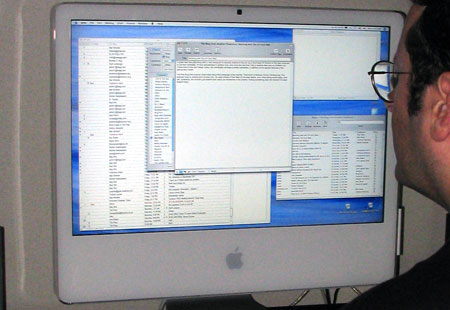
The first thing that anyone must notice about this computer is the monitor. That much is obvious. It’s big. Honking big. The strange thing is, photos don’t convey this. I’ve seen photos of the iMac on the web before, and I tried taking some today–and still, somehow, the monitor just doesn’t look nearly as impressive in the photos. Putting something near the monitor for scale doesn’t help. To get the full effect, you simply have to see one in person, otherwise the effect is pretty much lost. And the effect is pretty strong; I wasn’t sure about buying one until I saw it at an Apple Store–then I was very strongly motivated.
Imac-Look
It just looks so small here, and in the photo next to the PowerBook from before.

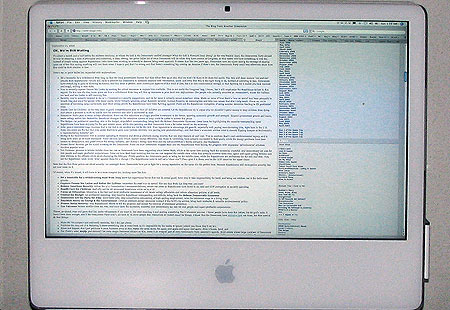
Strangely, the size of the screen has one negative effect: text gets too small. Now, that shouldn’t be a problem, because all you should have to do is set the text size to be bigger. And in apps like word processors, that’s not a problem–but I’m finding it to be a big problem in browsing web pages. In both Safari and Firefox, the text size stubbornly refuses to reset. In both apps, I go and set the standard screen font size to be larger than 12-point, and nothing happens. I’m sure there’s something I’m missing, but for the life of me I can’t figure out what it might be. Now, there’s an option to set the lowest possible font size, and that works to pump up the text size. Unfortunately, it does not affect line spacing, so the text crams together, and it also prevents me from making the text any smaller by the command-minus shortcut, if text becomes too big. So until I find the solution, I have to suffer with those problems, or get used to command-plussing every page I visit.
Imac-Text
What my blog looks like, full screen. You can imagine reading gets a bit difficult…

But size isn’t the only thing this monitor has; it’s also bright. Too bright, sometimes. Right now, I have the room lights on full and the brightness is set to its lowest level, and it’s a bit on the brighter side of just-about-right. It definitely takes getting used to. A reviewer said that in a brightly-lit office with sun coming in through windows, the 24-inch screen still seemed bright, and I can fully believe it.

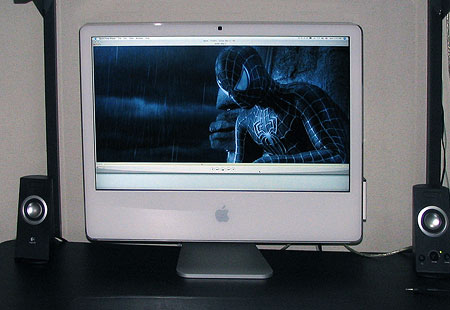
What’s best about the monitor is video. It plays video gorgeously. Even low-quality stuff looks fairly good. Medium-quality looks great. DVD video looks beautiful. But the kicker is downloading 1080p videos off the web (so far, just from Apple’s movie trailer page); the 1080p’s fit perfectly on the screen, pixel-for-pixel, almost completely filling it up. The monitor is, for all intents and purposes, a large HDTV screen. And the NVidia graphics card makes it play smoothly; on my PowerBook G4, even the smaller HD trailers can be somewhat jerky. I’ll bet that gamers would love this computer–but I’m not a gamer and have nothing to test on it, even if I wanted to. But I do have Google Earth, and man, does a big screen and fast graphics make a difference with that. In fact, I had gotten all too used to the speeds of my PowerBook, forgetting that everything from web pages to graphics programs load and play faster than I’m used to.
Imac-Trailer
What a 1080p video file looks like, natural-size. The clarity, of course, doesn’t come across in this photo.

OK, enough about the monitor. It is the central feature of this computer, but it’s not all there is. Though one last small point about a related issue: using a television as a second screen. With the video-out-to-RCA accessory cable, you can pipe your iMac to your TV (though there’s no longer that much advantage in size!), but there is also a surprising new option: you can rotate the image displayed on the TV 90, 180, or 270 degrees. Why, I have not yet figured out–maybe just because you can. It seems strange, but there must be a reason.

I’m having fun with other features, many of which might bore owners of desktop Macs bought over the past few years–like the built-in iSight camera. It’s been available for a year or two now as a standard option, but this is the first one I’ve had to lay around with. Now, for some time, I’ve been using Skype to voice chat with my family, and it just so happens that Skype has very recently released the beta version of Skype 2 for Mac, with video conferencing now introduced. I tried it out, and it works beautifully–better, in fact, than Apple’s own iChat AV! The iChat sound quality sucks, and the video feed is smaller than Skype, which also has excellent audio quality. Today, my dad is going to go out and get a peripheral iSight camera just so we can have 2-way video chats. It’ll be a nice addition, as you can show things to each other–for example, I just bought some old coins for my sister to make jewelry from, and tonight I can give her a peek at what I’m sending, maybe even get feedback on what to buy next. I’ve heard and felt the concern that you wouldn’t want others to see how you look, but I find with family and friends, that’s not really such a problem in practice, at least not for me.

Apple’s Photo Booth software also adds to the fun, allowing you to gawk at funhouse distortions of yourself and whoever else is there. I’m certain that’s going to get old fast, of course. But the ability to take easy snapshots will come in handy from time to time, I’m sure.

Another feature that’s been around for a while now if Front Row, which I’d never actually used before, and didn’t really get until now. Having used it, I find it resembles Apple’s demo of their iTV box very closely. I also wasn’t aware exactly of the functions–essentially, it makes your Mac into one giant iPod, in that you can navigate all your audio, image, and video files with the remote control interface, which is styled after the iPod. If you own a video iPod and have used it to peruse photos and movies in addition to music, it’ll be a very familiar experience. Frankly, I’d just as soon use programs like iTunes, VLC, Image Viewer, or DVD Player to do the same things. Maybe I’ll find myself using the all-in-one interface when I need it from a distance–but not that I can foresee.

When I bought the iMac, I opted for the Apple wireless keyboard and mouse. The wireless part is nice–I’ve always hated the clutter and tangles of shifting the mouse and keyboard around. One gripe is the power switch on the keyboard–essentially, you have to pick up the keyboard (which is a bit heavy), turn it over, and throw the switch on the bottom to turn it off–hardly a handy maneuver. A switch on the side would’ve been the obvious thing to do; why Apple didn’t is a mystery to me.

Other than that, it’s all about getting used to a new keyboard and mouse. I always have trouble with new keyboards, and spend weeks hitting the same wrong keys over and over. Right now the biggest pain is the “delete” (backspace) key and the F13 key. I set the F13 key to open my browser, and now half the time when I want to delete something, the browser pops up and for a moment I think my other app has suddenly crashed or something. I’d rather set the F14-F16 keys to start apps, but Apple mysteriously set F14 and F15 to be the brightness controls, without so marking the keys–and I can’t seem to find any way to reconfigure those without a third-party app… Otherwise, the keyboard is nice–solid and with healthy bounce.

The “Mighty Mouse” takes some getting used to. I’m used to standard 3- and 4-button mice with normal scroll wheels. The MM keeps Jobs’ fetishistic single-piece design intact, which means that the difference between a left click and a right click can be tricky towards the middle. The tiny scroll ball is strange at first, but you soon get used to the 360-degree functionality and the strange feel to its button action. I can come to like this. One other nice mouse movie is the control-scroll zoom feature. I use the zoom feature a lot, and this move comes in handy. The side “squeeze” buttons I don’t like as much, and might not get used to.

More impressions later, especially when I try out some Intel-native iMovie HD work….

Categories: Mac News Tags:

Delivery: 24-inch iMac

September 23rd, 2006 3 comments

Yesterday, I returned home around 8:30 in the evening. Since the iMac I ordered was scheduled to arrive Monday (after initially being set for next Thursday), I wasn’t expecting anything to be waiting for me Friday evening. Still, I checked the mail slot box on my front door–and sure enough, there was the express delivery company’s “while you were out” attempted delivery slip, saying that they had tried to deliver a package just after noon.

Had I arrived home an hour earlier, I could’ve had it delivered before they shut down for the night, but as it was, it was too late–which actually turned out to be OK, because I wasn’t even ready to get it set up yet. I had to clear out my PC and old G3 Mac tower from my main computer desk and set them up at the other end of the apartment, then clean up and arrange the desk so it’d be iMac-ready.

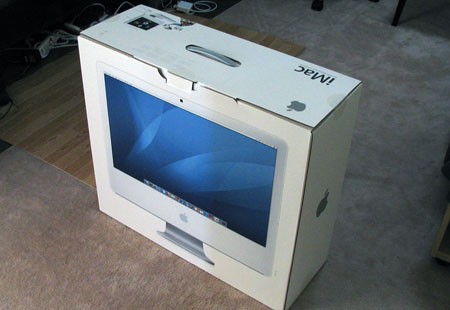
So this morning, at about 10:00 am, the delivery came, and I was ready to go:

Imac1

I unpacked it and set it up on the desk, and it’s beautiful. It’s framed perfectly–just as much space between the bottom of the machine and the desktop as there is between the top of the machine and the shelf above. And virtually the entire desktop is now free, a stark contrast from previously, when my PC’s 17″ CRT monitor took up half the desk. The iMac looks perfect here. Of course, I’m always dreading dead or stuck pixels, but this time I came out OK. There is one semi-dead pixel (it appears that the green element is out), but it’s way up in the upper-left corner of the screen, and heck–on this monster of a monitor, you have to strain to even notice it.

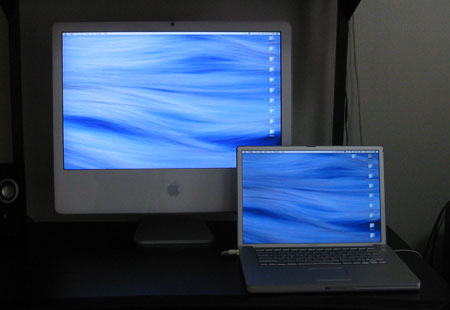
And the monitor is a beaut. Bright as hell–maybe even too bright. At night, I’m probably going to have to turn the thing way down. Here’s a pic of the new machine on my desk, with my 15-inch Powerbook G4 sitting next to it, to compare both the size and brightness.

Imac-V-Pb

I am very pleased to have gotten this delivered early Saturday, especially as I have Mondays off; I’ll have three days with nothing to do but play with my new toy. And if you think you might quickly get sick of reading about it on my blog, well, you’ll just have to leave and come back on Tuesday. You can count on quite a bit of 24″ iMac “pr0n” between now and then.

Update: Busy Saturday for Apple–my replacement battery for my PowerBook just arrived. No more shutting down every time I move the computer! No more lugging the power cable and brick around everywhere! It’s about time

Categories: Mac News Tags:

Who Checks Their Data Anymore?

September 20th, 2006 Comments off

I should not be surprised at this, really, but it does continue to be frustrating. Reports are going all around the web over one company’s data that show’s Apple Computer’s OS market share has been flat recently. One representative excerpt:

…data gathered by Net Applications shows that the Mac OS had 4.35 per cent of the world’s operating system share last December. Now it only has 4.33 per cent.

This is being reported as very bad news for Apple, indicating that the expected revolution has failed. Other articles, such as this or this, are ultimately based on an article in TechWeb. While the articles do mention how the data was collected–a firm called Net Applications monitoring web site accesses–none of them point out the fact that MacWorld reported:

…it must be borne in mind that the Net Applications data is based on the company’s PC-only web monitoring software which checks for what platform users are on when they visit a small collection of compliant websites.

In other words, the data is a non-scientific survey of people visiting web sites designed to work best on PCs. While the survey does measure changes over time, it is hardly an accurate measure of such; were it a submission of data for a scientific organization, it would likely be rejected out of hand. Hell, if I were using an Intel Mac running OS X but visited the site using IE on XP under Parallels, it would measure as an XP visit. Not that I expect the figures are much changed by that, but it is one example of how the data could easily be skewed aside from the obvious fact that the measurements are PC-centric in the first place.

Not to mention that this analysis of Mac shares staying flat from December to August flies in the face of Mac sales increasing 12% from summer 2005 to summer 2006, and Mac sales rising steadily over the past several years. (Coolest Gadgets also has a good analysis on the report.) Also not to mention that we’re heading into what could be a big rise for Apple as Vista and Leopard are coming out, and Vista ain’t looking too good. And on top of all that, there is the fact that people still haven’t caught on to the fact that (a) Macs are now as cheap as, if not cheaper than, equivalent PCs, and (b) Macs can run Windows as well as the Mac OS. As awareness of these points increase, it’s inevitable that Mac shares will grow–but by how much is the question. Will Apple’s sales explode, or will it just be a slightly more popular niche, but still a niche?

In any case, one should treat this latest Apple-doomsayer story like the other recent flurries, such as the bogus virus threats, more virus threats, and yet more virus threats (recycled). Not to mention the infamous WaPo hack-the-Mac video in which a hacker appeared to be able to take control of a Mac remotely, hacking into the system through a vulnerability. Later, it turned out that the Mac’s built-in wireless system was quite secure, and the hacker had invaded the system by exploiting a weakness in a third-party wireless card that was not even needed on the Mac, as all Macs that can accept the wireless card have built-in WiFi.

This is pretty much the gold standard nowadays for negative reporting on the Mac: accept any negative claim without checking its veracity.

Categories: Mac News Tags:

Seven to Ten Days

September 15th, 2006 1 comment

Well, I broke down and ordered it. I had been told that I would have to fill out a special form in Japanese, so I called Apple Japan just to ask about that. The agent told me that wouldn’t be necessary, and all I had to do was tell him the name of my school and we were on. (I already had an account with Apple Educational anyway, from my ordering Tiger from them last year.) I was taken a bit by surprise by this–I wasn’t really ready to order right then–but then I thought, the hell with it, I know I’m going to get it, why wait? So I did.

I got a boost in going this direction by stopping by Yodobashi Camera earlier in the day. I was on my way up to the 2nd floor of the main Nishi-Shinjuku branch (where they have a Mac center) when I noticed their Mac island in the middle of the main floor. Even better, one of the iMacs had Parallels installed with XP running. I played with it, and it’s pretty damned nice. It should do everything that I need from a PC at home–most of which has to do with preparing lessons for my Computer course, where they still use Windows (though I think I stand a very good chance of switching them to iMacs next time they have to buy a new bunch of computers). Having played with Parallels and the 24-inch iMac at the store, I pretty much convinced myself to buy.

All told, the purchase was ¥259,852 ($2212) including sales tax (¥247,478 or $2107 base). That’s for the 24-inch iMac, an extra gigabyte of RAM, and the wireless Apple keyboard and mouse. I’m currently looking into how to get XP (academic or OEM) for less than the $200 regular pricing; parallels is a download and will be easy. I’m also looking at getting the Applecare (thanks to Dazza for the LA tip, I’m contacting them [Update: Dazza, the LA firm got back to me; they will sell at a lower price as you indicated, but shipping to Japan costs an additional $45, way too much. The Apple Store Japan has educational pricing for Applecare; I think I’ll go with that.]); I’ve never had a serious meltdown on a Mac, but with a 24-inch LCD on an all-in-one desktop, I think it’s worth getting the insurance.

The iMac is not upgradeable, true. But then again, I’m not much of an upgrade person. I wind up not getting any extra video cards, or whatever else. The iMac already has most of the bells and whistles you would upgrade to, in any case.

But I have to admit, it’s the 24-inch screen that really got me with this one. I never really owned anything bigger than a 17-inch CRT–heck, I don’t think I ever even worked on anything bigger than a 17-inch LCD. So the 24-incher is a huge step up, and probably impresses me a lot more than it does you. But as my sister-in-law put it, if it makes you happy, that’s the big thing.

So my Windows PC and old 500 MHz G3 tower, conjoined with a 17″ CRT monitor, will all get exiled down to my free desk space in a lesser-used corner of my apartment–in seven to ten days, that is.

Categories: Mac News Tags:

New Mac Stuff

September 13th, 2006 6 comments

Several Sites are streaming the new Mac announcements live. Best is Engadget, who give the most information and have good-quality photos up very quickly. So far:

New iPods, not the full-screen video we’ve been waiting for, but upgraded regular video iPods. They come in 30GB and 80GB sizes (priced $250 & $350 respectively); they have brighter, better screens, a search function, and downloadable games like Pac-Man for $5 each.

iPod Nanos, in brushed aluminum colors (Blue, Pink, Green, Silver, and Black), in 2GB, 4GB, and 8GB sizes.

iPod Shuffle, in new, tiny aluminum case (matchbook sized!) which itself is a clip-on, a small clock & controls, 1GB memory, $80.

iTunes: going to version 7; videos increase in size from 320×240 to 640×480 (near NTSC-size resolution; should play back on TV rather well). New organization for layout. The “iTunes Music Store” (iTMS) is now just the “iTunes Store” (iTS).

Movie Downloads (as expected): $10 for most movies, $13 for new movies until the end of the first week of sales, $15 for new titles after that. Also at 640×480 resolution, “near DVD-quality.” 75 titles to begin with, from Disney-owned studios (Walt Disney, Pixar, Touchstone, Miramax). Dolby surround audio. Takes about 30 minutes to download a movie, but you can start watching immediately. Initial sales from U.S. store only; international sales start in 2007 (hopefully).

Media Box: codenamed “iTV” (not the final name), a set-top media box connecting wirelessly between a Mac or a PC (via iTunes, apparently) and the TV set/media system. To be released in early 2007. Also has ethernet, USB, RCA, optical audio, HDMI ports. Allows you to play downloaded TV/movies, other Internet video media. Priced at $300. Cobbled-together photos from Engadget feed below:

0906Itv

My reaction: well, OK. We expected the movie downloads. The new hi-res download standard is good, but they kind of had to do that to make people pay $15 for a downloaded movie. Sounds like the DRM will be reasonable, and maybe with the TV playback, the inability to burn it to a DVD won’t be such a problem.

The media box looks nice, but I’m going to have to see what it really does before I get excited about it. I mean, you can hook up your Mac desktop or laptop to your TV right now and watch video played back from the computer. How does “iTV” change that? Why pay $300 when a $20 cable could do the same thing? OK, iTV looks like it has a very nice interface. Wireless is nice too. But what else? If it just pipes video, I really don’t see the point.

OK, the Apple web site is back up, along with the Apple Store. The iTunes Store is still down, at least for me.

Gotta get to bed. This time zone thing kills me on these events…

Categories: Mac News Tags:

TubePort?

September 12th, 2006 Comments off

TUAW claims to have the agenda for tomorrow morning’s Apple event. Included in the highlights are the Movie Download store, the widescreen video iPod, and something called “TubePort,” which appears to be simply a USB-to-TV converter, performing the same function as a VGA-to-TV or video-minijack-to-TV converter.

Frankly, I’m doubtful; as described, “TubePort” would simply do for $100 what a simple $20 cable would do today, not to mention that “TubePort” is an incredibly lame-sounding name. And to save that for the “one more thing” spot when the video iPod is in the mix, well, it doesn’t ring true.

I’m still hoping for the video iPod, and the movie download store seems like a lock. If there’s a third thing, it’ll probably be Apple’s long-rumored media box which connects the computer to all of your AV equipment in the house, the “media jukebox.” Definitely something connected to the movie download bit.

The “agenda” also includes a movie download price structure which, in addition to a $15 movie download, includes a $20 price point for full-sized movie plus video iPod version. While this sounds very much like what the movie studios want, it is definitely not an Apple-like idea.

Categories: Mac News Tags:

To Wait 6 Months… or Cave Now

September 11th, 2006 8 comments

Imac24I really, really want one of these puppies.

The new 24-inch iMacs are out. I went and played with one at the Apple Store today. Now, when I first saw the 20-inch iMac, I thought, this thing is huge. But the 24-incher puts its 20-inch sibling to shame. For a minute there, I almost thought I was looking at Apple’s 30-inch super-luxury monitor; even knowing the size difference, I still walked over to the 30-inch display to compare. You can tell the difference, of course, but it doesn’t feel like much. Maybe the iMac’s large white facade makes the screen look bigger, but really, I don’t think it needs any help. In MS Word, a 2-full-page display of a document left the pages displayed more than large enough to read comfortably and had lots of screen space left over. Unfortunately, there was no full-screen, high-quality video on the machine to test, though in hindsight I now realize that I could have downloaded an HD trailer from the Apple movie trailer site.

The specs for the $2000 (base price) desktop are pretty impressive. The new Core 2 Duo chip (2.16 GHz, option for 2.33 GHz for an extra $250) has a 4MB L2 cache (that’s good, take my word for it if you don’t know what I’m talking about), and a fast NVIDIA graphics card. 250 GB HDD, Superdrive with DVD+R DL/DVD±RW, Built-in Bluetooth 2.0 & WiFi-g, built-in iSight camera, and the ability to use S-Video out to the TV (Apple does a good job of high-quality video out) in case the 24-inch monitor just ain’t humongous enough.

I decided some months back that I would get an iMac as my next computer purchase, but not until next year, after OS X v. 10.5, Leopard, is released. My last computer, this PowerBook I’m using now, I bought just a few months before Tiger was released, and I had overlooked the extra money it’d cost me to buy separately–one downside of Apple’s no-upgrade-option policy on software purchases. But when I decided to wait, I thought Leopard was coming in January (now March or even later seems more probable), and the 24-inch model hadn’t been released. And with the iMac line being refreshed now, it’s likely that I’d just see another iMac speed bump occur just a few months after getting one in Spring–which would make me want to wait a bit more, and I’d get caught up in the eternal wait-for-the-next-better-model game. Now it’s beginning to seem a bit silly to wait six months or more to buy a computer just because I don’t want to pay $130 for a new OS–especially when, as an educator, I have the academic discount that puts Leopard at $70.

There is one nit I have, though: Apple sells the iMac with 1GB of RAM, which is nice, but I of course want to upgrade to 2GB at least. The problem: the on-board 1GB is really two 512MB RAM chips which occupy both of the iMac’s only slots–no empty slots to add RAM. Which means that if I wanted to upgrade, I’d either have to pay Apple $175 for what should be a $120 upgrade, or I throw away perfectly good RAM chips, which in the end would be even more expensive. Bad form, Apple. The 1GB of RAM should absolutely have been a single GB chip–but maybe that was their idea, to make you buy from them up front. (One other nit for Apple: running Windows natively on a Mac is a huge plus point; why not demo it in Apple stores? You may well have lost a sale today when my Japanese friend couldn’t see it at work when we visited the Shibuya store.)

Japan pricing, usually higher than American, would add $140 to the total; however, I luckily am eligible for the 7% educational discount from Apple Japan, which would set it back down to $2000. But I’d have to shell out the full $200 for Windows XP–due to their system of educational sales, I would not be able to buy it without going through massive headaches with my school’s home campus, thousands of miles away (unless anyone out there knows differently?). The whole shebang, including XP, the 2GB Apple RAM, and the option for wireless keyboard and mouse, would set me back about $2400. Oh, wait, I forgot that I’d want to buy Windows virtualization software–almost certainly Parallels. Add another $80, call the whole deal $2500. Add another $170 (total of $2650) if I want to opt for the extra 2 years’ AppleCare warranty.

Partly I’m writing this to work out for myself whether to buy it now or wait. I have this personal rule where I don’t buy anything expensive until I’ve considered it for at least two weeks. However, that’s more for impulse buying something that I wouldn’t really use and don’t truly want (like the five hundred bucks I shot on a Sony Clie PDA years ago, virtually unused all this time). I know I would use the iMac, though.

Any thoughts?

Categories: Mac News Tags:

Something Big…

September 7th, 2006 1 comment

Well, the rumors of a 23-inch iMac were wrong. It’s a 24-inch iMac. While the 20″ iMac now goes for $1500 ($200 less than before), for an extra $500, or $300 more than a 20″ iMac cost last week, you get the considerable extra screen real estate in addition to an advanced graphics card (the 20″ has an ATI Radeon X1600, the 24″ an NVIDIA GeForce 7300 GT). The entire iMac line was also furnished with the new Core 2 Duo chips, and the Mac Mini line was made Core Duo across the board. The cheapest iMac, the 17″, now sells for $1000, or $300 less than before.
Apple Showtime
But that’s not what this entry’s title is about. Rather, it’s about September 12th, when Apple has a big media event, which they are touting with the logo at right, proclaiming that “It’s Showtime.” Most everyone figures this means that Apple is going to release their movie download service, a reasonable interpretation.

But the really interesting thing is that the 24″ iMac and CPU upgrades were no small deal; usually, they’d get a show of their own. Instead, just a week before an Apple media event, the iMac and Mac Mini upgrades were quietly announced, with no great fanfare. That suggests that whatever Apple is going to release on the 12th, it’s big enough not to leave room for today’s upgrades… and that’s saying something.

Expectations: aside from the movie download service, people are talking about the long-awaited iPhone, with sources saying that it’s finally ready. Others say a video iPod, but probably just because the video service seems ready to go. However, others say that Apple has a whole new media center solution (maybe hardware) ready to go, and the movie downloads may be of DVD quality, not iPod-sized. It could even be a new kind of video download service altogether, with perhaps the TV downloads also going higher-resolution.

In any case, we’ll know the answers in a week.

Update: Via MacRumors, Variety and AP are already talking about the movie downloads as a certainty, noting that Apple will probably only have Disney on board at first, as the studios are balking at Apple’s low, fixed price structure.

Categories: Mac News Tags:

A 23″ iMac?

September 2nd, 2006 Comments off

So the rumor sites seem to be reporting. The rumored release date would be September 12th. This has somewhat of a ring of truth to it, because more than one of the more reliable rumor sites are saying their sources confirm it. If so, a 23-incher would be a huge machine. Have you seen a 20″ iMac? Looks huge. A 23-incher would be giant. And if it does come out, I think I know what machine I’ll be buying when Leopard comes out next year.

There are also hefty rumors of the video iPod being released in mid-September (some say current iPods are being moved out the door to make room), along with the announcement of $10 and $15 movie downloads from the iTMS (though only one studio is known to have signed on).

Categories: Mac News Tags:

Apple Battery Exchange

August 31st, 2006 Comments off

I found myself caught up in the now-infamous battery exchange program when I checked the latest range of serial numbers Apple put out and mine fell into the range. Or at least it appeared to, so I called them up and they asked for the serial number of the battery and the computer. I’m not sure, but I have the feeling that the computer serial number was not needed to identify the problem, but rather they wanted to know who I was before alerting me so they could cover their liabilities. Despite good marks in general for their customer support, Apple’s legal department can be less warm and fuzzy.

You see, despite battery explosions being a relatively rare event, Apple doesn’t want to be liable for any damages that might be caused by a battery eruption to the computer, or more significantly, to surrounding property or persons. So when you identify yourself as having a suspect battery, the support person immediately tells you to remove the battery and not to use it until a replacement arrives. Which will be four to six weeks. And if, in that time, you are forced to use the battery and it explodes, Apple won’t pay for a penny of the damages. They told me that in no uncertain terms. Not that I accept those terms, of course.

Now, a lot of the time I use my computer, it’s plugged in, but a lot of the time, it’s not plugged in. For example, when I move from my office to my classroom every day, I work on my computer in the office and then move it to class where I will use it. If I can’t use the battery, then I have to shut down and restart the OS and all the software for each move–a pain in the ass. And I also use the computer where there aren’t any power outlets. After all, it’s a portable computer, that’s why I got the Powerbook in the first place. It’s got a battery because the users need that battery. Not being able to use the battery for six weeks is effectively taking away a $2500 computer for a certain chunk of the month and a half it will take to get the battery replacement.

To be fair, they did try to offer an alternative, though the alternative was unworkable for me and did not make sense. They said that if I packed up the whole computer and sent it in to their repair people, they could have it sent back to me in two weeks with a new battery. Later, they shaved that time down to one week. But I had to send the whole computer, not just the battery alone.

Now, that was unworkable for me because my school starts next week Tuesday and I have to have the computer for all kinds of preparation for the course I teach. But it did beg the question: why was it necessary to send the whole computer to Apple? Undoubtedly so that it could fit into a repair paradigm. Which means that in reality, Apple does have batteries sitting around the repair center, and they could send one to me within a week, but they won’t do it unless I conform to the repair paradigm which would make me send a perfectly healthy computer in to the repair shop, where absolutely nothing would be done to it, and that would take a week.

Arghh.

Now, I understand that Apple is now deluged with exchange claims. I understand that batteries must be in short supply (the tech support guy said they aren’t even selling batteries at the Apple stores). I understand that the repair route is probably offered specially to those who put up a fuss and they probably keep it difficult so that everyone won’t see that as a shortcut and start demanding it. And I understand that Apple wants to avoid liability for any battery fires which may result. And I would not expect anything more (and probably I’d expect a lot less, in fact) from Dell or any other manufacturer.

But what it amounts to is semi-crippling my computer for the next month and a half, and if anything does happen with the battery, they expect me to pay for every cent of damages–in other words, Apple truly is liable here, but they want the customer to shoulder the liability burden. Like I said, Apple legal can be just as warm and fuzzy as the next pack of lawyers.

Categories: Mac News Tags:

The Mac Is Back

August 24th, 2006 2 comments

Good to their word, the Apple Store got my Powerbook back after 5 days in the repair shop (they said three days to a week, none of this “working days” crap). The new screen is in, and it works beautifully (though I haven’t had time to heat-test the screen area darkening yet). Not a stuck or dead pixel on it anywhere–which is a step up from my previous screen, which had a single pixel with a dead green element, though it was off to the side. I have the feeling that with another computer maker, the complaint (which could not even be demonstrated well in the store, I had to use digital camera pics to show it) probably would have been refused and a free repair not given–even within the warranty, where Apple allowed me to get a repair three months later so long as I reported it within the warranty period. As usual, Apple gets high marks for service.

Being off the Mac does make me appreciate it over the PC more, though a good deal of that has to do with software versions. Qualcomm’s Eudora email software, for example, is very good on the Mac, but it sucks big time on Windows. Alert sounds especially were impossible to control well, and I couldn’t find a way to set auto mail check intervals for each account separately.

Also, generally, Windows apps work within a single window, whereas Mac apps can split tasks of a single app between several windows, if necessary. Like in MS Word on Windows, if you have more than one document open at a time, they can appear within one main window, and then a sub-window appears inside that has its own window buttons (minimize, maximize, close) just below the main app’s buttons. If there are no docs open, a gray pane persists. On the Mac, each doc has its own window, with toolbars and palettes free-floating. Maybe it’s just personal preference, but I like that better–it allows for freely sizing each window and allowing for overlaps. Less constricting, less crowded that way.

In any case, I’ve got my security blanket back. Yes, it’s pathetic, I know. But we all have things we’d rather not do without for long periods of time. What’s yours?

Categories: Mac News Tags:

WWDC Roundup

August 8th, 2006 5 comments

Engadget had the best live coverage, as it turns out–nearly transcribed the event, and included photos.


The new Power Macs were brought out first. Dual-processor Core 2 Duo Xeon (Woodcrest) Macs, up to 3GHz, 4MB L2 cache, 64-bit. Since the G5’s enormous space required for cooling will not be required any more, there will be space for two optical drives and up to four hard drives (up to 2 TB storage), reportedly snap-installed for easy access. Apple’s page is up.

Amazingly, the lower-level unit (2.6GHz dual) comes with a weak 256MB of RAM. Either Apple is cutting corners hard to reduce the price, or they are commenting on how little minimum RAM you need with the Mac OS–a strong point when comparing to Vista, one has to admit.

Nevertheless, that’s going to be a blazing computer. Love to get one, but I’ll have to do with whatever revision of iMac comes out instead.

Also announced were new XServes, Apple’s server model; these use quad Xeons, 5TB storage, yadda yadda… hey, look it up if you have to know about servers.

They made a point on prices, how the price of these higher-end units is lower (maybe 10% lower) than a Dell–however, one has to assume that they really worked hard to skew the numbers in favor of Apple. I suspect that if you compare Apple with average brands and do some research, it’d be a wash.


Next came Leopard, but not without first showing how Vista is going to be what the Mac OS has been, with a side-by-side comparison of Vista and Tiger.

Big news: Leopard shipping in “Spring”–so it won’t beat out Vista unless that gets delayed big-time. (That also means I’ll have to wait longer to buy the iMac; last time, I bought Tiger, then a few months later, bought a Powerbook; not doing that again).

Leopard features (Apple’s page is up):

  • 64-bit support throughout
  • “Time machine” versatile automatic file backup system (no one saw that coming that I know of)
  • Software accessories (Boot Camp, Front Row, Photo Booth)
  • Virtual desktops called “Spaces” (many predicted these)
  • Improved Spotlight
  • Improved automatic animation across system & apps
  • Universal Access improvements (closed caption in QT, better text-to-speech, Braille support)
  • Mail: better standard HTML stationery with templates, more of a graphic-oriented email system; Notes feature; adjunct “To do” list with alarms & systemwide tie-in
  • Dashboard: “dashcode” to help developers anyone make widgets (no need to know code, just drag-and-drop!); “Webclip” for users–make a part of any page into a widget (like the “Dilbert” cartoon strip), essentially a “make your own widget” feature
  • iChat: multiple logins, invisibility, animated buddy icons, video recording, and tabbed chats; Photo Booth effects, video filters; iChat Theater (voice-over slide shows, Keynote presentations); Backdrops, which allows you to do a green-screen effect without the green screen–simply step out of frame so the computer can discount all background information, then step in front of the backdrop, which can be a photo or video clip; also, share displays–look at a remote user’s screen and control stuff on it.
  • iCal: multi-user function
  • XCode 3.0 (developer stuff)

Funny about the Mail feature of the “to do” list–Jobs mentioned that he used to send emails to himself to remind himself to do things, but the new feature in Mail does it better. It’s funny because I did that exact thing, sent myself an email as a “to do” reminder, just minutes before monitoring the keynote…

As for “Spaces,” it’s hard to tell, but from what I can see, it’s not what I hoped. It only switches views for application windows you have open–it does not give you new Desktop real estate for your icons. Very disappointing, because that’s what I would want a lot more than what they did. My Desktop is constantly getting cluttered with icons. What I need is a way to have all the icons clutter a Desktop I don’t often use but can call up anytime I need it, keeping my usual Desktop clear and clean. Yeah, I know, I could put them all in a folder–but it’s not the same thing.

More about iCal is shown on Apple’s web site.

A bit of a shocker, though, is what was not said: Jobs announced that “top secret features” are not being revealed yet, purportedly so that Microsoft can’t copy them as early.


So, that seem about it. No new iPods, no iPhone–just new Mac Pros, new XServes, and most of the new features in Leopard.

So what are the “top secret” missing features for Leopard? Well, if you thought the speculation would be over today like I did, you were wrong. If anything, I imagine this will ramp up the rumor mills. Probable additions:

  • Maps (possibly in iChat), a service like Google Maps, which will provide satellite images and driving directions;
  • iTunes update, possibly with movie downloads;
  • Safari updates (possibly tie-ins with Spotlight, also saving tabs);
  • More Spotlight enhancements?
  • UI Enhancements?
  • Probably iLife and iWork enhancements as well.

But will there be something else big that no one is seeing? After all, many of the items shown today were kept under wraps very effectively, including the major app improvements to Mail, iChat, and Dashboard, not to mention Time Machine. So there is a good chance that there are a few big features left that nobody’s guessed at yet.


Unexpectedly, the iChat improvements stunned me the most.

The iChat collaborative shared display feature is very cool–effectively it looks like Timbuktu, remote access of someone else’s Mac. That would mean you can troubleshoot someone else’s Mac for them, or show them a process without having to be there.

Another iChat feature, the iChat Theater, allows you to show images, movies, or more importantly, Keynote presentations, with a small image of you on the side. This may not look like much to you, but I can see huge possibilities from a teaching standpoint. Remote teaching suddenly comes to life. What if I’m too ill to go to school and teach, but my voice is OK? I could remote-teach a lesson, given proper preparation. One Mac at school with with the camera pointed at the class, with the screen mirrored to a TV, and presto–instant remote lesson. The Backdrop feature could even hide the hideous mess of a room I didn’t want to clean because I was sick.

That also includes international lessons. My school has “Internet” classes, in which teachers in California lead a class which includes students here in Tokyo. Up till now, the class depended on expensive software to work–but iChat, a free app, could conceivably replace that.

Throw in the shared remote display feature, and you could teach computer classes. Throw in multi-conferencing, with enough joint users, I could teach a whole class that way, too, even more hands-on.

In short, iChat could really lead to some interesting stuff in online classes.

Categories: Mac News Tags:

WWDC Beginning Soon; M:I:III

August 8th, 2006 1 comment

WWDC starts in 90 minutes–just a heads up to those getting this blog via RSS, who are interested in Macs, and who weren’t aware of the timing for the event. If that number of people > zero.

Here’s perhaps the best live-update site for the keynote speech.

Off-topic: I just got back from seeing M:I:III, the late show. (Late show tickets are only $11! Whee!) Yeah, I know, M:I:III, old news, but (a) it opened two months late in Japan, and (b) I waited an extra month so I could be into my vacation and not have to fight the crowds.

I don’t know why that movie didn’t do well at the box office (though I just checked, worldwide it hit $380 million, not incredibly shabby). Yes, it had a weak, predictable ending, but everything except the last five minutes of action was as good as the M:I movies get, and Abrams managed to put in a few fun bits at the end despite the weakness. And before that, almost nothing except blam, blam, blam–loud noises, big explosions, lots of jumping and sneaking around and fighting and other fun stuff. What more could one ask for?

Categories: Mac News, Media & Reviews Tags:

Leopard Details Posted?

August 5th, 2006 Comments off

O’Grady’s Powerpage claims to have a detailed preview of some Leopard features on their web site. A few people are already calling it out as fake, but if they are genuine, expect them to be taken down very soon after Apple’s lawyers jump on them. After a brief glance, they certainly do not seem to be complete, if they are real. The information only deals with upgrades to some existing services in OS X (Spotlight and Dashboard mainly, with some details on Safari, and short bullet lists on iChat, Automator, Quicktime, Mail, iCal and Address Book). I say it’s not complete because if that’s all Leopard is, it’ll be a major dud. I’ve got to get ready to leave for my graduation ceremony in about an hour, so I don’t have time to blog on the details right now; just see for yourself. I’ll comment tonight, but by then, I am sure many others will have dissected this thing to a tee.

Categories: Mac News Tags:

WWDC, Vista Delays

August 2nd, 2006 Comments off

So what’s going to be up with the World Wide Developer Conference starting August 7th, less than a week away? One thing that we know for certain is that Leopard (Mac OS X 1.5) will be revealed, and we’ll know what’s really going to be going on with the new OS that will come out opposite Vista. But what else?

The common knowledge answer is that the new Mac Pros, with the newest and fastest Intel chips, will be released, completing Apple’s switch to Intel. Apart from that, an upgrade for the iPod Nano. However, Robert Scoble suggests that there will be a lot more:

Speaking of Apple, they are readying a dizzying amount of new products. I wish I could camp out at an Apple store during the World Wide Developer Conference on August 7th. I wish I could say more, but that’d get me sued by Steve Jobs and I don’t need that kind of heck right now.

A “dizzying amount of new products”? Well, people have been talking about the iPhone (still considered a long shot–they’ve failed to materialize for years now), and maybe a movie download/rental service. But what the heck else could there be? The full-screen “no-touch” video iPod isn’t expected to come out until early next year. There are rumors of iChat going VoiP a la Skype, but fewer expect that than expect the iPhone.

Could Leopard, the Mac Pros, a small iPod upgrade, movie downloads, and the iPhone be considered “a dizzying amount”? Is more coming than we’ve heard of? I would guess that Scoble is either over-estimating or is too easily impressed.

Possibilities are covered here, a wish list here, and a WWDC Bingo game is offered here.

Update: Engadget has a story on what might be the iPhone, called “iChat Mobile,” with photos. (A subsequent video that got people excited is now shown up to be a fake–a printout of the iPhone mockup on glossy paper cleverly folded to look like a real device in a low-quality video.) Also, here’s another WWDC rumor roundup, and here is perhaps the best.

FWIW, Scoble is also suggesting that Vista might indeed be pushed back again (or at least that it should be pushed back), perhaps by as much as six months. Roger Kay tends to agree, and all these people do as well. The reason is that there are still to many problems, mostly in speed, user interface issues, driver issues, and application compatibility problems. I have my doubts, though–I think that Microsoft would be hurt more by another six-month delay than by releasing a buggy OS. After all, both problems are expected by everyone, but the buggy OS is less apt to damage Microsoft’s image than pushing back the release date, an issue that already has Microsoft in the position of marketplace laughingstock.

Categories: Mac News Tags:

…And Nobody Seemed to Pay Attention

July 4th, 2006 Comments off

Even after Symantec admitted in a phone interview that the so called “Trojan Horse” titled “OSX.Exploit.Launchd” is not in the wild–that is, it has not attacked anyone’s computer–still, about a dozen sites, like this one, this one, and this one, and many blogs like this one and this one have picked up the story that it is in the wild and that it is a threat, though a low-risk one. The fact is, it is not a threat at all–in fact, despite being a trojan, no one seems to have any idea how it fools the user into allowing it onto their computer.

If any of the news organizations (and to a lesser degree, the blogs) want to maintain credibility in reporting computer news, they had better stop simply picking up news releases from anti-virus companies and printing them verbatim, and start actually checking out whether or not the stories are fabrications intended to stir up business for the companies.

Categories: Mac News Tags: