Trilemma

June 19th, 2007 Comments off

In describing Bush supporters, Brad DeLong invokes an Eastern European truism that supporters of a clearly corrupt regime can have personal dishonesty or intelligence, but not both:

Sincere conservative supporters are not bright. Bright conservative supporters are not honest. Bright and honest conservatives are not supporters…

Well said. Check it out. And Tom Tomorrow turned it into a cartoon.

Categories: Political Ranting Tags: by

Illegal Intent

June 19th, 2007 2 comments

This is how much the Bush White House knew they were breaking the law: they systematically set up an arrangement for an entire communications network which was illegal for the purpose of escaping scrutiny of their actions. The fact that they set up the alternate, private email system itself proves that they knew about the Presidential Records Act and the legal necessity of keeping White House records. That they were willing to violate the Presidential Records Act makes it clear that what they were doing in that communication was a lot worse than just violating the Presidential Records Act.

And now that everyone knows about the separate email system, the entire email records for 51 White House officials in that system have been erased. This goes beyond shameless. It goes into the territory where there is zero doubt left that there were major laws being broken–but since the records were destroyed, we can’t say which laws and which officials. Which was the whole idea. Even though it is absolutely undeniable that they broke the law and did so with clear intent, by using the “whoopsie!” defense in claiming the records’ destruction was “inadvertent,” they give just enough wiggle room that they can probably slough the eventual criminal prosecutions off on some aide (Scooter’s already booked for another gig, they’ll have to look elsewhere).

So, when you catch a major criminal in the police evidence locker standing over a pile of smoldering ashes and claiming that “the match just slipped from his fingers” and accidentally burned that pile of evidence that happened to be at his feet, what are you going to do as he looks at you with knowing contempt?

Let me just say, for a group of people who claim one of the biggest problems in society is criminals getting off on technicalities because of a bleeding-heart liberal justice system, they sure do take advantage of those technicalities every chance they get, don’t they?

Categories: Political Ranting Tags: by

Sugishima’s Revenge

June 19th, 2007 3 comments

You may recall a while back I explained that the phone number I have had for about four years now was previously held by some pinhead named Sugishima. This self-promoting wonder apparently gave his name and number (now my number) to about a gazillion people, and then when he moved, he didn’t tell a single one of them about it. So when I got this number, I got endless calls for this guy, as many as a dozen per week at its worst. I figured it would taper off, but for six months or so, it just went on and on. I guess it never quite reached the threshold where I felt like going through the hassle of changing my phone number and telling everyone of the change. It eventually dropped off to one call a month, close enough to background noise, but still it rankled me every time it happened. Over the past year, the calls for Sugishima got even more rare.

Now, I am about to move, and leave this damned number behind me. But it is almost as if the Curse of Sugishima knows this: in the past week, I have gotten four calls for him, the latest one waking me up early this morning.

I have the sneaking suspicion that on the very last day before they disconnect this phone line, I will get a call. The person on the line will say: “Hi, this is Sugishima. Were there any calls for me?”

Categories: The Lighter Side Tags: by

Taguba

June 18th, 2007 1 comment

If you’ve been reading the news lately, you should be aware of the story that the man charged with investigating Abu Ghraib has now come out with the true story behind the investigation. The upshot: he was ordered to limit his investigation to the soldiers who were in the photos, and to turn a blind eye to people at “higher levels”; Rumsfeld knew about the images when they denied they knew, and there was an intent to deceive investigators and the public about who knew what, and when. Taguba was threatened because of his report, to the extent that “I thought I was in the Mafia.” And there’s much more, a lot of incriminating stuff.

The story ends:

“From the moment a soldier enlists, we inculcate loyalty, duty, honor, integrity, and selfless service,” Taguba said. “And yet when we get to the senior-officer level we forget those values. I know that my peers in the Army will be mad at me for speaking out, but the fact is that we violated the laws of land warfare in Abu Ghraib. We violated the tenets of the Geneva Convention. We violated our own principles and we violated the core of our military values. The stress of combat is not an excuse, and I believe, even today, that those civilian and military leaders responsible should be held accountable.”

Next step: wait for the Bush administration to smear the hell out of this soldier so as to cover their asses. Again.

Categories: Iraq News Tags: by

Borrow and Spend

June 18th, 2007 Comments off

While Bush is castigating Democrats as being “tax and spenders,” let’s look at an interesting statistic about the Bush administration. And mind you, this is from a year and a half ago:

According to the Treasury Department, from 1776-2000, the first 224 years of U.S. history, 42 U.S. presidents borrowed a combined $1.01 trillion from foreign governments and financial institutions, but in the past four years alone, the Bush administration borrowed $1.05 trillion.

I have a feeling that those figures are not adjusted for inflation, but I’ll bet you that the Bush Debt still stands up respectably even after that; it would be hard to believe that any president in history has put us deeper in debt than Bush, save possibly for Reagan. For a good explanation with a chart, check out this page.

The expression “tax and spend” is a successful, time-tested political attack meme; as I noted a few posts back, it doesn’t apply to Democrats nearly as well as conservatives want it to. But in a sense, the very nature of government is tax-and-spend. How else do you finance a government that does what we want it to? As for taxes, whatever happened to the principle of paying for what you get? At least Democratic politicians try to stand up for that principle.

A much worse paradigm is what Republicans have generated since Reagan, what Bush has so excelled at: borrow and spend. One would think that a core conservative value would be to pay for what you get. Maxing out your credit card is something that you can be sure they’d like to apply to liberals, but it is conservatives who have mastered the art.

Remember when Clinton actually balanced the budget and a surplus was at hand? Remember what Republicans then said we should do? Tax cuts! Why? Because it is unthinkable that the government is taking in more than it immediately spends each year. Republicans painted this as an atrocity. Democrats, meanwhile, bending to the idea of tax cuts as much as they had to, nevertheless pushed for a crazy, wild-eyed idea: paying off the national debt. Conservatives then bent to that idea as much as they had to, but once they had full power, they abandoned that concept with relish, and started maxing out the national credit card like there was no tomorrow.

Because Republicans are fiscal conservatives. Because they know what’s best for the economy. Because Democrats are fiscally irresponsible. Because the Democrats will tax us out of existence and spend us into the poorhouse.

Nice when political memes describe reality so precisely, isn’t it? All you have to do is reverse the terms, of course. Small detail.

Update: These charts shows the trends pretty clearly:

Receiptsoutlaysfy2000

Focus on the red line at the bottom of the chart: that shows deficits. You can see some deficit problems happening at about the time of the Vietnam War, but a few big deficits started a trend in the Ford administration. Carter turned that around in 1976 and brought the deficits down a bit, but a few years into Reagan’s term, the deficits started getting really big. The Reagan deficits continued, more or less, until the end of Bush 41’s term. And then with Clinton, you see a sharp line, a definite trend upwards towards balancing the budget. That’s Clinton erasing the deficits. Then you get to 2001, and bam, Bush 43 drives debt up hard, leading us into record deficits unseen since WWII. Things have improved a little in the past two years or so, but the deficits still are at a level as bad as the worst Reagan deficits. Republicans try to explain this off by saying that Reagan and Bush 41 were really responsible for giving Clinton a good economy, and Clinton was responsible for giving Bush 43 a bad one. But this cannot explain the overall trends that match so perfectly with entire administration lifetimes. One administration can set the trend for a year or two into the next president’s term, but not for the following eight.

The disparity between Democratic and Republican administrations would be sharper still if you were to look at the figures in terms of budget gains and losses relative to administration starting points. You can see similar patterns in job growth in this post, which demonstrated how the worst-performing Democratic presidents created more jobs than the best-performing Republicans.

So, tell me again, exactly how did Republicans get the reputation for being economic geniuses?

Categories: Political Ranting Tags: by

Things to Look Forward To

June 18th, 2007 3 comments

There are a lot of things that I look forward to when we make the move to Ikebukuro. At the top of the list, of course, is being with Sachi–that’s the whole reason for the move, in fact. Second might be the location, being so close to work for a change, and having a major shopping district just a few blocks away. But there are smaller things as well.

1. Living above a 24-hour supermarket. I don’t care if their prices are inflated. It’ll just be really nice to be able to shop at any time I want, and not have to settle for convenience-store food. It’s a small yet full-fledged supermarket; they got everything, pretty much. Now, where you live, this might not be such a big improvement, but where I live, there’s only one supermarket, and it closes at 9 pm (they usually have put the meat away by 8:30). There have been too many times when I come home at 9:30 or later and it comes down to pizza, McDonald’s, or whatever I got in the fridge. Having a fully-stocked market just an elevator ride away will be worth it.

2. No more junk mail. In Japan, junk mail which is actually mailed to you is rare. Unlike the U.S., where only you and the postman are allowed to touch your mailbox, in Japan, mailboxes are free for anyone to dump whatever they like in them. So scores of people are hired to shove endless fliers and crap into mailboxes, especially the ones in large apartment complexes. Which means that every day you come home to find ten ads for each actual piece of mail. When you go on vacation, your mailbox fills to the brim, alerting burglars to the fact that you’re gone. Now, maybe that’s still true for some in the U.S.–worse, as the junk mail is often thicker there–but in the new building, we’ll have the best of both worlds. Since only the postman can get into the mail room at the building, we won’t have the box-stuffers, and because they are Japan’s version of junk mail, we won’t get much junk mail in the box at all. Sweet.

3. No more solicitors. I am sick and tired of newspaper salesmen, religious recruiters, and anyone else who feels like it coming around to my door at whatever hour I’m trying to sleep and wasting my time. The new building has Autolock, a common feature in many apartment buildings. When visitors come, they have to get buzzed in by someone. I can only presume that if a solicitor gets in by following a tenant in through the door, then unhappy tenants who get their spiel will soon call security or whoever handles this kind of thing, and get their asses kicked out. I can only hope that solicitors don’t substitute for this by buzzing everyone’s apartment number in lieu of ringing the doorbell. If they do, they’ll get an earful from me, and I’ll ask the building superintendent to do something about it. But I find it hard to imagine a salesman, no matter how desperate, actually standing there punching in the numbers of three hundred or so apartments.

4. We can put garbage out anytime we want. Actually, Sachi already has this, but I don’t. In Japan, most people put their garbage out on the sidewalk, where cats and crows and other creatures can easily get at it. So in such a situation, you can’t just put garbage out any time you like unless you enjoy seeing it scattered all over the street (at which time, the building’s garbage nazi will scour it for your name so they can have at you); you have to wait until just before it’s collected, twice a week (Tuesdays and Fridays where I am now). If you forget, then you have to keep the smelly bags of trash in your apartment for three or four more days, unless you opt for a largish outside trash can, which most people don’t have the space for–and they’d be unpleasant anyway, as you don’t just haul it to the curb, you instead would have to take the bags out of the can again and walk them downstairs.

When I moved into the place I live in now, they had large metal bins, and you could throw stuff in there any time you wanted. So naturally they took that away a year later, and we were reduced to a net over the bags of garbage. In addition to being a pest magnet and an unholy mess when animals get through the net (which is often), the garbage pile is unsightly and smells. In the new building, though, there’s no net–you throw stuff away any time you want, on the 2nd basement level. Which is where my scooter will be stored, so it’s even right on the way out.

5. Garbage disposal. This is one that I didn’t expect–I didn’t even know this was available in Japan. But the new place apparently has this feature. In Japan, sinks have wide drains which, when you pull off the rubber top, have a small metal mesh-wire drum that you have to put plastic nets over all the time. In Japan, people use these as little trash bags, and constantly shove food cuttings and other bits of garbage into them. But that means you’re constantly changing them, and the drum keeps getting moldy. Yechh. When I first came to Japan, I actually didn’t catch on for several yaers–I thought the net was there for long-term catching of miscellaneous junk, and never used it as a garbage net. That is, until a Japanese visitor to my apartment shoved a wad of vegetable cutoffs into the sink, drawing my rebuke–and then I got a lesson in how it was used. A garbage disposal will be much nicer.

6. Having a balcony you can actually use. Most Japanese apartments have a tiny balcony, if any. Most are just big enough to keep plants on, or fit a washing machine (one of the old, narrow, spin-dry units) or air conditioner outside-boxes. Our new place actually has a balcony we’ll be able to go out and sit on, or maybe even use a barbecue on. Nice.

7. Not having to play tag with deliveries. The new place has a nice flexible locker system for takkyubin or mail deliveries. No more having to find a delivery stub in your door’s mail slot and then having to schedule a stretch of the day where you have to sit around and wait for them.

8. Less noise–hopefully. Even with the very good mansion construction in my current place, some noises still get through. I can always hear when my upstairs neighbor is vacuuming, for example–not from the whine of the motor, but from their rolling it around the floor. That’s the main noise from the neighbors here. The new place touts double-level floor construction, which supposedly will deaden that kind of sound. Let’s hope. Then there’s outside sound. Yes, we are in Ikebukuro, on Kasuga Boulevard, a rather large street. Being on the 21st floor puts us above the sound a little, but not that much. I am told that the bosozoku (noise-loving bikers who roar through neighborhoods at 2 in the morning) don’t run much in central Tokyo any more (they do where I live, just not all the time). But still, buses, trucks, and regular traffic could be noisy. However, all the windows are double-paned glass, which insulates not only heat but sound as well.

I also won’t miss the loudspeaker trucks where I live now, the ones that endlessly weave through the complex parking lots at 5 kph, blaring away at full volume–politicians, junk dealers, food vendors, kerosene sellers, and so on. A constant stream. Also, while living near so much greenery is nice, you also get real loud bugs in the summer, and the crows start getting noisy at 4 am as well. All of these annoyances will likely not be an issue in the new place. Ahhhh….

I am sure there will be disadvantages. Less green. Less clean air, maybe. Waits for the elevator. And I am sure that new annoyances will pop up. But hey, let’s not borrow trouble.

Categories: Ikebukuro Tags: by

Yeah, But What Can You Expect?

June 17th, 2007 Comments off

Democrats have traditionally been called tax-and-spenders and weak on security by the right wing. The tax-and-spend meme goes back a ways; I remember hearing it especially in the Reagan 80’s. It’s always been a lie, easily proved. Just go to your local library, like I did, and look up the budgets during those years. You’ll find that out of the eight budget years during the Reagan administration, the Democratic-run Congress passed budget bills that were less than what Reagan had called for–in seven out of eight years. Had Democrats simply spent what Reagan asked for, we would have spent more; how that makes Democrats high spenders is not exactly explained by the right-wing rhetoric.

But today we see the conservative Reality Distortion Field™ even more strongly in play. For six years we suffered unchecked excessive porkbarrel orgies passed by the Republican-controlled Congress, not once vetoed by Bush for overspending (he only vetoed one bill, and it was over stem cell research). The Clinton surplus was destroyed right out of the gate by Bush and his Congress, and the deficit has been back up to Reagan-era levels ever since.

And yet, after all of this, Bush has the unmitigated gall to call the Democrats big spenders, whipping out the old, tired, but ultimately effective (thanks to that damned Liberal Media™!) canard about tax-and-spending Democrats:

President Bush warned Congress on Saturday that he will use his veto power to stop runaway government spending.

“The American people do not want to return to the days of tax-and-spend policies,” Bush said in his radio address.

The House passed a $37 billion budget for the Homeland Security Department on Friday, but Republicans rallied enough votes to uphold a promised veto from Bush.

Six years. For six years Republicans in Congress spent more than any other Congress in history. More pork-barrel bills and amendments than ever before. And the president, who could have checked it with veto threats, never did so. Bill after expensive pork-laden bill, Bush instead signed off on them, all of them–reserving his sole veto for a partisan issue to satisfy the hard-core religious right. Bush and the Republican Congress overspent by hundreds of billions of dollars, with several billion taxpayer dollars lost through corruption and bad accounting in Iraq alone.

But maybe Democrats deserve to be called tax-and-spenders today; what kind of pork did they heap on to the latest bill?

The spending bill passed 268 to 150. It calls for $2.1 billion in spending, or 6 percent, above the president’s request and 14 percent more than in the current fiscal year.

The bill would double the president’s financing request for state antiterrorism grants to $550 million and set aside $400 million in grants for port security, $190 million more than the president proposed.

Yep, those damned Democrats have gone and blown a couple billion dollars on antiterrorism and port security funding. You know, the kind of stuff that the 9/11 commission urged that we spend, and the Bush administration and congressional conservatives have blocked for years. Because they’re strong on defense. Democrats are tax-and-spenders because they oppose huge, multi-trillion dollar giveaways to the super-rich and to profit-heavy corporations, and they’re for spending a few hundred million more on minimally funding local governments’ ability to respond to terrorist attacks and other disasters. Because they’re weak on defense. The bastards!

But if you look closer, you’ll see a stronger underlying reason for Bush’s opposition:

Perhaps the most hotly contested part of the bill is a requirement that department contractors pay their employees at least the local prevailing wage. The provision, part of broader Democratic efforts to enact legislation being pushed by unions, would allow the president to waive so-called Davis-Bacon restrictions only in times of national emergency.

You’ve probably heard of this provision before. Remember after Katrina, when Bush and Republicans poured billions of dollars into “rebuilding” New Orleans, but mostly just pumped the money into the pockets of their campaign contributors? At the same time, Bush and the Republicans were trying to short-change hired labor–the same people they were supposedly trying to uplift. You see, the corporations that were getting huge, no-bid contracts wanted to pad their own pockets by using emergency provisions to pay less than market wages for labor.

Well, those nasty, middle-class-hating Democrats are at it again, trying to make it so the government funding does not allow people receiving the funds to pay below-market wages. And that’s the main reason Bush is against the bill. Forget that the workers deserve to be paid a fair wage–and that’s exactly what it is, a fair, “local prevailing wage.” Because it’s pro-worker, that means it’s pro-union, and therefore it must be an evil liberal plot.

Maybe if the Democrats had laden the bill with actual pork, Bush would have signed the bill out of sheer habit.

No Comparison

June 16th, 2007 3 comments

So right-wingers are in a frenzy because Drudge has reported that Clinton cashed in on 9/11, making a $100,000 speech to foreigners on that day. Of course, it’s not true: Clinton gave the speech to a group in Hong Kong by video, from Chappaqua, where it was September 10th. On 9/11, Clinton’s schedule did not include high-paying speeches to private parties.

Funny, however, that right-wingers are upset about a former president cashing in, as their hero of all heroes, their political savior and angel on Earth, Ronald Reagan, went to Japan to accept a $2 million gratuity for making two twenty-minute speeches. Not to mention that GOP front-runner Rudy Giuliani has a history of making $100,000 speeches, all of which are based solely upon his fame as the “9/11 mayor.”

So please, right wingers, save the polemics for a situation that (a) isn’t bogus, and (b) is slightly less than outrageously hypocritical.

Categories: Political Ranting Tags: by

My New Place, from My Old Place

June 16th, 2007 Comments off

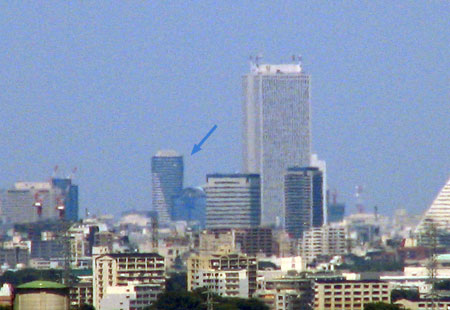
I got to thinking that maybe I could see my new apartment building from the top of my old one, and it turned out that I could. I had to wait for a day that was clear enough, but sure enough, there it was. I could not see it from my current apartment window–a hill blocks the way. I had to go up to the 10th floor and check it out from the landing. So here it is from there:

0607-Newplace0

0607-Newplace1

0607-Newplace3

It is, obviously, the building with the arrows pointing at it. You can see the distinctive balcony-style shift that produces that diagonal dark-light boundary across the bottom left. The big building to the right is the Sunshine 60 building.

The shot is not a bad one considering that the building is 23 km (14.3 miles) as the crow flies, or a 30 km drive.

As it turns out, you just can’t see my new apartment. It would be visible on the right lower side of the building. But do you see that low building blocking the lower right? That’s that goddamned Toyota showcase building, the same one that blocks my view of Mt. Fuji. As it would turn out, if you draw a line from Vanguard Tower to Mt. Fuji, my old apartment is directly along that path. (It’s true, I checked it out on Google Maps.) As is the fancy, gaudy, useless roof of the Toyota building. Thanks a lot, Toyota. Well, if I could make friends with the people on the other side of the floor of my new building, we could get a view… either that or just go to the observation deck of the Sunshine 60 and cough up the 600 yen or whatever they charge. Hey, I wonder, is there a place near or on the roof of my building they’d let people go? Probably not….

Categories: Ikebukuro Tags: by

Flag Day

June 15th, 2007 Comments off

Today (which is yesterday around the world) is Flag Day in the United States. No doubt a good number of politicians will be making good use of the day. Probably some of them will take the opportunity to resubmit anti-flag-burning laws. It’s interesting how the recommended, respectful way to dispose of an old flag is by burning; presumably the flag-burning laws allow for that, but simply outlaw specific burnings, as done in protest. And that’s what I wanted to comment on–what must be either utter cluelessness about what the flag represents, or the unmitigated opportunism of a politician to savage the core principles of America in order to gain a little in the polls.

Think about that dichotomy I just mentioned: a law that would allow burning for disposal but outlaw burning for protest. In short, burning itself is not being outlawed–instead, intent is being outlawed.* What’s more, it’s not violent intent, it’s not even hateful intent–after all, the people who burn the American flag in hatred are usually overseas, where our laws don’t apply; addressing this law to them would be impotent and stupid. No, the intent being outlawed here is simple: the intent to protest, the intent to maintain the freedoms and liberties inherent to the concept of America, the intent to practice free speech. In fact, the intent could even be one of celebration and respect.

* [Yes, I know your potential point about hate crimes and punishing intent; first, I would ask, if you oppose hate crimes for that reason, do you also oppose laws against flag burning for the same reason, and second, I see the hate crimes law not as outlawing intent itself, but identifying a more dangerous class of criminal as their harmful intent is toward a large group of people, and not just to an individual. But I digress.]

Now let’s focus a little on what the flag is. The flag is not just a piece of cloth, it has meaning–that’s what the whole brouhaha is about, in fact, and why some people object to flag-burning in the first place. But what does the flag represent? Does it represent the land, the physical fifty states embroidered on it as stars, or the original thirteen included as stripes? No. The flag represents America as an idea. And that idea is laid out in the Constitution of the United States of America and the Bill of Rights. The flag, essentially, is a symbolic representation of the Constitution and the Bill of Rights. Keep that one in mind, it’s important here.

When you have an idea so sacred and important as the Constitution and the Bill of Rights, the flag, no matter how sacred and respected it may be, takes a back seat. The flag, as a symbol, is not equal to, but rather is rather subordinate to the Constitution and the Bill of Rights. The flag is a symbol; you destroy it, and the Constitution and the Bill of Rights still remain, as does America. But if you destroy the Constitution and the Bill of Rights, the flag is meaningless, and America collapses.

Now, let’s be clear on the fact that American people who burn the flag are usually idiots. Not because they’re burning the flag in itself, but because of why they are doing it. These people usually think they are protesting our government in doing so, that the flag represents the administration in some way. Which, of course, shows their own ignorance: the flag does not represent any one president, any one bureaucracy, or any one modern administration. It does not represent the government. So when they burn the flag, they’re burning the wrong thing. Idiots.

Fortunately, Americans who burn the flag in protest are extremely rare. Really, when was the last time you heard of Americans protesting the government and burning a flag? Even before 9/11? As Aaron Sorkin wrote for the fictional Jed Bartlet, “Is there an epidemic of flag burning going on that I’m not aware of?” It’s not as if this is really an actual dilemma. It instead is manufactured by people who would just as soon urinate on the Constitution and the Bill of Rights if it meant more power for them.

But it’s not the politicians who are the real problem: it is, instead, the sizable portion of Americans who have embraced the symbolism, bought into the hype and the fanfare, and have left the core principles behind. And yes, by that I mean conservatives. Not all conservatives, but a hearty majority.

Conservatives say they love the Constitution, but they rail against it being expressed most of the time. The tendency is to see most of the Bill of Rights as being a sop to criminals or a liberal knee-jerk reaction. The Fourth, Sixth, and Seventh Amendments can be scrapped when we get too scared of the bad guys. The Fifth Amendment is a loophole for criminals to squeeze through, and the Eighth is a namby-pamby, bleeding heart sellout for those who love criminals too much to give them what they really deserve. And don’t even mention the Ninth Amendment, or else those liberals will go crazy with all the rights they think they have.

No sir, the only Amendment that conservatives seem to respect is the Second Amendment, and that part of the First Amendment that talks about religion, but only if it’s interpreted to mean that religion can go anywhere and do anything, and to hell with the commie atheists.

In short, conservatives often dislike and disrespect many or most of the core ideas contained in the Bill of Rights (and all to often the Constitution itself as well). But they love the symbolism, the pomp and circumstance, as long as we leave the troubling issues of what they represent outside the door.

And that is the core issue represented by the flag burning debate. The First Amendment of the Constitution of the United States of America was specifically designed to allow for free expression of ideas, whether they are expressed by speaking on a soapbox, drawing a political cartoon of a leader, or–yes–by burning a flag.

If we were to follow the lead of the opportunistic politicians who submit proposals to amend the Constitution to include a flag-burning amendment, we would be betraying the core principles upon which the Constitution was based. We would be killing the Constitution and the Bill of Rights. The flag would be protected, but the Constitution would be lessened, weakened, watered down. And as a result, the flag itself would lose an intrinsic value, an injury that could not be matched by the burning of a hundred thousand flags.

You burn a flag, I can make a thousand more, and each of those flags shines just as bright with meaning, perhaps even brighter since I will have proved that burning the flag cannot lessen it.

But you weaken the Constitution, I can’t make a thousand more of that. There’s only one, and when it’s injured, everything else collapses.

So yes, the people who burn flags are usually idiots. However, they are tiny in number, and their feeble acts of protest harm the nation not at all. The people who want to weaken the Constitution because they buy into the hype and the symbolism empty of meaning–these are the real threat. The people who think the flag is more important than the Constitution, these people are legion in number, and if successful, they could deliver a body blow to the freedoms they make a show of admiring. These are dangerous idiots.

As an ending note, I would point out that there is a third group: those who burn the flag not out of hatred, and not out of protest–but out of respect and celebration for what the flag represents. Watch the video below. It’s a scene from The West Wing, but in fact it is the closing act from Penn & Teller’s Vegas show, but with additional content added on. Penn & Teller’s original stage act can be seen here, but the clip below is just as, if not more, entertaining.

Categories: Political Ranting Tags: by

Tax Time

June 15th, 2007 3 comments

For those of you Americans who live here in Japan, just a reminder that today is the last day you can file your taxes with the foreign earned income exclusion under the automatic two-month extension. So if you haven’t filed for another extension already and you haven’t sent in your tax forms, time is running short. Don’t know how? No problem, here are the instructions that I wrote out three years ago. It has links to download the 1040 and 2555 forms, and a link to the 2006 annual average exchange rate (same link as the 2003 rate). As I stated then, I’m not a tax expert and you follow the instructions at your own risk. The forms are a bit outdated–the line numbers have changed a little–but with the illustrations, you can still follow it perfectly well.

Categories: Main Tags: by

XP Wow, Huh?

June 14th, 2007 5 comments

About a year ago, there were supposed to be about 400 million Windows XP users worldwide. Microsoft now says that more than 40 million copies of Windows Vista have been sold. That means that there should be about 360 million XP users and 40 million Vista users, very roughly speaking. About 11% of Windows users today should be Vista users.

According to my site’s stats, about 84% of my blog’s almost 25,000 visitors (that doesn’t include spammers or RSS feed numbers) in the past month were Windows users, so I have a pretty good sample pool to study. In Google Analytics, you can break down visitors by OS version. Over the past month, five months after the release of Vista, only 4.4% of this site’s visitors are Vista users. In contrast, 4.6% are Windows 2000 users.

0607-Ganumbers

Obviously, Microsoft is exaggerating things a wee bit. In fact, my stats may over-emphasize Vista users, if anything. Vista is likely more popular in the English-speaking world than elsewhere; it probably has not permeated China very deeply, for example. And as most of the visitors to this blog are English speakers, I should be seeing more than the average number of Vista users. Now, you might guess that since I write posts which are hostile to Vista, that might skew things; however, out of all Google visitors, only a few percent come from searches for Vista keywords, not enough to skew the results, and among Google visitors, the stats on who uses what versions of Windows remains consistent with overall visitor stats.

As I explained here, Microsoft has been caught cooking the numbers. Ever since early on in the Vista publicity cycle, Microsoft has been claiming amazing sales numbers–but those numbers included all the purchases of XP computers from late October, 2006, based on the idea that everyone who bought XP after that time got a coupon for a free copy of Vista. It doesn’t matter if they never used the coupon. In fact, a good number of those last-minute XP buyers were buying XP computers so they could avoid buying Vista computers. Sales of RAM were not nearly as much as were predicted due to Vista adoption, causing a glut in the market. While there was a post-Vista jump, sales weren’t as spectacular as predicted, nor as lackluster as thought before Vista was released.

More evidence of the numbers-cooking is that Microsoft is only counting their distribution numbers to retailers–not the actual sales to customers. Both this and counting XP purchases for three months prior to Vista naturally give an inflated view of VIsta adoption. The fact that Microsoft won’t release specific sales details which would back up or refute their general claims lends itself to the thought that Microsoft is not being fully honest here.

But the numbers that you see in the real world are more telling than anything else, and the numbers I’m seeing are not so hot for Vista. Apple saw a larger percentage of its users adopt the Tiger OS in the first month than Microsoft has seen its users adopt Vista in five months.

One more thing: yesterday, I attended a meeting at my school where we discussed what computer software the school uses in the labs. I was asked whether we should upgrade to Office 2007 to replace our aging Office 2000 software; since students will be using 2007 more and more often, and since the interface and file type is markedly different, I said that we should. However, they didn’t even ask about upgrading to Vista, and when I brought it up, they were obviously not inclined to do so.

But let me ask, to the 5% or so of my site’s visitors who have upgraded to Vista: what’s your experience? Is it positive, negative, or neutral? How does it compare to XP? Was it worth upgrading?

Categories: Computers and the Internet Tags: by

Vista Has Caught Up with Leopard? Ummm…

June 13th, 2007 1 comment

In my post on Leopard yesterday, I noted that the idea of hiding the “top secret” Leopard features from Microsoft seemed a bit silly because the new ones Jobs introduced seemed minimally similar to some Windows details from Windows 98, XP, and Vista. Specifically, I noted the transparent menu bar, basing a window viewing paradigm on a pre-existing media program, and document previews in icons. I am fairly sure, however, that I conveyed the limited way that these features resembled what was in Vista. Not that Vista had these features already, but that there were shades of the features in Windows; not that Apple was copying Vista, but that Microsoft already knew about a few of the design elements and had integrated them in Vista to a different or lesser degree.

Well, some person with a tech blog at ZDNet had the same idea, but combined a certain cluelessness about OS technology and ignorance about when things have been released, and combined that with the act of taking a weak idea to a ridiculous extreme. Essentially they are suggesting that Leopard is both copying and playing catch-up with Vista.

I know it’s kind of like picking a fight with someone you know you can wipe the floor with, but (a) I felt there was enough of a connection with what I wrote yesterday that I should clarify my own take on the idea, (b) this person has a blog on a noted tech site and many will take her seriously, and (c) it’s fun.

Here are the ten points Foley, the ZDNet blogger, made about how Vista is “pretty darn up-to-date” with Leopard:

1. New Leopard Desktop: Not a whole lot different from Vista’s Aero and Sidebar.

First of all, she seems to be comparing the Dock with Sidebar. What would a car aficionado say about someone who can’t tell a steering wheel from a tire writing car reviews?

She is apparently basing the comparison with Aero wholly on the fact that Apple’s menu bar is semi-transparent, which Vista window frames are also. This is like saying that a beat-up old Chevy is like a new, top-of-the-line Mercedes because they both have the same color paint. As I noted, the eye-candy transparency is irrelevant. The Dock is what puts the Mac’s OS way ahead of Vista, and though most of the new Dock features are also eye candy, there is nothing in Vista to match the functionality of the Dock. Stacks may be simply a nicer way of viewing a pop-up menu from the Dock, but I don’t see Vista giving you the same functionality that Mac users take for granted in this years-old technology.

In essence, Foley only noted that the new additions to the Desktop kind of reminded her of the style used in Vista, while ignoring (or being ignorant of) the pre-existing technology in OS X that the Mac has had for years but Vista still hasn’t caught up with.

2. New Finder: Many of the same capabilities as the integrated “Instant Search” in Vista (the subsystem that Google is trying to get the Department of Justice to rule as being anti-competitive). The new Leopard Coverflow viewing capability looked almost identical to Vista’s Flip 3D to me.

Ummm… where do you start? First of all, Spotlight has been in the Mac OS since Tiger came out more than two years ago; Vista was a latecomer to the game, and even copied Apple’s graphic layout for the feature, right down to the search icon.

CoverFlow is a pre-existing iTunes feature, and is similar to Flip 3D like an accelerator is to a brake. Flip 3D is a poor copy of Apple’s Exposé; it is unavailable in the Vista Basic versions, only shows windows, not files, and does so in a much more limited way. CoverFlow is a file-viewing paradigm created more than two years ago by a Mac developer and was purchased by Apple and implemented into iTunes four months before the public release of Vista.

3. QuickLook: Live file previews — just like the thumbnail preview capability available in Vista.

As I noted in my post yesterday, QuickLook leaves Vista far behind. Both Mac and Windows have been offering file previews in icon views in limited fashions for a few years now. For a while, Windows had a slight advantage because XP’s icons would preview some text documents and web pages in addition to the image and movie icon views that both operating systems were able to preview. But that was the limit for anyone–a small icon preview. In fact, the Mac OS had the upper hand on Windows in one respect for a while because it was able to preview movies in real-time without opening an app, something Windows caught up with in Vista a few years after the Mac had it.

QuickLook leaves both Vista and Tiger in the dust. Not only has it enhanced icon previews which beat out Vista, but it allows you to view almost any document full-size and viewing all pages and slides without opening the app that created it first. Vista can’t even come close to that.

4. 64-bitness: Leopard is the first 64-bit only version of a desktop client. Vista comes in 32-bit and 64-bit varieties. And most expect Windows Seven will still be available in 32-bit flavors. Until 32-bit machines go away, it seems like a good idea to offer 32-bit operating systems.

Foley apparently wasn’t listening when Jobs made the crystal clear point that Leopard integrated both 64-bit and 32-bit into the same OS. Hell, Jobs even did a demo showing both kinds of apps running side by side in Leopard. Foley must have been out buying nachos at the time, or else was snoozing during the demo, and later jumped to conclusions about the “64” icons she saw.

Here, Leopard is clearly superior. Just like Leopard doesn’t have differently-priced “Home,” “Business,” “Premium,” “Enterprise,” or “Ultimate” versions, it also does not have separate 32- and 64-bit versions. Everything comes in one package for one price–and that price is about equal to the lowest-priced upgrade version of Vista.

5. Core animation: Not sure what the Vista comparison is here. The demo reminded me of Microsoft Max photo-sharing application. The WWDC developers attending the Jobs keynote didn’t seem wowed with this functionality.

It might help to have even the slightest clue about what Core Animation actually is. Foley is comparing a graphic engine built in to the OS with some photo-viewing app that she thought resembled the sample program that Jobs ran to highlight what Core Animation could do. How many times can I repeat the word “clueless” before it gets too repetitive?

6. Boot Camp. You can run Vista on your Mac. Apple showed Vista running Solitaire in its WWDC demo. But I bet those downloading the 2.5 million copies of Boot Camp available since last year are running a lot of other Windows business apps and games.

Okay… so Foley is saying that Windows Vista has caught up with the Mac OS because Mac users are able to use tons of Windows apps? What exactly is Foley trying to prove here about Vista and Leopard? She apparently is bothered that Jobs took a jab at Windows by suggesting, jokingly, that Solitaire is a big reason why you might want to run Windows on your Mac. So first, can’t Foley recognize a joke when she sees one, and second, how does the Mac’s ability to run Windows apps make Vista seem “up-to-date” with Leopard?

7. Spaces: A feature allowing users to group applications into separate spaces. I haven’t seen anything like in in Vista, but the audience didn’t seem overly impressed by it.

Foley did note that this was only her second Mac keynote, and the other was in 2002. OS apparently she was not aware that Spaces was introduced ten months ago, which is why nobody was wowed by it–they saw it long ago, and as developers, have been using it for about as long. If Bill Gates demoed Internet Explorer 7 to a Windows crowd today, he’d get the same reaction.

But the interesting point here, as with point #6, is that Foley seem to have forgotten her thesis statement, that Leopard looks like Vista. Saying that a new feature in Leopard, which does not exist in Vista, did not excite the crowd does not support that thesis very well.

In any case, Spaces did wow the crowd 10 months ago, is a great feature, and does not exist in Vista.

And by the way, Foley writes a tech blog which focuses on Microsoft on a tech web site, and she says stuff like “I haven’t seen anything like in in Vista” as if it might be in Vista but she hasn’t found it yet?

8. Dashboard with widgets. Isn’t this like the Vista Sidebar with gadgets?

Oy.

Okay. First off, Dashboard, like Spotlight, has been around for two years–Sidebar with Gadgets is a shameless copy of Dashboard with widgets. (Okay, granted, Dashboard is a shameless rip-off of Konfabulator. Still.) Second, Jobs was showing how you can make your own widgets either dead-simple with Web Clip, or more professionally but still very easily with DashCode. As far as I know, Sidebar gadget development is still only something that professionals can handle, while it looks like non-programmers like me would be able to handle DashCode–and anybody’s grandmother could probably master Web Clip in a few minute’s time.

9. iChat gets a bunch of fun add-ons (photo-booth effects, backrops, etc.) to make it a more fully-featured videoconferencing product. The “iChat Theater” capability Jobs showed off reminded me of Vista’s Meeting Space and/or the new Microsoft “Shared View” (code-named “Tahiti”) document-sharing/conferencing subsystems.

iChat is an app that primarily is for consumers, not business people, but integrates the features Foley is talking about easily into one app–whereas Microsoft seems to have it partitioned out into several different apps. Microsoft does have an advantage as far as making it business-friendly, but not in terms of making it user-friendly. I checked out the “SharedView” app, and while it allows for collaborative document sharing, it is still an early beta and does not as yet include integrated audio or even text chat features. For that, you have to use a separate chat program or pick up a telephone. So even including separate Windows apps not integrated into the OS, Vista is not exactly “caught up” with Leopard.

10. Time Machine automatic backup. Vista has built-in automatic backup (Volume Shadow Copy). It doesn’t look anywhere near as cool as Time Machine. But it seems to provide a lot of the same functionality.

But that’s the difference, isn’t it–the Mac OS, even when it provides the same basic feature, makes it much more easy and fun to use. Both a beat-up old Chevy and a new, top-of-the-line Mercedes Benz will get you from home to the mall and back–but which one would you want to drive?

Seriously, ZDNet out to review whether or not they want someone who does such shoddy reporting to have a blog on their site. It’s pretty embarrassing.

Categories: Mac News Tags: by

It Would’ve Been a Lot Simpler If They Gotten This Straight from the Start

June 12th, 2007 1 comment

KDDI called me back again today, this time with a message that they would be delivering the modem and router to my new address two weeks before I can move in, so I would have to contact them in another department in order to get a new delivery date set up. This annoyed me, as it would seem to make things more difficult–that I would have to wait until a delivery could be arranged after I’d moved in, and I was moving in on a Friday, late Friday at that. Maybe no Internet for the first weekend.

So I called the number they gave and spoke through a translator–but this time everything got a lot simpler. These people said that because of the way my building was constructed, I won’t need any kind of modem or router–that instead, I would only have to plug an Ethernet cable into the LAN port in the wall directly, and that would be it. All the KDDI business would be done by June 14th, and my presence would not be required. All would be ready long before I moved in, and I would have instant 100 Mbps fiber optic Internet the moment I walked in the door.

Which is exactly what I expected from the beginning, and exactly what I told them they should be able to deliver, right from the start. I told them that the mansion was brand-new, that it had FTTH, and that there were LAN ports and even a modular fiber connector right there in the room. But they wouldn’t listen. Instead, I had to wait through a week and about half a dozen different stories about how things were going to work, before finally they told me what I expected to hear from the start.

Now I’m afraid to talk to them again, for fear that they’ll revert to some other story….

Categories: Ikebukuro Tags: by

Leopard Suffers from High Expectations and the Wait

June 12th, 2007 4 comments

While the new Leopard seems to be a snazzy new OS with some very cool features, it unfortunately suffers from overly high expectations, and Steve Jobs can only blame himself for that. When he announced that there were “top secret” features that had to be hidden from Microsoft so they wouldn’t copy them too early, people took him at his word, and expectations were sky-high. Windows apps run native on the Mac OS! A brand-new, world-changing windowless interface! A completely reworked Finder with 3-D animation everywhere! Something new and mysterious and unexpected and amazing!

Ummm… well, not quite.

The thing is, Leopard is cool. Stacks, QuickLook, Coverflow–the Finder has been reworked. But these don’t really seem like “top secret” features that had to be hidden for ten months so that Redmond wouldn’t copy them. A lot of it was in the name Jobs used last year–“top secret.” If he’d just called them “extra features,” then expectations would not have been quite so high. The long wait has also been partly to blame, and ironically, the early preview last year spread out the news a bit too thinly. Had all these features been released at once, it would have been as satisfying as any Mac OS release, maybe even more.

But here’s another bit of irony: while most of the “top secret” features that needed to be hidden from Microsoft are indeed new… enough of them are reminiscent enough of existing Windows features as to actually be a bit embarrassing in light of their having to be hidden so Microsoft wouldn’t copy Leopard. Ulp.

In any case, the “top secret” feature was… a new Finder. A lot of people expected that. Let’s take a look at the details. Quite a bit is eye candy, but most of that is as irrelevant as the new eye candy in Vista. There’s the new Dock with the “floor” which reflects not only the icons in the Dock, but even windows that get close to it. There’s a semi-transparent Menu Bar which in itself is reminiscent of Vista’s semi-transparent window frames. This is not so exciting.

0607-Newdock

The interesting stuff comes with functionality, and that has been improved. Interestingly, just like Windows 98 integrated Internet Explorer into the OS and made its windows act like web pages, Apple has done a similar thing, but this time iTunes was the model. The windows in Leopard not only sport the same non-brushed-metal look-and-feel, but the sidebar has changed to fit the iTunes theme–and even CoverFlow is now integrated. You know, that new iTunes thing which makes album covers flip by in 3-D.
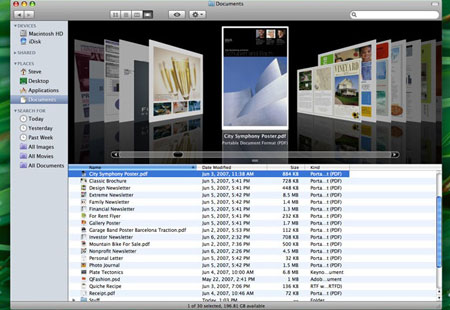
0607-Coverflowfinder

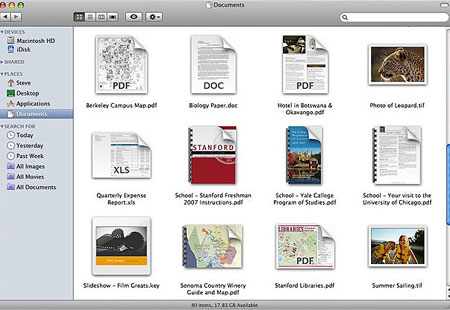
I was never excited by CoverFlow because it’s so hard to get album cover art for all of my archived music, so most of my “covers” are just blank. But that should be different in Leopard’s Finder, mostly because of another new Finder feature: QuickLook.
0607-Quicklook1A

QuickLook is another feature which is a bit reminiscent of Windows. In Windows XP, a lot more documents were available as previews in icon form than were available on the Mac. Web pages are one example; they would render in miniature in the icon in XP, something that Tiger would not do. The Mac could preview images and movies, but not much else. So XP was ahead in that minor respect… and now the Mac is.

Leopard takes document preview to an almost ridiculous extreme in the files it previews. It allows thumbnails of every kind of document… or so we are led to believe. The demo only shows images, PDFs, movies, and iWork & MS Office files. How other icons will render is unclear–for example, how about a FileMaker Pro database file? A DiVX movie? Even a folder? They didn’t show what a folder would look like in QuickLook. I suppose that this is stuff we’ll hear a lot more about very soon as Leopard will be open to more public scrutiny now… but the omissions worry me a bit.

But thumbnails are just the beginning of QuickLook; the real magic is the ability to preview files, full-size, without opening the application. just select an icon, tap the space bar, and it zooms up to show you not only the top page/image, but the whole file, which you can go through page by page, slide by slide, without having to wait for the app to open. A very nice, time-saving feature to be sure.
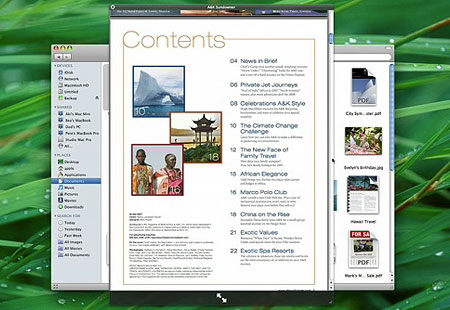
0607-Quicklook2

Again, the $64,000 question is, will QuickLook work on all documents, most documents, or just a limited set? Can developers update their apps so as to be QuickLook-friendly? What are its limitations? Stay tuned.

Another new Finder feature is one that has been rumored for many, many years: Stacks. And while this is a cool feature, from the demo it looks like the feature is limited to the Dock, which therefore limits the number of stacks you can have before your Dock becomes ridiculously tiny. But in concept, it’s a snazzy addition, and even in limited fashion, it could be a bit useful. The idea is essentially a way to get multiple-file QuickLook in the dock, probably not feasible in the boring pop-up menu form used now. Instead, a stack will display either as an arc of icons spread out, or as a dark Spotlight-themed preview pane:
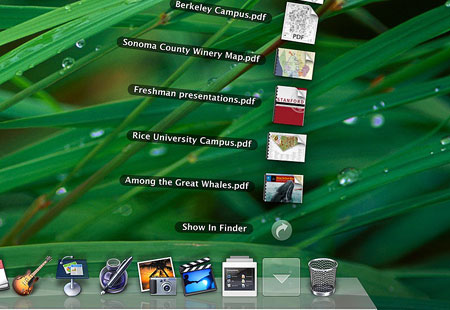
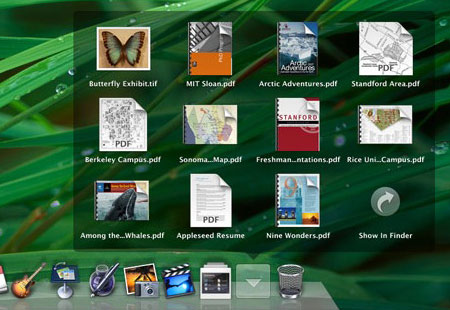
0607-Stacks1

0607-Stacks2

The final big new Finder feature is called “Back to My Mac.” This is part of the new shared-folder improvement, which allows the new Finder features to be used even when browsing files on other computers. Hopefully, they’ve improved on that general feature as well, and when a shared folder is removed before being ejected from the Finder, it won’t freeze the OS for two minutes like it does now… hopefully. They also included a “Share Screen” feature in shared computer finding, which presumably allows full remote access of the other Mac, seeing what their screen sees, just like was advertised in the new iChat.

But the “Back to My Mac” feature is kind of nice… if you have the $99/year .Mac service. Yep, another new feature that’s exclusive to that annoying paid service, which is loaded up with a myriad of marginal features that almost make it worth it to buy into, but not quite. “Back to My Mac” certainly fits that concept. It is kind of neat, actually–every time your Mac devices get a new IP address to connect to the Internet, that address is updated in your .Mac account so that you can always access your Mac from anywhere you can access .Mac on another Apple computer.

But sometimes features lay in waiting, almost capable and prepared, their potential hidden within established hardware and software… so they can jump out at you without warning. Sort of like what rental movies would be for the Apple TV. The “Back to My Mac” killer feature that I see coming down the road: access your remote files via your iPhone. Your iPhone won’t have to have much storage, because you could just connect to the Internet from your iPhone and access your Mac at home, just like that. Now that would tip .Mac into just enough relevancy to be worth a hundred bucks a year.

Another possible hidden potential is one of the unmentioned points of the keynote: iLife and iWork. There is always the potential that the apps in these suites could be made to work with the iPhone, furthering the mobile’s productive potential. But since none of these apps were even mentioned in the keynote, we’ll have to wait and see.

So of all the new “top secret” Finder features, some are just eye candy (the new Finder appearance, iTunes theme, CoverFlow, Stacks) and some are true productivity-enhancing features (QuickLook, Back to My Mac).

But here’s the real question, and one that will hopefully be answered soon: did they really Fix The Fracking Finder? Did all of those little annoyances get worked out? Did “View Options” get consistent? Will window-resize work properly now? Stuff like that? Or did we just get a few new features tacked on without a significant rewrite? We’ll have to wait and see–Jobs didn’t talk about those things, either because they were not big “features” or because they didn’t happen.

A lot of Leopard’s new feature set was under the hood as well. Core Animation still looks to be a big draw, and 64-bit compliance is very much improved for better performance.

There is also a lot more to be seen in Leopard that wasn’t shown, like how SpotLight has been improved. Do they allow searching by size, or sorting by it? That would be a nice addition. Another thing to wait for in the coming days, unless Apple has still clamped down on reporting users’ experiences as much as they have until now.


But the new Finder isn’t the only news. Safari also made some headlines, most notably because it’s now ported to Windows! How well it will work there, and how it will stack up to FireFox and Explorer 7 is another question. It’s now up to version 3 (beta), and has many of the new features touted last year, including text field resizing, re-arrangeable tabs, and inline search. It now claims to load things twice as fast, and it does seem to be true.

Safari 3 for Windows may also be a nod to the iPhone being released, as the iPhone uses Safari a lot–not just for browsing, but also for application support. In fact, while Apple opened up the iPhone to 3rd-party apps, they hedged on the security issue by making them run through Safari; the Windows release of the software may be tied into that issue, as well as being an attempt to challenge Explorer in the browser war. With interoperability between Apple apps and its cool new accessories, Apple could gain quite a bit of ground.

However–and this is a really big “however”–I will probably be uninstalling the beta version 3 I grabbed this morning, and going back to version 2 in a few days, despite how much I really love the tabs and the text field thing. Why? PithHelmet is disabled. That’s a huge thing for me. Once I installed version 3, I realized how much I’ve been taking PithHelmet for granted, as all of those goddamned annoying little ads and flashing images came back with a vengeance. I never realized how much they had proliferated, since PithHelmet had been blocking them so faithfully.

So until PithHelmet version 3 comes out, I’m sticking with Safari 2. But I will definitely see to it that Safari is installed on the school’s XP computers, and see how the students like it–not to mention that I’ll check out for myself how it performs on Windows.

Other Leopard news: Fast-switching in Boot Camp. Instead of fully rebooting between the two systems, Boot Camp now allows for “Safe Sleep” on the Mac and “Hibernation” on Windows–essentially saved states of the systems which allow for leaving apps running and windows open, and switching more quickly between the two. Not the Parallels-killer some were expecting, but a nice improvement for a free OS component.

Other than that, most of the features are already known: Spaces, Time Machine, and upgrades to Mail, iChat, iCal, Automator, and a few more.

One thing that was not made fully clear: some are reporting that we now know Leopard’s “full” feature set… while others hint that other features still remain hidden. So what’s up? I don’t think that Jobs even mentioned the whole “top secret” thing… and although it’s a long shot even to the point of being a pipe dream almost, is it possible that we have yet to see all that Leopard offers? Will there be more?

Two notable omissions from today’s keynote: iLife and iWork. There are always upgrades to those with a new OS, and yet not a peep from Jobs about these two. That so far is the biggest hint that there is more to come, unless Apple decides to release the new versions of both suites at a later time, like at the Macworld ’08 in January next year.

Or possibly were there features that Apple hoped to include but couldn’t make it to the final cut? Maybe Apple suffered from the same problems Microsoft saw in Vista, having to cut what they wanted to add, but Apple benefitted from its secrecy. Maybe Apple is unsure how the iPhone’s keyboard will work with the general public, or there might be other issues they could make work quite yet that would hold back the release of these apps. We may not know, at least not for some time.

But as we see it now, Leopard will, without question, be worthy of the $130 price tag, and will definitely be worth the $70 price tag I’ll get as an educator.


Categories: Mac News Tags: by

Apple TV Movie Rentals

June 11th, 2007 1 comment

And the other shoe drops… if the rumors are true, that is. Since the Apple TV was rumored, I figured that it was useless just as-is–after all, you can string an RCA cable from your computer to your TV and get the same effect. I had trouble believing that people would pay $300 or $400 for what you could accomplish with a $20 converter and a $10 cable.

However, in a discussion with my family, the idea of movie rentals came up, and suddenly the Apple TV made sense. Without the ability to either record TV like a TiVo or rent movies, the Apple TV just wouldn’t be worth it. But as a DRM box to hold movies and videos, the Apple TV could be enough of a nod to piracy-nervous studios but DRM-transparent enough so that consumers won’t mind.

And now it looks like that early guess was spot-on: Apple is reportedly in talks with the studios about securing their movie content for rental purposes. The reported deal would allow for a 30-day rental for $2.99, and would allow the movie to be viewed on an iPod or iPhone as well as your computer and TV. That sounds pretty good to me; though I never considered buying an Apple TV before, this could tip the balance for me.

It might even have a bonus feature for me if it works the same way as the iTunes music store: I live in Japan, but can use the U.S. music store if my credit card delivers to a U.S. address. If the same is true with the movie rental service, then I could see movies in Japan sometimes even before they get to movie theaters here. That would be nice for me, better if the films had the option of subtitles for Sachi (she does well even with English subs).

This is the killer app that Apple needs to get their media box off the ground. The timing of the rumor’s release is a bit suspicious–it could be something that Jobs will uncover tomorrow at the WWDC… or not.

In the meantime, there is a German site claiming to have a complete outline of tomorrow’s keynote (English translation here). Having read it, I am pretty sure that it’s a fake. It is essentially a rehash of all the rumors that have been flying around for several months now, with a few extra products that make little sense. In any case, the real keynote begins in about 12 hours, so we’ll know soon enough.

Categories: Mac News Tags: by

Moving Companies

June 11th, 2007 3 comments

0607-Movers
The rather goofy-looking Hero Shot for one of the moving companies.

When I moved to Inagi from Saginomiya in Nakano Ward, I did it without a moving company. Of course, back then, I had a bit less stuff. Also, my brother and another person helped out with the move. Still, it was not really the most fun experience, especially since my place in Inagi has the most stupid elevator arrangement. For some weird reason, the elevators here only stop at the half-floor, so wherever you stop, you half to climb up or down half a flight of stairs. Why they did this I have no idea; not having the elevator stop level with the apartment doors seems like they wanted to make it hard for disabled people or people moving in and out.

In any case, Sachi was arranging for a moving company herself, and so I got introduced to that whole world. I had never used a moving company before, figuring that I could save a lot of money. But to have people come in and take care of the hairy stuff is really appealing–especially since I have two air conditioners which have to be taken down (one of them has to be installed in Ikebukuro as well). So Sachi and I contacted three different movers and had them come in to do estimates.

That’s how it works: you look through the untold number of moving companies in Tokyo and figure which ones might be the best candidates. Then you have them come in to your place and size things up. Thank god for Sachi: she’s able to talk to the people without the language barrier making things twice as long. I don’t know if I would be able to communicate all the stuff that would have to be communicated if it were just me. Plus she has experience with this.

So the guy comes over and you walk through the place, pointing out what you need to have moved and what not. He takes a tally and then you sit down, and he writes out an estimate, or mitsumori-sho. You discuss all the particulars–the hows, whens, whats, and wheres. How much distance from the elevators to the door so they’ll know how much floor and wall covering to set down, that kind of thing. In the end, he completes the estimate and gives it to you. Then you compare what you get from different places and figure out which one to use.

0607-Movingmitsumori

Of course, the building we’re moving into isn’t making it much easier. They set a limit on the size of the truck–no bigger than 2 tons, which is the smallest truck most moving companies have, a tiny little thing. I would have to get two trucks from the moving company to do it all that way, which would add several hundred dollars to the moving tab. Also, they don’t allow moves on Sundays, or on any day after 7:40 pm. The Sunday thing doesn’t affect me too much, because I have Mondays and Fridays off this semester (and Friday moves are actually cheaper). The 7:40 thing is a bother, though, as moving companies charge a lot less for evening moves. But I may still be able to get the discount if we start from mid-afternoon.

Still, it’s working out pretty well in the end. The movers will move all the hard stuff, take care of the air conditioners, and get all the heavy and delicate stuff taken care of. What’s left over, I’ll cart over myself in a van, with a friend if I am able to get somebody to help. For what the moving company is doing, so far they say it’ll cost a tad over 60,000 yen.

So far, so good. Another three weeks and I’m outta here.

Categories: Ikebukuro Tags: by

43

June 10th, 2007 10 comments

At last I’m out of the “death” age. In Japanese, “42” can be pronounced “Shini,” which is the same as “death.” So I dodged a bullet there, having turned 43 a few days ago. (The age 33 is probably no better, being homonymous with “sanzan,” or “misery” in Japanese–which is why there are no rooms 33 or 42 in Japanese hospitals, just like there are few or no 13th floors in the U.S.) Here is the proof of my passage: my birthday cake, which Sachi so kindly arranged:

0607-Cake0

0607-Cake1

0607-Cake2

For Japanese cake, it was excellent; Sachi said the bakery was famous in the area, and I don’t doubt it. But Japanese cakes are made with whip-cream frosting; frosting based on powdered sugar and butter are pretty much unheard of in Japan–too sweet. Nevertheless, the cake was delicious, and even better was the message board–white chocolate… mmmmm….

We also had a nice couple of dinners. For my birthday, some fancy marbled steaks and Sachi’s famous salad (or at least it should be famous)…

0607-Dinner1

We did no worse tonight, two days later, with a very satisfying yakiniku layout, accompanied by another of Sachi’s great salads:

0607-Dinner2

But two nights ago, on my birthday, I got the real treat. As with most men in my family, I am notoriously hard to buy a present for. And yet, Sachi hit the whole gift thing nail-on-the-head, getting me a very cool new backpack. I swear, just the previous day, I had been saying to myself, time for a new backpack, but where can I find a good one? And there was Sachi, with just the answer.

0607-Eccobp1

I’ve got it sweet here.

Categories: Main Tags: by

The iPhone Keyboard

June 9th, 2007 8 comments

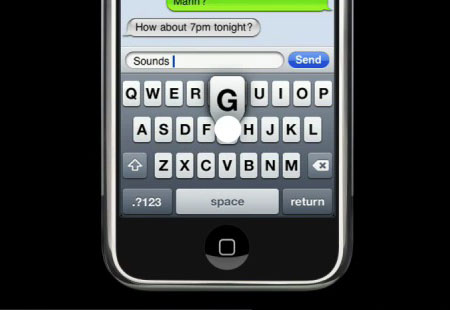
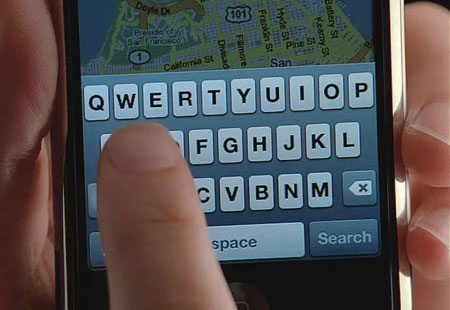
One of the chief criticisms that has been going around about the iPhone is the usability of the keyboard. One recent such rant was made by John Dvorak, who claimed that an unnamed “industry insider” says that the keyboard is a “disaster,” and that “people are going to return the phone in droves,” as many as 20% of buyers. But then, Dvorak is a self-proclaimed Apple troll, the Mac world’s Ann Coulter. Still, others have express concern over how hard it might be to use the keyboard. A few images of the keyboard below, and a demo of how it is used from Apple’s web site.

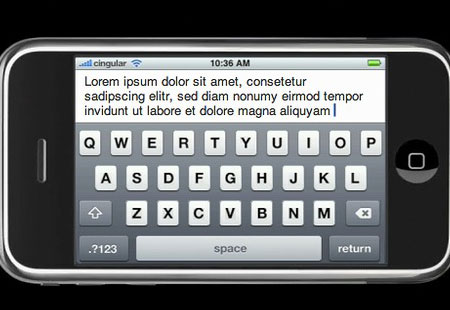
0607-Ipkb-1

0607-Ipkb-2

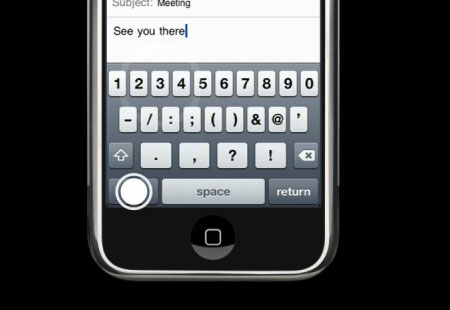
The interface is pretty simple: you have a virtual keyboard on the screen which you can use with one or two fingers. As your finger moves over the keyboard, the selected key grows a tab that appears above your finger, so that the view of the letter is not occluded by your finger. (Apple might want to think about adding transparency to the pop-up so that the letters behind it are not constantly masked, causing trouble for us hunt-and-peck types.) There is a shift key and a numbers-symbols key to allow for non-lowercase letters; the numbers-symbol button replaces the regular keyboard with all ten digits on top and thirteen common punctuation marks and symbols below.

0607-Ipkb-3

Presumably, hitting the shift key here will allow access to other symbols, but I can’t find a demo which shows that.

The iPhone keypad also has error correction for hasty mistyping (how well it works stands to be seen), and an auto-capitalization feature when you enter a new text field or hit the “return” button. The error-correction feature might also double as an auto-complete, but I’m not sure on that one.

So: with all of that established, how hard will the keyboard be to use? Of course, it’s almost impossible to tell until you get your hands on one and try, and then there’s the fact that everyone is different and so people will disagree to a certain extent. But from what I can see, I have the feeling that, while it might take a little getting used to, it should be a good system. I was put off originally by the pop-up tab for the key about to be pressed, but upon reflection I think it’s a positive; although it would obscure the two keys above the key to be pressed, it serves to un-obscure the key to be pressed and as such acts as a visual confirmation that you’ve got the right key. The auto-correct would seem to handle whatever errors are made anyway. I could imagine becoming pretty adept at it, typing not as fast as a standard keyboard, but still very quickly.

But here’s the real test: how does it compare with other real-world options? When you compare this to the standard numeric-keypad system, there’s simply no contest. For example, using the number keypad, the “7” key is “PQRS,” with lowercase and uppercase either rotating (p-q-r-s-P-Q-R-S) or using a shift key; in such a case, typing a capital “S” requires either five or eight keystrokes–which is why I never enter text into my cell phone unless I am absolutely forced to. I know that one could get adept at it, but it still requires a lot of extra effort even if you do. Most cell phones that I have seen have this keypad, and I cannot imagine anyone actually preferring it over the iPhone’s keypad, unless they had some sort of unusual and highly annoying difficulty with the iPhone.

An additional problem with the alpha-numeric keypads is that one sometimes must manually advance the cursor. For example, if you want to type the word “cab,” all the letters are on the same key. That means that you have to punch three (or six) times to get the “C,” and then you must press the cursor-advance key to get the “A” because pressing the same key again would just be considered an attempt to repair the original entry.

Then there are the alternatives to the standard keypad, which offer more buttons while still keeping with the original size constraints of the normal cell phone. Take these two for example:

0607-Twokeyboards

The one on the left (these links are to web pages where I got the images from) is an intermediate solution, reducing the number of letters per key to two instead of three, and adding the shift key. This helps a bit, but still is not as good as the iPhone. While it reduces the number of steps from the normal keypad, it does not do it as well as the iPhone does as there are still more strokes. Also, the phone has compromised a bit in making the keys a bit smaller and the phone a bit wider. I can’t see this as a preferable system, again unless a user has some unusual problem with the touch screen. This keypad also still suffers from the same-key-different-letter problem, requiring an advance-the-cursor keystroke sometimes.

The one on the right adds an almost piano-like white-and-black-keys solution, in alphabetical order. This could be better or worse than the standard keypad, depending. The buttons are tiny, and are laid out in a nonstandard fashion; though alphabetical, it is something a person would have to get used to–which means that it is no better than the iPhone in that respect. I really can’t see this as outclassing the iPhone, either.

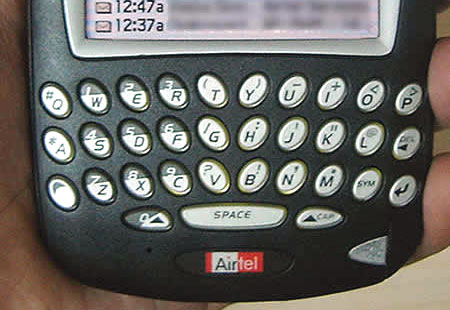
Then we get the Blackberry solution:

0607-Blackberrykp

I think this is what people are thinking about when they complain about the iPhone’s keypad. Instead of comparing the iPhone to most cell phones, they instead compare its keyboard to the best keyboard on the market, while ignoring other considerations. The Blackberry keyboard would seem to beat out the iPhone’s, again except for unusual situations or personal preference. The problem is that the Blackberry has other faults, chiefly the size and appearance, something a full comparison would have to take into consideration. Comparing the form factor between the two alone would, for most people, leave the iPhone the clear winner. So, if we take all aspects–including browsing abilities, music playing, photo taking and viewing, email and texting, syncing with a computer, menu interface–everything–into account, does the Blackberry still win? Again, it comes down to personal preference.

There are also slide-out keyboards, and maybe some people prefer them–but they would not only make the phone thicker and cause other design problems, but they would be an additional moving part, something extra that could get broken more easily.

However, the iPhone could possibly cancel out slide-out keyboards’ and the Blackberry’s chief advantage–the keypad–with a simple software fix: use its ability to change from portrait to landscape via motion sensor, and apply it to the keyboard, as this Photoshopper demonstrates:

0607-Landscapeiphonekp

Or maybe not–maybe some people prefer the tactile response of buttons. Maybe the landscape margins on the iPhone would be considered too much of an obstruction. But it could work.

Additionally, the iPhone, as a touch-screen phone, has the unique advantage of being software-reconfigurable. What if you, like my brother, is a Dvorak-keyboard (not that Dvorak) user? An iPhone could, potentially, make that switch easily, as it uses the Mac OS which can make that change as well, or it could change the keyboard language (e.g., Greek, Russian, etc.).

All in all, I think the pre-release negativity about the iPhone’s text keypad is premature and probably misplaced. Maybe it’s just the easiest thing for Apple critics to kvetch about, one of the only known things aside from the price that the device could be criticized about, ergo the attention to it.

We’ll see in a few week’s time anyway, won’t we?

Categories: Mac News Tags: by

Iraq Complied with Weapons Inspectors before 2003 War

June 8th, 2007 2 comments

Here’s a question to which the answer is worth clarifying: did Saddam Hussein block weapons inspectors from inspecting any sites in the 2002-2003 buildup to the Iraq War? Because that’s definitely the impression that has been given. I have stated several times on this blog that Hussein let the inspectors in and that they found nothing, but I believe that the general impression–given by Bush, of course–was that they were not allowed to inspect fully, that they were blocked, impeded.

However, that does not seem to be the case. From the Arms Control Association:

UN weapons inspectors worked in Iraq from November 27, 2002 until March 18, 2003. During that time, inspectors from the International Atomic Energy Agency (IAEA) and the United Nations Monitoring, Verification, and Inspections Commission (UNMOVIC) conducted more than 900 inspections at more than 500 sites. The inspectors did not find that Iraq possessed chemical or biological weapons or that it had reconstituted its nuclear weapons program.

Although Iraq was cooperative on what inspectors called “process”—allowing inspectors access to suspected weapons sites, for example—it was only marginally cooperative in answering the questions surrounding its weapons programs. Unable to resolve its differences with Security Council members who favored strengthening and continuing weapons inspections, the United States abandoned the inspections process and initiated the invasion of Iraq on March 19.

So the inspectors were given full access and were not blocked in any substantive way, and inspected hundreds of sites suspected of producing and/or storing WMD. Furthermore, “UN inspectors [were] given the authority to prohibit the movement of vehicles and aircraft around sites to be inspected and [had] the right to interview anyone they choose, without Iraqi officials present, in any location they wish[ed].” Iraqi compliance could be confirmed by satellite and aircraft observations. So it is not as if the Iraqis were able sneak huge or even small amounts of WMD from sites to be inspected.

No WMDs, nor any trace of a WMD program, were found.

What was then the contention was that Iraq did not accurately account for WMDs that had been produced at an earlier stage. Iraq submitted a rather massive report, but this was judged to offer little new information.However, that judgment was made by the Bush administration in a way that cannot be verified objectively; the full report that Iraq submitted has still today not been made public. Furthermore, even though some stockpiles were confirmed to exist as late as 1998, weapons inspector Scott Ritter stated that not only had Iraq’s WMD program been 90-95% verifiably eliminated, but that the “stockpiles” had a shelf life short enough as to render them ineffective by 2003, when the war started. According to Ritter, “Even if Iraq had somehow managed to hide this vast number of weapons from inspectors, what they are now storing is nothing more than useless, harmless goo.”

People talk about the intelligence reports as being the damning things, but the inspections were supposed to be the real benchmark–and those produced nothing, despite cooperation from Iraq. After discounting all that could be verified, there was virtually no room left to believe that Iraq had any WMD program that could be a threat to us.

If you believe differently, kindly point me to an objective source of information that shows otherwise.

Categories: Iraq News Tags: by