Amongst the hullabaloo surrounding the iPhone and iOS4, not many people probably noticed the new version of Safari that Apple released in its wake. Safari 4 was less than impressive, focusing more on flashy graphics that caused more trouble than they were worth. I never like the “Top Sites” spread, it took too much time and told me nothing I didn’t know; other “improvements” were so unpopular that software was released to disable them. The top-heavy tabs were an instant failure, and I doubt many people used the cover flow feature in history or bookmarks. It was as if Apple took the uncharacteristic role of copier, trying to add features some people liked in Chrome or Firefox. At the time, I commented that “the feature I like most is the ability to easily uninstall it and have Safari 3 back.”
Well, now Safari 5 is out–and Apple is back in form, delivering some key new improvements in the right areas. Three new points stand out: Extensions, greater HTML5 support, and Reader.
First, Extensions. While this is a great feature, the real question is, what the hell took so long, Apple? It’s about time. Who knows, maybe there were security issues that had to be handled first. Whatever the case, the ability to add extensions made by third parties is just what Safari needs. Before you can use them, you have to enable them: go to the app’s Preferences, go to the “Advanced” tab, and click “Show Develop menu in menu bar.” Then, in the “Develop” menu, click on “Enable Extensions.”
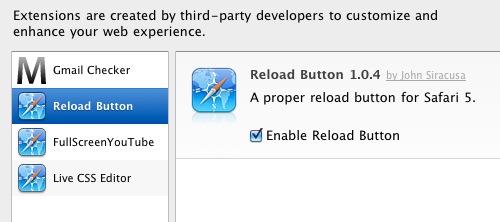 Some extensions out immediately: Reload Button (puts the reload button back in the toolbar where it should be, rather than waaay out on the far side of the address bar, another Safari-4-ism I didn’t like); GMail Checker (an early version–frankly, I’m not too impressed; a mail button in your toolbar that shows a number badge for unread mail–but only if you’re logged in); Live CSS (allows you to edit the CSS properties for any open page in real time); and AdBlock (haven’t tried it, I have excellent blockers already). And more.
After only a few days, there are a surprising number of nice little extensions, and more are sure to follow. If you want an official list of good extensions, you’ll have to wait: Apple’s “Safari Extensions Gallery” will not be published until “later this summer.” But here’s a list of some of them available now. There are warnings, though, that downloading just any extension without checking it could be a risk; we’ll know more as time goes on.
Next, better HTML5 support. This helps developers build impressive web apps (MS Office Live, not so impressive), allowing for pretty nice effects for web sites to be added with relative ease. To get an idea of what’s possible, visit Apple’s HTML5 page, and look at some of the demos. HTML5 is more than just better than flash, it’s a pretty substantial leap forward. The main problem: most browsers don’t implement all of it, and of course, IE will likely remain incapable of properly rendering pages for years. As a result of the masses who use IE–the worst browser on the planet–simply because Microsoft spoon-feeds it to them, the best of HTML5 will be painfully left behind by most web developers for quite some time, just like CSS was sabotaged by IE6 dominance.
 |
| many newspaper sites will break stories into pages so as to increase the number of ads you see. |
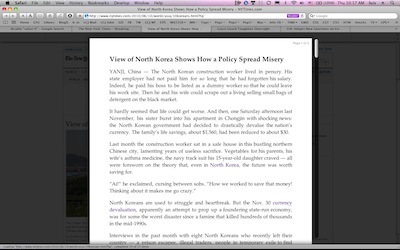
Finally, there is a feature that some are saying could change web browsing–for the better (for users) or for the worse (if you’re an advertiser). It’s called Reader. What it does is simple: it takes the text on your page and puts it up front, where it should be. All the formatting, all the ads, all the spinning, flashing, jumping animations fade into the background, leaving only the text, like a newspaper clipping. Better yet, if the story you’re reading has multiple pages (divisions intended to expose you to even more ads), those pages automatically load for you–no more clicking on 10 “next page” buttons to get through an article.
 This feature will not work on all web pages, however; Safari somehow realizes that you’re on a story page (as opposed to a page with an aggregate list of posts), and will only the offer up the “Reader” button at the right side of the address bar.
 |
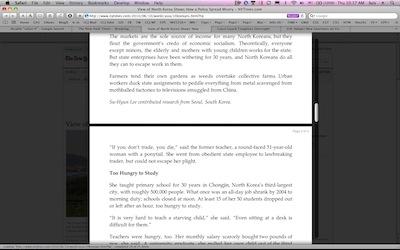 |
| The story only stands out, giving a clear reading experience. The site’s artificial “page” breaks are rendered as small gaps. Photos were not included in the pages I tried, despite Apple’s site showing them included. |
While this feature may be a bane to advertisers, I say let ’em fade to the background, until they learn to behave and not move around like hyperactive Parkinson’s sufferers doing the Mambo while on caffeine withdrawal. Apple even lets the ads load, perhaps making it hard for the site to tell if the ads are being shuffled to the background at all. The only down point here is that I am sure someone is working on a way to set up web pages so as to defeat this spiffy new feature.
One other great feature about Safari 5, one I have not heard anyone mention: it doesn’t disable all the add-ons you may have outfitted your copy of Safari with. That was a major annoyance of previous major Safari upgrades: you either had to abandon all of your add-ons for a while as their developers made them compatible, or else hold back from updating Safari. Not Safari 5–all the stuff I use for it now continues to work great. I use ClickToFlash to turn off annoying Flash ads (while leaving the potential to easily play the ones I want); Glims to add all kinds of functionality (I love the period-and-comma controls for navigating tabs, and the ability to recover previous open page sessions is useful as well–among the many, many features); and GlimmerBlocker, which does a pretty good job of blocking (for all browsers) all the non-Flash ads left over by ClickToFlash. All of these work just fine with Safari 5–a first, as far as I can recall, as the add-ons I used in the past always got knocked out of commission with each new major version of the browser.

 I am getting similar reactions on trains, with people making comments to each other, often stealing glances and sometimes asking questions. I thought the interest would subside soon after the release of the iPad in Japan, but if anything, it has only gotten stronger.