Archive

Archive for the ‘Mac News’ Category

Leopard: First Impressions

November 10th, 2007 3 comments

So far, I have only installed Leopard on my PowerBook G4, and not on my Intel Core 2 Duo iMac. I’m doing it for a couple of reasons, but mostly so as to try it out while still maintaining a backup. The PowerBook, being pre-Intel, provides a “worst-case” setup, where if something can go wrong, it probably will.

1107-Leopard-Main1

So far, I have had a few problems. In fact, at first, I thought that the setup was completely buggy–I kept getting interminable spinning-beachball cursors and system hangs. Then I discovered the problem: I had set up and started using Time Machine on a newly-purchased Buffalo external HDD. For some reason, this was causing most of the problems. Once I stopped it, everything started working fine. I am not sure why, however. It might have been the indexing, which was taking forever. It might have been the slower G4 processor. It might have been the Buffalo drive (which I had carefully reformatted as HFS+, having done my homework). Or it might have been Leopard itself; people have complained about Time Machine, and this might simply be one of those early-adopter problems.

Once I turned off Time Machine, I stopped getting beachballs and hangs, but I had a small other problem: I could not mount the external drive any more. Which was problematic, because I did a clean install of Leopard, and all my saved files were on the external drive. My iMac could mount it just fine, and on the Leopard Mac, using Disk Utility, I could see the drive but not mount the volume. I was considering alternate ways of transferring the data, like doing it from the iMac over the WiFi network (too slow) or transferring files to my other external drives and then from them to the PowerBook–when, all by itself, the volume mounted suddenly (after having been plugged in for some time). That gave me enough of a window to load the files I needed.

Doing the clean install is not so much of a pain as it often seems. Yes, you have to re-install all your apps and get your passwords and preferences just right. But installing apps is not so bad, and if you know where the vital preference files are, that becomes a snap as well. I just copied the Mac Keychain files and imported them into the new keychain, and bam, all my passwords filled in automatically again. Similarly, browser bookmarks can be easily restored. It didn’t take long to get things back to normal.

I am also trying out a switch: from Eudora to Apple’s Mail app. An app called Eudora Mailbox Cleaner works quite well, except that a few of my mailboxes seemed damaged and caused the migration to crash. I figured out that by creating a new mailbox, transferring the messages, and then deleting the buggy old mailbox, everything went smoothly. Eudora Mailbox Cleaner also migrates your addresses and filters.

This email client switch is another reason to install Leopard on one computer and no the other: to allow me to gauge the differences between the two without committing fully to either one. Depending on which I decide to use, I will simply delete the other one and transfer the files from the one I’ll use to the other computer, and I’ll be in sync.

Already, I am having doubts about Mail, but I have to discount how much of that is simply familiarity with Eudora. Eudora has a kick-ass search feature; Mail’s doesn’t measure up, but might be serviceable, once I figure out all the features. I am also not sure about the spam filter, but Mail’s filter improves over time, so I have to give it a chance. Eudora has more flexibility and easier settings, but it’s also stuck in 1997. Mail has a new To Do list I will likely use, and when emails come with dates and times, you can add them easily to iCal. I will use that a lot, but already see problems; my boss, for example, likes to write the dates and times for meetings on separate lines and with differing forms; Mail can read across lines, but the forms confuse it. See the example below, where Mail did not read the start time accurately, instead starting the appointment at the end time, and ending an hour later. So it’s not perfect… but close enough to be useful. You just need to edit a bit. For me, the big thing is making it easier to add a calendar entry when I am notified in email, so that I’ll remember to do it in the first place.

1107-Mail-Ical1

That’s the extent of my suffering. Everything else has been very enjoyable, with lots of features grabbing my attention unexpectedly. For example, Leopard’s new sidebar includes pre-set Smart Folders, folders that search by various criteria. One that I can definitely see myself using are the “Today,” “Yesterday,” and “Past Week” folders. The Shared volumes are not bad, either.

In the past, Apple has advertised “hundreds of features,” but with Leopard, a lot more of them are noticeably useful and/or eye-catching.

A big feature that I thought would be good and can see is even better than I expected: Quick Look. Just select any file and hit the space bar, and you get a preview of what’s inside. Read text, run through slide shows, watch movies, play sounds–without waiting for an application to open, or having to quit it once you’re through. With the QuickLook window open, you can use the arrow keys to continue to browse files, each one coming up in the QuickLook window as you select it. Movies can be played full-screen, too. Very nice.

1107-Leopard-Views1

Then there are stacks. I didn’t think that I would use this as much as I am, but I discovered that you can use the stacks to organize your apps. Just put any app into a folder (or make Aliases of them and put them in a folder), then drop the folder into the right side of the Dock. It becomes a stack with all of those apps in them. This is great for me as my Dock was getting too crowded; instead I now have stacks for “Office Suites” (iWork, MS Office, other text-editing stuff), “Movies” (various media players and video encoders), Image Editing, Apple apps, and whatever other category of apps I decide on. This frees up considerable dock space and makes it still easy to open the apps.

1107-Leopard-Stacks1

The downsides: Dragging-and-dropping documents onto apps in stacks is less-than-satisfying. You can’t do it directly, instead you have to wait for the folder to open in the Finder and then drop it onto that. Which is why my most-often-used apps remain in the app area of the dock. Also, the stacks sort alphabetically; if you want any app in a certain place in the list, you have to rename it. Not hard with aliases, but it look a bit funny. I’ll have to see how all of this wears over time.

Spaces seems cool, but I haven’t quite got the hang of it yet. I think I could get used to it, but it will take practice.

Safari is nice, with the highlighted search and movable tabs–but I will suffer a lot until auxiliary apps like PithHelmet get upgraded. I absolutely detest Flash ads. I dislike most web page ads, in fact, but ones that move hold a special dark corner of loathing in my soul. Hopefully I won’t have to put up with that much longer–and another good reason to hold off on putting Leopard on my iMac, where I do most of my browsing.

Other than that, all of my apps work smoothly; aside from the Input-Manager-driven Safari add-ons, everything seems to work fine. Yes, Classic is broken, but I need to try out SheepShaver with Mac OS 8.5, to see if I can get it working with sound and everything.

And finally, Leopard is probably going to drive me to do something I have resisted for quite some time: get a DotMac account. Syncing my computers, Back to My Mac, iLife ’08 enhancements–there’s too much for me to keep resisting the hundred-buck-a-year toll on all that. I don’t like it, mind you, but I will at last acknowledge that there’s enough in there to appeal to me now. Of course, I’ll try out the 60-day free trial first….

More on Leopard as I try it out more.

Categories: Mac News Tags:

Would You Like a Market with Your Stock?

November 10th, 2007 Comments off

Ouch. Apple’s stock has has two $10-a-day drops, after an initial $5 drop, going from $191 per share to $165 in just three days–a 13% drop. The good news is, it isn’t a reaction to anything related to Apple, it’s just that tech stocks in general are falling, and when the market drops, Apple usually drops as well.

No problem, though; Apple itself is strong and has a highly promising holiday sales season ahead of it. This drop will simply give Apple a bit more room to grow, for those who might have been worried about too big a market cap. That’s the best reason that I can think of as to why Apple didn’t issue a stock split when its price got pretty high–they don’t want the stock to inflate too fast.

Still, it’s not very fun watching it drop like that!

Categories: Economics, Mac News Tags:

Installing Leopard

November 7th, 2007 4 comments

I am installing Leopard on my 1.67 GHz G4 PowerBook tonight. The install took a bit more than half an hour, but went smoothly–you just get it started, and it does it in one take. None of this Windows bull where you have to sit there and attend the install process for an hour, waiting for the installer to stop and ask you to type in the 25-character code, or tell it to do this or that. Whenever I had to install XP, I could never leave it alone, because at any given time it might stop and ask something; you’d come back after 30 minutes to find the install process stalled near the beginning, waiting for you to set something.

Even better: no registration at all is necessary with the Mac–no registration codes, no activation. Apple trusts you. Well, mostly. There is one annoyance with the process if you are wiping the hard disk and installing everything from scratch: Apple tries to make you register whether you want to or not, requiring to fill in your name, address, etc. etc., with no readily apparent way of getting out of it. But there is a way: just do a Command-Q. The setup assistant will ask you if you want to skip registration and go straight to setting up the main user account. Say yes, and all you have to do is select a user name and password, and you’re up and running.

Despite running a 2-year-old computer, with a pre-Intel CPU, the install went smoothly and the result seems just fine. I got started late, so I only had a half hour to play with it before going to bed–so first impressions will have to wait. But pre-first impressions are good. Except that, for the sake of cleanliness, I decided to do the full wipe-and-install, so that means a lot of app installs and preference-setting tomorrow. But I tested out some basic apps and everything runs smooth and great, despite the age of the computer.

Categories: Mac News Tags:

Mac Trojan: OSX.RSPlug.A

November 1st, 2007 Comments off

MacDailyNews reports on a news release from a security company called “Intego” about a new trojan horse aimed at Mac users. The Trojan, dubbed “OSX.RSPlug.A” (a variation of “Zlob”) is malware, and is real. So, has the Mac’s famed security failed? Well, not quite. Trojans are the easiest form of malware to produce, because they don’t as much defeat a computer’s security as they circumvent it by having you open the door and usher them in. There’s no static security system in the world that can protect against a user personally installing the malware. If you think that you might fall for such ploys, then perhaps it is time for antivirus software on your Mac. Nevertheless, the risk is exceedingly low.

In order to get stung, you have to visit a porn site and try to see a porn movie–only to be told that your version of QuickTime doesn’t have the right codec. The user must then accept a download (“ULTRACODEC4313.dmg”), run the installer, and give the administrator password. The worst that can be said is that at no time does the Mac OS say, “Hey! You’re about to install a trojan!” As MacDailyNews puts it:

Of course, Intego says that “the best way” to protect against this exploit is to purchase and run Intego VirusBarrier X4 with up-to-date virus definitions, but we suggest that an even better way to protect against such trojans is to use your head and not download, authorize, and install software from porn sites.

And that’s what it really comes down to: common sense.

If installed, the trojan will not erase files or send your private information anywhere, nor will it use your address book to propagate–it only propagates by having users download and install it. However, it will hijack your Mac’s DNS settings so as to lead you to bogus web sites. Web searches or clicked links may be redirected to porn or phishing sites. This could be bad if you try to go to the real eBay or your bank site and are redirected to a phishing site that pretends to be eBay or your bank. However, the chances are that by the time you would want to visit such a site, you would have already noticed that your browser is being hijacked to all those porn sites.

So far, there is only one reported case of the trojan hijacking someone’s system, though admittedly there may be lots more who simply don’t want to advertise that (a) they visit porn sites and (b) were dumb enough to fall for this particular trojan.

Rob Griffiths at MacWorld explains everything, including how to remove the trojan without having to buy antivirus software.

Categories: Mac News Tags:

Leopard Way Outsells Vista

October 31st, 2007 Comments off

Apple announced that they sold two million copies of Leopard in the first two days. Blackfriars’ Marketing describes it this way:

I tried to find similar statistics for the Microsoft Vista launch, but the best I could come up with was that Vista sold 20 million copies in the first month (February), resulting in an average sales rate of 714,000 a day. Both numbers reflect pre-orders and machine installs, not just upgrades. So at least for now, Leopard is running neck and neck with the Windows Vista install rate.

I beg to differ: Leopard is not running neck and neck with Vista. Windows has ten times the market share, at least ten times the number of computers to service. Which means that if Leopard is selling the same number of copies, then Leopard is outselling Vista ten to one. Unlike Vista, Leopard is getting excellent reviews, and you can bet that no one is going to an Apple dealer and asking for Tiger instead of Leopard on their brand-new Mac. Nor does Apple have to skew the numbers to make it look like it’s doing better than the last OS release; Tiger took a month to sell 2 million copies. True, Apple has sold a lot more Macs since then, but not that many.

Oh yes, and let’s not forget that Leopard pre-orders only began a week before release, while Vista’s began months early–and included all Windows PC sales of XP in that 3-month period because they included coupons for Vista.

Categories: Mac News Tags:

NBC Chief Admits He Wants to Overcharge Customers

October 30th, 2007 Comments off

Jeff Zucker, the CEO of NBC Universal, more or less admitted that he wants to charge you a lot more for listening to music and watching TV shows over the Internet:

“We know that Apple has destroyed the music business – in terms of pricing – and if we don’t take control, they’ll do the same thing on the video side,” Mr Zucker said at a breakfast hosted by Syracuse’s Newhouse School of Communications.

NBC Universal recently snubbed Apple by not only pulling its TV selection from the iTunes Store and instead offering it via Amazon.com’s Unbox service, but it also started offering its music catalog on Amazon’s download service in the form of high-quality DRM-free tracks selling at 89 cents apiece, while pulling out of long-term music sales with Apple.

All the content producers have been claiming that they want more “flexibility” in their pricing, with the ability to “charge less” for some content, always emphasizing the “value” to the consumer. Well, it certainly seems like that’s what they’re trying to do–DRM-free songs at 256kbps for 89 cents? Free TV shows with just some advertising thrown in?

The thing is, Zucker laid out his game plan in his statement today: Apple “destroyed” the music biz by establishing a dollar-per-track pricing system that everyone now expects; consumers won’t go for $2 or more for a song any more, meaning that Zucker and his pals will have to settle for merely exorbitant profits instead of massively obscene profits, while stiffing the artists.

But there’s hope for TV and movies, Zucker is saying: Apple hasn’t won out that market yet, so there’s hope that we can charge $3, or maybe $5 per TV show!

So why aren’t they doing it already? What’s with the idea of selling better-quality songs for less, or TV shows at the same price or for free with ads? To destroy Apple’s grip on the market, of course. And that’s the danger of going over to Unbox or other services right now: do that, and you are more or less clicking on a check box next to the statement “I accept these terms”–but when you read the terms, they say that you agree to buying slightly cheaper stuff today in exchange for getting ripped off down the road. Not a good deal.

In the meantime, what is NBC paying the “artists” that they always mention when they blast pirates for depriving people of profits? Well, for a one-season DVD set of a TV series which brings in $40 a pop, NBC and the other studios pay writersfour cents. And they are risking a strike by writers because they want to refuse upping that payment to eight cents. They don’t want to pay a writer even two-tenths of one percent of the income from a sale.

It doesn’t take a genius to see what the whole motivation is for the studios, nor that they are endlessly greedy bastards who would charge you ten times more if they could figure out a way. While that does not make Steve Jobs a saint (he also would like to charge you as much as possible), at least the interests of Apple’s media distribution service coincide with yours–to charge less for music and video. And that’s not a terrible reason to stick with their service.

Categories: Mac News, People Can Be Idiots Tags:

Leopard Reviews

October 29th, 2007 2 comments

There’s a Leopard-vs.-Vista showdown on Engadget, and as you might expect, I find it rather strongly Windows-centric.

Take “Security,” for example: the showdown gives equal ratings to Leopard and Vista. Um, yeah. Within that category, both OS’s are marked down for not including anti-virus software. Come again? Apple doesn’t have anti-virus software because it doesn’t need it. I would think that this is not only an advantage, but a major one; not only do you not face the perils of malware, including spyware and adware, but you don’t have to shell out a hundred bucks to protect yourself against the stuff, not to mention all the time you have to spend maintaining it… and then Windows is still vulnerable to malware like the Storm superworm. To give Vista equal standing to Leopard in this category is ludicrous.

Other Leopard advantages are also overlooked; price, for example. The showdown allows features included in the Ultimate version of Vista to compete, while most users don’t have that, or pay a premium for it. Nor does Apple get credit for including all its features in one “version,” instead of going the Windows route and releasing a confusing jumble of different versions which mostly add up to “pay us a lot more if you want everything.”

And yet, despite the fairly evident Windows bias, Leopard still beats out Vista, 45 to 40.

This tends to support the overwhelmingly positive reviews Leopard has been getting (Wired, The New York Times, CNET, PC World, USA Today, Dallas Morning News, The Guardian, The Wall Street Journal) in most of the media.

The worst reviews I can find are mostly nits, such as this guy‘s review, which found “6 problems with Leopard” (but they’re pretty minor), or this Forbes writer who felt that the voice-recognition software wasn’t good enough. Other than that, most negative comments have to do with losing Classic or having a really old Mac (it would have to be more than 4 years old not to be able to use Leopard). But most reviews that point out these things still recognize that Leopard is better than Vista.

And maybe that’s one reason why Apple’s stock did not take the 5- or 6-point drop I expected after last week’s $16 rise.

For the final word, go and read this review at Ars Technica. In case you’re wondering, it’s very positive:

I started this review talking about expectations. As I’ve learned more about Leopard, it’s become increasingly clear where, exactly, those two-and-a-half years of development time went. Leopard is absolutely packed with improvements. It seems that not a corner of the OS has gone untouched.

Perhaps that’s not as clear to the casual user who just sees the surface changes and the major new features in Leopard. But even in that case, there’s more than enough to recommend it. if you’re wondering whether you should upgrade to Leopard, the answer, as it’s been for every major revision of Mac OS X, is yes.

I bought my copy already, but won’t install it at home until next week (I have a project to finish and don’t want it interrupted by anything). Leopard will still be just as good by then. It’ll also give me time to find the cheapest 320 GB hard disk for Time Machine to operate on.

Categories: Mac News Tags:

Fulfilling the Perception

October 27th, 2007 2 comments

This report (via Mac Daily News) from RescueCom, a computer repair center, puts Apple computers at the top of its reliability list, saying that users are way less liable to need drastic repair of their desktop or laptop if it’s a Mac.

I’d love to give this report whole-hearted support, but there are a few problems. First, it’s a private business, basing the calculations upon what they figure as each maker’s market share (a nebulous proposition in any case); they then take the number of calls they get to rescue shattered computers and work out the score from that. Not exactly the pinnacle of “scientific” studies.

Not to mention one other problem: the phone number they have you call is 1-800-RESCUE-PC. With the well-known dichotomy of “Mac vs. PC,” many will simply figure that Macs are not included in their services–something most Mac users expect when looking at generic computer services in the first place. That would affect the numbers in the Mac’s favor.

On the plus side for the Mac, its low numbers might also be helped by the reputation and/or efficacy of its customer support; people might be less trustful of other makers’ support centers, or may be frustrated by attempts they have made to use them, and thus driven to use alternate help centers like the one making this report.

It would be very interesting to see how the Mac performs in a more objective, well-researched comparison. The reputation is that Macs break down somewhat less (perhaps more so in the laptop domain), partly because they are better-designed and -constructed, and partly because the same company makes the machine, OS, and much of the software, which means smoother operation and fewer conflicts. Additionally, users are a bit more likely to be able to handle problems themselves.

These are just perceptions, however, mostly backed up by polls or reports like the one above; I don’t think I have seen hard numbers to support this. If anyone knows of such research, let me know; I’d be interested to see the results.

Categories: Mac News Tags:

Goodbye, OS9 (Officially)

October 26th, 2007 2 comments

One rather sad development in the Apple Leopard upgrade is the discontinuation of Classic support–that is to say, the ability of G4 Macs (Leopard does not support G3 Macs or earlier) to boot applications made before OS X. I actually do use some of these myself. A few are games: Risk and Super Yahtzee, for example. While games like Shanghai (mahjongg) have acceptable OS X equivalents, I have found no acceptable updated versions of those other two games–not among freeware, at least. Everything I’ve found is either not free, or is so clunky and poorly designed, I get no enjoyment from it.

Another Classic game that I sometimes indulge in is the original Civilization. I never got used to the angled view of the 2nd and 3rd versions of that game, and still enjoy the now completely-outdated original, with its cheesy graphics and everything. I also enjoys using some of the cheats developed for that version, to add variety. The down side of that game: it is a colossal waste of time. I allow myself maybe one play per year.

However, Classic can actually be useful in a more practical way. I still use SoundEdit 16 to edit and mix sounds. Yes, there are newer programs to replace it, but the best ones are not free (I have yet to feel comfortable with Audacity), and even while requiring Classic mode, the old reliable SoundEdit is easy to use and effective for my needs.

My father is in a tighter corner, however: his work in forensic acoustics requires the use of a Classic app that was very nearly custom-built for his needs, working fantastically well to do exactly what he has to do. Nothing since does the job better, and so if he wants to work the way he’s used to, he can’t give up on Classic.

There is a workaround for some needs, however: SheepShaver. It allows Classic Mac apps to run on Intel Macs and OS X, and reports seem to indicate that it will run under Leopard. The drawback: it’s a bit finicky and will not work 100%. For example, I can’t get sound to work–which means no help for my father’s must-have software. (YKW, any ideas for a work-around on that?) However, just now looking in a SheepShaver forum I just found, they seem to be posting new updates to the app. I’ll have to see if newer versions will work better.

Another solution is to use a dual-boot option–have Tiger sitting on an external hard drive somewhere, and fire it up when needed.

What remains is a discussion on whether Apple was right to abandon Classic. Even if advances in Leopard made Apple’s current “Classic Mode” inoperable, it would be relatively simple for Apple to adopt SheepShaver, and one might imagine they could make it work even better. So, why don’t they?

In one sense, Apple has always been willing to abandon old baggage, and it has worked well. Look at Windows, still carry baggage from a few decades ago; one of the common criticisms of Windows is how clunky and makeshift it can be in the name of backwards-compatibility. True, Apple gets flamed for cutting off people with old software or hardware–but that criticism usually dies off after a while as people inevitably adapt and adopt, and Apple gets kudos for having a more up-to-date system not bogged down by past technologies. Windows cannot avoid constant criticism as it continues to carry all that baggage with it.

Overall, I approve of Apple’s willingness to cast aside stuff that doesn’t work well any more. I still see Windows PCs selling with PS/2 and Parallel ports, and even floppy drives. Apple jettisoned that crap about a decade ago, and good riddance; if I need to use my old SCSI or Serial hardware again, I’ll revive my old G3 tower, or the older Performa I have laying around.

And though I don’t like leaving Classic behind, I’m willing to pay the price if it means a more streamlined computer and OS in exchange. Hopefully I am not misled in believing that this is what I’m getting, of course….

Categories: Mac News Tags:

Useless Mac Freeware

October 25th, 2007 Comments off

Here are three really useless pieces of software for the Mac, ranging from funny-cool to incredibly annoying, and yet you may want to try them all for a laugh.

The first:

Sqtd-Title

Open the app, and it will self-close. After that, clicking the mouse anywhere will result in the same sound as squeezing a dog’s squeaky toy. It’s not fully one-dimensional; different clicks and drags will result in slightly different squeaks. But it earns well its motto, “Wow, that’s annoying!” You will quickly want to turn it off by running the app again. Also useful as a practical joke for a friend or loved one.

Next:

Mgme-Quicktime Small

The MegaMan Effect. While this is running, any time you open an app, it will open with the same kind of screen splash and fanfare you would expect from a late 1980’s video game. It also gets annoying soon, unless you really love those old games–but even then, you could tire of it pretty easily.

And last:

1007-Macsabericon

The coolest one, one that you might enjoy or hate but have to admit it’s pretty damned clever: MacSaber. Many Mac laptops have a motion sensor intended to warn the computer that it’s dropping to the floor, so the hard disk can be stopped before it gets destroyed by the impact. Several people have used this sensor to employ various effects, like slapping the side of the monitor to change from one app’s window to another’s. But MacSaber does something far less useful.

When you turn it on, there is the sound of a Star Wars lightsaber igniting, and then the familiar hum of one operating. You know that special lightsaber motion noise? When the swing or tilt a lightsaber in the movies, it makes that sound–so iconic and irresistible that the actors in the Star Wars movies would often make the sounds themselves as they were swinging the sabers around. That’s the noise MacSaber makes when the motion detector senses movement.

Here comes the stupid part: you pick up your Mac and start swinging it around. It makes just about the most unwieldy and awkward imitation of a lightsaber that you can imagine… and it’s hilarious as hell. Again, a matter of taste.

Categories: Mac News Tags:

Double!

October 23rd, 2007 1 comment

When I woke up, I checked to see how Apple’s stock did since the quarterly report was released. The report was excellent: Apple blew past expectations and hit record sales and profits (again).

Because the report came at the end of the trading day, most of the reaction came after the market closed. Already, Apple had gained $4 (or 2.3%) at market close–but after-hours trading has Apple up an additional $12, or about 7%, for a total gain for the day of $16, ending up at over $186 per share. For me, that equals roughly a whole month’s salary gained in a single day.

That also makes it official: Apple stock is now double what it was when I bought it less than a year ago.

I am beginning to get the feeling that this is the main reason Apple has decided not to split the stock, at least for now: the value is going up too quickly. If Apple were to split the stock, that might give it too much “exuberance.”

This is not to say that Apple’s stock is going to fall. Yes, I would expect it to drop from its present height in the next week, maybe by as much as $5 or $6, but then it will almost certainly rise again. Even with a market cap (all shares of stock x current stock value) of $162 billion, Apple still represents growth. It currently has only about 6-8% of the market in computers, is releasing a new version of Mac OS X later this week, has a strong hold over the digital player market that shows no sign of ebbing, has just started to break into the lucrative cell phone market, and could enter other markets in the future. And we’re just getting into the hottest quarter of the year. There is so much room for Apple to grow, it’s hard not to see it getting bigger.

But the tricky question is, when will it top out? Eventually, it must; but from the looks of it now, that won’t happen any time soon.

Categories: Mac News Tags:

Other Cool Features I Look Forward to in Leopard

October 17th, 2007 8 comments

Here are some other Leopard features, some I knew about and some I didn’t, which will make a difference for me. These are not the main features, but rather the lesser-known ones.

UI Recording and Playback in Automator
Add even more capabilities to your workflows. Use a new action called Watch Me Do that lets you record a user action (like pressing a button or controlling an application without built-in Automator support) and replay as an action in a workflow.

This is what has kept me from using Automator before now: it was limited in what actions it could record. With this feature addition, maybe it will become the super-Macro program that it should have been from the beginning.

Here’s a feature I have a question about:

Boot Camp: Copy Files Between Mac OS X and Windows
Copy, open, modify, or delete files in Mac OS X that you saved to your Windows partition. Leopard understands the Windows FAT32 disk format.

Does that mean that you can make a disk image/copy of the Windows partition while in Mac mode and then use that to re-install a virgin copy of Windows at will, without trouble? Because you can’t now.

Dashcode IDE
Quickly design, code, and deploy your Dashboard widget. Dashcode is a completely integrated development environment.

This, along with a half-dozen other Dashcode features, may actually allow me to make widgets without learning a programming language. We’ll have to see if it lives up to the promise….

Icon Preview
See files for what they really are. Leopard displays icons that are actual thumbnail previews of the documents themselves.

This will be super-cool… so long as it doesn’t take forever to fill in the previews like it does now. I hope, but do not expect.

New Folder of Options
Take control your view options. Adjust the grid spacing to move icons closer together or further apart for the currently viewed folder, or with one click make this view the default for all your folders.

Nice, but is this as far as they went to FTFF? For example, when I set “all windows” to calculate folder sizes, will it remember and stay consistent? We shall see.

Screen Sharing
Collaborate with a buddy via iChat. Work on a Keynote presentation together, surf the web as a team, or help each other with an iMovie project. iChat initiates the connection (asking permission first) with an audio chat so you can talk things through as you work or play. Trade views of each other’s desktops. Even drag files from one computer to the other.

This is what will make iChat a killer app, in my opinion–the ability to cross-control Mac screens remotely. Previously this was only available in apps such as Timbuktu, for $180 or more.

Location-Aware Printing
Print in multiple locations with ease. Leopard detects when you’ve changed locations. So as you move your Mac between work, school, and home, Mac OS X figures out which printer to use and sets it as the default printer. You can choose another printer whenever you want.

A very small feature, but it’s the attention to details that count. I’ll be using this one.

Spotlight: Advanced Searches
Use a richer search vocabulary. The Spotlight search field now supports Boolean logic with AND/NOT/OR and parenthesis syntax. Search category labels such as “author” or “width.” Use ranges in your search including “greater than” and “less than.” Spotlight also understands quoted phrases and dates.

Search by Filename
Find files faster. If you know the filename you’re looking for, narrow your search results so that Spotlight searches only filenames.

Again, nice–but will you be able to sort Spotlight results by size? I’ve been waiting for that, and will be disappointed if it’s not there.

Icon Mode in Open and Save Panels
View your files as icons in the Open and Save panels, just as you would in the Finder.

Cool, but this is catch-up with XP. In Leopard, can you rename and delete files in Open and Save panels, like you can in Windows? Something overlooked in the past, and one of the few feature advantages Windows has over the Mac.

Grammar Check
Let your grammar set a shining example. A built-in English language grammar checker helps ensure that you don’t make errors in grammar.

This would only be useful so long as it doesn’t suck as much as MS Office’s grammar checker–but I’m betting that it’ll be roughly as bad.


So, not a bad set of additional features. As for the main features, I may or may not use Time Machine, QuickLook seems great so long as it actually is “quick,” I will probably use Spaces (but an still disappointed that they don’t allow for alternate Desktops), and look forward to Safari improvements–so long as I can still use an ad-blocker like PithHelmet (it looks like it’ll be possible!). There are a ton of other medium-level features that I’ll be using as well, in Mail, iChat, the Finder, etc. Leopard will almost certainly be well worth the price.

Speaking of price, what the hell is with Apple and the Education price? Education buyers used to be able to get OS X for something like $70-80–now the price is jacked up to $116, almost no discount off the $129 list price. What the hell, Apple? Getting greedy again? Bad form. (It’s still worth it, but you have to wonder why they did that.)

One final point: Safari took longer than usual (two and a half years) for a Mac OS X upgrade, but even at that, it was twice as fast coming out than Vista, and has a lot more useful features added to boot.

Categories: Mac News Tags:

Leopard More Japanese-friendly Than I Thought

October 16th, 2007 Comments off

Apple has just announced the official Leopard release date as just ten days away, and has posted a complete list of the 300+ features of the OS. What surprised me are some nifty additions for those of you interested in Japanese-language functionality.

First, in the Dictionary program:

Japanese-English Dictionary
Translate English to Japanese and vice versa. This capability is now built into the Leopard Dictionary.

Japanese Language Support
In Leopard, the Dictionary application supports the Japanese language right out of the box, with an industry-leading Japanese dictionary and thesaurus provided by Shogakukan. The dictionary contains over 200,000 words with rich descriptions and examples, and the thesaurus contains 25,000 words covering 6,000 categories.

Right there–with the Japanese dictionary and thesaurus–we have some powerful stuff. This will make a MacBook more valuable than ever for Japanese students who otherwise depend on their Word Tanks. And I’ll bet that the examples are not the usual 80-year-old linguistic dinosaurs so many J-E/E-J dictionaries tend to sport.

The translation thing is less impressive, unless Apple has radically improved upon the existing web-based J-E/E-J translation module, which for now does a fairly bad job–it’s only good enough to (sometimes) get the very basic gist of a sentence.

Expanded Font Set in Japanese
Put updated Japanese fonts to work. The included Japanese font families, Hiragino Gothic and Hiragino Mincho, are considered among the most beautiful of Japanese fonts, and they now support Hyogaiji, the new standard for Japanese character sets defined by the National Language Council and Japan Industry Standards.

That’s never bad.

New Input Methods
Take advantage of new input methods for Chinese, Arabic, and Japanese languages. … Advanced predictive input for Japanese [emphasis mine] guesses characters based on context, with improved accuracy in Leopard. And localized help is provided for all of the CJK input methods, including English.

Can you say “iPod Touch,” or even “iPhone” in Japanese? Even money that this is why Apple invested in these technologies. I noticed this system already at work in the iPod Touch in Japan. About time they brought it to OS X. Another big step forward for Japanese users.

Categories: Mac News Tags:

WasIRightOrWasIRightOrWasIRight?

October 2nd, 2007 Comments off

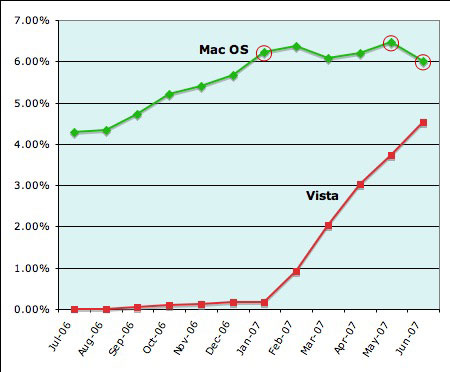
Remember this story from ComputerWorld a few months back? I wrote this blog post on it. The article basically used cherry-picked data to suggest that Vista was booming while the Mac was languishing in flat sales, pretty much the exact opposite of what was true. One quote in particular:

According to Net Applications, in June Windows Vista accounted for 4.52% of all systems that browsed the Web, up from January’s 0.18%. Vista has grown its usage share each month since its release to consumers Jan. 30, hitting 0.93% in February, 2.04% in March, 3.02% in April and 3.74% in May. Apple Inc.’s Mac OS X, meanwhile, accounted for 6.22% in January and hit its high point of 6.46% in May, but it slipped back to 6% in June.

Here’s the chart from which he chose his numbers, with his quoted Mac numbers circled in red:

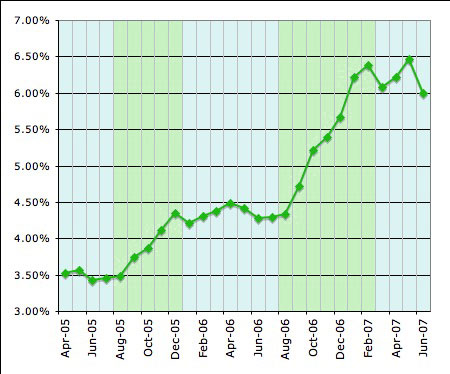
See what he did with the Mac numbers? He chose the January number, which was near the end of a 6-month climb, and then compared it level summer numbers through May, and a small drop in June, citing a 1-month fluctuation as if it were signs of a trend. He did not report that year-over-year, Mac market share has been increasing rapidly: 20% from 2004 to 2005, 26% from 2005 to 2006, and now 40% from 2006 to 2007. Not only is the growth rapid, but it is accelerating. I charted this out:

He used this data to make this conclusion:

Windows Vista’s share of online users has increased every month this year, while rival Mac OS X — to which Vista has often been compared — has shown little, if any, growth, a metrics company reports.

But what about that downswing at the end of the Mac OS chart? Two and a half months ago, I noted:

For example, if you just trouble yourself to get the Net Applications numbers for the Mac OS for the previous year as well, you’ll notice a pattern: Mac OS share rises in the second half of the year, then stays steady in the first half of the next year. The numbers for the Mac have shot up starting in August for the past two years–which means that Mac OS share, as reported by this source, should start to jump again in the next few months….

And guess what? Well, here’s the chart, extended into September of this year:

0907-Macvista3B

And of course, just as predicted, the numbers have shot up. If they continue to follow that same trend, we should see Mac OS X market share reach over 8% by the beginning of next year–and Mac sales seem to indicate that this is pretty much what is happening. If the trend continues, Macs should have between 12% to 15% market share by 2010. If you really want to go far-reaching, the same trendline shows Macs reaching over 30% by 2015. However, considering that there is only 3 years of data from which to extrapolate a future trend, that’s kind of reaching too far; even 2010 is a stretch, and who knows what events can and will affect the trends in the future.

That is, however, the current trend. I was right in predicting the upswing beginning in August; let’s see if I’m right about next January before I start getting excited about anything farther down the road.

Nevertheless, you can probably see why I am definitely holding on to my Apple stock; despite having risen 65% and reached an all-time high since I bought it, Apple has so much more room to expand–not just with computers, but with cell phones and all the other markets they can enter–that it’s not even funny.

It should also be noted that the data comes from Net Applications, and the share is calculated by measuring visits to web sites which are more oriented towards Windows PCs.

Categories: Mac News Tags:

Wait on That iPhone Unlock…

September 12th, 2007 1 comment

If you were considering paying $100 for that iPhone unlock from iPhoneSIMfree, hold on to your wallet for a little bit. There are people who are studying what iPSf are doing and are working to duplicate it for free. They may be very close to a solution.

Now here’s an ethical dilemma: is it unethical to reverse-engineer from people who reverse-engineer?

Categories: Mac News Tags:

Well… That’s Not Very Impressive…

September 11th, 2007 Comments off

The iPhone unlock is going on sale today… for a cool hundred bucks. If that’s not enough to make you think twice, then read the disclaimer which says that if Apple happens to re-lock your iPhone via a software upgrade or something, they will charge you again to re-unlock it.

A hundred bucks and no guarantee that you won’t have to shell out another unspecified sum more times in the future? The one-time high price one could get past, but after that, you’re kind of at the mercy of the winds of fate to pay open-ended amounts of money to keep what you might think is already yours.

I kind of expected this to go for fifty bucks with a promise to do their best to re-unlock for free if Apple re-locked it. But then again, we’re talking about getting away from a 2-year commitment to AT&T. When you think about it, why should AT&T be able to lock you in for that long when they aren’t even subsidizing the phone’s cost? If you can get into a cheaper plan without the long-term commitment and possibly better service, then the $100-plus-who-knows-what might be a deal… especially if AT&T doesn’t even serve your area.

Categories: Mac News Tags:

iPod Evolution

September 9th, 2007 6 comments

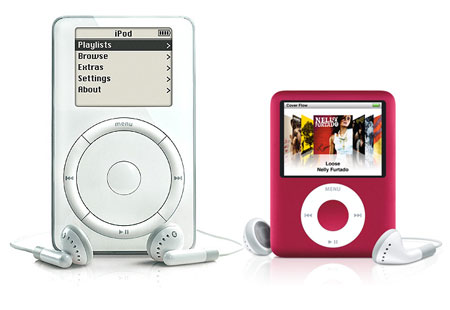
0907-Ipod2001-2007

How things change.

If you bought the first iPod back in 2001, you would have had the choice of the 5GB and 10 GB models (“1000 or 2000 songs”), with a 2“ black-and-white screen at 160 x 128 pixels, for $400 and $500, respectively.

Today, if you buy the 3rd-generation iPod Nano, you will have the choice of the 4GB and 8GB models (”1000 or 2000 songs“), with a 2” color screen at 320 x 240 pixels, for $150 and $200 respectively.

So we have essentially the same screen size and storage capacity, but today, six years later, you get twice the screen resolution, with color, movies, etc., at 40% of the cost.

Things have a tendency to change pretty quickly in technology. I remember, in the 90’s, getting a 105MB (that’s “MB”) hard drive for $300. I look at my AGFA digital camera from ten years ago and laugh; I look at the images it took and cry. Ten years ago, a 100 MB Zip disk cost $15, where a 1GB flash USB stick can be had for the same price today.

Yes, I know this is kind of a given, we all know about it… but still, it kind of surprises you to look back and see the differences.

Categories: Mac News Tags:

Unlocking the iPhone

September 8th, 2007 Comments off

Engadget has an image gallery of what it looks like to unlock the iPhone so you can get away from AT&T and (presumably) use the iPhone with any carrier you like. Looks like a very simple process. They say it’ll be available on Monday.

Categories: Mac News Tags:

Free iPhone Ringtones

September 8th, 2007 Comments off

Not that I can use this–yet–but someone has figured out a dead-easy way to make any audio file into a ringtone. Just use an AAC file (convert it to AAC using iTunes if it’s not AAC originally), change the extension to “.m4r” and add it to the iTunes library (if the file was there before, you have to remove it at least temporarily). ITunes will see it as a ringtone.

Seems rather too easy, as if this were an oversight by Apple. Probably they’ll have closed this loophole up by the time I get an iPhone… but I’m pretty sure that there will always be a way to add ringtones for free; it’s too popular a hack not to happen.

Apparently the file cannot be bigger than 3.1 MB. Of course, before you convert the file to an AAC, you can use an audio editing program like Audacity (version 1.3 can import AAC files directly) to edit it down to whatever you like.

NOTE: Apple moved fast. 48 hours after the trick was discovered, Apple closed the loophole. But other hacks still work.

ANOTHER NOTE: That didn’t take long either–someone found another easy workaround to Apple’s block for the original workaround. Just do the process as described above, but after importing the file into iTunes, change the file extension again from “m4r” to “m4a.” That’s it. At least, that’s it until Apple applies yet another block.

Update: Engadget has an article discussing the legality of making your own ringtones. In essence: iTS downloads are a no-no, but CD tracks or original audio is OK; but whatever the legalities, nobody’s going to bother you about it unless you start selling or distributing copyrighted material.

An interesting piece of info from the article: the RIAA fought to win a decision from the copyright office that allowed them to sell ringtones separately as if they were derivative works, but that they didn’t have to pay the artists as if they were derivative works. In essence–they get to sell the songs in a new market without giving a penny to the artists.

Because, as the RIAA keeps on saying, they care so much about the artists getting cheated out of their income.

Categories: Mac News Tags:

The $70 Million Giveaway

September 7th, 2007 5 comments

I am assuming on that $70 million figure, going on the idea that Apple will have sold a million iPhones by the end of September. The number may be higher.

And what I am referring to is this open letter by Steve Jobs, in which he announces the gift of $100 in store credit to anyone who purchased an iPhone so far.

True, store credit means that people may be buying stuff that carries a profit margin potentially as high as the iPhone did at $600; Apple is not actually giving away the full C-note. And it does seem fairly smart–this should relieve most complaints, as a $100 difference is easier to swallow, and Apple will move more goods and generate more good will. They will lose out on all the money those people would have spent themselves anyway, but in the end, Apple will do just fine. They do, after all, have gajllions of dollars socked away, and this much should be made up by the stock price rising another fifty cents or something.

Meanwhile, market analysts call this one an even trade-off: the lower price will entice a whole lot of new buyers in a competitive market, but that will be offset by the lower profit margin–which, if you recall, was one reason Apple stock went so high before.

There are those who are suggesting that the price drop is evidence that the iPhone is not selling as well as it should, but this flies in the face of a recent report which says that the iPhone is outselling all other cell phones on the market–a historic entrance by a new cell phone maker–and is firmly on course to sell the expected number of phones, 4.5 million in 2007 and 30 million by 2011.

It’s hard to imagine the 4.5 million figure–after all, they expect 1 million sales in the first three months; that means 3.5 million sales in the following three months? I know the holiday seasons are big sellers, but still. Since these forecasts (1 million by September, 4.5 million by December) have been around for a while, one wonders if the iPhone price drop were long-planned–that Apple expected to drop the price and so encourage a surge in sales for the end of the year. Or maybe they’re just counting on sales in Europe to be pretty big.

Another element to the equation: the price of making an iPhone dropped by about $54 since Apple started making them. iSuppli calculates that it costs $226.61 to make an iPhone, as of July; that still leaves a very healthy profit margin for Apple, even taking marketing and other costs into account.

That, plus a very strong new line-up of iPods, should do very well for Apple coming into the holiday season.

Categories: Mac News Tags: