Archive

Archive for the ‘Mac News’ Category

On the Other Hand…

April 7th, 2008 2 comments

I posted a review of Apple’s “Numbers” software last August:

I haven’t used Numbers yet in a real-world situation, but will over the next semester as I use it to calculate grades in my classes. I am sure there’s a lot more good and not-so-good to be found yet–missing features, extra touches, and so forth. But from just playing around with it for a few days, I am more than ready to dump Excel and work exclusively with Numbers. And with Numbers topping off the iWork suite, I find myself considering simply ditching MS Office altogether and switching completely over to iWork (except for when I have to teach Office in my Computer course).

Let it not be said that I readily admit when I’m wrong. Sure, I’ll usually put up a fight, but when there’s no doubt, there’s no doubt. And I was wrong about Numbers: now that I have used it in real-world situations, I can see that it’s not quite ready for prime time.

And the kicker of it is, it’s in the simple stuff where Numbers falls short. Take, for example, the fact that in Numbers, you can hide columns and rows individually, but you can’t unhide them individually. When working with my class grades (as I just finished doing today), I hid a number of columns, all across the spreadsheet. In Excel, if I want to unhide specific columns, I just select the columns around that one and select “Unhide,” and out it comes. In Numbers: you must unhide every single column in a spreadsheet, or none at all. Which means that if I want to unhide a single column, I have to choose “Unhide All Columns”–I have to bring all of them out, then go about re-hiding all the ones I don’t need, a laborious project. And that’s just stupid–Apple should not have overlooked such an obvious function. Not to mention that there is no menu bar selection for hiding and unhiding, meaning you cannot assign keyboard shortcuts for either command–a big shortcoming for me, as I use those features regularly.

Numb-Unhideall

Another example is how you can change formulas. In Excel, when you select a formula, you can see the referenced cells outlined–but then you can grab the outlines and change them, and the formula changes in kind. In Numbers, you can’t do that–you can see the referenced cells as shaded, but you cannot then grab them and change them–instead, you have to re-type the formula itself. Why not do things the easier way?

Numb-FormNumbers
Excel-FormExcel

The strange thing is, these go against Apple’s style, which is to do things more intuitively. These are not arcane features used only by power users, they are basic features that should not have been missed. There are still more intuitive bits in Numbers, like the ability I described last August, where you grab basic functions from the sidebar and drag them to make an easy calculation on the spreadsheet. But the two problems I outlined above are exactly that kind of feature–the easier, more natural, intuitive way of working that Apple should do better, but in this version of Numbers, Apple does very much worse. I can only hope these are oversights, soon to be rectified. But for now, they get in the way far too much, and make using the Apple program difficult and unwieldy.

There are also bugs in the program. For example, I can use the Fill handle to repeat a number, equation, or anything else downward–but not upward. Again, stupid–it should go both ways. Also, when you are in another app and want to go back into Numbers, you naturally click anywhere on the Numbers window that is visible–but this results in the cell you happened to click getting highlighted, as opposed to Excel (and most other apps) which ignores that first app-switching click, keeping the cell that you had left highlighted still in focus–a much better and more intuitive result.

Otherwise, Numbers just feels sluggish. You click, and it takes a second to react. You open a document, and it takes too long to open. The column- and row-manipulation arrows don’t appear as quickly as they should, and are harder to select than they should be. The lack of WYSIWYG font menus doesn’t help, either.

With Numbers being still in version 1.0, I guess I should not be so surprised–it still has a good ways to go, a long lag behind Excel’s functionality, But that doesn’t help me do my work. Sadly, I’ll have to go back to Excel–somewhat but not terribly improved in its 2008 reworking–to do my grunt work, at least until Apple does a lot more to get things right.
Categories: Mac News Tags:

Hey! Selling Scareware Is Our Job!

April 3rd, 2008 Comments off

New headline in the tech news today:

Another Trojan Targets Mac OS X

Yet another unscrupulous chunk of malicious software is being aimed at unsuspecting Mac users.

Security firms Sophos and Trend Micro are calling attention to a new Trojan application aimed at Apple Mac users. This Trojan, dubbed Imunizator, is similar to a previous attack called MacSweeper.

Wow! Yet another trojan for the Mac! This makes, what, three? With the first two being so incredibly lame that probably fewer than a dozen Mac users in the entire world have fallen for them? If even that many?

There are two monumental pieces of irony in this particular “malware” story. The first is: This … is … not … MALWARE. Calling it a “trojan” is, to say the least, an enormous stretch. Sophos actually calls it a “Trojan” in the “category” of “Viruses and Spyware,” which is completely ludicrous.

This is software that you have to actively locate, download, and then run. And then it does… nothing. It does not infect your system, does not inject any code into anything, gets past no security barriers, nothing. All it does is try to make you believe you have malware on your Mac, and prompts you to buy their software to get rid of it.

The second major irony here is that the Mac “security” vendors are warning people that this software “tries to scare Mac users into purchasing unnecessary software by claiming that privacy issues have been discovered on the computer.” The irony? That’s exactly what the Mac “security”vendors do all the time!!! I can see why they’d want to warn people away from this software–it’s trying to muscle in on their turf!

Categories: Mac News Tags:

Any Day Now…

March 30th, 2008 8 comments

The On This Day… widget in this blog’s sidebar is showing its worth; in addition to acting as a record of what I was thinking, doing, or seeing at this time in years past (not bad for birdwatching, for example), it reminds me of a lot of stuff I have written on but forgotten about, stuff that is worth commenting on. For example, there was a story three years ago about a “fast-charging battery” that would almost fully recharge in one minute. They said it would be available in 2006. Well, here it is, 2008, and I don’t see the battery around. Maybe it was released but is too expensive, or has limitations which keep it from being widely used, I don’t know. But it is worth noticing that so many of the stories of new, revolutionary technology that we see eventually come to nothing. Good reason to take such stories with a grain of salt, or at least a wait-and-see attitude.

Another story from the same day highlights the worthlessness of all the stories about how vulnerable the Mac is to attacks. Here’s a report released by an antivirus software company three years ago:

Security vendor Symantec is warning that Apple’s OS X operating system is increasingly becoming a target for hackers and malware authors. …

Symantec believes that as the popularity of Apple’s new platform continues to grow, so too will the number of attacks directed at it,” the report said.

Symantec’s concerns were echoed by James Turner, security analyst at Frost & Sullivan Australia, who said many of the people who bought Apple products were not concerned about security, which left them wide open to attack. … As soon as you start seeing mass deployment of any technology you are going to see exploits.”

According to Biviano, while there have not been any mass outbreaks of viruses targeting the Mac, the potential does exist. …

“Look at where mobile viruses are going and they are not targeting Microsoft – they are targeting the market leader, which is Symbian,” he said.

That was three years ago. The Mac market share has more than doubled since then, and now the iPhone is a major player in the mobile market. We have trumped-up publicity stunts like this one (thoroughly debunked here and here) still trying to tell us how vulnerable Macs are and how secure Windows is, but the fact remains that Vista is far from secure, and about 80% of Windows users are still vulnerable to more than 100,000 real-world malware packages… while the Mac has suffered from only two real-world attacks, both trojans (the easiest type of attack to carry out because it bypasses OS security instead of defeating it), and neither of those trojans is known to have done much if any damage at all. The first affected a total of one person. The second has been reported as existing in the wild, but I have heard no reports of anyone actually falling prey to it. Both require several steps to be taken by a naive Mac user to allow the trojan to attack their system, including typing in administrator passwords for no good reason whatsoever.

In short, the Mac has remained virus-free and virtually malware free, despite increasing its market share far beyond what the naysayers guessed at three years ago. The promised wave of malware attacks has completely failed to materialize. And yet we still get regular reports from the same people saying the same thing–the Mac has all these vulnerabilities (which somehow never actually get turned into real-world exploits), it’s going to get creamed any day now! Look!

Apple Macs running the Mac OS X operating system are just as vulnerable to viruses and other threats as Windows PCs are. That’s according to Symantec software architect Ollie Whitehouse who made the claims in an interview with Tech.co.uk.

“Apple has been demonstrated to suffer a number of vulnerabilities over the years,” he said. “Suffice to say that Symantec and other software security vendors do produce anti-virus software for the Mac because we believe there is the potential of a problem.”

That was last August, two and a half years after the first Symantec warning that I posted about–and I am certain there were scare stories from Symantec and others well before three years ago.

We’re still waiting for the massive onslaught of viruses on the Mac.

Categories: Mac News Tags:

More Evidence for a Japanese iPhone

March 28th, 2008 Comments off

New story out today:

Nagoya-based Aiphone chose this week to tell the world that it has been in talks with Apple since last summer about giving the US firm the right to use the ‘iPhone’ trademark in Japan.
You say iPhone, we say…

The possible conflict arose because, although ‘Aiphone’ and ‘iPhone’ are spelled differently in English, the Japanese rendering of both is exactly the same.

Aiphone says it has “reached a friendly agreement with Apple” that allows both to use the Japanese version within Japan.

Aiphone is not a telephone, but the name of a communications company founded in Japan in 1948. Since they seem to primarily make building intercom systems, you won’t be seeing any crossover, no cell phone “iPhone vs. AiPhone.”

The real importance of this announcement, as noted in the quoted article, is the fact that this proves the iPhone is indeed coming. While there is no confirmation that the iPhone will be coming to Japan in June (when it is rumored to come out in 3G in a variety of new countries), every new news tidbit suggests the loosening of the lid on the secret, which suggests a more imminent release.

Categories: Mac News Tags:

Maybe? Maaaybeeee….?

March 27th, 2008 Comments off

Rumors have been coming out the past several days that a new Apple iPhone, a 3G machine with GPS and possibly an OLED screen, will be coming out soon, possibly as early as June. Apple has supposedly ordered 10 million units for production. If true, then I am guessing that they still won’t come out in Japan until they have appeared everywhere else on Earth first.

Categories: Mac News Tags:

I’m Right Some More: Apple’s Surge, and Vista’s Epic Failure

February 9th, 2008 4 comments

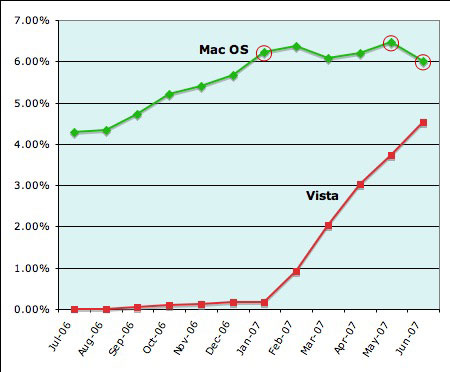
If you recall, in July 2007, there was a story in Computerworld magazine that used cherry-picked data to make it look like Vista was a winner and the Mac OS was failing. The report said:

Windows Vista’s share of online users has increased every month this year, while rival Mac OS X — to which Vista has often been compared — has shown little, if any, growth, a metrics company reports. … Vista has grown its usage share each month since its release to consumers Jan. 30 … Mac OS X, meanwhile, accounted for 6.22 percent in January and hit its high point of 6.46 percent in May, but it slipped back to 6 percent in June.

This chart shows the cherry-picked data points:

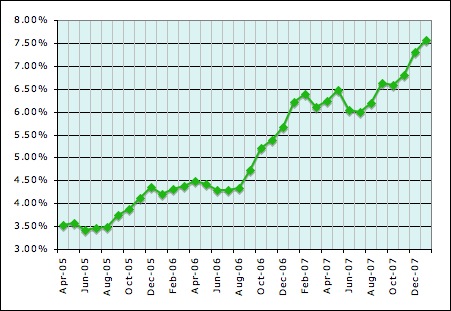
As I pointed out, the Mac data was carefully chosen to give the impression of a declining market share, when in fact, historically, Mac market share had a tendency to flatline in Winter through mid-Summer, but to shoot up in late Summer through the beginning of Winter. I predicted in July of 2007 that the numbers would start to rise in “the next few months”–and I was right. In fact, the trend has just now begun to reach its full peak:

0208-Mac-Market-Share

If it continues to match the trend, the market share has either peaked or will peak in February (perhaps March), after which it will stay level until July or August again. So far, my predictions have been almost spot-on; I predicted a rise to just over 8% by the beginning of 2008; while that is still possible, right now it is at just over 7.5%–not too far off, and certainly a hell of a lot more accurate than the paid prognosticator over at Computerworld.

I also pointed out that Vista sales were “increasing” only because (a) Vista started at zero, (b) is being sold by default with new computers, (c) and has a 90% market share to fulfill. In fact, relative to where it should have been, Vista sales were sagging, and people were asking that a 6-year-old OS (XP) be installed on their computers rather than a brand-new one (Vista), and that certainly held true. There is now a petition with nearly 80,000 signatures demanding that Microsoft abandon plans to stop selling Windows XP after this June, and with so many businesses refusing to switch to Vista, Microsoft is in the embarrassing position of actually having to consider keeping an old product alive and thereby admitting that their new product is a complete failure. Even the much-awaited Vista SP1, which was supposed to fix so many of the bugs in Vista and make it at least bearable, is failing to impress early testers. Analysts are now telling Microsoft that they should keep XP alive and on store shelves until 2009–when Vista’s successor is slated to arrive. (Though you shouldn’t bet the farm on that promise!)

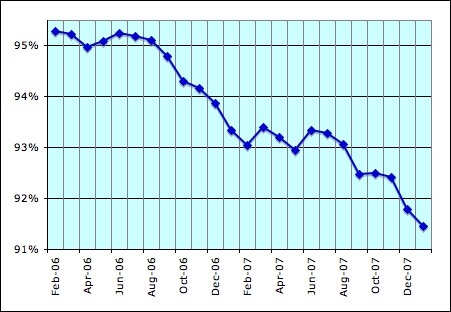
All this probably explains why, as the Mac market share expands, Windows market share drops:

0208-Win-Market-Share

Ooo, and look! Microsoft’s market share is dropping exactly as Apple’s is increasing! What a coincidence!

Sure enough, Vista’s share expands only as new computers are sold to suckers who don’t know they can and should demand and get XP, so Vista’s market share continues to grow. But it’s anemic growth, at best: after one year on market shelves, Vista is only at a pitiful 12%. At this rate, it should reach 50% in only 3 more years, in March 2011–by which time, the next version of Windows will be two years overdue. How pathetic is that?

Following various trendlines, the Mac market share by early 2011 could be anywhere between 12% and 20%, probably landing somewhere in the middle of that. (My prediction: 15% by January 2011. That’s pretty realistic, and yet still allows for the possibility of the far-reaching prediction I made of 30% market share by 2015. But few trends stay that true for that long.)

Long story short: Me right, Computerworld dead wrong, Vista bites big hairy donkey balls. Not that this makes me Nostra-freakin’-damus (anyone could have crunched the numbers), but it might suggest that Computerworld should stop paying the hack they have on their payroll and instead mail his paycheck to me for writing this blog.

In a perfect world, that is.

Categories: Mac News Tags:

Air Raid

February 2nd, 2008 1 comment

0108-Mba-Cm

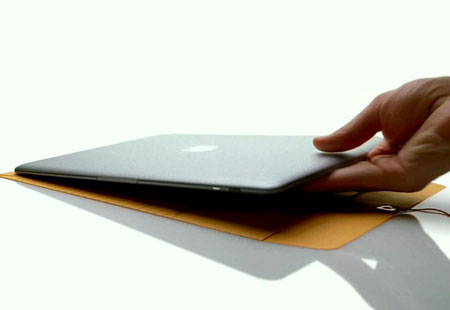
Having the TV switched on to Japanese channels like Sachi has a lot allows me to observe a lot of stuff I had not seen before. One of them is what products are being pushed. And one that I find interesting is that the MacBook Air is being advertised a lot in Japan. It’s the exact same manila-envelope ad which you see in America. Which makes me wonder if the speculation is true, about the MacBook Air being targeted at Japanese consumers as a way to increase the Mac’s languishing market share here.

Categories: Focus on Japan 2008, Mac News Tags:

Mac Virus Threat Exploding? Oh, No, It’s a Recycled BS Sales Pitch Again

January 24th, 2008 Comments off

You might be seeing articles flying around yet again warning of the ever-increasing threat of Mac malware. Run for the hills! Your Mac could be infected! Buy the anti-virus software made by the company generating the warning!

No need to panic, actually. It’s yet another exaggerated threat ginned up by the same group of folks who always use hyperbole to frighten Mac users into thinking there is a great and ever-expanding threat against them. The “report,” published by anti-virus software maker Sophos, makes the claim that the have “revealed” evidence of “cybercriminals moving beyond Microsoft,” meaning they are advancing on Mac users:

…organised criminal gangs for the first time arrived at Apple’s doorstep…hackers are extending their efforts beyond Windows…until recently, organised criminal gangs have not felt the need to target Mac users…late 2007 saw Mac malware not just being written by researchers demonstrating vulnerabilities or showing off to their peers, but by financially-motivated hackers who have recognised there is a viable and profitable market in infecting Macs alongside Windows PCs. For example, many versions of the malicious OSX/RSPlug Trojan horse, first seen in November 2007, were planted on websites designed to infect surfing Apple Mac computers for the purposes of phishing and identity theft.

Note the deceptive language, pretty much an outright lie: “gangs” (which are organized!) and “hackers” and more “gangs” (criminal ones!) and “hackers” exploiting a “profitable market” of attacking Mac users, with one “example” giving the direct impression that there are other examples.

Wow! It sounds like veritable armies of hackers and criminal organizations are massing like Orcs in The Lord of the Rings and are flooding the market with multitudinous malware aimed at victimizing Mac users!

When in truth, it is one criminal organization (which probably employs one or more hackers) which has released one piece of malware (with variations). The “report” makes the claim that “6000 infected webpages every day” are found, and suggests that all are aimed at the Mac via OS detectors, but does not firmly state whether all have the Mac version of the software. Nor do they provide even one actual discovered real-world instance of a Mac user actually being affected by the trojan, just as they do not report the long string of stupid errors a Mac user must make in order to be affected by the trojan. The “trend” they refer to is a grand total of one malware package, a trojan, with no evidence of actual harm achieved.

In order to download the actual report, you are required to provide an email address and are given the option of have Sophos spam sent to your mailbox. Personally, I declined the generous offer.

Nothing to see here, folks. Move along.

Categories: Mac News Tags:

Insanely Fickle

January 23rd, 2008 1 comment

Apple Posted record profits and market share gain. Still, the company says, we might see a bit of a slowdown because of the economy next quarter.

Apple shares plummet $20, or about 12%, within five minutes in after-hours trading, for an overall drop of $60 or 30% from a month ago. Why? “Earnings failed to top the most optimistic of analysts’ estimates.” Yes, but they exceeded the average estimates. And the outlook for the next quarter is still for good profits, Apple is just being prudent and conservative–good business sense that should bolster confidence in the company.

I suppose this is no less crazy than Apple’s meteoric stock rise over the past few years, but it’s still crazy.

Categories: Mac News Tags:

MacBook Air: Too Sexy for Your Party?

January 17th, 2008 6 comments

One thing that concerns me about the MacBook Air (MBA): it might have sexed itself right out of the market. I mean, that is one sexy-looking computer. The question is, who will want it enough to buy it and put up with all of its foibles?

There’s no optical drive, so you’d have to either buy and carry around the external, or carry an install DVD around so you can install software on various machines to “borrow” their optical drive (and I wouldn’t bet on it being a fast connection, nor bug-free).

There’s one USB port, a mini-DVI port, and a headphone jack, and that’s pretty much it. Of course, that’s supposed to be a feature–it’s called “Air” both for it’s slim design and for the fact that you’re supposed to use wireless with it. There’s not even an Ethernet jack–you’d have to use a USB adapter.

You can’t replace the battery by yourself, and it’s possible that you’d have to leave your computer with the store for a while to get it done–though one would hope not. This would not be an issue in the first year or two (unless you like to carry a spare battery around for extended outside use), but when it comes time to replace a battery, a lot of people like to swap the second battery in and out with the first, instead of just tossing the old one. Not a huge deal, but a nit, and the nits build up on this model.

What it really comes down to is that you’re paying a hefty price for sexy. Now, we’re used to paying more and getting less with laptops for their portability, but that’s a contrast with desktop models. With the MBA, you’d be paying that price relative to other laptops.

And you’re paying a lot, too–the price is much closer to the MacBook Pro line, but you’re getting less than is supplied with the MacBook. Compare:

model
price
CPU
screen
MacBook $1100 2.0 GHz 13“
MacBook Air $1800 1.6 GHz 13”
MacBook Pro $2000 2.2 GHz 15“

Add the cost of a portable Superdrive and the special adaptors, and you’re looking at almost the same price as the MacBook Pro. So, you’re paying for a MacBook Pro, but getting less than a MacBook, while dealing with more hassle. Sure, there’s the multi-touch trackpad, but you can expect that to come with future MacBook and MacBook Pro refreshes.

What it comes down to is a thin and sexy computer. To pay twice as much and get less just for that, I believe, is not the best bet in the business. Sure, some people will pay for it, just like many people shelled out a few hundred dollars more for the color black on a MacBook. But while portability is worth that much when choosing between a desktop and a laptop, I don’t think that sexy is worth another sacrifice of equal proportions when choosing between a laptop and an MBA.

It’s as if the Apple people got to thinking that sexy was more important than functional, when all along, sexy has been an important feature but second to functionality. Not the other way around.

I hope I’m wrong; I hope that the MBA’s will sell as fast as the hotcakes they actually look like. I just don’t see it being a big hit.

Maybe that’s what the market was responding to. Apple’s stock, already down to $179 yesterday from a high of $200, dropped to $169 the day of the keynote and has fallen an additional $6 to $163 in after-hours trading. The MacBook Air was the star of the show, and I think that people could see that this was a lofty luxury item, not a mainstream seller. iTunes movie rentals are interesting, but expensive and limited. AppleTV 2.0 is better, but doesn’t look attractive enough to bring it out of its rut. And Time Capsule looks pretty much like a specialty item that not many people will go for.

That, plus there were virtually no surprises in the Expo–everything except Time Capsule was leaked beforehand, save for a few small details. Add that to the usual list of expected announcements that didn’t make the cut, and the keynote this year looks more like a flop.

One could almost forget that the iPhone is selling like gangbusters and is transforming the market, or that Apple’s sales of computers are again hitting new highs. In short, the old news is fantastic, and the new news is that there is no big new news, really.

Categories: Mac News Tags:

SteveNote

January 16th, 2008 1 comment

Well, the SteveNote has started. Like last time, I feel a bit weird blogging live about someone else blogging live–but with there being no live webcast, there’s not much I can do about that, except not to live-blog, but then what would I do while waiting for screen refreshes? I mean, get real.

MacRumors has the best coverage–their notes are fairly good–not as good as Engadget’s, but you have to reload the whole Engadget page (the reload fails most of the time), whereas MacRumors has a smarter system which updates continuously, and works pretty well. Apple stock is moving very little (in fact, it’s falling), surprising considering that they just announced 4 million sales of iPhones and 5 million sales of Leopard. The 20% adoption of Leopard is great news, but 4 million iPhones? That’s a hell of a lot of iPhones, more than I believe a lot of people expected they’d be able to sell.

Steve is showing off the new iPhone features, but (a) they are pretty much the same as what had been leaked a few weeks back, and (b), the main thing I want to know is, when is it coming to Japan! I will be very disappointed if that’s not announced today. Ummm…. he just finished talking about the iPhone, and no announcements about its release. Yargh. Later? “One more thing”?

The iTunes movie rentals are being announced, and every major studio seems to be on board with the service–including Universal. How about that. The base service can be wholly computer-based. Rental rules: 30 days to start viewing, 24 hours to finish viewing after you start; viewable very quickly, you don’t have to wait forever for the download to get there; $3 for older films, $4 for newer films; new titles available 30 days after the DVD release (NetFlix doesn’t seem to have too much to be worried about). No word yet on the resolution of the movies. And something I’m wondering: like iTunes, will I be able to use the service from Japan, so long as I have a credit card with a U.S. billing address? Hmmm….

AppleTV does get in on the show, however. If you want DVD-quality movies, you can get it with the AppleTV unit, which can be used as a stand-alone box, no computer required. (Hmm–that suggests that computer-only rentals are “less-than-DVD quality”…). You pay more: $5 for an HD rental. No wonder all the studios are on board–Apple seems to have caved on the pricing.

Okay, what the heck is going on with Apple’s stock? I don’t see anything so far that is not good, and yet AAPL is dropping like a rock–almost $10, or more than 5%, most of that since the keynote started. Am I missing something? I know that Apple rises on rumor and drops on news, but (a) it hasn’t risen on rumor that much lately, and (b) last year, it rose a lot on news… so I am just trying to figure out what’s up with this.

Right. It’s time for MacBook Air. Again, this is almost exactly as the rumors have predicted–almost no surprises at all in this Expo son far. (Is that why the stock is dropping? Strange if true.) Seems to be targeted between the MacBook and MacBook pro lines.

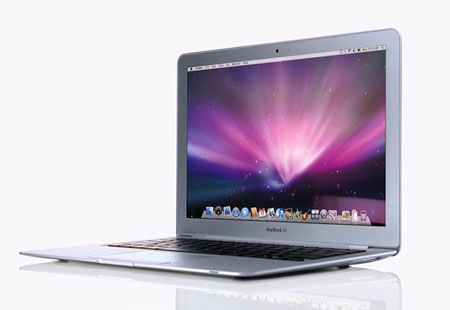
They finally showed pictures of it. Damn, that’s a slim notebook. Where the hell does the battery go? As rumors said, they must have left out the optical drive. BlueTooth and WiFi-n, natch–you would need wireless on this thing.

0108-Mba-01

0108-Mba-02

Well, Damn. No iPhone-for-Japan announcement. How depressing.

Categories: Mac News Tags:

iPhone Virtual Ordering?

January 11th, 2008 1 comment

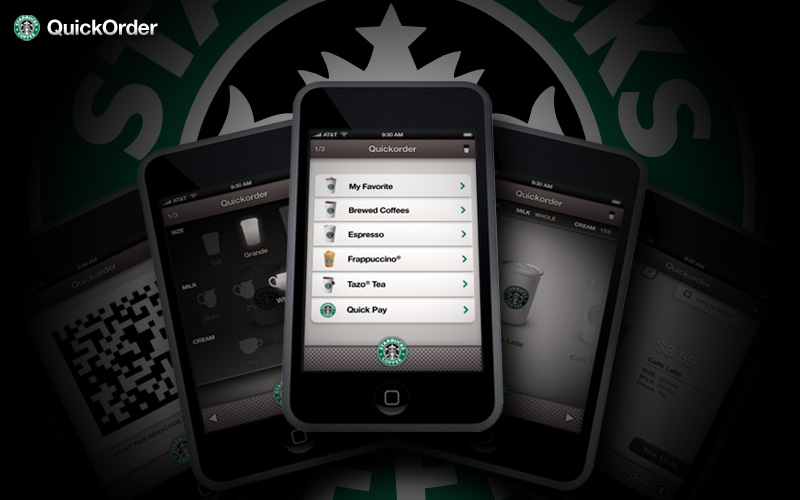
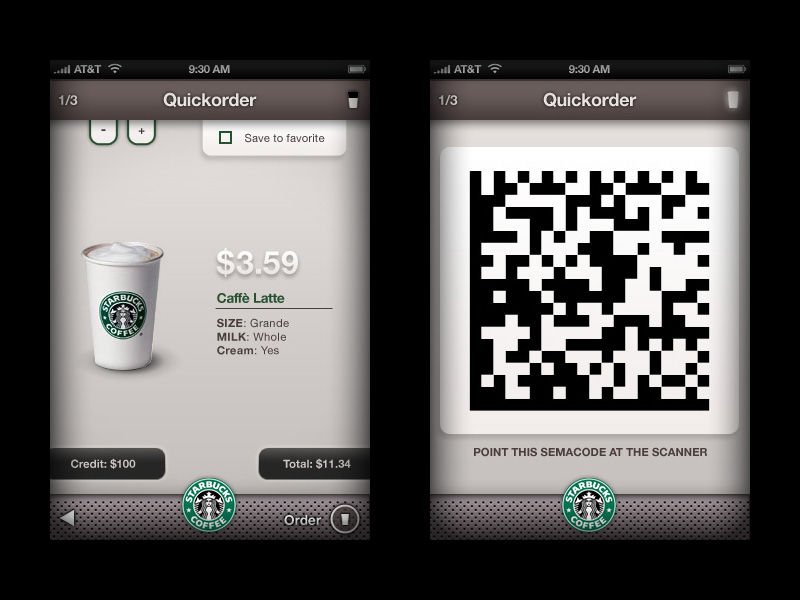
Rumors and an elaborate mock-up have started making the Internet rounds about an alleged new feature for the iPhone: make Starbucks orders using your iPhone without having to stand in line.

Interactive Quickorder T

See the full series of mock-up images.

This was reported by Forbes a few weeks ago. Let’s say you walk into a Starbucks or other place with a long line of people waiting to order something. Instead of waiting in line, just get out your iPhone, place the order wirelessly, and then wait for your iPhone to report to you that your order is ready and waiting–and then pick it up. You have just jumped to the head of the line, cutting in front of all those other people waiting like suckers!

It’s not as impolite as it sounds, though–people who order electronically bypass the line altogether. People in line are not waiting for their product, they are waiting for the services of a human at the register to take their order. People who order by iPhone still have to wait for their order to be processed, like everyone else. It’s just like getting a movie ticket on Fandango–when you get to the theater, you can bypass the line of people who want to buy a ticket at the counter, and instead you go to the line of people waiting to show their ticket to get in.

What the new iPhone feature does is make it so you can order “online” from within the store itself, a big change over ordering from your home PC. This could make a big difference in how people shop. Instead of having to prepare everything in advance from home, you could make an order on the fly from just about anywhere.

An interesting element of the mock-up:

Interactive Quickorder 3

It’s the use of SemaCode, a 2-dimensional barcode, to place the order. In Japan, a similar 2-D barcode called “QR Code” is often seen; however, as far as I can tell, it’s not used in the same way as suggested above. In Japan, the code is often seen on ads in magazines and posters on walls in any public venue. You use your phone’s digital camera to scan the code, and your phone decodes the data. It might be a telephone number you can call, or a hyperlink to a web page your cell phone can then visit. Often these codes can be seen on food wrappers; scanning them can tell you the history of the item, like where and when a certain fish was caught, or where and when the potatoes for a bag of chips were grown and harvested.

The idea that this technology is being integrated into the iPhone certainly makes sense regarding the rumor that the iPhone will soon be announced for Japan.

Categories: Mac News Tags:

No, It’s One of the Top Ten Overreported News Stories of the Year

January 1st, 2008 Comments off

InfoWorld has published a “top ten underreported stories of the year” story, and weighing in at #3 is the old canard, “Hackers Take Aim at OS X.” This story is worse than many of the others, partly because it’s touted as a huge story that nobody seems to be paying attention to, and partly because it focuses purely on “vulnerabilities”–potential chinks in an OS’s security fence–and not actual hacking attempts. They give zero support to the idea that hackers are actually targeting Mac users more.

So far, the only even semi-serious threat to the Mac has been a single trojan–trojans revealing weaknesses more in users than in the OS–and there is no evidence that this one trojan had any success in duping more than just a handful of users, if even any at all. After a thorough search of the web, I could find no figures whatsoever on how many Mac users fell for the trojan–which requires a user to (a) be surfing for porn, (b) fall for the scam which says you need a codec to view a porn movie, and (c) requires the user to type in the admin password upon installation, despite a warning that a video codec needs access to change your operating system.

It should be that the whole “Hordes of Hackers are Overwhelming Macs with Attacks” diatribe is wearing thin, after being one of the most over-reported “news” stories of the year, a result of the security software peddlers relentlessly pushing this scare tactic on tech publications so they can sell as-yet unneeded products.

Categories: Mac News Tags:

Apple TV About to See Relevance?

December 28th, 2007 1 comment

Many people thought upon seeing the Apple TV, “Huh??” All it did was make it possible for a Mac in another room to stream video to the TV–essentially the same thing as hooking up your Mac to a TV by cables, except without the cables. So why spend $300+ on the wireless equivalent? At the last MacWorld Expo, almost a year ago, Apple’s stock dropped when the Apple TV was mentioned, only to shoot up again upon news of the iPhone. The Apple TV was a non-starter.

Well, the answer, of course, was that Apple TV was incomplete. What the device was really built for was something more than just wireless TV: it was made as a rental movie box. I speculated on this as far back as last December, after discussions with my family on the topic, and six months ago, rumors of talks between Apple and the studios for online rentals flew around the net.

This potential makes the Apple TV look a lot more attractive. The product could act as a “DRM box,” a way to express movies to your TV over the Internet with the least risk of copying and distributing them. Not that such a thing is actually going to stem piracy–all they need is one copy, and ripping a rental DVD is simple enough. But it might be enough to get the studios to get over their piracy jitters enough to agree to it, and one more revenue stream could even entice them enough to sell their wares through Apple (though don’t hold your breath for Universal).

Which brings us to today’s story:

In an effort to jump-start the market for online movies, News Corp.’s Twentieth Century Fox and Apple Inc. are preparing to announce a deal in which Fox movies would be available for rent digitally through Apple’s iTunes Store, according to people familiar with the matter.

That will certainly help. You can probably bet that Disney and their affiliates will be on board, and maybe even Paramount (they sell older movie titles over the iTunes Store). Interestingly, the article only mentions the Apple TV in terms of its poor sales, and not in its potential as a part of the rental movie deal. But the article does mention this:

In a related move, Fox also plans to release DVDs that use Apple’s digital rights management system, a move that would allow consumers to make legal copies of the disc that could be played on an iPod or other device, such as a computer.

Now, that’s an unexpected move–unless somehow they make it so that you are allowed to do this for an additional fee, which would fit much more into the studios’ “pay as often as possible” paradigm. But if it can be done at the same cost as usual DVDs, then that would be a nice added bonus.

An additional boost to the legitimacy of the claim: the report comes from the Wall Street Journal, a newly-acquired property of NewsCorp (play Darth Vader’s theme here), which also owns 20th Century Fox. That doesn’t make it a lock, but it certainly enhances the possibility that the report is true.

Unsurprisingly, Apple Stock surged over 200 again, and may stay there this time.

If you want full disclosure, I bought a largish chunk of Apple stock back when it was at $90. So, nyah.

Categories: Mac News Tags:

Well, Finally

December 19th, 2007 2 comments

They took their sweet time about it. Apple is now said to be in active talks with NTT DoCoMo about selling the iPhone in Japan. This could suggest a summer rollout, and might further indicate that Apple has successfully developed a 3G version of the iPhone (perhaps to be unveiled at the MacWorld Expo?).

The Wall Street Journal Article goes on to say that while Apple is negotiating with NTT because it always tries to pair with the top market provider, it would turn to SoftBank, a recent upstart rival with a reputation for good deals but not-so-good customer service. SoftBank has been fairly well-known as an Apple groupie, selling iPods alongside their phones; its president even attended the last MacWorld Expo in San Francisco, the one where the iPhone was announced.

The report goes on to say that while NTT might blanch at Apple’s demand for a cut of the contract revenues, Apple won’t have trouble sealing a deal in Japan–suggesting that SoftBank would probably be happy to give Apple what it wants, thus putting more pressure on NTT DoCoMo.

Me, I don’t know from telecoms in Japan. I’m just getting the iPhone when it comes out. Which hopefully won’t be too much longer now.

Categories: Mac News Tags:

Yet More New FUD Bamboozlement Re: Mac Security

December 8th, 2007 Comments off

The International Business Times sports the headline, “Apple Mac, iPhone, No Longer Immune to Hacks.” The problem with that: Macs were never “immune” from malware, no computer is. And though Mac fans are usually tagged as the source of such claims, it’s usually the crowd that is antagonistic to Macs and Mac users who set that statement up as a straw man to take down.

So the question is, is the Mac really “increasingly vulnerable?” How accurate is this new report? Is the amount of Mac malware increasing? Are the number of security holes spiking? Is the Mac less secure than it used to be?

The answers: not really, not at all, no, no, and no. The “new” report bases its warning completely on a single trojan. Admittedly, it’s the first trojan that even shows promise of getting installed on more than one machine, but it’s a trojan nonetheless.

Trojans are a type of malware that requires the user to be fooled into sweeping aside the OS’s defenses. Trojans are the one piece of malware that no OS could possibly protect against without severely hobbling the user; they represent not a vulnerability in the security of the OS, but rather a vulnerability in the intelligence or awareness of the computer user.

For example, let’s say you get a high-end security system for your house. All the doors and windows are wired in a way that would be virtually impossible for a burglar to circumvent. If any are tripped, a security firm races to your house to apprehend the intruders. None of this, however, is of any use if you simply open the door and let in anyone who asks. This is what a trojan does, and the success of any one trojan is not the fault of the security system.

The “alert” from F-secure, a company that wants to sell its security software for the Mac, is a trumped up re-hash of similar chicken-little warnings they have issued and re-issued over the years. I suppose you can’t blame them, from a business perspective; they have a hard job. Selling security software for the Mac is kind of like selling raincoats in the desert.

The fact is that Mac malware is still so rare that the chances you’ll encounter it is close to nil. There are still no viruses and no worms that affect Macs. There have been two Trojans in the past few years that actually made it on to a few people’s computers. One was a fake image that was reported on only one computer in the wild.

The other came out more recently, and it is the focus of the new “warning.” It was a fake codec for watching porn movies. To fall victim to it, you have to surf porn sites until you find one that offers free porn movies–but they tell you that you need their special codec to play them. You must download the codec, ignore the message about installing software you found on the Internet, and enter your admin password for the installation to complete. That last part is the kicker: the password is needed only when an application needs to screw around with system resources. Only when a user passes through all these hoops–similar to a porn huckster showing up at your door and you decide to let him into your living room–will the trojan affect your computer.

And when it does, it will not spread to other computers or infect other users. Each computer must be infected one at a time.

Many of the other “threats” against Mac security are just that: threats. Not actual malware, but rather the potential for malware to be made. These took the forms of “vulnerabilities” or “proof of concept” hacks. And many of those tend to be unlikely, sometimes outlandishly so. Take, for example, a Bluetooth “proof of concept” hack in Macs reported a few years back. In order for an exploit to work, it would have to already be present on one Mac while another Mac was in the same room. Both computers would have to have outdated versions of the Mac OS, and both would need to have Bluetooth activated and discoverable. Then the infected computer would send out a signal to the clean one, telling it that a Bluetooth device was available. The user of the clean Mac would then be presented with a message by the computer, informing the user that a Bluetooth device was available, and do you want to accept it? The user would then have to agree to the incursion, despite there being no new Bluetooth device within sight.

Short story: Macs are still more than secure enough. You have to learn not to be an idiot, but that’s pretty much it, for now. Sometime in the future some actual virus or worm may materialize for the Mac, but it doesn’t look like it’s going to happen anytime soon.

The thing you have to look out for most is the scammers in the “security business” for Macs, and the media outlets that buy their FUD (Fear, Uncertainty, and Doubt) scare tactics wholesale. Take these closing paragraphs from the Times article:

News of Apple’s growing attacks comes as the number of viruses and other malware has doubled over the past year.

F-Secure had detected 500,000 viruses, trojans and worms in 2007, compared with 250,000 last year.

Doesn’t that sound like there are 500,000 viruses, trojans, and worms for the Mac? Oi vey.

Ouch

December 4th, 2007 Comments off

There is an incredibly thorough point-by-point comparison between the iPod and Zune 8GB flash players just published at RoughlyDrafted. While the author is recognizably Apple-biased, the review is nevertheless devastating against the Zune (even if you discount for bias), pointing out its flaws and shortcomings in rather gory detail.

One point that I had not been aware of: the depth of the Zune’s WiFi shortcomings. Zune’s WiFi has two features: user-to-user sharing, and wireless syncing. User-to-user sharing has always been an obvious flop; there are too few users, too few real-life opportunities to share even when in the presence of other users, and DRM limitations which make it far less likely that people will share.

Wireless syncing, however, sounded at least partly useful, though I have never been too hot about it. After all, you have to plug in your player almost every day anyway just to charge it up. Wireless syncing would only be useful in limited situations, such as when you get new music on your computer and don’t want to wait for the next charge-up to sync it.

Details in the review, however, completely blew away my illusion that this feature might be even partially useful. Apparently, while it is possible to sync wirelessly, most “wireless” syncing situations demand that a cable of some sort be attached–either a USB cable or a power cable–else the battery gets drained too fast. In which case you need to re-charge anyway. And if you’re going to plug in, then what the hell is the use of WiFi, especially when it is much slower than a direct link?

In short, just that one piece of information shattered one of the few potential advantages of the Zune. Not that this surprises me at all, but the whole article clarifies rather potently the chasm of quality between the two players.

Categories: Gadgets & Toys, Mac News Tags:

Huh?

December 2nd, 2007 Comments off

Here’s a report on a new mini PC put out by Asus:

There only seems to be one possible comparison, namely Apple’s Mac Mini, and while Cupertino may still keep the advantage on aesthetics and OS, Asus takes the win on components. Processing power is provided by a 1.86GHz E6320 Core 2, which is a desktop part, 1GB RAM is included and there is a slot loading DVD drive – a small detail but always a winner in my book.

Ummm… the higher-end Mac Mini comes with a 2.0 GHz Core 2 Duo, 1 GB of RAM, and a slot-loading Superdrive. That’s for $800, whereas the Asus Nova will reportedly cost $1,019. While the Mac Mini reportedly uses a mobile version of the Core 2 Duo (I can’t confirm that yet, but that seems to be the claim), the difference between a 2.0 GHz mobile and 1.86 GHz desktop Core 2 Duo hardly seems worth the extra $220 for the Nova. Not to mention that the Nova looks to be more than half again as big as the Mac Mini. But what’s up with the rest of the listed “advantages”? A little anti-Mac bias here? Or did these “news” outlets simply reprint the manufacturer’s bogus claims?

No Wonder

November 29th, 2007 2 comments

As usual, all of this is unscientific. It has to be, there is no “scientific” research about this kind of stuff. But I was curious about how many people had upgraded to Vista, and how many to Leopard. I found two polls online. The first was run by MacTips:

1107-Leopardpoll

677 people answered, and of them, 75% said they had already. Compare that with this long-running MSNBC poll that started a few months after Vista’s release, asking similar questions about that OS:

1107-Vistapoll

Only 11% said “yes,” or up to 30% if you include the “maybes.” More than half are holding off for the foreseeable future.

This mirrors a lot of what I have seen and heard; I have not yet met a person in the flesh who has said that they actually like Vista. Everyone I have met who has it has some major complaint about it.

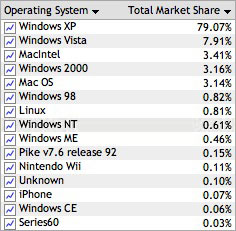
And before you dismiss that Vista poll as being too unscientific, note that Net Applications measured Vista use at just under 8% of the total, or about 9% of all WIndows users:

1007-Vistastats

Meanwhile, my own site’s stats put Vista users at just under 13%:

1107-Vistastats

Either way, the number hovers very close to the 11% figure in the MSNBC poll. Which figures. Businesses are “leery” of Vista, and “have no appetite” for the new OS. The recognize what most regular buyers seem to be realizing: Vista brings very little advantage in exchange for the headaches it poses.

Leopard, while it still has its own bad spots, brings a long list of improvements that people are talking about and enjoying. I myself failed to make Time Machine work, and turned off Spaces after having too much trouble with it. I am not enamored of much in the new Spotlight, either. But that’s the end of my troubles–and I very much like a lot of the other improvements. Quick Look is fantastic. I’m still working with Stacks, but find them a solid improvement. Some elements of Spotlight are an improvement despite its other lacks. The dictionary is better than ever. Safari 3 is a major boost up. I plan to get .Mac and make full use of the “Back to My Mac” feature, not to mention getting to use iChat a lot more. Every day, I stumble upon something new in Leopard, and most of the time I am very pleasantly surprised.

Even better, the system runs fast and crisp–even on my 3-year-old pre-Intel PowerBook G4. Vista, on the other hand, is a slow memory hog which usually cannot run at all on computers made more than two years ago. Service Pack 3 (SP3) for XP just came out, and it runs twice as fast as Vista does.

All this reminds me of the old Canadian joke from the 80’s: In America, you have Ronald Reagan, Bob Hope, Johnny Cash, and Stevie Wonder; in Canada, we have Brian Mulroney–with no hope, no cash, and no wonder!

Microsoft says that “the ‘Wow’ is now,” but all they have is Vista–with no speed, no customers, and no wonder.

Leopard Minutiae

November 18th, 2007 Comments off

Really, with Leopard, the small stuff counts. The reason for that is, there is just so damn much of the small stuff that it continuously hits you, like stumbling across decorated eggs at Easter. Some you’ll like, some you may not. But taken all together, they make quite an impact as you find more and more of them.

1107-Dockic1Among the many small new visual changes in Leopard are things like this, pictured at left: the title of each icon now has a little grey callout box; furthermore, instead of being static, it moves dynamically with the icon, when it is moved or when it jumps up and down on launch. Other changes include rather dramatically larger drop shadows around windows, rounded corners on menus, the lack of rounded corners at the corners of the screen, and so on. Two of the biggest visual changes commented on are the Dock and the transparent Menu Bar and menus. The transparent menus are most often griped about–people hate them. I guess I can see why people feel that way–the background showing through can be a bit distracting–but frankly, I don’t mind it much, and figure that in a week or two I won’t even notice it anymore. As for the Dock, I don’t see what people don’t like about it. Not that it’s incredibly cool or anything, but I don’t find it objectionable. I’m not too enamored of the blue lights replacing the black arrows to indicate an open app, but I kind of like the 3-D glass shelf thing. Besides which, people have found a way to easily modify the Dock to your tastes.1107-Softup1
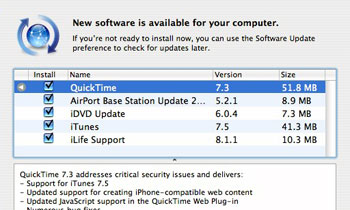
I’m not sure I’m so hot about changes in Software Update. The main change is that before (pictured at right), as you were downloading updates, you could still see them–along with the vital information given below, but most importantly, you could remind yourself if any of the updates required a restart. In Leopard, the Software Update has been changed so that instead of this information-ruch list, you instead get a nondescript progress bar dialog box. How is that an improvement?

I have learned more about Stacks in the meantime. You can alphabetize, by adding spaces to the front of the name of any app. I didn’t see this as working before because the new alphabetization ordering does not register in a stack unless you log out/in or restart, or erase the stack and re-insert it. So you can reorder the placement of the icons. On the downside: Apple set a limit of 8 icons per stack in “fan” display. More than that, and you have to switch to the less-attractive (for me) grid layout, or click the fan’s “More in Finder” button at the far end of the fan (they should put that button closer to the Dock, if you ask me). Seems to me that they could fit in a few more icons, or even compress the fan a bit more to add a few after that. Also, Apple didn’t make it so you could drag an icon from the Finder and drop it into an item in a stack.
1107-Screengr1
Here’s another small tweak: when you do a Command-Shift-4 screen grab (where you can select the part of the screen to be captured), Leopard adds the coordinates of the cursor to the cursor itself. Small, but an example of the endless variety of tweaks you’ll find.

Here’s an improvement in Safari: Google apps compatibility. You can now use Google Docs in Safari–previously you just got a message telling you that Safari didn’t work there. But Safari now plays nice with other areas of Google as well, like with Blogger:

1107-Safari1

This is one example of many, but you can see that below, in Tiger (Safari 2), most of the buttons in the “Create Post” interface were inaccessible. With Safari 3 in Leopard, it all works.
1107-Safari-Pdf-Controls
Another small modification is to Safari’s PDF viewer. Actually, a few small improvements. First, there’s an Apple viewer control added to the bottom of any PDF file viewed in Safari, which adds quick zoom controls, as well as “View in Preview” and “Save to Downloads.” Also, PDFs can now be zoomed in and out with the Command-plus/minus shortcut. Before, zooming was a chore, which is why I usually switched immediately to Preview. Don’t have to do that any longer. Plus, the PDF settings are remembered by Safari–if you view PDFs zoomed-in, Safari will keep them zoomed in the next time you view a PDF.

Here’s another touch I like: memory in Open/Save dialog boxes. Before, when dealing with files in list view in a navigation dialog box, you would always be presented with a standard view–in alphabetical order. Since I often copy names of files I just made when I name a new file, I like the list to be in time order–which meant that almost every time I saved a file, I’d have to click the column header to re-sort the list. That gets tiring. Leopard, however, remembers what you last set things to and keeps them that way.

That said, I would prefer that Leopard does what Windows does in such dialog boxes: allow full Finder access to files, allowing you to rename, trash, and otherwise work with files when in the dialog box. But I can live without it.

One thing I don’t like about Spaces: it does not play well with Exposé. Seems to me that when you do an Exposé command to see all open windows, you should get all open windows–that’s one of the great things about it. The problem with Spaces is that Exposé only shows the open windows in the Space you currently occupy. Which means that you have to either not use Spaces or give up on the functionality of choosing from all open windows. They should have at least made “all windows across Spaces” an option, I would think. Unless they did and I just haven’t found it yet.
1107-Spotlight1
Spotlight got an upgrade. It now displays dictionary definitions as well as answers to equations. I have noticed that where the automatic focus of the cursor was on the “Show All” option, it is now on the “Top Hit” in Leopard. That can lead to some unintended app launches for those making the switch. I can see the logic of wanting focus on Top Hit instead of Show All, but that seems to be more a matter of taste than of necessity. Spotlight also changed the “Show All” window from the Spotlight search window to a standard “Find” window… and they still don’t allow you to see or sort by file sizes in the Find list! What is with Apple on this? Don’t they realize that some people depend on that? Yes, you can search by file size… but you can’t see what the resultant file sizes are. I wish they would fix that, it has aggravated me for years now.

Lastly, one huge improvement is how Leopard deals with disconnected network disks. It used to be that OS X would get into a multi-minute hang (until it finally decided that yes, the connection was actually severed), essentially forcing you to stop working for a few minutes, or to Force-Quit the Finder and relaunch it. This was a big hassle for me because I move my PowerBook around a lot, and I access network shared folders a lot. I often forget to eject the shared folder before disconnecting, and that would lead to the familiar Finder hang, complete with a persisting Spinning Beachball of Death. With Leopard, that doesn’t happen anymore. When you disconnect without ejecting, the shared folder remains up for a few minutes, and is even navigable, until you try to open something. Then the files and folders all just disappear, and you are eventually told that the server has been disconnected. No hangs. Thank god.

Otherwise, Leopard remains as Tiger was before: very simple for making network connections. As usual, I had a lot less trouble connecting to a shared Windows folder on my Mac than I have making the same connection from a Windows computer.

Categories: Mac News Tags: