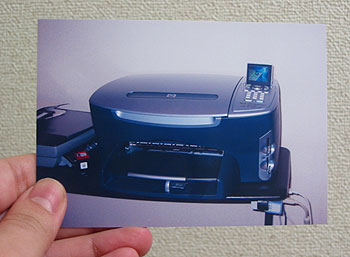
 So the HP All-in-one printer (HP PSC 2450 PhotoSmart All-In-One) got here as promised Sunday, and I’ve been working with it since then. Most everything works just great. I set up the software on both the Mac and the PC (both included English language versions of the software), and the functions mostly seemed to work just fine out of the box; the drivers do a good job here. Without any serious fiddling around, I was able to print very nicely.
One of the most impressive things–and not just for the all-in-ones, but for ink jets in particular–is the photo printing. Although a few printouts had noticeable banded lines running through lighter areas of the picture, most photos I printed (3.5″ x 5″) came out amazingly clear and sharp, pretty much indistinguishable from photos printed by a photo lab. And that’s using the cheaper photo paper, not the good stuff, and not at best printing resolution. I haven’t tried an 8×10 glossy yet, but will at some point. Most people who see the photos can’t believe they were made by an ink jet.
What impressed me as much was the copy feature. I took out a map book and put it on the scanner glass, and hit “copy”–and the copy came out very nicely. Even on regular paper at normal quality, it came out with quite acceptable clarity and accuracy. This will work much better than carrying a big map book around next time I want a street guide. Apparently, using photo paper at high quality, it can effectively reproduce a photo you place on the machine to copy–which I haven’t tried yet but can believe. I also haven’t tried to fax yet, nor have I tried the
The photo printing worked as promised–take your flash memory card out of your digital camera, stick it into the slot in the printer (there are four, for different types of media), and the images come up on the 2.5″ LCD screen. Select the one you want, change the settings for paper size, quality, etc., and off it goes.
The downside: so far I can’t even find the OCR program which is promised in the documentation. It is supposed to come with something called “ReadIris,” but it seems to not be included in the installation, which would be a big disappointment. HP’s customer support has been a mixed bag–their first reply came a day later than promised and was a canned response, which I hate (canned responses almost never accurately address the specific problem you have, and this one did not either). When I wrote back asking for a real person to answer, I got a prompt reply which was quite long, but boiled down to “call customer support by phone.” Yargh.
Another shortfall is the lack of network capability–I would have had to pay an extra $200 just for that one feature–so I have to suffer with a USB switching box, and will have to set up my Powerbook in the living room and plug it in there whenever I want to print from my Mac.
