
Somebody Remind Me
Why the hell would anyone want to upgrade to Windows Vista? I’ve had a chance to try it out, and I have to wonder what advantages it gives. There are improvements, but this is the result of five years of work? For the most part, Vista looks like dressed-up and warmed-over XP, with bits of old Apple tech thrown on top.
I really thought there would be something more, well, surprising about the system. But there isn’t. It’s an old sow in a new dress, not much more. Aside from the search feature being better, it really seems to me that little of this will impact the common user much. In fact, in order to make it look cooler, Microsoft has mostly just rearranged existing XP features in a way that might do more harm than good; it might, in fact, make it just as hard for XP users to figure out the new interface as it would be for them to migrate to OS X and get used to that interface–which, when it comes down to it, would be a much better move.
Let me go over the list Microsoft gives in their “What’s New in Vista” window.

First, the search is now better–but mostly because, as with many points in Vista, they ripped off Apple. There is now a search window in the top right corner of each open window, complete with a magnifying-glass icon which looks like they stole it directly from Leopard Tiger. I haven’t had the chance to test it while searching tens of thousands of files, so I can’t compare speed, but according to reports, the full speed optimization had to be left out, so it’s probably still slower than Mac’s Tiger.
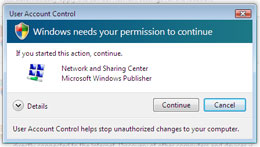 Microsoft touts security as a new feature (that sounds about right). But as others have reported, it’s in-your-face security. Prepare to have confirmation dialogs pop up at you twice as often, if not more, than when using a Mac–and it’s still not as secure a system.
Internet Explorer is touted as a new feature, because finally, after many, many years, it has barely caught up with Safari and Firefox. Yippee. I’m convinced–should I switch now or later? Update: One important feature missing from IE7: you can’t open a folder full of bookmarks into tabs with one click. You have to open each tab one at a time. That’s a big omission, and a strange one. I have about 30 web sites I scan daily, set up in 4 or 5 folders on my bookmarks toolbar. With each click, I get a toolbar full of my favorite sites. IE7, apparently, will make me open them all one at a time. No thanks.
Sync and sharing is another feature–one the Mac has had for, what, five years now? They even tout the “Ease of Access Center,” for people with disabilities. It’s still warmed-over mush, not as nicely done as the Mac’s. One feature I always use in OS X is the excellent zoom feature, which does exactly what it says–zooms in and out. The whole monitor becomes a zoom-in of any part of your screen, to whatever degree of zoom you want, controlled either by keyboard shortcuts you dictate, or (as I recently discovered on my new iMac) a control-scrollwheel move.
In contrast, Vista still has the same old useless part-screen zoom, which keeps the lower half of the screen at normal size, while the top half shows the zoomed version of the lower half. Not only does this cut your screen real estate in half, the two halves of the screen easily confuse the user.
Parental Controls sounds a bit more advanced than the Mac’s, so if you’re a concerned parent who does not have any other means of control over your kids, this might be useful.
The Backup and Restore Center is a wanna-be Time Machine, but Leopard will have this beat, easily.
Microsoft has a new Networks/Meeting Space idea, which apparently lets users congregate in shared folders and collaborate on files. While this may be good news for businesses, I can’t really see normal users getting anything out of this.
Vista also talks up their new version of Windows Media Player and the ability to work with Pictures–can you say “iTunes and iPhoto”? Where’s iMovie, iDVD, iWeb, iCal, and the rest?
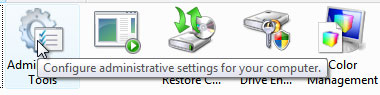 One “helpful” feature which annoyed me a lot is Vista’s information box, the little rectangle that pops up after half a second of cursor-hovering to inform you about what you’re hovering over. I keep wanting it to go away, as it covers up what I’m trying to get to next. It reminds me of those double-underlined links on web pages that make pop-up ads appear. Annoying as hell. And in typical Windows fashion, I can’t figure out how to turn the damned thing off. I checked a half-dozen control panels, including the logical place–the Mouse control panel, under the cursor (“pointer”) control–but nothing.
Then there’s the Sidebar, with Gadgets–a rip-off of Apple’s Dashboard with Widgets (which, to be fair, is a rip-off of Konfabulator software). But Apple’s implementation is far better–you can make it appear at any time, but you can also make it go away–which is not what the “Sidebar” does, as far as I can figure out.
Then there is the hidden stuff–the most prevalent being Microsoft’s new DRM features, which are designed to spy on you and protect businesses like movie studios and record labels. Using euphemisms like “Genuine Advantage” and “Plays for Sure,” they sound like they were cooked up by the Bush administration, with their flair for naming things in ways that contradict the real purpose, like “Clear Skies” or the “Patriot Act.” The “genuine” advantage is for corporations that assume you’re a thief and want a spy perched on your desktop; “Plays for Sure” will play, sure, but only titles that pass DRM inspection. There is no advantage for the user here, only loss of privacy and flexibility.
I haven’t had too long to play with it yet, but those are the impressions that pop out at me. The eye candy is nice, the new search is good (though I have simple learned to live without searching–XP forced me to organize better on Windows), but the UI changes will have people confused for a few weeks. If I really wanted to, I could force myself to use it and possibly get used to it (except for those damned info-tags), but the question is, “why?”
I really can’t see a reason why you’d want to switch from XP to this. Of course, then again, I also can’t see why you’d want to use XP over the Mac OS, so clearly I’m biased here. Still, it’s a matter of gradations. At least each new Mac OS version has new stuff, cool stuff, really useful stuff, after 12-18 months of development. After 5 years, Microsoft has little to show for all that work.
For more screenshots, go here.