Archive

Archive for the ‘Mac News’ Category

Vista vs. Tiger Comparison

August 2nd, 2005 4 comments

There’s a new article out in E-Week online, titled “Apple’s Tiger vs. Windows Vista: Who Comes Out Ahead?” comparing Tiger and Vista. This is quite typical of Windows-centric writers comparing Mac and Windows: though they get some things right, they all too often are mistaken about what Macs can do, and give unreasonable props to Windows for things that don’t deserve it.

The article starts out on a legitimate track, pointing out all the things Vista will do which imitate Tiger, especially with the note of search design & features and look-and-feel, though he also notes some rather irrelevant items, like the similarity between the names “Aero” and “Aqua,” and the names for the “Network” and “Computer” areas. It does not talk about other more significant similarities, such as Internet Explorer suddenly become an RSS-savvy tabbed browser with startling resemblances to Safari.

But then the author begins to point out the differences, he starts getting stuff wrong. He starts with:

The more-advanced Aero Glass option uses translucent window title bars, a handy feature of Mac OS X that Apple dropped with Panther, but is still used in the Dock.

I’m not even sure what he’s talking about here. Title bars in the dock? They don’t even exist there–no windows in the dock. And if he’s trying to say that transparencies don’t exist in Tiger, he’s gone batty. And how are translucent title bars such a big deal? What’s the advantage with that?

Vista does, however, have some nice touches that Tiger doesn’t. Vista places previews of documents right on file icons. These are more sophisticated than the thumbnails that Photoshop creates, as they update as the file is changed. Tiger can display previews of graphic files, but not text-based files. … Vista’s folders display a representation of the type of files inside. Dialog boxes for saving files and other tasks use these thumbnails.

Actually, Tiger can do previews of text files as well if you use the column view in Finder windows. But I will concede that icon previews are better in Windows–though this is not really a Vista improvement, as XP can do the same things the author is talking about. But then we get back to the question, so what? Is this really a big deal for anyone? It’d be nice if Macs had this also, but I use both systems and never really feel the need. I mean, they’re icons–they can’t hold very much information about a document. Metasearch is more important here, and Tiger has that, while Vista had to abandon it already.

But I really get annoyed when the Mac is criticized for essentially not being Windows. One example is when the writer praises Microsoft: “Windows Vista will be superior to Tiger in terms of networking, mostly because Windows is a better client for Microsoft servers.” In other words, Microsoft is better because it can communicate with itself better than Macs can communicate with it! How’s that for Windows-centric? And it’s not even always true: many times in the past I have had an easier time connecting a Mac to a Windows network than I have had connecting a Windows machine to a Windows network. There are certainly fewer steps involved with the Mac, to be certain.

The writer also says a great deal about archiving and searching, virtual folders and stacking–but fails to mention the vital fact that much of this depends on the WinFS file management system, which has been delayed and will not be available until 2008. Which means that Vista users will have a relatively hollow shell of these features, most of which are already available in Tiger–and yet the author here uses them as examples of how Vista will outshine Tiger. Really? When? Three to four years after the fact? He even mentions the use of “stacks” in file management–an idea Apple has been developing since 2000.

What’s even more outrageous is when the writer concludes, saying that the next version of the Mac OS, Leopard, “will need to be a compelling alternative to Vista.” In other words, Apple better catch up with Microsoft–pretty arrogant, considering that not only has Tiger achieved a year and a half early what Vista promises later, but that much of what Tiger can do now won’t be available on Vista for another two and a half years, well after Leopard has been released.

And that brings me to the final and somewhat overwhelming flaw in this article: although it does mention Leopard near the end, it is overall a comparison between Tiger and Vista–an already-released Mac OS and a future version of Windows that won’t be released before Tiger itself is obsolete! Think of comparing Mac OS X Jaguar with Windows Me, or even Windows 98; a fair comparison? Please.

Considering the fact that the Mac has always been way ahead of Windows, this kind of reverse-logic comparison smacks of revisionism before the fact. You have to admit, if you have to go so far as to compare a 2008 version of Windows (pretending it’ll be complete in late 2006) with a mid-2005 version of Mac OS in order to make Microsoft seem even marginally comparable–well, that speaks volumes as to Who Comes Out Ahead.
Windows Tiger Vista

July 28th, 2005 Comments off

This article gives you a sneak peek at features in the new Windows Longhorn/Vista to be released in a year and a half. Essentially, most of the features described are directly ripped off from Mac OS X, from the icons to graphic transparencies to the tabbed/RSS browser to the virtual folders–right up to the exact location of the contextual search boxes in the upper-right corner of each new window.

Categories: Mac News Tags:

Japan iTunes Music Store: August 4?

July 28th, 2005 2 comments

Apparently, some kind of “Apple Music Event” has been scheduled for 10 am on Thursday, August 4 at the Tokyo International Forum. Reporters have been invited to the event by Apple, so unless this is something completely unexpected, it’s probably going to be the long-rumored opening of the Japan iTunes Music Store.

Still unknown will be the pricing (rumored to be ¥150, undercutting all other music download services in Japan) and the selection–Sony’s rather large collection of music may likely not be available because Sony is trying like crazy to undercut Apple and its success with the iPod.

Categories: Focus on Japan 2005, Mac News Tags:

iTunes Music Store Japan: Next Month?

July 15th, 2005 Comments off

Well, that’s what they’re saying now. And more people are saying it’ll open in August sometime. Even Forbes said it as if it were definitive. Hmmm. I’ll believe it when I see it, but here’s to being hopeful.

Categories: Mac News Tags:

Audacity

July 14th, 2005 Comments off

A few weeks ago, I went on a bit about how to make a podcast, and I recommended a few audio recording and editing programs. I’m back to say that there’s one I missed which outdoes all the others. It is a freeware app called Audacity, and it’s a great program–so much so, you wonder why it’s freeware. Maybe Peak LE does stuff that pros use which I don’t know about, but as far as lay-people using apps to record and edit, this program has Peak beat hands-down.

Auda1

It works much the way SoundEdit did, perhaps even better, and is a worthy successor. Audacity can open WAV, MP3, OGG, AIF and Sun AU audio files (MIDI import is also possible). THe application can save audio projects as proprietary Audacity files, and can export at WAV or OGG; you can also export as MP3 with the use of a LAME library file. You can also use Audacity to record via a microphone.

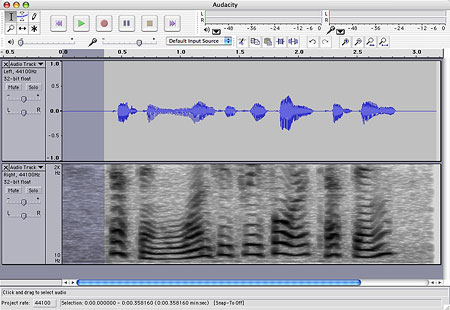
Once open, you can view and edit audio files in a variety of ways. In the example below, the left audio track is shown as a waveform while the right track is shown as a spectrogram:

Auda2

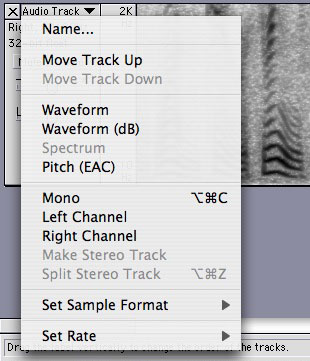
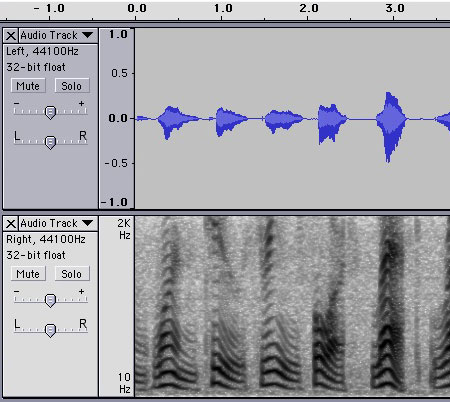
You can split stereo audio tracks and edit them separately, adding or subtracting tracks as you go. You can change the view for or switch channels for each track:

Auda3
Picture 10
A small control panel (shown at left) allows you to change the cursor mode between selection, edit volume (envelope), edit samples, magnify, move and multi-tools modes. The envelope mode is pretty neat, allowing non-destructive volume changes on the fly which you can edit back and forth without resorting to a dialog box, making permanent changes to the volume.
Auda4
Another toolbar (shown at right) allows you to cut, copy, paste; crop in and crop out; undo and redo; zoom in and zoom out; and most useful, the last two controls allow you to quickly expand either the selection or the entire audio track to fit the window.

The tracks themselves are easily and intuitively expandable, allowing you to resize the display to whatever is most convenient for you.

The audio-out and audio-in volume are even presented just right (for my tastes at least). Almost everything feels like it was designed in just the right way. Complex enough to please high-end users, but simple and intuitive enough for a lay person like myself.

Auda5

Furthermore, Audacity has a range of special effects very similar to SoundEdit, including fades, pitch/speed/tempo changes, amplification, bass boost, normalization, equalization, reverse/inverse, etc. etc. It can also generate tones and silence, sometimes useful and usually missing from other apps.

It’s also available cross-platform, Mac (OS 9 and X), Windows, and Linux/Unix.

If you’re looking for a good audio program and don’t want to pay for a professional package, this is your baby.

Categories: Gadgets & Toys, Mac News Tags:

New iTunes Cell Phone

July 5th, 2005 3 comments

Apparently the cat is–or might be–out of the bag: three days before an official announcement is expected, Engadget has posted photos and an iTunes screen shot of the new phone. It uses a TransFlash card for memory, the biggest size for that format being 256 MB. The phone appears to have some video function as well. However, the nature of the video function, or even if the phone includes a camera, is unclear. There is also talk about whether this is the real deal, or if it’s an older proof-of-concept version of an existing phone model, and not the final product. The same site showed this image of what was then also rumored to be the new iTunes phone. So nothing is certain–except that there will be an iTunes phone, and we’ll likely know its real final form by the end of this week.

Categories: Gadgets & Toys, Mac News Tags:

Typinator

July 3rd, 2005 1 comment

TypiconI just bought a new piece of Mac shareware and thought you might be interested in it. The software is called “Typinator.” What it does is essentially the same as what Microsoft’s AutoCorrect function does–it looks for you to type specific text strings, and when you do, it replaces them with other text strings that you have listed in the app. For example, if I want to type “The Blog from Another Dimension,” I could abbreviate it in Typinator as “bgd”; then, whenever I type “bgd,” the entire phrase is automatically replaced.

This function is also similar to the long-time Mac app called “TypeIt4Me” (around for close a decade), but from reports it works a lot better. TypeIt4Me works in the input menu, meaning you can only use it with the standard keyboard layout, and not, for example, Dvorak or any language other than QWERTY English. Typinator works differently, so you can use it with any keyboard layout; I’ve tried it by assigning English letters to activate Typinator to place Japanese characters, and it works. Typinator also allows for you to input images by typing specific strings. Typinator can also deliver date and time stamps, pre-formatted the way you prefer them. Finally, Typinator is cheaper, $19 shareware compared to TypeIt4Me’s $27.

In my case, I plan to use it as an AutoCorrect feature, system-wide. I want to switch over to using Pages more, and rely on MS Word less. However, Pages lacks an AutoCorrect feature; Typinator now fills that need, and not just in Pages–it does it everywhere. If I visit a blog and want to leave a comment, people usually require an email address, and I might want to type my own blog’s URL–but that can sometimes be a hassle. Yes, I know, I’m lazy as hell. But it’s nice to be able to type just a few easy keys in each text box and have a full email address and URL in a second or so.

Another good feature is that Typinator allows multi-line fill-ins. MS Word 2004 for the Mac allows this also, but not on Windows. For example, you can enter your entire multiple-line home address into Typinator, and get it back in a split second. Another good use would be in scripting web pages; if I want to make a quickie web page, it’s a hassle to type the basic HTML, HEAD, TITLE and BODY commands; takes a few minutes. But I can type them once, copy and paste the whole lot into Typinator, and from that point on I can insert the whole structure with only a few keystrokes. I can create similar fill-ins for TABLE or FORM tags, or any tag and attributes I please–which could save a lot of time writing basic HTML.

Typinator can also pay attention to your capitalization, so that if you have the string “typinator” with the trigger string “tpn,” then typing “Tpn” will similarly capitalize the “Typinator” expansion.

Typinator does have a few down spots. For one, whenever it’s activated, the automatically-replaced expansion text gets placed into the clipboard, kicking out whatever was in there previously; this has caught me up a few times, but I can live with it. Typinator is also a version-1.0, having just come out of Beta, so it’s not as feature-rich as it could be. Future versions may include a workaround for the clipboard problem, and other new features, whatever they may be.

I also had some concerns about security. What Typinator does seemed to me to be similar to what a keylogging program might do: watch what you type. I emailed their support department, and got a detailed reply back explaining why that was not a problem. Typinator uses an Apple feature introduced in Panther called the “event monitor” which allows them to watch what you type without logging anything except very temporarily; furthermore, password fields in Mac OS X are protected from prying eyes (Typinator can’t see what you type in a password field). It uses a completely different kind of technology to do its job. It would be easier for a hacker to simply create their own keylogging program than to somehow use Typinator for that purpose, so the security seems tight. Good enough for me.

TidBits reviewed Typinator, and you can find some user reviews on its download page at Version Tracker (assuming the reviews are genuine and not sales-related), or you can go to the product page at Ergonis. You can use Typinator as a trial, but it will only remember five expansion strings and no more, until you pay for the license.

As a side note, this app, along with the Dictionary now integrated into Tiger, make up the key elements I felt were lacking in Pages, which is now my first-string word processing application.

Yet Another Mac-Windows Comparison

June 23rd, 2005 3 comments

One contrast between the two operating systems was one that surprised me at first. At work, there were some Windows machines in the main teacher area (it was a teacher office at a building I usually didn’t work at). I wanted to install a specific application on one of the machines to do a task requested of me by the office staff. But when one of the teachers based in that office found out I was installing an app on one of their machines, he nearly exploded, and told me never to install apps on the machines without asking first. At the time, I didn’t understand why he was so upset; after all, you can just uninstall later, right? But he insisted that one stray app could screw up other stuff–and he was right. I was just too used to the Mac way of doing things.

Recently I was trying to cut down on some of the bloat on my Windows box, so I went to the Install/Uninstall control panel, looked through the list, found several apps that I never used any more, and uninstalled them. The uninstall program obligingly did away with them, occasionally asking me if I wanted to delete shared resources; each time I said “no,” not wanting to screw up anything else on the machine. But of course, it did. Though none of the apps I deleted had anything to do with browsing or even the Internet, my copy of Mozilla promptly developed an incredibly annoying bug: every time I opened up a web page, an error message appeared, telling me that a .dll file could not be accessed. Despite this, the pages I went to all loaded fully, so as far as I could tell, the missing file probably wouldn’t affect my browsing. But the error messages persisted, and if I tried to close them, they would continue popping up immediately after I closed the last one, and would continue to do so as long as any page was loading.

As the error message suggested re-installing Mozilla, that’s what I did. I uninstalled, and then re-installed the app. No luck–the error dialog boxes kept on coming. As far as I can tell, I’ll have to wipe the hard drive clean and re-install everything before I can use Mozilla again. Fortunately, Firefox still works, so I can use that in the meantime. But what a pain.

What’s worse, the Windows uninstall app doesn’t always do the job. Sometimes it just doesn’t work when you try it. Other times it will say it worked, but when you go to the Program Files folder, you’ll still see a folder for the app with some files remaining. And, as I described above, sometimes it will remove resources and files used by or affecting other applications, even when you specify not to disturb shared resources. A damned ugly system, inconvenient and annoying.

On the Mac, it’s pretty simple: to uninstall a program, just drag the app or its enclosing folder into the trash, and empty the trash. Bam, you’re done. But doesn’t that leave files behind? Yes, but they’re usually so small that they don’t take up much disk space, and they don’t interfere with other apps. Furthermore, if you ever decide to reinstall the app you removed, all your preferences and registration info are still in place. And if you really want to get rid of the whole thing, just go to the Library folders and remove any specific files or folders in the Preference or Application Support folders; no big deal. And you never have to worry about one app’s removal screwing up something else.

It’s Here!

June 17th, 2005 5 comments

Got the new PowerBook. And as advertised, it’s very, very nice. Transferred all my data and settings from the old TiBook, it was very seamless. So far, it’s working brilliantly. It plays the Hi-res Apple Movie trailers quite well, ones which would not play well at all on my old ‘Book. And though the unit gets hot, it doesn’t get nearly as hot as my older computer would get. And though it’s supposed to be .2 pounds heavier, somehow it feels lighter, even when holding both computers at the same time, one in each hand. I haven’t had the chance to take it for a real spin yet, and won’t see its full effect until the 1GB RAM upgrade gets here next week.

One problem: a dead pixel. Yargh. At least, it’s partly dead. As far as I can tell, only the green element to the pixel is dead. But in most circumstances, it makes the pixel look dead, next to the other pixels around it. Anything that’s not pure red, blue or purple, anything that’s lighter than that, and it shows up. And there seems to be another pixel stuck on blue as well. The good news, somewhat: both are on the right side of the screen, less than an inch from the edge, so they won’t be so noticeable. But you always really hope for the screen to be perfect. And Apple’s policy is to accept anywhere up to five or perhaps seven dead or stuck pixels on a screen. Won’t stop me from taking it to the Genius Bar at the Apple Store in Ginza and seeing what they say and do about it. I doubt I’ll get anywhere, but best to try all options.

Categories: Gadgets & Toys, Mac News Tags:

Confirmation

June 14th, 2005 6 comments

I received an email from Apple telling me that the PowerBook G4 I ordered last week will be arriving late this week, earlier than they first predicted. They told me it would get here on the 22nd, but now the correspondence says it’ll get here no later than this Friday, the 17th.

But that’s not the confirmation I’m referring to in the title of this entry. Rather, it’s a review of the exact same PowerBook model on a website called “Notebook Review.” The article is written by Gabe Lipson, a long-time Windows user who intended to buy another PC, but heard of issues with the model he wanted and quickly was sold on the PowerBook when he visited an Apple Store.

Many parts of the review are comforting especially in light of the possibility of Mactel Powerbooks as early as a year from now. Lipson points out that using a very simple benchmark (calculating pi to 2 million digits), the PowerBook outperforms a range of Pentium-M Wintel laptops running from 1.6 to 1.9 GHz; so despite the lack of a G5, the PowerBook G4 is still fast enough to rank up there in the laptop market. I know that more complex benchmarks will rank things differently, but still we’re talking about an equivalent class of computers.

Lipson also compared the PowerBook screen favorably compared to the highly-touted BrightView reflective screen. I’ve seen these on PCs and they look very nice, but as Lipson points out, the reflective part seems like it could be an annoyance. The PowerBook’s screen, he reports, does just as good a job without that down point.

Otherwise, Lipson praises though does not gush about the PowerBook: the size of the computer, the keyboard and the screen is just about right, not too big or small; the speakers do well, the processor performs well, the ports, WiFi and battery all perform as well as can be expected. Lipson likes the backlit keyboard, and admires OS X 10.4.

All of this not bad at all for a notebook computer which has received no significant processor upgrades for the past three years!

Lipson also mirrors my worries and complaints: the possibility of dead pixels (crossing my fingers big-time) and the fact that you never know when a huge upgrade may or may not be just around the corner.

This is what I’ve become used to hearing from long-time Wintel users who make the switch: pleasantly surprised. It also confirms many of the reasons why I like the Mac.

One more point, while I’m here: there has been a lot of talk in the past week about how Mac users are reacting to the switch to Intel, as if we’re all supposed to feel betrayed or something. My reaction has been, “why?” The Mac switched over to RISC and IBM years back, and it didn’t hurt me at all then. Apple will likely make this change just as transparent. So what? A new chip is a new chip.

Many Windows enthusiasts have been crowing about this, gloating about how Mac fans have been touting the PPC, and now have to eat crow over the switch to Intel. I don’t get that, either. I had great hopes for what IBM was supposed to deliver, and if it towered over what Windows PCs were getting, all the better. But what happened was IBM’s failure, not Apple’s, so Apple just went with someone else who could do a better job. Maybe if I’d been going on about how crappy Intel chips were and IBM was so superior and that’s the way it would be forever and ever and I’m so sure I would bet the farm, then I’d have to eat crow. But even at that, for the present at least, IBM’s existing chips are still superior to most of what’s out there in the Windows market. This is evidenced by what I mentioned above, that the laptop G4 still compares well to the latest Wintel chip offerings. The problem is that IBM has stalled and had no future promise–and apparently, no interest, either.

The only way that I see the Mactel news as being of any importance is that it seems to signal strong possibilities for the Mac OS to encroach on the Windows market. And even many Windows enthusiasts I see on the web seem to be more biased towards PC hardware, and would be fine with the Mac OS, so long as it could work transparently with Windows software–which is what will very likely happen.

Categories: Gadgets & Toys, Mac News Tags:

Air America Radio Widget

June 11th, 2005 6 comments

AarwidgetFor those of you who both use Macs (with Tiger) and listen to Air America Radio, there is a nifty new Tiger Dashboard Widget that lets you tune into Air America Radio easily. Now, I’ve had the AAR audio stream link on my Linkboard for some time now and will continue to have it, but if you use Tiger, get this widget.

Categories: Mac News, Political Ranting Tags:

Taking the Plunge

June 10th, 2005 10 comments

So I just got off the phone with the Apple Store, having ordered the new Mac. Should arrive in about a week and a half. Got the 15″ PowerBook G4 SuperDrive model running at 1.67 GHz, with optional U.S. keyboard (which causes the delivery delay).

Now to order an extra Gig of RAM.

I’m probably also going to order a Bluetooth mouse, though I don’t see many out there that look too attractive. But MacAlly has a new model, called the BT-Mouse, which sells for $50 and looks like it’s well-put-together. It’s full size (most BT mice are minis, which I don’t like at all), and has the third button just below the scroll wheel, also where I prefer it.

The mouse won’t be available for a few more weeks, but I should be able to get the RAM at about the same time as the computer arrives, which will be nice.

Anyone want to buy a used 800 MHz DVI TiBook?

Categories: Gadgets & Toys, Mac News, Main Tags:

Easy for Him to Say, Now

June 9th, 2005 3 comments

Chris Seibold, in an article for Apple Matters, wrote:

Witness the people hauling around first generation TiBooks holding out for the (never to come) G5 laptop. People have been guessing that a G5 PowerBook was just around the corner for two or three years and have waited for it accordingly.  Wouldn’t their overall computing experience have been better if they had gone ahead and purchased a new PowerBook when they first felt the need?

Now, if he’d written that before the Mactel announcement, I would have given him more credit. Right now, it’s unmistakably clear in hindsight. So thanks, Chris, for being paid to state the bleeding obvious after the fact.

Close to a Decision

June 8th, 2005 14 comments

For me, it’s harder to say that the Mactel news will slow Mac sales, because that very news has drawn me to decide, or almost decide, to get a new PowerBook G4. Of course, I won’t be in a typical place.

Right now I have an 800 MHz G4 PowerBook (the first DVI model) which just turned three years old a few months ago. I have been waiting for a significant upgrade before getting my next Mac ‘Book, but the Mactel news has spurred me to move forward sooner than I’d planned.

The model I’d buy now is the 15″ PowerBook G4 running at 1.67 GHz, the Superdrive model. I should be able to get academic pricing from Apple Japan on a model with the US keyboard layout, meaning not having to ship from the U.S. and not having to pay high California state sales taxes. The cost would be about ¥245,000 ($2300) including tax. Add another $200 for an extra 1 GB of RAM. It’s not a quantum leap over my present computer, considering that it’s been 3 years. The new ‘Book would have double the CPU speed, but in the past, that’s happened a lot faster. However, there are other considerations, including 512 KB of on-chip L2 cache as opposed to 1 MB L3 cache (the former is better than the latter, for those of you who don’t know what cache is about), a (slightly) higher bus speed, better RAM, better graphics chip, and several other small points. The big differences would be a faster Superdrive instead of a slower Combo drive, double the size of the HDD (40 GB to 80 GB), built-in Bluetooth, USB 2, and AirPort Extreme to match my base station.

If I wait for the new Mactel Powerbook instead of buying now, I could be waiting as long as 2 years, and will have spent much of that time impatiently expectant of a new PowerBook “any day now,” not to mention trying to get along with a much slower computer than I’d prefer.

In addition, most completely new models–not just upgrades, but new designs–have kinks in the system that need to be worked out, and the new Mactel PowerBooks are probably more likely to have such bugs than other models. These bugs get smoothed out, but only after one or two revisions. Which means that when the first Mactel PowerBook comes out, it’ll be fast but with the risk of annoying problems.

Getting a Powerbook now means that it’ll be three years old (my standard computer retirement time) when the first Mactel PowerBook free of problems rolls out.

The risks: there could be a significant G4 upgrade soon, such as dual-core, that could come out in 3-6 months. If that happened, I’d be kinda pissed. However, the chances of that are low, and by waiting for that much longer, I would be getting started later on the lifetime of my next computer. Also, there is the chance that the first Mactel PowerBook out of the gate could be killer and have no flaws. Again, chances are low, but possible. Were both these things to happen, I’d feel pretty stupid. But I’d also feel like an idiot if I waited till MacWorld SF in January to find the next PowerBook model to be a minor speed bump to 1.8 GHz and little else, followed by a Mactel release in June 2006, 6 moths after buying the speed-bumped G4.

If I buy a new computer this week, I’ll even have a good excuse: today was my birthday. Taking time zones into account, it’s 2:35 am Japan time on Thursday, June 9.

So I’m probably a day or two away from ordering. Anyone has good reasons to stop me, better chime in fast!

Finally… Maybe… Unofficially

June 7th, 2005 1 comment

Yet more Mac news, this time on the Eastern side of the Pacific: The Nihon Keizai Shimbun (a leading economic newspaper, kind of like the Wall Street Journal of Japan) is reporting that Apple will open an iTunes Music Store in Japan in August of this year. This would be encouraging, except that the same paper previously predicted that the iTMS Japan would open in Spring 2005. The Mainichi Shimbun, however, did predict that the store would open before the end of 2005.

What is encouraging about the new story beyond the possible August start date is the report that Apple may be charging as little as ¥150 ($1.40) per song, well under the $2+ prices offered by current download services in Japan (though the story did go further to say that the price could be “between 100 and 200 yen per song”).

Still, good news for Japanese music fans, or those in Japan without a credit card with a billing address in a country where an iTMS is already located.

Categories: Mac News Tags:

It’s Official

June 7th, 2005 4 comments

The Steve has just announced at the WWDC that Apple is indeed switching to Intel, because IBM simply cannot deliver–can’t give us 3 GHz in the PowerMac, can’t put a G5 into a PowerBook (tell me about it). What he also said was that Apple has been compiling OS X on Intel chips for five years now, and the Tiger presentation he is giving the audience as he speaks is a Pentium 4. Even though they can work Apple software on Pentiums today, the transition will go as reported in the press, from June 2006 to June 2007. Nevertheless, both IBM and Intel processors will be supported for “a long time to come,” undoubtedly making a lot of people happy that they will not be forced to switch.

As for how long developers will have to work to port their programs to Intel chips, Jobs is claiming that it just takes a few hours, using Mathematica as an example. The app apparently is very complex with millions of lines of code… but only 20 or so had to be changed for the app to work. The question is, will all apps be so easy to change?

Apple will add two points: first, an emulation mode called “Rosetta” that will allow all PPC software to work transparently on Intel Macs (Mactels?), and new software written in Fat Binary, able to run on both PPC and Intel chips. This is all very, very familiar to those of us who followed through the Motorola-to-IBM, 680×0-to-PPC transition some time back.

Even Microsoft is in: an Apple press release quotes a Microsoft exec as saying that they will develop a fat binary version of Microsoft Office for the Mac–a surprise to me, I had heard that they stopped developing that particular suite for the Mac platform.

interesting: no mention of .Mac despite the coincidental blackout; no mention of whether or not Intel will vary its chips specifically for Apple or if Apple will use off-the-shelf Pentiums; no mention of Transitive (probably they’re just not using them); no mention of whether Windows would run on Macs; no mention of using Windows apps more easily in OS X/Intel.

Sounds to me like there’s a lot of stuff going unsaid…

All of this, of course, leaves me in a tough spot. It seems rather apparent that I will not be getting a G5 PowerBook, or even a dual-core G4 or Freescale PowerBook. Probably nothing but minor-speed-bump G4s until the Big Switch is made. It is not even certain that a Pentium PowerBook will be released in 2006, it could take as long as two years for it to come around. And I’m stuck here with an 800 MHz PowerBook. Which means I can get a new PowerBook with a slow chip and be stuck with that for another 3 years… or I can suffer with a slow CPU for as long as 2 more years and get one of the new Pentium PowerBooks as soon as they come out.

It’ll take a bit of thinking about, but I’ve already figured a few things out. First, I don’t think I’ll want to be using a 5-year-old PowerBook. And second, new computer designs often have bugs that don’t get smoothed out until a few revisions down the line. If I get a PowerBook now, then it will probably be ready for a replacement model at just about the time when Pentium PowerBooks have gotten their kinks worked out.

I think I’ll start taking a look at what’s out there…

Another note: OS X version 10.5 will be called “Leopard,” and will be out by late 2006 or early 2007–around the same time Longhorn is scheduled. That should be a challenge to Microsoft; Apple has gotten their releases out fairly regularly and on-time, while Longhorn has suffered serious delays (even though they cut out two of the biggest new features so they could release it earlier).

Categories: Mac News Tags:

.Mac Changes Coming?

June 7th, 2005 Comments off

By the time most people read this, it will probably have been officially announced in the WWDC keynote, but…

An alert reader at Spymac noted that Apple’s .Mac service is going off the air at the exact time as and for the exact duration of Steve Jobs’ keynote at the WWDC. From reports, the service has almost never gone down before, and the timing is almost certainly not coincidental; there may be some significant .Mac service changes coming, and soon.

Maybe.

In any event, it’s half an hour before the keynote right now, with probably any big announcements coming some time after the start.

Categories: Mac News Tags:

Wired on Macs on Intel

June 5th, 2005 2 comments

Wired has a story out which may explain Apple’s willingness to make the platform jump: Transitive.

Transitive is a new product, introduced last year, which purportedly allows any software to run in emulation mode on any hardware without any perceptible speed cost:

In demonstrations to press and analysts, the company has shown a graphically demanding game — a Linux version of Quake III — running on an Apple PowerBook.

“One of the key breakthroughs is performance,” [CEO] Wiederhold said. “You can’t tell the difference between a translated application and a native application.”

Presumably, Apple will use Transitive’s technology to make the Intel switch painless for both themselves and for developers; this has actually been rumored for months now. If possible, it would explain why Apple would be willing to make a switch that normally would cost it more than it could afford.

Not only might it allow Apple to run OS X on an Intel chip more easily, but it might also allow Apple to run practically any Windows application under OS X as well–meaning that switching to the Mac OS could be completely painless–no need to buy new versions of software.

Wired is presently musing that Apple is not just looking at Intel’s fast chips, but more so their DRM technology, as a platform to allow Apple to become a movie peddler in the same way they’ve started selling music so successfully.

Apple with Pentium Inside?

June 4th, 2005 13 comments

Everyone was wondering what big announcement Steve Jobs will be making at the WWDC scheduled to start on Monday. Will it be hardware, software, a new gadget, or nothing except a status report on existing product? Will the PowerBook line finally get a G5 or at least a multi-core G4? Will there be a new video iPod? A new home media center?

Well, C-Net now claims to know the big news, and everyone is reasonably shocked by it: Apple, they say, is abandoning IBM and is switching to Intel’s chips for future Macs. While rumors of this nature were reported recently, no one gave them any credence. After all, we’ve been hearing Apple-Intel rumors for quite some time now, a few years at least, and no one took it seriously. But C-Net isn’t your common rumor site; they have a reputation for good reporting. Even so, most people are still holding back belief until Stevo makes an official announcement at the World Wide Developer’s Conference.

According to the report, Apple will switch its Mac Mini to Intel by mid-2006, and will have the PowerMac line on Intel chips by mid-2007. Concerns include the possible loss of software developer support and customer attrition that could come with a switch to a different chip architecture. However, Mac OS X runs on Unix BSD, which is not altogether incompatible with Intel’s architecture. And Intel seems to have interest; note this interview by the IDG News Service with Intel VP Anand Chandrasekher:

IDGNS: The Wall Street Journal recently reported that Intel has been trying to get Apple to use its processors. Has Intel been talking with Apple?

Chandrasekher: We always talk to Apple. Apple is a design win that we’ve coveted for 20 years and we continue to covet them as a design win. We will never give up on Apple.

IDGNS: What would you be willing to do in order to win Apple’s business?

Chandrasekher: Well, nothing unnatural that we wouldn’t do for other design wins. It’s got to make sense from a business standpoint. We would do what makes economic sense. If we can do that and still get the design win, we’d do it.

What people don’t seem to be assuming much is how much Intel would customize chips to be used in Macs. Some people are talking as if the Mac will somehow use off-the-shelf Wintel chips, allowing for easy cloning by other hardware manufacturers. While this is an option, I hardly believe that Jobs will go that route; he has seen the hardware as proprietary for far too long, basing too much of Apple’s business on that paradigm to simply open wide the doors to mass cloning of Macs. I am almost certain that if the Intel rumor is true, then the chipmaker will be producing a specific line of chips, probably including necessary changes to accommodate PPC and pre-PPC architectures, perhaps allowing for some emulation as when Apple switched over from Motorola’s 680×0 line to the PPC.

An interesting effect of such a switch would be the relative equalization of CPU speed when comparing Macs and Windows PCs–we might even hear the term “Mactel” in comparison with “Wintel.” It would certainly make for a more notable contrast between the two operating systems, even if Intel makes some modifications to suit Apple’s needs. And it would bring Apple one step closer to the eventual possibility of making the hardware non-proprietery, opening the doors to direct competition with Microsoft, should it be possible that the Mac OS would run on any PC box, or even if AMD were left out in the cold. It will be interesting to see how much Intel will do for Apple.

Certainly, Apple has not had the greatest luck with chip manufacturers; both Motorola and now IBM have left Apple hanging in the wind when it comes to updating the product lines and delivering on promised goods. The PowerBook line, for example, has been languishing in the G4 backwaters for far too long–the main reason I have not bought a new ‘Book despite the relatively slow performance of my 800 MHz machine. New PowerBooks at present only have double the processor speed, despite my current machine being 3 years old. I am holding out for a significant upgrade to the line before buying a new one, hoping for either a multi-core G4 or some form of G5, possibly liquid-cooled (even if it is thicker and heavier than the present line–I can live with that). This news about Intel, if true, might even be an indication that IBM has completely let Apple down and will not be able to supply them with and big new products at all–which could set back a big PowerBook upgrade for a few years, possibly.

But, as I said, it’s not set in stone, not confirmed yet. We’ll see what The Steve has to say. Maybe it’s true, or maybe C-Net got snookered. Maybe even if it is true, there will still be a multi-core/G5 PowerBook anyway. Or maybe nothing at all will happen.

Stay tuned.

Worth the Trouble?

June 2nd, 2005 14 comments

Yet another article from a disgruntled Wintel user. This one, in Fortune Magazine, about a maddening invasion of pop-up-generating spyware and the inability of the hardware and software sellers to eradicate it:

It started about a month ago. A blue window appeared on my screen. It was flashing, which is always a bad sign in Cyberville. The alert stated that my system was possibly invaded by spyware and that I should click on the ok button to scan for problems. I’m not a fool. I did not click. I am aware that viruses, like vampires, must be invited across the threshold to gain entry.

Over the next few days the blue window kept reappearing. I ignored it. But you can’t wish this kind of thing away, any more than you can keep an upper-respiratory infection from striking you on a flight full of coughing travelers. …

I went to Best Buy and purchased Norton Internet Security and something called Spy Sweeper, which promised to help eradicate cookies, sprites, wafers, and tidbits that gum up your system. The Norton was clunky and slow and inscrutable to me—it kept presenting windows that offered choices I did not understand. The Sweeper, on the other hand, was lean and nimble. It scanned my friend and pronounced that he was suffering from more than 250 viruses and some 2,000 traces of spyware seeping through my innards. I expunged them all, and felt much better.

Then up popped Mr. Window again. And then another. Hmm, I thought, and ran the fix-it program again. Whoops. It found 25 viruses and 350 or so footprints of associated dreck. Blew those off. Back they came. I had now spent the best part of a day cursing, yelling, damning the morons—wherever they were, whoever they were—who had caused this disaster. …

There are lots of people I guess I could blame—Microsoft, for leaving a back door into Explorer that made this all possible; Best Buy, for giving me back a box that still had issues—but I don’t. They, too, must be counted among the victims of the walnut brains who are out there wreaking havoc. If I could air out their skulls with a ball-peen hammer, I would. But I can’t. All I can do is my little part to make this kind of thing less likely.

I’m getting a Mac.

Perhaps you see this writer as being uneducated about how to use a computer–but then, so are most users. And certainly, a regimen of prevention (which would include spyware and virus blockers from the beginning) in addition to wise usage to avoid viral email and spyware-ridden ‘freeware’ would make using a Wintel box much less hazardous. But the problem is, most users are not savvy enough to know how to do these things, so a Mac would certainly be a better choice for them in that respect.

And for those who do know how to do ‘safe computing,’ is it really worth all the trouble just to avoid using a Mac? Seriously, I’d like to know what makes a Mac so less attractive than a Wintel?

Oft-stated reasons include: the Mac costs too much. My answer to that would be, they used to, but not any more. Yes, the prices are maybe 10% higher for comparable systems, but then on the Mac you don’t have to buy anti-virus software, and the machines tend to last longer than cheaper PCs. Another comment: Macs don’t have software. Granted, if you like computer gaming, the Mac is definitely not for you. But for most everything else, while there may not be as many titles available as there are for Windows, there are enough for every category to satisfy most people.

Another gripe about Macs is that they are not compatible. That strikes me as strange, as I find Macs to be very compatible. Any removable storage device I can read on a PC, I can read on a Mac. Any major software format from the PC, I can open on the Mac. Any MS Office document is cross-platform, and many say that MS Office for the Mac is even better than MS Office for Windows. And connecting to PCs on a network is a snap–in fact, it’s easier for me to connect to a Windows network on my Mac than it is to do the same on a PC! And for anything else, I can run Virtual PC on my Mac if I want to. Yep, it’s slow, but it’s much closer to having the best of both worlds.

However, most of the PCs-are-better-than-Macs arguments are not about why PCs are better; they tend to be pot-shots at the Mac, at either misconceptions about the Mac (“you can’t use a 2-button mouse”), exceptions (“the design sucks–look at the flower-power iMac”), peripheral claims they disagree with (“Apple claims to be ‘Your own digital entertainment center,’ but Windows can do the same thing”), or PC-centric subjectivity (“after using a PC, the Mac is too hard for me to use”–generally, it’s bad because it’s not exactly like Windows).

So I’d like to ask, while you may prefer Windows, is the Mac really that bad as to make it a lesser choice?