Archive

Archive for November, 2007

Leopard Minutiae

November 18th, 2007 Comments off

Really, with Leopard, the small stuff counts. The reason for that is, there is just so damn much of the small stuff that it continuously hits you, like stumbling across decorated eggs at Easter. Some you’ll like, some you may not. But taken all together, they make quite an impact as you find more and more of them.

1107-Dockic1Among the many small new visual changes in Leopard are things like this, pictured at left: the title of each icon now has a little grey callout box; furthermore, instead of being static, it moves dynamically with the icon, when it is moved or when it jumps up and down on launch. Other changes include rather dramatically larger drop shadows around windows, rounded corners on menus, the lack of rounded corners at the corners of the screen, and so on. Two of the biggest visual changes commented on are the Dock and the transparent Menu Bar and menus. The transparent menus are most often griped about–people hate them. I guess I can see why people feel that way–the background showing through can be a bit distracting–but frankly, I don’t mind it much, and figure that in a week or two I won’t even notice it anymore. As for the Dock, I don’t see what people don’t like about it. Not that it’s incredibly cool or anything, but I don’t find it objectionable. I’m not too enamored of the blue lights replacing the black arrows to indicate an open app, but I kind of like the 3-D glass shelf thing. Besides which, people have found a way to easily modify the Dock to your tastes.1107-Softup1

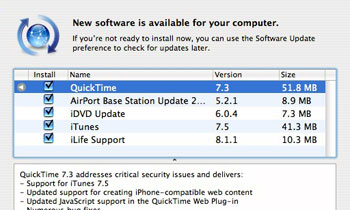
I’m not sure I’m so hot about changes in Software Update. The main change is that before (pictured at right), as you were downloading updates, you could still see them–along with the vital information given below, but most importantly, you could remind yourself if any of the updates required a restart. In Leopard, the Software Update has been changed so that instead of this information-ruch list, you instead get a nondescript progress bar dialog box. How is that an improvement?

I have learned more about Stacks in the meantime. You can alphabetize, by adding spaces to the front of the name of any app. I didn’t see this as working before because the new alphabetization ordering does not register in a stack unless you log out/in or restart, or erase the stack and re-insert it. So you can reorder the placement of the icons. On the downside: Apple set a limit of 8 icons per stack in “fan” display. More than that, and you have to switch to the less-attractive (for me) grid layout, or click the fan’s “More in Finder” button at the far end of the fan (they should put that button closer to the Dock, if you ask me). Seems to me that they could fit in a few more icons, or even compress the fan a bit more to add a few after that. Also, Apple didn’t make it so you could drag an icon from the Finder and drop it into an item in a stack.
1107-Screengr1
Here’s another small tweak: when you do a Command-Shift-4 screen grab (where you can select the part of the screen to be captured), Leopard adds the coordinates of the cursor to the cursor itself. Small, but an example of the endless variety of tweaks you’ll find.

Here’s an improvement in Safari: Google apps compatibility. You can now use Google Docs in Safari–previously you just got a message telling you that Safari didn’t work there. But Safari now plays nice with other areas of Google as well, like with Blogger:

1107-Safari1

This is one example of many, but you can see that below, in Tiger (Safari 2), most of the buttons in the “Create Post” interface were inaccessible. With Safari 3 in Leopard, it all works.
1107-Safari-Pdf-Controls
Another small modification is to Safari’s PDF viewer. Actually, a few small improvements. First, there’s an Apple viewer control added to the bottom of any PDF file viewed in Safari, which adds quick zoom controls, as well as “View in Preview” and “Save to Downloads.” Also, PDFs can now be zoomed in and out with the Command-plus/minus shortcut. Before, zooming was a chore, which is why I usually switched immediately to Preview. Don’t have to do that any longer. Plus, the PDF settings are remembered by Safari–if you view PDFs zoomed-in, Safari will keep them zoomed in the next time you view a PDF.

Here’s another touch I like: memory in Open/Save dialog boxes. Before, when dealing with files in list view in a navigation dialog box, you would always be presented with a standard view–in alphabetical order. Since I often copy names of files I just made when I name a new file, I like the list to be in time order–which meant that almost every time I saved a file, I’d have to click the column header to re-sort the list. That gets tiring. Leopard, however, remembers what you last set things to and keeps them that way.

That said, I would prefer that Leopard does what Windows does in such dialog boxes: allow full Finder access to files, allowing you to rename, trash, and otherwise work with files when in the dialog box. But I can live without it.

One thing I don’t like about Spaces: it does not play well with Exposé. Seems to me that when you do an Exposé command to see all open windows, you should get all open windows–that’s one of the great things about it. The problem with Spaces is that Exposé only shows the open windows in the Space you currently occupy. Which means that you have to either not use Spaces or give up on the functionality of choosing from all open windows. They should have at least made “all windows across Spaces” an option, I would think. Unless they did and I just haven’t found it yet.
1107-Spotlight1
Spotlight got an upgrade. It now displays dictionary definitions as well as answers to equations. I have noticed that where the automatic focus of the cursor was on the “Show All” option, it is now on the “Top Hit” in Leopard. That can lead to some unintended app launches for those making the switch. I can see the logic of wanting focus on Top Hit instead of Show All, but that seems to be more a matter of taste than of necessity. Spotlight also changed the “Show All” window from the Spotlight search window to a standard “Find” window… and they still don’t allow you to see or sort by file sizes in the Find list! What is with Apple on this? Don’t they realize that some people depend on that? Yes, you can search by file size… but you can’t see what the resultant file sizes are. I wish they would fix that, it has aggravated me for years now.

Lastly, one huge improvement is how Leopard deals with disconnected network disks. It used to be that OS X would get into a multi-minute hang (until it finally decided that yes, the connection was actually severed), essentially forcing you to stop working for a few minutes, or to Force-Quit the Finder and relaunch it. This was a big hassle for me because I move my PowerBook around a lot, and I access network shared folders a lot. I often forget to eject the shared folder before disconnecting, and that would lead to the familiar Finder hang, complete with a persisting Spinning Beachball of Death. With Leopard, that doesn’t happen anymore. When you disconnect without ejecting, the shared folder remains up for a few minutes, and is even navigable, until you try to open something. Then the files and folders all just disappear, and you are eventually told that the server has been disconnected. No hangs. Thank god.

Otherwise, Leopard remains as Tiger was before: very simple for making network connections. As usual, I had a lot less trouble connecting to a shared Windows folder on my Mac than I have making the same connection from a Windows computer.

Categories: Mac News Tags:

Movie and a Dinner

November 17th, 2007 2 comments

Sachi and I just got back from a very nice night out. We saw Stardust, an unexpectedly very well-made fantasy flick, with equal parts of romance, comedy, and adventure, with a magical environment. Very good movie; it’ll make you laugh. And quite a cast: Ian McKellen, Peter O’Toole, Robert DeNiro, Michelle Pfeiffer, and even Ricky Gervais, along with a lot of new and not-so-well-known cast members.

Then we went out to The Hub, a British-style pub with branches all over Tokyo. They serve pretty good Fish & Chips, one of the only places in Tokyo to do so. Their food is great, but as can be expected in any pub in Tokyo, the cigarette smoke is oppressive. Despite catching the best seats, a pair at the farthest end of the “no smoking” section, we came out reeking of cigarette smoke. Next time we’ll have to see if the place does take-out.

Still, it was a nice Saturday night out.

Categories: Focus on Japan 2007 Tags:

Live Search Popup

November 17th, 2007 1 comment

I have changed the Search bar to something called “Live Search Popup,” which offers a list of results as you type. A really good WordPress plug-in, if you ask me. Give it a try.

Categories: BlogTech Tags:

Or Maybe It Wouldn’t Explode

November 17th, 2007 2 comments

You know, all of us are assuming that Iraq would explode in violence were we to completely pull out. The main difference is that conservatives cling to the belief that should we stay, maybe after 5 or 10 years, we could stabilize the nation enough that it would become a democratic stronghold, and we could have bases there, cheaper oil, etc. etc., while liberals believe that Iraq will explode whether we stay there one more month or one more decade, and our staying there will only have the effect of getting our soldiers killed without much hope of any positive outcome.

But are we missing the target again? After all, before 9/11, we all believed that Saddam had at least some WMD; it’s just that conservatives thought Iraq was brimming with ’em, and would have nukes soon, while liberals believed that Hussein just had some chemical and bio weapons stashed somewhere, left over from a while back, but not enough to be a threat, nothing he would share with terrorists, and Hussein could be contained like he had been for a decade before.

But almost all of us missed the mark: Hussein had zip, nothing.

What if we were wrong about Iraq exploding in violence? This from a British general:

Attacks against British and Iraqi forces have plunged by 90 percent in southern Iraq since London withdrew its troops from the main city of Basra, the commander of British forces there said Thursday.

The presence of British forces in downtown Basra, Iraq’s second-largest city, was the single largest instigator of violence, Maj. Gen. Graham Binns told reporters Thursday on a visit to Baghdad’s Green Zone.

“We thought, ‘If 90 percent of the violence is directed at us, what would happen if we stepped back?’” Binns said.

What if we go further, and think beyond just attacks on our troops? What if the U.S. pulling out were enough to bring some stability? What if the violence subsides between the now-segregated communities, and the different groups work out a plan for dividing the country’s wealth and find a way to create an uneasy truce?

The only thing for certain is that whatever happens, however it happens, to Bush’s 25% core base, and to much of the media (which tends to follow his base’s lead), everything positive that comes out of the conflict will be a credit to Bush, and everything negative will be the fault of the Democrats. After all, their thinking is that the economic boom of the 90’s was more Reagan’s & Bush 41’s than Clinton’s, and virtually everything bad that happened on Bush’s watch, up until and including today, is Clinton’s fault. Hell, just today, Fox Noise blamed Nancy Pelosi for high oil prices, as if she and not Bush had everything to do with it. Rather astounding, the level to which it goes. So, if a Democrat wins the election and is able to pull out the troops, the right wing will assault the move as “cutting and running” by the “Defeatocrats”; if Iraq falls apart, that will be the Democrats’ fault, but if Iraq instead stabilizes because of our withdrawal, it will be all due to Bush’s genius.

That part is easy to predict with 100% certainty.

Categories: Iraq News Tags:

Up Again

November 16th, 2007 5 comments

1107-Cps100Site

Okay, I got the web site I was working on back up and running. As it turns out, the failure of the site was not as completely disastrous as I had feared, but it was still bad enough. It took more than two hours to get everything back up and running.

Here’s what it is: I teach a Computer Science class, a basic survey course entitled “Introduction to Computers.” For some time, I have used this site design, on my namesake domain, poza.net. It was good for my needs at the time, but I have been looking to redesign it for a few years now.

I had not planned on implementing the site until next semester, but a planned outage on poza.net which would hit smack in the middle of a lesson prompted me to open the site early. So far, only the main page and one section have been adapted to the new design; the rest of the site is simply the old web pages, grafted on to the new domain. You can check out the site at this address.

My main interest in creating the new site was to include a blog into the main page, as a way of contacting students at any time. As it is RSS and WordPress-powered, students can be contacted via an RSS reader or by email whenever there is a new message in the blog.

The blog is minimally viewable on a 1024-pixel-wide monitor as of this time (it can be viewed at lower resolutions, but the blog gets really squished), but is better suited for larger resolutions. The class sections are the big black buttons on the right (I have to size the buttons down, soon); only the section on Hardware (9 chapters) has been adapted to the new site design.

I have also changed things in that the old site was simply a directory on a site I use for various things, but the new site–www.lcjapan.com, a domain closely named after my college campus, is now to be dedicated to this one site for this course. I got the domain name for this site years ago, but never did much with it until now.

This is also why I have not been blogging on too much else; aside from my regular teaching duties, this has been taking up literally all of my time recently. I hope to get back to other things this weekend. Still, I need to update the Excel section of the web site to focus on the 2007 version; the current pages (not visible because they are out of date) focus on Excel 2000.

If you have any comments or suggestions for the site, please let me know.

Categories: BlogTech, Main Tags:

Frustration

November 15th, 2007 4 comments

It’s 2:49 am. I just spent all day, since 4:00 pm, setting up a new web site for my college course using WordPress. Tons of modifications, getting all the appearances just right, setting everything just so. Arranging all the links. Setting all the pages and graphics. It was a bitch of a task, but I bore down and got it nailed. The site was perfect. Beautiful. Just like I needed it to be.

So I closed down all the local files I was using to work on it, and did a bit of other work before heading off to bed.

And after finishing that, I checked the site.

Completely. Wiped. Out.

All that work, gone.

Somehow, WordPress decided that everything should be set to zero. I have no idea how it happened, only that between finishing the main body of work and doing that last bit of touch-up, WordPress completely reset the site and erased everything I had done over the day. The only thing I can think of is that I left open a page in my browser that set up the blog in the first place, and it must have reloaded by itself and re-established the blog… as blank and new.

2:55 am. I am too tired and angry beyond description. Somehow, tomorrow morning, I will rebuild all that work, hopefully in less time now that I have worked out the kinks. Still. It is at times like these when you feel like tearing someone’s head off.

Categories: BlogTech Tags:

To Worship… Or Not

November 14th, 2007 2 comments

This is a good ad.

Made by First Freedom First.

Our freedom to believe includes the freedom not to believe. That there is no god, or no distinct god, is just as sacred a view as any one which says there is.

And the fact that all views are protected–not just views that say god exists–is what has kept this country free for people of all beliefs. Take that away, and you deny freedom to all but the controlling few. And that is not what Democracy is about. That is not what America is about.

The lack of god in government or the public square is not a condemnation of god, it is a celebration of the freedom to worship… or not. Anyone who says otherwise is trying to shove their belief system down your throat, and does not deserve the monopoly on belief they are trying to run off with, even if they do still deserve the freedom they are trying to steal from you.

Categories: Religion Tags:

Keyboard of the Future? Redux

November 13th, 2007 1 comment

1107-Optimax In Use
Kind of looks like a 1960’s Star Trek console, doesn’t it?

A few years ago I posted on the Optimus Keyboard by Art Lebedev in Russia. After two years of being vaporware, they’re finally coming out with the thing… but it’s priced at $1564, more than five times what was initially rumored. And only a few hundred are being made in the next few months–understandable, as not too many people can drop a couple of G’s on a keyboard.

But the potential is huge. If the costs can be brought down (and the makers are talking about a sub-$500 configuration for the near future), then an OLED keyboard is potentially a “killer app” piece of hardware. Aside from the coolness of having a keyboard where every key is a mini-LCD monitor, aside from the ability to show game controls, application tools, or various language sets directly on the keytops, an OLED keyboard stands the best chance of any innovation yet developed to finally, once and for all, shed us of the shackles of the QWERTY keyboard.

If you already know why QWERTY is bad, then go ahead and skip on down to the video. Many people actually assume that QWERTY is laid out to accelerate typing, but in fact, the reverse is true. QWERTY was developed for old-style typewriters, which used key-shaped (hence the word “keyboard”) metal rods laid out in a fan shape below a strike zone with an embedded ink ribbon. Push a button on the keyboard, and a key strikes up and hits the target area with its engraved head, leaving an imprint on the paper rolled around the carriage beneath the strike zone; the carriage would then move a character’s width so that the next key to hit the strike zone would leave an imprint in the next blank space. The problem was, all keys were mechanically aimed at the same spot (the strike zone), so if you typed too quickly, the keys would collide with each other, sometimes sticking and piling up on each other in a “keyjam” that would at the very least delay you while you extricated the keys, and at the worst, left an indelible mess which screwed up your whole document. Thus, the QWERTY layout was developed to either slow people down or to place oft-used keys farther from each other inside the machine, thereby reducing keyjams.

1107-Mac-Intl-LayoutsThe keyjam problem was solved decades ago with type-ball and daisy-wheel typewriters which eliminated keys and so could not jam (and also introduced changeable fonts as early as 1961), and later more effectively with electronic word processing. And there is a keyboard layout which actually is designed to speed up typing: DVORAK. In fact, your computer could do DVORAK, right now; Apple has had it since 1980 or so, and Windows since the mid-90’s. A minor series of mouse clicks could switch you to DVORAK, no matter what your physical keyboard is. However, DVORAK goes largely unused; we have been stuck with the QWERTY layout because of a catch-22: people are trained to use QWERTY keyboards because that’s the keyboard everyone has, and we can’t change the layout because everyone is trained on QWERTY. So we have been stuck with a keyboard that works against us for a few generations now, robbing us of productivity. A few people (like my brother, for instance), have trained themselves on DVORAK anyway, not caring what’s printed on the keys.

But in order to really leave QWERTY behind, we need a flexible keyboard, one that can be both QWERTY and DVORAK, so two different pieces of equipment are not needed. The Optimus keyboard is an attractive answer, except for the fact that it’s prohibitively expensive. But when OLED drops enough in price, and OLED keyboards begin catching on, I would not be at all surprised if they became standard issue. How long that will take is the question.

In the meantime, enjoy this video of an Optimus in operation. The camera work in the video is annoying, but you can see what a changing OLED keyboard looks like.

Categories: Gadgets & Toys Tags:

Who Is Closest to You on the Issues?

November 12th, 2007 3 comments

1107-IycThere’s a pretty good web “test” at ItsMyNews.com (when you get to the page, look to the right side for the test). Often times these tests are frustrating because the answers you can choose from are poorly worded, incomplete, or severely limiting, and/or the tests seem more for pure fun rather than telling you something anything near relevant. But the “It’s My Candidate” test on the site is pretty well-made. You answer 25 questions about where you stand on the issues, and the test matches you up with the candidate who has views closest to yours. It also gives a list of all the candidates with their percentages as well.

The questions seem pretty well-written; they don’t have an over-abundance of answers, thus making the test clogged and difficult, and only once did I feel like the answer I had to give did not really represent my views accurately.

As you can see above, Barack Obama is closest to my views (tied with Mike Gravel). My anti-candidate is Republican Duncan Hunter, agreeing with me only 3.5% of the time. I took the test again, this time giving what I thought were the extremist right-wing answers, and Duncan Hunter came out on top. Most of the front-runners waft towards the center–surprisingly, the Republicans more than the Democrats. Obama, however, gravitated more towards where I reside: left of center, but not extremely so.

I still have not gotten down to a study of the candidates that I have been intending to do for a while now. So far, Obama remains at the top of the list for me, having made the best impression with what I know. He seems to have the broadest appeal in terms of pulling in independents and even many conservatives, is far less polarizing than Hillary, and speaks more eloquently than any of the other candidates I’ve heard. I also like the “Wonkiness” factor, that he seems to know the issues better and speaks more intelligently about them. When I watched part of a recent debate, I was struck by the fact that Obama was the only one who seemed to be giving examples to every point he made. Edwards, in contrast, was simply spouting slogans and generalities that left me wanting to know specifics to back his claims up. Call me old-fashioned, but I like to know that there is a reason beyond popularity for a person’s stand on an issue. Clinton may be more the “pro,” but I see her as more polarizing, more easily attacked (Republicans have that act down pat and the media is usually all too happy to play along with them), and seems too willing to move to the center for safety’s sake.

I know the test I linked to above is hardly a spot-on measurement, but–if they got the stands on the issues right–it does seem a useful, albeit gross measuring tool to start out with. And for me, a reminder to start looking into the details of the candidates’ stands and records in this race.

Categories: Political Ranting Tags:

Running a Gag into the Ground

November 11th, 2007 2 comments

There’s only so long a time in which you can blame Bill Clinton for everything and have it appear believable even to your base. Rudy Giuliani is still blaming Bill Clinton for the overtaxed state of the U.S. military today:

“Our military is too small to deal with the Islamic terrorism threats, but it really is too small to deter would-be aggressors to even think of challenging us. And that’s due to Bill Clinton,” Giuliani told students and others in the audience of about 350 at Iowa State University’s Memorial Union.

“Bill Clinton cut our military and our intelligence budget by such a huge amount that we’ve never made up the difference,” said the former New York mayor, a candidate for the Republican presidential nomination.

They never get tired of that old lie, do they? So let’s recap: (1) George H.W. Bush was the one responsible for starting the military cuts, as the well-known “Peace Dividend” after the fall of the Soviet Union. (2) Bill Clinton continued these cuts, but not as deeply as Bush 41 suggested they be followed. (3) Bush cut annual defense spending by $59 billion, Clinton by $43 billion. (4) The military was in far better shape when Clinton left it in 2001. And (5) Bush 43 has had six years to build it back up.

If Bill Clinton is to blame, then Bush 41 and Bush 43 share in that blame, and to a greater extent each. But truth be told, Bush 43 is primarily to blame.

End of story.

Except, of course, for Giuliani, who will keep telling this bald lie as he tells so many others that have been proven false. And for the media, which will continue to forward the lies as “one side of the story,” usually while ignoring the “other side of the story.” Like the Des Moines Register did in re-telling this Giuliani whopper.

Categories: GOP & The Election Tags:

What Does It Take to Be a Hero?

November 11th, 2007 2 comments

According to the Oxford Dictionary:

hero |ˈhi(ə)rō| noun ( pl. -roes) a person, typically a man, who is admired or idealized for courage, outstanding achievements, or noble qualities : a war hero.

Fox Noise recently put up this graphic:

1107-Kerik

Now, one would normally simply grunt or something at such a characterization–of a former Giuliani crony and scumbag lawbreaker being lionized on Fox as a “9/11 Hero.” But this does bring up an interesting right-wing paradigm: all you had to do on 9/11 was to be in charge of something and you were a one-hundred-percent, god-blessed, red-blooded American “hero.”

Bush was a “hero”; he stood a hundred feet tall, by god, and stirred the nation by standing on rubble and shouting out over a bullhorn, that the people who did this would “hear from us.” (Have they yet? Doesn’t seem like it. Bin Laden sure hasn’t, though we’ve captured seven or eight of his “number-three men.” Al Qaeda is stronger than ever, and the people who have heard from us most–the Iraqis–were completely uninvolved in 9/11.)

Giuliani was a “hero” because he was mayor and stood in front of cameras on 9/11. And Kerik is a “hero” because he was the New York police commissioner at the time.

Never mind that Bush had ample advance warning of 9/11 and jerked off instead.

No matter that Giuliani was responsible for the broken comm system on 9/11 that got lots of firefighters and police officers killed, nor that Giuliani chose the stupid placement of the Office of Emergency Management HQ within the primary terrorist attack target.

And never mind that Kerik is a well-known criminal and crony extraordinaire.

Never mind that it’s pretty much impossible to point to anything concrete that any one of them did to save a life that day. They just happened to be in charge, and were all corrupt and incompetent. Far from doing anything heroic or life-saving, all are known to have done things that probably cost lives on 9/11.

But to right-wingers, they’re “heroes.” For no better reason than that (1) they are Republicans, and (2) they happened to be in a position of authority when disaster struck. All else is forgiven and forgotten, or would preferably be so.

You ask me, someone who runs up the stairs of a burning building to rescue people, that’s a hero. Someone who puts their life, their fortune, their sacred honor on the line for the sake of others, that person could be called a hero. But someone who just happens to be in charge?

Right-wingers need a new set of heroes.

Categories: 9/11 News, Political Ranting Tags:

Strange Things

November 11th, 2007 2 comments

Reading web sites like FARK or Dave Barry’s blog, you can always find a bunch of really bizarre stuff that’s happening around the world.

Like this story from Nottingham, England, where a mother wanted to arrange a surprising incident for her son on his 16th birthday. So she hired the services of a costumed messenger service to have a guy in a gorilla suit chase him around his drama classroom. The mother even came to school before the event, gave her son’s drama teacher a video camera and asked her to tape her son’s reactions. The twist? The service got the booking mixed up and sent a female stripper in a policewoman’s outfit instead. Believing that the mother knew what it was all about, the teacher videotaped as her student was led around the classroom on all fours by the stripper as she whipped him 16 times, once for each year. The teacher was so stunned that she didn’t stop it–not, at least, until the stripper got down to a bra and panties and asked the boy to rub cream on her ass.

Less funny but also on the topic of moms, boys, and sex, is a story about how a parent can get arrested and convicted of a crime… for telling her teenaged sons about sex. True, she went a bit farther than most parents do; she described some of her own sexual experiences, explained what oral sex was, and showed them a sex toy. For this, she was arrested for “exposing a child to harmful descriptions,” which can be punished with up to three years in prison. The charges were lowered to a misdemeanor “exposing a child to harmful material,” punished with one year of probation and counseling. But it begs the question, where is the line where the state can dictate to a parent what is healthy for a teenage boy to know and what is not?

Here’s a story of a 72-year-old woman who had to pay two tickets for parking in a handicapped zone. She is handicapped, but forgot her placard on those occasions. One would think that all she would have to do would be to show up in court, show her certification, and be excused. But she was told that to appeal the case, she’d have to pay a non-refundable fee more than the cost of the two tickets. Your bureaucracy at work.

Meanwhile, in Illinois, the state government has mandated a “moment of silence” to be observed in public schools. The stated rationale is that the moment of silence will “help teachers control the classroom, keep boisterous students calm and give students a chance to reflect before the school day.” Um, yeah, right. No chance that it is a thinly disguised public schoolroom prayer. Fortunately, at least one school is not having any of that, and is refusing to institute it.

And finally, here’s a story that maybe Paul can corroborate: some airlines are intentionally underfueling their planes so as to save cost on jet fuel. If you give a plane a full load of fuel when it does not need that much to get to its destination, it will use more fuel than is necessary because it has to schlep around the extra weight. Give the aircraft just enough to get where it’s going, and it will require less fuel overall. The problem? Some planes are given so little reserve fuel that they are arriving at their destinations with dry tanks–sometimes even declaring emergencies on arrival. They must land immediately or they will run out of fuel and crash. Lovely.

Leopard: First Impressions

November 10th, 2007 3 comments

So far, I have only installed Leopard on my PowerBook G4, and not on my Intel Core 2 Duo iMac. I’m doing it for a couple of reasons, but mostly so as to try it out while still maintaining a backup. The PowerBook, being pre-Intel, provides a “worst-case” setup, where if something can go wrong, it probably will.

1107-Leopard-Main1

So far, I have had a few problems. In fact, at first, I thought that the setup was completely buggy–I kept getting interminable spinning-beachball cursors and system hangs. Then I discovered the problem: I had set up and started using Time Machine on a newly-purchased Buffalo external HDD. For some reason, this was causing most of the problems. Once I stopped it, everything started working fine. I am not sure why, however. It might have been the indexing, which was taking forever. It might have been the slower G4 processor. It might have been the Buffalo drive (which I had carefully reformatted as HFS+, having done my homework). Or it might have been Leopard itself; people have complained about Time Machine, and this might simply be one of those early-adopter problems.

Once I turned off Time Machine, I stopped getting beachballs and hangs, but I had a small other problem: I could not mount the external drive any more. Which was problematic, because I did a clean install of Leopard, and all my saved files were on the external drive. My iMac could mount it just fine, and on the Leopard Mac, using Disk Utility, I could see the drive but not mount the volume. I was considering alternate ways of transferring the data, like doing it from the iMac over the WiFi network (too slow) or transferring files to my other external drives and then from them to the PowerBook–when, all by itself, the volume mounted suddenly (after having been plugged in for some time). That gave me enough of a window to load the files I needed.

Doing the clean install is not so much of a pain as it often seems. Yes, you have to re-install all your apps and get your passwords and preferences just right. But installing apps is not so bad, and if you know where the vital preference files are, that becomes a snap as well. I just copied the Mac Keychain files and imported them into the new keychain, and bam, all my passwords filled in automatically again. Similarly, browser bookmarks can be easily restored. It didn’t take long to get things back to normal.

I am also trying out a switch: from Eudora to Apple’s Mail app. An app called Eudora Mailbox Cleaner works quite well, except that a few of my mailboxes seemed damaged and caused the migration to crash. I figured out that by creating a new mailbox, transferring the messages, and then deleting the buggy old mailbox, everything went smoothly. Eudora Mailbox Cleaner also migrates your addresses and filters.

This email client switch is another reason to install Leopard on one computer and no the other: to allow me to gauge the differences between the two without committing fully to either one. Depending on which I decide to use, I will simply delete the other one and transfer the files from the one I’ll use to the other computer, and I’ll be in sync.

Already, I am having doubts about Mail, but I have to discount how much of that is simply familiarity with Eudora. Eudora has a kick-ass search feature; Mail’s doesn’t measure up, but might be serviceable, once I figure out all the features. I am also not sure about the spam filter, but Mail’s filter improves over time, so I have to give it a chance. Eudora has more flexibility and easier settings, but it’s also stuck in 1997. Mail has a new To Do list I will likely use, and when emails come with dates and times, you can add them easily to iCal. I will use that a lot, but already see problems; my boss, for example, likes to write the dates and times for meetings on separate lines and with differing forms; Mail can read across lines, but the forms confuse it. See the example below, where Mail did not read the start time accurately, instead starting the appointment at the end time, and ending an hour later. So it’s not perfect… but close enough to be useful. You just need to edit a bit. For me, the big thing is making it easier to add a calendar entry when I am notified in email, so that I’ll remember to do it in the first place.

1107-Mail-Ical1

That’s the extent of my suffering. Everything else has been very enjoyable, with lots of features grabbing my attention unexpectedly. For example, Leopard’s new sidebar includes pre-set Smart Folders, folders that search by various criteria. One that I can definitely see myself using are the “Today,” “Yesterday,” and “Past Week” folders. The Shared volumes are not bad, either.

In the past, Apple has advertised “hundreds of features,” but with Leopard, a lot more of them are noticeably useful and/or eye-catching.

A big feature that I thought would be good and can see is even better than I expected: Quick Look. Just select any file and hit the space bar, and you get a preview of what’s inside. Read text, run through slide shows, watch movies, play sounds–without waiting for an application to open, or having to quit it once you’re through. With the QuickLook window open, you can use the arrow keys to continue to browse files, each one coming up in the QuickLook window as you select it. Movies can be played full-screen, too. Very nice.

1107-Leopard-Views1

Then there are stacks. I didn’t think that I would use this as much as I am, but I discovered that you can use the stacks to organize your apps. Just put any app into a folder (or make Aliases of them and put them in a folder), then drop the folder into the right side of the Dock. It becomes a stack with all of those apps in them. This is great for me as my Dock was getting too crowded; instead I now have stacks for “Office Suites” (iWork, MS Office, other text-editing stuff), “Movies” (various media players and video encoders), Image Editing, Apple apps, and whatever other category of apps I decide on. This frees up considerable dock space and makes it still easy to open the apps.

1107-Leopard-Stacks1

The downsides: Dragging-and-dropping documents onto apps in stacks is less-than-satisfying. You can’t do it directly, instead you have to wait for the folder to open in the Finder and then drop it onto that. Which is why my most-often-used apps remain in the app area of the dock. Also, the stacks sort alphabetically; if you want any app in a certain place in the list, you have to rename it. Not hard with aliases, but it look a bit funny. I’ll have to see how all of this wears over time.

Spaces seems cool, but I haven’t quite got the hang of it yet. I think I could get used to it, but it will take practice.

Safari is nice, with the highlighted search and movable tabs–but I will suffer a lot until auxiliary apps like PithHelmet get upgraded. I absolutely detest Flash ads. I dislike most web page ads, in fact, but ones that move hold a special dark corner of loathing in my soul. Hopefully I won’t have to put up with that much longer–and another good reason to hold off on putting Leopard on my iMac, where I do most of my browsing.

Other than that, all of my apps work smoothly; aside from the Input-Manager-driven Safari add-ons, everything seems to work fine. Yes, Classic is broken, but I need to try out SheepShaver with Mac OS 8.5, to see if I can get it working with sound and everything.

And finally, Leopard is probably going to drive me to do something I have resisted for quite some time: get a DotMac account. Syncing my computers, Back to My Mac, iLife ’08 enhancements–there’s too much for me to keep resisting the hundred-buck-a-year toll on all that. I don’t like it, mind you, but I will at last acknowledge that there’s enough in there to appeal to me now. Of course, I’ll try out the 60-day free trial first….

More on Leopard as I try it out more.

Categories: Mac News Tags:

24 in 1994

November 10th, 2007 3 comments

Via Engadget: a hilarious “24” spoof from College Humor. It purports to be the “original” pilot for 24, using 1994 technology, complete with Windows 3.1, AOL chat rooms, dot matrix printers, the works. For those of you who remember hi-tech back then, it’s frakking hilarious.

Categories: The Lighter Side Tags:

Would You Like a Market with Your Stock?

November 10th, 2007 Comments off

Ouch. Apple’s stock has has two $10-a-day drops, after an initial $5 drop, going from $191 per share to $165 in just three days–a 13% drop. The good news is, it isn’t a reaction to anything related to Apple, it’s just that tech stocks in general are falling, and when the market drops, Apple usually drops as well.

No problem, though; Apple itself is strong and has a highly promising holiday sales season ahead of it. This drop will simply give Apple a bit more room to grow, for those who might have been worried about too big a market cap. That’s the best reason that I can think of as to why Apple didn’t issue a stock split when its price got pretty high–they don’t want the stock to inflate too fast.

Still, it’s not very fun watching it drop like that!

Categories: Economics, Mac News Tags:

Unpainted

November 9th, 2007 1 comment

Paul just blogged on painting the walls of your house, and as I read it, I thought about whether or not this would ever apply to me. And then it struck me: I have never seen painted walls in Japan. At least not that I can recall. Every apartment, house, and office where I took notice, wallpaper was used. Usually it’s plain, textured wallpaper. A few times I have seen walls that look like a texture was sprayed on. But I do not recall ever having seen a painted wall. As much to the point, I have never seen much of a house-paint display in any “home center” store in Japan.

Sachi confirms this: painted walls in a house are a special thing in Japan. They exist, but are not common at all.

Hmm.

Categories: Focus on Japan 2007 Tags:

“god, I love freedom”

November 9th, 2007 2 comments

This statement by Bush has been getting a lot of press lately, for good reason:

Q Thank you, Mr. President. My question is on Iraq. Mr. President, this morning you talked at length about Afghanistan, Iran, but not Iraq. And I wanted to ask both of you, is France reconciled with the United States, the United States is reconciled with France? So what about Iraq? Can France, for instance, help to get out of the Iraqi quagmire? And President Bush, where do you stand on Iraq and your domestic debate on Iraq? Do you have a timetable for withdrawing troops?

PRESIDENT BUSH: I don’t — you know, “quagmire” is an interesting word. If you lived in Iraq and had lived under a tyranny, you’d be saying, god, I love freedom — because that’s what’s happened.

Now, you could defend Bush by pointing out that millions of Iraqis who are not better off today than they were under Hussein are not “living in Iraq.” A few million have fled Iraq because of the threat of being tortured and murdered in sectarian violence. And then there are the hundreds of thousands–if not a million, by this time–who are simply not living at all anymore.

But I suppose that things might be different for a member of the Mahdi Army, who has killed a few hundred of his neighbors after torturing them and cutting off their limbs, and then abandoning their bodies in trash heaps in the street. Such a man might take delight in the fact that he has planted dozens of IEDs in the streets so that when American soldiers, driving in unarmored vehicles and without sufficient body armor, come close to the device, get blown apart and ripped to shreds by the explosion.

I expect that Bush is exactly right about such a person, who might just this moment be uttering, “Allahu Akbar, I love freedom!!”

Heckuva job, Bushie!

Categories: Iraq News, Political Ranting Tags:

Blame Jobs

November 8th, 2007 1 comment

Former Disney studio head Michael Eisner says that writers are stupid to strike against the industry and to ask for a cut of digital sales:

The problem, Eisner said, is that the Writer’s Guild is lobbying for a bigger cut of the profits from digital distribution–and according to the former Disney chief, those profits simply aren’t there.

Gee whiz, where have we heard that before? It’s practically a mantra with the studios. This was portrayed pretty well on last weekend’s SNL, on Weekend Update, where a “Studio Head” talked about an end to studio profits:

Studio Head: DVDs and the Internet have put an end to all that. You know what it costs to make a DVD? Sixty cents. You know how much we charge? Twenty-nine dollars. And the writers want a bigger piece of the profit. What profit??? You know, we asked our accountants to figure out what twenty-nine dollars minus sixty cents is, and you know what they came up with?

Amy: Twenty-eight forty?

Studio Head: Negative thirteen dollars.

If that sounds like exaggeration, just take a look at Forrest Gump. Winston Groom wrote the novel, and made a deal with the studios to get 3% of the net profit. Not the gross, which is everything the film takes in, but the net, which is what’s left over after costs have been deducted. Tom Hanks and Robert Zemeckis got cuts of the gross, and made something like $40 million apiece.

The budget was estimated at about $55 million. It made $330 million domestically, and had worldwide ticket sales of $661 million. That’s before even DVD sales. And yet at that point, Paramount claimed that the movie was $60 million in the red. Somehow costs of $55 million became costs of $720 million. The studios, however, graciously admitted that “someday” the film would show a profit, and so “advanced” Groom a quarter of a million dollars to show their good will. This is commonly known as “Hollywood accounting”; many more examples can be found here.

So what is the new pitch? How come the movie studios aren’t making anything new off of Internet sales of TV and movies?

Blame Steve Jobs. According to Eisner, he’s the baddie:

Eisner, a well-known critic of Apple (whose CEO, Steve Jobs, is a powerful member of Disney’s board of directors), suggested that the profits may be getting sucked up elsewhere. The studios “make deals with Steve Jobs, who takes them to the cleaners. They make all these kinds of things, and who’s making money? Apple! They should get a piece of Apple. If I was a union, I’d be striking up wherever he is.”

Okay, two things. First of all, Apple makes most of its profits from sales of hardware like the iPod. I seriously doubt that they get much more a cut of retail sales than any distributor. And second, what Eisner is effectively saying here is that writers should be angry at Jobs for being a smart businessman, and not at the studio heads who bargained away all of their profits. Somehow that makes the writers “stupid” and the studio heads blameless–assuming that again, Eisner isn’t lying his ass off.

But that’s the problem with Eisner or anyone else who represents the studios. They are well known for being habitual, if not obsessive liars when it comes to profits. You do that, it may get you more money in the short run, but in the end, no one believes a word you’re saying, and simply assumes that everything coming out of your mouth is a self-serving lie.

Which it probably is.

Categories: Corporate World Tags:

Installing Leopard

November 7th, 2007 4 comments

I am installing Leopard on my 1.67 GHz G4 PowerBook tonight. The install took a bit more than half an hour, but went smoothly–you just get it started, and it does it in one take. None of this Windows bull where you have to sit there and attend the install process for an hour, waiting for the installer to stop and ask you to type in the 25-character code, or tell it to do this or that. Whenever I had to install XP, I could never leave it alone, because at any given time it might stop and ask something; you’d come back after 30 minutes to find the install process stalled near the beginning, waiting for you to set something.

Even better: no registration at all is necessary with the Mac–no registration codes, no activation. Apple trusts you. Well, mostly. There is one annoyance with the process if you are wiping the hard disk and installing everything from scratch: Apple tries to make you register whether you want to or not, requiring to fill in your name, address, etc. etc., with no readily apparent way of getting out of it. But there is a way: just do a Command-Q. The setup assistant will ask you if you want to skip registration and go straight to setting up the main user account. Say yes, and all you have to do is select a user name and password, and you’re up and running.

Despite running a 2-year-old computer, with a pre-Intel CPU, the install went smoothly and the result seems just fine. I got started late, so I only had a half hour to play with it before going to bed–so first impressions will have to wait. But pre-first impressions are good. Except that, for the sake of cleanliness, I decided to do the full wipe-and-install, so that means a lot of app installs and preference-setting tomorrow. But I tested out some basic apps and everything runs smooth and great, despite the age of the computer.

Categories: Mac News Tags:

There Is a Fine Line between Cute and Psychotic

November 7th, 2007 5 comments

1107-Zt3There is a guy out there who grabbed some tech-media attention out there when he got a Zune tattoo. The clear consensus was that he had serious issues if he (a) was going to tattoo a corporate logo permanently onto his body, and (b) seriously, dude, a Zune?? Headlines like “Area Man Gets More Tattoos, Fewer Dates” started popping up as the guy added a second, and then a third Zune tattoo (“Welcome to the Social,” pictured at right), likely fueled on by the attention.

Back in June, it was reported that Microsoft had found out about the guy and had decided to fly him out to Redmond for the “star treatment.” However, as far as I can tell, the only source of that info was the tattoo guy himself; at the end of the discussion board thread where he announced it, there was a note that the trip had been “delayed,” and no other information that I can find exists about any such event. Which suggests that either Microsoft sent out a feeler but then cancelled when they realized how bad it all looked, or the tattoo guy just made the whole thing up.

Well, apparently he needs more attention (though who wants attention when 99% of it is saying how big a loser you are?), as he now claims that he intends to legally change his name to “Microsoft Zune.”

There really isn’t that much to say beyond, (a) this guy needs attention from professionally trained people, and/or (b) he needs to have his Internet connection disabled before he hurts himself or those around him. There are limits to fanboy-ism. Not to mention bad taste.

Categories: People Can Be Idiots Tags: