Archive

Archive for January, 2010

Why the iPad Is Deceptively Good

January 31st, 2010 5 comments

A lot of people are panning the iPad, voicing a variety of complaints. It’s not revolutionary, they say; there’s nothing new here, it’s just a giant iPod Touch. It’ll be too heavy, too awkward, I don’t see how I will hold it or use it for such-and-such an application. It doesn’t replace other devices like the iPhone did, putting the features of the cell phone, iPod, and PDA all in one place. There’s no multitasking, no front-facing camera for video conferencing, there’s no USB or video out without an adaptor, no HDMI at all, and Flash doesn’t work on it. The battery can’t be replaced. The screen is a bad aspect ratio for watching widescreen video, I hate touchscreen keyboards, and an LCD monitor is bad for my eyes when I read. And the name is terrible, just look at all the feminine hygeine jokes.

So, the iPad is the biggest disappointment in history relative to its hype, right? From how these people are complaining about it, you would think so. It seems like articles based on the “iPad sucks” thesis are in vogue now. The question is, are they right? Is the iPad being trashed for good reason? Well, you can easily see from the title of this blog entry that I disagree. So let me explain why. It helps to break down the complaints into categories: lack of features, lack of novelty, and the user experience.

Lack of Features

Many people are upset that the iPad lacks many things they expected. This is often because they heard about such features in pre-release rumors, and came to think of them as part of what the iPad should be. It has a powerful enough CPU, so there should be multitasking; why won’t Apple support Flash animations; the device is a natural for video conferencing so where’s the camera; and why doesn’t it have the ports I want?

There are three answers to cover all of these questions. First, some features are software-specific, like multi-tasking. As with the iPhone, multitasking can and will be added with a software upgrade. If you get an iPad today, expect improvements to come without having to purchase a new device. Just like early iPhone adopters eventually got features like the App Store and cut-and-paste despite them not existing on the original device, your iPad will similarly receive updates, and multi-tasking is an obvious one–not to mention that it is implied in OS upgrades even now being tested.

Second, some physical features were not included in the original model, but they will be eventually. Yes, there’s no camera–but you can fully expect the feature to come with a future model. Again, just like the iPhone originally had no GPS, no video camera, and no compass, the iPad comes with a relative paucity of features. This was an obvious thing to expect; I predicted it myself in a blog post published ten days before the iPad was announced. This is simply the way many products are released. If you feel that a front-facing camera is a must-have, then simply wait for the next model to come out.

Third, some features were not included for design and esthetic reasons. We all know that Steve Jobs is a stickler for seamless designs; it’s the reason he never added a separate, physical right-click button to any Apple mouse. Few people agreed with him, and maybe this aspect of his design preferences is unnecessarily off-base. But this is part of the overall package, both the good and the bad, and what it means in the end is just that there’s no seam for a removable battery, and fewer ports along the edges. Fewer ports may also be a pricing or manufacturing concern, but whatever the case, most of these issues can be worked around, or don’t matter as much as many may think. You can add USB, SD card, and video out with adaptors. HDMI adaptors may come in the future (just as third-party HDMI adaptors came out for the MacBook Pro), but VGA should suffice in most situations if you want to use it as an output device. As for the battery, ten hours is more than almost anyone would use the device in a single day, and plugging in the device to recharge at night is not a hardship.

Some people complain about the lack of sufficient storage. I myself am peeved by Apple’s pricing tiers: $100 is way too steep for an extra 16 or 32 GB of memory. They clearly want to lure people in with the base price, but get them to end up spending the extra cash on more memory after having decided to buy one. However, there is a possible reason why the amount of internal storage won’t matter as much: networking. The iPad is not designed to be a storage device any more than the iPhone is. You don’t store your entire film and music libraries on the iPhone, you leave them on your main device and then sync the media with iTunes; same with the iPad. With the iPhone, wireless syncing was not included due to certain issues, battery life being the most significant. With the iPad, that may not be an issue. If you need a file, then from what I hear, you will be able to get it from your main computer using the WiFi network. Most stuff will be stored over the network, and so more storage on the iPad won’t be a big issue.

That leaves the lack of Flash support, and that was not an oversight: Apple intentionally left it out. They did so because they see Flash as more of a vulnerability than a benefit. Flash is slow, buggy, and opens up security holes. Personally, I detest Flash; although it can be used beneficially in controlled moderation, most Flash designers go way overboard, creating a web-surfing blight unmatched by any other, including the animated GIF and the “blink” tag. Apple is right to abandon it–and not just because it would open up the iPhone and iPad to hacking attacks, which is a good enough reason by itself. Flash is so Internet Explorer 6, it’s the Floppy Disk of software. Apple abandoned floppies years ahead of Windows PC makers, and they are similarly ahead of the curve where Flash is concerned. HTML5 is where it’s at.
IducttapeLack of Novelty

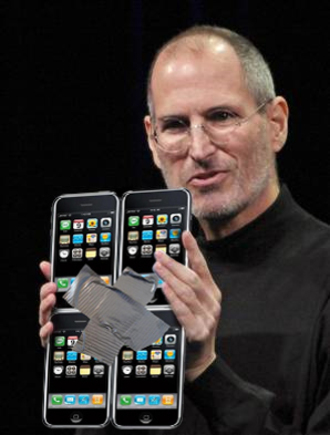
The next category of complaint is that the iPad isn’t revolutionary. We again see the problem–once more, as I predicted before the iPad was debuted–where expectations raised by the rumor mill led to disappointment. Everyone was looking forward to something completely new, a revolutionary OS or a stunning new design. Instead, Apple came out with what was essentially just a big iPod Touch. Why did it takes years for the Apple design team to start from scratch several times over to come up with something so basic?

It helps to remember that Apple’s challenge here was not to make something completely new and unexpected; Apple’s challenge was to make a tablet computer that would be practical and fun to use. People just assumed that this would naturally involve something new and revolutionary. I was personally nervous about the rumored “steep learning curve” of the tablet: if Apple made it too revolutionary and different, then people might not be able to use it. Just look at the iPhone’s touchscreen keyboard–hardly a huge new concept, but people freaked out at the idea.

The lack of novelty in the iPad might be explained by the old saying, “That’s a feature, not a bug.” As Steve Jobs pointed out in the unveiling, there are about 75 million people who will know exactly how to use this device from the word go. Apple chose the exact opposite of a steep learning curve, and once you think about that in light of the challenge of making a tablet computer easy to use, it makes perfect sense. The iPad is not intended to wow you with its novelty, it’s intended to be comfortable and convenient. People who complain that it’s just a big iPod Touch are completely missing the whole point of this new device.

One other consideration along these lines is the iPad’s place in the spectrum of usability. Many have noted that it doesn’t replace anything, save possibly for ebook readers. The iPhone, for example, replaced the need for lugging around a cell phone, PDA, ipod, digital camera, and video recorder. That’s wonderful, but that doesn’t mean that every device has to accomplish the same goal. The iPad was not design to replace existing products, it was designed to fulfill an existing need. That need was for a mobile device which was more capable than a smartphone, but easier to tote and carry than a laptop. It may not be the widest category of need you can imagine, but a lot of people will greatly appreciate and desire exactly such a device. Students will go nuts over what this will do for textbooks, for example. People who want color, backlit ebook readers will love it. How many people have complained about laptops being too heavy, or burning their legs with the excess heat, but can’t do what they want on a tiny smartphone screen? And then there are the uses that nobody thinks they need right now, but the iPad will open up for them–a holy grail in product design.

The User Experience

That brings us to the last category of complaint: it looks like I won’t like it. It looks too heavy and awkward to hold, the size is wrong, the screen won’t be good for me, the touchscreen keyboard is no good. The problem is, people who have only seen the device and have never held one in their hands are already making judgments about what it feels like to use one. That may be why almost all of the criticisms are coming from those who have never had a hands-on with the device. Look at the reviews by those who have played with the device, however, and you’ll encounter the same advice that Jobs gave: you have to use it before you understand how right it is. Once you use it, you may find that your concerns were unwarranted or have easy solutions. It may be heavy, but so are some books; we compensate by holding such objects while resting them on our laps or whatever surface is available. The touch keyboard may seem awkward, but so did the iPhone’s, and most people seemed to have little trouble adapting to that. I myself took just a few hours to get used to it, and now type on my phone almost as fast as I do a full-sized keyboard (a miracle relative to the numeric-keypad hell that I avoided for so long). The screen may be brightly backlit, but that’s what the brightness control is for.

This is not to say that the iPad will be for everybody. Some will never get used to a virtual keyboard; others will never be comfortable holding it; many may be bothered by any level of light from a backlit LCD screen; some may hate the design and esthetics, or may never get over their high expectations from the pre-launch days. Apple has always had its haters, and always will. That doesn’t mean that the product is bad or doomed to failure.

Dispelling Criticisms Is Not Proof of Excellence

You may have noticed that I have spent the entire blog post so far explaining why the negative reviews are off base, and have not really explained why the iPad is “Deceptively Good,” as I claim in the title. So let me take a whack at it. The answer lies in two aspects: the user interface, and the product’s future potential. Both are inextricably linked, and both are right now vastly under-appreciated.

The UI
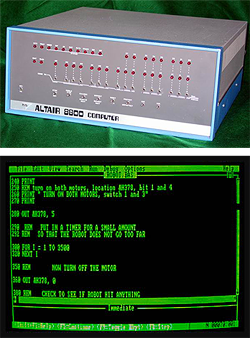
OlduisWhen the first “personal computer” came out, it was fully a geek’s plaything. The Altair computer had no monitor, no keyboard–just a few rows of switches and blinking lights to allow for communication in binary code. Very few people could actually use one for anything. A few years later, the “trinity” of PCs–the Apple II, the Commodore Pet, and the Tandy TRS-80–introduced a “CLI,” or a text-based interface. You either remember or have somewhere seen the old “green-screen” text displays. This allowed people who were not comfortable in binary to use the machines, although you did usually have to learn the language that the computer understood, which still kept most people too distant from the PC experience.

It only took seven years after that for the first commercially popular PC to use the GUI–the graphics user interface with visual metaphors like the Desktop, folders, icons, and menus–that we have become so accustomed to. The GUI was a godsend because it made the computer interface more recognizable, something we could relate to more easily. We understood that a desktop is a place where you begin your work, that you choose from menus, and that folders contain documents. Suddenly, almost everybody could use a computer, and PC sales took off. But we’ve had the GUI for a quarter of a century now, and it’s beginning to show it’s age. What’s next?

The answer is multitouch. Using a mouse may be a step up from a text-only interface, but it is still uncomfortable and clunky. Surely you have seen people trying to move something on the screen farther than their mousepad gives them room for, and clumsily attempt to pick up the mouse and reposition it–in fact, you may well have been that person, several times. The flaw with the mouse, and the trackpad as well, is that you are not directly controlling the content on the screen. It is one step removed from a “hands on” experience.

To get a good sense of how significant that is, try drawing a picture. Do it on paper first–I draw a pretty good Snoopy, for example. Then open a drawing app on your computer, and with the mouse, try drawing the same picture. You’ll most likely find the results appalling. A trackpad may not fare much better, unless you’re experienced at it. Whenever your hands and fingers are removed from the immediate action, you lose dexterity and control. Current cursor devices like the mouse and trackpad are remote devices; multitouch allows direct access, which is far more natural, comfortable, and accurate. However, you won’t realize this until you’ve actually used a device like the iPad where multitouch comes into far more appropriate use than it does with the smartphone.

The problem with multitouch is how the screen is placed when you’re doing your hands-on controlling. A desktop screen is much too distant, and even a laptop screen would require holding your hands out in an unnatural fashion. A smartphone screen is more suited for that, but it’s too small to do much with. The tablet PC is, if you’ll forgive the cliche, just right. Anything you control with your hands has to be in your hands. Yes, there are disadvantages, but the payoff in control will far outstrip any of those.

A good example is Apple’s multitouch trackpad on the MacBook Pro. When it came out, I thought it was cool, but not really revolutionary. I figured that I’d be able to do a few new things on it, but did not expect it to change they way I use computers. However, I only recently realized that I had completely stopped using a mouse–something I had depended upon for years with previous laptop models. The multitouch screen is the next step up from that; after getting used to it, you’ll laugh at how clunky a mouse is. But the catch is, you won’t realize it until after you’ve used it for a while. The true utility of the touchscreen sneaks up on you.

One Word: Potential

That brings us to the real promise of the product. A lot of people look at the iPad’s current state, and what we already know about using iPhone apps, and see that as the end result. That’s a big mistake. What you have seen is only the beginning. Most of what the iPad will wow you with hasn’t come out yet.

To get a better sense, watch the keynote, and pay special attention to the software demos. Pay attention to how Jobs used the photo viewing app. Watch what Phil Schiller does with programs like Numbers and Keynote, how the multitouch comes into play. Watch the Nova game demo, and note the grenade-throwing and door-opening gestures. Be sure to watch the users’ hands, not just the screen. These are just a few examples of what can be done, but there is far, far more. It is limited only by what software developers can come up with, and you’ve seen the amazing stuff people have come up with on the iPhone App Store. The closed ecosystem provides a sheltered environment which not only helps prevent malware incursions, but slows piracy so that apps can be sold more cheaply. But most significantly, it allows the individual, the small-time software tinkerer, to immediately offer their wares for sale in one of the biggest marketplaces in the world. And now the iPad blows that wide open by combining the novel and powerful multitouch interface with enough real estate to make almost anything possible.

I can appreciate the benefit to apps whose layouts have traditionally been hard to control, like Filemaker Pro for instance; creating, resizing, and placing fields and buttons has always been a bit of a pain. I can easily imagine multitouch being used to make that not only easier, but a lot of fun to boot.

Conclusion

The features most people have focused on so far–the music playing, movie viewing, browsing and email, and even the ebook reading–are all just background. They are little more than examples of what can be done with the machine. Once you take in the full potential of the device, you will come to understand that the concerns people are airing today miss the point entirely. Panning the iPad because the screen size doesn’t fit the aspect ratio of certain movies is like saying that your Porsche is abysmal because the gas cap is the wrong shade of grey. The iPad is way, way more than just one application. Watching movies on it is a perk, not a raison d’etre. Same goes for many of the other concerns.

Apple’s mission was very simple: make a platform, and they will come. The idea was not to introduce something with whiz-bang flashing lights that would knock people’s socks off, it was instead to do what computer makers have been trying for nearly a decade and failing at: creating a tablet computer which has enough going for it that it can succeed as a product category. Apple has, by all appearances, succeeded in doing that. By building on the achievements of the iPhone platform and the introducing full-scale multitouch UI in a low-cost product where that feature can flourish, Apple has created something which is truly groundbreaking.

Remember, ground-breaking innovations are not always appreciated or understood when they come out. A lot of people sneered at the original Mac, many thought the iPhone would fizz out after the buzz dissipated–heck, even the PC itself was dismissed as an expensive toy at first back in the late 70’s. So don’t count the iPad as DOA before it even arrives. It’s far more than it seems.

Hey

So, by now, you have probably thought, “If you’re criticizing others for coming to conclusions about the iPad sucking before they get their hands on it, how can you claim that the reverse is true if you’ve never held one yourself?” Well, you got me. Part of it is an educated assessment–I’ve been looking at this kind of technology for a while. But that’s not enough.

Call it an article of faith.
Obama and the Republicans

January 30th, 2010 6 comments

Obama went to the Republicans’ home turf and fielded unscreened questions from House Republicans at their retreat in Baltimore. Below is the full White House video (video and transcripts part one & part two) of his opening remarks and of his one hour and seven minutes of answering questions lobbed at him by his political opponents.

Now, one thing I would like to observe: when did Bush do this? Right-wingers make claims that Obama and Democrats are “afraid” of “journalists,” meaning they won’t allow Fox News to stage a right-wing political ambush under the pretense of a debate hosted by a “news outlet.”

The thing is, Obama has put himself not just up in front of the media, he has put himself directly in front of very aggressively challenging right-wing forums. Obama went on O’Reilly’s show on Fox; did Bush ever go on Olbermann? Hell, no. Now, maybe I missed something, but I sure as hell don’t recall Bush ever opening himself up to answering more than an hour’s worth of unscreened questions from Democratic lawmakers on live TV. No, I think I would have remembered that.

So, right off the bat, you have to give Obama huge props for going where no Republican leader would ever have the guts to go, namely into the lion’s den of opposition. On this, Obama is the courageous, bipartisan leader, and Republicans are the weak-kneed sissies afraid to be held accountable by the opposition. There can be no argument on that.

Next, watching the opening remarks and much of the questioning, you have to give Obama big marks for bipartisan outreach. He made several excellent points about how he has compromised and worked across the aisle, gave Republicans their due on many things, and publicly committed to working with the other side. Compare that to most of the questions, and you’ll see that while the Republicans in the room had some conciliatory remarks, they most definitely were way more partisan in their remarks than Obama was. Clearly, they felt that Obama had stumbled into their crosshairs and they were going to make a shooting gallery of it. But under the most challenging of questions, Obama more than held his own. He did not allow his record to be misrepresented, and did a good job of beating down the untrue accusations lobbed at him.

And there were quite a few incredibly biased and unfair “questions” (often couched in partisan speechmaking–just listen to the first “question”). I nearly gagged when one guy actually had the balls to say “We have not been obstructionist.” I had to remember that a few moments before, he had said that he represented freshmen in the House. I don’t know what their record is, but maybe among that small group, there has not been the same level of obstructionism as has been iron-clad amongst Republicans as a whole, and especially Senate Republicans. What this guy said may have been true in its very limited sense, but coming from a Republican lawmaker, and clearly intended to represent Republicans in general (note how he did not say “House freshmen have not been obstructionist,” but instead removed the classification to a preceding sentence therefore giving a false impression in the claim), it is one of the more outrageous claims ever spoken. And sure, freshmen House Republicans may not be as obstructionist as their party as a whole, but that’s because they can afford to be: there’s no filibuster in the House, and the Democrats have a clear majority, so 100% opposition is not necessary, and they can afford to cross lines more often. But if Democrats held a razor-thin majority, you can bet your ass that these guys would be exactly as obstructionist as their Senate brethren are.

Obama scored huge points in pointing out how Republicans have demonized Obama:

Now, you may not agree with Bob Dole and Howard Baker, and, certainly you don’t agree with Tom Daschle on much, but that’s not a radical bunch. But if you were to listen to the debate and, frankly, how some of you went after this bill, you’d think that this thing was some Bolshevik plot. No, I mean, that’s how you guys — (applause) — that’s how you guys presented it.

And so I’m thinking to myself, well, how is it that a plan that is pretty centrist — no, look, I mean, I’m just saying, I know you guys disagree, but if you look at the facts of this bill, most independent observers would say this is actually what many Republicans — is similar to what many Republicans proposed to Bill Clinton when he was doing his debate on health care.

So all I’m saying is, we’ve got to close the gap a little bit between the rhetoric and the reality. I’m not suggesting that we’re going to agree on everything, whether it’s on health care or energy or what have you, but if the way these issues are being presented by the Republicans is that this is some wild-eyed plot to impose huge government in every aspect of our lives, what happens is you guys then don’t have a lot of room to negotiate with me.

I mean, the fact of the matter is, is that many of you, if you voted with the administration on something, are politically vulnerable in your own base, in your own party. You’ve given yourselves very little room to work in a bipartisan fashion because what you’ve been telling your constituents is, this guy is doing all kinds of crazy stuff that’s going to destroy America.

And I would just say that we have to think about tone. It’s not just on your side, by the way — it’s on our side, as well. This is part of what’s happened in our politics, where we demonize the other side so much that when it comes to actually getting things done, it becomes tough to do.

Truer words have not been spoken. Watch the whole video, and I think you’ll be impressed with how Obama does. I have to say, he is very motivational; listening to him speak, especially seeing him stand up to and hold his own and then some against a crowd so pitted against him almost gives me hope again. But then I remember that it’s not House Republicans who are the problem, it’s Senate Republicans, and for all the tiny morsels of outreach the crowd claimed they were offering, none of that means squat if Senate Republicans don’t end their record-breaking filibuster marathon and stop their monolithic obstructionist campaign.

UPDATE: Amusing point: Obama was doing so good a job at defeating Republican attempts to make him look bad, and doing it so adroitly and effectively, that Fox News, which was airing the event no doubt in hopes that Obama would get his ass handed to him, cut away from the event 20 minutes early. To those who would claim that they planned to or had to go to another event, I ask this: if Obama were getting embarrassed instead of the other way around, do you think they would have cut away? Not to mention that they cut away to “analysis” of the event, and spent a lot of time bitching about how Obama was “lecturing” Republicans. Um, yeah.

Japan and eBooks

January 30th, 2010 Comments off

This reporter makes an interesting observation I hadn’t thought of before: Japanese people don’t do ebooks. You just don’t see them here. And the idea is that it’s not because they just haven’t arrived, but rather that Japanese people are not really that interested in them. From what I can gather, Japanese do read quite a lot (though not as much as 30 years ago), but most ebook reading is done on a cell phone. What drives most ebook reader sales in Japan is obvious–I knew even before I looked it up that manga would be what drives the ebook reader market. They come out often, and come in thick tomes that resemble gaudy, small-format telephone books. The bulk, graphic format, and large number of constant releases would make manga a natural ebook target.

So people do read ebooks here. And from what I found from a quick search, the market is taking off–it just hasn’t developed nearly as much here as it has in America. So the question is, will the iPad change that. The answer might be similar to what we saw with the iPod, then the iPod Touch, and then the iPhone: an initial lukewarm reaction, everybody says that Japanese people aren’t interested… and then a few years later, you start seeing them everywhere.

Categories: Focus on Japan 2010, iPad Tags:

iPad vs. Kindle

January 29th, 2010 3 comments

Unless you have some very specific needs, I can’t really see how the Kindle could outclass the iPad as an e-book reader, especially if you compare like sizes–the iPad vs. the 9.7“ Kindle.

Now, that’s all subjective, and depends on what you prefer and what you can stand. Some people will prefer the Kindle no matter what because the e-ink screen is less a strain on their eyes. Others will very much prefer a backlit display (my father sent his Kindle back because he couldn’t read in bed with the lights off).

I decided to make an impromptu chart to compare the two. Advantages are colored in orange. Note that I did not give either machine an advantage for the screen type (depending on visual preferences), WiFi vs. 3G (Amazon’s 3G connectivity is free), keyboard type (some people will always prefer a physical keyboard), or even the USB / VGA comparison (despite the video out, the iPad requires adaptors which many dislike).

The Kindle DX has an advantage with slightly higher resolution and pixels per inch (ppi) screen density, a slightly lighter body, and far superior battery life. If e-ink and long battery life are critical for you, then the Kindle wins hands-down–with all cylinders firing, it gets more than 4 days of continuous use; with the 3G used only sporadically and when used even at heavy reading rates, the Kindle can last weeks on a single charge. Some also claim that weight is an issue when you’re holding that device up for hours on end, and a 5-ounce difference is a difference some will balk at.

The iPad, meanwhile, is not limited to being an ebook reader, but if only used for that, it could still hold its own. For the same price as the Kindle DX, you get full color, a backlit screen, and four times the storage in a smaller form factor. But in addition, you get… well… a computer. You get to run apps, read email, play games, and most anything else a computer can do. You can run an office suite, watch movies and TV shows, all that and more–virtually no limits within the allowances of the hardware.

iPad vs. Kindle
  iPad Kindle
Overall Size 9.56" x 7.47" x 0.5" 10.4" x 7.2" x 0.38"
Screen size (diag) 9.7" 9.7"
Screen Type backlit LCD ISP touch e-ink, no backlight
Colors millions (?) 16 grays
Resolution 1024 x 768 (132 ppi) 1200 x 824 (150 ppi)
Weight 24 oz. 18.9 oz.
CPU 1 GHz custom 532 MHz Freescale
Storage 16 GB 4 GB
Battery life 10 hours "1 week" (4 days)
Wireless Wi-Fi (n), Bluetooth 3G (free)
Main connectors iPod USB
USB / VGA yes / yes (adaptor) yes / no
Book Store yes (? vols.) yes (400,000 vols.)
App Store yes no
Browser Safari "rudimentary"
Email Mail no
Games yes no
Plays music yes yes
Plays Movies/TV yes no
Keyboard touchscreen physical
Price $499 $489

So the question becomes, what are you looking for? Just an ebook reader geared toward general ebook reading preferences? Or an all-in-one device with loads of potential? Comparing the two is a bit jarring because they are different beasts, but like comparing the iPhone and the Zune, they both cover the same territory, and then one goes a lot further, for about the same price. And we all know how stunning a success the Zune has been.

Categories: iPad Tags:

Between Countries

January 29th, 2010 Comments off

Sometimes being caught between countries sucks. I want to buy software item “A” in English. You can buy it in America just fine. In Japan? Not available–just in Japanese, sorry. And retailers in the U.S. won’t ship it to you, as it violates the license for the Japanese seller, even though the language makes it a different product. And the Japanese seller can’t be bothered to sell an English version, even if it’s a download which would be dead simple to sell. Seriously, they’d just have to spend five minutes altering their web site, and they’d have more sales. But nope, can’t be bothered.

It is especially frustrating for my college, an American college in Japan. We are essentially a bubble of English language, a small bit of American soil in the heart of Tokyo. Our model is to replicate the experience at home campus. Except, of course, that those who sell software and media usually don’t recognize this. Can’t have the U.S. version, Japanese version doesn’t fit, you’re outta luck too bad.

I fear this will be the case with ebook purchases, in that we have lots of students here who would love to use ebook readers for textbooks, but international licensing agreements will probably frustrate us. Because of our location, we won’t have access to the textbooks we need–America won’t sell and Japan won’t offer.

Essentially, being a stranger in a strange land is a niche that businesses haven’t paid enough attention to, something which makes zero sense in a digital world. There are some businesses which address us, but they usually see us as prey more than customers, people who are left out and so will pay a premium to get what everybody else takes for granted.

Apple is one of the few businesses which has done a fair job of addressing this. When Apple makes software, they allow for a variety of languages to be used. Their OS software, whether for computers, the iPhone, or iPad, comes with at least a dozen base languages built-in. Apple’s software architecture allows for “localization,” or various languages to be built into every software package. Switch your OS to a new language, and all apps with that language in their localization files will automatically run in that language. Which means that if I buy Apple software in Japan, it simply runs in English for me, because my OS is set to that language.

You see this in a few other places–for example, the “Ultimate Matrix” Blu-ray set is sold in English, but put it in a Japanese player and it switches languages. Unfortunately, such setups are rare. Windows, for example, refuses to do this, and even many Mac software makers stodgily refuse to localize, instead issuing different packages for each language.

Categories: Focus on Japan 2010 Tags:

The iPad

January 28th, 2010 7 comments

Ipad

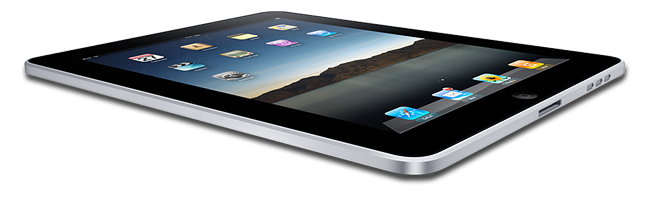
One word: potential. Remember how I mentioned people hyping it up too much? This is what I was talking about. Clearly Apple wanted to start from bare basics and then upgrade. Essentially, this is exactly what people heard since a while ago: a giant iPhone or iPod Touch. Apple clearly wants to ride the familiarity people have with the iPhone, which may or may not be a mistake. People were expecting something revolutionary, and instead they got the familiar, just bigger.

In one respect, the iPad is disappointing in that it really doesn’t do anything new. No 3-D interface, no use of advanced multi-touch, and no steep learning curve. It doesn’t even have multitasking, which people expected the iPad would bring to the iPhone. Instead, we’re all trapped under a single app at a time, which is virtually inexplicable for a device with a 1 GHz CPU that reportedly performs very quickly. I can only guess that Apple wanted to prevent the device from slowing down after opening up too many apps at the same time.

What Apple did right: the price. The base unit, 16GB WiFi and no carrier contract, starts at $499, which, if you recall, is exactly what the original 4GB iPhone cost with a contract. The 16GB price is obviously meant to sell, as I seriously doubt that doubling the memory really costs an extra $100. Apple wanted the low-end model to be at a price people wouldn’t gag at, and they did it: $500 for a tablet computer is actually pretty damn good. Add the pre-existing app base and how comfortably anyone will be able to slide into using this, and you begin to understand Apple’s strategy.

And that, I suppose, was a key point: make it available for most people, get the basics down right, and then follow up with more features every model. You can fully expect a new iPad in 8-12 months with a front-facing camera, Bluetooth and a compass, then another one after that with new screen sizes and multitasking, and so on. This is what Apple does. I called that one spot-on in my prediction 10 days ago:

Like the iPhone, one should expect a relative paucity of such features upon the initial release, allowing not only for everyone to focus on the core innovations of the product, but also to allow for Apple to make the subsequent generations of tablets more attractive.

See?

Apple is indeed going with the closed ecosystem; again, they are going with their strengths. Hopefully, you will be able to “authorize” the iPad so it can use all of your purchased apps right off the bat, without having to buy them all over again. Apple is adding iWork to the mix, so we get a long-overdue office suite. The apps are priced at $10 a pop, I presume no discount to buy all 3. But $30 for an office suite seems quite acceptable to me.

Missing from the presentation: any indication of how the file system will work. Now that we have an Office-style set of apps, surely we’ll need a place to save them. How will that work? If they introduced that, I haven’t seen it yet.

And textbooks! What’s up with that? No mention of textbooks in the keynote? Surely there will be something coming, but Apple better not make it so you have to buy a separate textbook app for each publisher. Even free apps from each publisher would be a pain in the ass, as you’d have to remember which textbook you’d gotten from what publisher, and you’d have to switch back and forth.

My predictions for the tablet were not bad–I got a lot right, probably more wrong, though I probably fared better than most analysts. The iPad is slightly larger than I thought, in order to accommodate the border/bezel, which I believe I accurately predicted–I think that’s about a half-inch, maybe a bit wider. I nearly nailed the pixels-per-inch prediction, guessing 130 (it’s 132), and was right that there’d be at least a 720p resolution–I guessed 1080 x 720, it’s really 1024 x 768, not spot-on but fairly close. I predicted that viewing angles would be an issue, and was right–Apple went with a special type of LCD called “IPS” which was a wide viewing angle. I don’t recall many other prognosticators addressing that issue. I was right about the camera not being there, and why not; I was right about the price but for the wrong reasons; and I was right about the importance about there being a Wi-Fi-only option.

I was wrong in my expectations for the interface to use advanced multitouch, though I fully expect Apple to start from the familiar base OS and upgrade gradually instead of shocking people with a new, hard-to-learn UI. I was wrong about the home button location, but right on all the other buttons. I was wrong about the mini-USB and the mic, and missed it on the CPU.

Overall impression: Jobs did not hit one out of the park like he did with the iPhone, in that this is not a huge, awe-inspiring device. Instead, it is far more subtle and subversive: it will slide people into a new way of computing, slowly acclimating them instead of diving right in.

In the end, the question is, will people buy it? It’s a very nice, familiar tablet/ebook device for an affordable entry-level price. I think people will indeed go for it, though not in the excited droves they went for the iPhone. Jobs is playing this one safe rather than taking risks. It’ll be a sleeper, slow in the short-term, but a long-term hit.

Categories: iPad Tags:

Oh, If Only

January 26th, 2010 2 comments

But as I explained recently, this will never happen.

Newsenatemapa

Categories: Political Ranting Tags:

The Onion Channels the Weak, Suffering Voice of the Remnants of Rush Limbaugh’s Broken, Microscopic Conscience

January 26th, 2010 Comments off

When you read it, you keep thinking, “My god, they are really going over the top with this one,” and then you remember who they’re talking about and go, “Well, maybe not.”

Categories: The Lighter Side Tags:

You Get What You Deserve

January 26th, 2010 10 comments

All indications now seem to point to Republicans picking up at least 4 or 5 Senate seats and who knows how many House seats come the midterm elections.

Let me see if I understand the causal chain correctly:

  1. Republicans spent the last eight years in power trashing the economy, starting quagmire wars, and generally mismanaging things so badly that most people agreed they sucked
  2. Obama elected because people want change
  3. Obama and Democrats get to work addressing major problems: economy, health care, etc.; early results were startlingly good as stimulus sharply reversed job losses, and large majority wanted some form of health care reform
  4. Republicans throw biggest hissy fit in memory, rage with over-the-top histrionics, throwing about outrageously obvious lies like “Obama’s creating death panels to kill your grandparents”
  5. Republicans throw 100% of their weight in obstructionist effort to grind business to a halt for the openly stated reason of wanting the president to fail so they can gain politically from it
  6. People respond by thinking Obama is doing a bad job and reward Republicans with election victories and more power

Whatever low opinion I had of Joe Voter just dropped through the floor. I know that the Dems have been more than a bit weak-kneed and ineffective in doing what they’re doing, but at least they were intent on doing well for the country, and no matter how bad they may have been, they are far more preferable than what the Republicans have to offer. It’s as if the people have completely forgotten about what happened the past ten years, and like gullible saps, are willing to believe just about anything the right-wing propaganda machine feeds them. I mean, really, does anyone believe that giving Republicans more power will result in more action being taken? Exactly the opposite: get ready for Obstructionism on Steroids as the GOP sets its sights on taking the White House in 2012.

If Americans are so astonishingly stupid as a group, then I suppose we get what we deserve.

We Can Dream

January 25th, 2010 4 comments

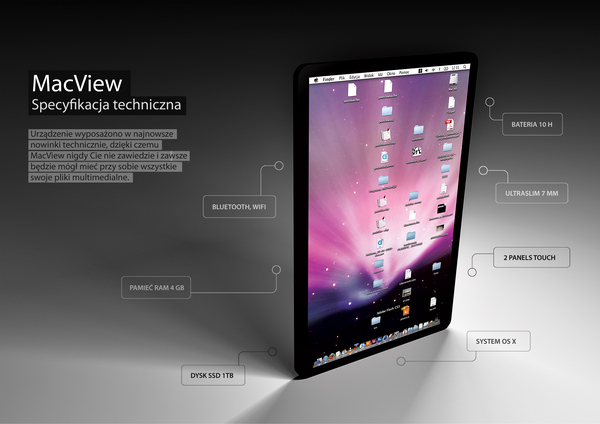
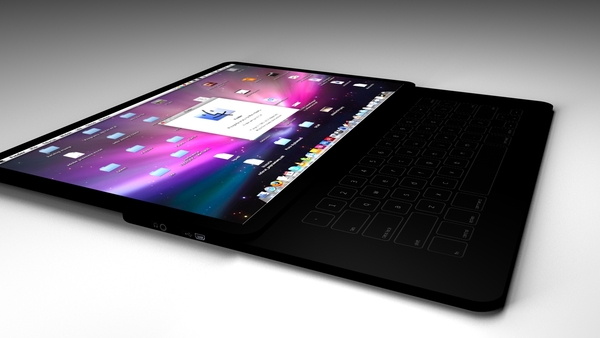
A new concept has been released by a Polish student showing a new take on the Apple tablet idea. The concept is certainly stunning, and I agree with commenters that it is a far more interesting mock-up than the standard ones proffered, which tend to simply be over-sized iPhones. Check it out:

Pt-01-Stand

Pt-02-Extend

The illustrations make it a bit hard to see the second, slide-out touchscreen LCD panel, but that’s what that is.

Pt-03-Slide

Now, I will be the first to admit that this is an incredibly cool concept, and like many of the fanboys out there currently raving about the design, I would like nothing more than to have something like this. However, there is one small hitch: the design is, by current standards, simply impossible to achieve.

The depth, for instance, is supposed to be only 7mm. Well, that’s nice, but the iPhone is currently 12.3 mm thick, and even the iPod Touch is 8.5 mm. Each LCD screen would have to be 3.5mm (roughly 1/8th of an inch) thick, have a sturdy enough back panel to protect a 10“ screen, and still somehow pack a computer inside there as well. Somehow I just don’t see that happening.

Furthermore, the designer decided to add a 1-Terabyte solid-state drive (SSD). A look at the only 1TB SSD I could find out there shows that this part alone requires a case 25mm thick; even spread out over a broader plane, the SSD alone would take up more space than the device would have. Not to mention that such an SSD would cost upwards of $3000, even if it could be crammed into the casing. That, the two LCDs, 4GB of RAM, and other impossibly small components would surely price this baby over $10,000 even if it were possible to make with current technology.

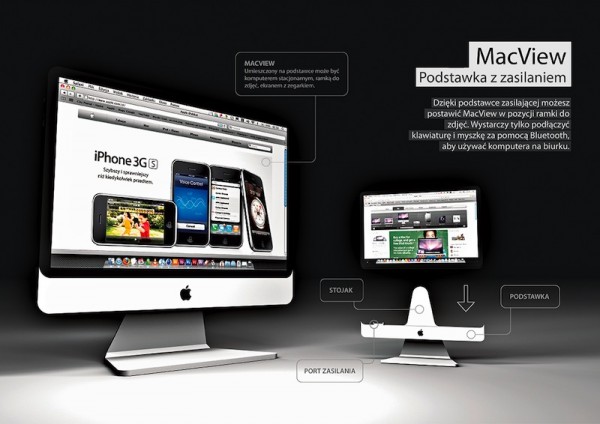
Now, there was one design element which was both interesting and possible with today’s technology, and would not break the bank:

Pt-04-Stand

The best word for this is perhaps ”cute.“ As for practical, that’s another matter. Maybe if the stand could tilt back a bit, it would be better; with such a small screen, so low to the desk, I imagine one would have to hunch down to see it well if it’s standing upright at 90 degrees. This also mostly negates the touchscreen, so it would be a less-than-perfect way to use the device. But the idea of sliding it into that little frame and it becomes a tiny iMac, there’s something almost irresistible about that. The charger-connector would have to be on the long edge of the tablet for this to work, but if it is and even if Apple doesn’t do this, I bet a third-party manufacturer could make some bucks selling a stand like that.

So, I’d have to give this guy an ”A“ for originality and coolness, but from a design perspective, especially if one must be constrained by realistic technological and cost restraints, this simply isn’t feasible.

Which brings me to a slightly different point: stuff like this isn’t helping. At least, it’s not helping Apple, nor is it helping those who want to be suitably impressed by what Apple comes out with this week. People see concepts like the one above and get impossibly high, pipe-dream expectations–and it just makes the actual device seem a lot less impressive, and unfairly so. Now, if people came out with more realistic designs, then that’s fair. For example, there have been a few iPhone design concepts for the ”4G“ model that could work, and may be cooler than what Apple comes out with. So, actual designs which don’t defy reality or break the bank, that’s a fair comparison which Apple should be expected to live up to. But to break the rules helps no one; I might as well imagine an Apple tablet with a 4 GHz, 16-core CPU with 32 GB of RAM and that terabyte SSD, with 3-D holographic displays in a 4-mm razor-sharp case made of unobtanium. Oh, and did I mention it’s a quantum computer? That would certainly be cool, but it’s also cheating–and to expect anything close to it would be pointlessly self-defeating.

Categories: Mac News Tags:

Point Taken

January 24th, 2010 Comments off

I have kind of cut myself off from politics recently as it was just too stressful and held little if any hope of ending happily. While I was looking the other way, somehow a Democrat lost Ted kennedy’s seat to a Republican, the people of Massachusetts apparently believing that (a) Obama was spending too much time on health care instead of helping people without jobs (hopefully I won’t have to explain how immensely wrong and stupid that idea is), that (b) the correct response would be to scuttle health care which is effectively what they did, and that (c) somehow this was not the fault of the Republicans who have done their best to crap on the people of the United States, and therefore they should be rewarded with a fantastic victory and a vindication of their hateful, lie-filled obstructionism which works to deprive the American people of health and livelihood.

In short, I am glad that I missed all of that.

Had I been around and watching closely, I probably would have become as angry and calloused as Keith Olbermann did, when he called Scott Brown “an irresponsible, homophobic, racist, reactionary, ex-nude model, teabagging supporter of violence against women and against politicians with whom he disagrees.”

Note the slim difference between an accurate description of Republicans (say, at the end of my first paragraph in this post) and the over-the-top description Olbermann offered. They are “hateful,” not a doubt about that; they lie constantly, something that has been well-documented on this blog and in many other places; they are obstructionist, obviously so; they clearly wish to support insurance companies and big pharma at the expense of the people and leave them without adequate health care; and whether they intend to or not, they have made it far more difficult for people to find work at livable wages. All these are substantial facts. But Olbermann stretched way too far with allegations like “supporting violence against women”; I saw that clip, and Brown either didn’t hear the curling iron comment or just ignored it.

John Stewart, in an excellent example of how he makes fun of all people who deserve it and is not just a leftist taking partisan stabs at right-wingers (right-wingers simply provide far more material for him), did a longish segment pillorying Olbermann for that comment and the rationalization he gave in a later broadcast.

Now, had someone like Rush Limbaugh or really any of the gasbags on the right been subjected to this attack, they would either have ignored it or argued with it. Olbermann, however, aired the segment in its entirety on his own show, and then after a bit of lame humor, ended with a refreshingly truthful and humble statement for a political talking head of this day and age: “I have been a little over the top lately. Point taken. Sorry.”

True, he could clarify better that he is being ironic with the “a little” over the top comment, but even if he were serious about the degree, it’s still a lot more humility than any other partisan commenter I can think of. Watch the whole segment:

Maybe I’ll start watching again next week.

Categories: Political Ranting Tags:

What the Heck Is It with Amp Sets in Japan?

January 24th, 2010 7 comments

I have been pricing them because we want to get one for my school; we have a lecture series and we want wireless mics that’ll be amplified through a speaker–should be a simple setup, right? But the cheapest setup I can find in Japan is priced at about ¥130,000 ($1,450), which seems ridiculously, even hideously expensive for two mics and a speaker.

I look at Amazon.com in the U.S. and I find a solution for about $350.

I know I have posted here before about price differences, but differences on this kind of scale are highly unusual, for specialty products. So, maybe I’m doing something wrong, looking in the wrong places or something.

Does anyone know what that is, or are we just going to have to shell out huge amounts of money here?

Categories: Focus on Japan 2010 Tags:

Nice to Know That the Economy Is in the Hands of Such Responsible People

January 23rd, 2010 2 comments

Great. My Apple stock was doing great–at $215 a share, and set to go way up. Everyone rates it as strong, and there’s general concurrence that it will go up to at least $260, with many speculating that over the next few years, it can go up to $500 or even $1000–and for very good reason. Apple is set to release the tablet, computer sales are up, it is conquering the smartphone market worldwide, and its computer market share is growing, with lots of potential.

But over the past three days it has slid from $215 to $197, $10 of that just in the last day. WTF?

And then I see the reasons:

The game was “on” big time this week. Petulant “let’s teach Obama a lesson” Street players did their thing on Thursday and Friday (today). The market’s big move down was partly the Street’s retribution against the Obama Administration for daring to regulate proprietary trading by banks.

The news on China and Bernanke didn’t help, but they weren’t the only causes here:

Apple (AAPL), being a large part of the QQQQs, was caught up in today’s down draft and was sold and shorted mercilessly, finishing the day down $10.58 (5.04%). Helping to accelerate the selling was a false report today about Apple (AAPL) being downgraded by Deutsche Bank. This “Apple (AAPL) downgrade” story was pumped widely by the Street echo-chamber (i.e. hedge funds, institutional trading desks and other denizens of Wall Street). It is my opinion that the majority of trading desks understood precisely what happened at Deutsche Bank, but held tight to the truth and may have intentionally misled the financial press (by omission).

Don’t you just love it when your personal fortunes are in the hands of these pricks playing their little games? As for Obama regulating trading, the Street’s reaction proves exactly why there should be a lot more regulation.

Categories: Economics Tags:

Ditch Explorer

January 22nd, 2010 5 comments

Banie2You’ve probably heard about how China has been spreading malware and using it to hack in to email accounts to spy on activists, journalists, and god knows who else. Of course, this should not be surprising: the Chinese government has quite a track record of acting like complete pricks and never facing consequences because everyone is afraid of losing access to a market with more than a billion customers and a very cheap labor force. So, old news, we all knew China’s doing crap like this.

What’s more immediately interesting are some reactions to this. France and Germany, for example, have begun urging their citizens to dump Internet Explorer–all versions–in order to avoid security breaches like those committed by China, which exploited security holes in the browser to invade people’s privacy. Of course, I fully support this; Internet Explorer is the Worst Browser Ever, with issues not just concerning security, but also concerning standards–IE completely fails standards tests, and not just by a little; whereas Safari gets 100% and Firefox gets close to that, IE scores in the 20-30% range–even including IE8 and the as-yet-unfinished IE9.

In short, IE is a bad joke and should be abandoned by everybody for Safari, Firefox, Chrome, or Opera. That said, to be completely fair, if IE hadn’t been around, China would have probably just hacked a different browser. None are inviolable, but IE is known to be particularly open to attack.

An amusing postscript to the story: Microsoft is now advising users to drop not only IE, but Windows as well! Of course, they’re not telling them to drop Microsoft products entirely, just old versions–they advise upgrading from IE 6 to IE 8, and from Windows XP to Windows 7. In other words, they are using this attack to sell their new OS.

However, an upgrade is indeed called for:

Upgrade

Categories: Computers and the Internet Tags:

They’re Back!

January 21st, 2010 Comments off

Screen Shot 2010-01-21 At 2.02.51 Pm

The Shiba Inu mama Kika has had a new litter of 5 puppies (3 red, 2 cream), born a bit less than a week ago. Popularly known as the “SF Shiba Inu Puppy Cam,” this became a sensation a while back as 3 million people watched the puppies on a more or less regular basis.

If you have missed your regular fix of Shiba Inu puppies, or if you wished you could have started watching them when they were younger, then here they are.

Categories: Computers and the Internet Tags:

The iSlate / MacTouch / iTouch / MacTablet / JesusTablet

January 17th, 2010 5 comments

Only ten days to go, and the rumors are flying like bullets in a war zone. The tablet could cost $500, or it could cost $2000; it might have an LCD display, or an OLED, or a completely new haptic touch screen; it might run on an nVidia system-on-a-chip, or it runs on an Apple-made CPU with an nVidia GPU. Who knows? Whoever does enjoy such insider info must certainly have god’s own NDA hanging over them like the Sword of Damocles.

Some elements are more or less universally agreed upon: the tablet will have a screen about 10 inches in size; it will likely share design elements with the iPhone; it will be thicker than an iPhone, but not too much thicker, with an aluminum case; it will share many qualities of the iPhone, including the ability to run iPhone apps, and will likely be a closed ecosystem like the iPhone is. It will use multitouch, most likely to an extent not attempted before, and there will be no stylus. And it will probably have 3G, in addition to the even more likely WiFi and Bluetooth.

From there, it’s anyone’s guess. A lot of the remainder constitutes bells and whistles, like the possibility of a built-in camera for video conferencing, for example. Such features are relatively unimportant, as they are the kind of thing that subsequent models will eventually include. Like the iPhone, one should expect a relative paucity of such features upon the initial release, allowing not only for everyone to focus on the core innovations of the product, but also to allow for Apple to make the subsequent generations of tablets more attractive. Look at the iPhone: it started with Edge and no 3G, no app store, a weak photo-only camera, no GPS, no compass, no stereo Bluetooth, etc.; each new model adds these features. If the tablet comes fully decked out right at the start, then where’s the ability to upgrade?

The Interface

The main draw of the tablet should be the OS, and in particular, the touchscreen interface. Rumors have suggested a new way to interact with the device, something with a “steep learning curve,” and which will have the user interact with the tablet in surprising ways. A “3-D” environment has been suggested by the usual avalanche of Apple patents.

I agree with the assessment that there will be a new emphasis on touch. There will almost certainly be no mouse, and probably no ability to attach one. Many new Windows-based devices use touch screens, but many only mirror the single point of the mouse-driven cursor, which is worse than useless in a touch screen (it’s like having 9 of your fingers amputated). Those that allow multi-touch are limited to fewer gestures than a current MacBook touchpad (especially with a cool utility like BetterTouchTool).

The question is, will the tablet’s gestures be intuitive or arbitrary? Some touchpad gestures are pretty intuitive: two fingers for scrolling; three fingers right and left for going forward and back; a two-finger tap for a pop-up menu. In their own ways, they make sense, and so are easy to remember. Even the four-finger swipes for showing the Desktop or using Exposé to reveal all windows are fairly intuitive, though I keep forgetting which requires the up-swipe and which needs the down-swipe.

If the gestures on the tablet are not intuitive enough (which could be what the “steep learning curve” is referring to), then the tablet could be in trouble, especially if there is no easy alternative way to carry out the same functions. Ever since the original Mac came out with the GUI, intuitive features have been Apple’s golden egg; they would bypass this standard at their peril.

Get a Grip

Another important consideration in the touchscreen interface will be how the device is handled. A tablet does not lend itself to flat surfaces as well as a laptop; we are used to screens being propped up at an angle to our faces. That’s not to say that it’s impossible to put a tablet down on a desk or a table, but there are problems involved.

Here’s a way you can test it for yourself. If you have a laptop with a relatively stiff screen hinge, try placing the laptop on a table, desk, or on your lap, upside-down, on its monitor with the keyboard sticking up (it’ll have to be at a 90-degree angle). Then imagine using the screen only and that the part sticking up doesn’t exist. What do you notice? My impression was that it wasn’t so bad–in fact, it seemed pretty cool. It wasn’t uncomfortable to look at, even though it was more at an angle than I am used to. The main disadvantage that I noticed was that the screen I have starts to fade out as the viewing angle increases. This might even suggest that the tablet indeed has an OLED screen, as some rumors are saying. But I can accept using it that way, although at times a sturdy back-stand seems to make a lot of sense.

Why is this important? Because the alternative is that either the tablet will come with a desktop stand for active use–unlikely for a mobile device, not to mention that touch becomes problematic unless the stand is slide-resistant–or it will be cradled in one hand while the other is used to control the interface (like a clipboard, except the tablet might be supported by one’s palm against the tablet’s back, instead of holding it at the edge, as with a clipboard).

The Keyboard Is Key

The way one holds it will greatly influence the method of interaction, especially for typing. A larger device like a tablet would lend itself better to two handed-typing; if only one hand can be used, then the keyboard would need to be altered. Will there be two kinds of keyboards available depending on how you use it? Convenience would suggest so, but Apple’s design history says no; look how long it took Apple to make just the landscape keyboard universal on the iPhone. Jobs has a tendency to stick with one way of doing things, even if it’s inconvenient. Despite my own desire for multiple keyboard styles, I expect that Jobs will have ordained The Best Way to Type and will expect everyone to follow that way.

Typing is indeed a crucial aspect: not only is it something we do all the time, but it is the one point in multi-touch where two hands are almost necessary for efficient input. As I noticed in this Jeff Han presentation at the Seoul Digital Forum (see “Interface: Beyond Interactivity” at the link; available only through web site; you must allow pop-ups for it to work), Han used only one hand even with the big wall-sized screen. He switched to two hands notably when he brought up a keyboard and started typing.

Getting Soft

Other considerations will include the software you can use with it. Will you be able to use existing OS X apps with it? The answer is, probably not. Apple has too good a thing with its closed ecosystem. Not just because Apple gets a 30% slice of each sale, but also because the platform lends itself to anti-piracy and lower app prices. Most notably for Jobs himself is that he gets to control the environment tightly, which is how he likes it. So expect an iPhone-style app situation, but now able to expand to use much more space and a more powerful processor–so popular database and Office apps, as well as fast-CPU-dependent apps will show up where they did not for the iPhone. While this won’t replace your laptop, it will allow for much greater daily use than your smartphone.

Multimedia is another area that everyone expects will work with this device. It is pretty clear that magazines and newspapers see the Apple tablet as a potential savior (Update: The NYT just more or less announced their Apple Tablet rollout), moving back to the paid-subscription model, and college students will likely use the device as an e-book reader for textbooks. The ability to play music may very well be redundant–almost every user will also have an iPhone or other device which they would more likely use for that feature. Video, however, will take on a new focus. Apple will probably attempt to tie this in with Apple TV, although they must not make that peripheral necessary for enjoying video. Still, there will likely be a focus on downloading video from a separate storage device or network as there will probably not be enough space to save all that video on the device itself. Apple will probably push for streaming video over the iTunes store. But video will be a big element in addition to print.

This, of course, will make a powerful CPU and GPU more important; keep a close eye on what Apple uses to run this baby.

3G or Not 3G

The networking will be vital for that reason. Many are saying that 3G will be a part of it, but I am waiting to see how plans with the carriers will be handled–especially if this will be another subsidized purchase. Will this be tied in to your iPhone account? If so, what extra contractual requirements will be foisted upon you? Will this be sold as a stand-alone data plan with a carrier, not associated with a cell phone contract? At what cost? The details of the deal may be critical.

For me, 3G is not really so important. I am guessing that I will be using this mainly at the home and office, where I have WiFi. I need 3G for my iPhone primarily for phone calls and GPS; otherwise, I could probably get by on WiFi alone. Will a 3G data contract be required to buy a tablet? Is that the only way it will be affordable? Will there be a range of options, like buy one for $500 with a contract for a data plan, or $900 without–I might go for the plan without a data plan or other contractual obligations, and live on WiFi alone.

Sex Appeal

Finally, there is form factor and physical features. Most of the mock-ups are essentially modified iPhone designs: a fairly thin screen with black bordering and a beveled chrome edge. Some bit larger borders on the ends and include the iPhone Home button. Others put the screen almost flush with the edge. There is one problem with having the screen too close to the edge, though: the device will likely have a rectangular screen, but also rounded edges. If the border of the device is too thin, that comes out looking quite strange. With Apple’s current design scheme featuring fairly wide black borders, and with the problems of accidentally activating something if you hold the device by the edge, I am guessing that there will be perhaps a half-inch border around all edges. (Addendum: it later occurred to me that they could handle this the same way they do the iPhone: have the screen go to the edge on two long sides, and have borders on the short sides; however, I don’t think they’ll do this for the tablet.) This would allow for hardware button placement (if there will be hardware buttons on the face) and potential placement of cameras and proximity sensors. It would also give more room inside to spread the hardware around and make the device thinner, which is what people will like.

As for how it will feel, imagine holding a thin hardcover or large-format softcover book–in fact, go get one from a shelf somewhere–and try holding it in your left hand as if it were a tablet. Most likely your left palm will fit neatly under the back if you hold it in landscape; in portrait, your thumb may rest along the side. You hear “ten inches,” and you think of something fairly large; but an 11-inch (diagonal) slate winds up being not so huge; try it and you’ll see.

Many are talking about exchangeable batteries, but these are mostly people who forget who is making this; at this point, it would be a shocker for Apple to allow for that. Steve Jobs likes unbroken surfaces, and that’s that. Don’t expect an optical drive, of course; like the MacBook Air, the tablet will very likely depend of WiFi connections for most of its data transfers. Even an SD card slot is not a solid bet; even though most users would want one, Jobs might decree that it is not to be.

Which brings us to connectors: what will there be? Will Apple use the standard iPhone connector? Possibly, but Apple loves to confound users with new cables and connectors all the time; don’t be surprised if there’s yet another new connector type here. Common sense would allow for a mini-USB jack, if for no other purpose than to allow you to download photos from a digital camera or other data. This may, however, depend on how close Jobs wants the ecosystem to be.

And how about screen resolution? We’re all expecting a 10-inch screen, but how many pixels? I could swear that I wrote a blog post on this, even seem to remember discussing it in comments, but for some reason, I cannot find it. In any case, a 10-inch screen will likely be about 6 inches tall and 8 inches wide; the iPhone has a pixel density of 163 pixels per inch (ppi); if these hold for the tablet, that means a 1300 x 980 pixel screen, which would be pretty good hi-def. However, the iPhone screen is denser than Apple’s laptop screens, which are about 112 ppi; at that density, the tablet would be more like 900 x 670 resolution. If Apple can get a ppi of 120 or better, then we have a 720p screen–which I think may be likely here.

Of course, that depends on the aspect ratio–I am assuming 4:3 here. The iPhone has a 3:2 ratio. The tablet could be more widescreen than I am expecting. If it’s 4:3 and we’re going for 720p, then the full resolution would be 960 x 720; if it’s 2:3, then it would be 1080 x 720, with a slightly higher ppi, around 130.

Laying Down My Bet

So, if I had to guess: a form factor of maybe 9“ x 6” with a 10 or 10.5“ screen, and a half-inch black border with a chrome bezel. A 130 ppi screen with a resolution of 1080 x 720, probably OLED or something else which will look good at more extreme viewing angles. My guess is no haptics on the touch screen, but would not be surprised if that was an added feature in a future model.

The screen will of course be multitouch, depending far more on touch than any Apple device so far, with a fairly new interface style. Like the iPhone keyboard, it’ll take a bit of practice to become comfortable with it, but it will be pretty intuitive and won’t be that hard to get the hang of. This will likely be the highlight of Jobs’ presentation, and what people will be buzzing about for some time after that.

There will probably be no camera (I am depending on rumors for that–personally, a camera seems like a no-brainer to me), which would imply no mic either. I am guessing at grille speakers along two opposite edges, a headphone/audio jack, an iPod/iPhone connector, and maybe a mini-USB port. There will be physical switches for power, volume, and maybe also a home button–along the edges, not on the face.

If Apple wants to move the device, then hopefully it will avoid the fiasco with the original iPhone and price reasonably from the start. $800 is believable, but many will choke at that price. I would guess that Apple will have deals with carriers for a subsidized data-plan contract–maybe a 2-year contract at $40-50/month, which will bring the price of the tablet down to $500 or less, and might even tie into existing 3G contracts for better savings. Alternately, you could purchase the tablet outright at the $800 price point (which I would definitely opt for myself), depending completely on WiFi for data.

Apple will likely be a bit cryptic about the CPU. I would like to imagine that Apple’s acquisition of PA Semi will mean a powerful in-house chip–but many times in the past, Apple has not utilized such resources. And there’s the nVidia Tegra 250, a dual-core 1GHz computer-on-a-chip able to handle 1080p encode/decode, should deliver good performance for gaming, and excellent battery life. If Apple does go with its own chip, then perhaps there will be an nVidia GPU along with it.

Anyone else want to make predictions?

Categories: Mac News Tags:

On Being Wrong

January 17th, 2010 Comments off

Most people hate being wrong, even fear being wrong. Some will go to great lengths to assert their correctness, even (or especially) after they know that they’re wrong. Next to the desire for vengeance, this is perhaps one of the most destructive features of the human psyche.

While being wrong is not necessarily a great thing, it is also not a bad thing–on the condition that it is used to learn, in which case it becomes productive and even positive. But that’s the catch: you have to be ready and willing, even eager, to discover when you are mistaken about something. But it is good, and it is respected: people will admire a person who readily admits when they are wrong

The only thing wrong with being wrong is not admitting, to yourself and others, that you’re wrong.

If children were effective taught this from a young age, I think the world would be a far better place.

Categories: Quick Notes Tags:

These Guys Should Work for the RIAA

January 15th, 2010 3 comments

Wow… a week without blogging? What’s up with me?

Just wanted to comment on the recent report that Apple and iPhone developers have been robbed of $450 million due to piracy. Really? Part of what that number is based upon is the estimation that fully 75% of all purchased apps are pirated.

That’s where I get off the train. Three out of four? Doesn’t quite jibe with what I observe amongst fellow iPhone users, but then I am not hip deep in the pirating community–I only know one person who jailbroke their iPhone and I know a lot more than 10 iPhone users. Even so, I find the 75% piracy rate a wee bit unbelievable. The figure comes from a report on 24/7 Wall St.:

While it is difficult to get a firm grasp on exact piracy rates, some developers have put features in their software that prompts it to “phone home” when the phone has been cracked. Developer testimonials put the figure much higher than many analyst [sic] would expect. Developers Neptune Interactive Inc and Smells Like Donkey Inc have reported piracy rates has [sic] high as 90% for their game $1.99 Tap-Fu, and claim that it was available in a pirated version within 40 minutes of its release on the App Store. Web Scout Inc. reports a 75% piracy rate for its $0.99 iCombat game. The developer of the $4.99 art program, Layers, reports a piracy rate of 75%, and Fish Labs reports 95% for its $7 Rally Master Pro 3D. Piracy rates almost certainly increase with the cost of an application. TomTom’s US & Canada GPS product for the iPhone, which retails for $79.99, ranks second in handheld application downloads on piratebay.com, a file-sharing torrent. The top 100 downloads listed at piratebay.com is littered with expensive TomTom and Garmin GPS products. A conservative estimate of the average piracy rate is that for every paid application developed and sold at the App Store 3 more are pirated.

It doesn’t take much to begin to see the biggest flaw in their reasoning: just because a few among the tens of thousands of paid apps are popular among the community that pirates, that does not mean that every single paid app has a similar piracy rate.

First of all, companies that add phone-home-when-cracked features in their apps are, naturally, ones which are much more likely to have the apps pirated, thus skewing the numbers. Next, one would expect that a company with a very low piracy rate might not want to publish those results for fear of seeming unappealing (“Nobody wants to steal our crap!”); similarly, it’s the developers who get pirated the most who will make the most noise. So, right off the bat, the estimates are slanted.

They then add more blind guesses atop more blind guesses: they estimate the number of paid apps, the average cost of a paid app, and the percentage of pirates who would have paid the full price if they hadn’t pirated–that on top of guesses as to how many iPhones are jailbroken, and how many jailbreakers pirate apps. By the time we come out the other end, the estimate is so iffy that it’s pretty hard to take seriously, even if the authors didn’t have so many typos and awkward phrases in their published writing.

TUAW does a handy calculation which helps knock down the estimate: if the numbers presented are accurate, then every iPhone/iPod Touch software pirate has an average of 510 pirated apps on their device.

Oops.

Categories: iPhone Tags:

Ocular Migraines

January 9th, 2010 25 comments

When I was a kid, I accidentally burned the retina in my right eye. It left a small but permanent scar on the retina, right near the center of my vision; thanks to the magic of the brain, however, my mind edits it out, making it invisible except when I close my left eye. Think of it as similar to the blind spot everyone has–same principle. Still, it does pop up when floaters or whatever obscure the vision in my left eye, and leaves me worried that if anything happens to the vision in my left eye permanently, it could seriously impair my ability to read.

When I was in high school, though, I got a huge scare: suddenly, the blind spot was in both eyes. That alone made me worry like hell. After a few minutes, I began to panic as the blind spot started to grow bigger.

I excused myself from class and called home. As I waited for my mom to pick me up, the blind spot just kept getting bigger and bigger. It went from being a spot to becoming a very large spot, a round blotch off-center to the left. It was affecting both eyes equally. I thoroughly believed that I was going blind on the spot. After my mom got me and we were driving home, however, something greatly encouraging happened: as the blind area grew, I regained vision in the center of the spot. From that point, the blind area took the form of a ring, which slowly began to move toward to edge of my vision. Before an hour had passed, it had completely fled my field of view, and my vision was normal again.

That was my first ocular migraine, also called a “scintillating scotoma.” A form of migraine headache, it mercifully does not come with the pain usually associated with such an attack. I get these periodically, but not too often–maybe once every 3-5 years. They last about 30-45 minutes, and thankfully are benign. Though they scare the crap out of you the first time, they leave no damage–it is happening in the brain, not the retina, ergo the fact that it affects vision in both eyes (strangely, that is a reassuring symptom, when you know what’s going on). After the first few times, the visual aura was less a ring and more of a semicircle, always arcing and growing to the left.

I blog on this because it happened again today, as Sachi and I took the train to meet with Maruko and her family. As usual, it begins as a small distortion near the center of vision, and is hard to discern; I usually mistake it for the kind of distortion one might suffer with an afterimage of a very bright point of light. For the first five or ten minutes, it’s indistinct enough to make it hard to recognize as a migraine, and so I have to worry through that until I can see that the distortion is both growing and is truly in both eyes; after that, I relax and wait for it to take its course.

There’s no easy way to represent this, but here’s an attempt. Keep in mind that it’s moving; the blind area is kind of dark, kind of sparkling–I get similar images when I squeeze my eyes shut real hard for a bit, I don’t know if you get the same thing. This is what it looks like late in the event, not too long before it moves out of the field of vision.

Scotoma

Anyone else get these? From what I read, they’re not too common, especially the kind that comes without any pain.

Categories: Health Issues Tags:

Maruko

January 9th, 2010 1 comment

Today, Sachi and I met with some blog friends. Sachi loves Shiba Inu (an affinity I have acquired from her), and reads a blog about a Shiba named Maruko. The author was kind enough to send us a calendar of her pooch, and we arranged for a short coffee. Below are some of the pictures of Maruko from the encounter.

Maruko 01

Maruko 07

Maruko 02

Maruko 03

Maruko 04

Maruko 06

Maruko 05

Maruko 10 Maruko 09

And as a bonus, a nice animated gif of a classic Shiba ear-wag:

Maruko Ear

Categories: Focus on Japan 2010, Shiba Inu Tags: