Turning Japanese

October 3rd, 2006 4 comments

Have you ever heard the song Turning Japanese? At the beginning, there’s a bit of an “oriental riff,” something that Americans might associate with Japan, as the musicians obviously did.

Interestingly, Japanese people are familiar with the little melody as well–but they associate it with China, not Japan. One of my students tells me that it’s played in a Chinese cooking TV show.

Categories: Focus on Japan 2006 Tags: by

Escalated Shrine

October 2nd, 2006 1 comment

We tend to think of shrines and temples in Asian countries as being places that encourage discipline and hard work. It is not atypical to envision a temple or shrine atop a mountain with a ten-thousand-step staircase leading up to it, making it so that only the most dedicated worshipers make it to the sacred ground.

In reality, it’s not like that in Japan, at least not typically. Many shrines in fact are at the top of a few flights of stairs, but it’s usually not quite as challenging as the stereotypes make out.

Nevertheless, when I visited the shrine at Tameike-sanno in central Tokyo yesterday with Sachi, I saw something I did not at all expect: escalators leading up to the shrine! Three of them, no less–two large ones, and then a smaller one at the top (you can just see the second big escalator above the staircase at center). Vehicular access was at the rear.

Tameikesanno-Esc

The traditional-shrine/modern-artifact contrasts didn’t end there, however–once you get into the shrine’s courtyard, you are immediately reminded of the shrine’s location (Akasaka district, neat the US embassy and lots of big businesses), as seen in the photo below, with the Prudential Building looming in the background.

Sanno-Prud

The final surprise came when Sachi and I went to offer prayers at the front of the shrine. I saw something I had never seen before: a wedding in progress, right inside the shrine, clearly visible to anyone and everyone who came up to throw in coins, shake the thick rope with the big bell on top, clap their hands twice, and then pray. On the pretext of taking a photo of Sachi praying, I got this in the photo, cropped to show detail.

Sanno-Wedding

Pretty cool, actually. Just surprising to me.

Categories: Focus on Japan 2006 Tags: by

And Here We Go Again

October 2nd, 2006 Comments off

I’ve noted before in this blog about media disparity in covering Democratic and Republican politicians, in that stories about Republicans tend to get friendly headlines, while stories about Democrats tend to get cast in a negative, opportunistic light. Past examples: On July 13, 2003, CNN asked the question, “Has the criticism of CIA Director George Tenet been unfairly politicized?” while just two days before, a story about Democrats in the same news service read, “Democrats grow bolder in criticism of Bush on Iraq,” reporting straight away that Democrats sensed “vulnerabilty” and were going for it; the story was accompanied by the note, “Republicans say Democrats are playing politics, trying to make some headway in the upcoming 2004 election.”

I blogged here about how, during the 2004 election campaign, Democrats like Gore were shown in photographs that captured them looking silly, while Bush was presented photographically as serene, strong, and presidential. And just earlier this year, I noted how CNN presented Hillary Clinton and Trent Lott making an appearance together, and Clinton was cast as being the scheming political one, just as CNN took a base, partisan attack by Republican Party Chairman Ken Mehlman at face value, reporting it as if Democrats had actually been indicted in a crime or targeted by an official investigation, instead of having simply been the target of a smear by a political hack.

And most of this comes from CNN, a “left-leaning” network.

Well, now we have scandal piled upon scandal among Republicans–big, hot, juicy, steamy stories, the kind which the media is supposed to love, the kind which the media is supposed to fall all over in spite of their political leanings… but guess what? Among the big news media outfits, Republicans are being given soft treatment, relative to the situation, while Democratic politicians are being cast as opportunistic. Some headlines:

Democrats See Chance in Foley’s District (ABC News)
Along With Victories, GOP Takes a Few Blows (New York Times)
Democrats see opportunity in Fla. district where congressman resigned after e-mails to teen (Boston Herald)
GOP leaders defend handling of page scandal (Chicago Tribune)

And good old reliable left-wing bastion CNN got their reverse-whammy headline in:

GOP leaders assail Foley amid Democratic criticism

The CNN story leads off with how Hastert and Boehner, the two top Republicans who knew about a pedophile sexual predator in their ranks almost a year ago and did little or nothing, were attacking Foley and demanding an investigation; their foreknowledge was also presented, but not as powerfully, and certainly not in the headline–while Democrats, in the headline and in the second half of the story, are portrayed as seeking to “take advantage” of the situation politically, as if this were a major focus of the story from a national news perspective. As I’ve said in prior entries, if this were a Democratic scandal, the headlines would not be as flattering, and Republican manipulation would go unreported–like with he story on William J. Jefferson, caught accepting bribes 6 months ago. Republicans took full advantage of that, but did the press cover it that way? Hell, no–Republican motives to use the story were largely if not completely absent, despite their taking full advantage to make it look like Democrats were as corrupt as Republicans amidst the Abramoff scandal.

True, most press stories at present are focusing on the scandal on its own–but for so many of the big news outlets to give the GOP such favorable headline and story slants is rather much.

Meanwhile, I would not at all be surprised if the newly released videotape of the 9/11 hijackers via the British press were not coincidental, but rather a well-timed and immediate attempt to control the news cycle–something which probably will not be wondered aloud, but likely we’d already be hearing about if Democrats were suspected, I’d wager.

As it stands, the GOP is taking a huge black eye over this, and will continue (rightfully) to take a beating in the media. My point, however, is that such beatings, even in extreme situations like this one, tend to be blunted by softball coverage like I’ve listed above.

Once again, damn to hell that persistent, overwhelmingly liberal media!

Addendum: Josh Marshall on why the media didn’t pick up the story, even though it was released to them last Fall. According to the St. Petersburg Times, they didn’t want to run with a story like that with only an anonymous source.

You might be surprised to learn that I wholeheartedly support and encourage such editorial restraint. Unfortunately, most media outlets will be hypocrites for stating such, as there was certainly no dearth of stories about Clinton from “anonymous” sources during his administration that they had no problem running. If they’re consistent, fine.

Update: And here we go with some more:

Democrats seize on Foley e-mail scandal (MSN)
WH: Bush ‘as shocked as everyone else’ at Foley charges (CNN International)
Dems slap GOP for keeping e-mails secret (Houston Chronicle)
Hastert Requests Criminal Probe of Foley (AP)

Note that the stories focus on either the Democrats’ opportunism or the Republicans’ calling for a probe–the lion’s share of headlines this morning (Japan time) in Google News–with the errant “White House” angle which just as inaptly omits Republican wrongdoing, taking attention away from it. Correct me if I’m wrong, but one of the primary elements of the story here is that the Republican leadership knew of the story and covered it up, allowing a pedophile sexual predator to continue preying on kids–something which seems to be covered less and less, not more and more.

Update II: The New York Times has a warm and fuzzy piece on how pages saw Foley as a cool, caring guy. Question: is it appropriate, let alone standard, to write a piece about a man who sexually harassed teenage boys, which focuses on all the teens them man did not go beyond a certain point with, who were gratified by the attention, thinking it was without ulterior motive?

Categories: Political Ranting Tags: by

Murdoch, Ailes, and Winning

October 1st, 2006 Comments off

A recent quote from Faux News chief Roger Ailes:

Murdoch didn’t invest a billion dollars in this company so people can have jobs. … He did it to WIN. … He wants to win and so do I.

One question is, how does Ailes define the word “win”? Win in the ratings game? Or win politically? The conventional wisdom would point to the former, but you have to wonder… if suddenly the market turned liberal and you had to be liberal to get ratings, how badly would Ailes and Murdoch want to “win” the market then?

Categories: Media & Reviews Tags: by

I’ve Got Future Tech?

October 1st, 2006 2 comments

When I was thinking of buying the 24-inch iMac, one small concern was whether or not I should wait for a WiFi upgrade. Apple’s iTV project will probably use the WiFi-n that I described in a recent post, and I was concerned that I might be left behind. I decided not to worry because I probably won’t use iTV anyway.

As it turns out, I seem to have gotten WiFi 802.11n anyway–Apple seems to have shipped the new iMacs with an 802.11n-compatible card. When the time comes, a firmware update might be all that’s needed to activate the new speed bump.

Cool.

Categories: Mac News Tags: by

Hastert Knew

September 30th, 2006 1 comment

Oops. Just after posting the last entry, I saw this story:

The resignation rocked the Capitol, and especially Foley’s GOP colleagues, as lawmakers were rushing to adjourn for at least six weeks. House Majority Leader John Boehner (R-Ohio) told The Washington Post last night that he had learned this spring of some “contact” between Foley and a 16-year-old page. Boehner said he told House Speaker J. Dennis Hastert (R-Ill.), and that Hastert assured him “we’re taking care of it.”

That with Hastert’s denial on the record that he didn’t know about it. OK, so it was Hastert’s spokesman, not Hastert himself, who denied it (sock puppets can be a wonderful thing, can’t they?). Even if Hastert isn’t made responsible for the initial denial, there is still the small matter that Hastert was told that there was an active pedophile sexual predator in his ranks, that he said he’d “take care of it,” and he didn’t. The guy continued sending lewd text messages to underage pages.

This should be quite the pre-election story…

Categories: Political Ranting Tags: by

Republican Family-Values America, 9/30/06

September 30th, 2006 1 comment

“Flat Daddy”? My god, this belongs in The Onion, not The New York Times. On one level, I suppose I can see that it keeps an image in childrens’ minds… but on another level, it seems incredibly cruel. And if nothing else, it points out how badly troops are being kept fighting in a war beyond the tours of duty they signed up for. “Backdoor draft,” “stop-loss,” declining recruitment, and now “flat daddies,” for a war we never even should have entered. It’s sick.


Meanwhile, Republican Jeanine Pirro, formerly the GOP’s best-and-brightest challenger to Hillary Clinton in the New York Senate race, is having… um, issues. After an inauspicious start, Pirro’s campaign floundered, and then she gave up against Hillary, and started to run for New York Attorney General. You know, the top “law enforcement” official in the state. Except now, she’s caught up in a little scandal: she believed her husband was cheating on her, so she attempted to abuse a little power, and get someone to illegally spy on him.

Unfortunately for Pirro, she chose Bernard Kerik, a Bush biggie who served as Interior Minister in Iraq and was nominated to head up U.S. Homeland Security, but was found to have been involved in various crimes, and eventually plead guilty to two misdemeanor charges. And his phone conversations were being recorded. Pirro is quoted as saying on the tapes, “What am I supposed to do, Bernie? Watch him f–k her every night? What am I supposed to do?… I can go on the boat, I’ll put the f—–g thing on myself.”

Now Pirro is playing the victim, claiming that the real criminal is the one who released the tapes, and is calling on Bush Attorney General Alberto Gonzales to look into the matter. You can’t make this stuff up.


But that’s not the big news. Straight out of Family-Values Republican-Land: A Republican congressman resigned after it was revealed that he’s a pedophile sexual predator–or at least sounds like one, having sent text messages to teenage male pages in the House. While he initially denied impropriety (the first revealed message could conceivably been simply a request for a page’s photo so the congressman could remember him better), claiming he was simply “overly friendly,” subsequent reports from other pages reveal messages including ones where he asks what they’re wearing, and then suggests disrobing them. There’s other sordid stuff, too.

Even worse, it seems that Republicans knew about this since about a year ago, when the initial page’s complaint was made. The congressman he worked for, Republican Rodney Alexander, says he told majority leader John Boehner, another Republican, as well as Thomas Reynolds, Republican chairman of the House Republican campaign organization. Then the House Page Board’s Republican member investigated Foley’s conduct with pages and the text message thing. A report was sent to Speaker Hastert’s office, but Hastert now claims he wasn’t informed. The Democratic member of the board was allegedly not informed of the matter.

So it’s looking more and more like a lot of Republican higher-ups knew about this, and covered it up. Hastert is promising an “investigation,” which will have to be closely monitored or it will simply be another cover-up. As it is, this quick “investigation” is likely the GOP’s best only way to set the issue aside before elections. Hopefully, the issue will be sufficiently juicy enough for the media to take it up.

Needless to say, it looks like the Democrats will pick up at least one seat over this….


I sometimes wonder how some bloggers get their blogs listed in Google News. Take this site, titled “Stop the ACLU,” a far-right-wing smear site. It’s not just that they’re so political, it’s that they apparently revise their web site without public notice. I found this listing on Google News:

Staclu-930

If you can’t read that, the headline is, “Mark Foley’s ‘Crime?’ Being a Gay Republican,” and the story snippet reads, “So right now, we know as fact that Mark Foley is not a pedophile, he has not broken any sexual consent laws nor has he violated any marriage vows….” The story was listed as new, and the URL tags it as 9/29/06. Interested in how they knew all this “as fact,” I went to their web site–and found that they had trashed the story, and replaced it with another one that didn’t directly address the bogus gay=pedophile issue, with no editor’s note about why the change was made. I’d love to see the entire original story, but can’t find a cached version of it anywhere.

If a site like that can get listed in Google News, then heck, maybe I should try to get listed. It would sure be a boon to visitor numbers…

Categories: Political Ranting Tags: by

Dead Pixel, Stuck Pixel, Dim Pixel, Fine Pixel

September 30th, 2006 2 comments

As I mentioned before, when I got my new 24-inch iMac, my initial worry was dead or stuck pixels. I thought there was one dead one, but now I’m not so sure. Let me explain from the beginning.

A “pixel” is named after the words “picture element,” and refers to a single dot on a computer display. It’s an element because you can’t divide it further (in one sense). Each dot, or pixel, has its own unique color. Your display’s image is made up of perhaps over a million such dots. The computer generates the display image by telling each pixel exactly which color it should take for any given refresh of the screen, and there are perhaps 60 or so refreshes per second.

The old, heavy CRT monitors “painted” the pixels on the screen, line by line, and could change the number of lines (rows of pixels) flexibly; this allowed them to change resolution (number of pixels on the screen) and still maintain a sharp, clean image. Because they “painted” the pixels with color guns, you never had problems with individual pixels on CRTs; instead, if one of the guns failed, you’d have a discolored screen.

The new, thin LCD monitors work differently. In these monitors, each pixel is a physical entity on the screen; each pixel is its own mechanism. If you peer really, really closely at your LCD screen (preferably on a white area), you might just be able to squint and see the tiny lines, little rows and columns of teensy little squares. Those are the physical pixels of the LCD monitor. Here’s an image to save you some squinting:

Lcd1

Now, getting closer…

Lcd2

And closer yet…

Onepixel

Now you can see what a pixel on an LCD is really like. As you can see, each pixel actually has a red, green, and blue element. Those colors are the primary colors of light. By changing the brightness of each of the three colors from zero to full, you can create any color the human eye can see. For example, if you turn the red and green pixels on full and turn off the blue pixel, you get yellow. Turn on the red and the blue and turn off the green, it’ll be purple (magenta). Turn all three on full, it’ll be white; turn all off, and it’s black.

So actually, each LCD pixel has three parts to it, each one working independently. My LCD screen has 1920 x 1200 pixels, or 2,304,00 pixels. Count the color elements, and the LCD screen has 6,912,000 working parts.

We whine about dead and stuck pixels, but when you consider it, the ability to make a very expensive single piece of equipment with almost seven million working parts and not a single one of them failing–well, that’s one hell of an accomplishment, when you think about it. Frankly, it’s amazing they can make such screens without any malfunctioning pixels.

But parts do come out bad, and that’s what we have to deal with. The two most common ways for an LCD screen to have something wrong is with “stuck” pixels and “dead” pixels. In each case, it is commonly not the entire pixel, but usually one color element within the pixel that goes bad. In a “stuck” pixel, one of the color elements turns on and never turns off until the monitor is shut down. A “dead” pixel is the reverse–the color element, or sometimes the whole pixel, remains dark. Here are a few examples of “stuck” pixels:

Stpx1-1

Stpx2-1

Stuck pixels show up best against a dark screen, so you’ll notice them most when you’re watching a video with dark scenes.

A “dead” pixel will appear to be a tiny speck on your screen–you will often mistake it for a bit of dust, or conversely, you’ll mistake a piece of dust for a dead pixel. Here’s one that was on my Powerbook screen, before I had it swapped out last month:

Lcd4

Only the green element was dead, not the whole pixel.

So, getting back to the subject I started with, my new iMac. When I got it, I noted that there was one dead pixel up near the top left of the screen, apparently with the green element out. It seemed even smaller than I had seen a dead pixel look like before. At first I thought it was the larger screen and the pixels were smaller, but that’s not the case–Apple keeps the pixels about the same size.

So I decided to photograph it, that being the best way to see tiny details too small for the naked eye. Strangely, the photos showed no dead pixel elements. I looked at the monitor with my eyes, and sure enough, there was the dark dot. What the?

I started up Photoshop, and created a red, green, and blue image. By moving each color over the malfing pixel, I could see which elements might be mucked up. Sure enough, when I looked at the blue and the red, the dead pixel “disappeared”; when I put it on green, the dead pixel stood out. It was the green element, all right.

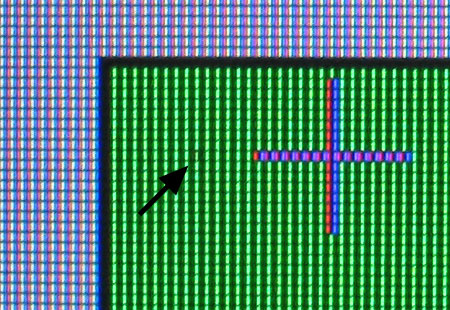
So why were my photos showing no dead pixels? After a bit of experimenting, I found out why: the pixel’s green element isn’t dead–it’s dim. I’d never heard of that before, but there it is. Here’s an image of the pixel with a green image; the red and blue elements will be dark, accentuating the green. You have to look carefully to see the one green element that’s dimmer than the others.

Dimpixel

Can you see it? It’s on the same pixel row as the horizontal bar of the “plus” cursor, with the arrow pointing at it.

Frankly, I’m amazed I even noticed it with my naked eyes–I must have pretty good vision. That explains why it’s not so dark as a dead pixel, and probably why I have to strain to even see it. I never even knew pixels could be permanently dim like this–now I do.

Categories: Computers and the Internet, Mac News Tags: by

Abramoff and Torture

September 29th, 2006 3 comments

According to the Washington Post, Jack Abramoff was in contact with the White House a lot more than the Bush administration admitted. A House committee researching Abramoff’s emails and billing records indicated that Abramoff had around 450 contacts with the White House, including nine specifically with Karl Rove. The White House reacted essentially by saying that Abramoff can’t be trusted, so the data can’t either.

This is another one of those you-know-they-did-it cases where the White House can use any small claim of doubt to evade responsibility or answerability, just as with the Wilson/Plame leak-and-attack strategy, or Bush’s evasions about his past drug use or National Guard duty. It’ll probably have the same impact as well. As I’ve said in one way or another before, Bush could perform an illegal act on live television and sign a full confession to breaking the law, and even then he’d find a way to weasel out of it somehow.

Also in the news is another Rovian election-year tactic: the bill that’s just been passed which essentially suspends habeas corpus, which allows the Bush administration to arrest anyone without court review, hold them for as long as they desire without charges, and then torture them under broad and vague rules full of loopholes–rules which probably wouldn’t be followed anyway. About a dozen Democrats voted for the bill, apparently still in the cowering crowd of I’ll-do-anything-to-avoid-looking-weak. The Republicans win on this big-time, because it suspends constitutional rights they find inconvenient (high up on the GOP agenda), and can be used to bludgeon Democrats a month before midterm elections.

On the cynical side, this is business as usual; Republicans scheming to bring us one step closer to totalitarianism under the guise of national security during an election year while enough Democrats fearfully scramble for political cover to discourage everyone else in the party. So, what’s new?

On the brighter side, the Supreme Court could easily shoot this one down in flames.

Maybe, if they want to.

Categories: Political Ranting Tags: by

Somebody Noticed

September 28th, 2006 1 comment

About a year and a half ago, I blogged on a new Sapporo Beer product called “Slims,” which bore the motto, “The new type of tasty draft brew. More flavor, with fewer less calories.”

Well, somebody noticed the error, apparently. The new can now reads:

It is true, the brew is no longer new. Also, it seems, with not as much flavor.

You see this kind of thing all over Japan, of course. Sometimes it’s really good (like the “off sale” signs, or the misspelled “in” sign I saw), but more often it takes the form of very mildly off-kilter English, like with these items:

Noped

Dream-In

Not especially funny, but certainly strange enough to remind you that you’re in a country where English is not the native language.

And then there are some errors that you have to look at carefully to see, like with this bite-sized cheese snack:

Desertcheese

From camels, perhaps?

And then, there’s the just plain goofy names they think up, like for this chocolate snack:

Feelenvy

And yes, I know that on this package of Hello Kitty Macaroni, that Kitty is supposed to be giving the thumbs-up. However, from the first time I saw it, it really, really looked to me like she was giving everyone the finger.

Kittybird

Food for thought.

Categories: Focus on Japan 2006, The Lighter Side Tags: by

Somebody Remind Me

September 27th, 2006 5 comments

Why the hell would anyone want to upgrade to Windows Vista? I’ve had a chance to try it out, and I have to wonder what advantages it gives. There are improvements, but this is the result of five years of work? For the most part, Vista looks like dressed-up and warmed-over XP, with bits of old Apple tech thrown on top.

I really thought there would be something more, well, surprising about the system. But there isn’t. It’s an old sow in a new dress, not much more. Aside from the search feature being better, it really seems to me that little of this will impact the common user much. In fact, in order to make it look cooler, Microsoft has mostly just rearranged existing XP features in a way that might do more harm than good; it might, in fact, make it just as hard for XP users to figure out the new interface as it would be for them to migrate to OS X and get used to that interface–which, when it comes down to it, would be a much better move.

Let me go over the list Microsoft gives in their “What’s New in Vista” window.


V-Search

First, the search is now better–but mostly because, as with many points in Vista, they ripped off Apple. There is now a search window in the top right corner of each open window, complete with a magnifying-glass icon which looks like they stole it directly from Leopard Tiger. I haven’t had the chance to test it while searching tens of thousands of files, so I can’t compare speed, but according to reports, the full speed optimization had to be left out, so it’s probably still slower than Mac’s Tiger.

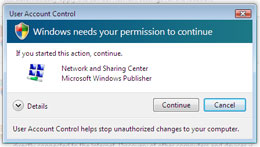
V-PermissionMicrosoft touts security as a new feature (that sounds about right). But as others have reported, it’s in-your-face security. Prepare to have confirmation dialogs pop up at you twice as often, if not more, than when using a Mac–and it’s still not as secure a system.

Internet Explorer is touted as a new feature, because finally, after many, many years, it has barely caught up with Safari and Firefox. Yippee. I’m convinced–should I switch now or later? Update: One important feature missing from IE7: you can’t open a folder full of bookmarks into tabs with one click. You have to open each tab one at a time. That’s a big omission, and a strange one. I have about 30 web sites I scan daily, set up in 4 or 5 folders on my bookmarks toolbar. With each click, I get a toolbar full of my favorite sites. IE7, apparently, will make me open them all one at a time. No thanks.

Sync and sharing is another feature–one the Mac has had for, what, five years now? They even tout the “Ease of Access Center,” for people with disabilities. It’s still warmed-over mush, not as nicely done as the Mac’s. One feature I always use in OS X is the excellent zoom feature, which does exactly what it says–zooms in and out. The whole monitor becomes a zoom-in of any part of your screen, to whatever degree of zoom you want, controlled either by keyboard shortcuts you dictate, or (as I recently discovered on my new iMac) a control-scrollwheel move.

In contrast, Vista still has the same old useless part-screen zoom, which keeps the lower half of the screen at normal size, while the top half shows the zoomed version of the lower half. Not only does this cut your screen real estate in half, the two halves of the screen easily confuse the user.

Parental Controls sounds a bit more advanced than the Mac’s, so if you’re a concerned parent who does not have any other means of control over your kids, this might be useful.

The Backup and Restore Center is a wanna-be Time Machine, but Leopard will have this beat, easily.

Microsoft has a new Networks/Meeting Space idea, which apparently lets users congregate in shared folders and collaborate on files. While this may be good news for businesses, I can’t really see normal users getting anything out of this.

Vista also talks up their new version of Windows Media Player and the ability to work with Pictures–can you say “iTunes and iPhoto”? Where’s iMovie, iDVD, iWeb, iCal, and the rest?


V-InfobarOne “helpful” feature which annoyed me a lot is Vista’s information box, the little rectangle that pops up after half a second of cursor-hovering to inform you about what you’re hovering over. I keep wanting it to go away, as it covers up what I’m trying to get to next. It reminds me of those double-underlined links on web pages that make pop-up ads appear. Annoying as hell. And in typical Windows fashion, I can’t figure out how to turn the damned thing off. I checked a half-dozen control panels, including the logical place–the Mouse control panel, under the cursor (“pointer”) control–but nothing.

Then there’s the Sidebar, with Gadgets–a rip-off of Apple’s Dashboard with Widgets (which, to be fair, is a rip-off of Konfabulator software). But Apple’s implementation is far better–you can make it appear at any time, but you can also make it go away–which is not what the “Sidebar” does, as far as I can figure out.

Then there is the hidden stuff–the most prevalent being Microsoft’s new DRM features, which are designed to spy on you and protect businesses like movie studios and record labels. Using euphemisms like “Genuine Advantage” and “Plays for Sure,” they sound like they were cooked up by the Bush administration, with their flair for naming things in ways that contradict the real purpose, like “Clear Skies” or the “Patriot Act.” The “genuine” advantage is for corporations that assume you’re a thief and want a spy perched on your desktop; “Plays for Sure” will play, sure, but only titles that pass DRM inspection. There is no advantage for the user here, only loss of privacy and flexibility.


I haven’t had too long to play with it yet, but those are the impressions that pop out at me. The eye candy is nice, the new search is good (though I have simple learned to live without searching–XP forced me to organize better on Windows), but the UI changes will have people confused for a few weeks. If I really wanted to, I could force myself to use it and possibly get used to it (except for those damned info-tags), but the question is, “why?”

I really can’t see a reason why you’d want to switch from XP to this. Of course, then again, I also can’t see why you’d want to use XP over the Mac OS, so clearly I’m biased here. Still, it’s a matter of gradations. At least each new Mac OS version has new stuff, cool stuff, really useful stuff, after 12-18 months of development. After 5 years, Microsoft has little to show for all that work.

For more screenshots, go here.

Categories: Computers and the Internet Tags: by

Madman at the Wheel

September 26th, 2006 1 comment

Vice President Dick Cheney on Monday accused Democrats of being soft in the war on terrorism with a strategy of “resignation and defeatism” that would invite more attacks on America. —Reuters

This is nothing new, but for the first time, it’s become so weak that it might not work any more. Many times, from the Bush administration, from right-wing pundits, and from conservative visitors to this blog, I’ve heard the same thing: recognizing the failure of the Bush administration is equal to wishing for failure for the United States.

Of course, it’s never been about that. It hasn’t been about that for Democrats, because we rarely if ever saw ourselves as being on board with Bush, Cheney, and their policies. And like us, now a majority of the nation does not see the Bush administration as being indistinguishable from the United States. Their failure is not our failure.

If you are in a car, you are entrusting your life to the driver, so in a very real way, you are ‘on board’ with them. But if the driver starts driving recklessly, if they hit guard rails, run into trees, and generally start driving like idiots, then you no longer feel like you are ‘on board’ with them–instead, you feel endangered by them. You and your desires and safety are now very distinguishable from the driver’s will.

But in this car, the driver is chained to the wheel, and you can’t get out of the car, either. So you’re trapped. That still doesn’t mean that their will is yours. Sure, they could drive you over a cliff, but just because you’re in the same car, it doesn’t mean you have to agree with it, and it sure as hell is not “your” failure if they drive the car into oblivion. Just because they’re in the driver’s seat doesn’t mean that going where they want is the best thing for everyone in the car.

So you do the only thing you can do: you start to yell at them. “Stop the car!” you shout.

“You want to cut and run?” they reply; “What, are you a coward?”

“You ran over an old lady and a six-year-old girl back there!”

“Stop whining about the past. We have to look forward and be positive, or we’ll fail.”

“You’re going to kill us!”

“It’s you’re negativism that will lead to our failure. I will not respond to resignation and defeatism. We’re going to stay the course.”

[Car drives off cliff and explodes in flames]

Categories: Political Ranting Tags: by

Using Parallels on a New 24-inch iMac

September 25th, 2006 1 comment

Parascreen
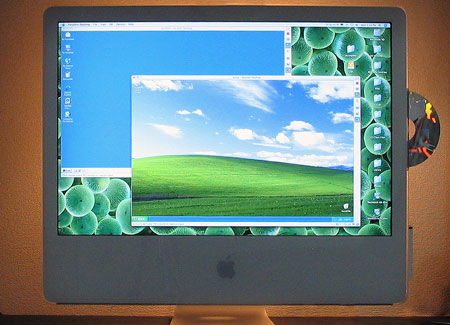
W2K and WXP alive on the Mac. Note the backlight, by the way; I find it helps a lot to make the screen brightness easier on the eyes.

The first thing you should know about running Parallels if you have one of the new Core 2 Duo iMacs is that the version of Parallels that download directly from their site won’t work–it will cause kernel panics, crashing your machine from the start. Instead, you have to get the latest build–which, at the time of this writing, is build 1908, which can be downloaded from this page.

Once you have that, it’ll all be cool. I installed Windows 2000 for starters, from an install disk my school gave me (we no longer use the OS, so they gave me a spare). With the new version of Parallels, it installed very nicely. When you make a new virtual machine, you’re supposed to check the CD-ROM settings to make sure that the optical drive will be recognized properly; since I was installing from a CD, the native settings were all I needed. Then you click the “Play” button on the right-hand toolbar (where the original version of Parallels would crash) and a virtual DOS setup starts, recognizes the CD-ROM, and you go from there.

After it installed, the Windows 2000 OS seemed to run fine–but was limited to a screen resolution of 640×480 pixels and a color depth of 4-bit (16 colors). It turns out that you have to install “Parallel Tools” in order for the W2K drivers to recognize your actual PC hardware. To do this, you go to the “VM” menu and select “Install Parallel Tools…” while your virtual OS is running. Then color and resolution work however you want them to. After you shut down the virtual OS, you can even go into “Edit” mode and create custom screen resolutions to fit your fancy.

After that test, I tried installing Windows XP, and had the same result–it installed just fine and started running without incident. In fact, XP instantly recognized my screen size, and allowed for better display settings from the get-go. However, there is still a big advantage to installing Parallel Tools: smooth transfer between operating systems.

In default mode, each virtual OS within Parallels will “capture” the attention of your cursor; the cursor will only stay within the bounds of the Windows virtual desktop, even if the virtual machine is not full screen. In order to get back to the Mac OS, you need to hit the Control and Option keys simultaneously. After installing Parallel Tools, however, this is no longer necessary; instead, the cursor will simply switch to whichever OS it happens to be hanging over at the time, making for much smoother transitions.

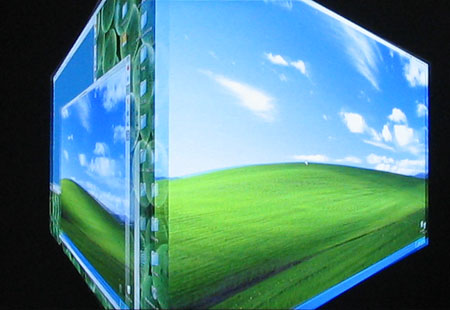
Switching to a full screen is similarly easy to do. Just hit Alt+Enter, and a nice Mac rotating 3-D cube effect switches you to full-screen mode in Windows. In fact, once you enter full-screen mode, Parallels automatically adjusts the Windows OS screen resolution to match your monitor, so the resolution remains clear and sharp. In addition to allowing full video control and smooth cursor transfer, Parallels Tools allow for audio to work well, cross-OS copy-and-pasting (text and small images only, at present), and shared folder privileges. At this time, Parallels does not allow for drag-and-drop transfers between OS’s–but give them time, and probably they’ll get that enabled as well.

Paracube

If you have an Intel Mac, want to use Parallels, but are having trouble, check out the Parallel Forums. For some reason, Parallels doesn’t appear to have a link to here from any of their main pages–but it is a enormously useful resource.

Categories: Mac News Tags: by

They Weren’t Wrong, They Just Lied

September 25th, 2006 Comments off

Me, August 27, 2002, six months before the Iraq War began:

Cheney argued that “extremists in the region would have to rethink their strategy of jihad.” Is he truly so utterly naive? An unsupported attack by America on an Arab nation would generate such fear and hostility in so many people that extremists would be swamped with volunteers willing to die for their cause. It would fire the call for a greater jihad, not frighten the extremists into impotency. Conflict is the friend of the terrorist.

The National Intelligence Estimate (“the most authoritative documents that the intelligence community produces on a specific national security issue”) today, three and a half years after the war began:

A stark assessment of terrorism trends by American intelligence agencies has found that the American invasion and occupation of Iraq has helped spawn a new generation of Islamic radicalism and that the overall terrorist threat has grown since the Sept. 11 attacks. … Titled “Trends in Global Terrorism: Implications for the United States,” it asserts that Islamic radicalism, rather than being in retreat, has metastasized and spread across the globe.

An opening section of the report, “Indicators of the Spread of the Global Jihadist Movement,” cites the Iraq war as a reason for the diffusion of jihad ideology. The report “says that the Iraq war has made the overall terrorism problem worse,” said one American intelligence official.

So, Negroponte could’ve saved a lot of time and money just by hiring me four years ago. Or, to be honest, just about any one of the thousands of voices crying out the same thing at the time. I’d like to say that I was ahead of the curve, that I was a keen predictor of future events, but frankly, this prediction was so goddamned freakin’ obvious that even a ten-year-old could’ve seen it. This is not a matter of Bush and Cheney being proved wrong, it’s a matter of the issue being so clear that they must have known it was wrong.

I think this demonstrates the fact that Bush and Cheney are simply not concerned about terrorism. This is also blindingly clear. Invading Afghanistan was nothing to them but a pretext for invading Iraq, their real goal. They gave up on hunting down bin Laden the first chance they got. They farmed out that goal to people they knew wouldn’t do as good a job as our people would. Once public attention turned to Iraq, they abandoned Afghanistan and allowed the Taliban to return. They have completely failed to secure our country against terrorism domestically, failing to guard ports, cities, and major facilities like chemical plants. They play with terror alerts as if they meant nothing, so they can get poll bounces at election time. They have spent literally hundreds of times more money on giving tax cuts to wealthy people and corporations than they have spent directly on terrorism. They have made only the most token efforts to do these things, only just enough so they can say they’re doing something, but not even a fraction as much as they would be if they truly were concerned about terrorist threats.

This administration has shown without any doubt that terror is nothing but a prop to allow them to focus on a neocon geopolitical agenda. Period.

Categories: Political Ranting Tags: by

Subtle Snow Job?

September 25th, 2006 Comments off

A lot of people seem to be presuming that the pricing of movies on the Apple iTunes Store is based upon how new they are–that new movies cost $15 and older titles are $10. Just to clear up a point, that’s not how they’re doing it. That was the rumor mill talking. Actually, Apple just has two-tier (actually, three-tier) pricing. If you look at the online store, you’ll see that some titles as far back as the 1940s are priced at $15, and some titles from just last year are priced at $10.

However, the misunderstanding is not wholly due to the rumor mill. You’ll note that Apple never actually says that new movies are $15 and old ones are $10–but when he introduced the service, Steve Jobs certainly made it seem that way. He said that new titles could be pre-ordered for $13, and would be priced at $15 after they were released–which makes it sound like the $15 pricing is reserved for new titles, but it’s not. Sure, all new titles do get that price, but a lot of older titles get it as well. Additionally, the $10 price range is applied to what Apple calls the “Library,” which again is unclear but sounds like we’re talking about older movies.

In fact, the two-tiered pricing simply applies in whatever way the movie studio decides. Disney has priced all of its animated features at $15, including decades-old titles like Dumbo, Cinderella, and The Aristocats. Meanwhile, poorly performing titles from 2005 such as The Brothers Grimm, Herbie: Fully Loaded, and The Hitchhiker’s Guide to the Galaxy are priced at $10.

So don’t expect to be able to get your favorite movies for $15, unless you like movies that most other people don’t. Apple didn’t exactly lie on this one, but they did mislead–though there might be a reason beyond sales to explain it. Jobs has long tried to protect his coveted one-price-fits-all philosophy for online sales, while the movie industry has tried to get him to do tiered pricing, a more whatever-the-market-will-bear philosophy. Jobs lost on this one, and it may have been a bitter pill to swallow; the “new releases” angle may have been a bit of face-saving in that regard.

Categories: Mac News Tags: by

Working with the 24-inch iMac, Part I

September 24th, 2006 8 comments

A great deal about working with a new computer is naturally relative to the old, so a lot of what I’m finding on the new computer is just that: contrasts. I’m fully accustomed to laptops now, and since the last time I had a desktop Mac was my 300MHz G3 Tower (one of the last “beige” ones), the immediate contrast is pretty noticeable, in addition to the special features of the twenty-four incher.

The first thing that anyone must notice about this computer is the monitor. That much is obvious. It’s big. Honking big. The strange thing is, photos don’t convey this. I’ve seen photos of the iMac on the web before, and I tried taking some today–and still, somehow, the monitor just doesn’t look nearly as impressive in the photos. Putting something near the monitor for scale doesn’t help. To get the full effect, you simply have to see one in person, otherwise the effect is pretty much lost. And the effect is pretty strong; I wasn’t sure about buying one until I saw it at an Apple Store–then I was very strongly motivated.
Imac-Look
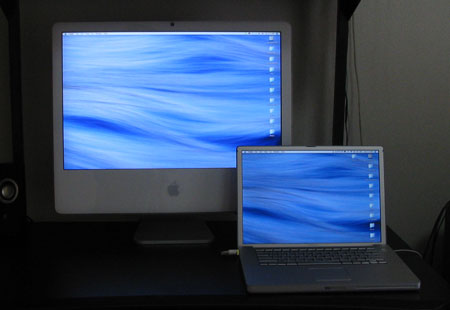
It just looks so small here, and in the photo next to the PowerBook from before.

Strangely, the size of the screen has one negative effect: text gets too small. Now, that shouldn’t be a problem, because all you should have to do is set the text size to be bigger. And in apps like word processors, that’s not a problem–but I’m finding it to be a big problem in browsing web pages. In both Safari and Firefox, the text size stubbornly refuses to reset. In both apps, I go and set the standard screen font size to be larger than 12-point, and nothing happens. I’m sure there’s something I’m missing, but for the life of me I can’t figure out what it might be. Now, there’s an option to set the lowest possible font size, and that works to pump up the text size. Unfortunately, it does not affect line spacing, so the text crams together, and it also prevents me from making the text any smaller by the command-minus shortcut, if text becomes too big. So until I find the solution, I have to suffer with those problems, or get used to command-plussing every page I visit.
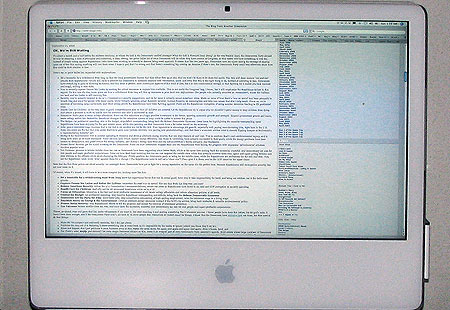
Imac-Text
What my blog looks like, full screen. You can imagine reading gets a bit difficult…

But size isn’t the only thing this monitor has; it’s also bright. Too bright, sometimes. Right now, I have the room lights on full and the brightness is set to its lowest level, and it’s a bit on the brighter side of just-about-right. It definitely takes getting used to. A reviewer said that in a brightly-lit office with sun coming in through windows, the 24-inch screen still seemed bright, and I can fully believe it.

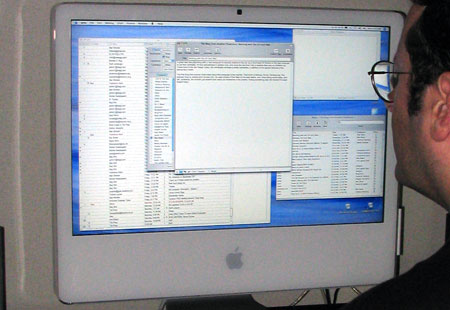
What’s best about the monitor is video. It plays video gorgeously. Even low-quality stuff looks fairly good. Medium-quality looks great. DVD video looks beautiful. But the kicker is downloading 1080p videos off the web (so far, just from Apple’s movie trailer page); the 1080p’s fit perfectly on the screen, pixel-for-pixel, almost completely filling it up. The monitor is, for all intents and purposes, a large HDTV screen. And the NVidia graphics card makes it play smoothly; on my PowerBook G4, even the smaller HD trailers can be somewhat jerky. I’ll bet that gamers would love this computer–but I’m not a gamer and have nothing to test on it, even if I wanted to. But I do have Google Earth, and man, does a big screen and fast graphics make a difference with that. In fact, I had gotten all too used to the speeds of my PowerBook, forgetting that everything from web pages to graphics programs load and play faster than I’m used to.
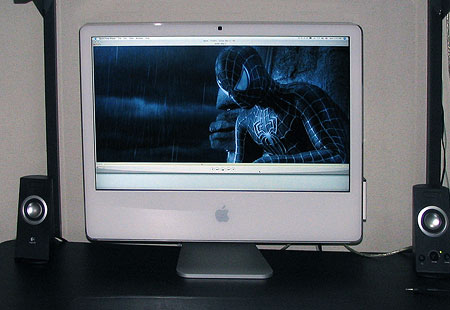
Imac-Trailer
What a 1080p video file looks like, natural-size. The clarity, of course, doesn’t come across in this photo.

OK, enough about the monitor. It is the central feature of this computer, but it’s not all there is. Though one last small point about a related issue: using a television as a second screen. With the video-out-to-RCA accessory cable, you can pipe your iMac to your TV (though there’s no longer that much advantage in size!), but there is also a surprising new option: you can rotate the image displayed on the TV 90, 180, or 270 degrees. Why, I have not yet figured out–maybe just because you can. It seems strange, but there must be a reason.

I’m having fun with other features, many of which might bore owners of desktop Macs bought over the past few years–like the built-in iSight camera. It’s been available for a year or two now as a standard option, but this is the first one I’ve had to lay around with. Now, for some time, I’ve been using Skype to voice chat with my family, and it just so happens that Skype has very recently released the beta version of Skype 2 for Mac, with video conferencing now introduced. I tried it out, and it works beautifully–better, in fact, than Apple’s own iChat AV! The iChat sound quality sucks, and the video feed is smaller than Skype, which also has excellent audio quality. Today, my dad is going to go out and get a peripheral iSight camera just so we can have 2-way video chats. It’ll be a nice addition, as you can show things to each other–for example, I just bought some old coins for my sister to make jewelry from, and tonight I can give her a peek at what I’m sending, maybe even get feedback on what to buy next. I’ve heard and felt the concern that you wouldn’t want others to see how you look, but I find with family and friends, that’s not really such a problem in practice, at least not for me.

Apple’s Photo Booth software also adds to the fun, allowing you to gawk at funhouse distortions of yourself and whoever else is there. I’m certain that’s going to get old fast, of course. But the ability to take easy snapshots will come in handy from time to time, I’m sure.

Another feature that’s been around for a while now if Front Row, which I’d never actually used before, and didn’t really get until now. Having used it, I find it resembles Apple’s demo of their iTV box very closely. I also wasn’t aware exactly of the functions–essentially, it makes your Mac into one giant iPod, in that you can navigate all your audio, image, and video files with the remote control interface, which is styled after the iPod. If you own a video iPod and have used it to peruse photos and movies in addition to music, it’ll be a very familiar experience. Frankly, I’d just as soon use programs like iTunes, VLC, Image Viewer, or DVD Player to do the same things. Maybe I’ll find myself using the all-in-one interface when I need it from a distance–but not that I can foresee.

When I bought the iMac, I opted for the Apple wireless keyboard and mouse. The wireless part is nice–I’ve always hated the clutter and tangles of shifting the mouse and keyboard around. One gripe is the power switch on the keyboard–essentially, you have to pick up the keyboard (which is a bit heavy), turn it over, and throw the switch on the bottom to turn it off–hardly a handy maneuver. A switch on the side would’ve been the obvious thing to do; why Apple didn’t is a mystery to me.

Other than that, it’s all about getting used to a new keyboard and mouse. I always have trouble with new keyboards, and spend weeks hitting the same wrong keys over and over. Right now the biggest pain is the “delete” (backspace) key and the F13 key. I set the F13 key to open my browser, and now half the time when I want to delete something, the browser pops up and for a moment I think my other app has suddenly crashed or something. I’d rather set the F14-F16 keys to start apps, but Apple mysteriously set F14 and F15 to be the brightness controls, without so marking the keys–and I can’t seem to find any way to reconfigure those without a third-party app… Otherwise, the keyboard is nice–solid and with healthy bounce.

The “Mighty Mouse” takes some getting used to. I’m used to standard 3- and 4-button mice with normal scroll wheels. The MM keeps Jobs’ fetishistic single-piece design intact, which means that the difference between a left click and a right click can be tricky towards the middle. The tiny scroll ball is strange at first, but you soon get used to the 360-degree functionality and the strange feel to its button action. I can come to like this. One other nice mouse movie is the control-scroll zoom feature. I use the zoom feature a lot, and this move comes in handy. The side “squeeze” buttons I don’t like as much, and might not get used to.

More impressions later, especially when I try out some Intel-native iMovie HD work….

Categories: Mac News Tags: by

Delivery: 24-inch iMac

September 23rd, 2006 3 comments

Yesterday, I returned home around 8:30 in the evening. Since the iMac I ordered was scheduled to arrive Monday (after initially being set for next Thursday), I wasn’t expecting anything to be waiting for me Friday evening. Still, I checked the mail slot box on my front door–and sure enough, there was the express delivery company’s “while you were out” attempted delivery slip, saying that they had tried to deliver a package just after noon.

Had I arrived home an hour earlier, I could’ve had it delivered before they shut down for the night, but as it was, it was too late–which actually turned out to be OK, because I wasn’t even ready to get it set up yet. I had to clear out my PC and old G3 Mac tower from my main computer desk and set them up at the other end of the apartment, then clean up and arrange the desk so it’d be iMac-ready.

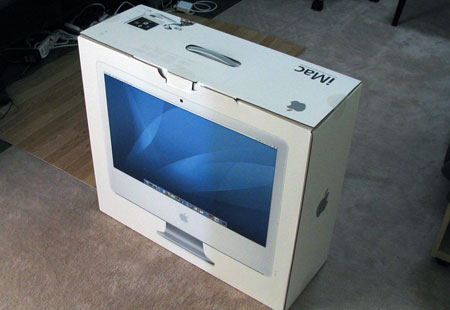
So this morning, at about 10:00 am, the delivery came, and I was ready to go:

Imac1

I unpacked it and set it up on the desk, and it’s beautiful. It’s framed perfectly–just as much space between the bottom of the machine and the desktop as there is between the top of the machine and the shelf above. And virtually the entire desktop is now free, a stark contrast from previously, when my PC’s 17″ CRT monitor took up half the desk. The iMac looks perfect here. Of course, I’m always dreading dead or stuck pixels, but this time I came out OK. There is one semi-dead pixel (it appears that the green element is out), but it’s way up in the upper-left corner of the screen, and heck–on this monster of a monitor, you have to strain to even notice it.

And the monitor is a beaut. Bright as hell–maybe even too bright. At night, I’m probably going to have to turn the thing way down. Here’s a pic of the new machine on my desk, with my 15-inch Powerbook G4 sitting next to it, to compare both the size and brightness.

Imac-V-Pb

I am very pleased to have gotten this delivered early Saturday, especially as I have Mondays off; I’ll have three days with nothing to do but play with my new toy. And if you think you might quickly get sick of reading about it on my blog, well, you’ll just have to leave and come back on Tuesday. You can count on quite a bit of 24″ iMac “pr0n” between now and then.

Update: Busy Saturday for Apple–my replacement battery for my PowerBook just arrived. No more shutting down every time I move the computer! No more lugging the power cable and brick around everywhere! It’s about time…

Categories: Mac News Tags: by

Clinton and Wallace

September 23rd, 2006 7 comments

Wow. Go check out Clinton’s smack-down of Chris Wallace on Atrios, as Wallace, post Path to 9/11, tries to nail Clinton for “not trying to get bin Laden.” Clinton does a great job in the limited time scope of a TV interview, and nails the issue right there and then.

Categories: Political Ranting Tags: by

Summer Movies (Autumn Movies, in Japan)

September 23rd, 2006 8 comments

As the recent summer movies have filtered late into Japan, I went to see them, ending recently with the new Pirates of the Caribbean movie. PotC: Dead Man’s Chest was not nearly as good as I expected it to be, and may have been the most disappointing film of the batch. It had great special effects, some fun and clever fighting scenes… but it just wasn’t very entertaining. Johnny Depp is what made the movie come alive last time, and he just didn’t seem to be in this one too much, at least not like he was last time. His lines this time around were not really all that clever. If you watched the teaser and the trailer, then you’ll have seen perhaps the funniest stuff he does… and the other stuff is not any more interesting. Not that Depp failed, it’s just that he didn’t have as much of a chance this time. If you like monsters and makeup and action sequences, this film is a bit dark but good for you. If you came to have fun and watch Depp do his thing, you’ll likely be disappointed. Not to mention that the film ends on a cliffhanger, with nothing resolved.

SPOILER WARNING: I spill the beans about some of what happens in the X-Men movie–if you want to see it and haven’t yet, move on down to the following paragraph. (Sorry, Helen!)

The latest X-Men movie has also been called “disappointing,” but I don’t really think so. You have to expect a lot before you can be disappointed. It was pretty much exactly what I expected from this franchise: weird mutant superpowers, action and special effects, twists and turns and so forth. Maybe it didn’t offer much more than Pirates, but I liked the presentation better. The strange thing was that in the previous X-Men movie, only one of the main characters, Jean Grey, was killed off; in the third movie, she comes back to life… but then half the cast gets killed off, with many others (including McKellen’s Magneto) being de-powered. So, will they all come back for X-Men 4? Or was this the filmmakers’ way of closing down the series? Probably not, as two of the main characters “come back” at the end. Magneto is seen regaining his powers after having gotten a quadruple-dose of the “mutant cure.” And Professor X–an early surprise death in the film–sneaks back in as well. Most people forgot about the beginning of the film, where X is lecturing students about the ethicality of transferring one’s mind into a brain-dead body and shows a video of a doctor with such a patient. At the very end of the film, after the credits, there’s a small snippet you may have missed if you left early, with Xavier waking up in that body. So… “X-Men 4: The Really Final Last Stand”? [Actually, IMDB says that a film called Magneto will be released next year–but it looks like a prequel. Although the story revolves around younger characters, McKellen and Stewart are listed as the actors. However, the current X-Men movie shows the two men as being younger, using CGI effects to make them look more similar to photos of the two actors taken twenty years earlier.]

Much better than either of the two I just mentioned was Superman Returns. The story was more interesting, the character conflicts better, the acting, writing, and directing was a lot less comic-book style than the Superman films with Christopher Reeve… and the twists were much better, one in particular. Overall a pretty high quality film among the recent horde of comic book movies. It’s hard to say if Brandon Routh was much better than Reeve as Superman, but there’s no question that Kate Bosworth was a far better Lois Lane than Margot Kidder. Though, I must admit, I just really don’t like Kidder at all, so maybe that’s affecting my judgment. Kevin Spacey I like in just about everything, so he also wins my vote over Gene Hackman as a better Lex Luthor. Generally speaking, the film has a better script, cast, and director than the previous films. If they continue the franchise, I hope they don’t descend into silliness like most of these series do.

The surprising low performer of the bunch was Mission: Impossible 3, not because it was bad, but because it didn’t perform well at the box office. Again, expectations are pretty low considering the franchise–we know we’re gonna get high-grade, high-tech spy action with lots of loud explosions, and that’s pretty much what happened. J. J. Abrams actually managed to make the film pretty interesting on top of all that, with a surprisingly well-done romance, good, strong characters, and Cruise did his usual fairly good job of acting. The ending was perhaps the weakest part, as it was eminently predictable beyond a certain point, but that was bearable. The action was pretty much non-stop, and for what it was, it was a very good movie. So why did it flop? Many say it’s because people are weirded out over Tom Cruise now. To me, that doesn’t make much sense–I long ago gained the ability to separate the real-life talent from the performances in their media (otherwise I wouldn’t be able to enjoy any of the Schwarzenegger flicks), but I guess a lot of people can’t do that. Too bad, this was a pretty good film.

The first film I saw this summer, however, was The Da Vinci Code. It should be a no-brainer that any film directed by Ron Howard with Tom Hanks in it is going to be pretty good, and this one was. Of course, the “facts” in the storyline itself have been fairly thoroughly debunked, with stories and details within the plot often exaggerated or even fabricated, but that’s normal in stories like this, like with Michael Crichton novels. If one can suspend disbelief and treat this as a kind of alternate-universe story, it’s a ton of fun. Ian McKellan, as always, is a treat to watch, and the film is richly photographed and paced very well.

Several films are coming out soon that I’m not interested in enough to see at the theater, such as The Lake House, World Trade Center, The Lady in the Water, 16 Blocks, Snakes on a Plane (“Snake Flight” in Japanese), and Nacho Libre. The earliest film I’d likely want to see is Casino Royale, which will be out in December, and so I’ll see it in the U.S. (for a lot cheaper than the $15 admission price in Japan!). An Inconvenient Truth gets released in Japan only after the new year–a month and a half after the DVD goes on sale in Japan. Since the American DVD only costs $2 more than a single movie theater ticket in Japan, which one is preferable is hardly a contest–which is why they have region coding in the first place, one would suppose.

Categories: Media & Reviews Tags: by

ESP ESL

September 22nd, 2006 Comments off

You really have to check out this presentation on Google Video. Not because the presenter is named “Luis,” but because the presentation he gives is really fascinating. I got wind of it from the Google Blog, and appropriately enough, it is related to search engines. Specifically, it focuses on computer/human intelligence, for example, labels given to photographs on the web.

Professor Luis von Ahn has worked out a very clever way of labeling images on the web, using “wasted” computational cycles… of human brains. He points out that billions of human work hours are spent on playing Solitaire, thousands of times more each year than were used to build the Empire State Building or the Panama Canal. He also points out that most images on the web do not carry labels, which are (a) the only way that visually impaired people can know what an image on a web page is, and (b) necessary for good search engine results when looking for images.

He solves this problem by making a game called The ESP Game (go ahead, give it a try!). In this game, two complete strangers from the Internet, logged on to the game at random, are paired together, but they cannot communicate. They are both shown the same image and asked to type words that best describe the image. If they type the same word, they get points; the faster they guess the same word, the more points they get. As a result, the answers they give tend to be more accurate and generated in less time. As words become verified as belonging to the image more and more, they are added to a “taboo list” of words the players are not allowed to guess, ensuring that the labels for the image are extensive and complete.

Of course, even with protections against cheating (many people could conspire to log on at the same time and give the same answer to all images, for example), common misconceptions or even certain opinions tend to creep in. An image of Walter Matthau with a big mustache was not labeled with the actor’s name, but did get labeled “Saddam” and “Mr. Wilson” (Matthau played that character in Dennis the Menace). An image of George W. Bush, on the other hand, received the labels “President,” “George,” “Bush,” “Man,” “Dumb,” and “Yuck.”

One side benefit of this game: It helps people learn English. When you think about it, that makes great sense–enough so that I am going to suggest this game to my students as a way to increase their vocabulary–an area they often ask for help with and is difficult to do.

Another game that gives even further data on images is “Peekaboom,” which has one player slowly reveal an image to another based upon a keyword given for the image; as the image is revealed to the second player, they have to correctly guess the word the first player has been given. This lets the database know where in each photo any particular keyword is located. In addition to also being a good English-language game, Peekaboom also helps programmers design image recognition software.

There are other games, and a lot more very interesting stuff in the 51-minute presentation. If you have a free hour, I’d recommend giving it a look.

Categories: Computers and the Internet Tags: by