Archive

Author Archive

The Heckler on Via Dolorosa

July 7th, 2012 7 comments

So, Romney flip-flopped yet again. Initially faced with having to admit that he was the biggest tax hound in Massachusetts history, he coweringly sent out a flunky to say it wasn’t a tax, causing a huge uproar among the right wing who were salivating at the prospect of beating Obama to death with the word “tax.” Sensing that he had to jump on the bandwagon, Romney joined the chorus and called it a “tax.” He knows that he won’t pay much for the hypocrisy; he didn’t “tax” the whole country as governor of Massachusetts, and the media almost never calls out politicians for lies or rank hypocrisy anymore.

Of course, it’s not actually a tax in the usual sense, unless the money you pay when you evade taxes is a “tax,” or the money you pay when you get caught driving without insurance is a “tax.” The most onerous “burden” will actually be the fact that you have to get insurance–which is mostly onerous to those who want to get the best out of the system without paying full price for it.

Not that the penalty-versus-tax meme lasted long; the economic report came out, and it’s a lot less than we need right now.

Yes, Obama’s job numbers are lackluster. But that doesn’t mean that Romney will do better–quite the opposite, in fact.

Romney is, as predicted, having a field day with Obama’s numbers–but hypocritically so.

Never mind that it is the 21st consecutive month of growth following an economic catastrophe which ignited a depression–all caused by Obama’s predecessor.

Never mind that we are now adding more than 800,000 more jobs per month than when Obama came in to office.

Never mind that despite being handed a far less difficult economy, Bush took two and half years to return to stable job growth, while it took Obama only one year.

Never mind that at this point in his term, again despite far better conditions, Bush had only 12 months of growth, only four of those being over gaining 150,000 jobs.

And never mind that Obama has had to deal with the most extreme opposition in living memory, a Congress actually dedicated to sabotaging his attempts to repair the economy in order to make him fail.

That last is a key point. Yes, Obama could have done better–but not because he acted liberally, rather because he did not stand up the the Republicans to do what he should have known was right.

It is a key point for two reasons: first, as Obama was trying to carry the nation back up, Republicans were grabbing his heels and pulling him back down. And second, had we done what Republicans were clamoring for–more tax cuts for the wealthy, higher taxes on the poor, and less spending on infrastructure and other ways to get the economy pumping again–we would be in far deeper shit than we find ourselves today. As is only sometimes observed, Obama’s poor ratings are not just because he’s more liberal than the right is comfortable with, but also because he’s not as liberal as those on the left want him to be.

Romney, unconcerned with facts, likes to wave around “his record” as governor of Massachusetts:

Romney takes credit for vetoing more than 800 spending items passed by the Legislature, saying he wiped out unneeded programs, cut taxes 19 times, built up a $2-billion rainy-day fund and balanced the budget four years in a row. All of that, he says, shows he can stop overspending. “We can balance our budget and live within our means,” he recently told supporters in Ohio.

He leaves out a few tiny details, however:

But Romney’s telling omits key facts that clash with the agenda of his campaign for president:

• The Legislature overrode most of Romney’s spending vetoes.
• State spending rose by 22% on Romney’s watch, nearly double the rate of inflation.
• Romney increased corporate taxes and state fees by $750 million a year, outstripping his tax cuts.

In short, everything had to get past the Democrats, just as Obama has to now get everything pat the Republicans. And while the Democrats shot down a lot of Romney’s ideas, it was not to sabotage the economy–quite the opposite, it was to help the economy, to improve it. Directly the opposite of Republican’s in Congress during Obama’s term. Romney and the Mass. Dems may have been at odds, but it was a constructive rivalry.

In the end, Massachusetts increased spending and it raised taxes on the wealthy–this is what Romney is celebrating, despite his claims to the opposite. Furthermore, it is not what he would do as president.

The primary moves initiated by Romney that helped Massachusetts improve their economy were fee increases and closing corporate tax loopholes. As president, Romney would not be able to raise funds with fee increases, and he wants to slash corporate taxes, not close their national loopholes.

But that was not the main reason Massachusetts’ economy improved–it was because, at the time, the country as a whole was finally coming out of the recession.

So, Romney’s record as governor really reflects a Democratic agenda being pushed over his vetoes, tax and fee hikes he cannot or will not implement as president, and improvements in a more general economic environment which Romney will definitely not have to benefit from as president.

Just the other day, I got a belated comment to a blog post from April 2010. In that blog post, I pointed out that Democrats should run on a chart showing where Bush and the Republicans had been leading us versus where Obama had taken us.

That is very important, yet something that goes virtually unrecognized because it is the proverbial dog that didn’t bark–despite the economy being shitty, instead of focusing on what Obama could have done, imagine what would have happened had McCain won and Republican had control over Congress.

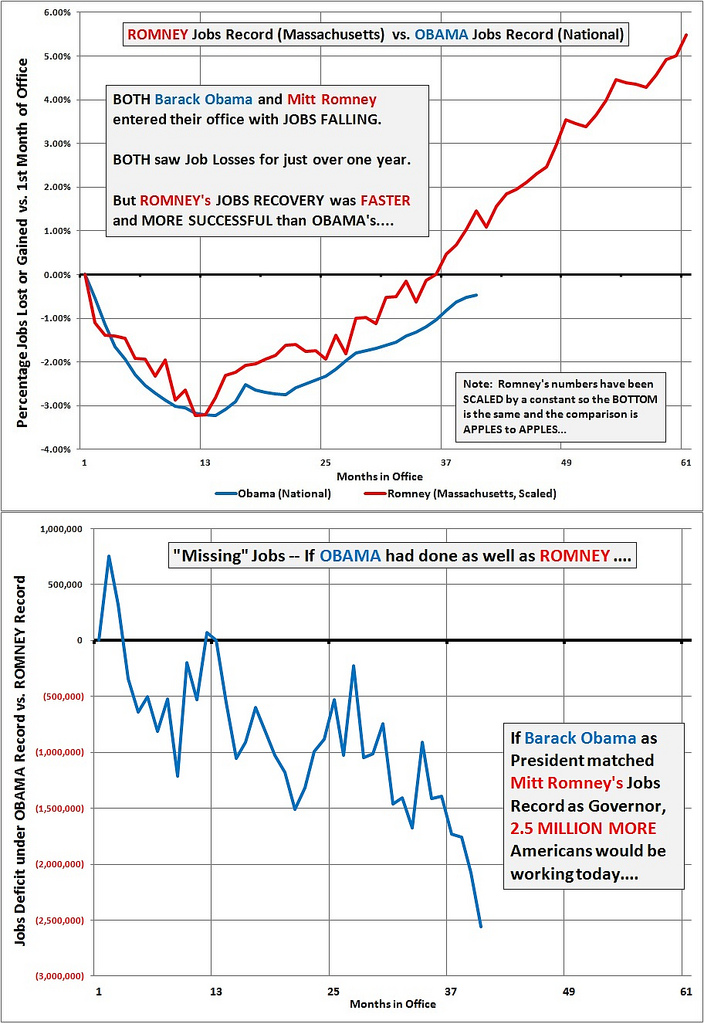
Anyway, the commenter linked to this chart:
7454295280 2E6894D993 B

It appears to be a chart the commenter made himself–and seems to be pretty bogus. The claim of measuring jobs by the “percentage of jobs lost or gained vs. 1st month in office” is misleading; this chart does not compare each successive months’ performance to the first month, thus showing performance against the initial benchmark (which would be a fairer way to judge).

Instead, it simply shows the number of existing jobs with starting number keyed to zero. The author pretends fairness by changing Romney’s numbers somehow so the nadir matches Obama’s, but it is far from accurate, for several reasons. For example, it is easier to recover from a stumble than it is to reverse direction when falling at terminal velocity. Obama was handed an economy in freefall and immediately set upon by an opposition bent on making him fail against the backdrop of a sputtering world economy. Romney was handed a state in mild trouble with a Democratic legislature trying to fix things their own way, against the backdrop of an improving national economy. So, yeah, “Apples to Apples” my ass.

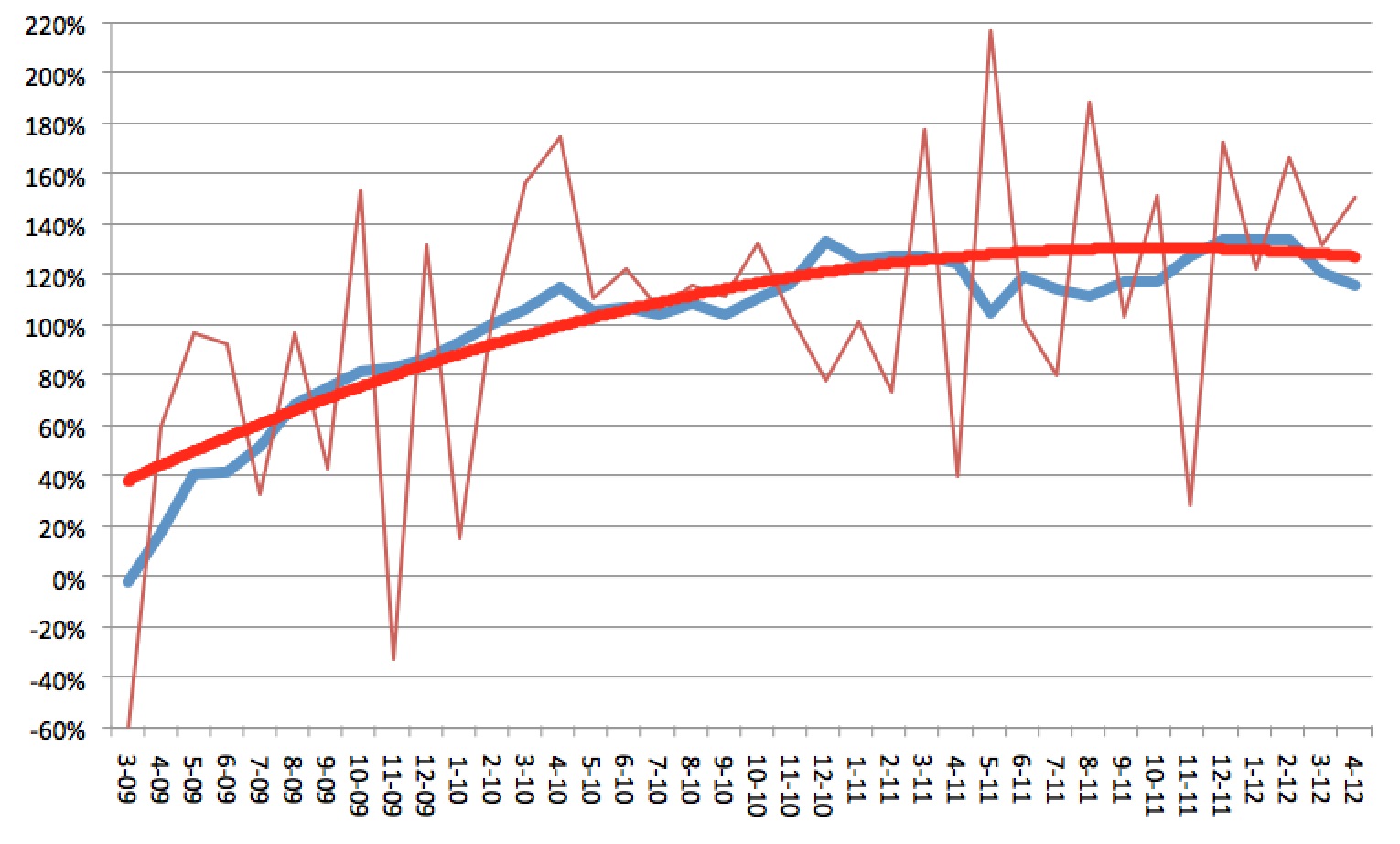
Curious as to what the real picture was, I got the numbers on my own and ran them through a comparison that used the initial state as a benchmark against which you could compare future results, and got this result:
Screen Shot 2012-07-07 At 4.02.20 Pm

The “100%” mark means that you are gaining jobs as opposed to losing; 200% would mean that you are gaining as many jobs as you were losing at the start. Again, a huge advantage for Romney, as gaining 9500 jobs in Massachusetts is a hell of a lot easier than gaining 750,000 jobs at the national level.

As you can see, this shows a pretty different story than the ginned up chart above. As one might expect, Romney’s numbers show greater month-to-month variation due to the fact that he’s presiding over a smaller workforce. Whereas Obama deals with changes in the tens or hundreds of thousands, Romney was dealing in changes of no more than 15,000 in a single month. To smooth that out, I added a trendline–and interestingly, it tracks pretty much exactly with Obama’s performance.

Which means that Romney, in Massachusetts, got just the same level of job growth as Obama despite (1) starting off with a far less catastrophic situation; (2) having a far lower bar in order to claim accomplishment; (3) having a legislature that’s trying to help you instead of hurt you; and (4) getting buoyed by a greater economic environment. In short, he did exactly as well as Obama despite lacking virtually every great disadvantage that Obama had to face.

Imagine what would have happened if Massachusetts were imploding, were Romney pressed to create impossible numbers of jobs, had the Democrats been pitted against him, resolved to sabotage his recovery attempts, and the nation as a whole been in serious decline. Massachusetts would have been crushed under Romney’s governance.

Faced with that challenge at a far greater level, Obama has done passably well instead of impossibly great, for which Romney blasts him for being an abject failure. Kind of like a guy who directed a community theater play, which got good reviews on account of a great cast, heckling Steven Spielberg for not winning the Oscar.

If Romney becomes president and Republicans maintain control of the House, with Republicans blocking or even controlling the Senate, we can expect (a) even more and bigger tax cuts for the wealthy; (b) mild (obligatory) tax cuts for the middle class, offset by (c) tax hikes for the poor and the middle class in various forms, including forcing the poor to pay or pay more; cutting federal aid, thus forcing either tax hikes at state and local levels or reducing local services which essentially forces individuals to pay more, hitting the poor the hardest; and a much more antagonistic environment against the worker–less pay, fewer benefits, less union protection, less regulation against unfair pay and other worker abuses, etc. etc.

This along with spending austerity measures which Krugman points out is poison to an economy like ours right now.


So, yes, Obama’s job numbers are lackluster. But that doesn’t mean that Romney will do better–quite the opposite, in fact. Only in American politics is it the case where the voters are stupid enough to vote for the Penguin just because Batman hasn’t stopped the Penguin’s minions from wreaking havoc.

Clobbered by Seibu

July 7th, 2012 7 comments

When I first moved to Hibarigaoka and up to the time we committed to living there, the train situation was sweet. The line we live on goes only as far as Ikebukuro (short of my work destination), but spurs off at an earlier station, Nerima, to link with the Fukutoshin and Yurakucho subway lines. The Fukutoshin is key for me; it goes directly to Shinjuku-Sanchome, the station where I work. Better yet, there were, I recall, six trains an hour which left my station and stopped in Shinjuku–non-stop locals and express runs. After years of transfers and extremely long walks to and from inconvenient stations, I finally had found a setup that seemed solid.

Just as we bought our new house, the 3/11 quake hit, and train service was disrupted; for a few months, the Seibu Ikebukuro Line stopped serving its connection to the Fukutoshin. During that time, I used my scooter to go to work.

By the time they restored normal service, I was disappointed: they had cut the number of direct trains between my station and Shinjuku down to four per hour–two express and two local runs. Still, there was a direct train every 15 minutes, which was not too bad, and not too different from previous times.

Last week, I came to the station as usual, and saw that the trains were all wrong. I initially assumed that there had been some disruption, and asked at the ticket office. Nope, I was told, the trains were right. The schedule had changed again.

They had cut the direct trains to Shinjuku down to two per hour. Both were express trains, whereas I usually prefer the local (I often use the station before the one at my work, as there’s a sandwich shop close to it, and the walk in to work is only slightly longer).

I was told that there was still a local to Shinjuku, but it left from a station down the line, and I would have to transfer.

Well, great.

I got an even greater shock, however, that evening: the trains coming back home were far worse.

The train lines are a bit complex. As I noted, the Seibu joins with two subway lines; those lines join with two other lines, the nexus more or less being a stop called Kotake-Mukaihara. From there, a small spur reaches out to a station called Nerima on the Seibu Line. This is why the direct trains are a blessing; I can jump on one train, hopefully get a seat, and ride it all the way home. If there are no seats at first, then there are sure to be openings at the transfer points.

When I left for home that night, I found no trains going directly to my line. So I took a train heading to the nexus, and got off to transfer there. It was an 8-minute wait for even a local train to my line, and an additional 12 minutes for the following local. Both stopped short of my station, no express trains within a reasonable time. I took the soonest local, and found myself at Nerima. There, I found that my train had an extra 7-minute wait, while another local to the exact same station would leave in one minute. So I transferred, but lost my seat. When I got to the final stop, one station before mine, it was another 6-minute wait for a train to take me one stop.

Usually it takes 30 minutes to get home. That night, it took more than an hour; four trains, waiting 15 minutes on crowded platforms for three transfers, all trains locals.

One of the reasons we chose our location, why we bought our house here, as I mentioned earlier, was because of the handy access on train lines. Now, a year later, it has been turned into a nightmare. And summer is just beginning. I do not look forward to an extra 15-20 minutes every night of sweating profusely in intense heat and humidity, waiting on a crowded platform for multiple transfers to crowded local trains with no seats.

I discovered my main problem: direct trains from work to home still exist, but there is a baffling 1-hour gap in the schedule with no direct trains in the 7:00 hour–smack in the middle of the times I usually leave work. So I will either have to rush out the door after class, or sit around and wait, and hope I can catch the one train at 7:57, or else wait half an hour for the next one. None of them, by the way, express trains–apparently, no more direct express trains–a few have express stretches on the Fukutoshin, but turn into local pumpkins on the Seibu Line. Kind of defeats the whole purpose of living at an express station.

I am definitely going to issue a complaint with the train company; this is ludicrous.

Not to mention, I am hardly the only one. I see people with physical disorders on the lines quite often; just that one hour-long trip home, a guy with bent legs, in obvious discomfort, was forced to stand and wait and walk and wait and stand some more; if I was annoyed, he was in pain.

Of course, what can you do? Sell the house and move to one on a different train line? No reason for Seibu to give a damn.

What I wonder about is whether this is a permanent change, or will it even get worse in the future? There is a planned extension where the Fukutoshin, at its far end in Shibuya, beyond my stop in Shinjuku, will hitch up with another line leading all the way to Yokohama. If that happens, then you could, conceivably, take one train all the way from Tokorozawa in Saitama to Yokohama in Kanagawa. Maybe when that happens, the schedule will change in my favor again–or maybe, the extension is what’s causing them, for some counter-intuitive reason, to cut the service I depend on.

Categories: Focus on Japan 2012 Tags:

Review: The Retina Macbook Pro

July 2nd, 2012 9 comments

It came a few days ago, and now that I’ve had a bit of time to play around with it, I have some initial reactions.

Unboxing Day

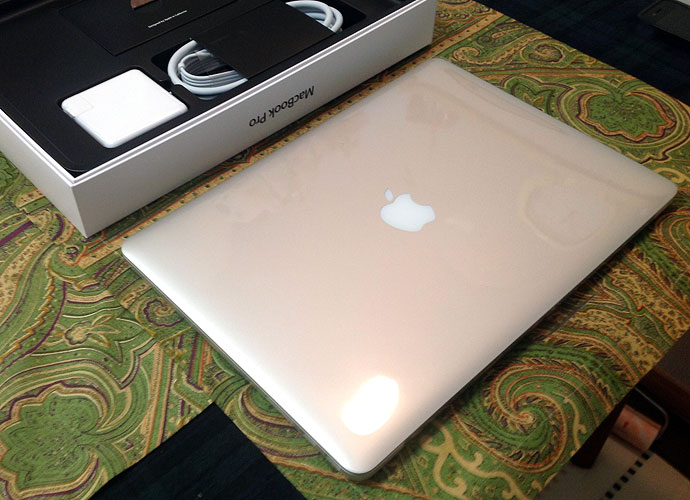
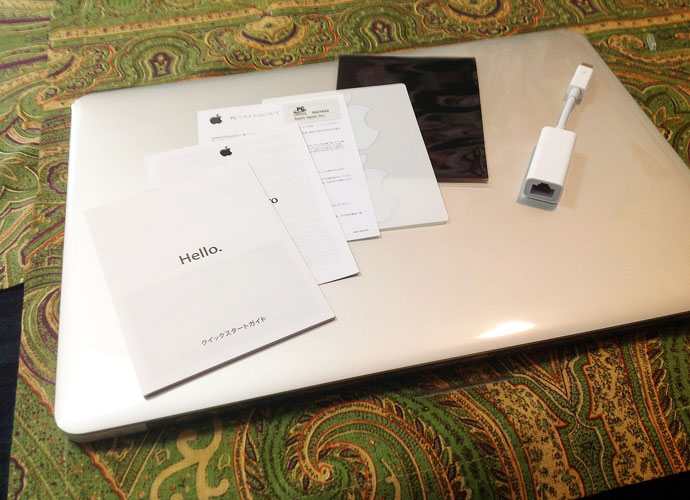
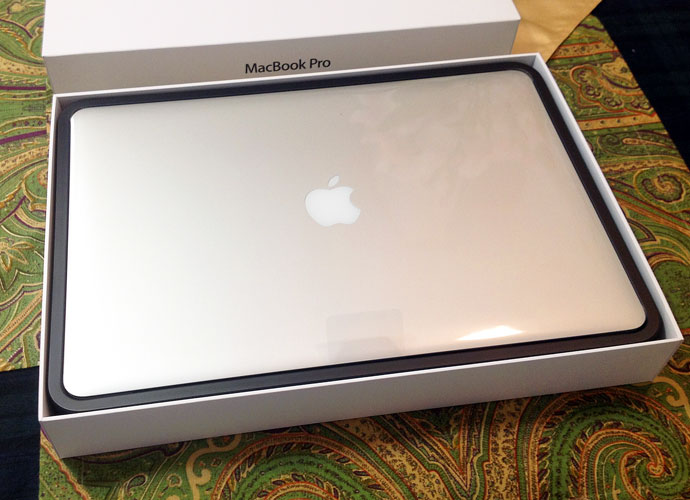
As one would expect, it comes beautifully boxed.

Box01

Box02

Box03

Box04

Sachi had a few chuckles over my photographing the unboxing; she is not that used to Nerd Pr0n.

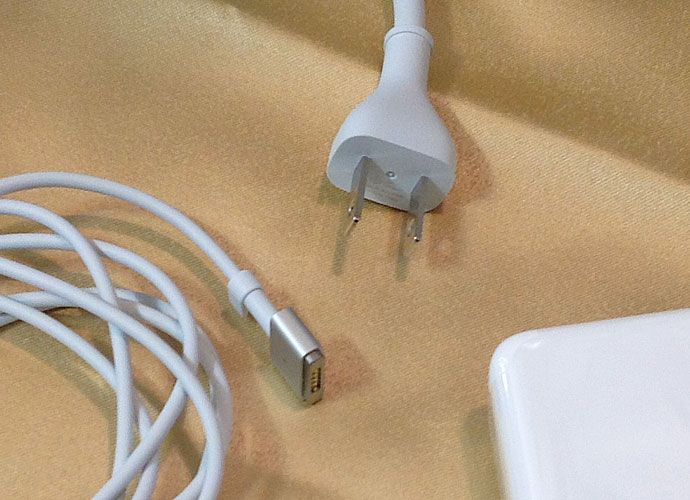
The first thing I noticed is, the power cable is different. There’s the MagSafe 2, and (at least for units sold in Japan) a more streamlined power cable plug.

Powe01

Apple really sees to the details, down to a piece of tissue paper separating the screen from the keyboard, cut in the precise shape. Insignificant, but they take care of details at that level, and it makes an impression (like using Garamond in a resume).

Paper01

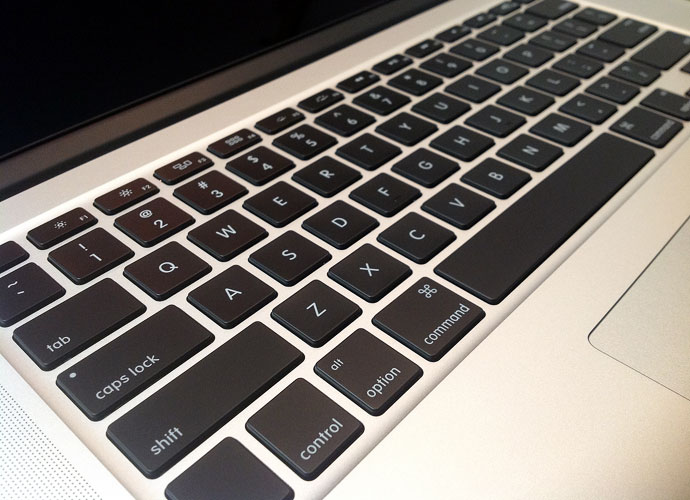
The keyboard is generally the same great-feeling chiclet keyboard, perhaps a bit more subdued than before.

Keyb01

Keyb02

Pixels Painted On

When I got the iPad 3, I was a bit less blown away by the Retina Display than I expected; the screen is great, but not mind-blowingly greater than the previous screens.

The Retina screen on the MBP, however, immediately impressed me. People have talked about things on the screen looking “painted on,” and you do get that impression. Here are a few images at 1380 x 1000 resolution if you click on them:

Screen01-1380

Screen02-1380

It’s not just he pixel density, though; the far-richer contrast hits you pretty quickly, too:

Screencontrast01

As I was setting it up, I took off my glasses and got within a few inches of the screen–and was immediately struck by the fact that you can see the pixels. Yes, I know that the retina display makes the pixels almost invisible at normal viewing distances. However, on my iPad 3, even close-up, it is nearly impossible to see the pixels. Again, I know the density is greater on the iPad (264 ppi for the iPad, 220 for the Retina Pro). Still, I didn’t expect to be able to discern anything visually.

But then I looked back at my late-2008 Pro, and was shocked to see that the pixels were huge. Now, of course, I have been looking at those pixels for four years, and have even noted the pixel grid before–but even after just a few minutes with the new Retina Pro, the older machine’s screen looked much worse than I had recalled.

After using the Retina Pro over the weekend, in fact, I switched back to the old Macbook Pro for a short time–and was even more shocked. Good lord, but those pixels look huge now! I am struck by how strong the screen-door effect is, and have to “get used to” the quality again before it stops bugging me so much.

It really is true–you’re going to have your standards raised so much that older screens will look far worse than you remember them. I heard that would happen, but was rather shocked at how quickly it took place.

Resolutions

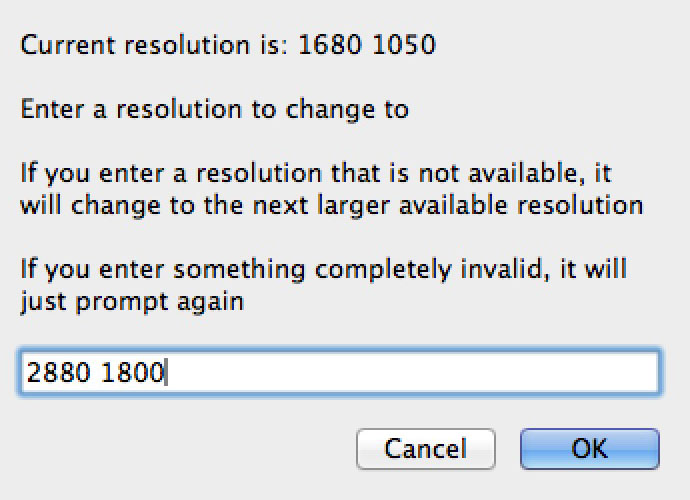
Next comes the screen resolutions. If you have one of these puppies, you’ll want–just for fun, mind you–to download an app called Change Resolution.

Changeres01

You open up the app, and (in a low-res window!) you can type in the horizontal and vertical resolutions and then click “OK.” Do that at 2880 by 1800, and you get this screen (click for full resolution, file size 1.4MB):

2880X1800Fs

This is the actual size of the screen shot. One thing you will hear is that the Retina Pro creates screen images at double (well, quadruple) the resolution, then down-samples in order to get a more acceptable screen image quality; as a result, screen captures are usually at double the resolution, too. However, this is not the case when you are doing native resolution–the screen shot is at 2880 by 1800. This means that, ironically, at full resolution, the GPU is not working as hard as it is at “lower” resolutions.

As you can see from the image, of course, the elements on the screen become ridiculously small, and while readable, you certainly don’t want to work that way unless you have really unusual needs.

Other resolutions you can work at are, approximated, 1024 x 640, 1280 x 800, 1440 x 900 (the old MBP resolution, exactly half/quarter the new one), 1680 x 1050 (the resolution of the higher-quality screen on the old 15“ models), and 1920 x 1200 (”Full HD“).

Displaycp-1

Here are screen shots of the five ”normal“ resolutions, scaled to 690 pixels wide (see full-sized on click; I scaled them down from the double/quadruple size of the screenshots to their stated-resolution sizes):

First, 1024 x 640–which I think they included for fun, as who the hell would want this resolution?

1024X640Fs

Next, 1280 x 800–barely reasonable:

1280X800Fs

Their ”best“ setting of 1440 x 900, which is OK, but I want more real estate, myself:

1440X900Fs

Their high-resolution option fitting recent MBP specs, at 1680 x 1050:

1680X1050Fs

And the ”Full HD“ at 1920 x 1200:

1920X1200Fs

I like 1920 x 1200 in terms of how much real estate it gives me, but am still trying to figure out if I can live with how small things get. For example, the images I produced for this post seemed so tiny, I had to check to make sure I didn’t have the image dpi mistakenly set at double. I find myself using the pinch gesture to zoom in on web pages, and often use the zoom feature to see what I am typing better. On the other hand, the zoom feature allows me to zoom in at double size and still looks like almost-native quality, probably due to the double-sampling explained below. It’s so easy to zoom with the Control-Scroll, I am finding it preferable to working with larger-looking elements on less real estate.

When news came out that the 2880 x 1800 setting would be denied to users, there were a lot of shocked reactions. I was disappointed, wanting full control (and subsequently given it by the Change Resolution app). In comment sections on tech sites reviewing the Retina Pro, Mac haters were having a field day, cackling over how we Mac users were getting swindled. That was before it was clear what the deal was really all about.

As stated above, 2880 x 1800 is simply absurd for a 15” display resolution. Apps that can handle it, like games which don’t display text at normal sizes, can claim access to native resolution (i.e., we’re not getting swindled out of pixels), but for normal use, it would be stupid to offer that resolution for your average user.

Additionally, at “lower” resolutions, you are not actually getting “lower” resolutions. It’s always 2880 x 1800. What’s happening is that the approximated lower resolution is produced by the CPU at four times the size (double each dimension), and then downsampled to fit the 2880 x 1800 display. Which means that when you are using the supposed 1920 x 1200 resolution, the quality you see is actually 3840 x 2400 (often referred to as 4K resolution), brought down to 2880 x 1800.

In short, “1920 x 1200” on a Retina Pro is, I believe, a good deal better than 1920 x 1200 on a display with that as the native resolution. Whatever the case, I am still struck by how nice it looks.

In fact, on reflection, I am now certain of it. Take the lowest resolution setting, for example–1024 x 640. If I go down to that resolution on my old MBP (or on any other screen, for that matter), the picture looks fuzzy at best. Not on this display; 1024 x 640 looks as sharp as any other resolution. Meaning that I am not really looking at 1024 x 640 resolution, but simply a 2880 x 1800 resolution which is scaled to look like 1024 x 640. In this case, I guess, 2048 x 1280, which is still better than Full HD, painted onto 2880 x 1800 pixels. However it’s done, it works.

This is a far better improvement (however “apparent” it may be) than I got switching from the old iPad to the new one.

Not Ready for Retina Time?

Many have talked about how bad things look when you are using a non-retina-ready app, but frankly, I don’t see it. Many had posted side-by-side images which don’t show much difference. I thought it was just because you could not see the retina-resolution image at its best, but now I think that it just isn’t nearly the contrast it’s hyped up to be.

Take a look at a small section of a screenshot from a movie at 1080p. The top part of the image is from the movie played in QuickTime Player, which is adjusted to take advantage of the Retina display; the bottom part is the exact same image as shown on MPlayer OSX Extended, an app not so updated:

Clip01

You can see there is a bit more jaggedness to the lower image–but with the pixels being so small on the Retina Pro, the images above are much smaller, and the jaggedness is much harder to see. In full motion, at normal viewing distances, the difference is negligible if not invisible.

You can notice text when it is not displayed right, but so far, using apps like MS Word 2008, I hardly see any quality degradation, and can use such apps perfectly well, without any discomfort. Probably this is due to font smoothing or some other effect that OS X employs.

Zooming Right Along

Next is speed. Now, I may not be the best judge of this, because my old, late-2008 MBP is not only aging, but it’s been dropped several times more than is good for it. More to the point, my normal way to work is to have 10 or more apps running at the same time, some of them memory hogs (Safari, Parallels running Windows 7, Photoshop), and Lion itself is pretty memory-intensive.

As my old MBP has just 4GB of RAM, and runs on an old Core 2 Duo… well, quite frankly, it was driving me insane. Safari took 24 bounces plus a 5-second wait after that to start. I got the spinning beach ball all the time. All to often, just clicking on a menu would elicit a 5- to 10-second pause. It didn’t help that my trackpad button failed more than a year ago, and a few weeks back the file system index blew a gasket, making content-based searches impossible. It is not an exaggeration to say that I am pretty patient when it comes to this stuff, nor that my patience was stretched to the limit.

The new Retina Pro, even the “lower-end” model I have, is so completely different that it’s not even funny. With an Ivy Bridge quad-core i7 CPU, along with a solid-state drive, this thing just rocks. 16GB of RAM doesn’t hurt, either–I have yet to max out the memory, but have come close, and am very glad I went for the upgrade.

Safari, like almost every other app, snaps open in a single bounce of the dock icon. Windows 7 in Parallels opens from a suspended state in just a few seconds. Photoshop is ready to go almost as quickly as I can be ready for it.

In short, it’s fast. Very nice. Expected, yes–but still excellent.

Closet Space

My main concern was not having enough drive space. If you read my posts from before the release, my main fear was not getting more storage. I was tired of a 250GB drive, and was very unhappy at the prospect of the new Pros falling back to my low capacity, after having reached 500 and 750GB previously. Alas, without paying gobs more than it’s worth for the higher-end Retina Pro, you’re stuck with the 256GB SSD.

However, I did have an unexpected revelation: the thing has an SD slot. And it’s SDXC ready, meaning you can stick a 64GB card in there. And Akihabara just happens to have 64GB SDXC cards (albeit off-brand) on sale for ¥2800 ($35). Meaning that, for $140, you could get the equivalent of a 256GB upgrade.

The question was, would it work? People had reported problems with previous SD card use in the Pro line, and I would be using an off-brand type; would it be too slow or wiggy in use? I bought a card (and a cheap portable SDXC reader, for transfer purposes) a few weeks ago so I’d be ready, and have been trying it out.

Card01

Long story short: it works. I slip in the card and an icon immediately pops up on the desktop. Data transfer times are not fantastic–a shade better than 10MB per second, not as good as branded cards, or so I read–but it’s good enough for what I want to use it for.

It’s not as good as having a 512GB drive, but it’s well worth the $500 saved, and then some. When I buy three more SD cards, I’ll use, perhaps, one for photos, one for archived documents, one for video files, and probably one for miscellaneous (or another arrangement if I find one that works better).

I’ll have to find the best way to keep them and to cart them around; in the past, I’ve seen small plastic-sheet holders with tiny sleeves for each card, but now that I need one, I can’t find any–all commercially available holders are hard-cover cases or other inconvenient arrangements. I have a snap-button pocket in my wallet I don’t use, which will probably be my solution, but I’ll have to fish around to get the right card.

Whatever I work out, I am pretty sure it will be sufficient for my needs.

Screendark01

Battery

I have read that the battery lasts 7 hours, 5 hours with heavy use. Seeing how the charge dissipates, I am not entirely confident of that assessment, though I have not tested it objectively. After what sure seems like less than 2 hours’ use, I fall below the 50% mark.

On the other hand, the battery measurement algorithm seems a bit off–it appears to charge beyond 100%, and takes a bit to fall below that. Maybe the lower end of the scale will stretch out more, I don’t know. And one thing I have noticed: the battery charges a lot faster than my old MBP. Probably this is due to the new battery type, similar to iPhone or iPad batteries. My iPad 3 doesn’t charge too fast, but my iPhone does, and so does this laptop.

Addenda: After charging to what I think was full capacity, I unplugged the battery cable–and it took about 22 minutes (browsing, mostly) to fall to 99%. Apple definitely leaves a margin after “100%” beyond which extra charge can be maintained.

Do I Really Need the Two-Tenths of an Inch?

When I first saw the Retina Pro in a shop in Akihabara, I was, honestly, disappointed. It didn’t look much thinner, and when I lifted it up, it had much more heft to it than I had expected. Not a good sign in what is supposed to be a revolutionary design for slimness.

I can only guess that the impression I got was a combination of heightened expectations and the odd height at which I picked up the store unit, along with the inability to close the top and carry it around.

Using the actual machine, the smaller profile makes a great deal of difference. It feels much slimmer and lighter in everyday use, and I am constantly noting the difference. Sometimes, it almost feels half the thickness, to be honest. The screen is thinner as well.

Despite all that, the machine in no way whatsoever feels flimsy. If anything, it seems to feel more solid–though much of that may stem from the fact that I dropped my old MBP a dozen times and the case is warped as a result.

The hinges on the display are a bit stiffer than I would prefer; sometimes I have to hold the bottom down to get the screen up. Hopefully, that will loosen up a bit in time.

Other Stuff

The new MagSafe port is spiffy, but seems even more prone to disconnect at a slight brush than the old model, which was too ‘brush-off-able’ for my tastes. On the other hand, Apple did an admirable job with their $10 adapter, which snaps right onto the old power cables and works beautifully–meaning I don’t have to throw away two perfectly good power cables, and now have up to three I can use.

In other miscellaneous categories, I have yet to use the HDMI port, but am sure it works fine. The USB 3 works as advertised; I have a USB 3 external HDD I have not been able to use at full speed until now, and it works great with the new MBP. The Thunderbolt ports also work fine, allowing me to use the Ethernet adapter I bought (my computer course classroom has no WiFi, requiring the Ethernet use) as well as the external display–I use a DisplayPort to VGA adapter for that. In fact, I need both at the same time for my classes, making me quite happy that Apple included two TB ports on this puppy.

That’s about all for now. To sum up, it is a sweet machine, worth the wait and the price, for my uses at least.

Categories: Mac News Tags:

Fast and Furious

June 29th, 2012 7 comments

This from the National Review Online:

And gun dealers who cooperated with the ATF report a shift in policy that coincided with Fast and Furious — from stopping sales and questioning customers, to telling store owners to just go ahead and sell the guns. While Fortune reports that the ATF had no chance to interdict the guns that might have killed Border Patrol agent Brian Terry — the shop that sold the guns informed the ATF that the transaction was suspicious, but it was a holiday weekend and the fax wasn’t seen for days — the gun store’s owner has said he was told in advance to go ahead and sell guns to people he normally wouldn’t. The entire Fortune piece seems to neglect the distinctions between probable cause for an arrest, the act of at least questioning people who are trying to buy guns illegally, and the ATF’s advice to store owners that they refuse to make any sale that they “doubt” is legal. A big part of Fast and Furious is that store owners were told to make illegal sales when the ATF couldn’t follow up on them or chose not to.

It occurs to me that there is a hypocrisy here much more significant than the fact that the general policy of “gunwalking” now called a horrific scandal and “Obama’s Watergate” started under the Bush administration (named “Operation Wide Receiver” in 2006).

The hypocrisy lies in the fact that, were conservatives allowed their way, no gun sales would be under any scrutiny at all. They are the ones who object to background checks or other federal restrictions–but now, apparently, seem to be on the gun control side?

Interesting.

Categories: Political Game-Playing Tags:

ACA

June 29th, 2012 15 comments

Wow. Roberts, not Kennedy. Who saw that coming?

American Thinker is already trying to rationalize it, but I betcha that Roberts will be vilified to no end by conservatives.

The interesting thing here: Roberts did not act as a liberal, but instead took a stand that would be called conservative, save for the fact that “mainstream” conservative has driven fully off the crazy cliff. One tweet by Matt Browner Hamlin noted by Andrew Sullivan:

I just can’t believe John Roberts ruled in favor of a policy cooked up by the Heritage Foundation

The Heritage Foundation, now firmly against the ACA, actually proposed the individual mandate a few decades ago.

So, while this shows that Scalia, Alito, and Thomas are partisan hacks, and says god knows what about Kennedy, I think the most we can take from this is that Roberts is probably not a political hack–or at least not consistently. We can fantasize that the Bush-appointed Chief Justice has taken a turn to the left, but that would be asking way too much–and considering that a conservative from 1990 would see this as reasonable…

Though, there is another way to see it: a conservative from the late 80’s or early 90’s almost is a liberal today. Not a “true” liberal, but as a matter of relative gauging compared to where the right wing has bounded off to….

Or, who knows, maybe the Thinker is right and this is just chair-switching of some sort. I don’t pretend to know.

And certainly, this is not the health care plan we should have, and hopefully it won’t take us 30 years to take the next step.

Still, I really would like to know what just happened.

Categories: Supreme Court Tags:

Yaayy… Kind Of… Update: Yaayy!

June 27th, 2012 2 comments

The day the new Macbook Pros were released, by the time I woke up, the shipping time for the 15“ Retina Pro had already expanded to 2-3 weeks for new orders. I ordered on June 12, so today was the first day within that span–and right on schedule, the status of the order shifted from ”Processing order“ to Preparing for Shipment,” then later tonight, “Shipped.” I had hoped that Apple was just being conservative and would ship it earlier, but there it is.

Which means that my rMBP is now sitting in a warehouse in Shanghai, waiting to catch a plane (hopefully not a boat).

Apple’s original estimate for delivery was between June 30 and July 6; despite “shipping” on the 26th, the original target frame may still be true. When I ordered my iPad 3, it was shipped from Shanghai on March 10, but did not arrive until March 16. So I may yet be a week away from getting my hands on the new machine.

Yargh. It can’t come too soon–I am experiencing too many issues with the current Macbook, it’s acting like a clunker more and more.

Update: The tracking moved, from “Overseas Reception of Package” (海外荷物受付) to “Shipped from Overseas Location” (海外発送). The good news is, when it took my iPad 6 days from “Reception” to arrival, moving to “Shipped from Overseas” took 3 days. This time, it took one day. At minimum, it should arrive here Monday.
Update 2: This delivery is booking along in comparison to the iPad! The iPad took 3 days from “Reception” to “Shipped,” and then two days before it got to Japan. This morning, the Retina Pro is already in Japan, just two days from reception. The thing could actually come today, possibly! Probably by tomorrow–which is great, as I’ll have the weekend to set it up.

In the meantime, my iPhone, after working for two weeks, suddenly crapped out again. I think it’s the cables or connectors for the new screen, which may yet be unsalvageable. I tried opening it up and reconnecting the contacts, to no avail. I will try testing the old screen again, and if I can’t make the new screen work, may yet splurge for one more new LCD screen / digitizer front panel.

Update on iPhone: I tried fixing the screen by opening up the back and then plugging things back in. Did it several times, and all that happened was that the touch screen stopped working too. I put it back together, and it still didn’t work. Then, hours later–the touchscreen came back, and the LCD started working again–but this time, the backlight crapped out. Hrrmmm.
Categories: iPhone Tags:

Trailer: Seven Minutes of Terror

June 25th, 2012 3 comments

These people are fracking insane, while still being unbelievable geniuses. If they pull this off, the general reaction will probably be, “Oh, another Mars rover.” This trailer, however, shows how utterly fantastic the challenge is. If it works, everyone should be impressed as hell.

Categories: Science, Technology Tags:

Surface Surfaces

June 19th, 2012 12 comments

Is the new Microsoft tablet a winner? Possibly. There’s still a lot that’s not known about it.

On the one hand, Microsoft seems to be presenting something very different from Apple: a full-fledged PC in tablet form. Apple comes close with the Macbook Air, but that is clearly more in the netbook/notebook side. Microsoft’s new “Surface” tablets are definitely on the tablet side.

This could be good, or it could be bad. Microsoft has always, from the very beginning, pushed tablets as regular computers, failing each time because the technology was never good enough to produce a tablet computer. Apple won that game by first waiting for minimally usable technology to evolve before presenting a product, and then presenting it for what it was best suited for instead of staying trapped in the personal-computer paradigm. Companies other than Microsoft made the same mistake with netbooks, and Apple showed them up by waiting until they could make the Macbook Air.

This time, however, Microsoft could come up a winner: the technology may be more than strong enough to support a full-fledged PC in tablet form. If it is, then Apple could be in some trouble, as it has not yet merged its mobile and laptop environments quite enough to produce a Mac-like tablet–a tablet which fully supplants a laptop computer.

On the other hand, Apple may know what it’s doing. Despite some people desperately trying to use the iPad as if it were a laptop, most people are more than satisfied with it being a handheld media device. So the question is, will the tablet form work for a full-fledged PC? It might, but we just don’t know yet. Microsoft strictly limited hands-on access to the device, allowing reviewers only a minute or two with a device, and only the lower-end “RT” model. There were no hands-on demos of the keyboard.

This might be because some of the hardware is not actually ready. Remember when Microsoft previewed the Windows Series 7 Phone? Their “hands-on” presentation was to have trained users walk around and show visitors how it was used–and it was a complete disaster. The live-use demos were atrocious.

Which leads to other caveats. Microsoft is not releasing any information on pricing. Why not? Will Microsoft try to pit this against the iPad, taking only minimal profits? Or will it try to match the Surface against the Macbook Air? I can only imagine that the lighter model will be priced low, and the “Pro” model will be in the thousand-dollar range at the high end.

What Microsoft seems to be doing is telling everyone the good news before they hear the bad news–carefully controlling all information so that people only know what’s great about the new device, thus generating excitement–and only later, after (Microsoft hopes) people have formed a solid opinion about and desire for the tablet, quietly disclosing the bad news.

Even more suspicious is that there was no information, not even a hint as far as I could tell, of a release date. Microsoft is famed for introducing fantastic-looking stuff and then not actually releasing it for a long time. When Apple gives a sneak peek, they always give a time frame, even if just a quarter. As far as I can tell, Microsoft has not even given a year yet, though 2013 is a safe bet.

There is the usual Microsoft fan base (and/or the Apple Hating crowd) which more or less automatically proclaims anything Microsoft releases as the best thing since sliced bread; this has to be taken into account when reading what people are saying. The lack of data really makes it impossible to be certain about this product, meaning that anyone who currently claims it will be a hit or a dud is whistling in the dark, at best.

I would normally be tempted to say that Microsoft initially releases a piece of crap but then improves on it, evolves it, and eventually has a solid product. However, the Zune kind of belied that; Microsoft no longer makes a music player. It could be said, however, that the DNA from Zune lives on, in Windows Phone 7 (still not doing well with an embarrassing 4% 20 months after release), Metro, and now this tablet.

One telling point is that this is not the first PC-ish tablet to challenge the iPad. Tablets have come out with laptop CPUs, laptop amounts of RAM, USB ports, sexy designs, nice peripherals, etc. None have made a dent in the iPad. This can’t just be another full-featured tablet, it has to have something that will jolt people and make them want it, even need it.

Again, this could be an iPad killer. Given Microsoft’s track record, however, that’s not the safest bet in the world. Microsoft has gotten great hype upon announcing this kind of thing (originally, the Series 7 Phone was touted as the best thing since sliced bread even as it fell apart in the hands-on demos), only to have the most serious problems–that of the whole user experience–to sink the project upon release.

None of this is to say that Microsoft can’t make anything successful in hardware–the Xbox is successful, for example–but it would be wisest to refrain from any conclusions at all until people get a chance to take it home for a week, or even just play with a for-market version for an hour, unsupervised or otherwise constrained by Microsoft PR hacks.

Categories: Technology Tags:

And Steve Jobs Invented Computers

June 19th, 2012 2 comments

I was reading up on the new Microsoft tablet, and found this paragraph in a story from one of the major networks:

The company has been hit and miss in the hardware market, and when the company misses, it does so epically — remember the Zune? But Microsoft’s hardware successes have become billion-dollar innovations, such as the Xbox or the mouse, which Microsoft pioneered.

Yes. Microsoft pioneered the mouse.

Forget about Douglas Engelbart inventing it in the 60’s. Forget about Xerox being the first major company to design a GUI computer using one. Forget about Apple being the first to successfully deploy it, putting it in the public consciousness. Forget about Microsoft not even being in the hardware business until much, much later.

The Xbox has seen success, but if you pile up Microsoft’s successes and failures in hardware, it’s kind of hard not to notice the dominance of the latter category.

Then I saw who published the story. If they get everything else wrong, why not this? Small wonder they don’t allow comments on their stories….

Categories: People Can Be Idiots, Technology Tags:

Weight and Resolutions

June 18th, 2012 8 comments

I went to Akihabara today as it was only a few stops east of my medical appointment today, and stopped by a shop which had a Retina Pro. I have to say, it was not all that I expected.

First of all, the damn thing feels heavy. Partly it’s because you expect it to be lighter, but mostly I think it’s because it has been reduced in size more than it has been in weight, therefore it feels heavier than you expect. I had the same experience with the iPhone when it first came out, and the iPod before it: it feels solid, like a piece of machinery, not some cheap hunk of plastic. I’m certain that I’ll become accustomed to it.

The form factor is as advertised: slim, streamlined, sexy. The ports are all there. The screen bevel is not as smooth as I had thought it would be, but I think I just misread a review and expected something else.

Second, there’s speed. As one reviewer pointed out, apps open fast. By the time the icon in the dock has the ability to bounce once, the app is open. Currently, my aging Pro is giving me more and more spinning beach balls. I tried to open Preview, and the icon just bounced there for a minute before I force quit it and restarted. I literally cannot wait for the new machine.

Finally, the display. As with the iPad 3, you can see the quality and the depth of the retina display–but it doesn’t exactly jump out and bite you on the face. I’m sure I will feel like at least one reviewer, who didn’t notice it as much until they tried going back to an old display, and then felt like things were out of focus or something. It’s kind of like trying to sit and watch an old pre-HD NTSC TV show, and you wonder, “How did I ever watch TV at that crappy resolution, and why didn’t I realize it at the time? It used to look sharp, now it’s just blurry.”

The Retina Pro was sitting right beside the new Macbook Pro, and you could instantly see a difference when they are side by side. The Retina display has deeper, richer colors and notably better contrast. It is, no doubt at all, a better display.

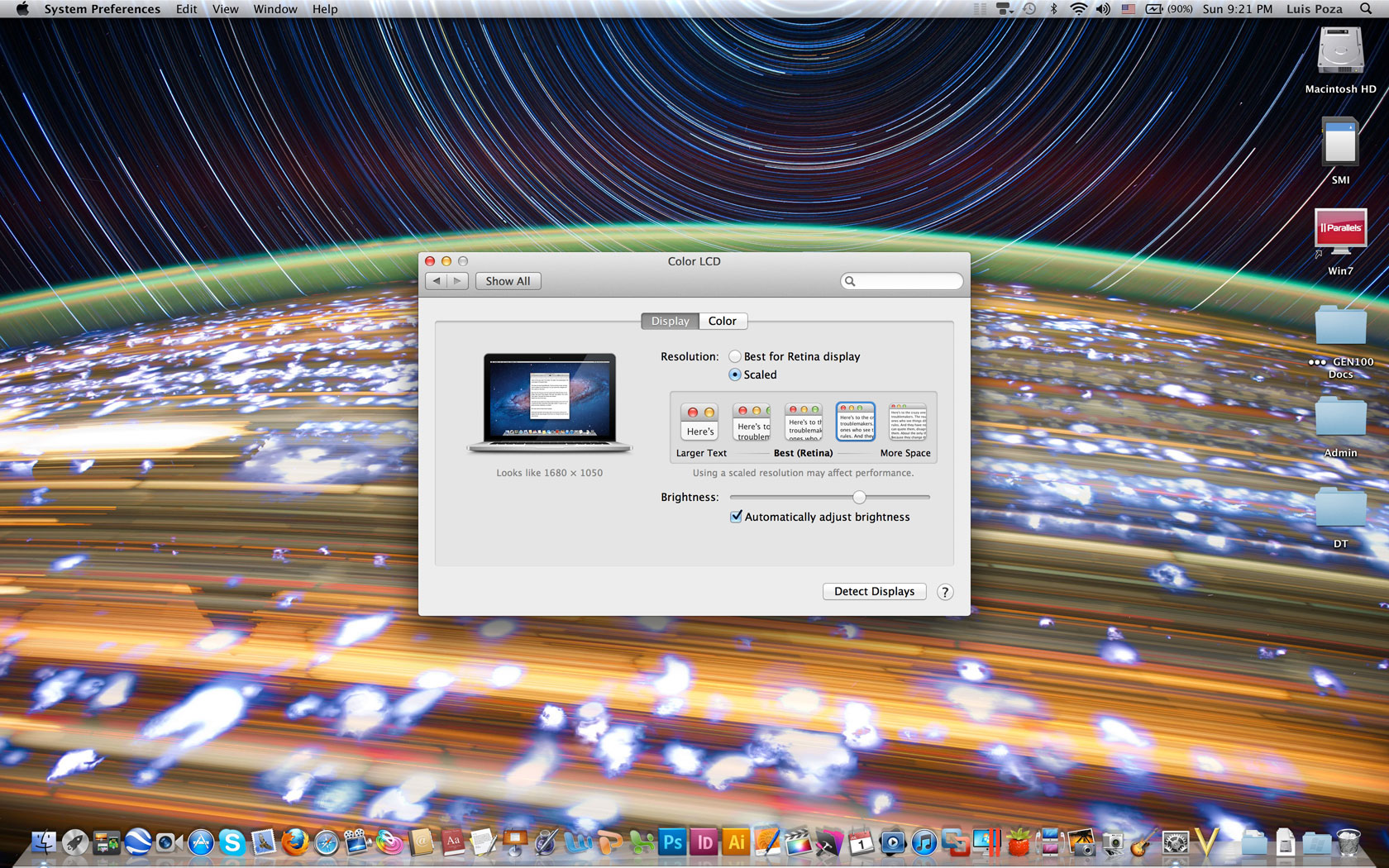
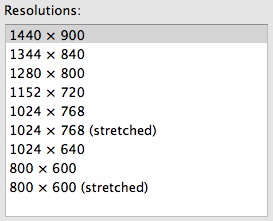
However, there is a catch: Apple is being a bit screwy handling the resolution. With all past machines, you could choose to be in native resolution, or you could, using a list of applicable resolutions, decide exactly what resolution your screen will show.

Screen Shot 2012-06-18 At 9.15.21 Pm

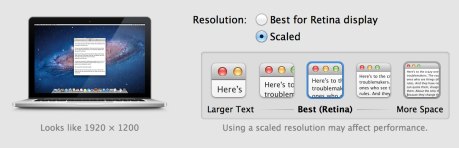
Well, not any more. Now you get options like this:

Rmbpr

As you can see, you don’t choose from a list–in fact, the computer doesn’t even tell you what the screen’s actual displayed resolution is. You can choose to have things look bigger (lower resolutions) or tinier (higher resolution), as you would if you scaled your resolution between 1024 x 768 and 1440 x 900–except, when you choose each one, Apple only tells you, in text below the image of the laptop, what the resolution “looks like.” As opposed to telling you what “it is.”

Further complicating things is the fact that, when you make one of these changes, the screen dims and pops back–much the way it would when you make an actual resolution change.

At this point, I honestly don’t know if you get to actually see 2880 x 1800 pixels in action, or if everything is scaled down to 1920 x 1200 at best, and the real native resolution is only displayed when you do something like play games. And if we’re not getting the full resolution in normal use, will Apple give it to us after all the apps have been updated to play nice with the Retina?

Yes, I know that rendering the screen in true 2880 x 1800 would make everything unacceptably tiny, but that’s what I thought Resolution Independence, introduced in 10.4, was all about. The display would be 2880 x 1800, but everything would be drawn bigger. Instead, it seems that we get approximations of different non-native resolutions.

Can anyone explain how this works? Is the display actually always in 2880 x 1800, but just downscales individual graphic elements, or is the screen actually never better than 1920 x 1200 and all the pixels everywhere just approximated–meaning we’re actually fuzzier than if we had a 1920 x 1200 display? Will we get back full control in a future OS, with this just being a transitory compromise?

Categories: Mac News Tags:

Possible Workaround for Smaller SSD in Retina Pro

June 18th, 2012 1 comment

This, of course, is not nearly as good as having a 512 GB or larger SSD, but since the Pro has the SDXC card slot, I figured that I would drop by Akihabara and see how cheaply I can pick up a 64 GB card rated at 10 MB/s or better. I see them advertised for as little as ¥2700 for a generic; If it works halfway decently, I may get 4, along with the most effective carrying solution I can find, as a way of effectively doubling my on-hand memory without having to spend an extra half thousand dollars to do so.

Categories: Mac News Tags:

Repairing an iPhone

June 18th, 2012 2 comments

It works!

I will give a complete telling of the whole saga of the repair below; it’s rather long, and possibly boring to anyone too experienced or just not interested in stuff like this. However, if you have ever thought of iPhone DIY repair, this might be of interest to you.

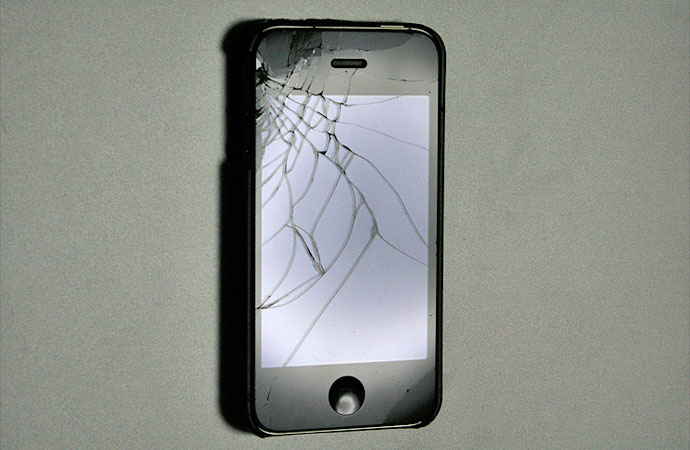
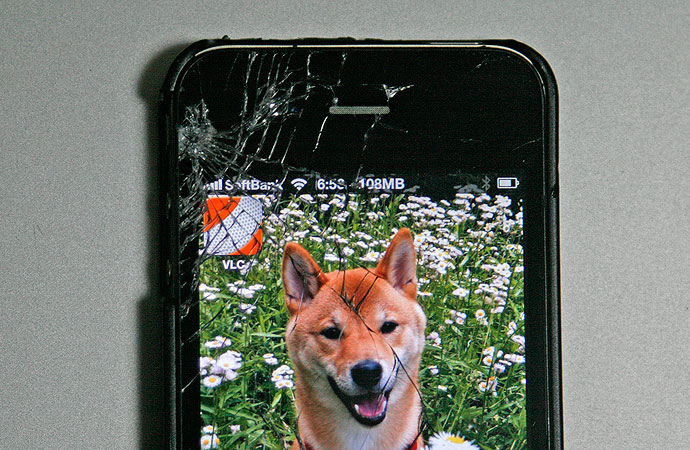
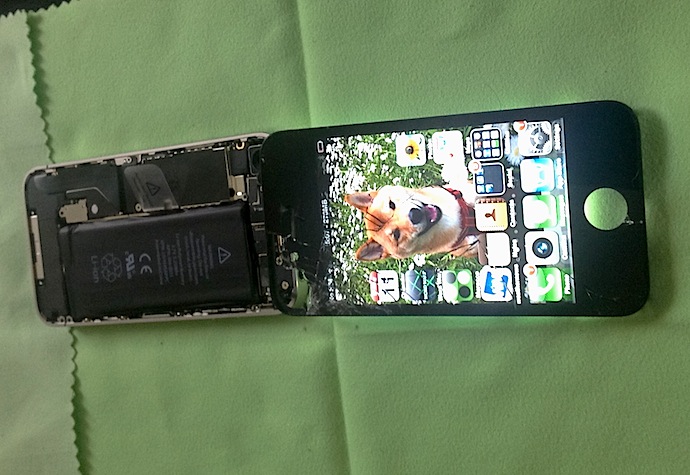
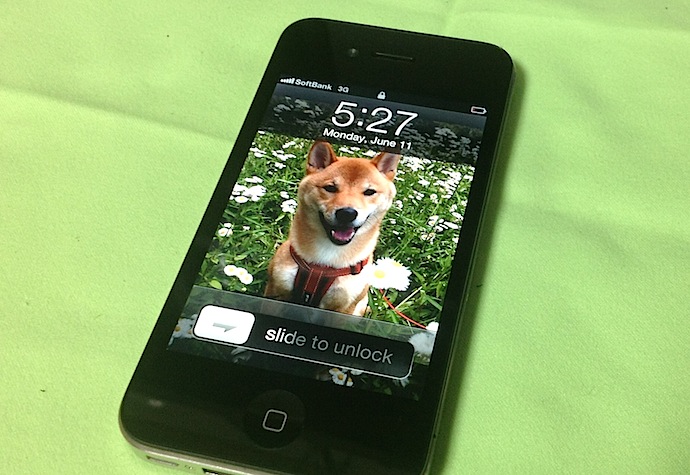
A few weeks ago, I dropped the phone on the pavement, about the 20th or so time I had dropped it. Before, nothing happened except for, apparently, one time when a small crack appeared on the lower right corner, away from the screen. Didn’t even notice it until later.

Iphonebreak02-1

Iphonebreak03-1

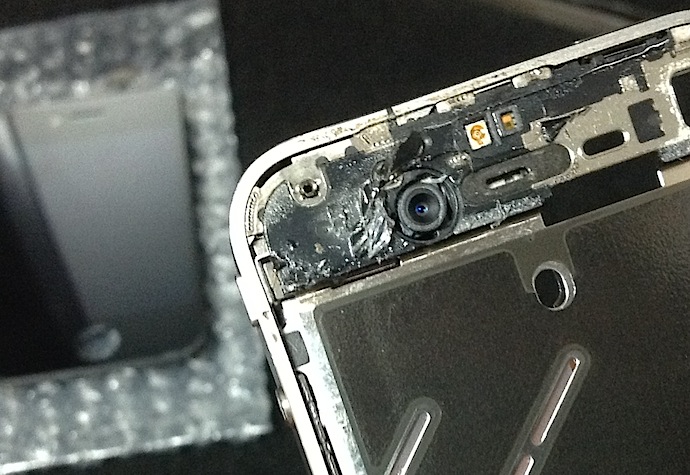
This time, it was impossible not to notice; the screen was shattered. It still worked, but was hardly comfortable.

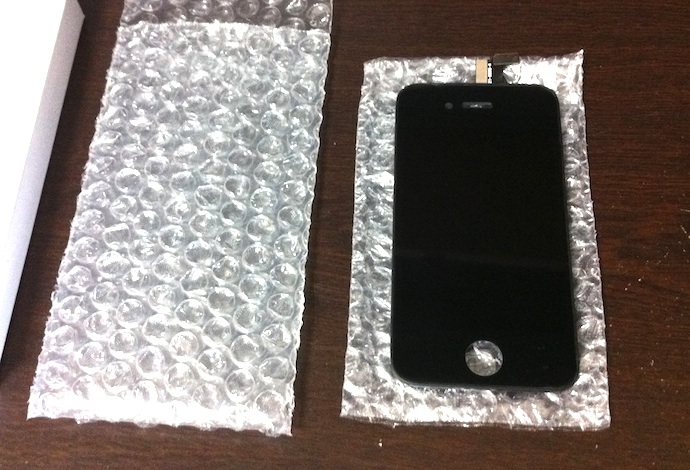
After checking things out, I discovered that you could order a new front panel for a surprisingly cheap price–about ¥3000 in Japan ($37), or $27 in the U.S. This includes not just the front glass, but the touchscreen mechanism and the LCD screen and backlight. I presume it’s the full retina display. Hard to believe it’s so cheap!

Of course, the hard part is the repair job. Places in Tokyo advertise repairs for around ¥10,000, or $126 (though some places advertise for less), but repairing it myself held a certain appeal. I knew it would be hard, perhaps frustrating, and I might end up with a bricked phone. However, it would be a great experience, and could help me become more adept at cheaper DIY repairs, as I have become with laptops and desktops.

So, I ordered the LCD replacement part, being careful to select an iPhone 4 part, and not an iPhone 4S screen. I also had to order a toolkit with the right drivers, a guitar pick, a good pair of tweezers, and a few plastic tools. That was cheap, but came separately.

From there, it was time for Nightmare With Amazon 3rd-Party Sellers. The tool kit, which had the slowest delivery time, got canceled one day after I ordered it, with no explanation. So the screen came and I had to wait two days for a re-ordered toolkit. Then, only after having disassembled the phone, I discovered that the LCD screen was also a botched order–more on that below.

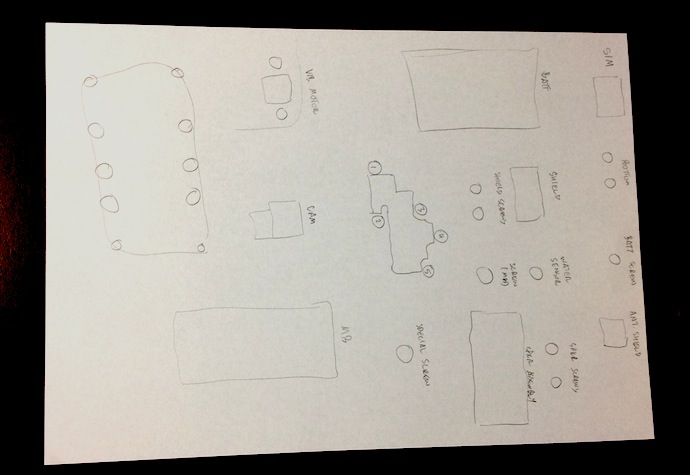
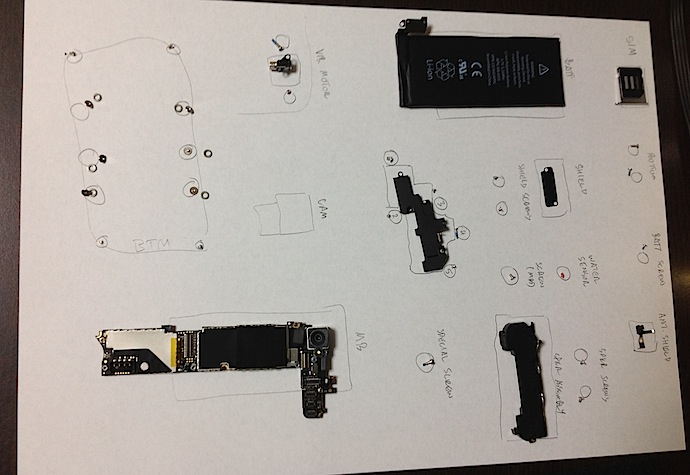
Before I started the repair job, I did some serious prep work. I researched the job generally, and found two videos on the complete process. I watched the videos beforehand, taking notes of all steps, as well as all parts involved. I even numbered the screws (26 of them!). I prepared a piece of paper to lay down the parts on, carefully drawing labeled outlines for all parts, little circles for each screw. All were in order of assembly.

Ipr02-Paper01

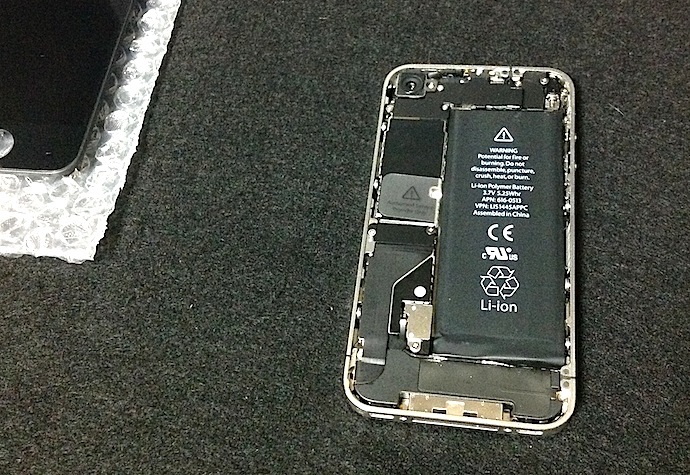
Taking it apart the first time took more than an hour. I was extremely nervous about bending wires too far, or pulling things out too hard. For this repair, you need to take the phone almost completely apart, as it disassembles from the back and everything must be removed to allow access to the screws holding the front screen in place. Let me detail the basic steps; skip the next paragraph if you’re not interested.

Ipr03-Backoff

First, you remove the SIM card by using a small paper clip and pressing real hard in the hole; it just pops out. You remove the two screws at the bottom on either side of the connector port. Then, the back panel slides off with surprising ease. You remove a screw from the battery connector and remove the connector along with the tiny antenna shield. The battery comes out with a little difficulty as it is glued into place. Then a shield with 2 screws comes off from a ribbon connected to the motherboard, then the ribbon itself is detached. Detach the antenna cable, then remove a screw with a water sensor (a small sticker-like thing) from the motherboard, then remove two more screws at the bottom so as to remove the speaker/antenna assembly.

Ipr04-Batt-Spkr-Out

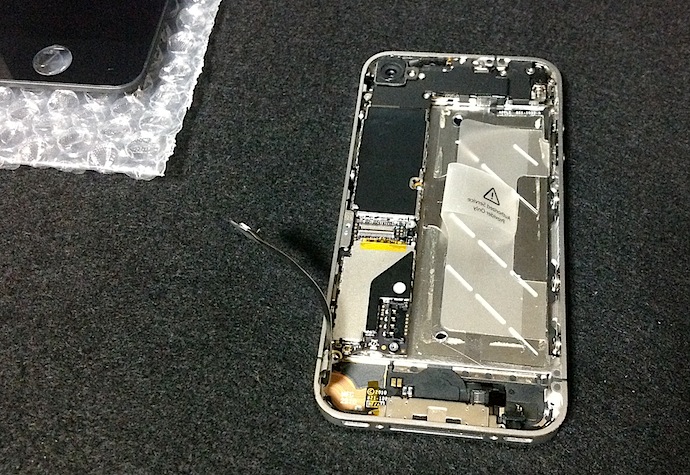
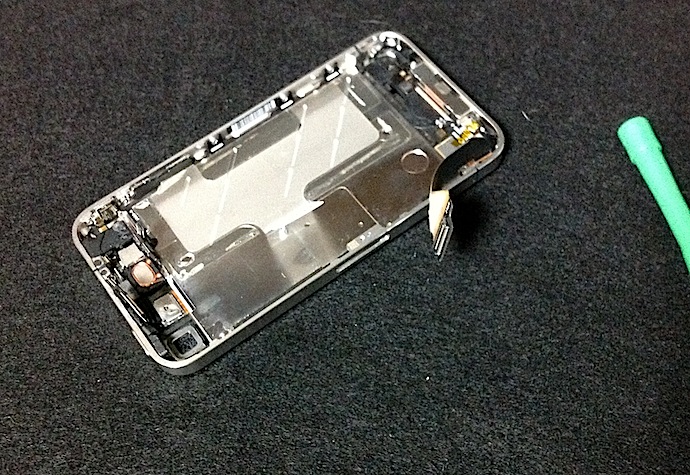
Then there are 5 screws (all different!) holding an EMI shield in place over 5 motherboard connectors; remove all that, then 3 more screws and the vibrator, then detach the rear camera. You can then detach the 5 remaining motherboard connectors (2 are for the LCD), and lift out the motherboard. Removing the screen requires that you unscrew 10 screws from the frame–3 on each side (with washers), and one each from every corner. Then you spend maybe 3-5 minutes carefully prying the screen from the frame which it is glued to, careful not to yank it out. The two LCD panel cables run through a small slot in the center frame, and need to be guided out carefully when the front panel is loose. I had to remove broken glass that had buried itself in the glue on the frame, but other than that, everything looked OK.

Ipr07-Frame-Damage

Ipr06-Empty-Case

Ipr05-Paper02

Whew! Like I said, that took more than an hour. When I was finished, I was more or less a nervous wreck. However, I had done it, and apparently had avoided destroying anything. So, I got the replacement LCD, threaded the two connectors through the frame, and got ready to snap it into place.

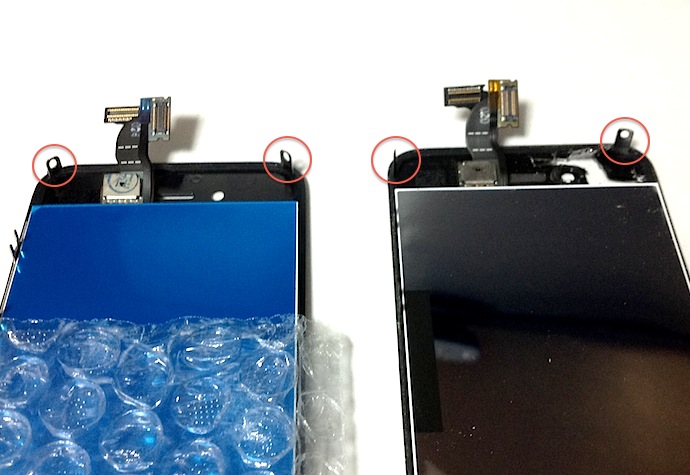
It didn’t fit. That’s when I discovered it was the part for the iPhone 4S, in which the top two corner screw brackets are placed slightly differently than for the iPhone 4.

Ipr08-Wrong-Part

Now, I had ordered the part for an iPhone 4, not 4S. I checked the order; even the image on the seller’s page showed an iPhone 4 part (although when I bought it, I didn’t know the difference). I also checked the invoice, which again said “iPhone 4.” The package said “iPhone 4.”

Ipr09-Wrong-Tag

Obviously, this was their screwup. Disappointed, I covered up the parts sheet, bagged the major pieces, and got to dealing with Amazon.

A few days later, the new part arrived, and was in fact the right part. That evening, I set about putting it back together. In doing so, I hit some snags and made a few mistakes. First, three tiny pieces fell off which no tutorial had warned against, and as I did not see where they fell from, I had to search for detailed images of all the parts so I could identify what they were.

A small black rubber rectangle was the first to fall off. Eventually, I tagged it as a cushion between the speaker assembly and the bottom of the frame. That got super-glued back into place. Second came a small screw holder for part of the motherboard; that got carefully placed back, but stayed loose until the screw went in. And last, a small, grooved black rubber strip from somewhere, I could not figure out. I left it out, hoping it was not vital.

In addition to that, I could not fit the motherboard in right, and therefore the EMI panel did not fit on 100% correctly. It seemed to fit enough, so I foolishly (optimistically) left it as it was. I was prepared to open it back up and fix any or all of these issues if the phone did not work.

I put it all back together, it closed up OK, and I switched it on.

It worked!

I did notice a small glitch: the front panel was not flush with the frame, and you could see the LCD panel back-light leaking out. I decided to live with it. I used it enough to establish that all the functions were indeed operational, and happily plugged it in to charge overnight.

The next morning, I turned it on. The screen was black, and stayed that way.

Sometime during the night, the LCD part of the panel failed. In the morning, the backlight turned on, and the touchscreen worked, and I could operate the phone blindly. But no picture. Yargh.

So, I waited until I had time again, and then took the whole thing apart. It took much less time this time around, and I was much more confident and skilled at it. I discovered a few things I had done wrong. First, the small rubber part I could not identify was a cushion at the top of the motherboard–right where the LCD cables passed around it. Crap. That might have resulted in the cables getting fried.

Second, When I took the front panel off, a blue film came off the back of the LCD. I thought the screen was falling apart, but then realized that the blue film was there for protecting the part in shipment and should have been removed. I hadn’t done that because I thought it was part of the screen; the part came with no instructions, and none of the online tutorials mentioned it. The reason why is the bane of all such documentation: the people writing it assume that the people watching it know about such things, forgetting that people who get these tutorials get them because they don’t know these things.

So, crap again. If the unprotected cables were not the cause, then the added pressure on the LCD screen from the unremoved film may have been.

I re-assembled everything, making sure I made no mistakes this time. The front panel went on firmly, the motherboard went in right, the connectors all seemed to snap in, the EMI shield fit right this time, and the whole phone went back together perfectly. Again, it took a lot less time than before, but still more than an hour for the whole process.

After it was all back together, I turned it on.

The screen was still broken. However, this time there was a bonus: the touchscreen was now broken too.

I determined that the phone still worked; I could receive calls (just not answer them), and when plugged into a computer, iTunes showed the phone as normal.

I resolved that I had, one way or another, broken the screen. I spent the next day trying to decide whether to buy another LCD screen and risk another repair job.

I decided to do just that, but wanted one final test to make sure it was a problem with the LCD panel part, and not a broken motherboard connector. I opened the back panel and unplugged the battery. I removed the EMI shield protecting the LCD connectors. Then I unplugged the installed, new LCD without removing it, and instead plugged in my old, shattered front panel, hanging outside the whole shebang. I turned it on, and lo, the phone worked. That proved that any problem was with the LCD part only, and so a re-order would stand a fair chance of repairing it.

Ipr11-Frankenphone

So I unplugged the ungainly old panel, plugged all the current parts back into place, and closed it up, so I could then go to my laptop and order a new LCD panel.

However, just for shits and giggles, I turned it on, to make triple-sure that the LCD was indeed broken.

Ipr12-Working-Phone

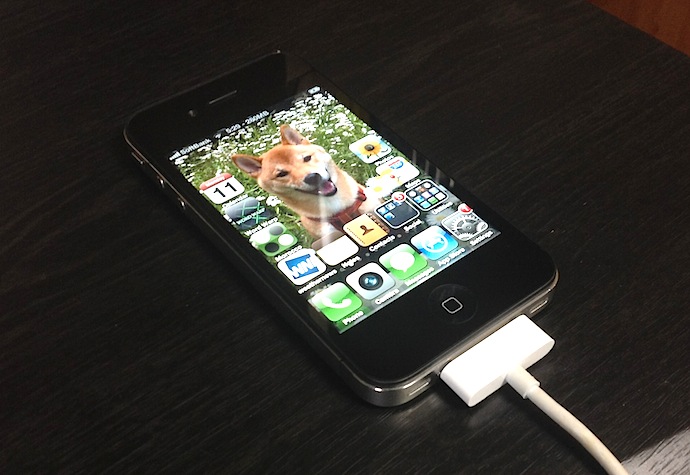
The screen worked. LCD screen and touch panel both.

I was floored. My only guess is that somehow, the LCD connectors were not properly placed either of the previous two times–despite the fact that I swear they snapped into place both times, and were certainly secured by the EMI shield pressing down on them afterwards.

All night, I kept on turning it on again and again to make sure it was still working. I figured it could go any time. I still do.

Well, that was about a week ago. Hard to believe, it seems longer than that. But the phone still works. Not a problem since. So, for about three and a half thousand yen, and some frustration, I got a perfectly working phone again. And, in the bargain, I got a good deal of experience disassembling and re-assembling the phone.

Ipr13-Working-Phone-C

All in all, it was worth it.

Categories: iPhone Tags:

Didn’t Take Long for Microsoft to Screw Up Skype

June 14th, 2012 1 comment

First it was the “Skype Home,” an unnecessary screen with data most people have no need for. When you use Skype, the primary task is to contact someone–not to check who has been seen in the last two months (I know already) or have to dismiss annoying ads. And yet Microsoft made the “Skype Home” the default screen, and you can’t change that. Going on line, I found a lot of people like me who hate the damned thing.

Then there was that fracking awful “rate your call” screen at the end of calls, like I want to spend a minute every time doing that–especially when most problem occur due to bandwidth glitches, which Microsoft can do little or nothing about. No way to stop that either, as far as I can tell.

And now? Microsoft figures it’s a great idea to put giant ads in the middle of your Skype call. Not banner ads, which would be annoying enough. Not text ads, like Google. Nope. They want to shove your contact’s image to the side and present an ad as big as they are, like you’re talking to two people, but one of them is an annoying ad.

What happened to Skype making money from people on paid accounts? Probably it just wasn’t enough for Microsoft, they probably figured that there was an untapped revenue stream, so screw the users and screw the app itself.

They claim that you can get rid of the ads, but only by going to a web page and opting out (seems simple, but I’ll bet good money it doesn’t work like you expect), but you can count on the fact that eventually, it’ll become a non-dismissible “feature.”

They already are trying to gold-plate the turd of an idea by claiming that the ads will give users something to talk about. They are even calling these things Conversations Ads:

We’re excited to introduce Conversations Ads as an opportunity for marketers to reach our hundreds of millions of connected users in a place where they can have meaningful conversations about brands in a highly engaging environment.

What does it look like?

Conv Ad Screenshot For Pr With Unilever Magnum Ad-Thumb-485X351-22183

Well, they’re right in that it will spur discussion. “Goddammit, another fracking ad!” “Yeah, me too. Frack Microsoft. Let’s get a different chat program, one that doesn’t suck.”

Seriously, I am considering switching to FaceTime on the Mac, or maybe Google’s GMail video chat. It’s probably as good as Skype if not better, it’s just that Skype is what everybody has been using. But if I continue to get frustrated, annoyed, and pissed off every time I use it, then I won’t give a damn if I have to drag people over to FaceTime, I’ll just do it.

Is the Retina Macbook Pro a Waste of Money?

June 13th, 2012 11 comments

We pay a premium for certain features in computers and computer peripherals that are not entirely functional. One of those is a slim profile. When LCD flatscreens came out, people paid a premium for these, despite the fact that they were worse than CRTs in almost every respect except for their size. They were dimmer, lower-resolution, had a fixed number of pixels (native resolution), had a worse viewing angle–and they were expensive, hellishly so at first. But they were thin, so we bought them. Eventually, their popularity helped bring prices down, and now you’d be hard-pressed to find CRTs for sale at all. They went the way of the floppy.

Laptops are similar: everything about them is inferior to desktops except for their size and mobility: they have weaker CPUs, less memory, smaller hard drives, fewer features, smaller screens, can only be expanded externally, and are more expensive. And yet, I know people who buy laptops but never move them from their desks. That makes no sense; laptops are all about mobility; everything else is a drawback.

We pay for a smaller profile; the smaller it is, the more we pay, in both greater cost and lesser features.

When the Macbook Air came out, I saw the same problem, magnified. Compared to the 15“ Macbook Pro at the time, it had a slower CPU, a smaller screen, fewer ports, and lacked an optical drive–and yet it cost almost the same. People asked me if they should get one, and I always gave the same answer: only if you place a huge priority on ”sexy.“

Today, a co-worker had a similar reaction to the Retina Macbook Pro: it was priced for sexy. They said they did not need the retina display, and outside of that, you were just paying for the sexy.

I don’t think that claim stands up to scrutiny, however.

For example, I no longer ward people away from the Macbook Air. It matured, especially with the speedy SSD, and became a good machine in its own right–not to mention, the price has dropped considerably (from $1800 to $1200 for the base 13” model). It’s not a high-powered computer, but it functions extremely well, and is still sexy–but this time for a reasonable price.

Within the context of the Mac line, the Retina Pro is also worth the cost. Consider the difference between the base 15“ for both the regular Pro and the Retina Pro: you pay $1800 for the regular, $2200 for the Retina. However, it’s not just the retina display that you get. The CPU is the same, but the RAM is doubled in the Retina, you get an 256 GB SSD instead of a 500 GB HDD (an overall plus due to performance increases), and double the GDDR5 memory.

If you don’t need the display, don’t need the RAM, don’t need the video, and prefer capacity to HDD access times, then of course, get the non-Retina model. But that’s not because it’s a better value; it would purely be a matter of preference.

Take the regular Pro model, double the RAM and swap in a 256 GB SSD to make it closer to the Retina specs save for the resolution, and the price goes up to $2400–$200 more than for the Retina–and you still lack the Retina display and the extra graphics memory. In this sense the Retina model is priced competitively with the older Pro (and/or the upgrades are way overpriced, which is also likely).

Here’s how the basically stack up:

Unit 13” Macbook Air (high-end) 13“ Macbook Air (high-end, upgrades) 15” Macbook Pro (low-end) 15“ Macbook Pro (upgrades) 15” Retina Macbook Pro (base)
CPU 1.8GHz dual-core Core i5 (TB: 2.8 GHz) 2.0GHz dual-core Core i7 (TB: 3.2GHz) 2.3GHz quad-core Core i7 (TB: 3.3GHz) 2.3GHz quad-core Core i7 (TB: 3.3GHz) 2.3GHz quad-core Core i7 (TB: 3.3GHz)
RAM 4GB 8GB 4GB 8GB 8GB
Storage 256 GB SSD 256 GB SSD 500GB 5400-rpm HDD 256GB SSD 256GB SSD
GPU HD Graphics 4000 HD Graphics 4000 NVIDIA GT 650M / 512MB GDDR5 NVIDIA GT 650M / 512MB GDDR5 NVIDIA GT 650M / 1GB GDDR5
Monitor 1366 x 768 1366 x 768 1440 x 900 1440 x 900 2880 x 1800
Optical Drive Superdrive 8x Superdrive 8x
Price $1,499 $1,699 $1,799 $2,399 $2,199

Apple seemed to do a fair job of balancing the pricing (within the parameters of their profit-taking, of course). The closest real challenge is the upgraded Macbook Air vs. the base Retina Pro, especially if you’re not at all interested in graphics.

Even then, the $500 price difference can be accounted for. The processors may seem similar (both i7s with similar GHz ratings), but compare a dual-core at 2 GHz with 4MB of L3 cache to a quad-core at 2.3 GHz with 6MB of L3 cache (not to mention double the L1 and L2 cache), and I betcha you see enough of a difference. Geekbench reports 50% higher performance from the Retina’s CPU.

Aside from that, you have one machine with a 13“ 1-megapixel display vs. a 15” 5-megapixel display, not to mention the difference between integrated chipset graphics and that plus a serious GPU… you’d have to really not care about graphics.

Of course, that’s where it really comes down to preferences. I really want the resolution and the graphics abilities, if not for today then for the future; I want the upgradability to 16GB of memory… and especially, I want the 15“ screen. The processor difference may not seem like too much now, but in 3 years, I think the difference will be rather marked.

I know many people may object to the whole context, saying that you can get similar specs in Windows laptops for a much cheaper price. True. Even counting the retina display (though that will be adopted by PC makers soon, I am sure), it would seem that Macs are overpriced. But such comparisons fail to recognize some important qualities which differ between product lines. How many Windows laptops are built as well as any of the Macbooks? So many are flimsy, cheap-feeling, poorly designed, and often seem ridiculously thick and bulky compared to Macs. The Windows laptops which are not are often priced closer to Macs. Macs are not that much more expensive, they just don’t make the cheapo discount versions. Then there are advantages to the Mac in general: the same company makes the machine, OS, and much of the software, not to mention favored mobile devices, allowing for a seamless integration you can’t get elsewhere. Relative security without the cost in cash and performance for anti-virus software. And, interestingly, a lot of the software is cheaper (when do new versions of Windows cost $20?), often more versatile (e.g., multi-language), and usually much easier to install and use. Okay, off my flame-war soapbox, sorry.

Back to the point: I am very much OK with how the Retina Pro stacks up against the other Macbooks, and expect to be very pleased with what I get. Not to mention that I am moving up from a 2008 Core 2 Duo with 4GB of RAM, meaning a 350% increase in CPU speed, a 400% increase in RAM, and generally a lot more of everything everywhere. I doubt I’ll be disappointed.

Categories: Mac News Tags:

Probably Gonna Get Me a Next-Gen Pro

June 12th, 2012 9 comments

As background, I am using a 4-year-old Macbook Pro on it’s very last legs. Damaged case (dropped it too many times), optical drive gave out more than a year ago, trackpad button doesn’t work, hasn’t for a while. But it’s also getting buggy and with updated software, gets slow as hell. I am way overdue for a workhorse computer like this.

There were last-minute rumors about the new Retina-display Macbook Pros, that they would be separate from the two existing lines–and the cost would go up to over $4000. And the maxed-out version may well be… but the starter version is within my price range, thank god. I was sitting here thinking I would have to buy a speed bump or fork over way too much cash.

The minimum-spec version:

  • 0.71“ profile, 4.46 lbs.
  • 15.4” 2880 x 1800 Retina Display @220 PPI
  • 2.3Ghz Quad-core i7 CPU (upgradable to 2.7 GHz); no info on Turbo Boost, maybe N/A in slim-profile mobile?
  • 8GB RAM (upgradable to 16GB)
  • GT 650M 1GB GPU
  • 256GB SSD (upgradable to 768 GB)
  • 7-hour battery life (YMMV)
  • 2 USB3 ports (combo with USB2)
  • Dual Thunderbolt ports
  • HDMI port, SD slot, New-design MagSafe (damn, can’t use old ones)
  • Adapters for FW800 & Gb Ethernet
  • Starts at $2199

Presumably, the CPU, RAM, and SSD are upgradable, maybe the graphics chip also. Only one model was showcased, so it may be the one basic design with everything else a la carte. I would be OK with the CPU, but will look at prices (expect: ouch) on 512 GB SSD and 16GB RAM upgrades. Probably, not. So I will have better space management and think about upgrading RAM after 2 years when prices are much cheaper.

I can live with that.

Question is, how long before it can be at my door?

Other news: Mountain Lion will be released in July, for $20. Makes it trivial that it won’t come pre-loaded on the new Macbook Pro. Lots of new features–the iCloud documents looks to be good for me, Power Nap updating during sleep looks nifty as well. I have to look into whether AirPlay mirroring will allow me to throw laptop video onto my iPad easily.

With iOS 6, Siri is being improved with graphic responses, more data on restaurants, entertainment, and sports–and also seems to be able to launch apps. “Eyes Free” will work with cars built with a Siri button; I will be more impressed when a sleeping iPad can wake up when only talked to. Local search going international, meaning I can presumably use it for searching for restaurants and movies here.

Also, it’s coming to the iPad. Strange it didn’t before. If it’s not coming to the iPhone 4, that’s a disappointment. Ah well.

Otherwise, nice enhancements to iOS 6, looks like a lot more integration with Macs (FaceTime apparently available on laptop when someone calls your iPhone?), Photo Stream looks to make it easier to send photos to yourself and others, VIP Mail addresses to highlight email from specified people. Passbook is the new “Mystery” app, it seems–boarding passes, movie tickets, store cards… is this a prelude to an e-wallet for the iPhone 5?

And, of course, Maps. The long-awaited, very cool 3-D capable new mapping app to replace Google Maps, which Google mysteriously updates a lot less than the Android version. Apple has done their own cartography–will new features still not visible on Google Maps now be visible on Apple’s app? It has traffic info and turn-by-turn navigation–in Japan too? Monitors traffic along a route and changes if it senses shifts in traffic speeds. “Flyover” has the much-ballyhooed 3D views, rendered in real time.

iOS 6 ships “in the Fall,” meaning between September and December, I suppose.

I suppose the Apple Store, offline right now, will not open up until way too late–it’s already 4 a.m. here, so time to grab 4 or 5 hours of sleep.

Gotta order something in the morning.

Categories: Mac News Tags:

Checkmate!

June 9th, 2012 7 comments

A Tumblr page called “Checkmate, Pro-Choicers!” run by someone calling herself “Rebecca,” asserts that it is “Taking down Baby Murderers with Logic!” It is, actually, a fairly representative look at the level of “logic” used by many, if not a majority, in the fundie pro-life community. This person seems to have, at the very least, a very shaky understanding of what exactly is involved in “logic” (not to mention an equally shaky understanding of color schemes in web design); her points are mostly emotional in nature, and when not, are, well, laughable. Here are some examples, from the most recent:

Pro-lifers care about ALL WOMEN, not just the born ones.
Checkmate, Pro-Choicers

A simple statement to a certain effect is not a fact, and the details of “caring” can include harsh treatment “for their own good.” In such cases, “caring” treatment may be something you would definitely want to avoid. Case in point: mandatory vaginal ultrasounds using a manually-operated wand. While an objective observer might call it a form of state-mandated rape, a pro-lifer may rationalize that it saves a woman from making a choice that could scar her emotionally, and since it saves the life of the fetus, it prevents her from becoming a murderer and going to hell. See how much we care? You’re welcome!

It’s funny that “women’s rights” suddenly end when sex-selective abortion comes into play.
Checkmate, Pro-Choicers

An assertion which only makes sense if one assumes that a fetus is a “woman,” which essentially means that for a pro-lifer, the debate on whether abortion is murder begins with the assumption that human life begins at conception.

Beyond that, this asserts that pro-choicers don’t care about whether abortion is used as a form of sex selection, which is also untrue. It is seen as a terrible abuse of the procedure, and is very worrisome to those concerned with women’s rights. While it is not seen as a women’s rights abuse against the fetus, it is seen as a greater abuse against the gender itself. It is possibly one of the only criteria under which pro-choicers would agree to restrict abortion–save for the fact that it would rely on people getting abortions to truthfully state their intended purpose, which they would not do if it prevented them from doing as they wished.

One may suppose that pro-lifers would then say that this is a reason to outlaw abortion in general, to prevent the minority abuse, but that is incorrect. Many parents value and treat daughters far worse than sons without resorting to physical abuse, also an affront to women’s rights–but we cannot legislate and end to that, and it would not make sense to make parenting in general illegal in order to stop it.

If your mothers had aborted you, there would be no abortion movement at all.
Checkmate, Pro-Choicers

This ignores the name of the movement: Pro-Choice, not Pro-Abortion. Ergo, change the assertion to “If your mothers had been given a choice whether or not to abort you, …” and it falls apart, as they obviously did choose not to abort. If the argument is saying that abortion would be 100% amongst people who believed in pro-choice, it would not keep children of pro-lifers from being pro-choice. If the argument is against every mother having an abortion (which is the assertion made in an earlier post), then there would be no pro-life movement, either–the race would end after a generation. This demonstrates another incorrect assumption by pro-lifers: that people who are pro-choice want every woman to have an abortion every time they get pregnant.

If you cared so much about women, where were your Pre-Roe Crisis Pregnancy Centers?
Checkmate, Pro-Choicers

Since the term “Crisis Pregnancy Center” refers to a pro-life organization trying to persuade, trick, cajole, or frighten women into not having an abortion (usually presenting false information as a means to do so), this question bizarrely seems to be an attack against pro-lifers, not pro-choicers. Indeed, if you cared so much about women, pro-lifers, where were your Crisis Pregnancy Centers before Roe v. Wade?

Casey Anthony was just making a choice about her family and her life. She just wasn’t ready to be a mother, and she made a mistake. Oh wait, she’s in jail for that.
Checkmate, Pro-Choicers

Again, it assumes an equivalency between abortion and child murder, in effect that a pre-requisite for any debate is to first accept the pro-life assertions as inarguable fact.

If you have time to have sex, then you have time to get a job and support your new baby.
Checkmate, Pro-Choicers

Really? Fifteen minutes a day (assuming daily sex of moderate length) is enough time to work and support a child? These people must be organizational geniuses. Either that, or they think that pro-choicers spend ten to twelve hours a day having sex.

I don’t hear you complaining about Christian principles making the murder of teenagers illegal.
Checkmate, Pro-Choicers

First of all, exactly which Christian principles would specifically refer to teenagers? At the very least, this is oddly worded. But, once again, it starts from the assumption that abortion and the murder of born human beings is equivalent. From here, I’ll ignore all “arguments” based on this fallacy (which is a good number of the total posts).

If abortion is as normal and acceptable as you claim, why are there so few movies and TV shows that show it?
Checkmate, Pro-Choicers

Same reason why there are so few TV shows which display live birth in detail. Unless the contention is why more TV shows and movies don’t deal with the general idea of abortion, in which case it is because mainstream entertainment tends to shy away from issues that would normally receive vehement protest from any significant segment of society, whether it is a minority or not. Which is one reason why not many TV shows depict the Prophet Muhammed. This question may as well ask, “If abortion is as normal and acceptable as you claim, why are there so few pro-lifers which accept it?”

Mary was a 12-year-old single mother who didn’t decide to have sex. She chose life.
Checkmate, Pro-Choicers

First of all, I am beginning to wonder if this person actually understands what the word “checkmate” means.

Presumably, this refers to the biblical Mary, mother of Jesus. I’m sure that in this person’s mind, this somehow argues for the pro-life side. Ironically, however, it makes the case for choice. Mary, after all, chose to give birth, right? That’s what this person is saying. Possibly, this person does not even understand the meaning of the word “choose.”


They go on and on like this. “We used to think it was okay to burn people at the stake. We learned our lesson. Checkmate, Pro-Choicers!” Hunh?

One of my favorites: “Steve Jobs’ mom didn’t want him, but he invented computers. Checkmate, Pro-Choicers!” Yeah, Steve Jobs invented computers.

As every single assertion this person makes has at least one glaring logical flaw and/or false assertion, and most of them betray a breathtaking misunderstanding of what “winning an argument” means, this could end up being a very long post. Suffice it to say that they’re pretty much all like this.

I’ll just end with this one, because it speaks to the heart of the whole debate:

If a “zygote” is not a person at conception, but a baby is at birth, when does the magic Personhood Fairy come along?
Checkmate, Pro-Choicers

Indeed. That is the very question at the heart of the debate, and one which cannot be objectively answered. Conception is just as “magic” a delineation as any other.

And this is what, ironically, makes abortion, at its core, a First Amendment issue–not one of privacy (though that also applies), but of religious choice. Deciding when human life begins before the fetus is fully developed is, in a very real way, a matter of faith. One has the personal freedom to choose what one believes; since whether abortion is murder or not is a matter of personal belief, it must be a choice made by the individual, as a matter of religious freedom.

People like this want to impose their own religious beliefs on everyone, a direct violation of religious freedom guaranteed by the First Amendment. But for people like this, “religious freedom” means “the freedom to believe what we tell you to believe.”

A Lot of Stuff Sounds Good…

June 8th, 2012 3 comments

Pshrimp-1

Sure, popcorn shrimp sounds good… but then you buy the dollar-pocket of convenience store seafood and begin regretting it.

Five Days Out, Macbook Pro “Specs” Leak

June 7th, 2012 7 comments

First it was the 13“, now a claim for the 15”. The 13“ specs seem too weak, the 15” way too strong. For the 13“ model:

  • 2.5Ghz dual-core Intel Core i5 with 3MB L3 cache (Turbo Boost up to 3.1GHz)
  • 4GB of 1600MHz DDR3 SDRAM
  • 500 GB 5400-rpm hard drive
  • 13.3-inch (diagonal) LED-backlit glossy widescreen display; 1280 by 800 pixels
  • Intel HD Graphics 4000
  • 8x slot-loading SuperDrive (DVD+R DL/DVD+RW/CD-RW)
  • Thunderbolt port support high-speed I/O and Mini DisplayPort devices
  • SDXC card slot, FireWire 800 port, two USB 3.0 ports
  • Size and weight: 12.78 by 8.94 by 0.95 inches (32.5 by 22.7 by 2.41 cm); 4.5 pounds (2.06 kg)

Even as Ivy Bridge, the CPU would not be much more than a speed bump from the current 2.4 GHz Core i5. Same amount of RAM, slight speed bump. Same HDD. Speed bump for graphics chip. USB 3 included, otherwise ports are the same. Most strikingly: the optical drive is still there, and the display is identical–not a retina display. And the form factor is identical–no redesigned case.

This could be true, but not likely. There were rumors that the 13” model might not get Ivy Bridge in time, and so an upgrade might be delayed, but this is the opposite–it has Ivy Bridge and the USB 3 that comes with it, but virtually nothing else. After a previous release being a similarly unimpressive speed bump, it is doubtful Apple would be so conservative, go so long without better improvement, especially in a key laptop area.

It is doubtful also that they would not do any one of three heavily reported upgrades: the new form factor, the retina display, or the lost optical drive–not to mention the SSD, or at least SSD caching.

I could only buy it if they are essentially abandoning the 13“ Macbook Pro to to Macbook Air line, or if this were a maintenance bump and a stronger 13” were coming earlier than the usual 9-month wait. It also would be terrible if this somehow reflected the 15“ model as well.

However, specs have ”leaked“ for that one too–and they (mostly) go much too far in the other direction:

  • 2.6 Ghz quad-core Intel Core i7 with 8MB L3 cache (Turbo Boost up to 3.6 Ghz)
  • 16GB of 1600MHz DDR3 SDRAM
  • 750 GB 7200-rpm hard drive
  • 15.4-inch (diagonal) LED-backlit glossy widescreen display; 2560 by 1600 pixels
  • AMD Radeon HD 7770M graphics processor with 2GB of GDDR5 memory and Intel HD Graphics 4000 with automatic switching
  • Built-in FaceTime HD camera
  • Thunderbolt port supports high-speed I/O and Mini DisplayPort devices
  • SDXC card slot, FireWire 800 port, four USB 3.0 ports

This has a far more impressive CPU–but also seems not to be one that fits published CPU specs (it should be 6MB L3 cache). And 16GB of RAM? Riiiight. I would love that, but it screams ”fake.“ I would be ecstatic to be proven wrong, but I will be shocked if Apple makes more than 8GB standard. The GPU sounds similarly suspiciously padded.

While the specs would indicate all the rumors are true (retina display, no optical drive, Ivy Bridge, new form factor), they stick with an HDD (no SSD or SSD caching), and it declares four USB 3 ports. Again, this just screams ”fake.“

And while the listed dimensions show a thinner form factor, it also reports losing about a half inch in width and depth, which, while possible, also sounds a bit off.

These are both very likely fakes, and the participants of the Macrumors forums are cheerfully challenging each other to design, print, and ”leak“ similar fake specs, most looking just as authentic as the reported ones. So it is unlikely that we have seen what they will be.

My own guess as to the new specs for the 15” model:

  • 2.6 Ghz quad-core Intel Core i7 with 6MB L3 cache (Turbo Boost up to 3.6 Ghz)
  • 8GB of 1600MHz DDR3 SDRAM
  • 500 GB 5400-rpm hard drive with SSD cache
  • 15.4-inch (diagonal) LED-backlit glossy widescreen display; 2560 by 1600 pixels
  • SDXC card slot, FireWire 800 port, two USB 3.0 ports

I am guessing blindly on the HDD; I do not know if 500 GB will stay (considering prices, I guess more likely it will), or that 5400-rpm is reasonable with SSD caching (I am guessing that a lower RPM is more viable with SSD to pick up the speed). I am also not sure about the FireWire. That is rumored to also have been dropped, but with no viable adapter cables from Thunderbolt or USB 3 to FireWire, I find it hard to believe that Apple would so easily cut off all support for so many professional users who have so much equipment which use that connector.

The other factor is the price. Yet another “leaked” list of unnamed Apple items in a store inventory system suggest that only two new MBP models would be in the list, and they would cost $2475 and $3170–both way more than the current $1800 and $2200 prices for the 15“–in fact, the lower price is almost exactly what the 17” model currently runs for. Frankly, I think they’ve tagged it wrong–the prices listed for the iMac seem more in line with the Macbook Pro line, although those seem a little low on the 15“ models ($1700 and $2000)–a healthy price drop, especially with added costs for the retina display. It would make sense only if Apple were really trying to cut into the competition (or–gasp–if the weak specs are true and the new Pros are minor speed bumps), but Apple shows little tendency toward that end.

Well, we’ll know in five days.

Categories: Mac News Tags:

When Inferior-Quality Off-White Lard Just Won’t Do

June 6th, 2012 Comments off

Seen on the street near my home recently:

Greenlard01

Greenlard02

The Parts Came…

June 6th, 2012 8 comments

Iphoneglass

…but I can’t do a damn thing till I get the tools. I ordered them and they should have arrived… except that the Amazon 3rd-party dealer, which Amazon not only lists but vaults to the highest spot and automatically presents above all other dealers, screwed me over. A day and a half after I ordered, they mysteriously canceled the order. No reason given, and they still advertise the part. I had to re-order, and am now delayed because of the first dealer.

Is it possible that they saw I gave a negative response to another dealer who screwed me over and canceled for that reason? As far as I can tell, I am now unable to even give an unfavorable rating to this dealer as there was no actual purchase.

Categories: iPhone Tags: