
Why Do People Need to Feel That the Japanese Hate the iPhone?
Before the iPhone ever came out here, there was prognostication of doom. Japanese will hate the iPhone because it pales in comparison to what is out in Japan. People won’t like it because it doesn’t have emoji or because it doesn’t have a convenient strap hook.
But then, when the iPhone went on sale, huge, unprecedented lines formed to buy it. It didn’t take long for this to be forgotten and we started hearing again how the Japanese detested the iPhone. Meanwhile, I’ve started seeing it everywhere; in restaurants, used by people on train platforms, in the hands of people on the street. It’s one of the more common–and certainly more recognizable–phone models in a country with hundreds of models out there. And people who don’t have it know about it; even people who don’t get it say they think it’s cool and they want one. It might be one of the highest-profile cell phones in Japan, period. Just today I was at immigration to pick up my visa, and I got out my iPhone to while away some time. Immediately, three women to my left started having a long discussion about what plans were available for the iPhone.
The whole “Japan hates the iPhone” meme got a weird boost yesterday when Wired magazine published an article titled, “Why the Japanese Hate the iPhone.” What’s weird about it is that it was (and even after edits, still is) filled with inaccuracies. It misquoted Japanese tech reviewers, most notably Nobuyuki Hayashi, completely skewing what they said to change a quite favorable view of the iPhone into a negative, even dismissive view. AppleInsider does a pretty good job of laying out the badly-done piece.
Even after edits, the article reeks of know-nothingness. In the first paragraph, it claims, “the handset is selling so poorly it’s being offered for free.” The iPhone has been selling pretty well, in fact; Hayashi points to the iPhones’ sales figures as fairly strong considering that mobile sales dropped sharply in 2008. The “free” 8GB iPhone (the 16GB is half price) is a promotion, the kind SoftBank is famous for, and is seen as a way to both steal market share from competitors and to clear out inventories for an expected June launch of the next iPhone model (the promotion ends in May).
I could go through the whole article, but let me just focus on a few paragraphs:
Besides cultural opposition, Japanese citizens possess high, complex standards when it comes to cellphones. The country is famous for being ahead of its time when it comes to technology, and the iPhone just doesn’t cut it.
Actually, the iPhone floors most Japanese who see it; Japanese phones are packed with features, but those features are complex and hard to access; the iPhone’s easy-to-use interface and multi-touch screen are big attention-grabbers with Japanese keitai users. Maybe the hardcore uber-nerd crowd reacts the way the Wired article says, but not most Japanese.
As for “cultural opposition,” they’re full of it–Japan was “culturally opposed” to non-Japanese music players–and yet the iPod now dominates the market.
For example, Japanese handset users are extremely into video and photos — and the iPhone has neither a video camera nor multimedia text messaging. And a highlight feature many in Japan enjoy on their handset is a TV tuner, according to Kuittinen.
Actually, no. You don’t see too many people actually using these features, mostly because they are too hard to use. As a previous Wired piece correctly quoted the Japanese tech guru, “while being able to watch TV anywhere is a spectacular idea, there’s no signal in the subways, and even above ground, the sound cuts out every few seconds.” Fact is, I don’t often see people using those features on their keitai. They are widely considered as cool bells and whistles, but ultimately not used very much.
What else bugs the Japanese about the iPhone? The pricing plans, Kuittinen said. Japan’s carrier environment is very competitive, which equates to relatively low monthly rates for handsets. The iPhone’s monthly plan starts at about $60, which is too high compared to competitors, Kuittinen added.
Again, not so much. Most plans in Japan cost at least that much, and most cost more, especially with full Internet connectivity and unlimited data plans. What hurts SoftBank is not the overall price of the plan, but rather SoftBank’s high per-minute charges. Most of my students express deep envy over the iPhone, but say they can’t afford it because it costs 42 yen per minute, and SoftBank’s cheap White Plan only allows free calls among fellow SoftBank users. Were most students already SoftBank users, the iPhone would take off; since most are not, calling their friends would be way too expensive. SoftBank must somehow reach a critical mass before the free-calls deal means much to most people.
Gizmodo followed up on Wired’s story, but got even more wrong. They also misquoted Hayashi, claiming that he fault’s the iPhone’s lack of emoji as a reason it’s failing. Except Hayashi didn’t say that, he said it used to lack emoji, but SoftBank “did a good follow up job” by getting Apple to add that.
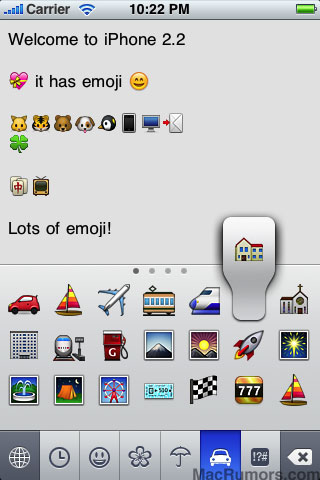
Gizmodo shows up a key element in the “iPhone is doomed in Japan” scenario painters: using whatever excuses are handy, not rational, in predicting or proclaiming doom. When the iPhone came out, it was the lack of emoji, a wrist strap, 1-seg TV tuner, electronic wallet feature, and QR Code reader. While the iPhone still lacks the e-wallet feature, it now has emoji & QR Code readers, you can get a 1-seg add-on, and straps are easily added using neoprene covers with strap hooks. So is it mostly cool now?
Of course not. Why? Because of the phone’s “high monthly plan, lack of multimedia messaging support, and dependence on a computer for syncing.” The iPhone is already seeing a big cut in the pricing plan, and frankly, the computer syncing issue is bogus–most Japanese people have computers today. But when these issues dissipate like the old ones did, how much you want to bet that they’ll find a list of new reasons? It’s a sucker bet: some people are just latched onto the idea that the iPhone will never succeed in Japan, and until its sales become undeniably massive, they’ll just keep on finding excuses, most likely based upon why the iPhone doesn’t include every single feature in every other cell phone in Japan.


 The next worse I tried was 2-D Sense. It allows for the use of a wide range of code types and has fairly customizable settings. You also are given then chance to rescale the code for better reading reliability, something all the apps I tried save for iDecode had. However, although it was able to scan larger QR codes (it had trouble with medium-sized ones that other readers could handle), I couldn’t make it save the codes or go to the site that was revealed. Maybe I was doing something wrong, but after trying several times, I couldn’t make it work. Additionally, if there is a failed scan, you have to retake the entire photo to try again. To top it all off, it crashed once while I was trying to use it. It got a little further than iDecode and shows promise, but ultimately failed to do the job.

 Barcode [
 The best I tried, however, was BarcodeS (plural, emphasis on the “S” mine) [
 I was kind of hoping for a game like
  To enter words, tap the letters in sequence, and they appear in the white blanks above the letter buttons. If you want to take a letter back, tap the white blank with the letter and it’ll go back.
 The “Warp” button jumbles the letters–a useful function as it helps you rearrange them quickly to prompt you to find new combinations (see image below). I’m not sure how useful the “Last” button is, as it just shows you the last word you tried. When you have a word you think is valid, tap “Got It” and if it’s one of the words, it will appear in the list. If it’s not valid, then it doesn’t appear and the white boxes blank out for the next try.





 Another app I got recently is
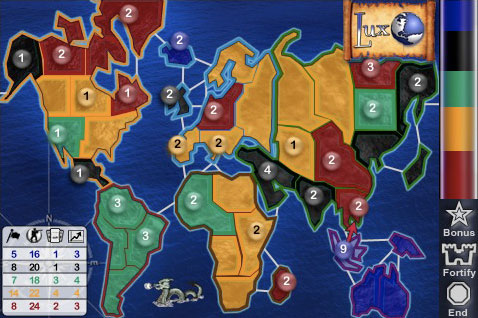
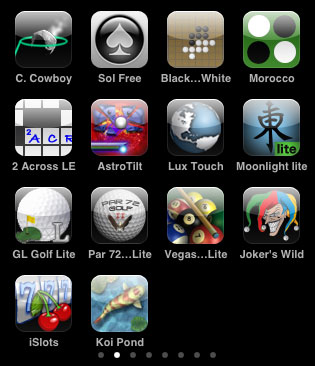
  This isn’t a camera-related app, but I like it enough to want to tack it on somewhere. I like those Risk games, but it’s nearly impossible to find good ones for free (even the paid versions are usually not very good). I had one for a while, but it was a pre-OS X app, and is no longer playable on my Intel Macs. But there’s a decent one for the iPhone for free: Lux Touch.


 ®
®


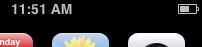 Something I got to test out when back in the U.S.: how much the iPhone’s 3G feature eats up battery time. The answer: lots.
















 But the second app I bought was a Japanese language study aid, a kanji flash card program called “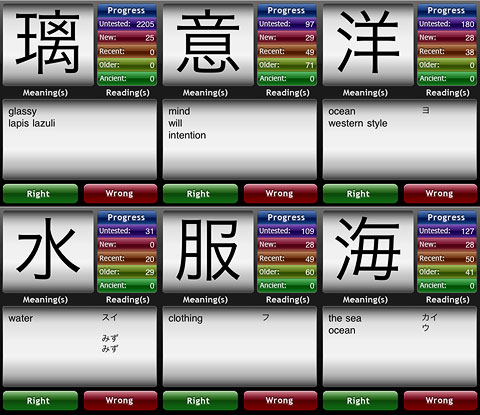
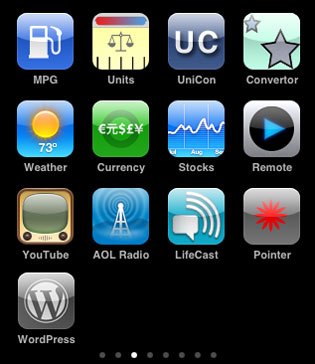
 It seems to work just fine; the last three posts were made using the iPhone. You can easily sign in to your blog, get the last x-number of posts (default is 30), edit posts, and make new ones. When you make a new one, you enter the title, decide a category and tags, and then tap out the post. You add pictures from the library or by snapping a photo on the spot, adding as many photos as you like.