Archive

Archive for the ‘Mac News’ Category

Black is Beautiful; or, $125 for Paint

May 16th, 2007 1 comment

TUAW pointed out something that I’d noticed before, but never tested in detail: that when you buy a high-end MacBook, you pay a premium for color. In the old MacBooks, there was at least a difference in hard drive capacities, though only a small one. But with the new set of MacBooks, you can configure the models so that all technical specifications are exactly the same, and the only difference that remains is color.

The price difference? $125. That’s right, Apple is charging people $125 for black paint instead of white paint. See:

Macbookcompare

Go ahead, try it yourself. All you have to do is upgrade the white MacBook’s hard drive to match the black MacBook. Quite a hefty surcharge for a dead simple, purely ornamental difference.

That said, the black finish on the MacBook is way cool. However, I don’t think that I could ever really bring myself around to paying that much for a color.

Categories: Mac News Tags:

New MacBooks?

May 15th, 2007 Comments off

The Apple Store is down, and it’s been heavily rumored that five new MacBook models–including possibly one or more ultra-slim, flash-aided, possibly LED-backlit 13″ models will be among them. Stay tuned.

Title Backsoon1

Categories: Mac News Tags:

No windows?

May 12th, 2007 Comments off

An interesting idea from a blog called Blackfriar’s Marketing: Leopard’s secret is that it will start doing away with windows. Not Windows, but windows–the interface element itself. In what would have to be the slickest, most ironic blow to Microsoft, Apple could be edging towards a new UI style that would either force Microsoft to rename their OS or stop copying Apple.

The argument is that many of Apple’s products already operate without windows per se. A good example is Apple’s Front Row, which is similar to what is used in Apple TV. Instead of a window, one sees one’s screen fade into an alternate interface. We have already seen that Leopard’s Time Machine software operates in the same way. And the Blackfriar writers point out that most of Apple’s apps already use a single-pane interface, giving iTunes and GarageBand as two examples (actually, virtually all of Apple’s iLife apps are designed that way, as well as some of its high- and low-end apps). The use of new Core animation and resolution independence could assist this new style.

It takes a bit of re-imagining to wrap your head around this idea. It helps to consider what a “window” is. The concept of a window comes from the fact that often times, what you want to look at takes up more space than is visible on your computer monitor. Say you have a ten-page document; clearly, you cannot display the whole thing on your computer while the text remains large enough to read. So instead, the area with the information is imagined as existing as a greater area than visible on your monitor, and the window acts as a frame through which you view the portion that can fit on your screen. This can never be fully done away with, of course. There will always have to be some window-like properties, where you have to scroll this way or that.

However, one can imagine this being done in a different style. For example, do we really need scroll bars? If we enter a word processor, could the entire document be represented in a translucent overlay to one side (similar to what we see in the side “drawer” in Apple’s Preview app when looking at a PDF file, for instance), which could replace the idea of a scroll bar? Maybe it could even pop up and disappear like the Dock so as to save space. Meanwhile, pages in full-size view could float up and down in virtual representation of pieces of paper–this would play right into the Core animation technology Leopard will bring. Things will probably move in the more natural, inertia-based style that we see demonstrated in the iPhone’s interface.

So, could all apps work this way? Potentially, yes, though it would require a thorough redesign for most apps. If this is indeed what is coming, then Leopard certainly would not be able to effect this change overnight. At the very least, it would have to allow the old-style interface to persist and have a place for as long as backwards-compatibility is to last. But that’s not too hard to imagine–a windows-populated screenscape could simply be another environment, something to switch to like one now switches in and out of the Front Row interface. Leopard’s new Spaces feature could even play into it, as the Blackfriar’s bloggers suggest.

One visitor to the Blackfriar blog brought up an excellent point, however: what if you want to view two apps simultaneously? This is a common working style for many people, to split the screen between two apps. The blogger responded to this but did not really answer the question. But I can imagine a solution, one that resolution independence could play into: simply have the apps reshape and share the screen–not overlapping necessarily, but splitting the screen’s real estate. Think about how Expose works, how the windows slide away from each other–but imagine that the parts are sized (or reshaped) so that there’s no dead space between them. Already some apps have toolbars and interface elements that reshape when you resize the window; that could happen if you “pane” two apps to share a screen together. Right now, if I want two apps to appear at the same time and have each one take up optimum space to fill up my screen, I have to carefully resize and place the windows. It would be nice if that could be done automatically, with no part of one app covering up any part of another one, and with no dead, wasted space between them.

Of course, this is all pure speculation. The Blackfriar bloggers point out that they are simply picking up on UI clues that Apple has used in some of its apps that seem to be signaling a sea change. But it is a fascinating idea, and could redefine things in a way that could make Microsoft Windows look like old hat–which could deal a serious blow after MS put five or six years of work into a new version of their OS which merely inched forward, while Apple’s OS takes huge strides. And such a significant UI change would be very hard for MS to copy and yet still claim that they are not completely ripping off Apple’s ideas.

Categories: Mac News Tags:

Mac Tip

April 25th, 2007 Comments off

If you use a Mac, you might use the Dictionary feature. By this, I don’t mean the Dictionary application, but rather the integrated feature where (available in many programs, but not all) when you hover the cursor over a word and hit the designated keyboard shortcut (preset to Control-Command-D), a little box will appear with the Dictionary entry in it.

This can be very handy in looking up definitions, but I find it most useful as an OS-wide thesaurus. Whenever I write a blog or prepare some other writing, I use it constantly.

The problem: normally, the word’s definition shows up when you hit the keyboard shortcut, and to get the thesaurus listing, you have to move in with the mouse and click the little menu at the bottom of the pop-up box. It takes time, and when you need synonyms as often as I do, it can be a real pain.

Fortunately, there’s a fix in which you can make the thesaurus come up by default instead of the definition. Here’s how to do it: Open the Dictionary app, then go to Preferences. You’ll see the Dictionary and Thesaurus listed (you can turn either or both on and off, by the way). The dictionary will probably be on top. Just click-and-drag the thesaurus to the top, then close Preferences. From then on, the thesaurus listings will always appear first.

Just a little tip. But I find the feature so useful I thought I’d mention it. And if you’re not using the integrated dictionary feature, then start using it: it’s very handy indeed.

Categories: Mac News Tags:

Leopard Delayed

April 13th, 2007 3 comments

So, it’s official. Apple’s Leopard will in fact be delayed until October:

iPhone has already passed several of its required certification tests and is on schedule to ship in late June as planned. We can’t wait until customers get their hands (and fingers) on it and experience what a revolutionary and magical product it is. However, iPhone contains the most sophisticated software ever shipped on a mobile device, and finishing it on time has not come without a price — we had to borrow some key software engineering and QA resources from our Mac OS X team, and as a result we will not be able to release Leopard at our Worldwide Developers Conference in early June as planned. While Leopard’s features will be complete by then, we cannot deliver the quality release that we and our customers expect from us. We now plan to show our developers a near final version of Leopard at the conference, give them a beta copy to take home so they can do their final testing, and ship Leopard in October. We think it will be well worth the wait. Life often presents tradeoffs, and in this case we’re sure we’ve made the right ones.

About three weeks ago, a site called DigiTimes predicted that Apple would be delayed until October. Everybody scoffed at the rumor, including me, because they got the other half of the rumor so badly wrong: they claimed that the delay would be caused by adapting Boot Camp to Windows Vista. So while it turns out that they were wrong on the reason, they were in fact right on the timing.

Reports say that Apple’s stock has fallen below $90 on the news, which is to be expected; the delay will disappoint a lot of people (not the least of which will be myself). On the other hand, this will end a lot of speculation about when Apple will tell everybody what those “top secret” features of Leopard are; that news will come at the WWDC in June. The bad news is also mitigated by the fact that while a Leopard delay is bad, it it much better than an iPhone delay; the iPhone is, for the time being, considered a much more important development by Apple. Another mitigating factor is the fact that Tiger is already a highly satisfactory OS, and while the features we know about in Leopard are nice, they are not yet something that people will miss yet–a positive side effect of not telling us what all of Leopard’s features are, I suppose.

This delay, however, has the effect of moving Apple closer to Microsoft’s sphere of incompetence; for a long time, Apple’s supporters (again, including myself) have been mocking Redmond for not being able to get a product out on time. There will no doubt be quite a bit of carping by Windows supporters about how Apple now sucks just the same. Of course, there are mitigating factors here, as well. One of them is the fact that this represents a delay of four months, not three years. Another is the fact that, as far as we know, Apple has not had to cut several key features of Leopard in order to get it out on time, as was the case with Vista. And finally, there will be the final release quality of Leopard: if it sucks like Vista, then there will be some justice to the carping, otherwise not so much. And, of course, there is still the fact that since Apple’s 2-year-old Tiger is still more advanced than Windows Vista, we can well afford to wait an extra four months for a new OS.

Let’s just hope that this is the last of the bad news from Apple for a while.

Categories: Mac News Tags:

That’s It

April 11th, 2007 Comments off

Apple regularly demonstrates genius in design. Their laptops inspire comments of awe when people first see them. Their consumer desktops are emulated industry-wide and decorate desks of innumerable computer users on TV shows and movies. iPods rule the music-player market, and the iPhone is a thing of beauty. So why is it that Apple can’t build a mouse that doesn’t suck big huge hairy ones?

Ever since the beginning, Apple’s mice have never been good. Attractive, often yes, but not of any quality that would make people want to use them. Remember the hockey-puck mouse sold with the first iMacs, the one which, since it was round, your hand accidentally rotated it so it wouldn’t respond properly? Who the hell designs a circular mouse and doesn’t see the design flaw in three minutes? Then Steve Jobs got stuck up on the idea that a mouse should have a surface unbroken by seams, and hasn’t been able to get over it since. It took forever for Apple to finally release a two-button mouse, and longer still to fit a scroll wheel into it.

Well, today I am officially retiring my Mighty Mouse. After having used it for six months now, it has proven to be nothing but a pain in the ass for me. I know there are people out there who like it, but I am not one of them. I tried, God knows I tried. But the damn thing just sucks.

I went over some of the major reasons four months ago. The scroll wheel was hard to handle, the rocking left-right clicking mechanism doesn’t work well, and the side buttons are very badly designed. Well, I eventually got used to the feel of the scroll wheel, and still do like the flexibility of 360˚ scrolling, but then I discovered a new common flaw: it gets gummed up after a while and stops working properly. This should have been obvious to a skilled designer: after all, the whole reason we switched to laser mice is because the sensor wheels that drove the old ball mice would get gummed up by hand grime. It was a pain to have your mouse always become less and less functional, and to have to remove the ball every month or so and clean the rollers with your fingernails or some other sharp object. So what does Apple do? They create another ball-controlled object on their new laser mice, except that this one can’t even be removed for cleaning! Instead, you have to take a cloth with cleaning solution and roll the ball with that, and hope that it cleans the works sufficiently. Every month or so. Sorry, I gave up on ball mice to get away from that crap.

The left- and right-clicking mechanism is something I never got used to. I still have trouble with it, so that every 10th click or so is the opposite of what I intend. Message to Apple: put a goddamned seam in the thing like every other mouse maker on the planet, so the buttons will work properly for everyone.

And the side buttons are even worse than I thought. Aside from being hard to activate as I reported before, I found that they will activate for the wrong reasons. One mouse move I often make is when I am clicking-and-dragging and I run out of desk space before I get the cursor to where I want. When that happens, I lift up the mouse while continuing to hold down the left mouse button (such as it is), put the mouse down in a new position with more room, and then continue to move in the same direction. Doing this requires you to hold on to the sides of the mouse tighter in order to keep the left button depressed–which then activates the side buttons, with whatever function you have assigned to them, whilst simultaneously losing your click-and-drag. Bad, bad designing.

But it gets worse. The batteries run out all too quickly, and there are three different annoyances associated with that. First is that the Bluetooth software on the Mac OS is designed to flash incessantly in your menu bar to warn you of a low battery in your mouse and/or keyboard. I tried to turn this off and couldn’t get it to work. Bluetooth prefs allow you to turn off showing Bluetooth status in your menu bar, but mine would not frakking go away, even after restarting the computer. And I despise things flashing on my screen. What’s more, the flashing would start a good two weeks or more before the actual battery failure, so if I followed the warning immediately I’d be throwing out batteries with a good deal of juice still in them.

Then comes the problems associated with changing the batteries. The Apple mouse has an on/off switch which is badly designed. It doubles as a cover for the laser sensor, but because of the way it’s designed, it is virtually impossible to close the cover and turn off the mouse without accidentally clicking the mouse a few times before it turns off, thus screwing up wherever you left your cursor.

And then, when you put new batteries in and turn on the mouse again, it is not recognized immediately by the Mac. The first time I did this, I waited ten minutes for the computer to recognize the mouse, and it didn’t work. I tried turning the mouse off and on again, putting it closer and further away from the computer, I tried leaving it turned on in place for five minutes–nothing. (And yes, I had Bluetooth set to Discoverable, and the mouse was in the Favorites list.) Instead, I had to use Bluetooth File Exchange to browse the mouse back into recognition, and to do that, I had to dig up another mouse and plug it in first. Bad, bad, bad design.

I finally had it up to here with the damn thing, and after the hundred-thousandth mis-click, I just set the thing aside and plugged in an alternate wire mouse that I usually use at school (Spring vacation gives me another month before I have to buy a replacement for that). The Mighty Mouse will serve as an emergency backup, or I might use it as an alternate mouse at school.

Now, the other Bluetooth mouse I have, the Logitech V270, that works beautifully. Why can’t Apple just color the thing white and use that? Would it really kill them?

Categories: Mac News Tags:

Tiring of Fake Mac Virus Stories, Media Jumps at Fake iPod Virus Story

April 7th, 2007 Comments off

The new story out: viruses attack your iPod! Errr… sort of. The report is that a virus app called “Podloso” now can affect your iPod directly. Providing, of course, that you are a stupendous idiot. It’s yet another proof-of-concept virus:

“We’ve seen it happen over and over in the malware world. Someone will do a test, creating a simple thing that does no real damage. Once hackers see that the approach works, they continue to tweak it and use it for malicious intent,” said Dee Liebenstein, director of product management at SecureWave, a Luxembourg vendor of security software that helps companies control when and how portable devices connect to corporate computers.

Gee whiz, another security company being the source of a bogus Apple virus threat–who’da thought?

The “approach” for this virus that hackers will follow? Well, first you have to install Linux on your iPod. Then, if the virus is on the iPod, you have to intentionally run the virus. Yeah, that “approach” should work just great! All hackers have to do is trick iPod users into installing the Linux operating system onto their computers and then installing and loading the virus after that. No problem!

The article then mentions that iPods carried a Windows virus last fall; even though they added the caveat that such a virus doesn’t actually infect or affect the iPod itself, the addition of this information in an article about an iPod “virus” only adds to the misconception that something is going to affect their iPod. In truth, the iPod as sold is completely unaffected, as it was with the Windows virus.

The problem with these “proof of concept” viruses for Apple products is that, at least so far, all of them require the user to both have some kind of unusual setup on their product, and then after that, do something monumentally stupid in order for the “virus” to work.

Plus, we’ve been hearing these reports of waves of viruses coming to Apple products for quite some time now, and still nothing has materialized. It was two and a half years ago that the rootkit “Opener” was announced, and two years since Symantec announced that “it is now clear that the Mac OS is increasingly becoming a target for the malicious activity that is more commonly associated with Microsoft and various Unix-based operating systems.” Almost a year after Symantec’s panic warning, the “first” Mac “virus” came out, except that it was actually a trojan, and required someone to click on an image and the type in user authentication to run it. If I recall correctly, all of one people were affected by it.

Viruses will eventually come for the Mac, and maybe even someday for the iPod. However, don’t let these scare articles released by self-serving anti-virus vendors trick you: so far, there is still no malware out there for Apple products that actually works worth a damn.

Categories: Mac News Tags:

An Old Gunfire Cliche, with an iPod Twist

April 6th, 2007 Comments off

You’ve heard the story a thousand times: someone is hit by a bullet aimed at their heart, but an object in their breast pocket (usually a small bible, but also some other item such as a lucky coin, a locket, or some such) stops the bullet and saves the person’s life.

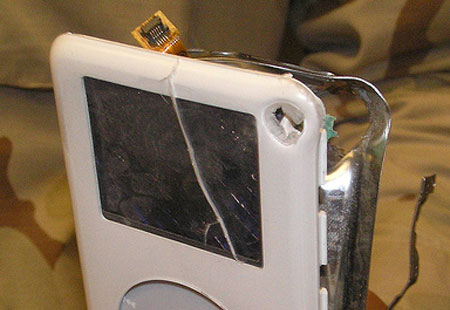
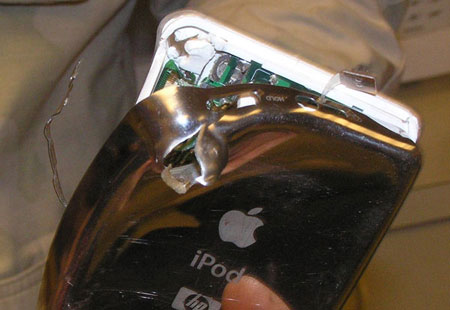
Well, here’s the 21st century telling of the tale: an iPod stops the bullet. U.S. Army Sergeant Kevin Garrad of the 3rd Infantry Division was on a street patrol in Iraq. As he rounded a corner, he came face-to-face with an insurgent. Both men open fire at near-point-blank range. The insurgent was killed, and Kevin almost was: the insurgent’s AK-47 fired a bullet which, at that range, probably would have penetrated his body armor–except that his iPod, in his left breast pocket, took the bullet instead, slowing it down enough so the MP3 player likely saved the soldier’s life. Photos from tikigod at Flickr:

Ipodbullet3

Ipodbullet2

Ipodbullet1

I don’t even have to speculate as to whether someone at Apple will see this and send the guy a new iPod: apparently they did, and they will.

Cool.

Categories: Iraq News, Mac News Tags:

It’s a Long Wait Until June

April 3rd, 2007 Comments off

Humor me. I’m going off on another Mac-is-great rant. For those who tire of this, movealongthere’snothingtoseehere.

Well, okay, so June is only a little more than two months away (if it will take until June, as many are now reporting). But in two months, something come out that I am very excited about. Specifically: Leopard. But not just Leopard: also iWork, with (most likely) a spreadsheet app that will complete the suite as an alternative to Microsoft Office, and the next version of iLife. Supposedly the suite is coming out in June, possibly June 11th. According to the lethargic and yet usually well-sourced ThinkSecret rumor site:

“Leopard is shaping up to be a more significant release than anyone expected, with much more to come than any of the developer builds have led on,” one source said.

Also scheduled for a June release now are new versions of Apple’s iLife and iWork suites, which will pack extensive Leopard-dependent features. Sources say Apple continues to toy with the idea of bundling one or both suites with the new operating system free of charge in an effort to further play up the extra value and features Mac OS X offers over Microsoft’s new Windows Vista.

… Apple’s next version of iWork, meanwhile, is poised to compete even more directly with Office with the addition of a new spreadsheet application.

One has to wonder at what Apple has up its sleeve. I have become convinced that Apple does indeed have something rather special. I refuse to believe that Steve Jobs would talk up “Top Secret” features, let rumors build for 6-9 months, and then say it was all a gag and Apple has only a tepid upgrade to release. That would be incredibly stupid, and Steve Jobs is not incredibly stupid. Obstinate, secretive, obsessive, and perhaps even egotistical, yes. But not stupid.

And if the rumor is right and Apple actually decides to sell Leopard with iLife and iWork bundled, it’s my belief that they would have a blockbuster on their hands. For just $30 more than the lowest upgrade-level pricing for Microsoft’s most-disabled version of Vista, you would get a full-featured OS at least 2-3 years ahead of Vista, bundled with most of the software you’d ever need for a computer–including an office suite comparable to what Microsoft is selling for $340. And all this would come free with the purchase of any Mac.

Bundling in iWork would be the finishing touch. When I compare a Mac and Windows purchase for my students, I always have to add a few hundred bucks for the purchase of an Office suite, as they need Excel, and can get Word and Excel bundled with most PC purchases. If I could tell them that they could get a Mac and that a full office suite–including presentations software (not offered in the PC bundle, you have to buy PowerPoint separate)–would be bundled with it, that might be enough to make even more of them decide on the Mac purchase instead of the PC.

Think about it: here’s the list of software that would come with Leopard, with most of the listed apps being integrated for cross-functionality:

  • Pages (word processor, Word-compatible)
  • Keynote (presentation, PowerPoint-compatible)
  • Numbers/Charts (spreadsheet, Excel-compatible)
  • iTunes (music/video media center, iPod Syncing)
  • iMovie (video editor)
  • iDVD (video DVD creator)
  • iPhoto (digital photo cataloging/editing)
  • iWeb (web page editor/publisher)
  • GarageBand (music publishing software)
  • Mail (email)
  • Safari (browser)
  • iCal (calendar software)
  • iChat (text/audio/video chat software)
  • Address Book
  • Time Machine (backup/recovery)
  • Dictionary
  • Dashboard / Dashcode
  • Accessory apps: PhotoBooth, Front Row, QuickTime, TextEdit, DVD Player, Preview, Automator, Applescript, and more

That would be one hell of a lineup for a $130 purchase. And even without the fact that Boot Camp and/or Parallels lets you run all Windows apps on your Mac, that whole package bundled with every Mac would shoot down most complaints about software not being available for the Mac. Most of the software that most people would ever use would come free with the machine!

If Apple does it right, of which there’s no guarantee. Still, one can dream, yes?

Categories: Mac News Tags:

So… Where’s Leopard?

March 23rd, 2007 Comments off

The Apple TV is shipping, and we know most there is to know about the iPhone, which should ship in mid-June. Aside from new releases of Mac systems (including 8-core Mac Pros and perhaps-redesigned iMacs), the only big mystery expected from Apple is Leopard, OS X 10.5. The mystery contains two elements: when will it be released, and what are those “top secret” parts of the OS that Steve Jobs teased about last year?

Unless Apple is going to seriously undermine everyone’s confidence in them by announcing a delay in the release of Leopard, especially this late in the game, Leopard will come out no later than June 20th. Apple is still now promising a “Spring” release of the OS, and has given no indication that it will miss that range. Speculation is rife over when the release will be, and all bets are off on Apple following established patterns because this OS has a very different paradigm–those aforementioned “secret” features.

Some are saying that a release is imminent because Apple just released OS X version 10.4.9, and in the past two versions of the OS, the big upgrade came within six weeks of the last incremental upgrade.

Others, however, point to the fact the developer’s releases of OS X (the versions that software makers get so they can prepare their applications to work with the new OS as soon as possible after its release) are still way too buggy, and that these problems could not possibly be ironed out before June. Some have even suggested that Apple will miss spring altogether and won’t release until July or later.

But the “secret” features throw a wrench into this speculation. Apple is definitely keeping this very hush-hush, and there is almost certainly something significant going on that we haven’t heard about yet. Apple proved they could keep stuff quiet with the iPhone–no one predicted that one correctly before Jobs unveiled it–and if Jobs was exaggerating and the “secret” features are just a minor bell and whistle here and there, there will be massive disappointment.

So assume that there are fairly substantial features about Leopard yet to be revealed, secrets Apple wants to keep as quiet as they kept the iPhone before January. That means they could not send these features out in the standard developer’s builds. Despite NDAs (non-disclosure agreements), anything that comes out in developer’s builds almost instantly gets leaked to rumor sites.

What does that mean? It means that Apple is building the OS along two lines: the secret-feature-free standard developer’s builds, and the internal build at Apple which has all the secret features built into it. This is not a new idea; after all, Apple had Intel-compatible builds of OS X running for years and developers never got wind of those.

Such an internal build would explain why developer’s builds are still so buggy: as the secret features become more and more integrated into the final version of the OS, the developers get less and less of that part of the OS, leaving them with outdated chunks of the OS which will still be buggy. So buggy developer releases don’t reflect the status of the actual OS, and Apple could still release Leopard at any time.

Some have argued that this is not possible because Apple would get pummeled with criticism if they suddenly released the OS in such a different form that it would ‘break’ current versions of developers’ applications. However, that doesn’t have to be the case. After all, most new OS releases will work fine with past software; while many programs do need to be updated with new OS releases, Apple’s secret features do not need to be program-breakers. Apple is, hopefully, releasing enough in the developer’s builds to allow software makers to make their apps work with Leopard.

Of course, like everything else, the above is pure speculation. Apple will release Leopard when it will release Leopard. We just have to wait, is all.


One note: Ars Technica reports that Leopard will not allow “InputManager plugins” anymore. What are those? For me, the main significance is that they’re the things which allow browser plugins such as PithHelmet and SafariStand to work. Why is Apple (maybe) doing this? Security. Apparently, those InputManager plugins are how many of the attempted security breaches are exploited.

If this is true, that will be a major disappointment for me. Yes, the new Safari features will be cool, and I’ll want them… but the price will be high: PithHelmet blocks ads and Flash animations in Safari, something I have become very enamored of; SafariStand brings back all the windows you had open when Safari last quit or crashed, and though I’ve had that for only a short time, I will miss it very much. The new Safari will be cool, but it will also be ad-ridden and annoyingly animated. Argh.

Hopefully, these mods will be redesigned so they can still do the same thing in some other way, but even if that happens, it may take a long time for that to come.


Update: New rumor says that Leopard will be delayed until October. The source has been known to get some rumors right, but this one sounds so utterly fake that one would have to be the most naive person on the planet to accept it. Why? Because the stated reason is:
Apple is expected to launch its next generation Leopard operating system (OS) in April, but according to industry sources, the release of the new OS will be postponed to October to allow Apple to make Leopard support Windows Vista through an integrated version of its Boot Camp software.

And that’s got to be the dumbest rumor I’ve ever heard. Apple holding up its latest and greatest OS, the OS that will support the iPhone and multiple other apps and hardware, push all of them back at least four months… just so 1% of the user base can install Vista on their Macs? Please.

Categories: Mac News Tags:

Boot Camp Ease

March 13th, 2007 1 comment

A student of mine bought a Mac Mini, and asked for my help installing Windows XP via Boot Camp. Glad to help a new Mac user, I agreed–and was surprised at how easy it was.

When I had heard that Boot Camp would need to partition the disk to allow space for XP, I naturally assumed that the entire hard drive would have to be wiped and that both the Mac and Windows OS would have to be installed from the start. This comes from my history of formatting disks, which (and perhaps I was in error in assuming this) I could swear required blanking the whole disk first. Apparently, hard disks can be repartitioned on the fly today; you don’t have to wipe the drive or re-install the Mac OS.

In fact, the entire process was painless, save of course for the tedium of the Windows installation. Not only does it take longer than a Mac OS install, but it requires intervention at various times in the process, so you have to stick around and watch the screen, else risk having it stay at 33-minutes-to-go while it waits for you to enter the registration code, while you are somewhere else believing that the process is ongoing. The Mac OS install, last time I checked, required no such intervention. Just let it go.

The process is pretty easy: create a CD with drivers for Windows; decide how much disk space to dedicate to XP; install XP; then install the Mac drivers from the CD you made. And you’re done.

Simple. Like most stuff with the Mac. It reminds me of conversations I’ve had with people about printers lately. By chance, I have had discussions with different people using Windows, and the difficulties they have had with their printers. A few can’t get their printers to work with Vista. One risks losing the ability to print every time she disconnects the USB cable. And so on.

A student who recently bought a Macbook came to me for their Mac starter lecture, and I wanted to show them how easy it would be to create a driver. In my experience, you had to open the Print system preference, click the “+” button, select the printer from the list, make sure the driver selection was right, and then click “Add.” At that, it’s dead easy.

But his Mac surprised me. All I had to do was plug in my Canon i560, and viola–it appeared in his printer list without his having to lift a finger. We didn’t even have to open the System Preferences–it was just there. Plug it in and it works. My student with the Mac Mini got the same thing. Easier than dead easy. The same kind of thing happened to me when I wanted to print using the school’s Fuji-Xerox color photocopier. I’m not talking about a standard printer, I’m talking about a full-fledged, honking-big office copy machine. Our guy in the office told me that I would need a special driver from the company; certainly a Windows machine would need that. But all I needed was to plug in my Mac, open the Print pref pane, look for the printer on the IP network, and seconds later I was printing in color.

I should probably take the opportunity here to mention a pitfall in my constant crooning about Macs: they do suffer from problems. I get the feeling that people who listen to me and switch to Macs (more and more people do so at my school) get the impression that there is never any difficulty, that you never encounter problems. Of course, that’s not the case.

But most of the time, it’s so damned easy to work with that it’s easy to forget that.

Categories: Mac News Tags:

Apple vs. Dell

March 2nd, 2007 1 comment

This news sent Apple stock rising:

Sales of Apple Inc.’s Mac line of personal computers saw year-over-year growth accelerate over 100 percent during the month of January, with revenue growth rising even further, according to Pacific Crest Securities.

In a brief research note distributed to clients on Thursday, the firm cited NPD market research data which implies that year-over-year growth in Mac unit sales accelerated in January to 101 percent, up from 55 percent in December.

Meanwhile, a rise in the average selling price (ASPs) of Macs is reported to have driven even greater year-over-year dollar sales growth of 108 percent during the same time period, again, up from 55 percent in December. …

Hargreaves said that sales of Mac notebooks grew 194 percent year-over-year in January with a rising ASP that drove 221 percent revenue growth in the segment.

“January was the third-largest revenue month for Mac notebooks ever,” he added.

Meanwhile, Dell stocks tumbled at this news:

Dell reported a 33 percent drop in fourth-quarter profits, slightly ahead of expectations. But the No. 2 PC maker’s sales figures came in below estimates, and Dell warned that growth and profit margins will remain “under pressure” for the next few quarters.

Shares of Dell … fell 2 percent in after-hours trading on the news. …

“Both desktop and notebook sales looked weak,” said Bill Fearnley Jr., an analyst with FTN Midwest. “The notebook number was especially anemic given the overall strength in the category.”

This does not overly surprise me. Even though this is completely local and anecdotal, my workplace has been undergoing a Mac tidal wave. When I first came here in 1998, I was the only one in the building who owned a Mac. That continued for years, but recently it seems that everyone is getting a Mac. Out of the full-time faculty, 5 of the 7 have Macs (two bought in the past few months), and one more is on the verge of buying. A part-time member just bought a Mac a few days ago, and four or five of my students have also bought Macs.

Like I said, completely local and anecdotal. And yes, I do work in education. And yet, it does represent a significant change from the recent past, and I think it does demonstrate how the Mac has new appeal, especially due to the ability to run Windows.

Categories: Mac News Tags:

iPhone Rundown

January 10th, 2007 1 comment

Sean has an excellent piece spelling out what’s fantastic about the new iPhone; go check it out. And while we’re at it, maybe we can start a petition to get Cingular to start servicing his town again.

Categories: Mac News Tags:

Not in the Stevenote

January 10th, 2007 4 comments

I mentioned a rather glaring omission from the keynote last night/this morning, which was Leopard, and upon review, the keynote also did not talk about iLife, nor did it talk about iWork and the anticipated new spreadsheet software.

In fact, the keynote made no mention of software at all. Nor did it mention any upgrades to computer lines. Just the iTV and iPhone.

That’s something. It is doubtful that Apple has nothing to present along software and PC hardware lines. Which means that Apple probably has a new announcement waiting to be made at some point. After all, when are we going to find out about those “top secret” points about OS X?

One interesting detail about the iPhone that was not mentioned by the keynote bloggers was the screen resolution: 320 by 480 pixels. The 3.5-inch screen beats Zune’s “big” 3-inch screen, and has a better resolution–double, in fact–than the Zune’s or previous iPod’s 320 x 240 pixels.

Question: what will happen to existing iPod lines? Will there be no widescreen, touch-controlled iPod without a telephone? That would seem foolish. Will it include WiFi and/or Bluetooth? Will it have all the features of iPhone, but without the phone?

No time to go on about this–gotta get ready for work. More questions and speculation later…

Categories: Mac News Tags:

Stevenote

January 10th, 2007 6 comments

I have to get to bed as soon as I can (it’s after 2 am here in Tokyo), so I might actually miss out on the last part of the keynote… but for me, it won’t matter too much, as I’ll just wake up and see it then. But so far, the MacWorld Expo Keynote is showing good news. And Wall Street seems to expect good news–even before the keynote started, Apple stock was up more than $2, and it’s still rising moment by moment. I wonder what it’ll do when the Apple phone is announced.

The news so far: contrary to a prior “study”, iTunes Store sales are not slowing down. They have gone up, rather sharply in fact, with more than 2 billion total tracks sold, 5 million more sold each day. 50 million TV shows sold. That’s not too shabby at all. And finally Steve announced a new studio signing on for movie sales–that would be Paramount–although many expected more studios to be signing on as well.

Then there’s less-than-stellar news, about the Apple TV (formerly “iTV”), with the expected WiFi-n superfast streaming from up to 5 computers in the house. TV shows, movies, music, pictures can all be streamed through to your TV and stereo system, temporarily residing on the Apple TV’s 40 GB hard drive. But that’s it. The ability to stream wirelessly from computers to your entertainment system. No rental-movie scheme. I don’t get it. Why spend $300 on that?

Apple stock just dropped $2! They must agree with me that the iTV is a bust.

But now Steve has dropped a bombshell: he announced the widescreen, touch-controlled iPod, the iPhone, and a third “Internet communications device” all in one swoop! Edit: it looks like they are all the same machine.

First, the iPhone (yes, “iPhone”): it uses an intelligent, next-generation touch-screen interface. It runs OS X. The screen displays 160 pixels per inch, 11/16ths of an inch thick, proximity sensor (to tell if it is near your face), orientation sensor to tell if it is held in portrait or landscape mode, 2 MP camera built in. And an iPod, of course–as well as just about everything else on OS X. Beautiful interface.

0109-Iphone1

0109-Iphone2
Photos shamelessly ripped off from Engadget.

Apple stock just jumped $2.50. And rising.

The iPhone is a “quad-band GSM + EDGE phone,” whatever that means. It has both WiFi and Bluetooth 2.0 (eat that, Zune!).

0109-Iphone3

0109-Iphone4

0109-Iphone5

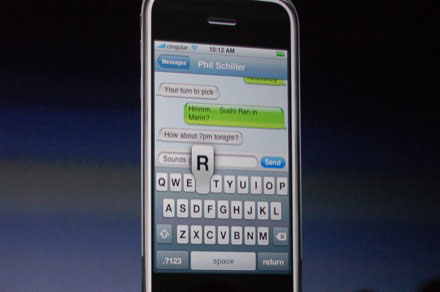
And yes! It has a keyboard interface that makes sense! No more hitting a numeric key seven times to produce a single letter! I am getting one of these babies!

The Zune is now officially dead. No way it can overcome this.

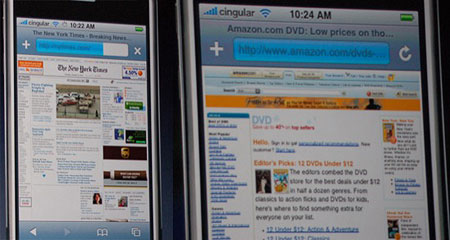
The iPhone uses Safari (excellent web surfing, with zoom feature), widgets, Google Maps (including satellite images), POP3 and IMAP email, WiFi and “EDGE” networking (EDGE gets up to 384 Kbps Internet connection). Photo gallery, all sorts of software… this is like a mini-computer.
0109-Iphone6

0109-Iphone7

[Holy crap–unless someone’s playing a gag on me, John Varley just left a comment in a past entry. What a night!]

Apple’s stock is flying–up $4.12 for the day so far, rose $2 in the past ten minutes–after Steve checked it on the iPhone and it was at $2.43.

A month ago, when Kevin Rose speculated that the iPhone would sell for $250 (4GB) and $450 (8GB), I wrote: “Frankly, I don’t know about paying $450 for a cell phone; it’d have to be pretty goddamned spectacular.”

Well, it’s pretty goddamned spectacular. And I would drop the cash for one right now.

More: Bluetooth means you can use Bluetooth accessories, like wireless headset. 16 hours battery life for audio, 5 hours using the video screen/phone.

And here’s the price: more than expected, it’s $500 for 4GB, $600 for 8GB. Still well worth it.

The first bad news: due to FCC and other regulatory roadblocks, it won’t come out until June. I was just about to type that I know what I’m gonna get for my birthday… when I saw that it won’t be out in Asia until 2008. Damn!!!

This will be one device I will know the most about and anticipate more than anything else… and still will have to wait a year or more before I can get one. Argh.

I just realized that the 2 hours are nearly up and Leopard hasn’t even been mentioned yet.

If there’s more, it’ll have to wait. I gotta get to bed. Good night.

Categories: Mac News Tags:

More Free Mac Apps

December 20th, 2006 Comments off

Let’s look at a few Safari add-ons this time. By itself, Safari is a good browser, but has very large, gaping holes in its features. For example, being unable to shut down flash animations or animated gifs; that’s a deal-stopper for me right there. Fortunately, there are two very powerful helper apps available for Safari.

PithiconThe first is PithHelmet. Described on its site as “an ad blocker for Safari,” it does much more than just that. But in that primary role, it does a great job. Just install PithHelmet, and pretty much all of those annoying, flashing, jumping ads simply evaporate. You can go with just that, or you can delve into the PithHelmet menu or preferences and start really controlling how your web sites appear. The add-on will allow you to set very specific preferences for each and every site that you visit. For example, if you want Flash on by default but one site you enjoy annoys you with non-advertising flash animations (ads will be blocked anyway), then you can turn Flash off for that site only. Or the reverse–if you have animated images turned off by default but you want to see them move on this or that particular site, PithHelmet allows that. In fact, each site can be customized by a few dozen settings. PithHelmet is $10 shareware, but you can use it for free by clicking “I paid” in the preference pane. I paid for it, it’s such a good add-on.

SafaristandiconThe second app, which I just recently found, is SafariStand (why these guys can’t put spaces between the two words of the app names I don’t know). SafariStand also has a good number of features. The two I use most are the ability to make “open in new window” links open to a new tab instead, and the ability to remember all the web pages you had open when Safari unexpectedly quits (something which happens more than I’d like). One feature I don’t use but is often cited as cool is the ability of SafariStand to create a sidebar with thumbnails of all the pages you have open; it acts like a graphic tab bar, and allows you to switch to or close any tab open in the window. SafariStand also has powerful search tools for your bookmarks, surfing history, and html documents on your computer. It also adds some extra preferences, like killing gif animations. You can even use the period and comma to toggle through your open tabs–but only if keyboard actions are not pointed at the address bar or some open text area. More is explained in these reviews here and here. SafariStand is free.
Both of these add-ons used the SIMBL method. Install PithHelmet first, and it’ll install SIMBL for you. That might make installing SafariStand easier.

For more on pimping up of your Safari, visit the appropriately-named Pimp My Safari.

I know that some of you will say that Firefox does most or all of this and does it better, and so on. Maybe so, but I did try Firefox, several times, using the extensions people pointed to and whatever else I could find on the Mozilla site, but in the end, it just didn’t suit me right, and there were too many problems. With Safari, the interface is just how I like it, and with these two simple add-ons, I can get all the alterations I want or need… for the moment.

Categories: Mac News Tags:

Apple Rumors

December 16th, 2006 Comments off

I think that I should build a widget that counts down the number of days until the iPhone and touch-screen video iPod will be released. The widget would display a different random number every four hours.

Today marked the release of many new rumors. This includes a hot rumor from a highly untested, not to mention vague, source: “Gizmodo Knows: iPhone Will Be Announced On Monday. I guarantee it. It isn’t what I expected at all. And I’ve already said too much.”

So far, everyone is taking this with a grain of salt approximately the size of Montana. Some people are even hedging that announcement to mean that it might not be next Monday, but some later Monday, which would be incredibly lame.

Think Secret, on the other hand, says that the release will be delayed, and is releasing yet another contradictory set of specs relative to earlier rumors. They say the iPhone will not be 3G, but instead will be 2.5G, and that Apple is trying to get carriers not to subsidize the iPhone, else it will become a simple “commodity.” They also say that it should be considered more an iPod with a phone than a phone with an iPod.

In the meantime, expectations are again high for Mac sales next year.

Categories: Mac News Tags:

Stupid

December 15th, 2006 1 comment

Apple stock fell almost $3 on news of a report that Apple’s iTunes Store sales of music are “plummeting,” falling 65% over the past year. This report is stupid for several reasons.

First, the study did not measure overall sales; it measures only sales of “2,791 U.S. iTunes debit and credit card purchases between April 2004 and June 2006.” (This is not noted in most media articles.) Not all sales, not all types of sales, and not sales worldwide. In other words, a tiny and probably non-representative chunk of Apple music sales.

Second, the drop is measured by taking the peak sales number to compare by, and does not give a sense of the overall trends. Furthermore, the peak took place in January, after many people were given gift cards, and the “present” lull was actually last June, not necessarily a high sales month. Measure the sales in January 2007 and then you might have something.

Third, Apple does not profit much directly from iTS sales; it makes little difference to Apple whether people buy from the iTS or rip the music from purchased CDs, or even load pirated music onto their iPods–the key numbers for Apple are the sales of the iPods, which are booming.

The report as quoted in the media is alarmist, distorting, and out of context–and caused Apple’s stock to drop 3%. Like I said, stupid.

Update: I wrote this last night, but only uploaded it this morning (at my folks’ house, for some reason a blog entry won’t post if I do it from a WiFi connection, so I have to plug in an Ethernet cable to alter the blog). Since then, a new report from PiperJaffray blows the Forrester “study” to bits, noting Apple iTS sales growing steadily based upon sales milestones which Apple reports. The new report says that iTS sales have increased 78% between September 2005 and September 2007. Here’s another report from ZDNet also debunking the report.

Update 2: Now the writer of the report is backtracking, saying that he did not mean that Apple sales were “plummeting,” but that the media blew it all out of proportion. The writer says, “Now for the record, iTunes sales are not collapsing. Our credit card transaction data shows a real drop between the January post-holiday peak and the rest of the year, but with the number of transactions we counted it’s simply not possible to draw this conclusion… as we pointed out in the report.” He further clarifies by making most of the points I made: the data is partial, it measure a peak vs. the rest of the year, and Apple makes money from the iPods, not the music store.

Told ya!

Nevertheless, it took this joker a day to clarify himself while Apple’s stock tumbled 3%. Possibly because he recanted, and partially because it was clear to anyone who thought about it for a minute that the report was not worth paying attention to, Apple’s stock has since risen back to 30 cents above where it was when it fell yesterday.

Update 3: While more and more reports question the original story, and even the report’s author is debunking the media’s spin on it, some in the media–major news outlets, in fact–a few days later, are still running with the original and now completely discredited slant. Amazing.

Categories: Mac News Tags:

First Hints at the Top Secret Stuff?

December 12th, 2006 Comments off

When Steve Jobs unveiled Leopard a few months back, he said that he was leaving some stuff out, some “Top Secret” information kept that way so that Microsoft wouldn’t have the chance to copy it so soon. Most people doubted that this was the real reason; even if Microsoft will copy the hidden features (which they probably will, eventually), it would have been far too late for them to have incorporated the changes into Vista, and there will be way more than enough time after Leopard’s final release for them to still copy the features in the next version of Windows a few years down the road.

So why was some stuff top secret? Probably most of it has to do with upcoming product releases that Apple wants to keep secret for the time being, including the iPhone and some aspects of iTV, and perhaps even the rumored fullscreen iPod. Releasing some OS details may have given away too much about these items.

Other reasons could include Jobs keeping some juicy stuff saved for the January MacWorld Expo, a new strategy for keeping people interested in a product by stringing out descriptions over time (like with the iTV), or even because the features are unfinished and might not look good enough to release yet.

That last reason may be the one behind keeping the new OS’ interface changes secret. One of the rumored changes in Leopard is the Finder; many have hoped that Apple would “FtFF” (“Fix the Fracking Finder,” so to speak), and perhaps overhaul the overall appearance of the OS. There have been subtle hints about this–new styles applied to iTunes, and small imperfections of the GUI in developer releases of Leopard.

But today there is a rumor that reveals a little bit more: that the UI will have an all new name, to replace the “Aqua” moniker given it from the start. The new name is supposedly “Illuminous.” No details on the new look except for a report that the latest build of the OS incorporates more “black gloss” than might be expected. Though how black gloss might go along with the idea of illumination is anyone’s guess, and suggests that these rumors are either partially or fully untrue or that we’re really missing the big picture here.

Whatever the case, it is probably true that Apple has two lines of OS releases: one that is going out to developers, and one that is kept in-house, which has the “secret” features. The developers’ version is likely to have a certain amount of placeholder stuff (explaining some of the graphic rough edges), with only the parts of the secret stuff which are absolutely necessary to build into the OS being incorporated until Jobs is ready to spill some more beans.

Categories: Mac News Tags:

What Is iTV?

December 11th, 2006 2 comments

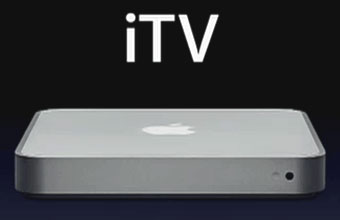
Itv-SmallSometime early next year, Apple will start selling a new item, aside from (possibly) the iPhone or touchscreen video iPod. Oddly, this was announced a few months ago–something that is almost never done by Apple, previewing an upcoming product. But as with Leopard, not everything was revealed about the product. Here’s what we’ve been told:

The set-top box will sell for about $300. It will have ports in the back for component (RCA) video and audio, USB2, Ethernet, and optical audio. It will come equipped with WiFi. It will be able to automatically locate any computer in your house on the network (wireless or Ethernet), and stream photos, audio, and video between the computer(s) and the set-top box. There is a control interface similar to Front Row. “iTV” is not its real name, just a placeholder.

The idea as stated so far is that the unit will be like a media center and allow you to control all the media on your Mac (or, presumably, any other iTunes-connected computer) and see it or hear it on your TV and stereo system.

Now, just that alone doesn’t really sound too spectacular; the same could be accomplished by using Front Row and hooking up your Mac to your TV/stereo with cables. Even if your Mac is too far from your TV to do that, would you still want to pay 300 bucks just to stream like that?

But there is more. For example, the WiFi is not specifically identified, but all new Macs for several months now have come equipped with a new WiFi protocol called IEEE 802.11n; existing protocols can send data at a max of 54 Mbps (6.75 MB/sec), while 802.11n can send at between 2 and 5 times faster than that (potentially as much as 10 times faster, eventually). But the WiFi-n is not activated–it was kind of slipped in there quietly by Apple, and will likely be turned on at some near-future date. It is a no-brainer that this is being done, at least in part, to prep for the iTV.

But the big speculation is over what Apple isn’t telling us. Obviously they’re leaving something out. The iTV as described is very unimpressive, and it would be hard to believe that Apple could sell too many.

However, two missing details could give a hint as to what Apple might be planning. First is the question of a hard drive, which would allow the box to do more than just streaming. And the other would be how strong the DRM is on the box, making it a possible home for more than just ordinary video. These are big items if you want to see the unit as something worth all the secrecy and development.

In discussions with my family, one possibility came out as a good possibility: a new rental video system. The old Blockbuster-style brick-and-mortar system is beginning to die. Some people would rather pay a bit more at Wal-Mart and own the movie. Others use the alternative Netflix. But both rental paradigms have drawbacks. Brick-and-mortar rental shops often have OK availability, but you have to travel back and forth to the shop, and everyone hates the time restrictions and late fees. Netflix does away with both of those problems, but availability can be a huge problem with them, and turnaround time using the postal service can take days.

Imagine Apple coming up with a third option: order a movie over the iTunes Store. It then streams to your iTV, where it sits within the nicely DRM-protected hard drive. You may then play it on your TV as much as you want for the next 3 days, after which time it disappears. Availability could be 100%–a movie would never be out of stock, as they would be digital–and delivery would be nearly instantaneous. Even better, if Apple could swing a deal with the movie studios like Microsoft did with the music labels, a monthly subscription fee could substitute for the per-title system; this would be essentially the same service as Netflix, but without any of the disadvantages–save for the initial expenditure for the set-top box.

Standing in the way of this might be the greed of the movie studios: with DVD sales driving profits for them more than even box office sales, they might not want to risk cutting into that market for a much lower-priced alternative. Also, there would be other disadvantages: the quality of the video would likely be the same as the current iTunes Store videos (barely NTSC, not HDTV for certain), and special features on DVDs would not be available. Also, movie studios would likely be hesitant to join, meaning a small library to start out with (like Apple’s current buy-to-own movie download service, which currently features only several dozen Disney titles).

However, if this is what Apple is planning, and it they can make it work, it could be to movies what the iPod is to music–which I would imagine is what Apple probably set out to do with the set-top box in the first place.

Categories: Mac News Tags: