Microsoft, smelling blood in the water, continues its cost-based assault on Apple. As usual, they seem to find it difficult to simply stick to the facts, and cannot resist using a fair amount of deception. In this case, it is a “white paper” (something which people associate with objective reports) written by a Microsoft shill who gets a lot of facts wrong. For example:
First off, Apple configurations tend to be higher. Apple makes the case that it, and only it, chooses configurations, …
Part of this is specious. Every computer manufacturer “chooses configurations” to a certain degree. Many manufacturers have limited model lines–in fact, Apple once tried making a plethora of model types and it didn’t work. Every manufacturer creates the models they believe sell best for them. Apple is no different, they just target different market areas. Still, Apple sells 18 models in 7 categories, each with customizable options. Maybe not as many as other manufacturers, but not exactly sparse, either. Here, Kay is trying to sell the “liberal elite” argument: Apple thinks it knows better than you do.
…and it doesn’t want to sell down market because those systems wouldn’t deliver the best experience. Thus, Apple’s lowest-end products are built to higher specifications than average, which cost more, even though Apple could argue that the higher cost has a clear relationship to higher value.
This I don’t think any Apple user would argue with this. Here is where the primary argument comes into play: which makes more sense? And here is where the “Apple tax” being “hidden” is nonsensical–Apple charges up front, that’s one of the reasons it costs more. It is with Windows machines that you get the hidden “taxes,” in the form of malware hassles, built-in adware, OS issues, incompatible hardware issues, maintenance and repairs, and so on. The “coolness” factor is just one of those, and could include not just “wow” coolness, but also ease-of-use and convenience.
All of this is highly subjective, and depends upon who you are and what you can handle. If you are familiar with Windows, know your way around, and have a fair amount of tech experience, then the Windows tax will be less of a burden–you’ll know how to get around the adware, what free apps will save money on anti-virus, and how to deal with a lot of the maintenance and OS issues. You’ll know where to get freeware and add-ons that give you functionality that comes with the Mac OS, and you’ll know how to tinker with settings to optimize performance–and likely you won’t mind spending the time to deal with all this. In this case, you should definitely go with Windows. Most people, however, don’t know most of this stuff, and would definitely benefit from Apple.
Kay then goes on to argue that similarly-specced Windows and Mac machines have a definite price differential–that Mac machines cost more. These comparisons have been made for years. In one sense, such comparisons seem unfair but are not: effectively, you are not just comparing one manufacturer to another, you are pitting one manufacturer against all the others combined. But this is the way things are: it’s Mac versus PC, which means Apple has to be better than a dozen or so other manufacturers, each of which can leverage profits from best-sellers and volume sales to provide savings on the cheapest models. But Apple can’t complain about that.
Something less fair is the quality of parts. For example, Kay compares the HP dv3510nr to the MacBook and derides the Mac’s shortfalls. But he compares only baseline features, not the finer points where a lot more differences appear. The HP has slower RAM and less battery life, is heavier and quite a bit thicker than the Macbook, and has a less solid frame. This is before many of the taken-for-granted, built-in Mac-vs-PC differences–Apple’s lack of ad and trialware, the lack of malware (including CPU hits for AV software and the sheer constant worry involved, not to mention the hassle of dealing with the ones that get through the AV software), its excellent hardware-software compatibility, better language support and flexibility, included software, better customer service and support, features like multi-touch trackpads, the built-in advantages of the OS, etc. etc.
And yet, out of all the manufacturers, making all the hundreds of different systems, this one is perhaps the best alternative to the Macbook. I think that says something–that it takes a dozen or so manufacturers using all of their research & design, and all of the built-in advantages of the Windows platform to make a few machines that compare well to Apple’s basic laptop. One never hears about the many, many, many PC models which fare far worse–which leads to another hidden PC tax: you have to be very savvy and do your research well to find the best Windows machine, whereas with the Apple line, you know that every machine is going to be a good one. Again, not an advantage for the well-informed, but a big difference for those who are not.
The Mac blog at Fortune points out a variety of other issues with the report: the tables of “data” are riddled with errors, old Mac models are compared with current PC models, different standards between the machines in terms of including software costs, etc.
Indeed, some things Kay just gets flat-out wrong; he quotes prices for Apple products that are semi-fictional, and/or at least artificially inflated: MobileMe for $150? Try $100 ($70 with a Mac purchase)–but Kay claims the most expensive family pack price is required. He quotes iLife upgrades at $100, when they are $80, and Office for Mac “starting” at $150, when Amazon has it for $112, and he completely ignores the cheaper $80 iWork suite.
In the end, Kay uses highly specific user needs (unless everyone needs to use Blu-Ray on their machines, for example) inflated with incorrect and often unnecessary prices while ignoring extra costs required for Windows use to make the absurd conclusion that Mac users will pay an extra $3367 over five years in order to use a Mac.
There’s a lot more, but I am on vacation and don’t have the time. Read this review for more information.
In short, the report is, to say the very least, heavily biased. Kay is a paid consultant for Microsoft, which demanded changes before he published it. Not in accuracy, though–they left in the incorrect data, but demanded that Kay remove some information that they didn’t like, such as his note about Microsoft copying much of Apple’s innovations.
The bottom line: for some people, Windows is better; for some, Macs are. But Microsoft just can’t seem to be satisfied with pointing out its advantages, it has to constantly lie and distort to make it seem better than it is.

 A few more notes about Snow Leopard. First, small changes in the UI have crept in that don’t necessarily affect functionality. They are, however, very welcome and often convenient. Take the language switching, for example; when you switch languages using the keyboard shortcut, you get an on-screen change indicator similar in ways to the application switcher. I am not sure if plain-Leopard used to allow you to hold down the Command-key and switch through several languages by keyboard alone, but you can now, and you can see the languages as they come.


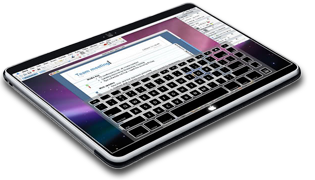 So, when will this magical new OS come to a computer store near you? Well, potentially, we could be seeing it late this year or early next: very likely this is what Apple’s rumored multi-touch tablet device will use. It probably won’t be the total break from the current OS that the Mac OS was in 1985, but it should be the start of that evolution to the next interface. As I said, we’ve already seen elements in Apple devices already. Note, for example, not only the multi-touch features in the iPhone and the new Macbook trackpads, but also note the developments in screen technology, most notably the hard-surface screen that Apple snuck into the latest Macbooks–a must-have if you’re going to use a touch screen device–and the



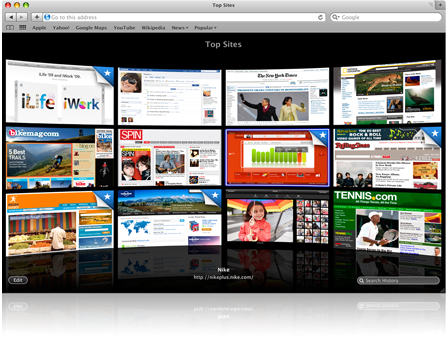 The Top Sites really doesn’t make sense. It essentially comprises an automatic loading of a dozen commonly-visited sites whether you want them right now or not. I set up my bookmarks so that the top sites I decide on will load when I click the bookmark; Safari 4’s new feature does the same thing with processor-eating and time-consuming graphics, and it chooses sites in an order I no longer control. What’s so great about that?