Tiger Tales: And All the Rest

May 4th, 2005 Comments off

So I’ve covered three of the top new features about Tiger, namely Safari RSS, Spotlight, and Dashboard. I haven’t tried out Automator yet–it seems useful, but I’ve never used macro-like features before, and would want to read very carefully about it and try it out several different ways before speaking on it.

So what else is there? Well, minor appearances, for example. The copy file pane is different from before. Quicktime 7 now handles larger, high-definition files–but my computer is not fast enough to display them in anything but a jerky stop-and-start way. And then there is an interesting appearance change which is both tiny and significant: in open windows, there is no longer a division between the title bar and the tool bar immediately beneath it; they appear to share the same area (at least in the brushed-metal style–classic Aqua style seems unaffected). The functional divide still exists, though–click and drag on the title area and it will move the window, while doing so in the toolbar area will not. A purely cosmetic choice, and one that could cause a bit of confusion.

And I should speak on smart folders sometime, I didn’t get to that. Essentially, they are a way to keep a specific search permanent and ongoing in the form of a folder; visually, it’s like a virtual folder where all items of one type will go to whether you save them there or not.

And then there’s the Oxford English Dictionary and Thesaurus, now integrated into the system. For example, when I’m drafting in Ecto, I can right-click on a word and select “Look Up in Dictionary,” which will open the dictionary and show me the definition, etymology and synonyms, if any. Very nice. Dictionary is also available in a widget, and as a stand-alone application.

There’s the new interface for Apple’s Mail program, with some other features, like setting mail priority (which in a quick attempt I could not make work). Many have complained that the new look is ugly, but I like it fine. I might even give it another try sometime soon, but frankly I like Eudora so much that I won’t make a full switch anytime soon.

You may have heard that Tiger has “200+” new features, and Apple lists them here. But a close examination will show that the list is artificially lengthened. For example, the Spotlight feature is represented as multiple features when it’s really just applied in multiple applications–Spotlight used in Contacts, Spotlight used in dialog boxes, Spotlight used in Font Book, Spotlight used in iCal, Spotlight used in Mail, etc. Also, each major new feature is divided into many parts; the Spotlight menu bar item, the spotlight window, smart folders, and so on. Dashboard is a single feature, but Apple lists individual widgets as separate “features.” Additionally, add-ons are counted as features–more fonts and more languages, for instance.

But then again, this is standard for the industry. While you may not find 200 actual new features in the sense of what you may consider a “feature” to be, you will find enough in Tiger to make it interesting and useful.

But is it necessary? Well, probably not, though that may depend on your needs. Is it worth the price of upgrade? It was for me, but again, it may not be for you. And that’s true of all upgrades.

Categories: Computers and the Internet, Mac News Tags: by

Tiger Tales: Dashboard

May 3rd, 2005 1 comment

Aside from Spotlight, the other headlined feature of Tiger is Dashboard. If you know about Konfabulator, then you should understand Dashboard. Essentially, Dashboard is a place for widgets, which are mini-programs. You hit the shortcut key (you decide which), and the desktop goes dark while a layer of colorful, 3-D-ish little gadgets zoom in to cover the screen. These are limited-purpose, minimally-sized simple programs that perform a simple function–clock, timer, calculator, measure converter, weather forecast and so on. Stuff too small to really merit a full-sized program.

Many say that Apple ripped off Konfabulator, and it’s hard to argue with them–the concept is nearly identical. But then again, others argue that Apple had the idea first, and they were called “Desk Accessories.” If you’ve used Macs since the 80’s, you know what those were, but essentially they were indeed the same concept–little mini-programs very similar to widgets. Maybe that’s how Apple is able to avoid litigation from Konfabulator–they could easily sue them right back on the same charge. As a user, I can’t complain too much–Konfabulator costs $25, and with Tiger, it’s part of the system (and probably better-integrated), but many say that Apple will have a harder time getting people to make good 3rd-party apps if they take those ideas and integrate them into the system like that.

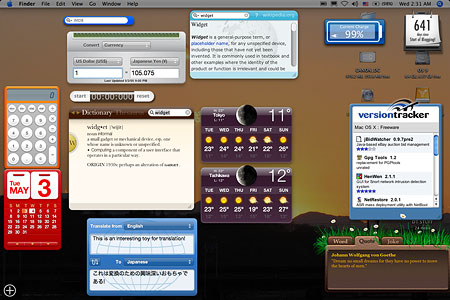
All that aside, Dashboard is a nice thing to have. Hardly essential, not exactly ground-breaking, but a fun and useful toy. This is what it looks like in use:

Dashboard

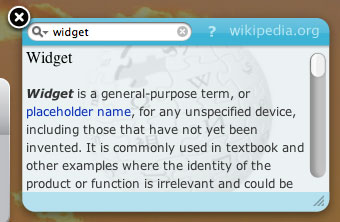
You’re just happening to look at the widgets I’ve decided to use full-time. You get started out with a dozen or so, but there are 150 different ones available on the widget developer site, with new ones appearing every day. Apple has a list, but it’s not as complete. (Note: when I download them in Safari, they get automatically placed in the correct folder in my Library–a nice touch.) Many of the widgets will be useless to you, unless you happen to need to know the traffic conditions in Houston, train schedules in the United Kingdom, or how to say “armpit” in Norwegian. With time, hundreds more will come out, and eventually you’ll be able to build up a really good set.

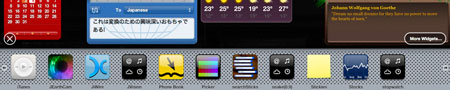
How does it work? I set mine to appear with the F11 key. Just press it an zoom, it’s there. How do you open new ones? You don’t have to go to the Widgets folder and double-click, instead just activate the Widget bar (click on the little plus-sign in a circle at the lower left corner of the Dashboard screen), which pushes its way up from the bottom of the screen.

Widgetpanel

Click on one of the widgets in the bar, and it’ll open, and stay open till you close it. To close a widget, you can click on the little close button at the top left of the widget, which is visible when the widget bar is open, or when you hold down the option key.

Widgetclose

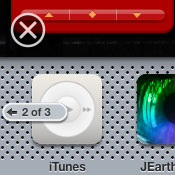
If you have more widgets than fit on the bar, little buttons appear on either side to prompt you to see the next batch. When you’re finished with the widget bar, click the “x” in a circle above the bar and to the left.

Widgetturn

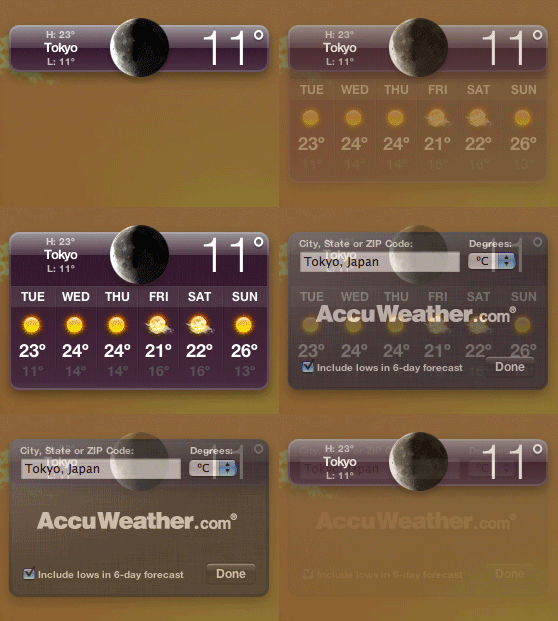
Most of the widgets can have options set by looking at the “back” of the widget. The widget should show a little “i” in a circle in one corner; click on that, and with a very cool 3-D effect, the widget turns around to show the options, if any. Some widgets can change in size as well, depending on their function. Take the common weather widget, for example, one of the Apple standards. Here’s a little animated GIF to show you how it works:

Weatherwidget3

The initial image is of just the basic bar, showing current weather conditions. Next, if you click the middle of the bar, the 6-day forecast drops down. And finally, on the back, you can set the city the bar is for and whether it shows in Centigrade or Fahrenheit.

When you’re finished with widgets, you can make them go away in one of three ways: hit the key you designated to open them, hit the “escape” key, or just click on any window or the Desktop visible behind the widgets.

As I said, not a must-have item–but it’s handy, fun, and cool.

Categories: Computers and the Internet, Mac News Tags: by

Tiger Tales: Spotlight, the Basics

May 2nd, 2005 4 comments

Another new Tiger feature is Spotlight, and this is really the star of the new OS. This is the blazing new file search feature that’s supposed to make it incredibly easy to find any file on your computer. And from my use of it over the past few days, I’d say it both does and doesn’t make it easier. But the “does” part is much more significant than the “doesn’t.” Any system to find files is bound to have drawbacks, but overall, Spotlight is a big improvement over old search methods.

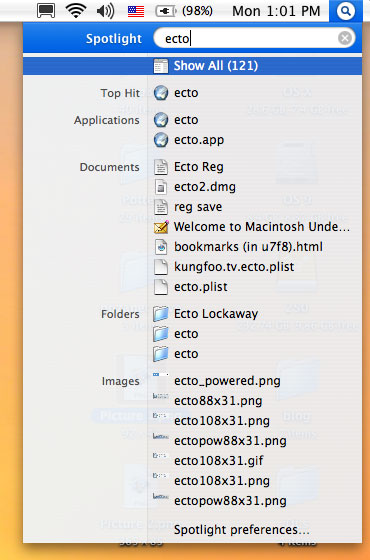
A Spotlight search begins with the new spotlight icon at the far right of the menu bar (pushing aside the account switching menu, not shown here). Click on the Spotlight icon (or use the configurable command key), and a search bar appears.

Spotlightbar

Type in your search term, and a menu will appear, showing the search results. I use an 800 MHz G4 Powerbook, so it’s not lightning fast–a dual-processor G5 PowerMac might show instant results, I don’t know. But this is what your results look like:

Spotlightmenu

Here’s where some of the negative points about Spotlight come into play. First, it’s difficult and sometimes impossible to confidently choose any of the items in the menu before the search is dome. On my computer, a full search takes about 6 or 7 seconds, but before that’s finished, the list is constantly jumping and shifting due to new items being found and added. Still, 6 or 7 seconds for a full search is not bad at all, and my Mac is relatively old and slow. If I had the latest powerbook, it would likely be only 3 or 4 seconds; a PowerMac G5 would likely cut that down to 1 or 2 seconds.

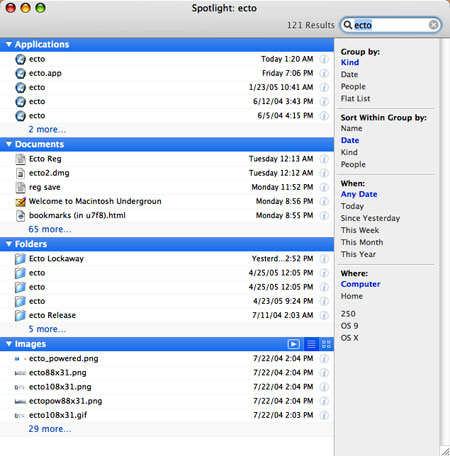
The other problem has to do with choosing an item from the list. From this menu, the only thing you can do for any specific file is to open it. You should be able to right-click on any item and then choose to open it, view it in the Finder, or get info on it. Maybe that’s impossible to do in a drop-down menu, but if it is possible, that feature should be added in the future. So, if you don’t want to open one of the files you see, you have to go to “Show All,” the item at the top. This will open a window displaying the results in a more manageable fashion. This is something you can do at any time–you don’t need to wait for the search to finish.

Spotlightwindow

The results are here divided into categories, such as applications, folders, documents, images, music, fonts, and so on, each category showing five results each. You can exclude categories from your searches in the Spotlight preferences pane. (You can also group into categories by file author, date, or just display as a plain “flat” list.) Each category can be minimized to its title bar, or expanded to show all results. They can be sorted by name, date, kind, or “people,” and limited by time frame or volume location. They cannot, however, be sorted by size–something I regard as a glaring omission.

A big feature of Spotlight is that it indexes and searches not only file names, but the contents of all those files as well. This is great, but the problem is that you can’t limit it to a filename search only, unless I missed something. Which means that every dictionary file, text database and probably email archive will dominate the results of any search, flooding the results to a degree that makes it hard to find the file you want. Although you can’t turn off the contents search, you can exclude certain folders from searches using the Spotlight preferences pane. In the preferences, if you go to the Privacy tab, you can select folders that will not be included in any spotlight search. I had to find all of my mail archives and dictionary files and exclude them in order to make it work well. (If you use Apple’s Mail app, those results will show in a different category group and won’t pollute the documents results–but I use Eudora). That helps, but it would be better for Apple to allow you to choose file names, contents, or both in any search.

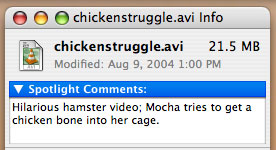
The content search does help in other ways. Now that you have it, you can tag special files by making notes that spotlight can see. This can be done through the Get Info window:

Spotlightcomments

These comments allow you to single out a file by using keywords. However, the drawback is that it takes a bit of effort. You cannot select multiple files and add a single Spotlight comment to all of them in the Get Info window (another oversight by Apple, they should add that ability), and if you take thousands of photos a month, obviously it would be ludicrous to try making comments in all of them. This is for specific files you will especially want to find in the future.

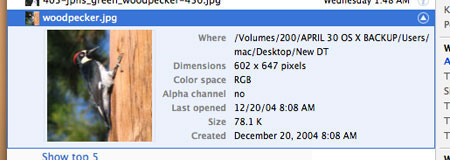
SpotlightinfoBack to the “Show All” window. Note in the illustration I presented when introducing this window that each item takes up one line and gives limited information. A little hard to see is a ghostly “i” for “info” icon at the right of each line. Click on that, and Spotlight will expand the item to show a more detailed icon and basic information for the file.

Spotlightinfo2

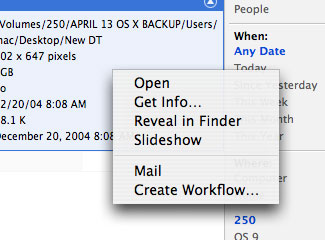
Furthermore, by right-clicking (control-clecking for those of you who still use one-button mice) on any item, you can choose from several commands, including “Reveal in Finder,” which allows you to see the file instantly. This is what should be added to the initial Spotlight search menu, if possible.

Spotlightrc

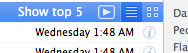
SpotlightimageAnother feature is for images. The blue title bar for the images grouping has three icons at the right, allowing you to choose how to display the images: as a slideshow, a list, or by thumbnails. Thumbnails are nice, but if you have a lot of images, it takes a while for the Finder to generate them all. The slideshow, however, provides a good way to get a very detailed look.

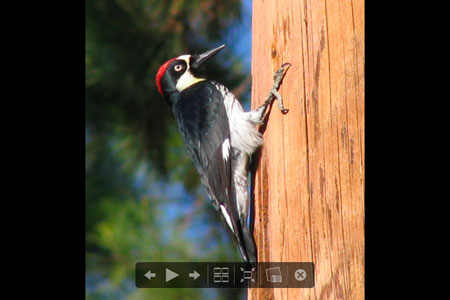
Opening one or more images in slideshow is possible. Either will allow you to see the image at actual size or fit to screen, with a black background that occludes the desktop. You also always have the option of adding the image to iPhoto (but there is no option to send the photo to any other application–perhaps not an oversight by Apple, but that should be changed). But with multiple images, you have more options.

Spotlightss0

Here’s one result from a search for images of woodpeckers. Before I started the slideshow, I selected all six images I found. Note the control bar at the bottom:

Spotlightss2

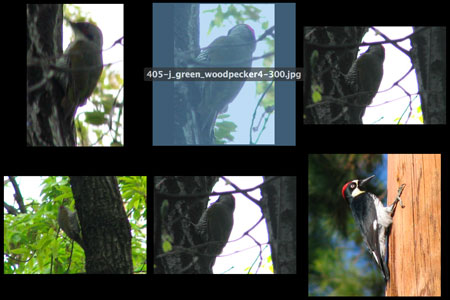
The choices are, from left to right: back, play/pause slideshow, next; index sheet; actual size/fit to screen; add to iPhoto; and close. If you choose the Index Sheet, you will get an Exposé-style choice of all the photos; choose one, and it will show in the player. This is a nice option to have handy.

Spotlightss1

There is more to Spotlight, and I may touch on those other features later, but these are the basics. As I’ve noted, there are some down points–the time it takes to finish on older computers; the inability to get info on any item in the initial Spotlight menu, to sort by date, or to search by filename only, among other smaller nits. But the plus side overwhelms that: an extremely fast search method which allows you to flexibly sort and manage huge amounts of data to find what you’re looking for. If search features like this are important to you, then Tiger may be an essential upgrade.

Categories: Computers and the Internet, Mac News Tags: by

Tiger Tales: Safari

May 1st, 2005 3 comments

So I’ve installed Tiger, of course. The question is, is it any good or worth the $129 ($85 by academic discount in Japan) you pay for it? The answer to that, I suppose, lies in what it is that you value. In such a short time, I haven’t had a chance to delve deeply into all the new facets to the OS, but I do have a few impressions; I’ll be discussing these over the next few posts, each taking on a new general feature of Tiger.

Unfortunately, the speed of the new OS is not something I can comment on too well. Speed is supposed to be one of the big new under-the-hood features in Tiger, and it may well be. But it’s hard for me to tell. You see, I had been using Panther (10.3) running since its release, and had never reformatted the disk and re-installed everything, or even re-installed the system. As a result, the system was breaking down, crashing all over the place and slowing down quite a bit–coming to a crawl whenever I copied files from one location to another. So of course things run faster now, but I can’t attest to how much faster they are compared to a clean install of Panther.

What I can attest to, however, is that Safari definitely works faster than I ever remember it working, and since Mozilla is inexplicably slower in Tiger (or is it the new version of Mozilla? or the bloated profile files from being used continuously for such a long time?), I’ve decided, at least for now, to switch over to Safari–despite the fact that it still lacks the ability to turn off those annoying animated GIFs. Safari, like most Apple applications, is very well-designed, easy to use, and lacking in features and controls. But what it does feature, it features very well.

One of the highly-touted features in Tiger is Safari’s new RSS ability, which lets you use the browser as a news feed program. In case you’re not familiar with that, RSS feeds are kind of a no-frills version of an article in a web page publication. With an RSS feed reader, you can quickly see a list of all the entries available–kind of like seeing an index of the new stories on the web site. But readers will also automatically scan all the bookmarked sites and alert you when new offerings are available, so you don’t have to tediously scan all the web sites to seek out new entries. Unfortunately, most web sites do not have RSS feeds.

SafarirssbmSafari, like most readers, will scan the sites you’ve bookmarked at regular intervals you can decide. If you look at the bookmark, it will show you how many new articles there are available for each site (or group of sites you’ve bundled together) by showing a number in parentheses. While this form of notification doesn’t jump out at you like some RSS readers do, it is quite usable. This blog itself has an RSS feed, though I’ve made the length of the feed unusually long, so you can read entire blog entries that way, instead of the usual practice sites have of only giving you one or two lines, then requiring you to jump to the web site in order to read the rest.

Now, this feature just as I’ve explained it would be kind of a Swiss-army-knife attachment to Safari, but if left at that, you might as well just get an RSS app and use it by itself (indeed, many may prefer to, as some will show the number of new articles in the dock icon, or have other features Safari lacks). But Safari does provide another twist to the game: in the course of regular browsing, when you visit any site that has an RSS feed, a little Safarirsstag“RSS” tag will appear in the URL (web page address) window, on the far right. Click on the tag and the whole window changes to a list of all the RSS stories available (see illustration below).

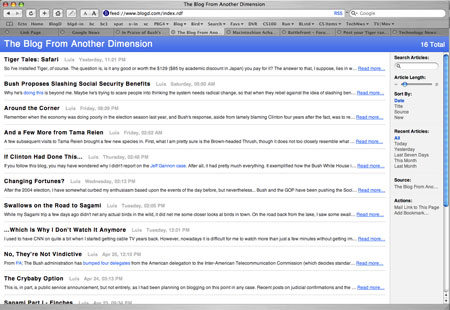
Safarirsssheet

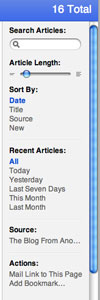
SafarirsssearchThis list can then be searched in a Spotlight-style search bar on the right. This allows you to set keywords, sort, choose articles of various ages, or mail a link to the pages’ RSS feed.

You can also bookmark a specific search in a specific web page. For example, if you want to be informed of any article concerning social security from the New York Times, just go to their main page, click on the RSS tag, enter the search words “Social Security,” and bookmark it. You’ll have a bookmark which then acquires a number by it to show you how many new articles on that topic at that site are available.

Other than the RSS system, the only new feature I can see worth mentioning in the new Safari is the parental controls, but I have not tried it and have no interest in it, so you’re on your own there.

But Safari itself has many pre-existing features to make it worth using. It’s a tabbed browser, for one. That’s a make-or-break feature for me; after Mozilla started using them, I’ve become addicted and now find it cumbersome and annoying to have to open a new window every time I want a separate page open (even though OS X’s Exposé feature could help deal with that).

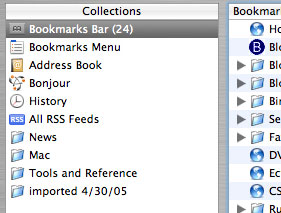
Safari also has a bookmark system I’ve decided I like (though I just started using it a few days ago). It has all the features other browsers have, such as a bookmark bar, and the ability to create subfolders. But Safari’s bookmark management is, I think, better than Mozilla’s. It shows the bookmarks by taking over the browser window, upon which you have the bookmarks divided into sections at the left, and each section displayed in the main window when selected. SafaribmcatThis makes it very manageable. Also, when you decide to bookmark a site, you are allowed to choose where in the bookmarks it will go; while some may see this as an extra step they may not need, most of the time this is exactly what I want to do. In Mozilla, I have to open the bookmark manager, find the bookmark I just made, and then perform a “move bookmark” action; all of this takes far longer than I like. Safari allows you to much more easily handle unwieldily long bookmark lists. One gripe: when I try to move a bookmark folder to a new location between two other folders, it always lands inside one of those folders, and never in between. If there’s a trick to it, I haven’t found it yet.
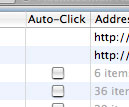
SafariautoclickOne other feature worth mentioning is the “Auto Click,” or “Open in Tabs” feature. If you’ve collected a number of bookmarks in one bookmark folder (to form a sub-group), you can choose to open them all at once. In the bookmark manager, you can check the “auto-click” box for any desired folder, and it will thereafter happen automatically. Otherwise, just right-click on any bookmark folder in the bookmark bar, and select “open in tabs.” As many pages as you want will then open all at once in a string of new tabs.

So far, my only problem with Safari has been in remembering passwords. There are two situations in which this presents itself: (1) when you fill in a password on one web page to move on to another protected page, and (2) when a page is protected and you have to fill in name and password in a dialog box before the page appears. The former is no problem in Safari. The latter can be one. I found that if I try to go to my web site’s control panel, I get the usual dialog box asking for the name and password. I fill those in, and then check the box to save the password to the system keychain. Then I log out, and try to log back in again–and the keychain has forgotten the password. With the Keychain window open, I can observe that the keychain password I entered for the site simply disappears as soon as I try to re-enter the protected page, and I have to enter the information all over again. But this happens only if I immediately try to log in after logging out. If I log out, then go to another site or sites, then log in a little later, the keychain password persists. I can live with this, but it was maddening when I was trying to establish all the passwords and immediately testing them, making them disappear. I can also foresee that I might log out from somewhere and want to get right back in–but if I do this and forget about the bug, I’ll lose the keychain password; if I can’t then recall it from memory, I’m screwed. If anyone know why this happens and if it can be turned off, please let me know!

All in all, however, Safari seems like a solid replacement for Firefox or the Mozilla browser–and as such, beats the hell out of Internet Explorer every day of the week and three times on Sunday. There are more features I didn’t go into here, but you can find them like I can–if you have a Mac, of course.

Categories: Computers and the Internet, Mac News Tags: by

Bush Proposes Slashing Social Security Benefits

April 30th, 2005 2 comments

Why he’s doing this is beyond me. Maybe he’s trying to scare people into thinking the system needs radical change, so that when they rebel against the idea of slashing benefits, he’ll just come back and say, “well then, let’s do privatization instead.” Because if it’s not that, then his current push is absolutely bizarre. Didn’t he completely rule out cutting benefits not long ago? Or maybe he’s just so embarrassed and defeated from losing his two-month Bamboozlepalooza campaign to privatize that he’s trying to gut SS just to stick it to those ungrateful louts for not buying into his BS.

His proposal to “save” social security is really yet another tax hike in the form of service cut for the middle class. Won’t the rich take one in the chin, too? No, because they have the salary cap, and so don’t get much in SS benefits anyway. While people making under $20,000 a year may be eligible for the same benefits under the new Bush plan, and while the rich won’t miss the extra bucks lost, the middle class (and the higher end of the lower class) is going to find their benefit cuts hurting them to no end.

Of course, Bush has an explanation: since SS will go broke soon anyway, this is better than nothing. But he is completely ignoring the fact that SS solvency could be completely managed by simply eliminating the salary cap and making the rich pay the same percent of their income to SS as everyone else does. But that would be taxing the rich, and God forbid we should ever think of doing that. No, better to sock it to the middle class–they can take the beating with much better grace.

Categories: Political Ranting Tags: by

“Around the Corner”

April 29th, 2005 3 comments

Remember when the economy was doing poorly in the election season last year, and Bush’s response, aside from lamely blaming Clinton four years after the fact, was to repeat the mantra, “an economic recovery is just around the corner”?(Or was that Hoover in 1930? Hard to tell the difference.) Bush was saying it, Republicans were sure of it.

Well, guess what. Like most everything else Bush has promised about the economy, it’s a load of crap. Remember how aggressive tax cuts for the rich (and a get-a-minor-tax-cut-now, pay-for-it-later sucker’s sop to the middle class) were supposed to turn that economy right around? Remember how he ran in 2000 as the guy who could talk to the Saudis and keep oil prices reasonable? Remember how he railed at Clinton and Gore for letting oil prices go to $35/bbl., what is now an attractively low price?

Well, the economy never got better. And now economists are starting to use a rather uncomfortable word: stagflation. People still aren’t getting jobs under Bush–not surprising, as he’s been the worst jobs president since Hoover. In fact, of the last 14 presidents, 8 have been Republicans, and all are at the bottom of the jobs chart, while all six Democrats are at the top. Now, with a disastrous economic mix of skyrocketing oil prices, a depressed jobs market, a slowing GDP, inflation ballooning, stock market tumbling, interest rates rising, booming imports and slowing investment, the Americans who voted for Bush may finally come around to the realization the rest of us were trying to get across last year: It’s the economy, stupid, and Bush is driving it into the ground.

Categories: Political Ranting Tags: by

And a Few More from Tama Reien

April 29th, 2005 Comments off

A few subsequent visits to Tama Reien brought a few new species in. First, what I am pretty sure is the Brown-headed Thrush, though it does not too closely resemble what my field guides show in terms of shape and color shades–but all the signs are there.

405-Brown-Headed Thrush-450

Note the white coloring on its belly; that’s one of the telltale signs. Here’s another shot I got the following day, somewhat clearer on the front:

405-Brown-Headed Thrush2-45

The other new species was, to my surprise, the Japanese Green Woodpecker, though I missed any clear shots of the bird. Still, the black-and-white stripes on the belly as well as the red coloring on the side and top of its head identify it clearly:

405-Jpns Green Woodpecker-450

With the above, you can catch the belly stripes, and can just see the red spot on the back of its head, both of which might be clearer here:

405-J Green Woodpecker4-300

And then these shots, though much less focused, show the coloring better, and one shows the red spot on the side of its head a bit more clearly.

405-J Green Woodpecker3-300

405-Jp Green Woodpecker2-45

I also happened to catch other shots of Grosbeaks (previously sighted at Reien) and a Hawfinch (which I’d only seen around Sagami):

405-Grosbeak5-450

405-Hawfinch2-450

The lighting is due to a massive dark cloud, which accompanied strong winds, both of which arrived just as I did. Other photos, taken on the next day, had better lighting, but numerous attempts at sound recording were thwarted by loud ambient noise, such as that produced by a helicopter which chose to circle the area for a full hour. Both of these have been typical nuisances for my trips to Tama Reien, which also include an uncanny knack for passers-by (usually with frisky dogs) and loud sudden vehicles to come along exactly as I’m ready to press the shutter button on an interesting new bird. My perception, I know, but it happens all too often nonetheless…

Categories: Birdwatching, Uncategorized Tags: by

If Clinton Had Done This…

April 28th, 2005 3 comments

If you follow this blog, you may have wondered why I didn’t report on the Jeff Gannon case. After all, it had pretty much everything. It exemplified how the Bush White House is interested in controlling the news media (also paying off journalists to hype administration programs, and using federal funds to create fake news videos that double as campaign and agenda commercials). It shows how far they’ll go, giving White House credentials to anyone they damn please without the slightest background check, if it suits them. And the fact that the guy was a gay male prostitute and pin-up on a porn site shows up the utter irony of this “moral” administration. It was a juicy story.

So why not go nuts over it? At the time–and still now, to a certain degree–I just had another bout of overload and contempt for how this kind of story is handled by the media. I knew what the end script would be. No investigations, a bit of chuckling in the media, and in a few months’ time, few recall it. The thing is, this event fit perfectly into a category I first saw mentioned by Joe Conason, which could be referred to as the “If Clinton Had Done This” syndrome.

Conason first came up with this comparison in the wake of 9/11, when Saudis–some of them having given Bush money in the past, some of them closely related to Osama bin Laden–were given special clearance, when most US air traffic was still grounded, to jump onto jets across America and be spirited out of the country, without allowing the FBI to perform the checks they wanted to make, or ask the questions they needed to ask.

Conason framed it in terms of how Republicans would have reacted if it were Clinton: what if, after the Oklahoma City bombing, Clinton had allowed the family members of Timothy McVeigh to get on a jet and fly out of the country without the FBI checking them out first? And then it turns out they gave money to Clinton in the past? What would Republicans have done? They’d have gone nuclear is what they would have done, they would have exploded in a furious orgasm of righteous anger, calling for investigations and perhaps impeachment. Showing hypocrisy when they don’t react like this when Bush does the equivalent, and showing the media reacting differently to Bush and Clinton stories of equal status.

A very good analogy, in any case. A few problems, though: first, noting such discrepancies doesn’t make any difference in the real world. Though the comparison is apt, and shows up GOP hypocrisy and corruption to no end, it does not wind up doing anything. No investigations began because of the comparison, no new public attention or outrage was stirred. Second, it was hardly the last time such a comparison could be made. How about Bush’s string of outrages concerning the aftermath of 9/11? His opposition to any investigation or commissions, his refusal to become available to investigators except under absurd conditions, the fact that he did not properly react to intelligence he received, that he was warned about bin Laden and didn’t do anything to stop him, didn’t “shake the trees.” Any one of these, and more, would have been mortal crimes in GOP eyes had Clinton done them. How about Valerie Plame, the CIA agent outed by a vindictive White House? The GOP would have gone insane with rage had Clinton done such a thing. The bald-faced lie to Congress about Medicare costs. Same reaction. The invasion of Iraq on the pretext of WMD, and the cherry-picking and exaggeration of intelligence to deceive the people? The failure to go after bin Laden? Jeff Gannon is simply the most recent of dozens of examples. Hell, the GOP demanded investigations of Clinton at the drop of an anonymous, unsubstantiated rumor. But Bush gets a bye on many more scandals of far greater importance and impact–and on a regular basis.

And that’s where the overload comes in. It’s a perfect argument: if Clinton had allowed a gay male prostitute with no real journalism credentials working for a left-wing rag to be admitted to the White House press corps under an assumed name and toss the president softball questions… you know how Republicans would have reacted. Again.

But despite the fact that the media went postal for years over trumped-up sex scandals over Clinton, Bush can preside over scandals that cause wars, kill tens of thousands of people, compromise national security and threaten our economic stability, and no one seems to give a damn.

There is a point where the hypocrisy and corruption go beyond the threshold of anyone doing anything about it, and reporting for the Nth time that if Clinton had done this, well, it tends to lose its appeal.

Categories: Political Ranting Tags: by

Changing Fortunes?

April 27th, 2005 Comments off

After the 2004 election, I have somewhat curbed my enthusiasm based upon the events of the day before, but nevertheless… Bush and the GOP have been pushing the Social Security destruction reform measure for many months now, and it looks like it’s not going to pass (64% disapprove of Bush on Social Security). Word is getting out a bit more about how Bush has gotten 95% of all his judges approved, except for the extremists, which is more than any president in decades, and support is soft for the crybaby option–66% disapprove, only 26% approve (even though the press has signed on blindly to the new PR-based named the GOP is pushing after blaming Democrats for their own “nuclear option” name). It is doubtful that the filibuster will be axed, especially since most Americans–and even a large number of Republicans–are against it. Furthermore, Tom DeLay is hanging on to power, and even Bush is chumming with him; one could not ask for a nicer gift for the Democrats, let’s hope he hangs around until next election season. And John Bolton looks like he’s not going to make it, either.

All in all, the GOP is doing a pretty good job of smearing itself. Let’s hope people are paying attention, and that this lasts long enough for it to make a difference in the makeup of Congress after 2006.

Categories: Political Ranting Tags: by

Swallows on the Road to Sagami

April 26th, 2005 3 comments

While my Sagami trip a few days ago didn’t net any actual birds in the wild, it did net me some closer looks at birds in town. On the road back from the lake, I saw some swallows resting on a power line, and soon noted that a lot of swallows were flying about in the area. It soon became clear to me that nests were in the area, and I started snapping away.

405-Barnswallow1A-450

This fellow I caught in midsong (click on image to see 1000-pixel unreduced image).

The birds were also strangely drawn to the higher edge of a wall of a convenience store; why I do not know, there was nothing there for them–no nest, no food, and no good perch, unless they love hanging off of signs like this:

405-Barnswallow2-450-1

Here are some good images of one swallow on the single nest I was able to see:

405-Barnswallow4-450
Click on this one for a larger image

405-Barnswallow5-450-1

405-Barnswallow9A-450

And finally, you can look at a movie of the swallows (8.6 MB AVI file), half of which shows them playing King of the Hill in a crevice in that popular wall I mentioned, the other half of the mama swallow on the nest.

There’s more, but I’ll put them into the “continued reading” area.
Read more…

Categories: Birdwatching, Uncategorized Tags: by

…Which Is Why I Don’t Watch It Anymore

April 26th, 2005 1 comment

I used to have CNN on quite a bit when I started getting cable TV years back. However, nowadays it is difficult for me to watch more than just a few minutes without getting impatient and even disgusted by the slant they cast on the news. Covering major events of the day, they mentioned–in quick passing–how Bush is trying to get the Saudis to generate more oil and lower prices, the Saudis mentioning how everything really depends on oil refining in the U.S., which is limited, how Tom DeLay will be with Bush in Texas and accompanying him on Air Force One back to D.C. All mentioned in passing, a line for each item perhaps.

But what did they focus on? Bush and the Saudi Crown Prince Abdullah holding hands. Not on any results. Not on why Bush is only now meeting with the Saudis after such a long stretch of oil price hikes (when he first campaigned in 2000 as one who could talk to them and handle oil prices). Not about Tom DeLay himself or the massive corruption Republicans are furiously trying to avoid investigation of. Not about oil companies and why we don’t have refining capacity.

They focused on what was perhaps one of the least significant aspects of the entire situation, with the least relevance and least meaning. And yes, I know about the cultural aspect–but Bush has been seen many times holding hands with Saudis, this is nothing new to anyone who’s been paying attention. It means little to nothing concerning actual hard results, and certainly nothing at all about how the current energy situation came to pass.

This is why I hardly ever turn CNN on anymore–there’s pretty much nothing whatsoever worth listening to. Going to Google News provides incredibly more breadth and depth, though even that still is limited to what the media overall can produce. But TV news? A joke. At best.

Categories: Political Ranting Tags: by

No, They’re Not Vindictive

April 25th, 2005 Comments off

From PA: The Bush administration has bumped four delegates from the American delegation to the Inter-American Telecommunication Commission (which decides standards for telecommunications in the Western Hemisphere).

Is it because the delegates acted improperly, like John Bolton? Is it because they broke laws, like Tom DeLay? Is it because of anything improper they did?

According to the Bush White House, yes–they gave money to John Kerry during the 2004 campaign. One of the nixed delegates gave as little as $250.

And the Bush White House is not being coy about it, either; they come straight out and admit the reason. They say that because there were contributions to Kerry, these people can’t represent this administration. Funny, I though they were representing the United States and its business interests. But that’s a common perception in the White House nowadays: they are the country. You do something against the Bush administration, you’re against America, and have become an enemy of the state.

But this sends out and even more frightening tone of Bush-league politics: you drop even so much as a penny into our opponents’ cups, you are on our shit list and you will get nothing, ever. Two of the barred delegates are Nokia and Qualcomm, two telecom giants which represent a major chunk of the U.S. telecom industry–effectively handing their competitors huge advantages for either contributing to Bush or not contributing to Kerry.

Is it just me, or does this cross a line, even for an administration as corrupt and vindictive as this one?

Categories: Political Ranting Tags: by

The Crybaby Option

April 24th, 2005 Comments off

This is, in part, a public service announcement, but not entirely, as I had been planning on blogging on this point in any case. Recent posts on judicial confirmations and the filibuster touched on this, but I did not address it directly.

In case you haven’t been paying any attention to politics over the past few weeks, the Republicans are now gung-ho on what they themselves have termed as “the nuclear option,” which is to say, changing the rules (boy, they really love doing that whenever it suits them) so as to do away with the filibuster. Never mind that the filibuster is a vaunted, respected and much-loved element of Democracy; never mind that they used it themselves both as opposition and as the party in power; never mind that they used other processes almost identical in nature in even more abundance; never mind that they only want to do this because they are now in charge, and never mind that if they succeed, when the Democrats take power again the GOP will be screaming for the filibuster to come back in the name of “fairness.” Forget about all that.

Focus instead on exactly what this is all about, why the GOP wants the filibuster, at least for the time being, to be gone. They control the White House, both houses of Congress, and for the most part, the Supreme Court. They get 95% of the judicial appointments they want (as opposed to maybe 70% for Clinton), and probably a much higher percentage of legislation overall. Almost everything that happens in government is Republican, almost nothing of Democratic origin even reaches the floor.

You would think they would be happy with that. But of course, they are not. Not unless they can have it all, not unless they can completely silence and disempower the opposition, which only represents 45 to 49% of the populace.

They are like a child of such immaturity and selfishness that they have to have everything, every time, and in every way they want to have it. They are, in short, the definitive crybabies.

This take comes from a reader of Josh Marshall’s, and it should be used as it deserves to be used, which is as often as possible. “The nuclear option,” after all, is a GOP term, the one they prefer; but if a shoe fits, then one should be made to wear it. If they act like crybabies, then indeed we should call them on it.

It’s not “the nuclear option.” It is, far more accurately, “the Crybaby Option.” Use the term. Spread the word.

Categories: Political Ranting Tags: by

Sagami Part I – Finches

April 23rd, 2005 Comments off

I took a day trip out to Sagami today to do some birding, and didn’t have the greatest luck. A lot of nature out the way of Lake Sagami, forests, rivers and so on. I’m finding out that my vacation at least begins in a very dry birding season–as if the winter birds have gone but the spring birds haven’t arrived yet. I went to many places where there should have been a lot of birds, walked through miles of trails in forests, farmland and parks, and didn’t get very much. I probably would’ve done better at Tama Reien, now that I know where to look; I’ll probably head back there again as soon as I have a clear day.

But I did find a few things. First, in a tree by the first lake I came by, I spotted some finches. One of the finches is, I am pretty sure, an Oriental Greenfinch, same as I found on the Tama River a month or two back.

405-Greenfinch2-450

I didn’t see much of it, but got a glimpse of maybe yellow in its wings, and there aren’t too many brown-green finches out there.

405-Greenfinch1-450

But before I got on to that bird, I did catch another–so fleeting, so hidden that I didn’t get a good visual on it, but when I got home I could see that it’s a bird I’ve been looking for: the Hawfinch.

405-Hawfinch-450

See this illustration for comparison, from this page. The white at the back of the bird’s neck is telling, if not the dark area around the eye and beak, and the orange back.

I was pleased to get it, but would liked to have gotten it more, not to mention more clearly. Maybe later.

There are a few more Greenfinch photos in the continued reading, by the way.
Read more…

Categories: Birdwatching, Uncategorized Tags: by

Sunset

April 22nd, 2005 1 comment

Stopped by the Tama River the other day to catch the sunset.

405Sunset-450

If you’re interested in the image as a desktop picture, or just want to see a larger version, you can download a 800-pixel-wide version.

Categories: Uncategorized Tags: by

Bird Bath

April 22nd, 2005 1 comment

Just a few more images of the Great Tits taking a bath in the little Shinto stream…

405-Tbath4-450

405-Tbath2-450

405-Tbath3-450

405-Tbath1-450

Ahhh…..

Categories: Uncategorized Tags: by

Tama Reien

April 21st, 2005 6 comments

I’ve found that Sengenyama Park is very good for birdwatching, and heard that Tama Reien (Tama Cemetery) was good as well. The cemetery is a vast park-like area with a great many trees and shrubs, with not too many people around. I intended to visit Tama Reien, when I discovered that it and Sengenyama Park were adjacent–I had been a stone’s throw away on a few occasions before. So I went to Sengenyama, and walked through into Tama Reien. Not a spectacular day for birdwatching, but I did get two new species and some good footage of some I’d seen before.

First, the Varied Tit. I’d seen this little guy once or twice before, always in the same area, and now I’ve got it figured out: there’s a little semi-shrine-like area, with a tiny stream coming out of a hillside, and the Tits all like to come there to bathe.

405-Titbath-450

By staking out a seat just a few meters away and keeping still, I could wait and see the Varied Tit (and Great Tits) come and go, netting me a few nice photos of the Varied:

405-Variedtit-450

405-Variedtit2-450-1

In the same area, I was able to catch the Chinese Bamboo Partridges again, probably the same pair as before. I got another few good photos:

405-Cbpartridge2-450

405-Cbpartridge1-450
This one has a 1000×700 version; click the photo to see it.

For a small film of these two birds and of some Grosbeaks (photos right after this), click on this thumbnail (AVI file, 9 MB, so you’ll need a fast connection–best results may be found by downloading the movie to disk and viewing it on a media player):

So on to the Grosbeaks. Japanese Grosbeaks (Ikaru • イカル), that is. When I ventured across the bridge from Sengenyama to Tama Reien, I ran into the same birders I encountered in my first visit to Sengenyama, including the guy with the camcorder with the zoom lens. He showed me the birds he got, including a shot of a dozen or so Japanese Grosbeaks. After I ventured into the cemetery, I ran into probably the very same flock–many dozens of the little buggers. The birds’ calls sounded almost like someone playing a percussion instrument, tapping on hard, thin, hollow bamboo stems. It’s hard to describe, and unfortunately I didn’t have time to get a recording–I was barely able to get off a few shots of these birds before someone came along with an energetic dog which chased them all off. But here are some of the better shots I did get:

405-Grosbeaks4-450

405-Grosbeak1-450

405-Grosbeak2-450

405-Grosbeaks3-450

You can see a small part of the flock here, and get an idea of their number. I realized after seeing these guys that this bird is one I often see used as a mascot or something in signs and illustrations. I’ll have to enquire more about that to someone soon.

Finally, I got a glimpse of a bird I’ve heard about quite a bit but never saw except once quickly flying by: the Azure-winged Magpie (Onaga • オナガ):

405-Azuremagpie-450

The Japanese name literally means “Long-tail,” which makes sense–when you see them in flight, the tails especially stand out, not just long and straight but slightly fanned out in the middle. Unfortunately, I had even less time with the Magpies than I had with the Grosbeaks; this time, a group of bicyclists rode through just seconds after the Magpies landed. So though I got two new species, they were both very brief encounters due to interference from passers-by. Ah, well. At least I know where to go again sometime soon for more good birding.

Categories: Birdwatching, Uncategorized Tags: by

Google Satellite

April 20th, 2005 2 comments

I’ve noted before in this blog that Google now has a very cool map page. What I haven’t mentioned yet is that they added a very cool satellite image feature. You can browse North America by satellite photos just as easily as by maps. It has also led to some very interesting sites based purely on finding cool images in the massive photo database, including names carved into fields, airplanes in flight over land, stadiums with games in progress, and even a fair or gay pride parade in the Castro district of San Francisco.

I tried zooming in on the home campus of my college, but that’s when I found out that many areas have only limited resolution, and you can’t get very detailed images.

But some areas you can get great images of. Here’s San Francisco. Try it out. Double-click on a part of the map where you’d like to zoom in on. Double-clicking will center the map on that point. Then you can slide the zoom bar at the upper left to get a close-up view. You might want to try the TransAmerica Building, the Golden Gate Bridge, Candlestick Park (where that 49’ers game was being played–dad, can you see your car?), or perhaps my alma mater, San Francisco State University. Here’s a plane taking off from SFO, and here’s the South San Francisco City sign painted on the hillside. And here’s my hometown, and the house where I lived when I was born. Oh, and of course–Apple Computer headquarters!

Also, here’s the Hollywood sign. And here’s NORAD, which you may be familiar with if you watch Stargate SG-1. What can you find?

For notes on interesting images, there is the Google Sightseeing Blog, and this page with a wealth of links by type and state.

Categories: Computers and the Internet Tags: by

NHK English Must Be Good

April 20th, 2005 2 comments

Whenever I meet a Japanese person who speaks English very well, but they have never lived overseas, it is almost always the case that they have studied English by the NHK courses. I’ve never bought the materials or watched the courses, but I have a very high opinion of them simply from the evidence alone.

Has anyone else here made the same observation, or a different one?

Categories: Focus on Japan 2005 Tags: by

Yasukuni

April 19th, 2005 1 comment

Japanese politicians are yet again preparing to make an official visit to Yasukuni Shrine, further fueling anger in China and other countries in the region. Outside of the diplomatic question of unnecessarily pissing off your close neighbors and, apparently, deliberately alienating yourself from other countries surrounding you, there is the question of whether they would accept similar actions from others.

What if, in America, there was a shrine which glorified the atomic bombings of Hiroshima and Nagasaki, as well as those who planned and carried out the atomic bombings and the many bombing raids on Japanese cities which killed so many civilians; and further, what if American presidents as well as numerous lawmakers, in an official government capacity, visited this shrine on a regular basis?

I find it difficult to believe that the same Japanese lawmakers would not respond in tremendous outrage. I also find it hard to see how their own actions are in any way different from such an analogy.

Categories: Political Ranting Tags: by