Archive

Author Archive

Using the iPhone App Store as a Campaign Tool

May 25th, 2010 Comments off

During the 2008 election, Obama used an iPhone app to help spread his message, raise money, and generally help win him the election, as part of a much broader Internet campaign strategy. Since then, many politicians and parties have published their own apps on the App Store, left- and right-wing alike.

Ari David, the Republican challenger to Henry Waxman in California’s 30th District (Malibu, Beverly Hills, & Santa Monica), is trying to win himself some free publicity by violating Apple’s App Store policy and then crying over how he’s being denied “free speech.”

Apple’s policy on this is:

3.3.12 Applications must not contain any obscene, pornographic, offensive or defamatory content or materials of any kind (text, graphics, images, photographs, etc.), or other content or materials that in Apple’s reasonable judgment may be found objectionable by iPhone or iPod touch users.

One may presume that Apple would rather avoid being held culpable in libel suits, or perhaps, in the same vein as keeping porn off its mobile devices, just wants as nice and calm a playground as they can manage. There is nothing at all keeping David or anyone else from publishing positive statements about their own records, but when you start smearing an opponent, Apple steps in and tells you to take it elsewhere.

Waxman claims that Apple singled out specific statements as being defamatory, and lists them. Included in the listing are allegations that Waxman “would have brought us $7 a gallon gas and … would make electricity rates ‘necessarily sky rocket.’” … “would severely hurt seniors” … “jeopardized the US and Israel” … and “TRIED TO STRANGLE family farms with insane Soviet-Style regulation.”

Yeah, that’s not defamatory.

Now, we can debate whether Apple can and/or should have such a policy, but one thing here is pretty clear: David is just using this as political fuel. Sure, maybe he was just clueless and figured that a vehement attack app would get approved. But I think it is much more likely that the entire app idea itself is a ploy to get free publicity, and make David out to be that favorite of favorites for right-wingers: the victim.

Here’s how I see it happening. At a session among his staff to see how they can get some good, free press, someone brings up the App Store policy. Political cartoonist Mark Fiore had his political cartoon app initially denied under the same policy, but after a good deal of controversy, Apple reversed itself and let it go through. Apple has a history of relenting when put under pressure. So somebody on David’s strategy team gets the idea of making an iPhone app intentionally designed to trigger the policy–enough so that it gets stopped, but not enough to look completely outrageous. When Apple inevitably rejects the app, David’s campaign goes all over the media shouting about how Apple is censoring their speech and denying them their First Amendment rights.

Right there, they have a winner: they (1) get free publicity, (2) get to play the victim, and (3) get their attacks printed free. There is zero chance that no one will listen to a story like that–at the very least, Fox will cover it, and likely other networks will follow. It’s sure to get on the local news. David’s campaign can’t lose.

They add another dimension, though: they insinuate that Apple is secretly a liberal bastion which allows Democrats to bash Republicans, but not the other way around. They try to build up an image of Apple as being populated with liberal elitists working for Democrats:

… Apple is now making an in-kind contribution to Henry Waxman by denying his competitor a modern tool for political communication. They are stifling my right to free political speech and they are carrying water for the Obama administration … Apple pulled all of their advertising from the Fox News channel … Clearly people who work at Apple are likely to be the kind of creative people who may tend to vote Democrat and hold liberal views, but this goes far beyond that. This experience with Apple clearly shows that there is a political agenda going on within the culture of the company, and business decisions are subject to Apple’s political views. … it would be interesting to see what iPhone apps Apple has approved for Democrats in which negative statements about Republicans are made, and what standard Apple has held those statements to before approval.

Never mind that Apple would reject any app with attacks like this integrated into it, Democratic or Republican. Never mind that Apple pulled its ads from Fox because Glenn Beck told people not to go to church if they heard certain words spoken there–as did dozens of other advertisers. (I guess that Geico, Best Buy, Wal-Mart, AT&T, Bank of America, General Mills, Mercedes Benz, Subaru, Toyota, Volkswagon, UPS, and Radio Shack are also in on the conspiracy.) No, forget that the claims are specious and self-serving.

This goes hand-in-hand with playing the victim card–you get double the juice if you can show that you are being crushed under the heel of liberals, with Apple being transmogrified into a Silicon Valley version of the Liberal Media™.

Beyond the hopes that this story catches fire, David’s campaign undoubtedly hopes to get Apple to eventually succumb to pressure. The MSM usually caves in almost immediately when charged with being liberal, and since Apple is known to not act on such rejections until a lot of pressure is applied, the David campaign is probably hoping for the story to be out there long enough to be milked–and then the icing on the cake would be for Apple to cave and allow the app. David is trying to compound that win for himself by asserting that all of his statements are “factual” and therefore not defamatory, presumably so that if Apple succumbs to pressure and allows his app, it will appear like Apple is admitting that his statements are factual.

As for David’s final swipe that Apple probably lets Dems bash GOPers while denying right-wingers the same freedom, just do a search for “GOP,” “liberal”, “conservative,” etc. on the iPhone App Store and you’ll see that this is a baseless charge. There are a lot more right-wing apps than left-wing ones, and a lot of the right-wing ones tend to get pretty nasty–though they do not defame specific individuals within the integrated app data, the act which runs afoul of Apple’s policy.

Interestingly, try to search for “Republican” and you get a hundred apps (the limit for a search), most of them being pro-right and/or anti-left; search for “Democratic” and you get 14 apps, only a few left-wing; a search for “Democrat” scores more–88 apps–but not many are left-wing apps.

I found a few Democratic congressional campaign apps, but they were completely inoffensive. Mike Oliverio’s (D-WV) app is just a poster showing a debt clock and a link to his site. Alan Mollohan’s (also D-WV) app includes a calendar of events and a bio, but is just as inoffensive. Felton Newell has a much more sophisticated app helping him run for CA-33, a Democratic safe seat, and that app also is positive only.

Republican Chris Cox, trying out for New York’s 1st District, is a Republican; his app allows you to read a short bio, donate to his campaign, and has a little game where you catch money “leaking out of the White House”–not really hardball, but it is a negative swipe at Obama rather than a positive statement about himself. Ginny Brown-Waite (R-FL) has an app with news and pages for volunteering and contributing (though she recently announced that she’s retiring). And Bob Latta (R-OH) has an app with mostly just links and contacts–but also a News section, in which he–guess what–attacks Democrats, accusing them of various evil-sounding misdeeds.

Those were the first three Democratic and Republican politicians I found with iPhone apps–all Dems were only positive, two of the Republicans were critical of Democrats. So much for Apple as a liberal wing of the Democratic party stifling Republicans while allow Democrats to savage right-wingers without restraint. (In fact, Al Ramirez, a Republican running for Senate in California, has his own app–and he set up residency in Ari David’s district to run for office.)

But here’s the real tell concerning Ari David: you can get political attacks into your iPhone app. Just either make the attacks general (against a party, for example), or include a News section which you can later fill with feeds of political attacks. Either that, or build a web app for the iPhone, which is not subject to Apple’s approval.

In short, David’s insinuations about Apple are patently false, right-wingers seem to be more numerous and negative in their political apps, and David could have easily have made an app which allowed him to smear Democrats and probably even Waxman–but he was either stupid, or more likely, geared his app with the intention of getting it rejected.

Again, we can debate whether Apple should have this policy at all–but whatever the outcome of that argument, Ari David is probably just another whining, conniving smear artist hoping to get his fifteen minutes.
Now Let’s Make It Look Less Like a Giant Insect

May 24th, 2010 Comments off

Very cool tech:

Categories: Technology Tags:

No Surprises Here

May 24th, 2010 3 comments

A self-proclaimed “ordinary citizen from Omaha, Nebraska,” horrified by President Obama’s “hard-left agenda,” has set up a right-wing tea-party lobbying group. Having worked for a right-wing think tank, she is “a fan of Rush Limbaugh” and is “intrigued by Glenn Beck” and listens to him “carefully.” By all measures, this person is about as hard-right-wing as you can get.

It should be no surprise, then, that she is the wife of Supreme Court justice Clarence Thomas. Justice Thomas recently represented the tie-breaking vote in a case (Citizens United v. Federal Election Commission) which allows organizations like his wife’s to spend unlimited amounts of corporate donations on political ads naming specific candidates without full disclosure of where the money came from. Naturally, he did not recuse himself.

Categories: Quick Notes, Supreme Court Tags:

Whew

May 24th, 2010 5 comments

Just got finished with a day of furniture construction. I already made several pieces of furniture following our move, including a 6-foot by 3-foot shoe cabinet, which was a bear to get done. After a day of wrenching screws in with the screwdriver, I wanted no more of it. Later, when Sachi and I visited a “home center” (a Japanese “Home Depot” kind of store), I looked at power drivers for the hell of it–and was surprised to see that they sold for as little as $25. Hell, I thought, that would be totally worth it! So when the big desk I’d ordered came in, I went out and bought one. Very good choice–it sped things up and was way easier than doing it by hand.

First, today, I put together a cabinet we bought for the toilet room, which has a big, open alcove behind the seat, perfect for placing a cabinet to take advantage of all the vertical space. I measured the alcove’s width to be 91cm, and we ordered a cabinet which was 88cm wide, which I thought would fit nice and snug. What I neglected to consider was how we’d get it into place. Too wide to fit in the door, we had to turn it first–and that’s when I realized that the whole room was 91cm wide, and turning back an 88cm-wide cabinet with any depth to it just won’t work. But no problem–we discovered the cabinet looks great in the living room.

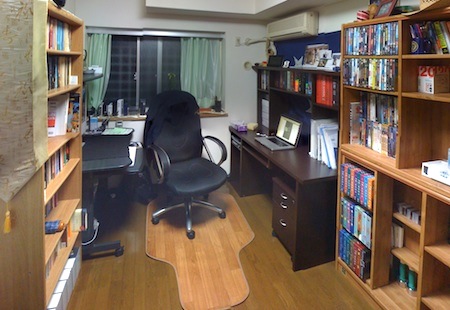
My desk was a much bigger task. I still have my old PC desk, but wanted something more, so my cabinets and shelf space wouldn’t be jammed full of stuff. So I went for a second desk in one room. I bought it for $300 online, and like all the other furniture we got, it’s a project you have to piece together from parts. And this was a nice, big desk–150cm wide, 60 cm deep, and 145 cm tall. It comes with shelf space on top, sliding panels for a keyboard and photo scanner under the desktop, and a separate file cabinet on casters below it. It took most of the day, but the power driver helped speed it up–but still, I finished at about 10:30 pm, and it took me another hour to clean up and rearrange. But now, this is what the room looks like now (stitched panorama to show more):

Den01

It’s a bit crowded, but it’s a room for me to sit in, not to play badminton in. I sit in the office chair and have desks on either side–one with my iMac, and the other nicely serving as a place for my MacBook Pro. The new desk:

Den02

In case you’re wondering, the blue banner with stars behind it is the Admiral’s flag from the USS Blue Ridge, the flag ship of the U.S. Seventh Fleet. A student of mine who is recently out of the Navy gave it to me (a very much appreciated gift), and it makes a very nice backdrop for the desk.

Categories: Hibarigaoka Tags:

iPad Review, Part III: Third Party Apps (Games)

May 22nd, 2010 Comments off

When you first get your hands on an iPad, you check out the look & feel of the device. How much does it weigh? How do I hold it? Is the screen really that reflective and smudgy? Where are the buttons and how do I use them? You turn it on, and immediately, of course, swipe forward and back to whatever screens there are. You try opening an app or two. You just get the feel of the device. I see this all the time when I hand over my iPad to people so they can check it out.

If it’s your iPad, the next thing you do is check out the apps that come with the device. How are iCal and Contacts different? How do Safari and Maps compare with the versions on my iPhone? Does Mail still suck just as much? What do videos look like on this thing? Can I access the stores, and what do they look like? You’ll spend a little time setting up things the way you like them in Settings. The apps Apple gives you are handy, but not all that engrossing. You can probably play with Maps for a while, do some browsing on Safari, and set up your email accounts, but soon you run out of stuff you want to do, and are hungry for more.

That’s when the third-party apps come in, and that’s where the iPad really begins to shine. You start getting the same range and versatility that you expect from a computer, and you start seeing more of what the iPad can do.

The problem with writing a review on third party apps is that everyone’s apps will be different. The number, variety, and choices of apps are perhaps so unique as to be equivalent to fingerprints. Nobody will agree completely on what apps are good, or even worth a free download and a space on the iPad’s real estate. You may prefer more games, whereas I might focus on utilities; you may be willing to spend a lot on a good app, where I might prefer to do with less for cheap; I might love this note-taking app, whereas you might hate it. So the following should be taken as more of a sharing of apps I enjoy and think you might have a chance of liking as well.

Games

Pinball Hd IconOne game that almost everybody agrees is a good one is Pinball HD. For $3, you get three pinball tables–but much more significant is the quality of the graphics. If for nothing else, this game is good for showing off what the iPad can do. But you’ll probably enjoy the pinball games even better, like I do. The tables are very realistic, as are the physics and playing. You really feel like it’s a pinball game. There are two viewing modes–full-screen and fly-over. Fly-over gives a much closer look and appreciation for detail, but it’s hard to get used to, and the zoom often deprives you of certain information, like what lights are lit for you to aim at. I much prefer the full-screen view, and with the latest version, you can get full-screen view in portrait mode, which even provides a cool tilting effect when you move the iPad around. The controls are simple–just tap almost anywhere on the left and right sides to use the flippers.

The game does have a few bugs. At first, I experienced a time lag with the flippers (also reported by other users), which ruined the game play–but that disappeared and has not recurred since. Sometimes a flipper will go when you don’t want it to, or stick in the up position at a critical time, which can be annoying as hell. The ball plunger needs adjustment–it’s often difficult to “grab,” and will sometimes only work if you touch it off to a side. There’s no reason the plunger’s “grab” area shouldn’t be a lot bigger. The score boards are not a big hassle, but it would be nice to be able to turn them off–and I have noticed that most of my scores are not staying over time. Finally, while the games you can play are good, I find myself wanting the ability to adjust the parameters. For example, changing the gravity or power of the bumpers, or being able to increase the frequency or number of balls for multi-ball play (“The Deep” board, for example, does not go multi-ball often, and then only with 2 balls, unless you can trigger a subsequent multi-ball).

You can even play the game in 3-D (go to the Settings app to change it)–but it didn’t work well at all for me, at least not with the cheap cardboard 3-D glasses I had on hand. The separate colors appeared too far apart, and all I got was disoriented. Much more fun just plain.

Click on screengrabs for full-sized versions.

Pinball 01 300   Pinball 02 300


Solitaire IconFrom these reviews, you’ll quickly see that I’m not a big RPG player, or a big game player at all. The next app is a simple Solitaire game. Despite the sheer number of solitaire games on the app store, it’s surprising how hard it is to find a good one. Solitaire City Lite, for example, looks really good–but is ad-laden and only offers double Klondike, not the standard game–you have to shell out six bucks for the full version. A free game called “The Solitaire” is passable, but is not the best. My favorite is actually a paid app, but only a dollar: Plain Old Solitaire HD, made by the same people who make an excellent free Klondike game for the iPhone. POS HD (unfortunate initials) has good graphics and gameplay. Although a few things are not as I like them (you can’t move Aces once placed, for example), generally they get the game more right than any other developer, for a reasonable price.

Poshd 300


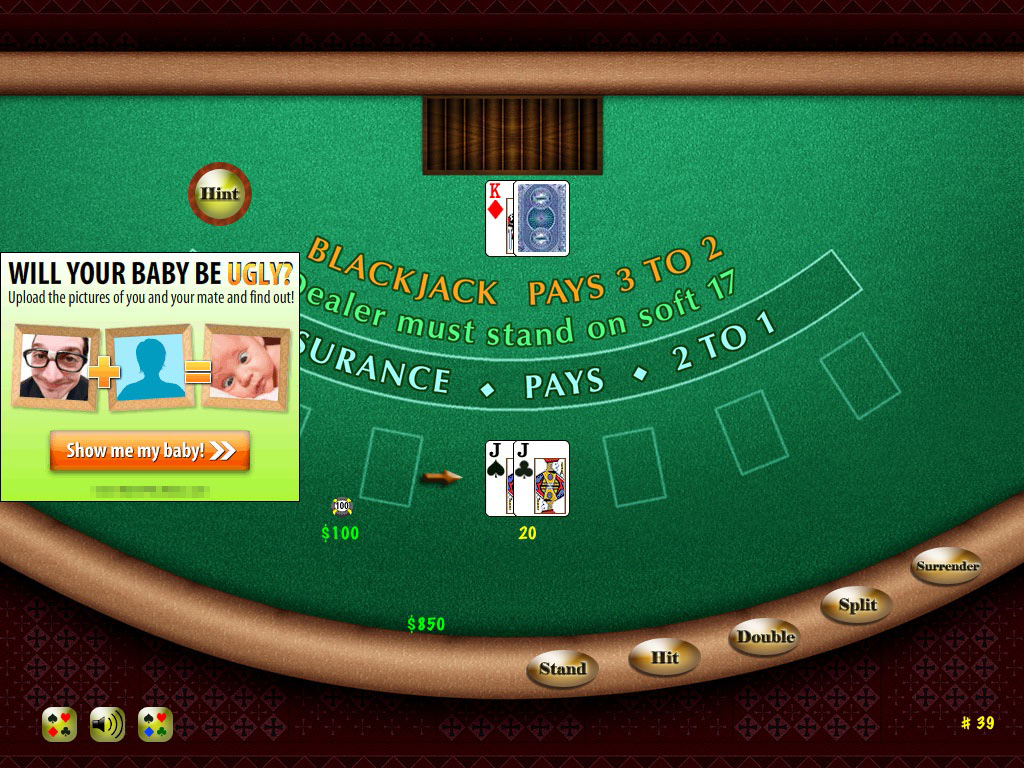
Blackjack IconWhile we’re on card games, why not whine a little about blackjack games. It should be simpler than solitaire to create, but it’s as if this game gives deveopers the impression that it has to be charged for if it’s halfway decent. Not that I can really complain–a free app is a gift (a gift with ads), not a right–but you’ll find most other simple games free more often than blackjack or poker. The best blackjack game I could find for free was Blackjack Lite for iPad. The graphics are almost too simple, the animations are poorly timed, it lacks an indicator to show the count of your cards–but it works, is free, and the ads are not intrusive. A different app, Blackjack Free HD (see lower image below), had such an annoyingly intrusive ad–one that covered a large portion of the card table, while the actual cards looked tiny–that everyone gave it low ratings for that despite the relatively good gameplay, so much so that the developer quickly switched to banner ads (I haven’t tried the updated version yet, though).

Blackjack-Lite-300

How not to do ads:

Bad-Blackjack-300


10 Pin IconNeither of those card games are ones I play all the time though. Instead, I found an unexpected game to be too much fun to pass up: 10 Pin Shuffle HD Lite. A strange combination of shuffleboard, bowling, and poker–but it works. You play on a shuffleboard table and shoot off pucks toward a set of bowling pins. If you get a spare, you are dealt a single card; if you get a strike, two cards. If you have five cards when scoring, then you can choose one or two to throw out and replace with new cards (or you can hold what you’ve got). By the end of the game, your poker hand is used to score your effort. The graphics are very good, though the physics are a bit exaggerated and often wonky, but that’s not a big deal. You can set the game to “easy” (the puck goes more or less straight) or “hard” (it easily strays off target). You can change perspective, though I have yet to figure out how to do that and not get an unintended gutter-puck. If you have four cards and get a strike, you get only one card. But mostly it is enjoyable. There is a banner ad which is easy to ignore during game play, and each game you must navigate four menus filled with prompts to buy and must shift hand position to avoid hitting the purchase link. Still, it’s a worthwhile free app. I’d get the full version, except that it has way too much that I don’t really want, for $4.

10Pin-01-300


Shanghai Hd IconI also like Shanghai games, and again, there are many, but most don’t get it right. I haven’t found the perfect one yet, but there’s one that comes pretty close: Shanghai Mahjong. The tiles are nice and you can download different skins. I tried the free version and liked it enough to pay the obligatory dollar for the full game.
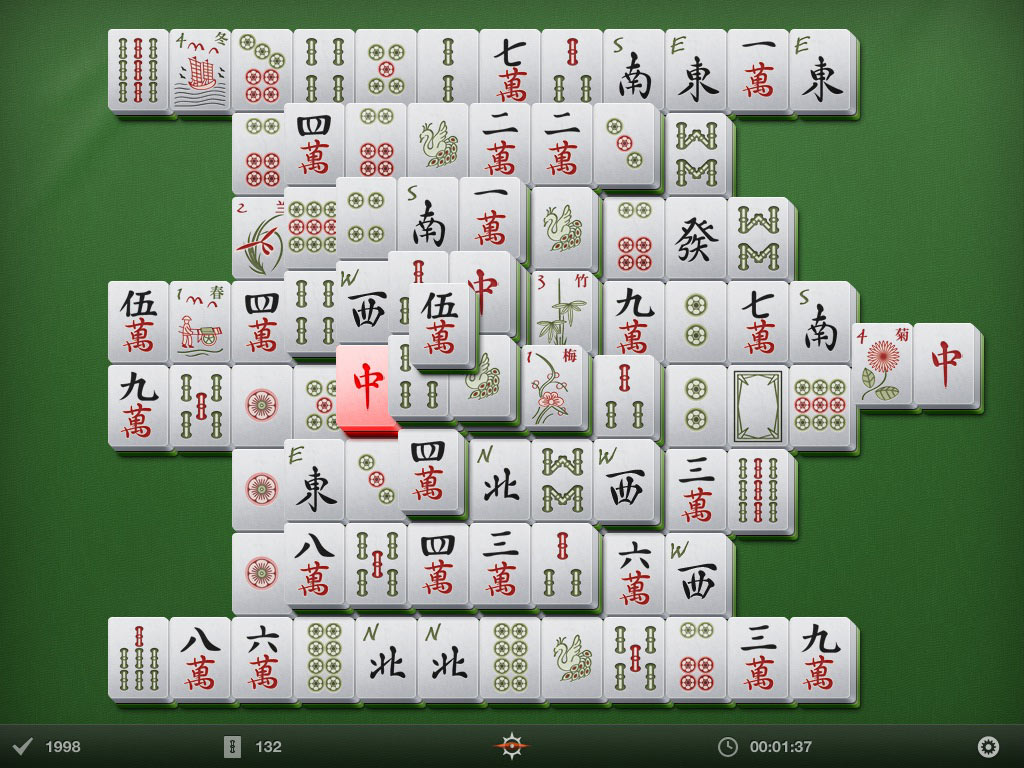
The graphics are well done, and the tiles look nice–though I prefer more of a color differentiation to help identify pairs. The animations are subtle enough not to distract. Overall a very nice game for a dollar.

Shanghai-02-300

Shanghai-01-300


Lux IconAs an example, let me show you an iPhone game which looks decent on the iPad. Many don’t, but Lux Touch, a variation of Risk, looks good enough–and even performs better, with more space to tap, which the game requires a lot of. If you like Risk, then you’ll probably want to get this one–it’s free, and entertaining enough. If you love Risk a lot, then the paid version–more customizable and with lots of different maps–will set you back $5, is also an iPhone-sized app, and I don’t know what it looks like on the iPad. Note, BTW, how the icon for iPhone-Lux is slightly lower-res than the other, iPad-native icons.

Lux-2X-300

For comparison, this is what the app looks like at iPhone size on the iPad:

Lux-1X-300


Of course, I am not going into any of the really heavily graphic-dependent games here, but they are around. I’m just not that big a game player. But one example of what you can get is the free lite version of Star Pagga, a game where you use the iPad’s accelerometer to steer the ship. Looks very nice.

Star Pagga-300


Pocket Pond IconFinally, there’s a simple “game” for the iPhone which many people like, called Koi Pond. That’s not available for the iPad, but there’s a clone called Pocket Pond. It’s scaled for the iPad and has most of the same features, though is really a lite version and so lacks some settings that Koi Pond has–but Pocket Pond is free, which makes up for that.

In Pocket Pond, you have the pond, the nice carp, the ability to splash and scare the fish. It’s easy to miss the button for lily pads and dragonflies, as it is a semi-transparent “+” sign, and you may overlook it after you fine the “i” sign (which mostly is an ad for the paid version). But you can add any of three different lily pads. The dragonflies will literally fly off the side menu when you tap them, and buzz around until you tap them dead–whereupon they float on top of the water and act as fish food. A cute little app.

Ppnd-01-300

A close-up of a living dragonfly, before swatted; sometimes they can buzz quite “high” and appear large to you.

Ppnd-01-450


Total cost for the apps shown in boldface: $4.95.

Next part of the review: networking apps.

Categories: iPad Tags:

Cool and/or Scary

May 21st, 2010 2 comments

They’ve created the first living organism with completely synthetic DNA. They didn’t build the whole cell, though, they did a transplant. Still, wow. And, unnerving. You wonder when they are going to use this to (a) cure cancer and (b) create a virus that will kill every last human being.

This part is a bit spooky:

Dr Venter told BBC News: “We’ve now been able to take our synthetic chromosome and transplant it into a recipient cell – a different organism.

”As soon as this new software goes into the cell, the cell reads [it] and converts into the species specified in that genetic code.“

Software. And the cell is hardware, which reads the program and executes it. Hrmm.

Categories: Science Tags:

Apple Online Stores and National Borders

May 20th, 2010 2 comments

Apple has been a bit weird about their online stores and international locations. The U.S. iPhone App Store was at first completely accessible from Japan, so long as you had an account there. But then, last June, with iPhone OS 3, they changed and shut that down. Now, with the iPhone, you can only purchase apps from the store in the country you are in. Which means that if I am using my iPhone to purchase apps, I have to pay yen (usually a 50% higher price than with dollars) and get only apps made available in that store–and not all apps are available.

So, my U.S. account is no good, right? Well, not so fast: you can still get on your laptop or desktop computer, go to the App Store using iTunes, and buy apps from the U.S. store there. In what is a bizarre inconsistency, computer purchases for the iPhone from the U.S. store while in Japan is OK. Just transfer them to your iPhone next time you sync. Similarly, apps bought in the U.S. won’t accept updates overseas, but you can get the updates via iTunes. Like I said, weird.

When the iPad came out, I tried using the U.S. app store. At first, it worked–but then the iPad figured out it was in Japan, and shut down that avenue. Similarly, the Apple iBook store also worked for a few hours, and also shut down after seeing it was overseas. It stayed that way for a few weeks. Then, yesterday, I suddenly found I could access both again! But only for about 20 minutes; the first time I actually tried to “purchase” a free item, it stopped working, and neither would let me in again. Drats.

Well, today, the international iPad app store went online. I tried the App Store, and indeed, it was just like the iPhone: you could buy apps from the Japanese store, but not from the U.S. store, not on the device itself.

Weird thing: the iBooks store is online, and you can buy stuff. At least for now. Whether that’s an intentional thing or they just kinda goofed is a different question; we’ll have to see if it persists. In the meantime, I downloaded a whole bunch of free stuff for my iBooks app. Will look at the non-free stuff if the store stays up.

Categories: iPad Tags:

Apple Rage

May 18th, 2010 3 comments

Thomas Fitzgerald makes a good point: there is way too much phony outrage against Apple. Every Apple announcement, it seems, receives a certain amount of obligatory scorn and accusations by people who see the corporation as an evil presence, conspiring to take over the world. The iPhone OS is closed! Apple is censoring people! Apple is a monopolistic giant! Apple is oppressive! Apple is pushing Chinese workers to suicide! Apple gouges people! And so on. iAds comes out, is eviscerated. The iPad is announced, and is eviscerated. The iPhone was announced, and was eviscerated.

It’s hard to tell if this is all the same crowd, but it is certainly a strong presence on the web. Sure, Apple has faults like every other company, and can be justly criticized on some things just like everyone else. But the criticisms are starting to become a knee-jerk reaction, usually single out Apple when problems are worse industry-wide, and sometimes take on the tinge of conspiracy theories.

The Foxconn suicide story is an excellent example. In July last year, a Foxconn employee committed suicide after losing an Apple prototype. Reportedly, Foxconn reacted abusively, supposedly contributing to the suicide. Apple was immediately blamed, the usual angle being their hyper-secretive policies about prototypes. But many companies closely guard prototypes; Foxconn is a contractor which does work for a number of tech companies, not a subsidiary of Apple; and there is no evidence that Apple played any part in Foxconn’s response to the incident, or had any influence, even indirectly.

Since then, there has been a lot of focus on Foxconn and suicides. Many are reporting a “cluster” of suicides, insinuating that Apple’s secretive nature is somehow linked to an oppressive work environment at the contractor. Note this Huffington Post article titled “Apple Supplier Foxconn Reports Eighth Suicide THIS YEAR,” with “THIS YEAR” in all caps, as if it is a shocking number. That sets the tone for the article, which, typical for articles like this, otherwise insinuates a shadowy, oppressive, iron-fisted horror chamber with Apple somehow tied in.

Terrible, right? Apple’s policies are killing these poor, oppressed workers, we’re led to believe. Except that, as stated above, Apple is just one of their clients; why put “Apple Supplier” at the start of the headline? And in fact, instead of the suicides being a sign of terrible stress, the opposite may actually be true. A few more responsible writers actually looked at the larger context and applied the Chinese national suicide rate–13.0 per 100,000 for men, 14.9 for women–and found that for the 300,000 workers at Foxconn’s Shenzhen plant, there should be between 39 and 43 suicides per year. So by now, by mid-year, we should have seen about 20 suicides at the plant so far. Instead there have been 8. In that context, one can hardly make an argument about workers being horribly oppressed.

In fact, Apple does better than most in the industry in terms of trying to fly straight. A few months ago, Apple released a report of its investigations into contractors who make parts for Apple. Apple had done an investigation to find unethical working conditions, and found some abuses. Too few companies make such inspections, and fewer still report them openly or do anything about them; Apple was acting very responsibly and openly by making this public, demonstrating a policy of suppressing such practices. So, what happened? Apple was vilified by reporters who claimed that Apple was responsible for the unethical practices, despite the fact that (a) Apple did not commit any of the wrongs, and (b) was in fact trying to stop them.

So, what’s the reason for the hate? Does it come from the die-hard Windows crowd, always trying to find a reason to fault a perceived nemesis? Is it a result of some in the media wanting to appear more “balanced,” so to counter the reports of cool gear and top-rated customer support, they look for ways to say bad stuff as well? Or does it simply come from the fact that Apple is now an industry giant with an encroaching monopoly in the mobile arena, and so is automatically judged as sinister? Or perhaps a combination of these and more.

As I mentioned above, Apple does bad stuff sometimes. They make poor hardware (mice) and software (Mail), they have predatory pricing practices (RAM chip allotment), and do other stuff which is worthy of criticism. But, just as it should be the case with Microsoft, let’s complain where there’s good reason, not on every single news release or hint of possible wrongdoing.

Just saying. And, this seems like an appropriate place to disclose that I own Apple stock.

Categories: Corporate World, Mac News Tags:

iPad Review, Part II: Apple’s Apps

May 17th, 2010 1 comment

As I have often said before, the real secret of the iPad lies in its applications. The multitouch OS is of course vital, but it is, in true OS style, a support mechanism, and is only a means to an end. The true secret is what you can do with the device, and even more importantly, where you can do it. I could never feel comfortable pulling out my laptop on a bus or train, and while I could use the laptop in bed or walking around the house, it was less than comfortable. The iPad lets you go virtually anywhere you want with a near-full-fledged computer experience at your fingertips.

There are limitations, of course; you can’t readily whip out the iPad and use it for your shopping list in the supermarket, or easily pull it out of your bag to check the train schedule. While walking, the iPhone or other handheld device will still win out. But the iPad fills in the gaps between the laptop and handheld–and then some–removing from your experience all those awkward moments where neither device will work well.

As I mentioned in the first part of this review, however, you’ll have to realize that the apps for this device, at least for now, are not full-featured. They are cheap, easy to use, and in great quantity, but they are also somewhat limited. However, in a mobile device, that’s not necessarily a bad thing: you don’t always need a full-featured app. This device is for more casual computing. So let’s see what we can do.

Ipad-Std-01The Basics

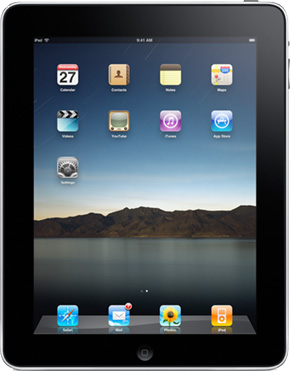
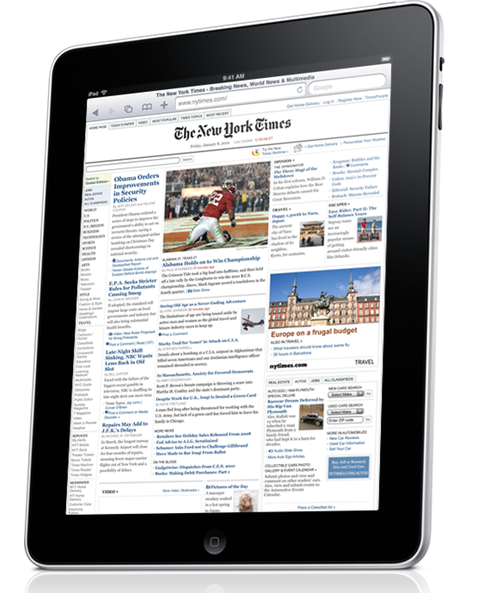
The iPad comes with a smaller set of built-in apps than the iPhone, interestingly. As you can see from Apple’s sales image at right, You get Calendar, Contacts, Notes, Maps, Movies, YouTube, Safari, Mail, Photos, and iPod, along with the App Store, iTunes, iBooks (not pictured, but a free download), and the system’s Settings app.

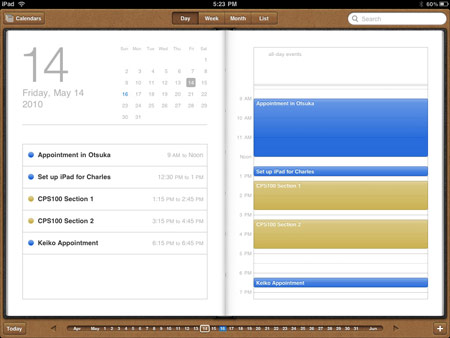
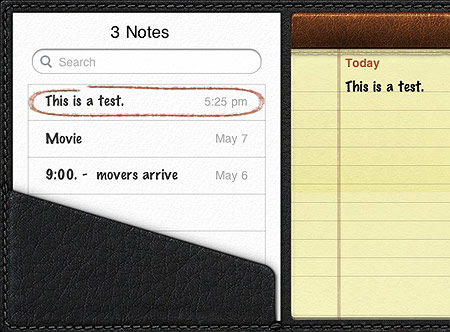
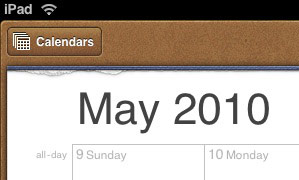
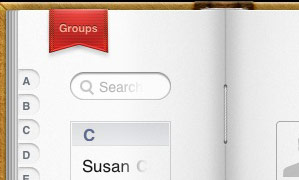
Calendar is nicely presented and works well (syncing smoothly if you use Mobile Me), but it has one major drawback: it doesn’t let you create new events with tap-and-dragging. instead, you have to spend the extra time carefully adjusting the start and end time for each event, which is a bit of a pain. Aside from that, it’s a great app. Contacts is similarly beautifully-designed (right down to the faux string binding in the gutter between pages), and works just as you’d expect, without the one reservation I have with Calendar. In Contacts, the web site and physical addresses act as links to the browser and map apps, respectively. Notes is as annoyingly limited as its iPhone counterpart (seriously, Apple, nobody likes the Marker Felt font, let people choose whatever they want), but it will do in a pinch–though you will likely replace it quickly with a better third-party app, like Simplenote or Paperdesk Lite. Calendar, Contacts, and Notes act as you might expect, but none really show off what the iPad can do.

Cal-02

Notes-01

Note, by the way, the attention to detail with the little touches here and there–torn page stubs, textures, subtle shadows, and such.

Details-01

Details-02

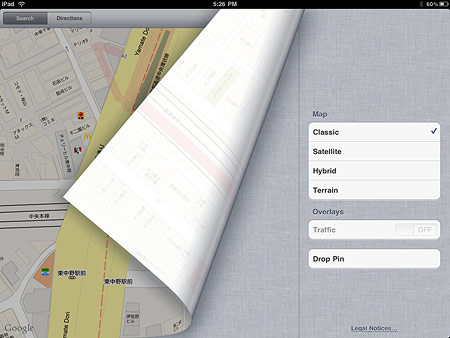
With Maps, you start to see the real benefits of the iPad. If you’ve used Maps for the iPhone, then the iPad’s version will surprise you. It’s strikingly fast, much faster than the iPhone app, even faster than Google Maps on the web, or so it feels. New map drawings and even satellite pictures seem to just rush on to the screen. When I saw the first iPad commercials and they showed somebody zooming up on the Eiffel Tower with a reverse-pinch gesture, I thought it was an exaggeration they cooked up for the commercial–but no, it really works like that. In some cases, it helps if you’ve viewed an area before before and are using the cache to re-view it, but even when looking at a place for the first time, the Maps app is just darn speedy.

I put it to good use a few nights ago, actually; a coworker had forgotten something at work, and since his neighborhood was on my path home, I volunteered to take it to him. We had to arrange a place to meet–time for the iPad! I opened up Maps, and as quickly as we could speak, I zoomed in and saw the best area to meet. The app opened at my location (the non-GPS location finder on the iPad is surprisingly accurate, by the way), and I was able to speedily zoom out, see both our locations, note the route I’d take, and zoom into the area where we would meet. As I zoomed in even more, I saw a McDonald’s and a KFC next to each other and was about to say that we should meet there, when the coworker, who had lived there for a long time, suggested just that. Maps is a spiffy app, better even on the iPad.

Maps-01

Movies and the iPod app work pretty much as you would expect. Not much to report there, except for the usual gains from screen real estate. Same goes for YouTube. Similar comments on iTunes and the App Store, though I have only had fleeting experience with both due to being locked out because the iPad stores for Japan haven’t opened yet.

Safari and Mail both work agreeably well. Safari works just like the iPhone version, except that the screen size makes a huge difference; what was a rather unenjoyable and slow task on the iPhone is now a much more comfortable and likable experience on the iPad. While I still prefer my laptop or desktop for browsing, it is something I do not mind at all on the iPad.

Mail is also better–and will be more so when OS 4 comes out and we get unified inboxes–mostly gaining from the larger screen size and the use of panes and pop-overs to show both the mailbox listings and the email windows at the same time. In that sense, landscape view works better, as the pop-overs require an extra tap to become visible and get in the way of viewing the message. One improvement: batch-marking emails a “read.” No, the feature has not been added, but the device’s speed has made up for it. Especially in landscape mode, you just tap-tap-tap-tap, and all the mails get marked as read. But seriously, Apple, get around to making a decent email client someday, OK?

Photos-03

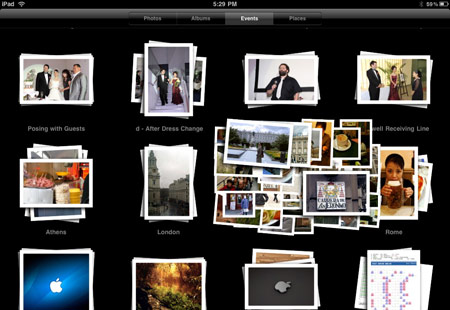
An event group of photos being pinch-spread apart; fingers not pictured, so it looks a bit odd here.

Photos is another crowd-pleaser which shows off the multitouch interface. It’s just a charm to use. When opened, you choose between “Photos” (which shows you all photos in a single, extended thumbnail sheet), “Albums” (all images grouped by albums you set up, with the addition of screenshots taken by the iPad), “Events” (individual groups of downloaded or otherwise grouped photos), or “Places” (geotagged images–for me, it only shows pins in London, as the iPhone snaps taken there on our honeymoon are the only loaded images I have with GPS data).

Usually “Events” has the most groups of images, and that’s the most fun: reverse-pinch on a group and they spread out to show you thumbs of the photos in the group; complete the gesture to “open” the group. (You can quickly understand why this was often used in demos for the iPad.) A similar gesture will open a photo, though a tap will do the same thing. Zooming in and out works like a charm, of course, and pinching will close the photo, and the group. While looking at an individual image which is part of a larger set, a slider appears at the bottom with tiny thumbnails of the set, easily allowing you to navigate the whole group. Otherwise, the usual left- or right-swipes will allow you to browse as normal.

Photos-01

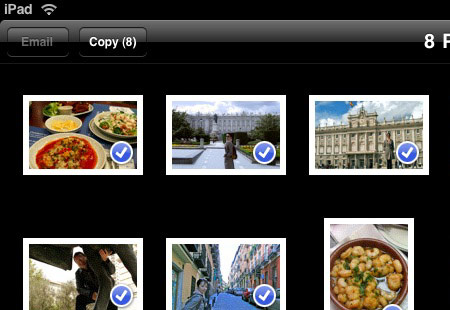
While looking at a group of images as thumbnails, you can tap on the action button (the square with the arrow coming out of it) and choose to either copy or email any images that you select by tapping on them. Each tap tags an image with a checkmark, and activates the “email” and “copy” buttons. Email is limited to five photos. Copy works between apps–for example, you can copy images in Photos, quit, open Pages, and then paste them there.

Photos-02

More Apps

That pretty much covers the basic apps that come with your iPad. It is, of course, impossible to cover other apps extensively, because everyone has different ones. But let’s stay in the Apple playground and start with a popular group of choices, namely Apple’s iWork suite.

Pages-Portv-01   Pages-Landv-01

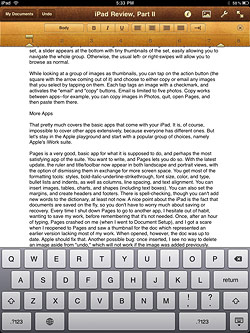
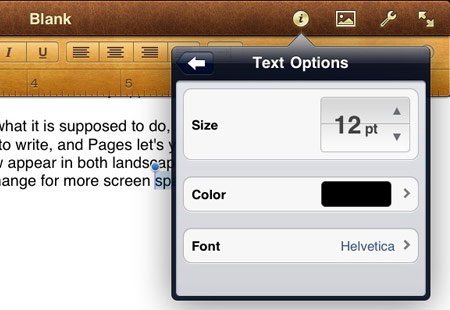
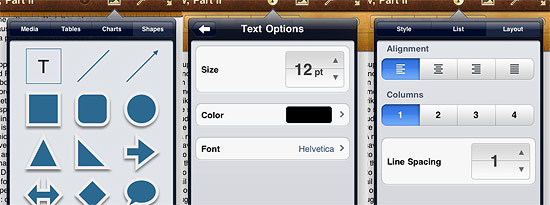
Pages is a very good, basic app for what it is supposed to do, and perhaps the most satisfying app of the suite. You want to write, and Pages lets you do so. With the latest update, the ruler and title/toolbar now appear in both landscape and portrait views, with the option of dismissing them in exchange for more screen space. You get most of the formatting tools: styles, bold-italic-underline-strikethrough, font size, color, and type, bullet lists and indents, as well as columns, line spacing, and text alignment. You can insert images, tables, charts, and shapes (including text boxes). You can also set the margins, and create headers and footers. There is spell-checking, though you can’t add new words to the dictionary, at least not now.

A nice point about the iPad is the fact that documents are saved on the fly, so you don’t have to worry much about saving or recovery. Every time I shut down Pages to go to another app, I hesitate out of habit, wanting to save my work, before remembering that it’s not needed. Once, after an hour of typing, Pages crashed on me (when I went to Document Setup), and I got a scare when I reopened to Pages and saw a thumbnail for the doc which represented an earlier version lacking most of my work. When opened, however, the doc was up to date. Apple should fix that. Another possible bug: once inserted, I see no way to delete an image aside from “undo,” which will not work if the image was added previously. While Pages may not be the best app for finishing a document, it works very well for creating them; I can see myself using this app a lot–in fact, I already do.

Pages-Feat-02

Pages-Feat-01

Keynote is also a neat app, making it easy to make presentations. The formatting controls are nearly identical to Pages, with predictable exceptions (no headers and footers, for example). You also have the ability to add animations and transitions. Unlike Pages, however, you quickly begin to notice what is missing from the iPad version. The number of choices for themes, animations, and transitions are fewer. There is no sound, so forget background music or sound effects, much less movies. Only one size of presentation is allowed. Special fonts you may have used elsewhere, like on your laptop, are not available and don’t translate. You can open PowerPoint docs, but can’t save in that format. There are a few multitouch tricks on the iPad version that are not found on the main app, but for the most part, Pages stands out as an underpowered application when you stray into areas where it lags behind. I would still recommend it as a purchase for your iPad, unless you never make presentations, but it is a fairly close call in some respects. One hopes that Apple will shore up this otherwise good program in future versions. A possible cheap alternate: PDF Presenter, a $2 third-party app which only shows PDF slideshows. It’s much more limited in some ways, but also has some features which might even be better. (More on that in the next part of this review.)

I haven’t used Numbers much at all yet, but I am as unimpressed with it so far as I am its desktop counterpart. You can do spreadsheet stuff, the functions are there, there are some nice features, but many features I use a lot–such as the sort feature–are not there yet. Scrolling is inexcusably weak, with no apparent way to jump quickly down a long column. I just kind of gave up on this after a short time and went back to Excel on my MacBook Pro. Unless you have specific mobile spreadsheet needs, this is les of a priority. This may just be my own bias, however; I have simply never liked Numbers in the past.

As with all iPad apps, their documents are sandboxed, meaning that each app only sees the documents it has imported or created. You can send documents to each app separately using iTunes on your desktop or laptop, but as far as Apple’s setup is concerned, that’s just about it. Some third party apps can send a document to specific apps, but unlike the Mac OS, the iPhone OS does not auto-detect the whole list of apps that can open that type of document, nor can you choose from a list. So until more solutions become apparent, each app is pretty much on its own. One can only presume that you won’t save too many documents per app, because when you want to open a saved app, they appear as very large thumbnails, viewed one at a time; more than 15 or 20 and you’ll be spending all day flipping through them to find the one you want. One would presume that Apple will remedy this with either folders, smaller thumbnails, or a new file access system.

Something I should have mentioned in part 1, by the way: the apps open very quickly. A few may take a bit of time to load, but most will just open up and be ready, just as the iPad itself tends to boot up faster than the iPhone (or at least the 3G). In fact, with docs always being saved and copy and paste working between apps, I don’t think I’ll notice much difference with multitasking when it comes in OS 4.


Part I of the Review: The iPad Itself

I’ll go over third-party apps in part 3 of this review.

Categories: iPad Tags:

Cavuto on the Blame Bush Horse, Again

May 16th, 2010 4 comments

Cavuto loves this topic: how Democrats just can’t stop blaming Bush for stuff, and how it’s time for them to stop. He often goes on about it, and here’s his latest rant:

Today, Massachusetts Democratic Congressman Ed Markey saying: “For years, the Bush administration’s oil strategy placed the granting of drilling leases ahead of safety review.”

Ipso-facto — Bush to blame for the big leak-o.

Just like he’s apparently behind that big thousand-point swing-o.

Just like he’s to blame for the unemployment rate that’s higher than when he left office, and the deficits that are much higher than any year he was in office.

All problems, all Bush, all the time — probably until the end of time.

Aside from the fact that Republicans blamed Clinton for just about everything–the bad economy (for effects well beyond his immediate influence), 9/11, etc., as well as past Democratic presidents for a variety of deeds both real and imagined–they still hate Roosevelt for Social Security, and Clinton for decimating the military, for example–there is the fact that the Dems are not blaming Bush for anything he didn’t do. Bush was responsible for the problems that led to the oil leak.

Cavuto asks:

When does the statute of limitations run out on blaming someone? When you start looking at good numbers, or start looking in a good mirror?

No, the statute runs out when the effects of what you did end. If you’re playing ball indoors and you break a vase, you don’t stop being to blame because you ran upstairs and your brother walked into the room. And if you burn down the house because you thought it’d be fun to see what color flame the curtains produced, you don’t stop being responsible for the effects on the family budget just because X number of months have passed by. Now, if Mom buys an ugly new vase, then you’re no longer responsible for how the living room looks. And after the house is rebuilt, if a wiring short burns it down again, you’re not to blame for that. But if you did something bad and the effects of that action bring about crisis later on, then there is no “statute of limitations” on your responsibility.

Bush relaxed regulation and oversight on the banks; so long as the banking crisis affects us, that’ll be Bush’s legacy. Bush similarly set things back in the oil industry, Cavuto’s current snipe, and so he bears much of the blame for that. Cavuto would hold Democrats to blame for the worst effects of Bush’s policies, and for the mismanagement under his agencies, simply because the Dems were present and did not act to stop Bush effectively enough. Even when something is directly due to Bush’s bad judgment, it’s still the fault of the Democrats because they didn’t stop it. Republicans love to point out how Democrats bear at least equal responsibility for stuff like the Patriot Act and the Iraq War, as if they were their ideas just as much as they were the GOP’s. Conversely, they love to take credit for stuff they opposed, like the 1990’s deficit reduction and the money coming from the 2009 stimulus. No matter how opposed the Dems were, if something bad happens, their presence in D.C. makes them culpable for the bad stuff; no matter how opposed Republicans were, their presence gives them credit for any success. They observe no statutes of limitation where these things are concerned.

Republicans didn’t stop blaming Roosevelt for Social Security just because a year and a half passed by after his term ran out. No, the basic GOP line is, blame the other guy. The Dems do that a lot too; the difference is, at least recently, they’re a lot more right than the right-wingers are.

The actual rule is, you break it, you bought it. Cavuto just doesn’t like it because now it applies to Bush. What Cavuto is in effect doing is asking, when can we start blaming Obama for everything, even stuff which is clearly Bush’s fault? Of course, on Fox News, the answer is “sometime between Obama’s nomination in 2008 and his election later that year.” Cavuto is ticked off because the rest of the media is not following that same guideline, and is instead blaming Bush for stuff that he actually did.

Now, some things do run out if enough time passes, especially under the rules of the game. The economy is an example of this. By the midterm elections, it will be harder to effectively blame Bush for the economy, though that’s a political rule, not a rational one. Realistically, Obama is responsible for what he has done or has failed to do from Day One; but Bush will still have to be held to account for the long-term effects of his policies. Bush added at least $5 trillion to the national debt, and indirectly probably much more than that; he can’t stop being responsible for that. Iraq was pure Bush; he won’t ever stop being responsible for its effects (nor would Cavuto want people to forget that he got Hussein, only that it cost so much). Certainly, Republicans have never let anyone forget the Clinton bubble burst, something Cavuto himself often brings up, nine years after the fact. Nor should we forget that Republicans, including Cavuto, started blaming Obama for the ills of the nation even before he got into office and was able to actually do anything.

And in terms of overall political claims, Obama had to start out hobbled: Bush handed him a market that was hemorrhaging jobs, 740,000 per month. Never mind that Obama was not responsible for that state, nor that he introduced a stimulus bill that immediately reversed that trend; Obama is officially “responsible” for the jobs that Bush really lost, and so after his first year in Office, Obama “lost” 3.35 million jobs, something the history books will hold him to. All things being fair, Obama should be allowed to start at zero and measure his performance based on where he started, not where the last guy dumped his failures on him. By that measure, Obama created 4.8 million jobs in the same 1-year period, and 7.4 million from Day One to the end of April. Instead, he’s still 2.8 million jobs in the red, and will have to struggle to climb out of the hole that Bush dug for him.

I don’t see Cavuto giving Obama a break on that. Which means that Cavuto has no problem assigning blame to Democrats where no blame is due. He just has a problem with assigning blame to Republicans where it is due. True Fox News principles.

So, Cavuto, if you want to be anything else aside from a transparent partisan gasbag, start getting upset only when someone blames Bush for something he didn’t do. Political rules will let people forget Bush long before the actual responsibility even partly fades. But when you do something and the effects last beyond the moment, then you do what most adults do: take responsibility.

Categories: Right-Wing Hypocrisy Tags:

You Gotta Remember This Is Fox

May 16th, 2010 5 comments

Wow. You gotta be amazed at how someone passing himself off as a journalist can (a) get so many facts wrong, and (b) pack his interview with so much bias. And usually, these things are allowed to pass without remedy, but this time, the interviewee was someone who knew the actual facts and was willing to stop the conversation and make the corrections (if not point out the bias). Here’s Fox second-stringer Dave Briggs getting his fanny gently handed to him by Dan Barker of the Freedom From Religion Foundation:

Note the usual Fox captions, including “Preying on Prayer,” and the suspicious ID of the judge, with photo–which, to Fox viewers, is a message saying “harass this person.”

But the vapid, error-filled arguments, really nothing more than right-wing talking points, are what really catch one’s attention. Briggs got pretty much everything wrong. He claimed that no one had complained, when so many had; he claimed that the central issue was that no one is forced to pray, when the issue was separation of church and state; he claimed that the Constitution made mentions of god, when he was quoting the Declaration of Independence, which is not a legal document. He even brought Christmas into it, rather lamely, suggesting that the guest would want to ban that next.

Barker replied well, and even brought up the Treaty of Tripoli, a legal document signed by John Adams himself, ratified by that early Congress, and published publicly without scandal or outcry, which stated unequivovally that the United States is not “in any sense” founded on Christianity. If anything, Barker was kind and gentle to this guy. Me, I detest “journalists” who don’t pay attention to facts, and would have called him out rather ungently. Barker’s approach was better, of course–but you can bet any amount and be safe to win that the vast majority of Fox viewers heard only what the interviewer said and didn’t believe anything said by Barker.

When will these numbskulls get the fact that separation of church and state is there to protect all beliefs, especially the right to religious belief? That this separation, in fact, was originally designed to safeguard the freedom of religion, and that if these evangelicals and wingnuts get their way, it will be the death knell of that religious freedom in this country?

Categories: Religion, Right-Wing Lies Tags:

The iPad Review, Part 1

May 15th, 2010 4 comments

Ipad-1I have been using the iPad for two weeks now. As an accident of timing, I did not acquire it at the best time for enjoyment; we were in the middle of a move to a new apartment, giving me little time to focus. Too bad, in a way–the best way to enjoy a new toy is when you have time to play with it. Get it when you’re busy, and there is time enough to wear out the novelty, but not enough to get the best of a really good thing. In a way, however, this is good for a review: you don’t see it through the subjectivity of enjoyment, not as much, anyway.
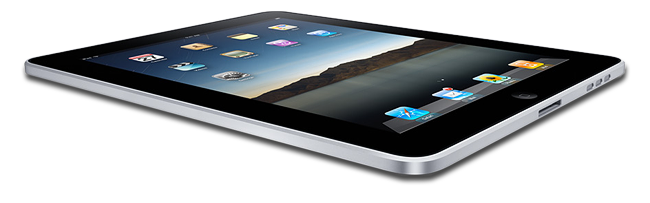
One of the things you have to get used to is that it’s not a full-fledged computer, even an underpowered one. Sadly, it could be, if the software were written for it and a few changes made. A few times, I have had need of a full-powered spreadsheet app, or a real word processor, and realized that the iWork suite that you can purchase don’t fully fit the bill. For example, in the spreadsheet app, I wanted to be able to sort rows, but Numbers does not allow this. All of the iWork apps are like this–even more limited than their OS X counterparts. Don’t expect the full functionality of Office apps, nor the ability to move files around.

As I have written before, the true success of the pad lays in the potential, what the apps can do; the iPad is a vehicle for these apps. And while there are many very good apps, the potential is not even close to having been met. That’s the good news, too: the future will hold a great deal more for this device. The little tablet will just keep getting better and better.

The iPad Itself


Let me focus first on what Apple created in the hardware using the basic OS, and then later take a look at what the software can do.

Ipad

Hardware. The iPad is a clear study in Apple’s design philosophy. Minimalist. Simple and elegant. When turned off, only the logo on the back and the home button on the front are most evident (though in low light, it’s easy to miss the home button). You have to look to see the speaker and dock port on the bottom, the power button, headphone jack and mic on the top, and the orientation lock and volume control on the side. I mean that–many times I have had to look to figure out which end has the power button. With the ability to change orientation, you can lose track, and the buttons stick out so little that you often won’t notice them. A few times I have accidentally turned the iPad off by setting it down on the floor, propped up against a wall, but upside-down so that the power button is depressed by contact with the floor.

The iPad weighs a bit more than you might expect; at one and a half pounds, it is not heavy, but it’s also not the lightweight tray you might imagine it to be. Some have commented on how it is hard to hold up while reading. (Strangely, half the people I hand it to who have never held one before–which is to say, everyone, as this is Japan–comment on how light it is. I guess it’s a matter of expectations.) Despite having used it to read rather heavily in the past ten days, I have never had a problem with the weight. You will likely always find some orientation that is comfortable for you. The weight ends up being less of an issue than the reflectivity, as you have to sometimes position it so screen glare isn’t a problem.

Picking it up can be an issue sometimes; you want to avoid touching the screen too much and so you get used to handling only the black margins (they looked huge at first, but now almost seem too thin!), finding that with so little purchase, and that much weight, the machine can be a bit slippery. It’s not a terrible thing, but takes getting used to.

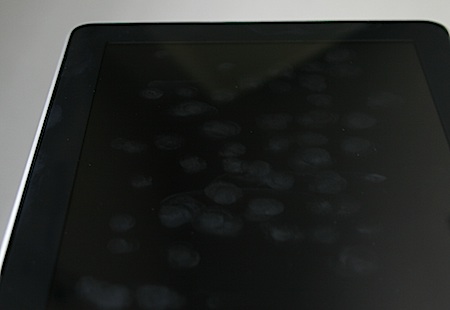
The screen is very nice: hard, solid, but not too uncomfortable. It’s glossy as hell, just like MacBook Pro screens, and makes a suitable mirror when turned off. Many have noted that it picks up finger smears like crazy. This is true, but what struck me was how easy it is to clean. Just get a microfiber cloth (a tissue won’t do the trick), any cloth intended to clean eyeglasses should be OK, and carry it around with you. I picked up several at the local 100 yen (dollar) shop, and have spares stashed away all over so there’s always one nearby. No matter how smeared the screen is, just a few wipes, maybe 5 seconds tops, and the screen looks great again. This opposed to my MacBook Pro screen, which is a bear to clean. It seems that the oleophobic coating is not to keep oils from transferring to the screen, but instead keeps them from sticking so badly that you need to work to get them off.

Ipad Smudge

I actually tried pretty hard to make these sample smudges, but they come easily enough on their own.

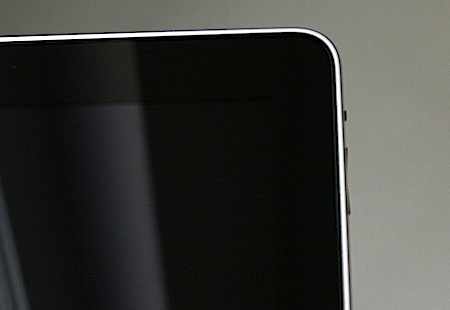
The buttons work as you would expect: smoothly. The orientation lock is the most trouble, sometimes hard to toggle, especially when using Apple’s case. The volume control is much easier (once you locate it), and has the feature of muting when held down–you don’t have to press it ten times or hold it down for a while to get to zero. Hold it down long enough so that two or three sound bars disappear, and then it jumps to “off.”

Ipad Buttons

This shot demonstrating the unobstrusive buttons is actually angled toward the edge to show them better.

Ipad BattOne last note: the battery. I have not tested it for a full 10-12 hours, but it seems to drain faster than that for me. Perhaps I got a weak one, I’ll have to test it at some point. Also, it doesn’t charge too quickly; while the iPhone just juices up in a jiffy, the iPad takes its time. So if you want to make sure it’s charged, you can’t neglect to plug it in when you go to sleep. Make a habit of that, and you should never run out of juice unless you use it all day long without a break.
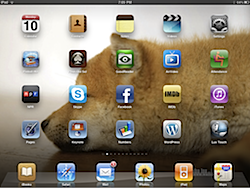
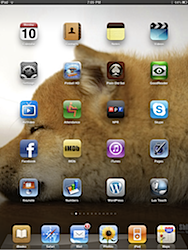
The OS. If you’ve used the iPhone or iPod Touch, then you know about this already. The iPad’s OS is virtually identical, with a few differences here and there. Unlike the current iPhones, you get a background (“home screen”) wallpaper image, which should be 1024 x 1024 pixels; though the screen is 1024 x 768, the background will re-orient when the machine is turned, so will need to be full-length in both landscape and portrait dimensions. A background image the exact size of the scene will rotate, but will zoom when turned the wrong way, presenting a lower-resolution image with the longer ends cropped out.


Bgland
Bgport
A sample wallpaper at 1024 x 768; note how the portrait has the ends chopped off

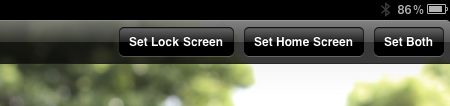
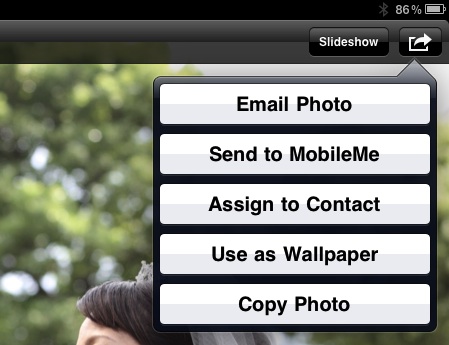
To set a home page or lock screen wallpaper, you can open the photos app (images in email or from web pages can be easily saved to there); once selected, the image can be set to either be the lock screen or the home screen. You can also change either wallpaper in the Settings.

Wallset01

Go into Photos, view the picture you want, then tap the action button at top right.

Wallset02

Wallpaper

Otherwise, the OS is about as simple as the iPhone OS gets. You see apps on the screen, swipe left or right to see other screens, tap an app to open it, press the home button to quit.

Prefssamp-1

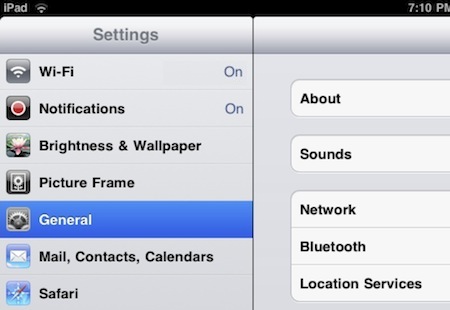
Getting into the Settings brings up a lot more options. WiFi seems to work well, though I found the range more limited than with my other devices. As reported, it does sometimes disconnect and then reconnect, but not often for me and it never seems to mess things up–just a short wait period is all. You can set notifications for apps as well; I tried the MacDailyNews app and it was constantly throwing notifications at me; this would be where you turn them off.

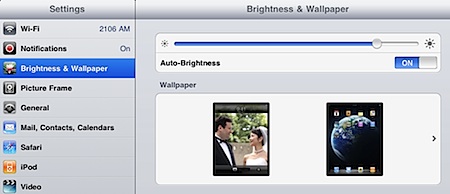
Brightness and wallpaper have their own panel. You can set the brightness and it will “stick” from then on; adjusting the brightness in an app, like iBooks, will only be in effect for that session. Wallpapers can be set for the lock and home screen separately, as noted below.

The General settings are numerous. “About” gives you all the info you need, like the serial number and MAC addresses. You can pair Bluetooth devices, as I did with my Motorola s305’s. You can set a password to keep out snoops, and set parental restrictions in various apps. One thing that I figured was not included was caps lock, but then I discovered that they had simply made it an option which is turned off by default; you can switch it back on under “Keyboard.” Accessibility allows you to zoom in and out, but I found the gesture (a three-fingered double-tap) to be too easy to accidentally trigger when using some apps.

Under the Mail settings, you can set up your accounts just like with the iPhone, but be very careful to check the “Load Remote Images” setting and make sure it’s turned off as soon as possible–spammers use remote images to spy on you.

There are a lot more, but those are the highlights.

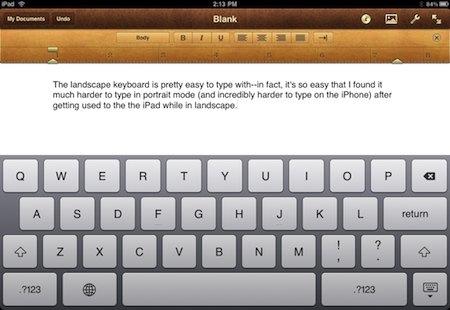
Typing. If you’re a touch typist, then you will probably have trouble with the touchscreen keyboard, as touch typists are in the habit of resting their fingers on the keyboard. I type by hunt-and-peck, so it’s not a problem for me–in fact, I can type at near-normal speed. For extended typing, especially when the iPad is in my lap (as it is as I type this blog post), I find the landscape keyboard works best. In fact, typing this post, I got so used to using the landscape keyboard that going back to the portrait mode was awkward–and going back to iPhone typing was almost painful, despite being OK before. Placement also matters in how they work, of course. For example, if I am leaning over the iPad as it rests on a table, then the portrait keyboard does OK, though I am less confident about it.

Landscape01

A few nits. First, what’s with excluding arrow keys? BIG oversight–I have found myself wanting to use them many, many times. (Citrix adds them for navigating on a remote connection, so they are possible, of course.) Second, why not allow a real full-sized keyboard, with numbers at top and shift keys for special characters, especially punctuation (as is done with the comma/exclamation-point and period/question-mark keys already)? I find it annoying to have to constantly switch back and forth between the alpha, numeric, and symbol keyboards like that. Either make the keys a tad smaller or the keyboard space a tad larger, or both, and give us some relief here.

And hey, what’s wrong with a few keyboard shortcuts? Not having a universal “undo” is a major hassle sometimes. Add a command key, please.

Finally, good and bad points about errors. Good: the auto spell correction. Really helps speed up typing. Bad: mistyped keys, in particular when you hit too high on the top row (and wind up changing the position of the cursor and typing a bunch in the wrong place) or too high for the space bar, getting a C, V, B, or N instead of a space. Takes practice, I guess. A few points with good and bad, like when you tap to place the cursor–you can only place the cursor between or at the end of words, never in the middle of a word unless you hold down and do the loupe thing.

Future OS. I will be glad to see multitasking, but will not be too glad because Apple has limited it–you won’t be able to have two things open side-by-side unless you get an app which specifically does that. Still, switching between apps should be better than now, and hopefully quicker.

As I stated above, the is new. The apps are not nearly as developed as they’ll get, and the OS is bound to improve quite a bit–but knowing Apple, never as much as you’ll want it to.

Reading. One of the iBook’s strengths can be as an ebook reader. This depends completely upon your preferences, of course. If you’re a die-hard e-ink fan, then the iPad may annoy you. But I have found it quite comfortable. You can set the light level and font size to whatever is best for you. The hardest thing to get used to is the orientation. If you lie on your back, it’s not so bad–just prop it up on your stomach, or if you’re sitting up, perhaps lay it in your lap with your knees up. But if you lay on your side, then you’ll have some trouble. While the iPhone or iPod touch may rest comfortably below your eyes, the iPad is too big for that; to place it comfortably flat on the bed, it’ll be far enough away from you that the angle will be wrong. I use my Apple iPad case to prop it up, and often stick something under the left side to angle it toward my face more. It works, but it’s wonky. But it’s worth it, and enjoyable. I find myself using it every night; it even gets me to bed earlier.

Strangely, there is a relative dearth of ebook readers. Apple’s iBooks is so far the best, with Kindle close behind. Kindle falls to second place easily, though, as you can’t seem to import non-Amazon books into your Kindle app (at least not without a lot of nonsense to deal with), whereas you can put any book into iBooks, so long as it’s in the ePub format. And if you have Stanza and/or Calibre (both desktop apps available for Mac and Windows, Calibre for Linux as well), it’s not hard at all to save any ebook into an ePub. There are other readers–Kobo, for instance–but they also seem to lack the ability to easily import your own books. ReadMe is another, and apparently can import stuff, but I haven’t decided to spend the two bucks for it yet. Free Books is great for Public Domain books, by the way, and is free for the iPad.

By now, I would have expected a lot of people to have designed a variety of ebook reader apps–they apparently are not prohibited by Apple–to suit everyone’s tastes, but so far, not so much. Even Stanza is not iPad-ready yet. Maybe not enough people have non-DRM’ed ebooks.

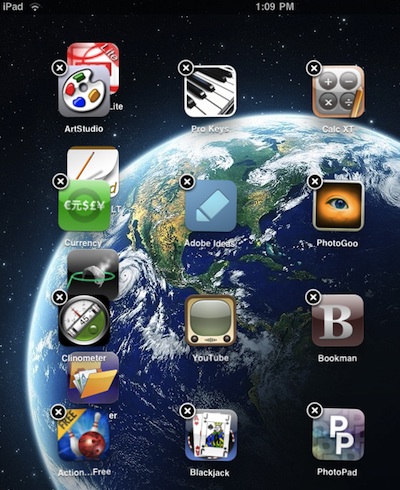
Bugs. So far, I have not have many crashes at all–maybe one or two, but that’s it. And overall, the OS has worked perfectly. But just today I experienced a very strange bug. When turning on the iPad one time, a row of app icons from one page migrated to another page and mixed in a very strange manner. The off-set icons would not work, and when I held down on a normal app to enter edit mode, not only the off-set apps, but the who page they came from did not respond. The bug was easily fixable–I just turned off the iPad and rebooted–but it was weird to experience.

Offsetbug

I’ll focus on apps in the next part of this review.

Categories: iPad Tags:

Been Away

May 15th, 2010 Comments off

Sorry I haven’t kept this updated recently–the new semester started, we’re still moving in, lots of projects to see to, I’m lazy–the usual slew of excuses. Posts coming very soon.

Categories: BlogTech Tags:

Sharp Quake, Centered in Tokyo

May 9th, 2010 1 comment

A few minutes ago, I was sitting in my new room and felt a few small tremors. I was going to shout, “quake!” to Sachi when BAM, the building shook hard, but only for a second or two–then it stopped. A quick, sharp jolt like that often indicates a small quake with a close-by epicenter, and that’s what this was. Early reports have the quake striking at 1:33 pm, the epicenter under Nishi-Ogikubo (revised epicenter: Takaido), with an intensity of 4.0 on the Richter scale.

Categories: Focus on Japan 2010 Tags:

Jobs (Not the Apple Variety)

May 9th, 2010 1 comment

290,000 jobs added in April. With adjusted numbers for February, the fourth straight month of job growth. The best jobs report in 4 years. Even the uptick in the unemployment rate–from 9.7% to 9.9%–was good news in disguise, as it reflected people who had given up the search for work rejoining the ranks of applicants. And the job numbers for February and March were both adjusted upwards. The new chart:

Jobs-4-10

Republican attempts to (a) credit Bush and/or themselves, (b) deny that Obama had anything to do with it, and/or (c) blow this off as insignificant, in three, two, one…

What is encouraging is how the trendline is holding steady. It may be unrealistic, but the current trendline has us gaining roughly 750,000 jobs per month by the midterm elections. That trend will, of course, max out at some point, likely before 500,000, but still, the regularity of the trend so far is very encouraging.

Categories: Economics Tags:

Softbank’s iPad

May 9th, 2010 2 comments

With the iPad international release date finally set (May 28), Softbank has beat even Apple to the punch, and is now advertising the iPad for sale–from ¥48,960 ($535 by today’s exchange rate) for the 16GB WiFi model. That price was pretty much expected, but Softbank’s 3G data plans were the real question mark.

Softbank is doing it two ways: you can get a monthly data package, or sign up for a two-year contract. If you go by the month, it’ll cost ¥4410 ($48) for 1 GB of data per month; you go past 1 GB or if the month runs out, then the deal ends. The other way is unlimited data for ¥2910 ($32) a month–and while the details are a bit fuzzy to me (I can’t read the Japanese well enough and the English reports seem unclear), I think it breaks down to the fact that you have to buy a 2-year contract along with a 3G iPad in order to get that pricing.

Clearly, this is very inferior to the plan offered in the US, where $30–no contract, just a monthly payment–gets you unlimited data for the month. Softbank is charging twice that much for a limited amount.

Glad I don’t have to deal with that. Our data plans for the iPhone are already way too pricey.

Categories: iPad Tags:

How Dare He

May 6th, 2010 1 comment

Grover Norquist, noted arch-conservative, on President Obama reportedly using the term “teabagger”:

This remark is the equivalent of using the ‘n’ word. It shows contempt for middle America, expressed knowingly, contemptuously, on purpose, and with a smirk. It is indefensible to use this word. The president knows what it means, and his people know what it means. The public thought we reached a new low of incivility during the Clinton administration. Well, the Obama administration has just outdone them.

Um… yeah. Right. This from a guy whose entire political movement has made it virtually mandatory to twist and create an epithet from the very name of the opposing political party, so much so that the previous president and the party’s succeeding candidate for president used the term constantly. This from a guy whose own movement incessantly calls the president a “communist,” “socialist,” “fascist,” “traitor,” and much worse, comparing him regularly to Hitler, even suggesting he’s the antichrist, daily accusing the president of horrific conspiracies and crimes.

But no, Obama is reaching “a new low of incivility” by using a term that the Tea Party themselves coined for their own use, and only realized after months of open laughter was perhaps not the most effective term to use.

Yeah. Right.

Categories: Right-Wing Hypocrisy Tags:

Excusing Republicans

May 5th, 2010 Comments off

Something I’m hearing a lot is people excusing Republicans for the Arizona immigration law because a few Republicans are speaking out against it. For example, take this diversion by Jake Tapper from This Week:

To be fair, to conservatives, Virginia Governor Bob McDonnell, a conservative Republican, and Florida Congressman Connie Mack have had some tough words about parts of this law … these are conservative Republicans, nobody would question Bob McDonnell’s bona fides as a conservative, and they are voicing serious concern about those laws.

Tapper, who leans to the right himself, said this as the conservatives at the table nodded sagely and voiced assent. But the whole claim is BS, frankly. Think about it: if a Democratic legislature in a Democratic state passed a bill banning guns, and a Democratic governor signed it into law while a large majority of Democrats across the country approved, would conservatives agree that Democrats were not responsible just because Brian Schweitzer and Jim Webb spoke out against it? Please.

Republicans thought up this law. They passed it, against a solid wall of Democratic votes. A Republican governor signed it. 75% of Republicans who have heard of the law approve of it, and are the only ones I hear defending it. That there are a few right-wingers who see the true ramifications of the law and object hardly make this not a Republican matter. This may be the right wing of the Republican Party, but it is the Republican Party which produced it, and most Republicans approve of it.

What we’re seeing is Republicans trying to disavow the more radical actions of what is frankly the majority of their party while not really doing anything to stop or reverse those actions, so they can appeal to a broader base and not be taken to account for what the party is as a whole. Good midterm election strategy, but not the truth.

Bill Maher, in that same round table discussion, made a few excellent points about the racism inherent in the law. Imagine a law, maybe based on militia activity, that would pressure the police to pull over white males in pickup trucks indiscriminately, asking them for their papers and jailing them if they fail to produce. Like they’d be OK with that, wouldn’t scream “reverse racism” or some government plot to oppress them, and create widely-believed conspiracy theories about Obama and this is what happens when you put a black guy in the White House. The Tea Party crowd would be in an uproar about that, unlike now, when we’re not hearing a peep out of most of them. No, only when it’s people of another color whose rights are trampled when 3 out of 4 of in the party as a whole give hearty applause. As Maher pointed out, if the large masses of hysterical, gun-toting radicals calling for government overthrow were almost all black, you think they would be treated like the teabaggers are? Would Fox News be organizing for them and upholding their Second Amendment rights? Hell no.

But, remember: IOKIYAR. And being white helps a lot. Not that the two are different data sets, mostly.

Moved In

May 5th, 2010 10 comments

Sorry to be offline for so long. We’ve been busy, understandably. The move went pretty well, and the movers we chose, Ark, seem to be a good outfit. I explained before how their rep handled himself well, and the moving staff did the same. They arrived a half hour earlier than their estimated start time, did a good job of familiarizing themselves with the plan, and got to work right away. Any request we made was instantly carried out. They wrapped everything up well, and nothing was damaged or lost (at least as far as we can determine so far).

The day before the move, their air conditioner guy had come over and uninstalled our two units, setting them on the floor for moving, so that was all ready to go. On the day of the move, everything got transported, no problem with space in the trucks, and no difficulties in terms of logistics. (The Heart guys in Inagi were almost churlish about squeezing all of my stuff in the truck.) Within three hours, they were all packed up and ready to go. Sachi stayed behind to clean up while I scooted over to the new place so I could let them in. This is what it looked like the last time I saw it:

Vanguard Panorama 600

Now, the last time I moved, when we finished getting the trucks packed up and moved to the new place, the movers (an outfit called “Heart,” as I recall) were slow; on my scooter, I stopped by work on the way back, and still the movers did not get there until about a half hour after I did. This time, though, even without a delay more than a quick gas station pit stop, the movers got there within minutes of me–taking normal roads, no less. The Heart guys also were poor at installing stuff; they just dumped our washer-drier in its space, and said they didn’t do connections, leaving us in a pinch, as the hoses didn’t match the new setup at the time. But the Ark guys this time took care of everything, and made sure we were set up.

By the time Sachi finished up and got to our new place, the movers were mostly finished. But the place was cluttered with stuff, mostly boxes–it seemed like there was way too much stuff. It just looks like that when all your stuff is out and boxed, I guess. After the movers left, we had other visitors–delivery people, cable TV people, and a few others, to help us get started with everything. By the end of the day, we had phone, Internet, and cable TV in addition to the necessary water, gas, and electric. We were way too tired after that to do much unpacking.

The next two days were torrents of comings and goings. Two different air conditioner installers came; one to reinstall the ones we had previously, and one to install two new ones we just bought (for a bargain 35,000 yen each, a sale we found a few weeks ago). Another guy came to install the heated toilet seat with bidet (can’t do without that), and a variety of other goods were brought to us–a 6 x 3 foot shoes cabinet for the foyer (which I spent most of yesterday putting together), shelves for a kitchen spot, lamps for two rooms that needed them, and I forget what else. Oh yeah, a gas stove/range, which I installed. Later, while I installed lamps and laid wires, Sachi laid new topsoil for all the potted plants, which we hope will do away with the infestation of fungus gnats which we believe breed there. They’ve been in our faces for two years now; I hope we got rid of them. And then there was the unpacking, which we’re still only about 80% of the way through–but enough so that we don’t have to dodge boxes wherever we walk so much anymore.

So today we went out to visit home centers, hoping to find little “furniture” items that could help hold all the stuff we want to put in certain places, and take advantage of otherwise blank spaces in the apartment. Like this large counter space behind the toilet that would just be a big, empty, wasted space, or the ledge next to the washer & drier which we need to hold much more stuff. The kitchen pantry is great, but has way too much wasted vertical space, so we’re trying to find smaller shelving and boxes to add to it. We found some good stuff, but decided that it’d be cheaper, faster, and much easier to buy it online. But hey, home center stores are great fun anyway.

After that, we did the obligatory visit to the neighbors with little gifts, what you’re supposed to do in Japan when you move in somewhere. Two people were home, another two were out, and the last place seems to be in mothballs. Still, the neighbors seem like decent folks. Over the next week or two, we’ll have to finish up notifying all businesses and government offices of our new address.

The apartment: we’ve only been here for 3 days, but already several points are becoming apparent. First, it’s a big place. Great for spreading out, bad for trying to find Sachi to talk to her about something. Closet space is fantastic–we have five full-sized closets, and one small one. The small one is in the toilet-bath-laundry area, which is contrarily lacking in storage space, a lot less roomy than our old place–ironic, because it seems to take up more space in the new place. So while we’re struggling to figure out where to jam stuff in the bath area, we’ve got tons of closet space elsewhere.

The water pressure is so-so, and we’re back to having a system where we have to turn on the gas heater to get warm water. My solution back in inagi was simple: leave it on all the time. Sachi originally thought about turning it on and off every time we used warm water, but I balked and so now we turn it on in the morning and off at night or when we both leave for a few hours. The toilet room is OK–more isolated from the rest of the place, though not as well soundproofed–but it kinda has that new-apartment mildew smell to it, which I think this building is prone to. I’m not worried, Sachi has an innate (neurotic) sense for fighting stuff like that.

The soundproofing for the whole place is rather weak. Internal walls and doors are easy to hear through, and we could even hear stuff that neighbors are doing at their loudest–a switch from our last place, which was built more fortress-mansion-like. Still, it’s not so bad. However, I would not want to live with more than my wife here with the noise like that. Interestingly, the place could potentially house a family of five easily, six if you use what seems to be the foundation for a partition to make part of the living room a small extra room. If every room had two people, that would mean as many as 10 people in the place. I’m actually a bit surprised that poorer East Asian immigrant tenants, sometimes known for loading up in apartments, haven’t moved in to one of these units (people who don’t mind living in other people’s noise); rent would work out to about $150 per person, a steal for Tokyo. I only mention it because it almost seems like the place was designed for that. Or at least a large (for Japan) family with grandparents shacking up with them.

The sunlight is not too bad, but nothing direct enters the apartment. Most of the time it’s bright enough, but the dining room does get dark in the daytime sometimes; Sachi commented that a skylight would be perfect for the dining area, and I agree.

The neighborhood is pretty good. There’s a fantastic yakitori joint across the street from us which has terrific chicken on a stick, and they do take-out. We ate from there the first two nights. It’s 100 yen per stick, and they’re not chintzy on the meat.

Michan

Unfortunately, there don’t seem to be too many other eateries too close, but I’m sure we’ll unearth some good places nearby soon. Denny’s is right across from us, and they’re not bad. As I think I mentioned before, there’s a big supermarket with large drug store and dollar shop around the block (a rather large block), open till 9 (the market until 10:45pm), and a smaller 24-hour supermarket much closer, almost across the street.

Coop

And there seem to be four home centers within a 20-minute bike ride, a long with a lot of other stuff.

One more nice point: while our south-facing windows mostly look out on a 15-story bank of danchi, when we leave the apartment, the hallway overlooks a nice park, seen in panorama below. Down point: lots of kids making noise during the day, and a hangout for older kids later in the evening (which has me worried about the bicycles and the scooter). But nice to look at most of the time.

Hibari Park Panorama 600

Overall, it’s a good move. We miss some of the nicer appointments of Vanguard Tower, but for a place that’s saving us a relative thousand bucks a month, we haven’t traded down nearly so far as it might sound.

Categories: Hibarigaoka, Ikebukuro Tags:

Moving Day

May 2nd, 2010 1 comment

Ah, Vanguard Tower. 21st floor. Great view. Almost 3 years. Way too much rent money. We’ll miss it all. Especially the rent money.

Moving

Gotta pull the Internet cables now. See you in Hibarigaoka.

Categories: Ikebukuro Tags: